Blog

  • Top 10 Trading Robots: A Systematic Approach to Manage Them

    Top 10 Trading Robots: A Systematic Approach to Manage Them

    Are you interested in high performance trading robots to improve your trading strategy? In this guide, we’ll show you how to easily manage the top 10 trading robots (EAs) available on our website, eatradingacademy.com. Whether you’re a beginner or an experienced trader, these steps will help you get started.

    Top 10 Trading Robots: Step 1: Downloading the EAs

    To begin, visit our website and download the top 10 Forex, crypto, and gold expert advisors (EAs). These EAs are powerful tools that can automate your trading decisions.

    Step 2: Unpacking the EAs

    After downloading the EAs, you’ll need to extract or unzip them. This step is essential to access the necessary files for installation.

    Top 10 Trading Robots: Step 3: Choosing a Broker

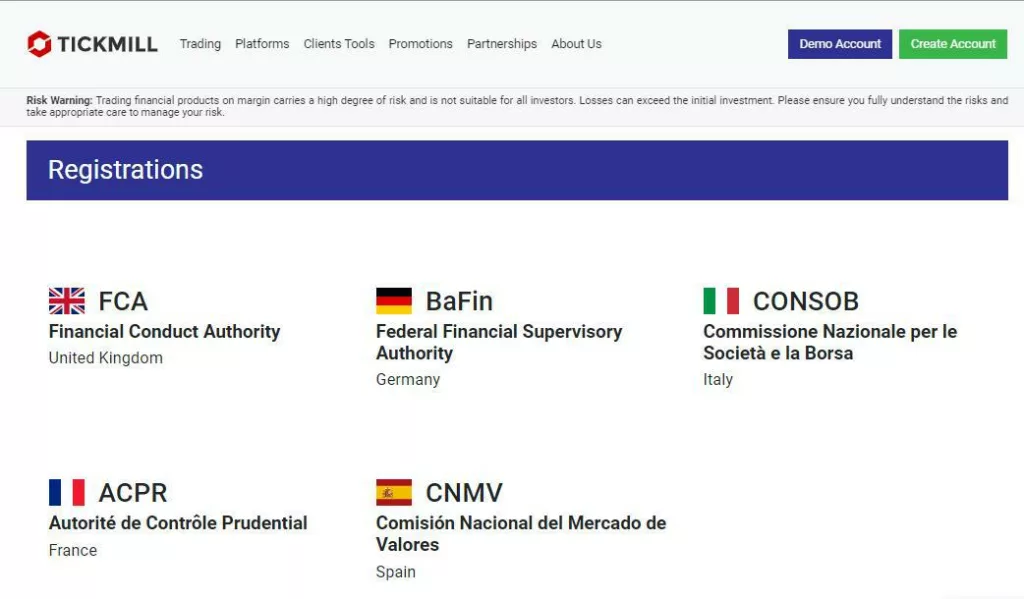
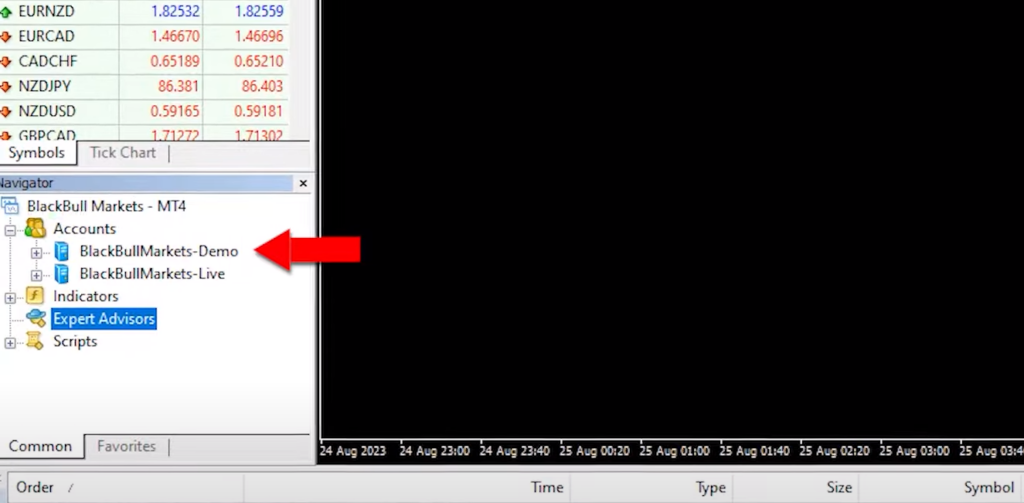
    Select a regulated broker to open a demo or virtual account. If you’re unsure where to start, visit our Academy’s broker page, designed to assist beginners in finding reliable brokers and prop firms.
    Top-10-Trading-Robots-1

    Step 4: Setting Up the EAs on MT4

    For MetaTrader 4 (MT4) users, follow these simple steps:

    1. Open your demo account with your chosen broker.
    2. Go to ‘File’ and select ‘Open Data Folder.’
    3. Click on ‘MQL4’ and then ‘Experts.’
    4. Paste the downloaded expert advisors into this folder.
    5. Navigate to ‘Expert Advisors’ and click on ‘Refresh.’ This action compiles the EAs into EX4 files for use.

    Top 10 Trading Robots: Step 5: Setting Up the EAs on MT5

    For MetaTrader 5 (MT5) users, you have two options:

    1. Close and reopen the platform to make the EAs available.
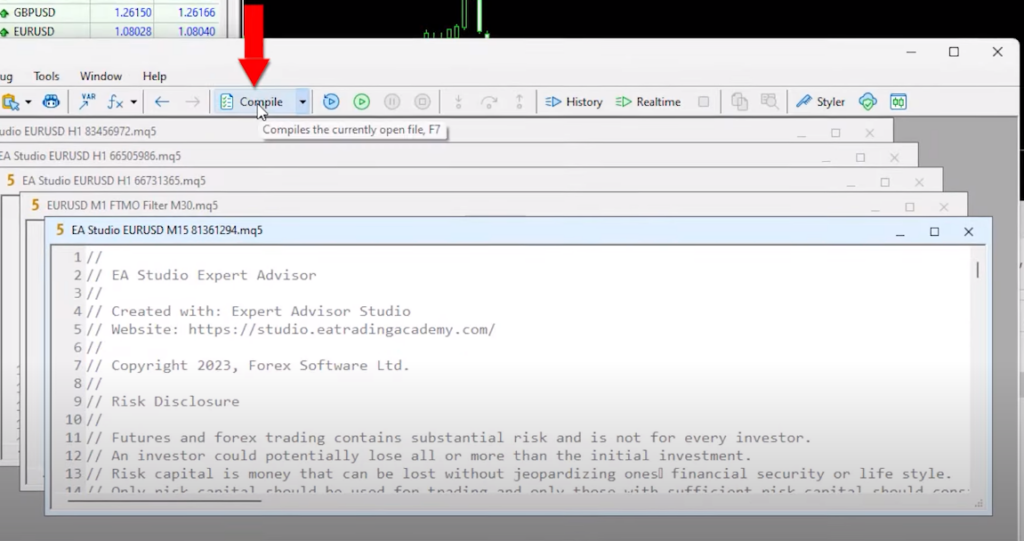
    2. Alternatively, compile the expert advisors from the MetaEditor by clicking the ‘Compile’ button.
    Step 6: Enabling Auto Trading

    Before placing an expert advisor on your chart, ensure that Auto / Algo Trading is enabled in your platform settings. This feature allows the EAs to execute trades automatically.

    Step 7: Adding EAs to Your Charts

    Now, attach the EAs to your charts with these straightforward steps:

    1. Drag and drop the desired expert advisor onto your chart.
    2. Customize your trading parameters, such as trade size and indicator settings.
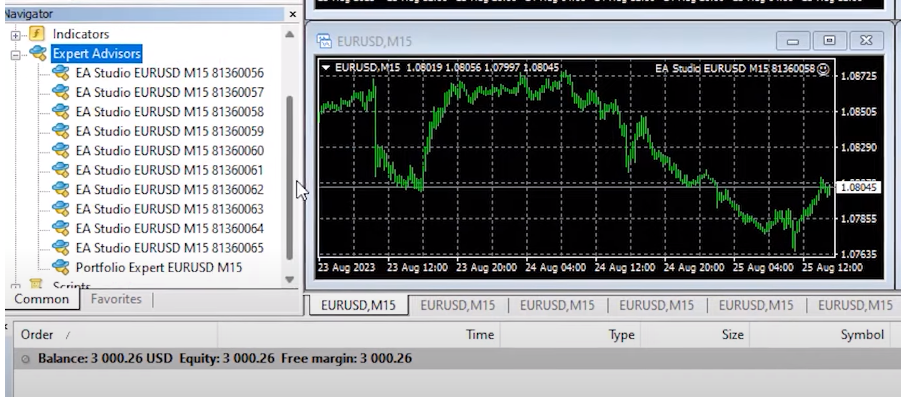
    3. Click ‘OK,’ and you’ll see a smiley face in the upper right corner, confirming that the expert advisor is successfully attached.

    Top 10 Trading Robots: Step 8: Replicating for Multiple EAs

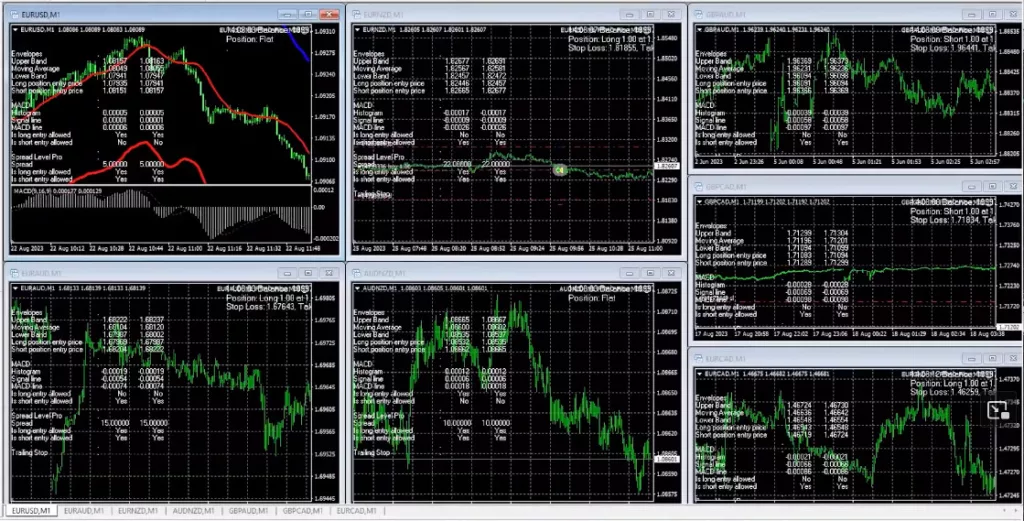
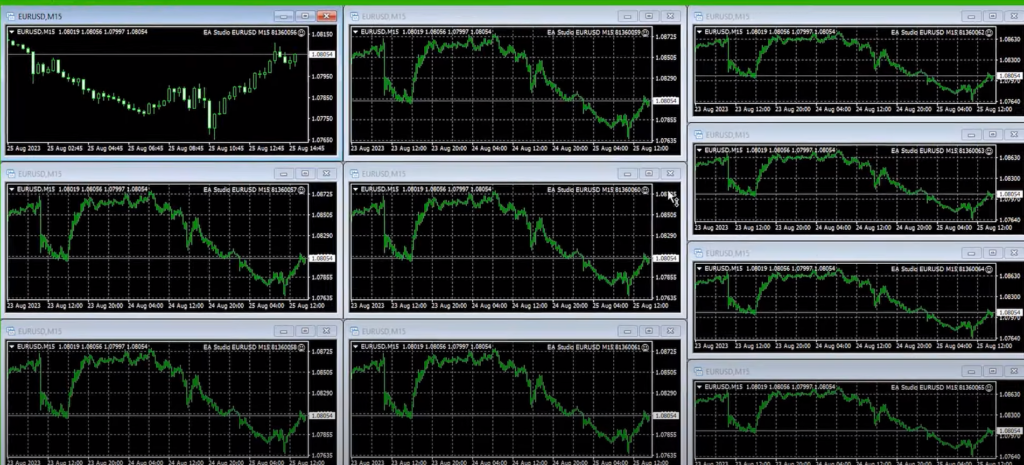
    If you wish to use multiple EAs simultaneously, open additional charts on your trading platform and repeat the same process for each expert advisor. Remember to select the appropriate time frame (M15) for these EAs.
    Top-10-Trading-Robots-3

    Step 9: Monitoring and Evaluation

    With your EAs running, closely monitor their performance. Utilize statistical websites like FXBlue or MyFXBook to track their progress. Each EA is assigned a magic number to help you identify which one performs the best.

    Top 10 Trading Robots: Managing Multiple Expert Advisors

    Now that you have all 10 different robots trading on 10 separate charts, let’s take it a step further. You might have noticed the “portfolio expert advisor” in the folder. This special robot contains all 10 expert advisors in one. In this section, we’ll explore how to manage both individual EAs and portfolio EAs.

    Utilizing the Portfolio Expert Advisor

    If you want to simplify things and manage all 10 EAs as a single entity, you can use the portfolio expert advisor. To get started, copy the portfolio EA and paste it into the ‘mql4/experts’ folder. Then, double-click on it and compile it. Once compiled, click ‘Refresh,’ and you’ll find the portfolio expert advisor ready for action.

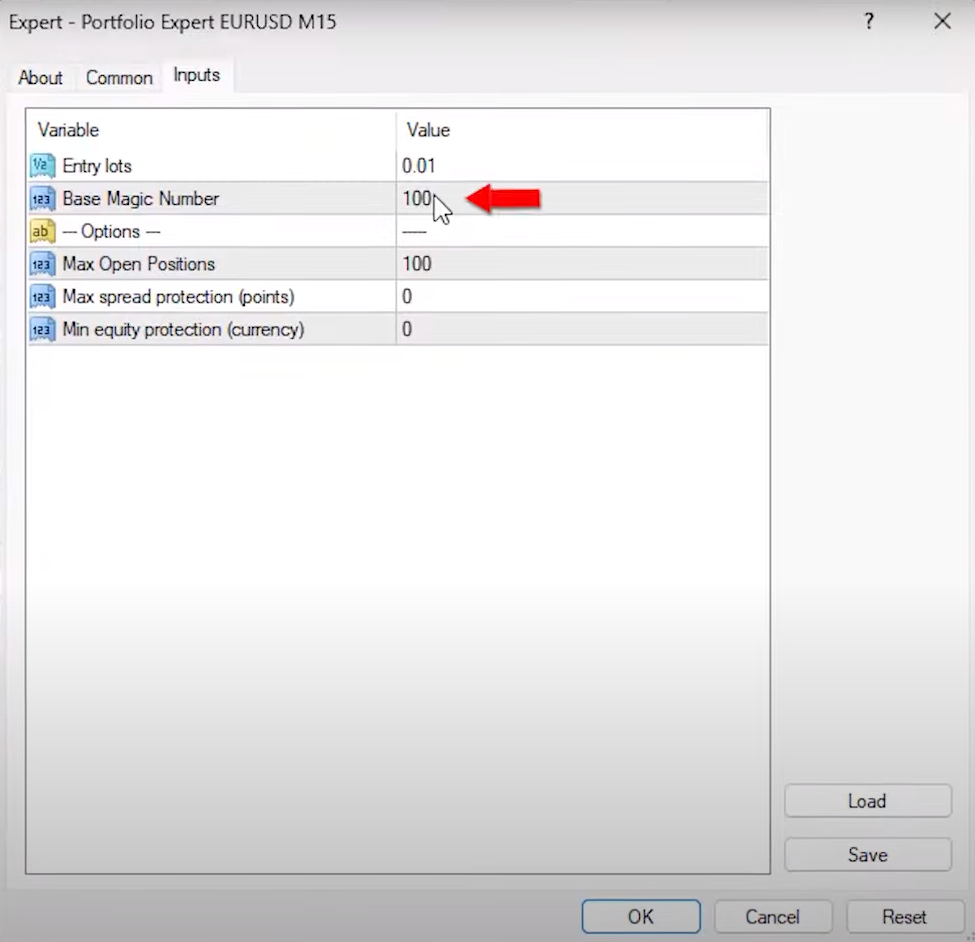
    Attach the portfolio EA to a separate chart, just like you did with the individual EAs. Adjust the trading volume (0.01 is a common choice) and note that the base magic number is 100. The portfolio EA will automatically assign unique magic numbers for each of the 10 EAs it contains.

    With the portfolio EA on a chart, you now have the option to let it trade alongside the individual EAs. This way, you can compare their performance and determine which approach suits your trading style best.

    Top 10 Trading Robots: Monitoring and Gathering Data

    The next step is crucial: let these EAs trade on your demo account for some time. Allow them to execute trades, gather data, and record their performance. The duration of this phase depends on your preferences, but it’s advisable to give it enough time to generate meaningful results.

    Once you have a substantial dataset, you’ll be equipped to assess the performance of these expert advisors. You can analyze which one outperformed the others or decide on the top-performing three or five EAs, depending on your goals and risk tolerance.
    Understanding the Difference

    By now, you might be wondering about the difference between trading separate EAs and using a portfolio EA. This experimentation will provide you with valuable insights. You’ll observe how each approach behaves under various market conditions and trading scenarios.

    Leaving the EAs to trade is the next step in your journey. It’s essential to be patient and let the data accumulate.

    Analyzing the Results

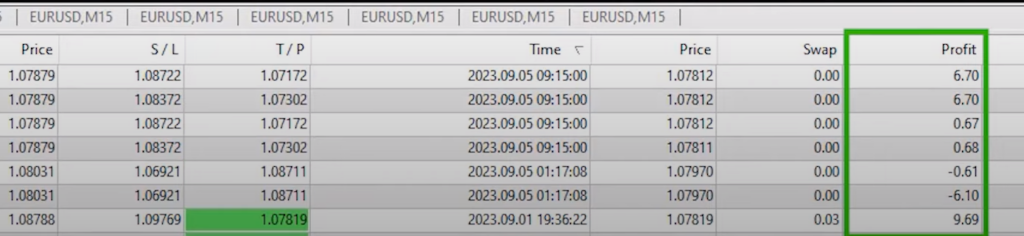
    After a few days of letting the expert advisors trade on your demo account, it’s time to examine the results. If you take a look at your screen, you’ll likely see a multitude of trades that have been opened and closed across different charts. While this data is valuable, it can be challenging to determine which EA is the top performer for the current market conditions.

    Top 10 Trading Robots: Using Tracking Websites

    To make this evaluation easier, I rely on external tracking websites like MyFXbook or FXBlue, especially when trading with multiple robots in a single account. I’ve connected my account to FXBlue, and it provides a clear overview of the performance of each expert advisor.

    Understanding Magic Numbers

    When examining the trade history on FXBlue, you’ll notice that each trade has a “magic number” associated with it. The magic number is a unique identifier assigned to each EA and trade. By default, it starts with 100 and adds additional digits at the end to distinguish which EA opened a particular trade.
    Top-10-Trading-Robots-5

    Evaluating Individual Expert Advisors

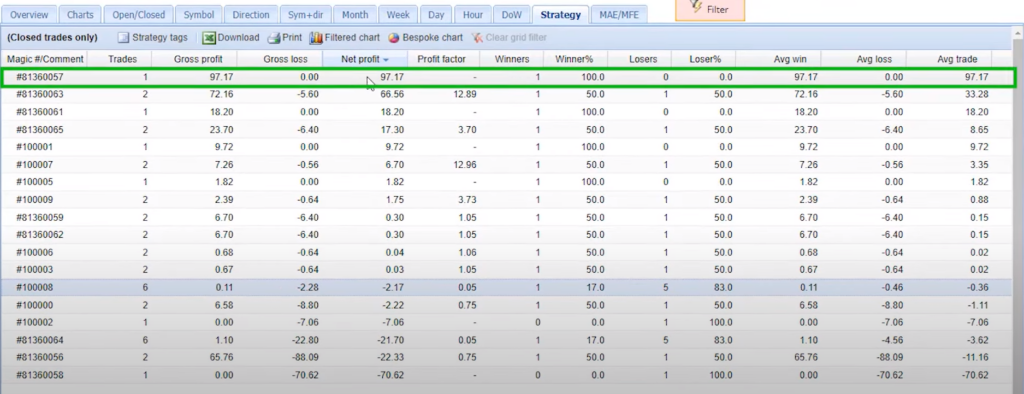
    Below the portfolio expert advisor trades, you’ll find the individual expert advisors with their magic numbers ranging from 056 to 065. Analyzing these individual EAs can provide insights into their performance.

    For instance, if an expert advisor has a negative profit, like -$21.70, it indicates that this specific strategy hasn’t been performing well during the trading period. Similarly, an EA with a profit of $97.17, as seen with the magic number ending in 0057, has shown strong performance.

    Top 10 Trading Robots: Comparing Strategies

    You can further analyze the results by arranging them according to net profit. This allows you to identify the expert advisors that have generated the most profit during the trading period. In this case, the robot with the magic number ending in 0057 is the top performer, bringing in $97.17 in profit.

    It’s worth noting that some expert advisors may not have opened any trades during the period, indicating that there were no signals from their respective strategies.

    Fine-Tuning Your Approach

    The data you’ve gathered so far provides valuable insights into the performance of each expert advisor. This information can guide your decision-making process as you move forward with your trading strategy. You can choose to focus on the top-performing EAs, adjust their parameters, or even explore new strategies based on these results.

    Optimizing Your Trading Strategy

    Now that you have collected data and identified the top-performing expert advisors, it’s time to optimize your trading strategy. In this section, we’ll explore how to make the most of your trading robots based on their performance.

    Top 10 Trading Robots: Choosing Your Top EAs

    By arranging your expert advisors according to net profit, you can easily pinpoint the ones that stand out from the rest. In your case, you’ve found four highly profitable EAs. Now, the question is, how do you proceed?
    Option 1: Separate Live Account

    One option is to place the top-performing expert advisors on a separate live trading account. This approach gives you the flexibility to trade just the top performer, the top two, three, or all four, depending on your preference and risk tolerance.

    For instance, if you decide to trade the top two EAs on a live account, you can leave the remaining 10 EAs trading on a demo account. Periodically, monitor their performance to see if any of them outperform the existing top EAs.

    Option 2: Portfolio Expert Advisor

    Another option is to utilize the portfolio expert advisor, which allows you to trade multiple strategies in one robot. However, you may want to fine-tune this approach by eliminating the underperforming strategies within the portfolio.

    Top 10 Trading Robots: Customizing the Portfolio EA

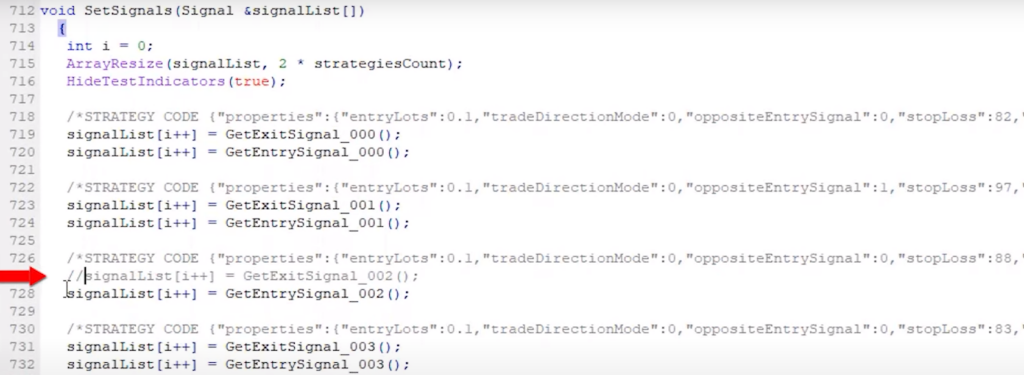
    To customize the portfolio expert advisor, you’ll need to modify it using the MetaEditor. Look for the individual strategies within the code, and it’s straightforward to identify them. To remove a specific strategy from the portfolio, simply place two forward slashes (‘//’) in front of the ‘get entry signal’ and ‘get exit signal’ for that particular strategy. Once you compile the EA, it will disable that strategy from opening or closing trades.
    Top-10-Trading-Robots-7

    Tailoring Your Portfolio

    In this way, you can eliminate strategies that are not performing well in the portfolio. For example, if you want to remove the strategy with the most losses (ending in 002), follow the same process to disable it. This allows you to focus on the top-performing strategies within the portfolio expert advisor.

    Top 10 Trading Robots: Exploring Your Options

    Ultimately, you have two approaches at your disposal:

    1. Individual EAs: Create separate demo accounts for each of the expert advisors, track their performance with FXBlue or MyFXBook, and choose which ones to trade on a live account. This method provides flexibility and precision in selecting your trading strategies.
    2. Portfolio EA: Utilize the portfolio expert advisor to manage multiple strategies within one robot. Customize it by removing underperforming strategies to concentrate on the top performers. This approach simplifies trading but requires careful performance monitoring.

    The choice between these options depends on your trading preferences and goals. Remember, most regulated brokers offer both demo and live accounts, allowing you to experiment and fine-tune your strategy.
    Setting a Statistic Threshold

    Before we conclude, there’s one important piece of advice I’d like to share. When evaluating the performance of your expert advisors, I recommend waiting for at least two or three trades to be executed. It’s not about the time frame, whether it’s a week or a month; it’s about having sufficient statistical data to make informed decisions.

    Top 10 Trading Robots: Profit Factor Matters

    Pay close attention to the profit factor of your expert advisors. Ideally, it should be above 1, with 1.2 or higher being even better. This metric reflects the profitability and risk-reward ratio of your trading strategies. A profit factor above 1 indicates that your strategy is profitable.

    Regular Updates for Ongoing Success

    Remember, I regularly update these 10 expert advisors every month, ensuring you have access to the latest versions. By placing them on a demo account, you can continually identify the ones that perform the best. This ongoing process empowers you to make informed decisions about which EAs to trade in your live or separate demo account.

    Top 10 Trading Robots: Conclusion

    In this blog post, I’ve shared my approach to managing multiple expert advisors. You have the freedom to decide how to manage them, whether by trading all of them or selecting the top-performing ones. The key is to have a clear strategy, continuously monitor their performance, and adapt as needed.

    I hope this guide has provided valuable insights into expert advisor management. If you have any questions or need further assistance, don’t hesitate to reach out in our Forum. Trading with expert advisors requires a deep understanding of every aspect, and I’m here to help you navigate this exciting journey. Happy trading!
  • Testing Evening Scalper Pro: Is This The Best Scalping EA In 2026?

    Testing Evening Scalper Pro: Is This The Best Scalping EA In 2026?

    In the vast world of trading, finding the best scalping EA can be a challenge, but in this review, we will look at a real contender. Sometimes, the best tools are right under our noses. Today, I’ll be sharing my insights on the Evening Scalper Pro expert advisor by Valeria Mishchenko.

    Who is Valeria Mishchenko?

    For those unfamiliar, Valeria Mishchenko is the mastermind behind renowned tools like Waka Waka, Golden Pickaxe, and Night Hunter Pro. Her reputation in the trading community is commendable.

    First Impressions of Evening Scalper Pro

    I must admit, I had overlooked the Evening Scalper Pro for a while. However, after a thorough review, I realized its potential. This EA stands out for several reasons, and it’s not just another name in the crowd.

    Evening Scalper Pro Specifications Table

    SpecificationDetails
    DeveloperValeriia Mishchenko (ValeryTrading)
    Platform CompatibilityMetaTrader 4 / MetaTrader 5
    Currency PairsEURNZD, EURAUD, AUDNZD, NZDCAD, AUDCAD, EURGBP, GBPAUD, GBPCAD (8 total)
    TimeframeM5 (5-minute charts)
    Trading SessionAmerican evening (19:00-23:00 broker time)
    Strategy TypeMean-reversion scalping
    Martingale/GridNo dangerous recovery systems
    Stop LossYes, on every trade
    Verified Track Record3+ years on MyFXBook
    Price$2,200 (frequently discounted to $1,980)
    Account Licenses10 live + unlimited demo accounts
    Free Trial Period14 days, full functionality
    Money-Back Guarantee30 days after purchase
    Minimum Deposit$100 (recommended $500+)
    Recommended Leverage1:500

    No Martingale or Grid System

    Right off the bat, something that really stood out to me was how this tool, the Evening Scalper Pro, goes about its trading. It doesn’t use the Martingale method or what’s called a grid system, which are common ways some other tools trade. Instead, this one has a different approach.

    It trades what are known as Cross pairs, and it does this specifically during the time when America is trading. By doing things this way, the Evening Scalper Pro makes sure its trading is more steady and less all over the place, which means it’s likely to be more reliable in the long run.

    Performance Insights

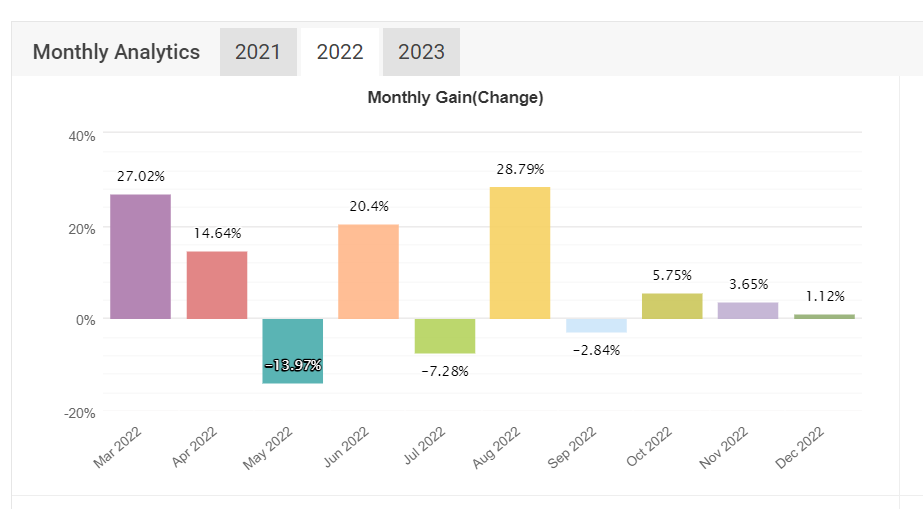
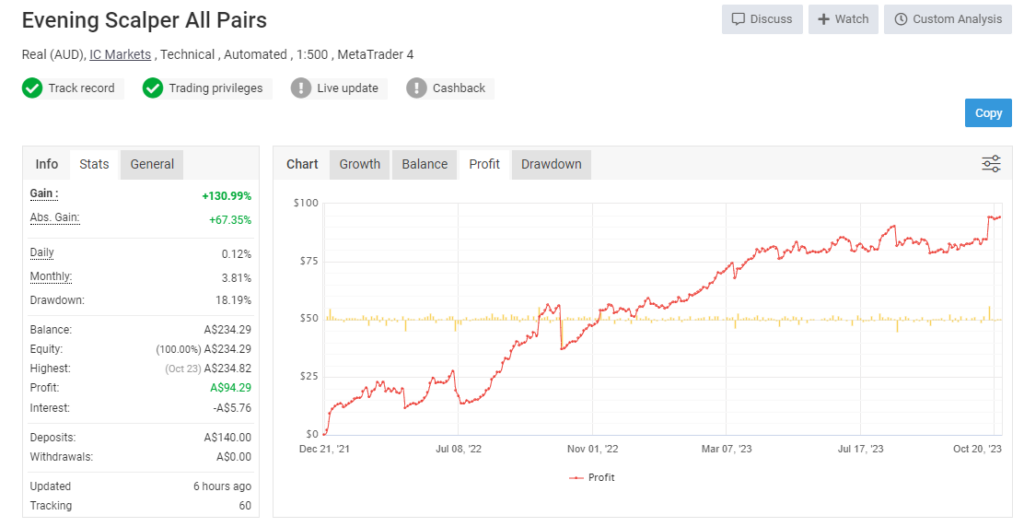
    When I delved into its live performance, the results were intriguing. The graph showed consistent growth, though not as perfect as Waka Waka. It’s essential to note that no EA is without losses. Yet, in 2022, the Evening Scalper Pro boasted a remarkable 127% growth. As of 2023, it’s at a modest 6%. But there’s a reason behind this, which I’ll explain next.

    evening-scalper-pro-review-1

    Risk Management: A Closer Look

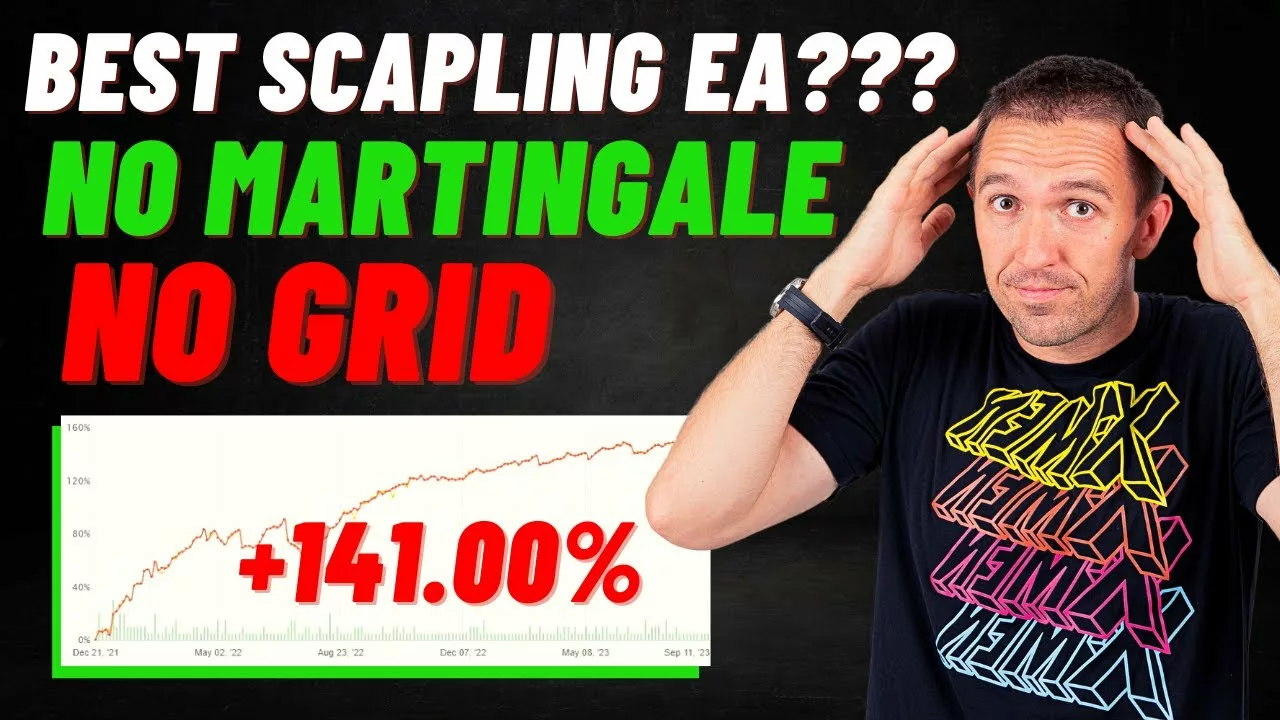
    Upon further investigation, I discovered that the developer had made adjustments to the trading volume. By examining the MyFXBook accounts associated with Valeria, two accounts specifically for the Evening Scalper Pro caught my eye. The best pairs showed an initial investment of $150, which grew by an impressive 141% since December 2021.

    Trading Volume Adjustments

    When I took a closer look at the past trades and how things went, I found out some cool details. Right now, the amount they’re trading each time, called the trading volume, is set at 0.01. This is the smallest amount or “lot” you can trade with on Metatrader.

    But here’s the interesting part: when I went back and checked older records, specifically on the 12th page, I saw that they started off trading with a bit more, at 0.02. This change, from trading a little more to a little less, could be the reason why there were such big profits or gains in the year 2022.

    A Closer Look at the Numbers

    Diving into the monthly performance, January showcased a commendable profit of 28%. However, the journey wasn’t always smooth. The EA faced two challenging months, followed by a robust performance in August. November presented a slight dip with a loss of nearly -1%. Fast forward to 2023, the Evening Scalper Pro consistently yields between 2 and 3% profit. There were also a couple of months with around -2% in losses.

    Why the Fluctuations?

    The reason behind these fluctuations is clear: the absence of the grid martingale system. This means the EA doesn’t employ aggressive strategies to recover losses, resulting in a more stable growth curve.

    In contrast, tools like Waka Waka, which use the grid martingale system, might display an impressive balance chart but can experience significant drawdowns, especially with high-risk settings. It’s crucial to remember that while these systems can recover losses quickly, they can be riskier without proper money management.

    Drawdown and Growth Insights

    When we take a closer look at the numbers, we can see that there was a drop in value, or what experts call a “drawdown”, of 15.62% in July 2022. This means that during that time, things went down a bit. But the really good news is that after this drop, there was a steady increase or growth. It’s like when you trip and fall, but then you get right back up and keep going. This shows that even after facing a challenge, there was a strong comeback.

    Marketplace Ratings and Feedback

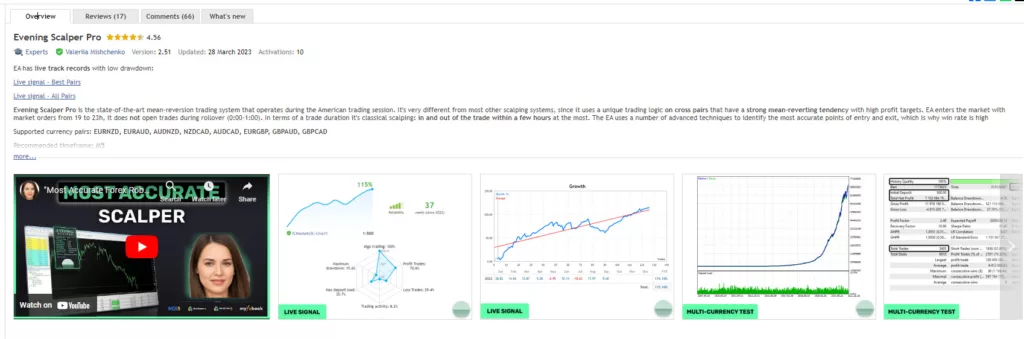
    Heading over to the marketplace, the Evening Scalper Pro boasts a rating of 4.75, backed by 17 reviews. The majority of these reviews are glowing, with only a few exceptions. One particular review labeled the EA as “bad” without any detailed explanation. A closer look at the date of this review, the 9th of June, provides some context. It seems the user might have tested the EA right after a significant drawdown, leading to their dissatisfaction.

    It’s understandable; purchasing a tool and witnessing losses can be disheartening. However, the subsequent performance of the EA paints a different picture, showcasing its ability to recover and thrive.

    evening-scalper-pro-review-3

    Performance Comparison Table

    FeatureEvening Scalper ProNight Hunter ProWaka Waka
    DeveloperValeriia MishchenkoValeriia MishchenkoValeriia Mishchenko
    Trading SessionAmerican evening (19:00-23:00)Asian night (21:00-01:00)24/5 trading
    Currency Pairs8 cross pairs12 major pairs18 pairs (majors + crosses)
    StrategyMean-reversion scalpingTime-based scalpingGrid + martingale recovery
    Verified Gain (3+ years)+127% (2022), +6% (2023)+215% cumulative+3,400% cumulative
    Maximum Drawdown~41%~30%~25% (with extreme spikes)
    Uses MartingaleNoNoYes
    Risk LevelMediumMediumHigh (during recovery)
    Price$2,200$2,340$2,400
    Best ForCross-pair diversificationMajor pair night tradingAggressive growth seekers

    Your Own Research Matters

    Even though I’ve given you a deep look into the topic with my analysis, I always tell traders that it’s a good idea to read what other users are saying too. By checking out other people’s opinions and experiences, you can get a fuller picture of the situation. This way, you gather more information from different sources, which can help you make better, well-thought-out choices.

    A Worthwhile Investment?

    The Evening Scalper Pro has a price of $2,200. I know, that might sound like a lot of money to some people. But here’s a bit of happy news: if you go to Valeria’s website, she’s offering a special deal where you can get the Evening Scalper Pro for $220 less than the original price. That’s a pretty good savings! And to make things even easier for you, I’ve put the website link right in the description below, so you can just click on it and check out the deal for yourself.

    Test Before You Invest

    Before you decide to spend any money, there’s a great chance for you to try out the robot without paying a single penny. They’re offering a 14-day trial, which means you get two whole weeks to see what this expert advisor can do and if it’s right for you. All you have to do is click on the button that says “Download Evening Scalper Pro Now”, and just like that, the EA will be downloaded to your device and it’s all set for you to start using. It’s a simple way to check things out before making a final decision.

    Live Account Testing

    While I typically test EAs on demo accounts, the absence of the grid martingale system in this EA gives me the confidence to test it on a small live account. However, a word of caution: always test any EA on a demo account first to understand its nuances.

    Ensuring Continuous Trading with VPS

    Scalping strategies live or die by execution speed. When profits target 5-15 pips per trade, even minor delays can transform winning positions into losses.

    Latency Requirements

    Evening Scalper Pro requires sub-10ms latency to your broker’s servers. This specification isn’t arbitrary, cross pairs often have wider spreads than majors, making every millisecond of delay increasingly costly. Trading EURNZD or AUDNZD with 50ms latency means you’re routinely getting filled 2-3 pips worse than expected, which completely erases your edge.

    Cross Pair Execution Challenges

    Major pairs like EURUSD route through highly liquid interbank markets with tight spreads and instant fills. Cross pairs trade in thinner markets where your broker might need additional time to match orders. Some brokers route cross-pair orders differently than major pair trades, introducing extra latency.

    Before running Evening Scalper Pro live, test your broker’s execution quality specifically on cross pairs. Open 20-30 manual trades on EURNZD, AUDNZD, and NZDCAD during American evening hours. Measure your average slippage, requote frequency, and rejection rates. If you’re experiencing consistent negative slippage above 1 pip, your broker may not be suitable for this EA, regardless of VPS quality.

    Continuous Operation Requirements

    The American evening session runs during specific hours that may not align with your personal schedule. A VPS ensures Evening Scalper Pro operates without interruption, opening positions at optimal entry points even while you sleep. Home computers suffer power outages, internet disconnections, and automatic updates, any of which could cause missed trades during profitable setups.

    Recommended VPS Specifications

    For Evening Scalper Pro, select VPS providers with servers geographically close to your broker. If trading with an Equinix NY4-based broker, choose a New York VPS. London-based brokers pair best with LD4 servers. The EA runs efficiently on basic specifications (2GB RAM, 2 CPU cores) since it only monitors the price on a single chart.

    Customizing Your Trading Preferences

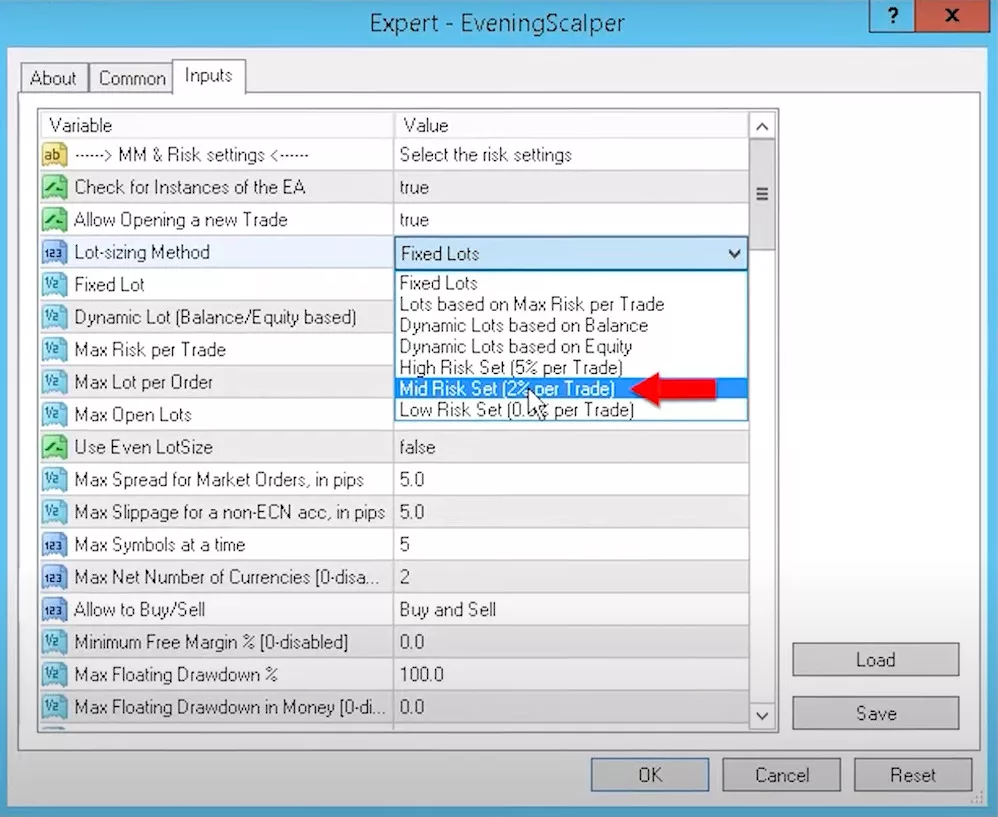
    Upon launching the EA, you’ll notice various input settings. You can choose between fixed lots or adjust the risk settings. If you’re unsure about these settings, Valeria’s dashboard provides a downloadable set file, mirroring the settings she uses on her myFXbook account. This ensures you’re using optimized settings for the best results.

    evening-scalper-pro-review-5

    Understanding Evening Scalper Pro’s Input Settings

    The EA offers flexible configuration options to match different trading styles and account sizes:

    Risk Management Settings

    Evening Scalper Pro provides three primary approaches to position sizing. Fixed lot mode allows you to set specific trade volumes (0.01, 0.02, etc.) for complete control. Medium risk automatically calculates 2% exposure per trade based on your account balance, adjusting positions as your equity grows. High risk increases this to 5% per position, generating faster account growth but exposing you to larger potential losses.

    Each trade includes a maximum risk cap of 5% regardless of your chosen setting. This ceiling prevents catastrophic losses even during volatile market conditions.

    Execution Protection Features

    Spread protection monitors real-time bid-ask spreads and refuses entries when costs exceed profitable thresholds. This prevents the EA from trading during illiquid periods when wide spreads would immediately put positions underwater.

    Slippage control sets maximum acceptable deviation between your order price and actual execution. If market conditions cause fills beyond this tolerance, the EA cancels the order rather than accepting unfavorable pricing.

    Trading Constraints

    The EA limits simultaneous exposure to five currency pairs maximum. This diversification cap prevents overconcentration while maintaining manageable risk across your portfolio.

    Rollover time trading restrictions prevent positions from remaining open during the broker’s daily rollover period (typically 0:00-1:00 broker time). Since swap costs can be substantial on cross pairs, the EA closes all trades before this window and resumes activity afterward.

    FTMO Challenge Optimization

    For traders using Evening Scalper Pro in prop firm challenges, dedicated input settings adjust the strategy for challenge rules. These modifications include tighter stop losses, conservative position sizing, and enhanced news filtering to avoid violating challenge parameters while maintaining profitability.

    Key Features to Note

    The Evening Scalper Pro boasts several notable features:

    • Risk Management: You can set a maximum risk per trade, ensuring you never exceed your comfort level.
    • Currency Pairs: The EA trades on specific pairs like Euro New Zealand, Euro Aussie, Aussie New Zealand, and New Zealand CAD. This diversification helps spread risk.
    • News Filter: This feature ensures the EA doesn’t trade during major news events, avoiding potential market volatility.
    • Trading Times: The EA won’t trade during rollover times and won’t keep positions open overnight.

    Pros and Cons Analysis

    Pros

    • Transparent Risk Management: Unlike grid or martingale systems that can spiral into catastrophic losses, Evening Scalper Pro uses fixed stop losses on every position. You always know your maximum exposure before entering a trade.
    • Cross-Pair Diversification: Most scalping EAs crowd into EURUSD and GBPUSD, where hundreds of algorithms compete for the same edge. Evening Scalper Pro trades eight cross pairs with less algorithmic competition, potentially offering more sustainable profitability.
    • Reputable Development Team: Valeriia Mishchenko’s portfolio includes Waka Waka, which generated verified 3,400%+ returns. Her track record demonstrates serious algorithmic trading expertise rather than fly-by-night EA development.
    • Comprehensive Trial Period: The 14-day free trial eliminates purchase risk. You can verify performance on your specific broker with your actual account conditions before spending $2,200.
    • Active Maintenance: Unlike abandoned EAs that gradually decay as market conditions shift, Evening Scalper Pro received major updates in 2024-2025 with re-optimized parameters based on current market behavior.
    • Multiple Protective Filters: News filters, stock market crash detection, swap cost analysis, and spread protection work together to prevent trading during unfavorable conditions.
    • Professional Setup Resources: Downloadable set files matching MyFXBook configurations eliminate guesswork in parameter selection, giving you professionally tested settings immediately.

    Disadvantages and Concerns

    • Expensive Investment: At $2,200, Evening Scalper Pro costs significantly more than competing scalpers like Forex Fury ($249) or GPS Forex Robot ($149). The price may be justified for serious traders, but casual users might find alternatives more accessible.
    • Substantial Drawdown History: The 41% maximum drawdown raises concerns even for a non-martingale system. Traders accustomed to smoother equity curves may struggle psychologically during extended losing periods.
    • Modest Recent Performance: After an impressive 127% growth in 2022, the EA produced only 6% returns in 2023. This deceleration suggests either market condition changes or parameter optimization issues that haven’t been fully resolved.
    • Cross Pair Liquidity Challenges: Lower liquidity in cross pairs means potentially wider spreads, especially during low-volume periods. Brokers with poor execution on these instruments will significantly degrade results.
    • Profit Factor Concerns: When average losses (-16.1 pips) exceed average wins (10.6 pips) by 50%, you need exceptionally high win rates just to break even. Any slight deterioration in accuracy quickly turns profitable months into losses.
    • Session-Limited Trading: Operating only during the four-hour American evening window (19:00-23:00) provides fewer trading opportunities compared to 24/5 systems. Missing just one or two profitable setups per month can materially impact monthly returns.
    • Broker Sensitivity: Scalping EAs perform differently across brokers due to spread variations, execution speed, and requote frequency. Evening Scalper Pro’s results may not replicate on budget brokers with substandard infrastructure.

    Who Should (and Shouldn’t) Buy Evening Scalper Pro

    Ideal Candidates for Evening Scalper Pro

    • Portfolio Diversifiers: Traders already running major-pair EAs like Night Hunter Pro or Forex Fury can add Evening Scalper Pro to gain cross-pair exposure. Since it trades different instruments during different hours, you’re not duplicating positions or concentrating risk.
    • Risk-Aware Algorithmic Traders: If you understand that 41% drawdown is possible and can mentally withstand temporary losses without panicking, Evening Scalper Pro’s non-martingale approach offers predictable risk compared to recovery-based systems.
    • Valeriia Mishchenko Followers: Traders who achieved success with her other products (Waka Waka, Golden Pickaxe) understand her development philosophy and may appreciate Evening Scalper Pro’s design logic.
    • Serious Capital Allocators: With $5,000+ accounts, you can properly size positions to weather drawdown periods while maintaining acceptable risk levels. The EA’s performance makes more sense with sufficient capital to handle volatility.
    • Quality Broker Users: If you trade with IC Markets, Pepperstone, or similar brokers offering tight cross-pair spreads and fast execution, Evening Scalper Pro can perform as designed without execution-related degradation.

    Poor Fit Profiles

    • Budget-Conscious Beginners: At $2,200, Evening Scalper Pro represents a significant investment for new traders. Cheaper alternatives like Forex Fury ($249) provide an entry-level algorithmic trading experience without a major financial commitment.
    • Aggressive Growth Seekers: Traders expecting Waka Waka-style 3,400% returns will be disappointed. Evening Scalper Pro targets modest, steady growth rather than explosive gains.
    • Low Drawdown Requirements: If 15-20% drawdown represents your absolute maximum tolerance, Evening Scalper Pro’s 41% historical maximum will cause psychological distress during inevitable losing streaks.
    • Set-and-Forget Traders: While the EA runs automatically, optimal performance requires periodic monitoring of broker execution quality, news event calendars, and market condition changes. Completely hands-off traders might prefer simpler systems.
    • Small Account Holders: With $500 or less, you lack sufficient capital to properly diversify across eight currency pairs while maintaining appropriate position sizing. Minimum recommended capital is $1,000, though $2,000+ is preferable.
    • Impatient Results Seekers: Evening Scalper Pro trades selectively during a four-hour daily window. Some days produce no trades at all. Traders wanting constant activity and immediate gratification won’t appreciate the patient approach.

    Final Thoughts On Evening Scalper Pro

    The Evening Scalper Pro offers a blend of advanced features and user-friendly settings, making it a top contender in the world of EAs. With options to test it for free and customize it to your trading style, it’s a tool worth considering for both novice and seasoned traders. Remember, the key to successful trading is not just the tools you use, but understanding them thoroughly. Happy trading!
    Frequently Asked Questions

    How does Evening Scalper Pro perform during major news events like NFP or FOMC announcements?

    The EA includes an advanced news filter that monitors high-impact economic releases. When significant announcements approach (typically 1-2 hours before), the system stops opening new positions and may close existing trades to avoid volatility spikes. This protection mechanism recognizes that cross pairs can experience extreme spread widening during news events, turning predictable mean-reversion setups into unpredictable chaos.

    You can customize filter sensitivity through input settings, choosing between conservative (pauses for all moderate+ impact news) or aggressive (only pauses for high-impact events). The filter automatically updates its calendar, so you don’t need manual intervention.

    Can I run Evening Scalper Pro simultaneously with Night Hunter Pro or other Valeriia Mishchenko EAs?

    Yes, running multiple EAs from the same developer works well because each targets different trading sessions and currency pairs. Evening Scalper Pro operates 19:00-23:00 on cross pairs, while Night Hunter Pro trades 21:00-01:00 on major pairs. This creates minimal overlap and diversifies your exposure across instruments and timeframes.

    However, monitor your total account exposure carefully; running three or four EAs simultaneously can lead to overcapitalization if you’re not managing position sizes appropriately. Consider reducing individual EA risk settings when combining multiple systems to maintain overall portfolio risk within acceptable bounds.

    What’s the difference between running Evening Scalper Pro on MT4 versus MT5?

    Both platforms support the EA with identical functionality, but execution characteristics differ slightly. MT5 typically offers faster tick processing and more precise order execution due to improved platform architecture. Some brokers also provide tighter spreads on MT5 accounts compared to MT4.

    However, MT4 remains perfectly suitable for Evening Scalper Pro; the developer’s verified MyFXBook account runs on MT4 with strong results. Choose based on your broker’s offerings rather than platform preference. If your broker offers identical spreads and execution quality on both platforms, MT5 provides marginal technical advantages.

    How much capital should I allocate per currency pair when using Evening Scalper Pro?

    The EA automatically manages position sizing across all eight pairs based on your selected risk setting (fixed lots, medium risk, or high risk). With medium risk (2% per trade), you’re exposing roughly 16% of your account at maximum when all eight pairs have simultaneous positions, an uncommon scenario.

    Most traders find that a $2,000 minimum account balance provides a comfortable cushion for the EA’s operation. Below this threshold, you’re forced into 0.01 micro lots, which severely limits profit potential even when the EA makes correct predictions. Consider $5,000+ optimal for proper diversification and meaningful returns.

    Does Evening Scalper Pro work effectively on cent accounts, or does it require standard account types?

    Cent accounts function well with Evening Scalper Pro, particularly for testing and small capital experimentation. Since the EA supports 0.01 lot sizes, you can operate with proportionally scaled positions on cent accounts.

    However, verify your broker’s cent account spread characteristics; some brokers widen spreads on cent accounts compared to standard offerings, which directly impacts scalping profitability. The additional spread costs could negate the EA’s edge entirely. Test for at least two weeks on a demo cent account before risking real capital, comparing execution quality against standard account specifications.

  • Pin Bar Trading Strategy: An exciting and unusual strategy

    Pin Bar Trading Strategy: An exciting and unusual strategy

    I recently discovered an exciting Pin Bar Trading Strategy. Every month, I delve deep into the world of trading robots. This month, I stumbled upon a gem that uses the “pin bar trading strategy”. Let’s dive into this fascinating topic.

    A Monthly Ritual: Reviewing Trading Robots

    Every time the month wraps up, I have a routine. I take a close look at all my trading robots. This regular check-up ensures I’m not missing out on any new trends in the trading world. On this particular review, something stood out. There was one robot that really grabbed my attention. What made it special? It employed the “pin bar trading strategy”. This isn’t just any strategy; it’s based on a distinct chart pattern. And while this pattern is certainly interesting to look at, what’s more impressive is its performance. It consistently sends out strong and reliable trading signals, making it a standout in my collection.

    A Special Announcement: The EA is yours – FREE

    Exciting news for my followers! I’m sharing the robot for free. You’ll find the link to download the robot at the end of this blog post. I would strongly suggest you read the entire post to get a better understanding of how it was created, how it works, and how to correctly backtest it.

    Top 10 Forex EAs: A Monthly Update

    Each month, I take the time to carefully handpick a list of the top 10 Forex Expert Advisors (EAs). To come up with this list, I don’t just pick randomly. Instead, I dive deep, conducting thorough testing and detailed analysis of various EAs. After all that hard work, one particular robot stood out. This robot employs the “pin bar trading strategy”. Earning a spot on this prestigious list is no small feat. So, the fact that this robot made it clearly speaks volumes. It’s a shining example, showing just how efficient and effective this strategy truly is.

    Pin-Bar-Trading-Strategy-1

    Introducing the 21-Day Online Program

    I have more exciting news! After months of hard work, I’ve launched a 21-Day online program. And the best part? It’s absolutely free. By enrolling, you’ll gain access to three of my premium courses. Plus, you’ll get numerous free EAs and learn to use strategy builders. It’s a comprehensive package that encapsulates everything we teach at the EA Trading Academy. I’ve dropped below this blog post for those interested.

    Decoding the Pin Bar Trading Strategy

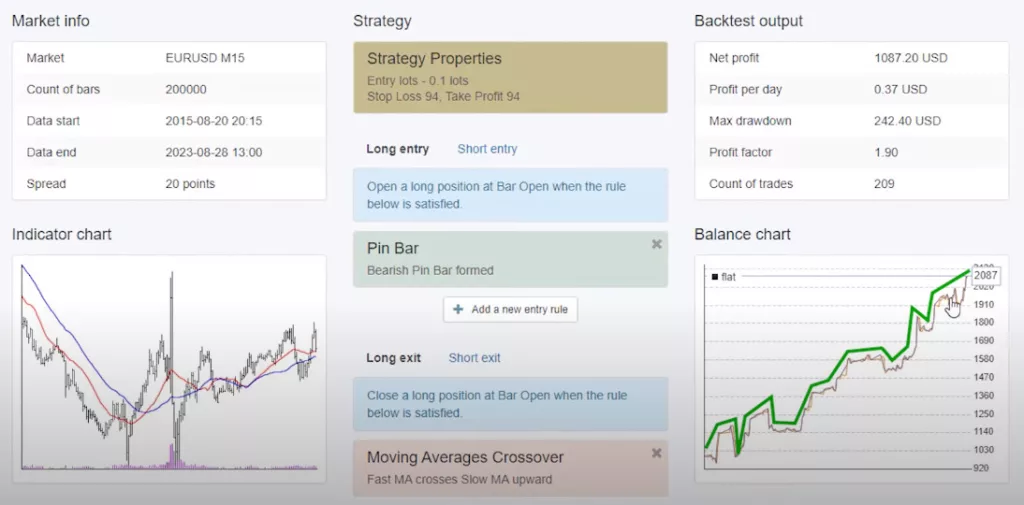
    Now, let’s talk about the star of the show – the “pin bar trading strategy”. What is it exactly? In simple terms, it’s a specific chart formation that traders use to predict market movements. This strategy has proven its worth, emerging as the top performer this month. And the most astonishing part? It achieved this feat with just two trades.

    Pin Bar Trading Strategy: Trading with EAs: Metatrader vs. EA Studio

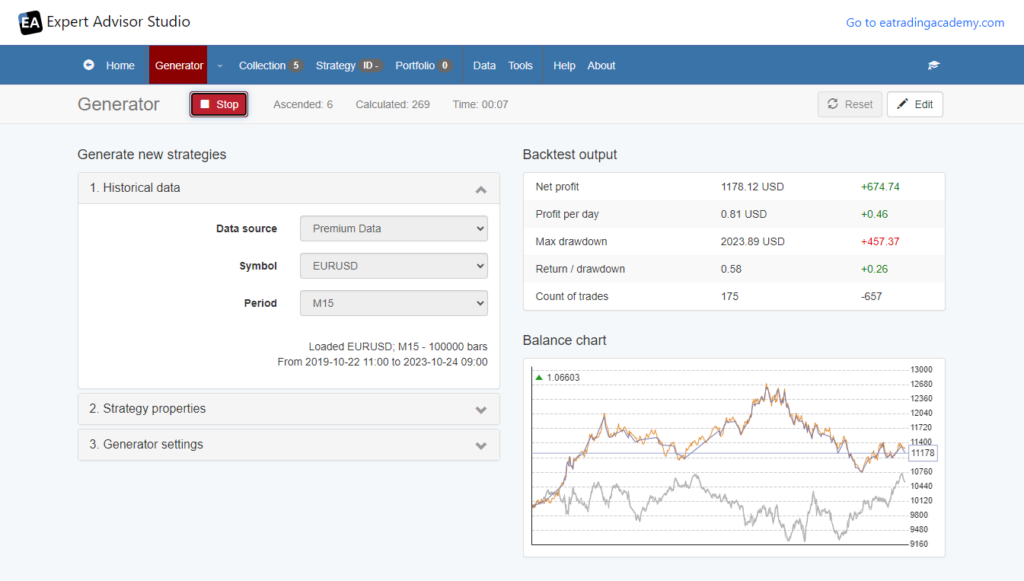
    When it comes to trading, I predominantly use EAs on Metatrader. However, EA Studio offers a unique advantage. It simplifies the process of recalculating performance. By employing the “start date limit filter”, I can easily assess the performance of various strategies. Without this filter, the balance charts display data since 2015. But what if I want to pinpoint the top-performing strategy for a specific month?

    Zooming into Monthly Performance

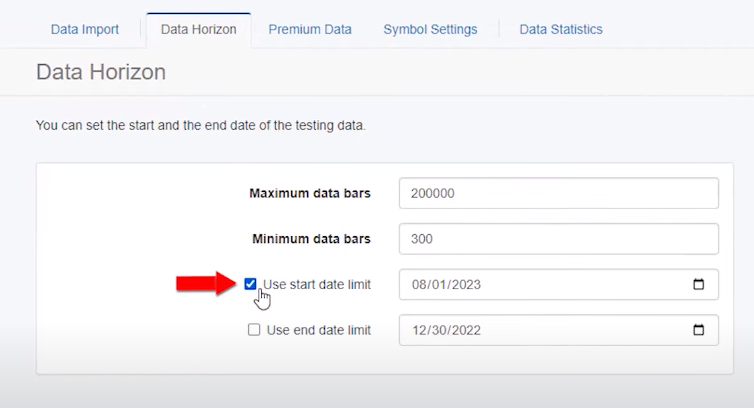
    To focus on a month’s performance, I head to the ‘Data’ section. Here, I click on ‘Data Horizon’. By selecting ‘Use Start Date Limit’, I can specify a date range. For instance, to analyze August’s performance, I set the range from the beginning of August to the 28th. Upon recalculating, the top strategies for the month become evident. Intriguingly, the top strategy this month executed only two trades. Yet, it yielded the highest net profit when trading with 0.1. And guess what? Both trades were influenced by the “pin bar trading strategy”.

    Pin Bar Trading Strategy: Deciphering the Pin Bar Formation

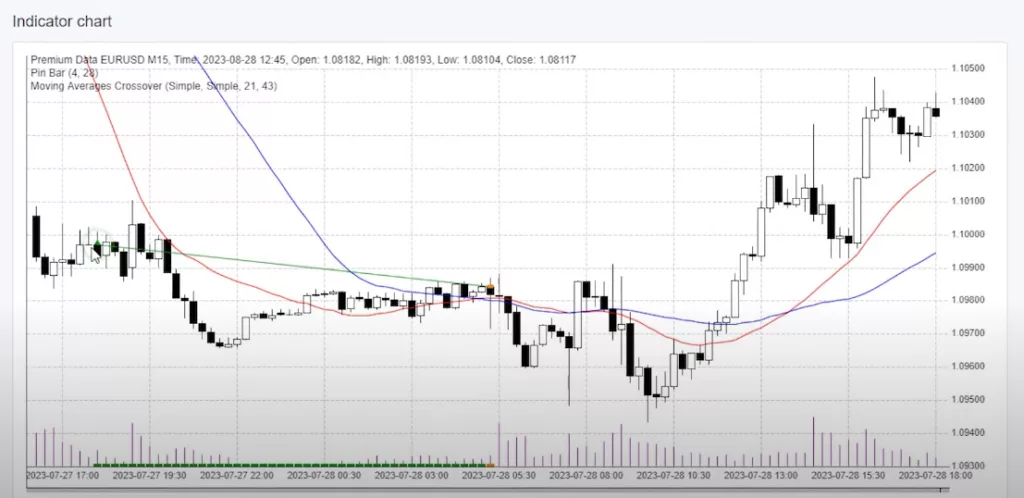
    The pin bar, in essence, is a candlestick formation. A bearish pin bar emerges when the candlestick’s upper shadow surpasses its lower shadow. This might sound a tad complex, but a glance at a chart clarifies things. On the chart, you’ll spot a minuscule bar with a pronounced upper shadow. Noticeably, it lacks a lower shadow. At the onset of the subsequent bar, a buy order was placed, culminating in a profit. Earlier this month, a similar bar appeared, further underscoring the efficacy of the “pin bar trading strategy”.

    A Glimpse into Long-Term Performance

    To get a clearer, more expansive view, we need to make a small adjustment: let’s do away with the start date limit. By doing this, we’re not just looking at a snapshot; we’re seeing the whole movie. Moreover, we can watch the “pin bar trading strategy” unfold over time. And what we see is impressive. This strategy doesn’t just spike up and plummet down; it shows a steady, reliable climb in profits. It’s like a hiker who finds a rhythm and sticks with it, making steady progress up the mountain. For traders, including myself, that’s the golden ticket. We don’t want wild rides and unpredictability. We’re after that consistent growth, the kind that can help us plan for the future with confidence.

    Pin-Bar-Trading-Strategy-3

    Pin Bar Trading Strategy: Diving Deeper into the Pin Bar Formation

    As we delve further into the “pin bar trading strategy”, specific patterns emerge. For instance, a bullish pin bar is characterized by a longer lower shadow, often devoid of an upper shadow. Conversely, a bearish pin bar showcases a pronounced upper shadow, dwarfing the lower one.

    Understanding the Strategy’s Nuances

    A key rule in this strategy is the body’s proportion. The body, from the candlestick’s low to its high, should constitute a mere 4% of the entire movement. Meanwhile, the wick (or shadow, as some traders term it) should represent at least 28% of the candlestick. This distinction between the body and wick is crucial for the strategy’s success.

    Pin Bar Trading Strategy: Strategy Mechanics: Stop Loss, Take Profit, and Exit Indicators

    The strategy employs a stop loss and take profit, both set at 94 pips. Additionally, it uses the moving average crossover as an exit indicator. When the fast-moving average surpasses the slow-moving average, it signals an exit point. For instance, a trade initiated post a pin bar concludes once the two moving averages intersect.

    Grab Your Free Expert Advisor

    Exciting news for my readers! I’ve extracted this expert advisor from my top 10 EAs. And I’m offering it for free. You’ll find the download link in the description. While it may not be the most active strategy (with only two trades this month), its profitability is undeniable.

    Strategy Builder: A Game-Changer

    The Strategy Builder truly shines in its straightforwardness. Gone are the days when you needed a developer or deep coding knowledge to craft a trading strategy. With this tool, all it takes is one simple click, and voila! You have the expert advisor ready for both Metatrader 4 and Metatrader 5 platforms. For someone like me, who isn’t a developer, this is nothing short of a blessing. It makes the whole process smooth and hassle-free.

    Pin-Bar-Trading-Strategy-5

    Pin Bar Trading Strategy: Choosing the Right Broker

    Selecting a regulated broker when trading forex is of paramount importance for a multitude of reasons. Firstly, a regulated broker adheres to stringent guidelines and standards set by financial authorities, ensuring the safety and security of traders’ funds. This regulation acts as a safeguard against potential fraud and malpractice. Secondly, brokers that offer multiple account types cater to a diverse range of traders, from novices to seasoned professionals, allowing them to choose an account that best suits their trading style, capital, and risk tolerance. Additionally, having access to various trading platforms provides traders with flexibility, ensuring they can trade efficiently and effectively, regardless of their preferred device or interface. In essence, choosing a regulated broker that offers a variety of account types and platforms is crucial for a seamless, secure, and tailored forex trading experience.

    Conclusion: Test Before You Invest

    The “pin bar trading strategy” holds a promise of potentially lucrative returns, but it’s vital to tread carefully. Instead of hastily jumping into live trading, take a step back. First, initiate a trial run by testing the waters with a demo account. This practice phase is crucial. It acquaints you with the strategy’s subtle aspects and quirks, preparing you for what’s ahead. By taking this precaution, you’re not just gambling on chance but strategically enhancing your prospects of trading success. So, embark on this journey with wisdom. Safe trading!

  • SabioTrade Review: A Fresh Perspective for Traders in 2023

    SabioTrade Review: A Fresh Perspective for Traders in 2023

    Introducing SabioTrade

    Entering the year 2023, SabioTrade has garnered the interest of traders globally. Indeed, as a prop trading firm, it’s revolutionizing the industry by providing significant pre-funded accounts. Consequently, this SabioTrade Review will delve into the details of what they provide.

    SabioTrade Review: Understanding Proprietary Trading

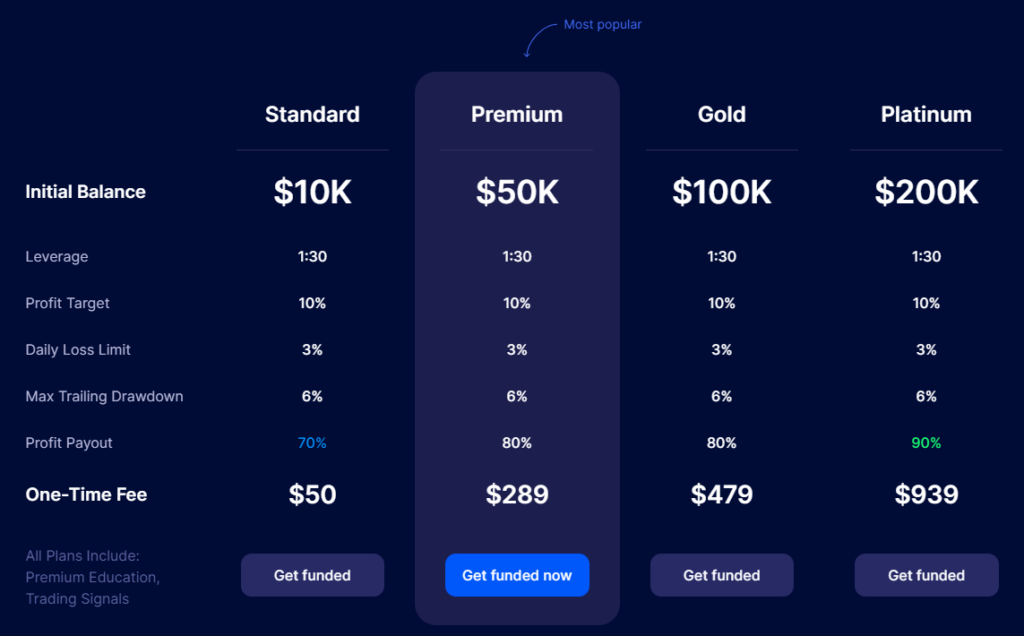
    Imagine a company giving you money to trade and then sharing the profits. That’s proprietary trading. It’s a deal where you get to trade with more money than you have, without borrowing or risking your own cash. SabioTrade offers deals where you can keep 70% to 90% of the profit.

    What Sets SabioTrade Apart

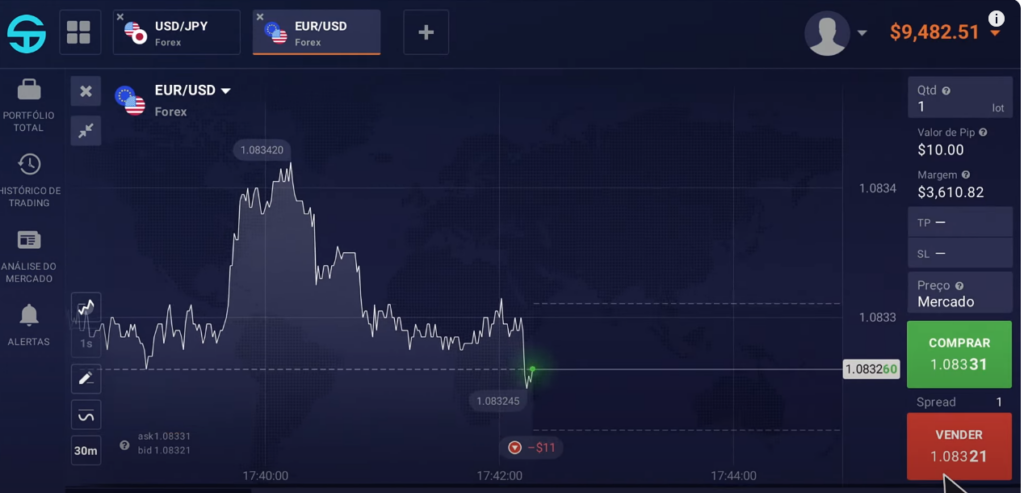
    SabioTrade may be the new kid on the block in prop trading, but it’s already distinguishing itself. Its ace card? A bespoke trading platform that’s part of your dashboard, simplifying your trading activities by keeping everything in one place.

    SabioTrade’s Standout Features

    SabioTrade is not just about the unique platform. It’s also about the ease of getting started with a simple trial or one-step assessment and the promise of up to 90% profit sharing. They’ve made it easy for traders to get their feet wet without heavy investments, starting with packages as low as $50.

    SabioTrade-Review-1

    Rules of the Game

    SabioTrade has some rules:

    • Don’t exceed the 3% daily drawdown limit per day.
    • Keep your overall loss under 6%.
    • Aim for a 10% profit.

    The Pros and Cons of Trading with SabioTrade

    Pros:

    • Entry-level pricing is highly competitive, making it accessible to many.
    • The trading room is integrated into the dashboard for a seamless experience.
    • The proprietary platform is designed for ease, featuring a smart user interface.
    • Payouts are swift, with no need to wait for a set number of trading days.
    • Profit targets are realistic, set at a 10% gain.
    • Leverage options are generous, offering a range to suit different trading styles.
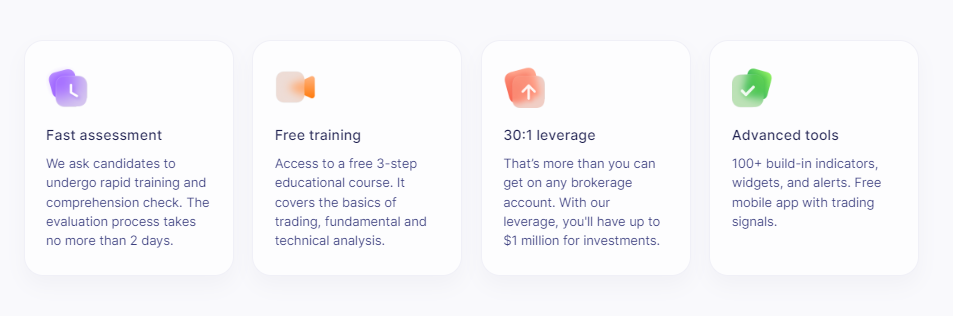
    • Educational resources are provided for free, helping traders improve their skills.
    • A trial account is available for seven days, giving you a taste of the platform with virtual funds.
    • Traders can benefit from a wealth of technical indicators and tools.
    • Trading signals are provided at no extra cost, straight from the SabioDashboard.

    Cons:

    • The platform does not support high-risk investments or cryptocurrency trading.
    • Withdrawal methods are limited strictly to bank cards.

    Trading Opportunities with SabioTrade

    SabioTrade welcomes traders from all over the world, providing an opportunity to trade using the firm’s funds. Consequently, this method enables traders to manage substantial amounts without tapping into their personal savings or taking on debt.

    Diverse Account Options

    SabioTrade caters to a range of traders with three distinct account types:

    1. Trial Account: Get a feel for the platform with a free, 7-day trial loaded with virtual currency.
    2. Assessment Account: Show your trading skills with a demo account when you sign up for a plan.
    3. Real Funded Account: Pass the assessment to unlock a live account filled with trading capital.

    Choose Your Account

    They have four account types:

    • Standard: $10,000 to trade with, 70% profit for you.
    • Premium: $50,000 to trade with, 80% profit for you.
    • Gold: $100,000 to trade with, 80% profit for you.
    • Platinum: $200,000 to trade with, 90% profit for you.

    Navigating the Trading World with SabioTrade

    SabioTrade supports trading in various assets, including Forex, stocks, commodities, and more. While mobile traders may need to wait for an app, the web platform is robust and ready to use.

    Diving into SabioTrade’s Trading Options

    SabioTrade Review: A World of Trading Possibilities

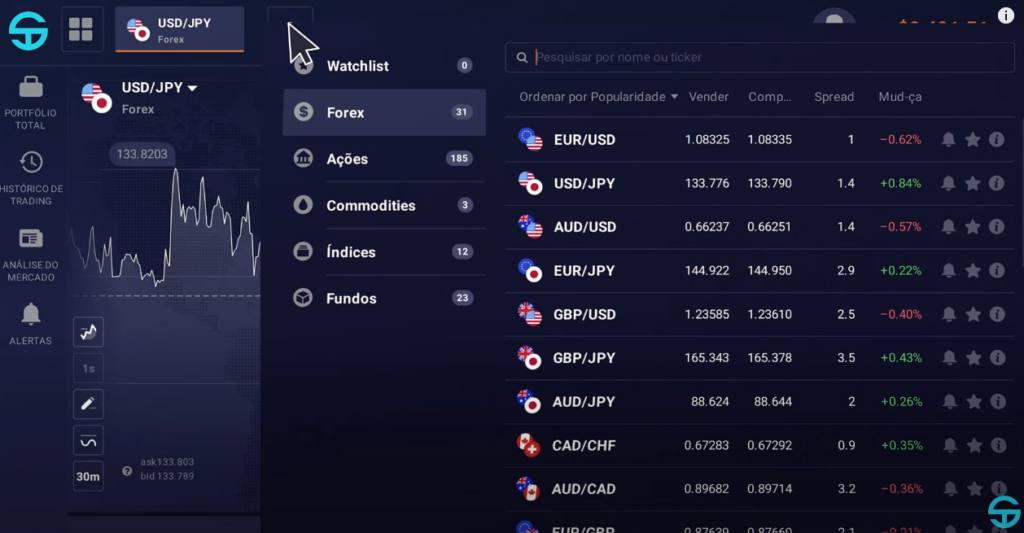
    SabioTrade opens the door to a diverse world of trading with 250 different assets. You can trade in various markets such as Forex, stocks, commodities, ETFs, and indices. Let’s break down what SabioTrade has to offer in each category.

    Forex and Stocks: A Closer Look

    Forex traders have 31 currency pairs at their disposal, including major pairs like EUR/USD and more exotic options. For stock traders, SabioTrade offers a selection of 182 stocks from leading global companies across various sectors.

    SabioTrade-Review-3

    SabioTrade Review: Leverage and Spreads: Maximizing Potential

    Leverage is a tool that can amplify your trading capacity. SabioTrade provides leverage options tailored to different assets, allowing for strategic trading moves. Spreads, or the cost of trading, are competitive on SabioTrade, with the EUR/USD pair having a spread as low as 1.3 pips.

    Commodities and Indices: Broadening Horizons

    Although the commodity options are limited to essentials like oil and metals, they cover the basics for those interested in this market. Indices traders have access to 12 major benchmarks, reflecting the health of various global economies.

    SabioTrade Review: ETFs: Expanding Your Portfolio

    For traders interested in broadening their investment portfolio, SabioTrade presents an attractive array of 22 Exchange-Traded Funds (ETFs). This selection includes highly sought-after ETFs that mirror the performance of significant market indices and various economic sectors, providing a comprehensive range of options for diversification. Moreover, SabioTrade ensures that the cost to trade these ETFs remains low, with spreads beginning at a mere 0.01 pip. This competitive pricing structure is designed to facilitate traders in maximizing their investment strategies while minimizing costs.

    Understanding Deposits and Withdrawals

    SabioTrade streamlines the monetary aspects of trading with a straightforward approach. Rather than requiring deposits, you’re only tasked with a single payment for an assessment account. This fee unlocks the door to your trading journey, eliminating the need for additional financial commitments upfront. When it comes to withdrawals, the process is uncomplicated and user-friendly. You have the freedom to withdraw any amount of your earnings, as often as you like, without facing any restrictions. Moreover, these transactions are executed promptly, ensuring that your funds are available to you without delay. And notably, SabioTrade processes these withdrawals without imposing any extra charges, allowing you to enjoy the full benefits of your trading success.

    Navigating Fees and Costs

    SabioTrade Review: Platforms & Usability: Trading Made Simple

    SabioTrade stands out for its straightforward fee structure. There are no hidden charges; you’ll only encounter standard trading costs like spreads and swaps. This transparent approach to fees ensures traders can manage their costs effectively.

    SabioTrade’s proprietary trading platform, powered by Quadcode, is designed for ease and efficiency. Currently available on web browsers, it offers a user-friendly experience with all the necessary tools at your fingertips. While a mobile app is not yet available, the web platform ensures you can trade from anywhere at any time.

    Trading with SabioTrade: A User-Friendly Experience

    SabioTrade’s platform is a testament to modern trading technology. It’s intuitive and straightforward, making it accessible for traders of all levels. The lack of a mobile app is a minor setback, but the robust web platform more than makes up for it, ensuring you can trade effectively and efficiently.

    SabioTrade’s Integrated Trading Environment

    SabioTrade distinguishes itself by merging its trading platform with the user dashboard, creating the Sabioverse for a smooth experience. As a result, traders can effortlessly track their progress, set profit goals, and utilize educational tools in one unified location, eliminating the need to juggle multiple applications.

    SabioTrade Review: Account Analysis at Your Fingertips

    The SabioDashboard serves as an essential tool for traders, offering a comprehensive analysis of their account’s performance. It showcases various statistics such as profit targets and account balances, and includes an in-depth view of profit sharing, complete with a history of payouts.

    Safety and Trustworthiness

    SabioTrade prioritizes the safety of its clients’ funds and personal data. With segregated accounts and advanced security measures, the platform ensures a high level of protection. Positive customer reviews and sponsorship of reputable athletes further reinforce its credibility.

    SabioTrade Review: Customer Support: Always Connected

    SabioTrade offers robust customer support through live chat and email, ensuring traders can get assistance when needed. While the absence of phone support is noted, the available channels provide efficient service.

    Navigating Risks with SabioTrade

    Using SabioTrade comes with certain risks, such as the potential loss of your account if trading rules are breached. Leverage, while a powerful tool, also carries the risk of magnified losses. It’s crucial to trade within the platform’s guidelines and manage risks effectively.

    SabioTrade-Review-5

    Research and Analysis: Tools for Success

    SabioTrade excels in providing a suite of tools for market analysis, including over 100 technical indicators and a Telegram channel for trading signals. Additionally, traders can join a Discord community for shared insights and support.

    Education: Building Knowledge

    SabioTrade heavily invests in trader education, offering a comprehensive guide and a free Trial account for practice. Video tutorials and walkthrough guides are also available, making it an excellent platform for both new and experienced traders.

    The platform demonstrates a strong commitment to nurturing traders’ growth and success, evidenced by its extensive educational resources and vibrant Discord community. Moreover, the Sabioverse streamlines the trading experience by combining the dashboard and traderoom, thus enabling a more concentrated and effective approach to trading.

    Who Should Consider SabioTrade?

    SabioTrade stands out as an excellent choice for traders aiming to fully tap into their trading potential. The platform’s design is clear and direct, making it particularly attractive to those new to the world of proprietary trading. However, it’s important to note that while it welcomes novices, success on the platform is contingent upon having a solid foundation in trading skills. This is crucial when it comes to passing the assessment phase. For those with the requisite expertise, SabioTrade offers a golden opportunity to engage in trading activities with the promise of substantial rewards for their proficiency and market acumen.

    Is SabioTrade Beginner-Friendly?

    Absolutely. With a simple assessment process, affordable plans, a free Trial account, and comprehensive training resources, SabioTrade is well-suited for beginners eager to learn and grow in the world of trading.

    SabioTrade Through the Eyes of Its Users

    Across multiple review platforms, SabioTrade earns high praise, with users frequently awarding it top marks that underscore its dependability and their contentment. This wave of positive feedback indicates that SabioTrade is successfully meeting its clients’ needs, providing a dependable and gratifying trading experience.

    SabioTrade-Review-7

    SabioTrade Review: Conclusion

    SabioTrade’s innovative approach to proprietary trading, combined with its user-friendly platform, competitive pricing, and transparent profit-sharing models, makes it an attractive option for both novice and experienced traders. As the prop trading landscape continues to evolve, SabioTrade is well-positioned to become a leading player, offering a reliable and rewarding trading experience to its clients.

  • XAUBOT Review: Your Gateway to the Golden Robot

    XAUBOT Review: Your Gateway to the Golden Robot

    Today marks the beginning of a thrilling new chapter in our trading journey as we explore the golden avenues in this XAUBOT Review. I have been tracking this remarkable trading robot for a considerable period, and the time has finally come to delve deeper and share my firsthand experience with all of you. Buckle up as we embark on this exciting adventure together, unraveling the mysteries and potentials that lie within the world of XAUBOT.

    Setting the Stage

    Before we dive in, let me share a bit of background on how I approach new trading tools. Over my decade-long journey in the blogging sphere, I have cultivated a practice of patience and meticulous analysis. It is a rule of thumb for me to observe a trading robot’s live performance for a minimum of six months before even considering investing my time and resources. The XAUBOT has not only caught my attention but held it, showcasing a promising track record over the past half-year.

    XAUBOT Review: A Closer Look at the Performance

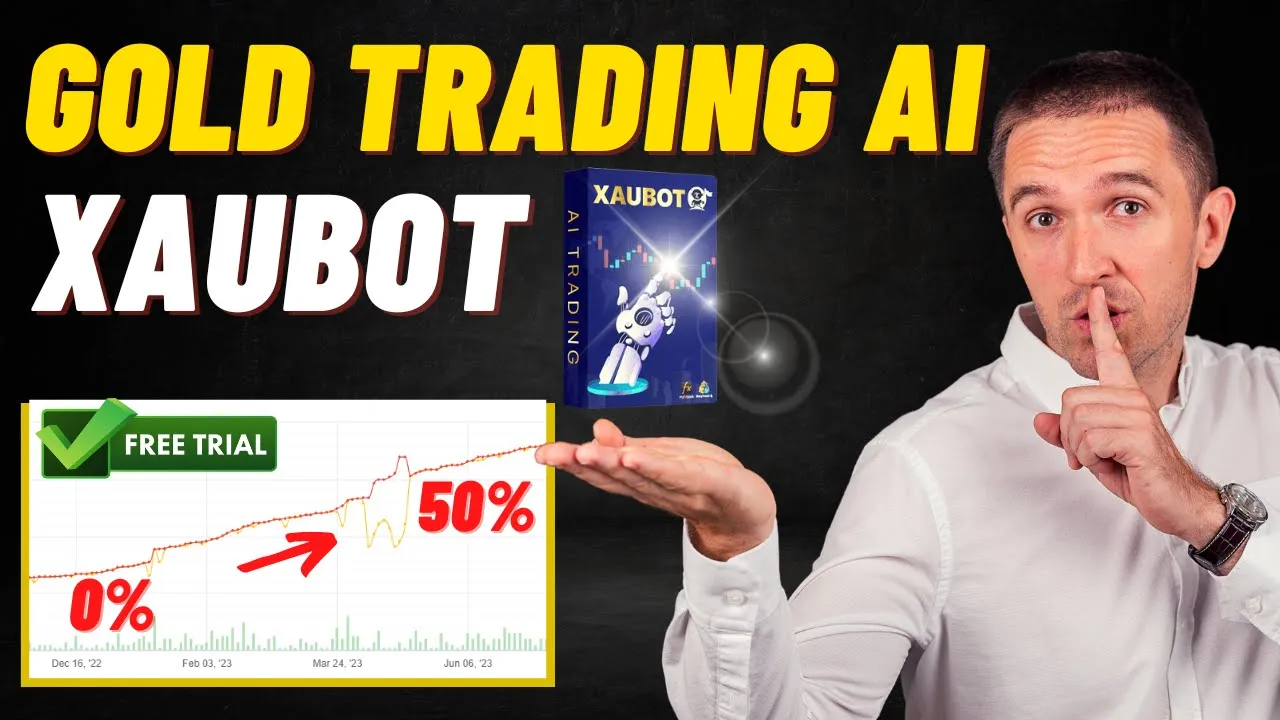
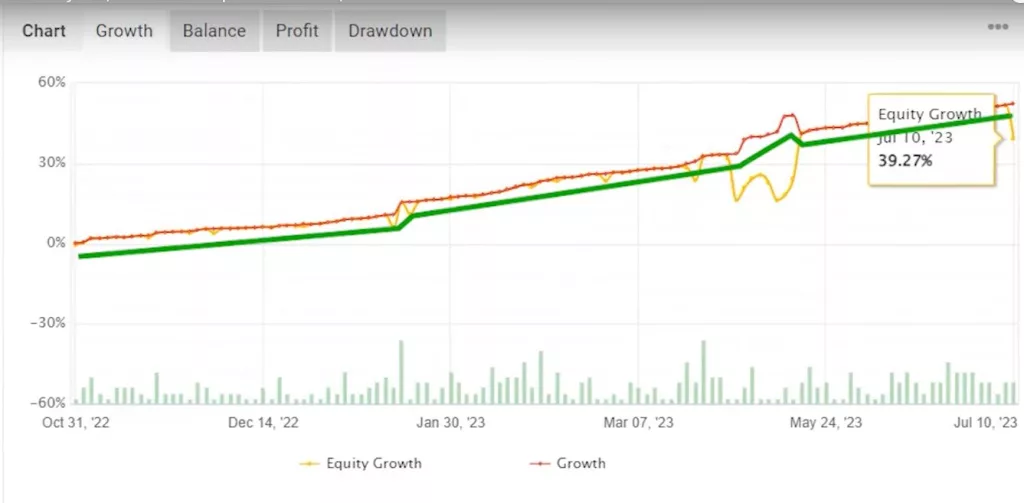
    The XAUBOT started its journey with a humble amount ranging between $1600 and $1700. Fast forward six months, and the account balance has soared to a whopping $1,900, translating to a gain of around 40%! It’s important to note that the journey wasn’t all smooth sailing; the drawdown reached nearly 20%. However, in the grand scheme of things, this golden robot has demonstrated a steady and promising performance.

    XAUBOT-Review-1

    Analyzing the Numbers

    Now, let’s break down the numbers that make XAUBOT stand out in the crowded market of trading robots. The profit factor, a critical metric in trading, is an impressive 2.78. To put it in simple terms, this number is derived from dividing the total profits by the total losses. A profit factor above one is a green signal, indicating a profitable strategy. Hence, a score nearing three is nothing short of fantastic, painting a promising picture for potential investors.

    XAUBOT Review:Monthly Performance Breakdown

    To give you a more detailed insight, let’s dissect the monthly performance since its inception in October 2022. November was a fruitful month with gains surpassing 5%. January stood as the champion, stealing the spotlight with the highest gains. In recent times, the account has been maintaining a consistent performance, with returns oscillating between 2% and 5%.

    Testing the Waters with XAUBOT

    As your trusted blogger with a decade of experience, I believe in testing the waters myself. I am all geared up to install this expert advisor and run it on a virtual account, ensuring a risk-free exploration. The XAUBOT generously offers a free account for enthusiasts like us to get a taste of its capabilities without any financial commitments.

    XAUBOT Review: Step-by-Step Guide to Getting Started

    If you are as excited as I am to start this journey, here is a simple guide to setting up your XAUBOT account:

    1. Sign Up for Free: Begin by clicking on the link provided below. You will find a variety of subscription options to suit your preferences, including a 15-day free trial to get you started without any hitches.
    2. Smooth Checkout Process: Once you’ve chosen your plan, proceed to the easy checkout process. Fill in your billing details, and you’re almost there!
    3. Download and Set Up: After receiving confirmation of your order, you will get access to the XAUBOT file. Download it, and you are ready to dive into the golden world of XAUBOT trading.

    Downloading and Extracting the File

    First things first, I downloaded a zip file containing the necessary elements for the setup. Next, I extracted it to find the EX4 file. This file is crucial as it needs to be copied and pasted into my Metatrader account.

    Using a Regulated Broker

    For this XAUBOT review, I chose to use FXView, a regulated broker that I trust. It’s essential to use a broker that offers low spreads, especially when trading with robots.

    XAUBOT Review: Installing the Expert Advisor

    To install the expert advisor, I opened the data folder in FXView and navigated to MQL4, followed by experts. Here, I pasted the EX4 file. After this, I refreshed the expert advisors section to see the newly added file.

    Setting Up Web Request Options

    The next step was to set up web request options according to the detailed PDF guide provided by XAUBOT. This guide is beginner-friendly, explaining how to open and log into your account, and how to set up the expert advisor. Following the instructions, I enabled web requests for a specific URL, which involved pasting a link into the settings.

    XAUBOT Review: Enabling Auto Trading

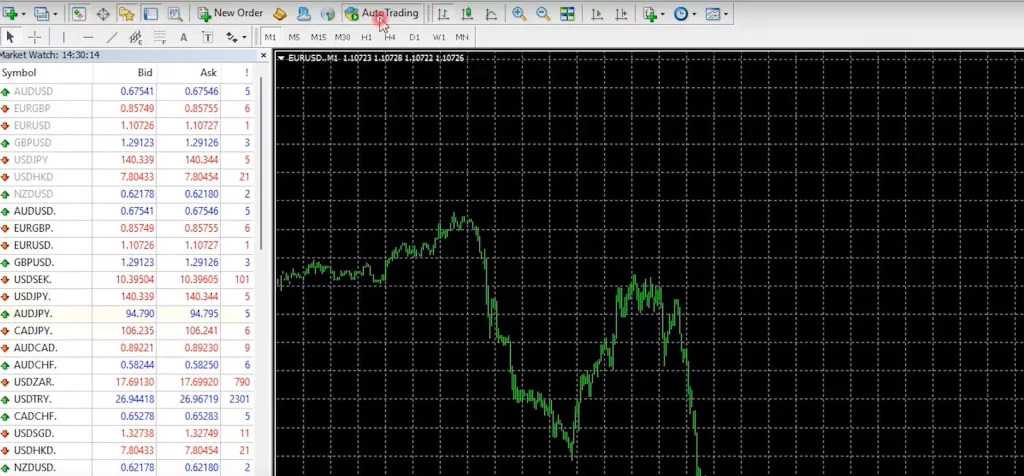
    After setting up the web request options, I enabled auto trading and opened a new chart with the XAUUSD symbol. I chose the M5 time frame as recommended in the manual.

    XAUBOT-Review-3

    Dragging and Dropping the Expert Advisor

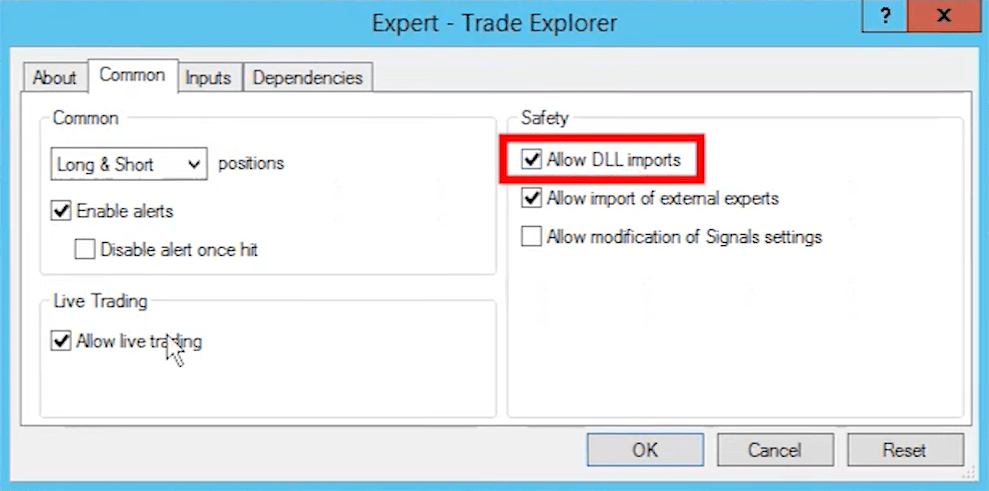
    Next, I dragged and dropped the expert advisor onto the chart. In the common settings, I allowed DLL imports to proceed with the setup.

    XAUBOT Review: Understanding the Importance of Low Spreads

    Before diving into the inputs, I want to emphasize the importance of low spreads when trading with robots. Select a broker that offers a spread of about 19-20 cents on the gold price, which is quite favorable.

    XAUBOT Review: Setting Up with a Small Account

    If you’re starting with a small account, say 200 euros, it’s vital to trade lots accordingly to maintain a balanced approach.

    Navigating the Expert Advisor Inputs

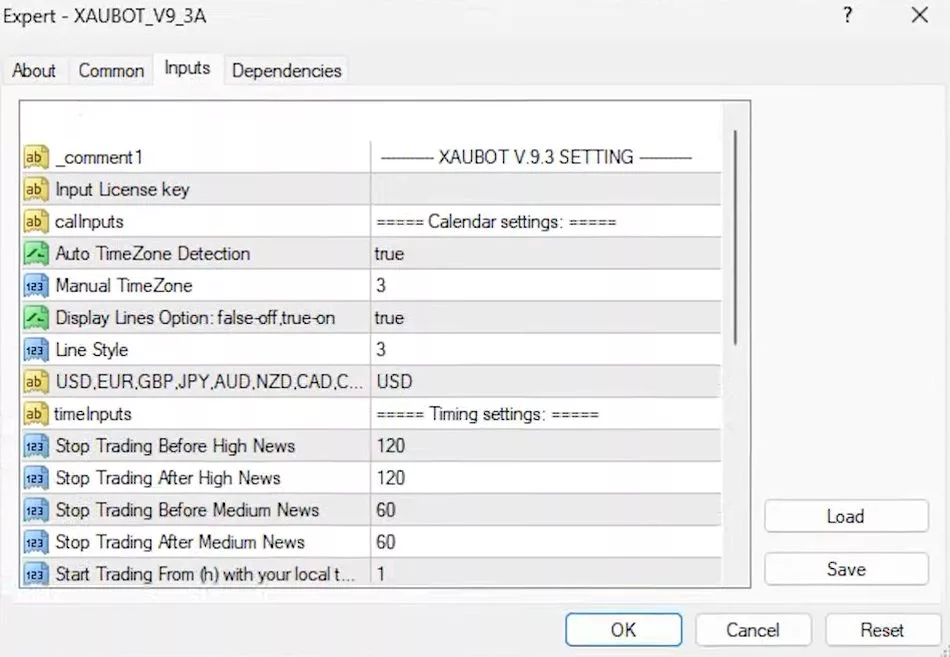
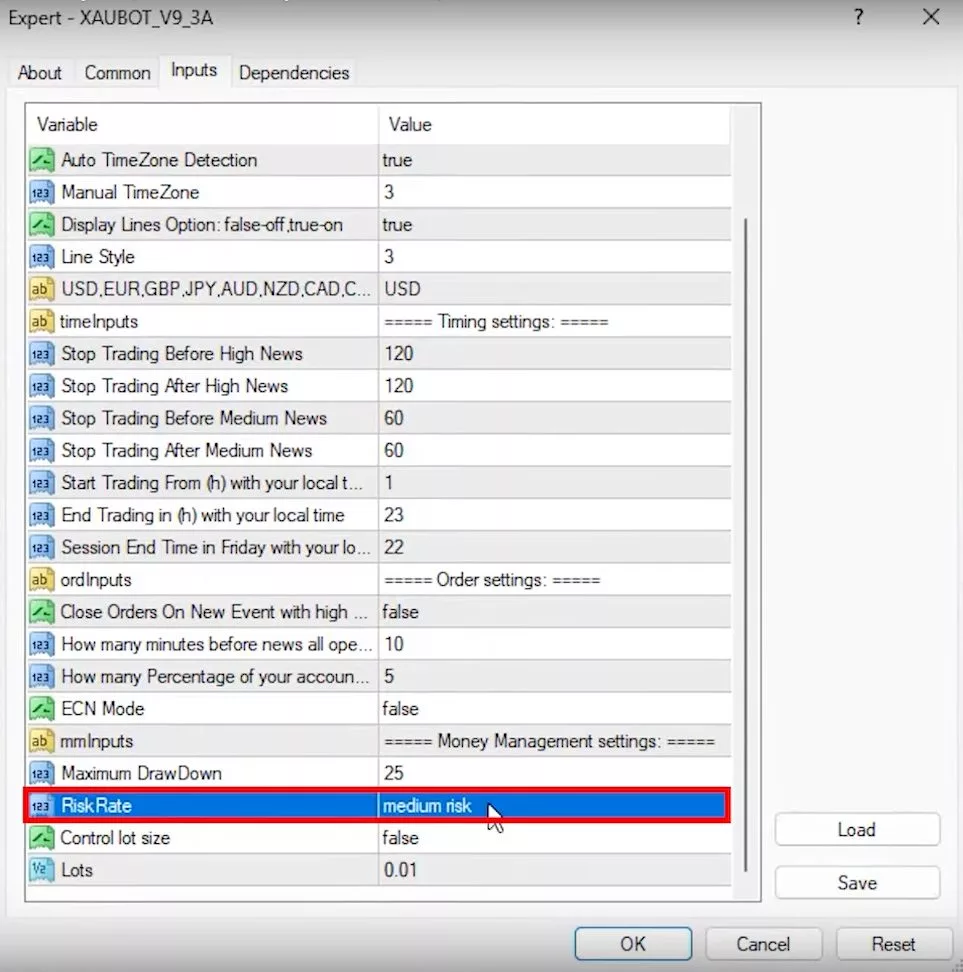
    Moving on to the expert advisor inputs, the XAUBOT automatically detects your time zone, which is a handy feature. You also have the option to display lines and choose from different currency pairs for trading.

    XAUBOT Review: Referring to the Manual for Help

    If you find yourself confused at any point, refer to the manual. It contains detailed sections explaining each input, helping you make informed decisions.

    Adjusting Timing Settings

    Lastly, the XAUBOT review wouldn’t be complete without mentioning the timing settings. You can set it to stop trading two hours before high-impact economic news and resume two hours after. This feature helps in avoiding trading during volatile periods.

    XAUBOT Review: Customizing Trading Session Hours

    The expert advisor also allows you to customize trading session hours. If you prefer not to keep your trades open overnight or wish to stop trading an hour before the day ends, you can adjust these settings in the inputs.

    Understanding Order Settings

    Diving right in, I explored the order settings in the manual. I discovered an interesting feature: the option to close orders on a new event. This means the bot can close positions, even those at a loss, before high-impact news events. You can even choose to close a percentage of the total amount, allowing some of the position to remain open during news events.

    XAUBOT Review: Setting Up Stop Loss Parameters

    Next, I learned about setting a hidden stop loss based on a specified percentage of the account balance. For instance, setting it at 25% means trades will close if the balance drops to this level. For accounts under $600, a minimum drawdown of 50% is recommended. The developers advise keeping the drawdown below 20% for a safer trading experience and encourage regular profit withdrawals.

    Choosing a Risk Level

    Then, I focused on risk levels. The XAUBOT offers three levels: low, medium, and high, utilizing two, five, and twelve strategies, respectively. The medium risk, recommended for starters, seemed like a balanced choice for me.

    XAUBOT-Review-5

    XAUBOT Review: Determining Lot Size

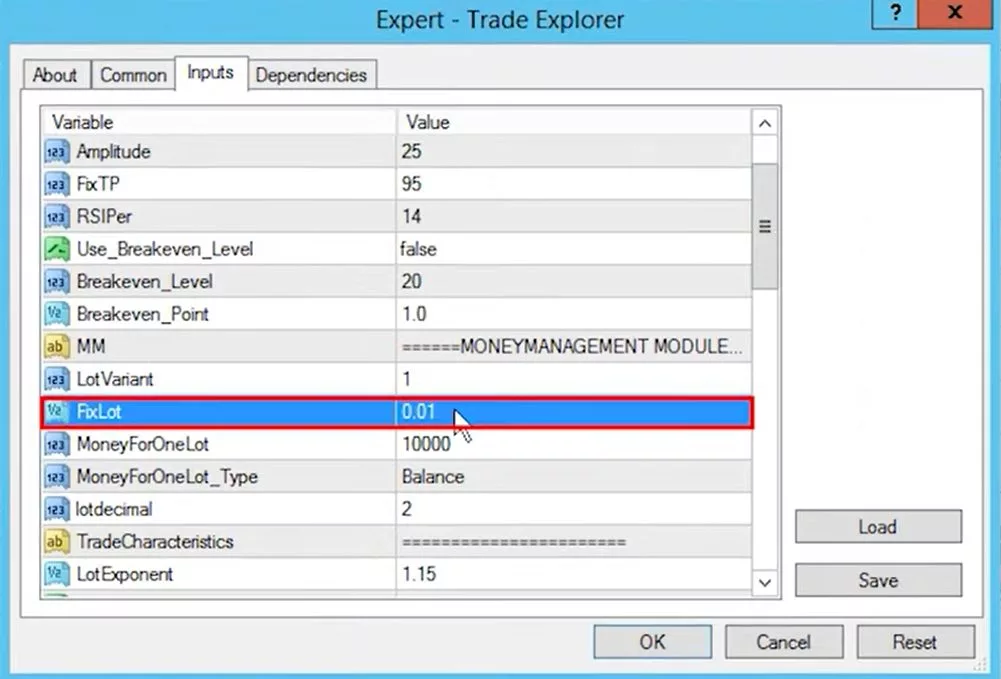
    Moving on to lot sizes, I found that the EA can control the size automatically, a setting I decided to stick with to test the bot’s full potential. However, if you prefer, you can manually set the default lot size.

    XAUBOT Review: Installing Indicators and Setting Up the Expert Advisor

    Adding the XAUBOT Indicator

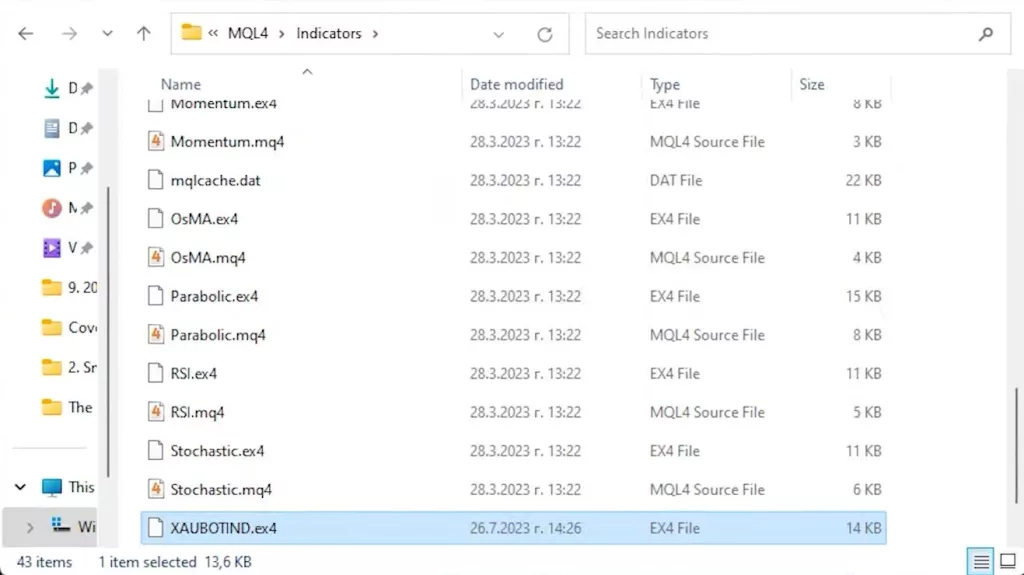
    During the setup, I encountered a prompt to add the XAUBOT indicator. Following the alert, I copied the indicator file and pasted it in the MQL4 indicators folder, refreshing to make it visible.

    Attaching the Expert Advisor

    Next, I dragged and dropped the indicator onto the chart, using the default settings. The only additional step was entering the license key received via email.

    Observing the Platform Overview

    Once set up, I noticed changes in the platform overview, highlighting upcoming high-impact economic news. It’s a handy feature to stay updated on significant events affecting the trading landscape.

    XAUBOT Review: Exploring Additional Resources and Final Thoughts

    Utilizing a broker’s Calendar

    I also explored the broker’s calendar, a detailed tool offering global economic news. It allows filtering news based on regions, a useful feature for targeted trading strategies.

    XAUBOT Review: Affordable Subscription Options

    Lastly, I appreciated the XAUBOT’s affordable subscription options, including monthly payments, which provide flexibility for testing the bot over several months before committing to a yearly subscription.

    Conclusion

    In conclusion, this XAUBOT review has guided you through the meticulous setup process, highlighting the bot’s unique features such as the order settings and risk management options. The XAUBOT stands out with its user-friendly interface, offering a range of risk strategies and the flexibility to control lot sizes. Moreover, it integrates seamlessly with platforms like FXView, enhancing your trading experience with additional resources such as a detailed economic calendar. Whether you are a beginner or a seasoned trader, the XAUBOT caters to all, promising a trading experience that is both safe and optimized. Stay tuned as I venture further with the XAUBOT, eager to see if it meets my expectations in the dynamic world of trading.

  • Prop Firm Robot: A Deep Dive into its Evolution

    Prop Firm Robot: A Deep Dive into its Evolution

    In the dynamic world of trading, staying stagnant isn’t an option. The same goes for trading robots. Let’s explore the continuous evolution of the Prop Firm Robot and its impressive features.

    The Never-Ending Journey of Improvement

    Building a robot isn’t the final step. It’s merely the beginning. The market is ever-changing, demanding constant updates. The Prop Firm Robot is a testament to this. We don’t just set it and forget it. We refine, adapt, and improve.

    What’s New with the Prop Firm Robot?

    The Prop Firm Robot is now more versatile than ever. It boasts a range of features, from spread protection to account safety. The recent version even introduced a break-even and trailing stop feature. But the highlight? It now trades across seven currency pairs. While some may know it as the FTMO robot, its capabilities extend beyond just one platform.

    FTMO vs. FX2Funding: A Cost Comparison

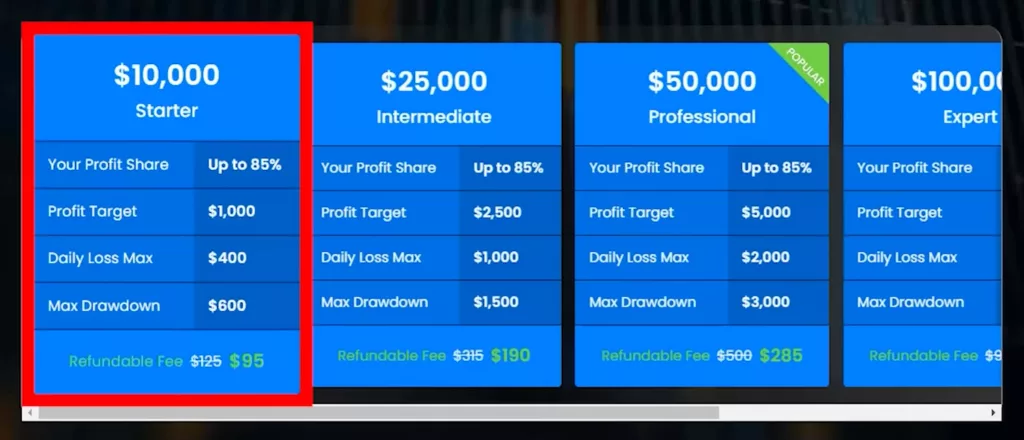
    While on the topic of platforms, I recently discovered FX2Funding. It stands out, especially when you compare its pricing to FTMO. For a $10,000 account, FX2Funding charges a mere $95. In contrast, FTMO asks for €155. That’s a noticeable difference. But it’s not just about cost. FX2Funding offers flexibility with no time constraints. Some might argue that FTMO offers the same. However, a closer look reveals otherwise. My 200k account verification with FTMO, for instance, has a set end date. So, what does “unlimited” truly mean in their context?

    Prop-Firm-Robot-1

    Prop Firm Robot: The Simplicity of a One-Step Evaluation

    FX2Funding simplifies the process with a one-step evaluation. This is a boon, especially for those using expert advisors. For this review, I chose a $10,000 account with FX2Funding. The terms are enticing: up to 85% profit share, a 10% profit target, a 4% daily loss limit, and a 6% max drawdown. Plus, the fee is refundable.

    A Special Offer for My Readers

    Before sealing the deal, I used an invite code: PETKO10. This code granted me an extra $10 off. It’s a small gesture of appreciation for my readers. If you’re keen, the link is shared below. Use the code and enjoy the benefits.

    A Smooth Purchasing Experience

    Finalizing my purchase was a breeze. I secured a $9.50 discount using my card. Promptly after, I received a confirmation email. This allowed me to swiftly download the Metatrader platform and access my account.

    Prop Firm Robot: Diving into the Challenge

    Upon logging into the challenge, I noticed the active market watch. This indicated a successful connection to the challenge’s server, which operates via Eightcap. Now, the real task began: deciding which of my robots to deploy for this challenge.

    Evaluating the Best Robots for the Challenge

    On a separate platform, I’ve set up seven FTMO robots I recently crafted. Each robot, while using the same core strategy, is fine-tuned for different currency pairs. The list includes pairs like Aussie/New Zealand, Euro/Aussie, and Pound/Canadian, to name a few. I grouped these seven under one account, making it easier to monitor their performance and identify the top performer under current market conditions.

    Prop Firm Robot: Tracking Performance with FXBlue

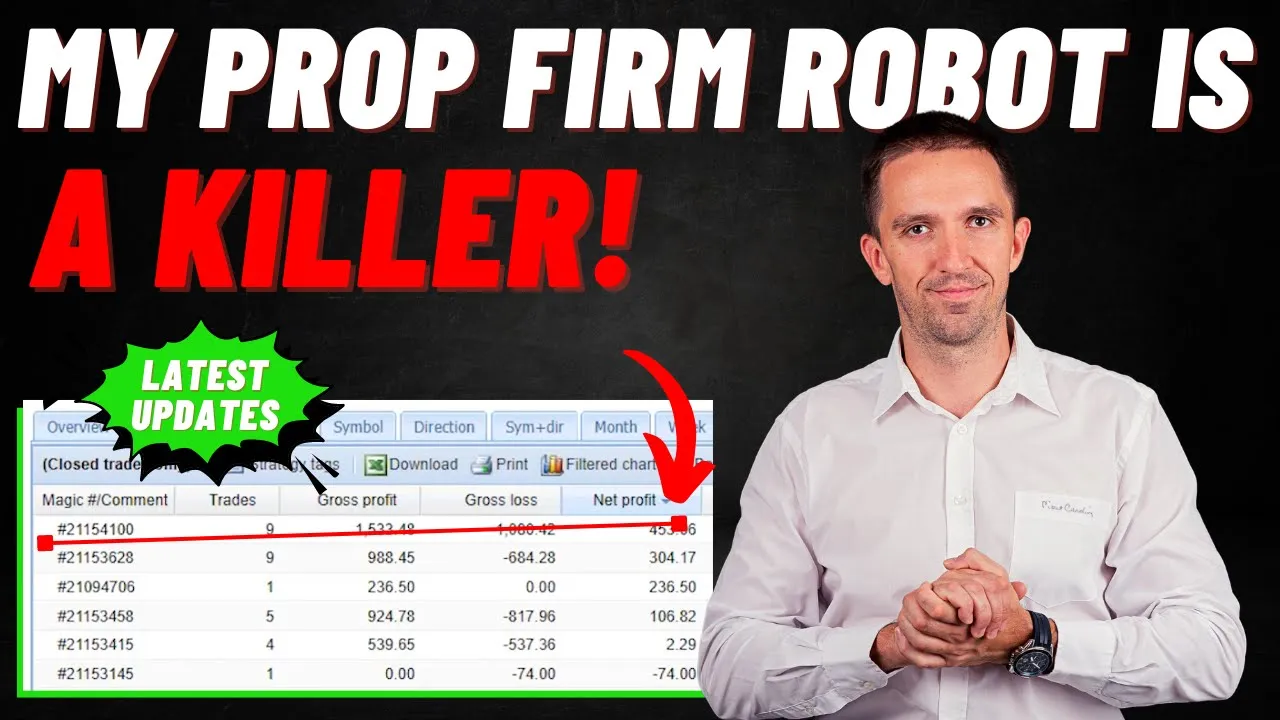
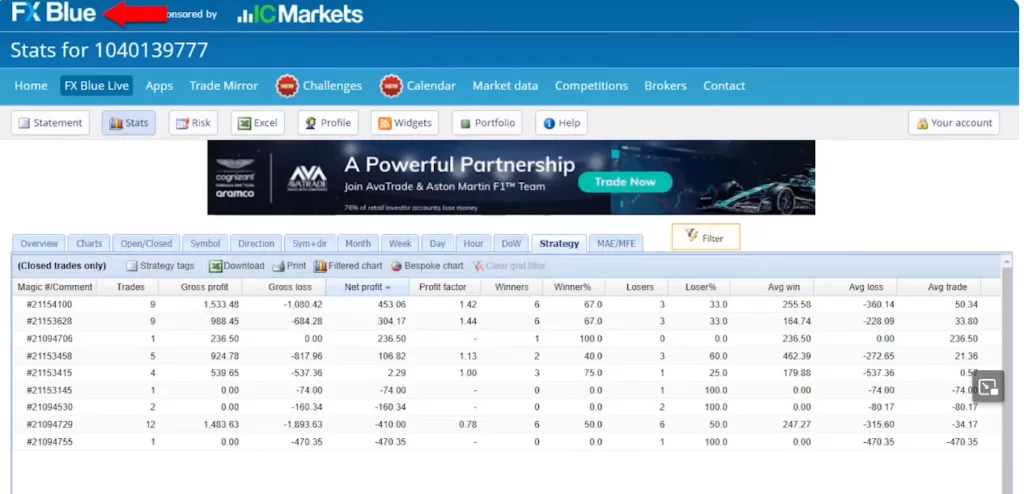
    With numerous trades executed, it’s essential to have a clear overview. I connected the account to FXBlue, a tool that offers a detailed performance analysis. By sorting the expert advisors based on net profit, I could quickly identify which robots were thriving and which were lagging. Interestingly, while some robots showcased profits, others hovered around the break-even point, and a few recorded losses. However, the New Zealand Yen robot, which was only tested for a few days, has already been excluded from my EA pack.

    Identifying the Top Performer

    The standout? The expert advisor with the magic number 2154100. A quick cross-reference revealed that this was the robot optimized for the Euro/New Zealand pair. This discovery meant that, currently, the Prop Firm Robot is performing best with the Euro/New Zealand currency pair.

    Prop Firm Robot: Implementing the Best Robot into the Challenge

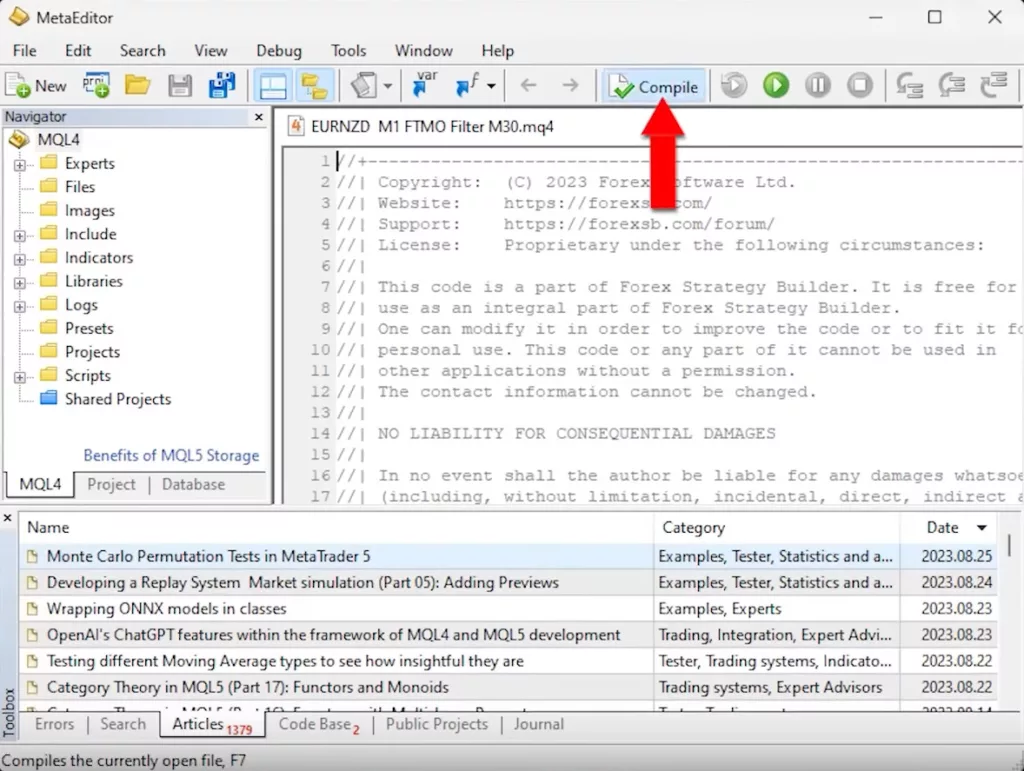
    Knowing which robot is currently on top of its game is half the battle. The next step? Integrating it into the new challenge. I began by copying the Euro/New Zealand expert advisor from its original platform. Then, I pasted it into the FX2Funding account. A few default options appeared, but my focus was on the newly added robot. To ensure everything was set up correctly, I opened the MetaEditor, clicked on ‘compile’, and voila! The expert advisor was ready for action.

    Prop-Firm-Robot-3

    Setting Up the EURNZD Chart

    In the intricate world of trading, every detail matters. For me, the focus was clear: the Euro New Zealand pair. Instead of juggling multiple charts, I streamlined my approach. By expanding the market watch, I quickly located the Euro New Zealand pair. With a simple drag and drop, it was on my chart. It’s essential to note the significance of setting it to M30. This isn’t just a random choice; it’s a higher time frame filter that the robot relies on for optimal performance. To ensure the Expert Advisor (EA) operates without hitches, I zoomed out and loaded as many bars as possible, repeating the process on the M1 chart. While M1 is the primary time frame, the M30 acts as a crucial filter, enhancing the robot’s efficiency.

    Prop Firm Robot: Configuring the Expert Advisor

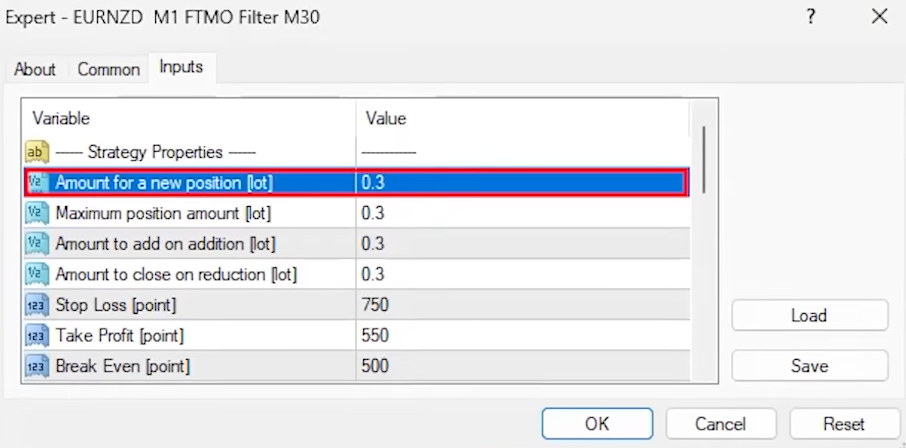
    Trading is as much about strategy as it is about precision. With auto trading activated, I meticulously configured the expert advisor on the chart. Under the ‘inputs’ section, I made a strategic decision to adjust the lots to 0.3, keeping in mind the 10K account I’m trading on. The Prop Firm Robot is feature-rich, offering everything from a stop loss mechanism to a break-even feature. One of the standout features is the spread level setting. By setting it at 30 points or 3 pips, I can ensure the robot steers clear of trading during volatile news events, minimizing risks. The trailing stop was another crucial setting, fixed at 85 pips. The magic number, a seemingly simple feature, plays a pivotal role, especially when you’re operating multiple robots on a single account. It’s these nuances that can make or break a trading strategy.

    The Versatility of FTMO Robots

    The world of trading is vast, and having versatile tools is a game-changer. The FTMO robots pack is a testament to this adaptability. Contrary to what the name might suggest, these robots aren’t just for FTMO. They’re designed to be compatible with any prop firm. One such firm that has recently caught my attention is FX2Funding. Their competitive edge? An incredibly attractive pricing model for one-stage evaluations. To put things into perspective, their 200k challenge comes with a price tag of $925. In contrast, FTMO charges a heftier 1080 Euros and adds an extra layer of verification. The allure of a straightforward one-stage evaluation is hard to resist, especially for seasoned traders who value efficiency.

    Prop Firm Robot: Tracking and Improving Robot Performance

    A trader’s work is never done. My daily routine is a blend of innovation and evaluation. I’m constantly on the drawing board, crafting new robots, testing their mettle on demo accounts, or putting them through the rigors of trial prop firm challenges. But creation is just one part of the equation. Monitoring their performance is equally, if not more, vital. Typically, I rely on FXBlue for this. This platform offers a granular view of each robot’s performance, ensuring I’m always in the know. But the future looks even brighter. We’re in the advanced stages of developing an online app, soon to be a flagship feature on the Academy’s website. This tool, available for free, promises to revolutionize how users track their robots’ performance. It eliminates the dependency on third-party sites and offers a more integrated experience.

    Prop-Firm-Robot-5

    Exciting Updates and Offerings

    In our quest to offer unparalleled value, we’ve recently rolled out the 21-Day Ultra Algo Program. This isn’t just another program; it’s a comprehensive learning experience. Completely free of charge, it offers a curated selection of courses, state-of-the-art robots, and deep insights into the world of strategy builders. It’s tailor-made for anyone with a keen interest in algorithmic trading. And there’s more! The FTMO robot, despite its name, is a master of adaptability. It’s not confined to FTMO but is a perfect fit for a range of prop firm challenges. FX2Funding, with its competitive edge, stands out as one of the best in the business.

    Prop Firm Robot: Conclusion

    Trading is a journey, one that demands both skill and the right tools. The Prop Firm Robot, with its unparalleled adaptability and cutting-edge features, ensures traders are always equipped for success. Whether you’re navigating the waters of FTMO, venturing into FX2Funding, or exploring other prop firms, the right robot can amplify your success. Embrace the world of algorithmic trading, leverage the wealth of resources at your disposal, and chart a course to trading excellence.

  • Free Gold Expert Advisor: A Game-Changer in Gold Trading

    Free Gold Expert Advisor: A Game-Changer in Gold Trading

    Introduction

    In the realm of gold trading, the right tools can make all the difference. On a recent Sunday morning, I made a discovery that’s worth sharing: the Free Gold Expert Advisor.

    Free Gold Expert Advisor: A Sunday Morning Discovery

    Sundays are often for relaxation. But for me? It was about finding the perfect gold robot. After sifting through numerous robots I crafted with EA Studio, one stood out.

    Why This Robot?

    It wasn’t just its impressive performance that caught my eye. It was the logic behind its strategy. I always aim for a clear, logical trading strategy in the robots I design. This ensures precise trade openings and closings. And here’s some exciting news: I’m sharing this robot for free!

    Diving into the Strategy

    This robot uses a blend of indicators to make its decisions:

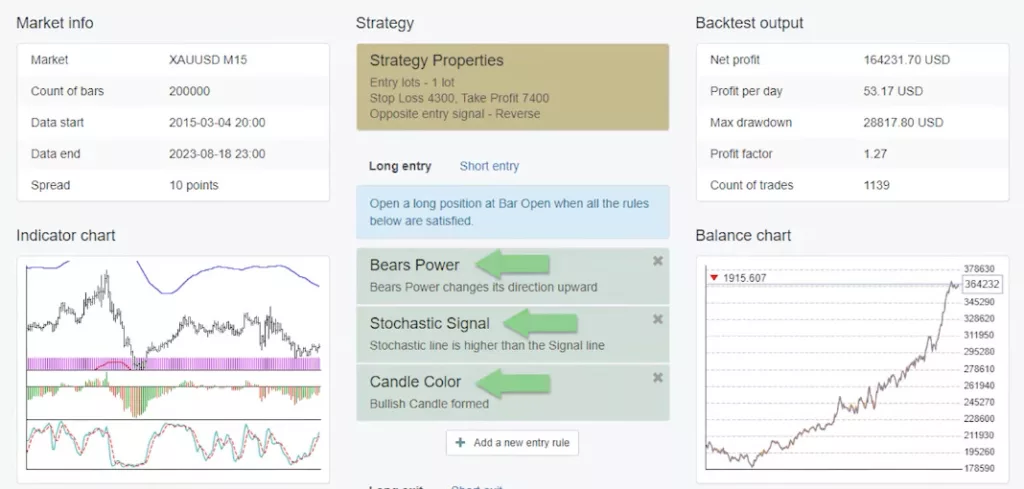
    1. Bears Power Indicator: This is our main entry point. Displayed as green and red bars below the chart, it signals when to enter a trade. We look for a shift from downward to upward movement.
    2. Stochastic Line: Our secondary indicator. It needs to be above the signal line. Specifically, we’re observing K period 14, D period 4, and slowing 2.
    3. Candle Color Patterns: The final piece of the puzzle. We’re on the lookout for three consecutive candlesticks, each with a body height of at least 18 pips.
    Free-Gold-Expert-Advisor-1

    Free Gold Expert Advisor: A Real-World Example

    Imagine you’re considering a long trade. Here’s the checklist:

    When these stars align, it’s time to open the trade. In one test, this setup led to a profitable outcome!

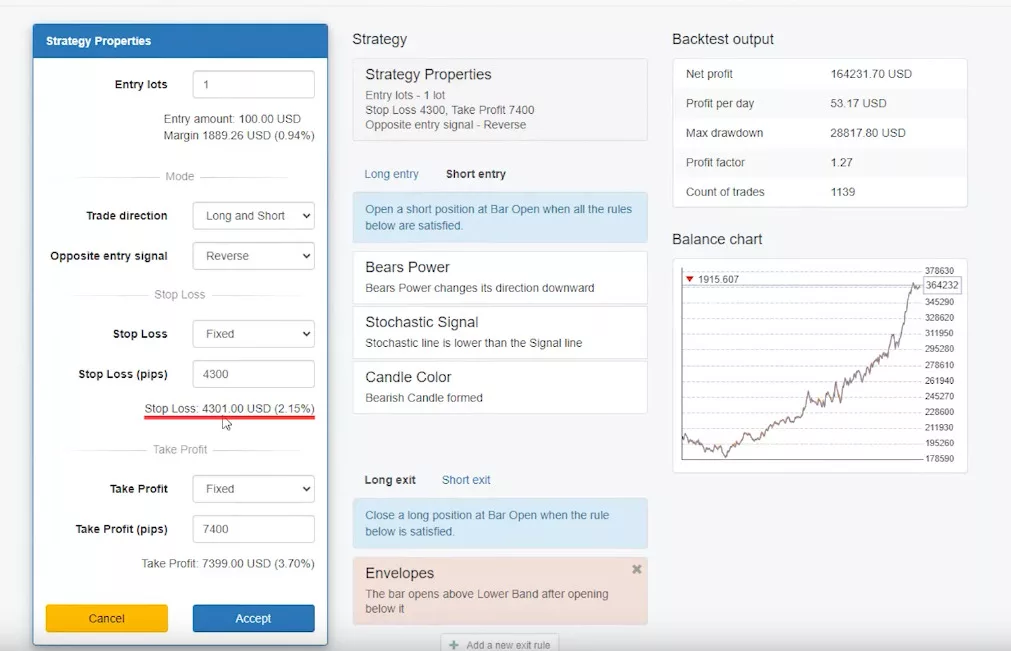
    The Art of Reversing Trades

    But what if the market suggests a different direction? The expert advisor has a plan. If the indicators hint at a short trade while we’re in a long one, the advisor acts. It closes the long trade, whether it’s profitable or not. Then, it opens a short trade. This ensures we’re always in sync with the market’s rhythm.

    In the world of gold trading, having a logical and efficient expert advisor is invaluable. The Free Gold Expert Advisor offers just that, making trading both logical and profitable.

    Free Gold Expert Advisor: Setting Up Stop Loss and Take Profit

    In trading, it’s essential to manage risks. With this robot, I’ve set a stop loss of 4,300 pips. This means if things don’t go as planned, the maximum I’d lose is 4,300. On the flip side, the take profit is set at 7,400 pips. But remember, these figures are based on trading one lot in a 200,000 account, as configured in the EA Studio.

    Adjusting for Smaller Accounts

    Not everyone starts with a large account, and that’s okay. If you’re beginning with, say, a $1,000 account, you can adjust the entry to 0.01. While this means potentially smaller profits, it’s all about scaling to what you’re comfortable with. Always remember, the key is to start somewhere and grow from there.

    Free Gold Expert Advisor: Testing Before Diving In

    Before committing real money, I always recommend testing on a demo account. I’ve set up a demo with FXView, and I’ll guide you on how to get the robot running.

    Installing the Robot on MetaTrader

    Firstly, you’ll find links for both MetaTrader 4 and MetaTrader 5 in the link below. Once you’ve downloaded and extracted the files:

    1. Copy the Robot: Ensure you’ve selected the correct file for the platform you’ll be using. MQL4 for Metatrader4, MQL5 for Metatrader5
    2. Access the Data Folder: In MetaTrader, go to File > Open Data Folder.
    3. Navigate to the Experts Folder: Click on MQL4, then Experts. For Metatrader 5, click on MQL5.
    4. Paste the Expert Advisor: This is where you’ll place the robot’s code.
    5. For Metatrader 5: Open in MetaEditor: Clicking on the pasted file will open MetaEditor, letting you view the code. The best part? I’ve kept nothing hidden. If you’re keen on learning, this code can be a great starting point to enhance your programming skills. If programming isn’t your thing, no worries. Just hit ‘compile’, and the expert advisor will be ready in the experts tab. For MetaTrader 4 users, a simple refresh in the Navigator window on the right will do the trick.
    Free-Gold-Expert-Advisor-3

    Bringing the Robot to Life

    Now, open a new gold chart and switch to M15. Drag and drop the expert advisor onto the chart. You’ll then see various inputs: stop loss, take profit, lot size, and the indicators. After adjusting these to your preference and clicking ‘OK’, a smiley face will appear. This indicates the robot is active and ready. However, since today’s Sunday, trading won’t commence just yet.

    Free Gold Expert Advisor: Introduction to Backtesting

    In the world of trading, backtesting is a crucial step that allows traders to evaluate the potential and reliability of a trading strategy or robot. By simulating trades based on historical data, backtesting provides insights into how a strategy would have performed in the past. With the Free Gold Expert Advisor in focus, let’s delve into the backtesting process and understand its nuances.

    Step-by-Step Backtest Process

    Backtesting might seem like a daunting task, but with the right steps, it becomes straightforward:

    1. Initiating the Backtest: First, within the MetaTrader platform, right-click and navigate to the expert advisors section. Here, you’ll find the option for ‘strategy tests’.
    2. Choosing the Right Model: It’s essential to select the ‘open prices only’ model. This is a vital step because all Expert Advisors (EAs) from EA Studio initiate trades at the beginning of a new bar, ensuring accuracy in the backtest.
    3. Launching the Test: With everything set, click ‘start’. As the backtest runs, you’ll witness a visual representation of how the robot would have traded based on historical data.

    Dissecting the Differences: MetaTrader vs. EA Studio

    Upon running the backtest, seasoned traders might observe a difference between the graphs displayed in MetaTrader and EA Studio. This discrepancy, while initially puzzling, has a logical explanation.

    The Significance of Choosing the Right Broker

    Every trader knows that the choice of broker can make or break their trading experience. The robots I meticulously design and share with the community are optimized for brokers that offer minimal spreads.

    But what exactly is a spread? In simple terms, the spread is the difference between the buying (ask) and selling (bid) price of an asset. A smaller spread means reduced trading costs, which can significantly impact profitability in the long run.

    Selecting the right broker isn’t just about competitive spreads. Commitment to transparency and trader security is crucial. With the right broker, traders can rest easy knowing their funds are protected. Some brokers roll out enticing incentives for traders, such as free VPS services and a generous 100% welcome bonus for those registering under their global entity. But the single most important aspect when selecting a broker to use, is to ensure they are well-regulated.

    Free Gold Expert Advisor: Unraveling the Mystery Behind Backtest Discrepancies

    When comparing backtest results, the difference between MetaTrader and EA Studio becomes evident. In MetaTrader, the data chart typically starts from the end of January of the current year. On the other hand, EA Studio, with its premium data offering, provides a backtest that stretches back to 2015. This extended data range in EA Studio offers a broader view of potential trading outcomes, explaining the variance in backtest results.

    However, it’s crucial to note that the accuracy of backtesting also hinges on the symbol settings used for different assets. When utilizing EA Studio for backtesting, traders must ensure they apply the appropriate symbol settings for each asset to get accurate results.

    Free-Gold-Expert-Advisor-5

    Free Gold Expert Advisor: The Power and Potential of EA Studio

    For traders looking to elevate their trading game, EA Studio emerges as a potent tool. It’s not just a platform for backtesting; it’s a comprehensive environment where traders can generate or automate trading strategies, transforming them into expert advisors. The platform’s user-friendly interface ensures even those new to trading can navigate with ease.

    Equipped with the right tools and a reliable broker, traders are poised to navigate the tumultuous waters of the trading world with confidence. For a more in-depth guide on harnessing the power of EA Studio, do check out the video on my YouTube channel. Remember, in trading, knowledge is power. Stay informed, trade wisely, and I eagerly await our next interaction in my upcoming posts.

    One of the standout features of EA Studio is its ability to export trading strategies as expert advisors with just a single click. This seamless integration ensures traders can swiftly move from strategy creation to live trading. And for those curious, I’ve included a link to the expert advisor I crafted on that memorable Sunday morning in the description.

    Wrapping Up: The Journey of Trading and Backtesting

    In conclusion, the realm of trading is vast and ever-evolving. Backtesting stands as a beacon, guiding traders by offering a glimpse into potential future performance based on past data. While discrepancies in backtesting results across platforms like MetaTrader and EA Studio can arise, understanding the reasons behind them demystifies the process.

  • Tickmill Broker Review: A Comprehensive Exploration

    Tickmill Broker Review: A Comprehensive Exploration

    Tickmill-Review-1

    In the vast world of online trading, finding a reliable broker is vital, and today, we embark on a detailed exploration of Tickmill, a notable player in the Forex trading domain. We carefully wrote this Tickmill broker review to give you a clear understanding of every part of the platform.

    Overview: The Remarkable Growth of Tickmill in the Trading Domain

    Established in 2014, Tickmill has impressively evolved from its initial stages as a nascent trading platform to its current stature as a major force in the global Forex and CFD brokerage landscape. The firm, located in Seychelles, has done well in the tough trading world mainly because of its smart choices, like offering low forex fees and making deposits and withdrawals easy.

    Beyond these offerings, what truly sets Tickmill apart is its unwavering commitment to its users. They design every part of their service to focus on the user, making sure traders of all experience levels have the tools and resources to succeed.This dedication to empowering traders is further exemplified by their state-of-the-art tools, comprehensive educational resources, and real-time data insights, all aimed at enhancing the trading experience.

    Tickmill Broker Review: Regulation

    Tickmill strongly follows transparency and security because of its clear set of rules and guidelines. This commitment is not just a mere statement. It follows rules from many global regulatory bodies. The UK’s top-tier Financial Conduct Authority (FCA) especially makes sure traders’ money is safe and the broker works with clear and responsible standards.

    Furthermore, Tickmill’s global presence is further solidified by its regulation under other well-known financial jurisdictions. These include the Seychelles Financial Services Authority (FSA). In addition, the Federal Supervisory Authority in Germany )BaFin), and the CONSOB in Italy. Each of these regulatory bodies has its own stringent standards and rules. This ensures that Tickmill operates with the utmost integrity and professionalism, prioritizing the interests and security of its traders.

    In addition to he regulatory bodies mentioned above, Tickmill is also regulated by the ACPR in France and the Financial Sector Conduct Authority (FSCA) in South Africa.

    Service Quality

    Tickmill stands out in the trading industry due to its exceptional service quality. They offer a wide array of trading platforms to cater to the diverse needs of traders. One of the most notable platforms is the widely recognized MetaTrader, which has been a favorite among many traders for years. However, Tickmill doesn’t stop there. They continuously strive to innovate and introduce new platforms that are designed to meet the changing demands of modern traders. This dedication to innovation and improvement is evident in their recent introduction of the Signal Center. This tool is a game-changer for traders, providing them with real-time trading signals.

    The Signal Center is not just any ordinary tool. It combines both human expertise and AI-driven analysis to provide traders with actionable insights. This means that traders can now make more informed decisions without having to sift through endless news and data. Each trading idea presented in the Signal Center comes with a detailed analysis. This is further is broken down into concise bullet points. This ensures that even traders who are just starting can easily understand and benefit from these insights. Furthermore, the Signal Center offers suggestions on entry and exit points, making it easier for traders to strategize and maximize their potential returns. With tools like this, Tickmill confirms its commitment to giving traders the best resources to succeed in the trading world.

    Tickmill-Review-3

    Tickmill Broker Review: Countries the Broker Operates In

    Tickmill, a famous trading company, leaves its mark on many continents with a big global presence. Their impressive international presence showcases their dedication to reaching traders from various parts of the world. However, while they operate in many countries, there are certain places where they can’t operate due to specific regulatory restrictions. Countries like the USA and North Korea have certain rules and regulations in place that prevent Tickmill from offering their services there

    Trading Platforms

    Tickmill offers a wide range of trading platforms, catering to the diverse needs of traders worldwide. Among their offerings, MetaTrader 4 (MT4) and MetaTrader 5 (MT5) are the most recognized and trusted by many. These platforms have been the backbone of many traders’ strategies for years. However,

    Tickmill doesn’t just rely on these classics. They are always on the lookout for innovative ways to serve their clients better. This is evident in their introduction of platforms like the MetaTrader WebTrader, which allows traders to access the platform directly from their browser without any downloads. Additionally, they offer MetaTrader version specifically for Mac users. This ensures that everyone, regardless of their device, can have a seamless trading experience. On top of these, Tickmill has also rolled out their proprietary mobile app. This app is tailored for today’s traders who are always on the move, ensuring they can trade efficiently and effectively, no matter where they are.

    Tickmill Broker Review: Trading Tools

    Tickmill is deeply committed to empowering traders, and this commitment shines through in the diverse and advanced trading tools they offer. One of their standout tools is Autochartist, a cutting-edge pattern recognition software. This tool automatically scans the market, identifying potential trading opportunities based on technical analysis. It’s like having a personal assistant that constantly analyzes the market for you, pointing out potential trades.

    But that’s not all. Tickmill also offers API connectivity, which is a fancy way of saying that traders can easily connect Tickmill’s platform with other third-party platforms. This feature is super useful for traders who use multiple tools and want them all to work together seamlessly. Another highlight is the Advanced Trading toolkit package, which is powered by FX Blue. This toolkit provides traders with a bunch of additional features and tools, making their trading experience even more efficient and effective. All these tools are designed with one goal in mind: to give traders the best possible resources to succeed in the market.

    Educational Resources

    Tickmill places a strong emphasis on education, believing that an informed trader is a successful trader. They’ve built an extensive library of educational materials to ensure that traders, whether beginners or experts, have access to the best resources to enhance their trading skills. This library includes a range of materials such as detailed live courses, easy-to-understand eBooks, visually appealing infographics, and weekly webinars conducted in multiple languages.

    These webinars are especially beneficial as they cover a wide range of topics and are often led by industry professionals. Additionally, Tickmill has taken their educational efforts a step further with their YouTube Masterclass series. This series is spearheaded by industry experts and provides traders with deep insights into various trading topics. Whether you’re just starting out or have been trading for years, this series offers valuable lessons that can help improve trading strategies and decision-making.

    Tickmill-Review-5

    Tickmill Broker Review: Trading Markets

    Tickmill provides a broad range of trading options for those interested in the financial markets. They offer opportunities to engage in CFDs, which are contracts that allow traders to benefit from price changes without owning the underlying asset.

    These CFDs encompass various markets such as forex (currency trading), stocks (company shares), stock indices (collections of stocks), commodities (like gold or oil), and bonds (loans to companies or governments). Additionally, Tickmill offers options and futures trading, which are other methods to capitalize on market predictions

    Trading Accounts & Fees

    Tickmill has designed its account structure to meet the needs of different types of traders. They offer a “Classic” account, which is perfect for beginners or those new to trading. This account doesn’t charge any commission, which means traders don’t pay extra fees when they trade.

    However, the difference between the buying and selling price, known as the spread, is a bit higher in this account. On the other hand, Tickmill offers “Pro” and “VIP” accounts. These are meant for more experienced traders or those who trade a lot. Both these accounts have lower spreads, which can save money in the long run. They also charge a commission, but in return, traders get more features and tools to help them trade better.

    Tickmill Broker Review: Deposit & Withdrawal Options

    Flexibility is key when it comes to financial transactions, and Tickmill delivers on this front. Traders can opt for a range of deposit and withdrawal mechanisms. The include Bank Transfers, Crypto Payments, Visa and Mastercard, Skrill, Neteller, Sticpay, Fastpay, UnionPay and WebMoney.

    Customer Service

    Tickmill is known for its strong focus on customer service, combining both efficiency and deep knowledge to assist traders. They offer support through various channels, making it easy for traders to reach out when they have questions or need assistance.

    Traders can contact them through phone, email, or chat, ensuring that their concerns are addressed quickly. This multi-channel approach is a testament to Tickmill’s dedication to serving its clients effectively. Support is available 24/5.

    Tickmill-Review-7

    Tickmill Broker Review: Pros & Cons

    Pros:

    • Multi-jurisdictional regulation ensures security.
    • A vast array of platform offerings.
    • Competitive pricing structures tailored for different trader profiles.
    • A treasure trove of educational resources.
    • Vast deposit and withdrawal options
    • Many trading instruments available for all traders

    Cons:

    • Customer support, while efficient, isn’t available on weekends.
    • US Citizens and residents are unable to trade with the broker

    Conclusion and Verdict

    Tickmill stands out in the trading world due to its vast range of offerings, competitive pricing, and a strong dedication to helping traders succeed. They have created a space where traders, whether beginners or experts, can find tools and opportunities that are both affordable and effective.

    One of the things that makes Tickmill unique is their innovative approach to trading. They offer a variety of platforms and advanced trading tools that are designed to give traders an edge in the market. This commitment to innovation and excellence ensures that traders have the best resources at their disposal.

  • Testing Trade Explorer: Is This Martingale Forex EA Worth the Risk In 2026?

    Testing Trade Explorer: Is This Martingale Forex EA Worth the Risk In 2026?

    Welcome to my blog, where I share my experiences and insights into various trading tools and strategies. Today, I’ll be reviewing the Trade Explorer Expert Advisor from LeapFX. This EA has garnered quite a bit of attention, with numerous accounts showcased on MyFXBook. In this blog post, we’ll dive into the details, discussing its features, performance, and whether it’s a good investment.

    Exploring the Trade Explorer EA

    As someone who’s been in the trading game for a decade, I’ve come across my fair share of expert advisors and trading robots. LeapFX has an array of EAs available on their website, but what caught my eye was the Trade Explorer, primarily because it claims to trade on 27 different currency pairs. However, it’s important to note that some traders have raised concerns about its risk profile, with reports of blown accounts.

    SpecificationDetails
    DeveloperLeapFX
    Platform CompatibilityMetaTrader 4 (MT4) only
    Strategy TypeMartingale grid recovery system
    Total Currency Pairs27 pairs supported
    Active Pairs (Low Risk)10 pairs (AUD/USD, EUR/USD, GBP/USD, etc.)
    Primary TimeframeM5 (5-minute chart)
    Recovery MethodMartingale grid (adds positions during drawdowns)
    Recommended Lot Sizing0.01 per $5,000 account balance
    My Conservative Test Size0.01 on $92,000 account (ultra-conservative)
    Maximum Verified Drawdown~70% (MyFXBook verified)
    Best Month Performance+120% (March, per MyFXBook)
    Pricing – 1 YearApproximately $600
    Pricing – LifetimeApproximately $900
    Money-Back Guarantee30 days, full refund
    VPS RequirementHighly recommended (24/7 operation mandatory)
    Test Account Leverage1:10 (Darwinex account)
    DLL Imports RequiredYes (must enable in MT4 settings)

    Addressing the “High Risk” Reputation: What You Need to Know

    Before investing in Trade Explorer, it’s important to address concerns raised by other traders and reviewers. Multiple YouTube reviews and forums mention that this EA has “blown accounts,” and it’s frequently labeled as a “really risky expert advisor.”

    The data supports these concerns. The verified MyFXBook account shows a maximum drawdown of nearly 70%, meaning the account lost 70% of its value at its worst point. While the account eventually recovered, this level of drawdown would have wiped out most traders psychologically and financially.

    Why Does This Happen?

    Trade Explorer uses a Martingale grid system, a recovery strategy that adds positions when trades go against you. While this can recover losses in ranging markets, it creates exponential risk during strong trends. When multiple currency pairs trend against your positions simultaneously, the EA opens cascading positions that can drain accounts rapidly.

    The MyFXBook history reveals specific periods where recovery sequences spiraled dangerously. During March’s 120%+ profit month, the account simultaneously experienced substantial equity drops before recovery. This pattern—explosive gains followed by near-catastrophic drawdowns—characterizes Martingale systems operating at aggressive risk levels.

    Real Trader Experiences

    Beyond my own testing, numerous traders have documented their experiences with Trade Explorer across forums and review sites. Common themes emerge: impressive initial profits lasting weeks or months, followed by sudden drawdowns exceeding 50-70% during volatile market conditions. Some accounts recovered; others did not.

    The blown account phenomenon typically occurs when traders:

    1. Use recommended lot sizes without adequate capital reserves
    2. Operate during high-correlation market events (central bank announcements, geopolitical crises)
    3. Fail to monitor and intervene during extended drawdown sequences
    4. Run the EA on accounts with insufficient margin to survive recovery periods

    Making an Informed Decision

    I’m not dismissing Trade Explorer, the verified profits demonstrate its potential when conditions align favorably. However, transparency about worst-case scenarios matters more than highlighting best-case returns. Understanding that 70% drawdowns represent realistic possibilities, not theoretical extremes, fundamentally changes how you approach position sizing and capital allocation.

    Test on demo accounts first. Start with minimal lot sizes. Never risk capital you cannot afford to lose completely. The 30-day money-back guarantee provides a testing window, but real evaluation requires monitoring through both favorable and adverse market cycles lasting several months.

    Risk Management

    To assess the EA’s performance, I decided to deploy it on one of my Darwinex accounts, a platform known for its low leverage options. I started with a $90,000 account and opted for conservative risk settings. According to the EA’s manual, it recommends trading at 0.01 lots for every $5,000 traded. This would mean 0.18 lots for my $92,000 account. However, I chose to stick with 0.01 lots to play it safe.

    Setting Up

    Before I delve into the actual trading, let me provide you with an overview of the Trade Explorer expert advisor. There’s a wealth of information available on LeapFX’s website, including MyFXBook accounts and reviews. While I won’t go through all of that, I want to highlight some performance statistics I found on MyFXBook.

    Trade-Explorer-Review-1

    Performance Analysis

    One account that caught my attention began in 2021. Initially, it seemed like the developer was using conservative settings, resulting in steady growth. However, there was a significant performance spike accompanied by a substantial drawdown. The drawdown nearly reached 70%, which is undeniably risky. But what’s intriguing is the recovery that followed.

    The Numbers

    Let’s look at the numbers. The account started with $3,500 and eventually generated close to $50,000 in profit. The monthly performance figures are equally striking, with gains exceeding 120% in March. This paints a picture of a high-risk expert advisor.

    My Approach

    Given the risk associated with the Trade Explorer EA, I’ve chosen to tread cautiously. I’ve set it up with minimal risk settings and a low drawdown configuration. Now, let’s see how it performs in real-time.

    Uncovering Trade Explorer’s Performance

    Before we get into the nitty-gritty of setting up the Trade Explorer on our trading account, let’s take a look at its performance in recent years. To do this, I delved into its track record, particularly focusing on the best-performing months.

    In 2022, Trade Explorer showcased an impressive 25% gain, indicating its potential for profitability. Looking back to 2021, the EA boasted close to a 26% return in November. These figures paint a promising picture, but it’s crucial to remember that past performance doesn’t guarantee future results.

    For a comprehensive understanding of Trade Explorer’s capabilities, there are numerous accounts and track records available. You can explore these further through this link.

    The Importance of a VPS for Trading

    Now, let’s address a crucial aspect that can significantly impact your trading experience – a Virtual Private Server (VPS). For those new to trading jargon, a VPS is a virtual machine that allows you to run your trading software, such as MetaTrader, remotely.

    One of the primary advantages of using a VPS is that it ensures uninterrupted trading. Unlike your PC or laptop, which might need to be powered on continuously, a VPS remains online 24/7. This is vital because if you switch off your computer, your EA will stop working as it disconnects from your broker’s server.

    Choosing the Right VPS Plan

    To get started with a VPS, I opted for a plan from ForexVPS. They offer different packages, each catering to varying needs. I selected the basic plan, which allows me to run three MetaTrader platforms. However, I decided to push the limits a bit and installed four platforms on it.

    Here are the key specs of the basic plan I chose:

    • Two core CPU
    • 80 GB SSD
    • 2.5 GB RAM

    This configuration should be more than capable of handling four trading accounts simultaneously. When you’re selecting a VPS plan, consider the number of accounts you intend to trade, as this will help you determine the most suitable plan for your needs.

    Setting Up Trade Explorer on My VPS

    With my VPS up and running, I installed the Trade Explorer on it. In addition to Trade Explorer, I also have other trading accounts, including an FTMO account, a Blackbull Markets account where I’m testing the King Robot, and another where I’m experimenting with the XAUBOT. However, for today’s review, we’ll be focusing on the Trade Explorer, which I’m deploying on my Darwinex account.

    I wanted to ensure that my VPS could handle the load, so I checked the system resource usage. With four trading platforms running simultaneously, I’m utilizing approximately 60% of the CPU and about 49-50% of the memory. This assures me that my VPS is well-equipped to manage multiple trading accounts effectively without any hiccups.

    Trade-Explorer-Review-3

    Getting Started with Trade Explorer

    To kick things off, I’ve acquired the Trade Explorer expert advisor along with an indicator that complements its functionality. Now, let’s get right into the action by setting up the expert advisor. It’s a straightforward process that begins with copying the EA to the correct directory.

    1. Copying the Expert Advisor: Open your MetaTrader platform, navigate to “File,” and select “Open Data Folder.” In this folder, you’ll find the “MQL4” directory. Inside “MQL4,” locate the “Experts” folder and paste the expert advisor here.
    2. Adding the Indicator: Similarly, copy the indicator, but this time, head to the “Indicators” folder within the “MQL4” directory and paste it there.

    With these steps, you’ve successfully added the Trade Explorer expert advisor and its corresponding indicator to your MetaTrader platform.

    Configuring Trade Explorer for Multiple Assets

    Now that we have the expert advisor in place, let’s move on to configuring it for multiple assets. I’ve opened ten different charts representing various assets where the Trade Explorer will be actively trading.

    According to the manual, you can adjust the risk level by selecting specific currency pairs and utilizing lower risk set files. To begin, I’ve chosen the AUD/USD pair and switched to the M5 time frame. Here’s what you need to do:

    1. Drag and Drop the Expert Advisor: Drag the Trade Explorer expert advisor onto the chart.
    2. Adjust Comment Settings: In the expert advisor’s settings, ensure that you allow DLL imports and enable live trading.

    Now, you’ll notice a plethora of input settings, each with its own significance. While they may seem overwhelming at first, it’s essential to understand key options, such as “Break Even,” “Money Management,” “Magic Number,” “Basket Stop Loss,” “Account Maximum Trades,” and “Total Equity Risk.”

    Using Set Files for Lower Drawdown

    Trade Explorer provides pre-configured set files that cater to different risk preferences. To implement a lower drawdown strategy, I’ve chosen the “low drawdown set file” for the AUD/USD pair. This file automatically adjusts the settings to align with a lower risk approach.

    For my Darwinex account, which operates with a leverage of 1:10, I’ve decided to start with a conservative lot size of 0.01. However, as I gain more experience with the EA and assess its performance, I may consider increasing it to 0.05. It’s crucial to evaluate risks meticulously, especially when dealing with an EA like Trade Explorer, known for its Martingale system.

    Trade-Explorer-Review-5

    Real-Time Monitoring and the Role of a VPS

    With the expert advisor configured and set files in place, I’ve attached it to multiple charts representing various currency pairs. The smiley face icon on each chart indicates that the EA is actively monitoring and looking for trade opportunities.

    Now, here’s a game-changer in the world of automated trading: a Virtual Private Server (VPS). I’ve recently acquired a VPS from ForexVPS to ensure uninterrupted trading. A VPS is like having a dedicated virtual machine that runs your trading software 24/7. It’s especially valuable for traders because it eliminates the need to keep your PC or laptop running at all times.

    Considering the Risks

    As I progress with Trade Explorer, I’m well aware of the risks associated with its Martingale system. While I don’t shy away from Martingale strategies and have successfully used them in the past, it’s crucial to exercise caution and avoid over-leveraging.

    Trade Explorer offers a 30-day money-back guarantee, providing a safety net for those who want to explore its potential. The pricing options include a one-year subscription for approximately $600 and a lifetime membership for $900.

    Trade Explorer: Quick Reference Summary

    Key Advantages

    27 Currency Pair Support: Maximum diversification across major, minor, and exotic pairs reduces single-pair dependency.

    Multiple Pre-Configured Risk Levels: Low/medium/high drawdown set files provided, eliminating manual parameter configuration.

    Strong Recovery Capability: Martingale system can recover from temporary losses when ranging markets eventually reverse.

    Verified MyFXBook Performance: Real accounts show $3,500 → $50,000 growth, proving profit potential under favorable conditions.

    30-Day Money-Back Guarantee: Risk-free testing period allows thorough evaluation before final commitment.

    Lifetime Updates Included: Strategy adjustments as markets evolve without recurring subscription fees.

    24/7 Automated Trading: Requires no manual intervention once configured, operating continuously across all timeframes.

    Established Developer: LeapFX has multiple proven EAs (King Robot, XAUBOT) demonstrating serious development capability.

    Critical Limitations

    ⚠️ Extreme Drawdown Risk: 70% maximum drawdown verified on live accounts; most traders cannot psychologically survive such declines.

    ⚠️ “Blown Accounts” Reputation: Multiple traders report account wipeouts; YouTube reviews specifically warn about catastrophic losses.

    ⚠️ Martingale Grid System: Exponentially increasing risk during adverse trends; when markets move against positions, exposure multiplies rapidly.

    ⚠️ High Capital Requirements: Safe operation requires $10,000+ per 0.01 lot; recommended sizing demands substantial reserves.

    ⚠️ MT4 Only: No MT5 support limits broker options and prevents usage with modern trading platforms.

    ⚠️ VPS Mandatory: Cannot run reliably from home computer; adds monthly infrastructure costs.

    ⚠️ Psychological Challenge: Watching 40-70% drawdowns requires extreme discipline; most traders panic and close positions prematurely.

    ⚠️ Multi-Pair Correlation Risk: When markets trend globally (risk-on/risk-off scenarios), all pairs lose simultaneously, compounding drawdowns.

    Final Thoughts On Trade Explorer

    In the world of trading, preparation is key to success. Setting up a VPS for your trading activities not only ensures uninterrupted operation but also offers peace of mind. The Trade Explorer EA, with its impressive historical performance, shows promise, but always remember to trade responsibly and be prepared for market volatility.

    As I continue to test and evaluate the EA, I’ll keep you updated on its performance and share real-world trading results. Trading is an ever-evolving journey, and having the right tools and knowledge is crucial.

    Frequently Asked Questions

    Can Trade Explorer work on MT5, or must I use MT4 exclusively?

    Trade Explorer operates solely on MetaTrader 4 platform. If your broker offers only MT5 accounts, you’ll need opening an MT4 account with a different broker or employing trade copying software replicating signals between platforms.

    However, copiers introduce execution delays potentially impacting performance on the M5 timeframe where precise entry timing matters significantly. The developer has not announced MT5 version availability, so MT4 compatibility remains mandatory for foreseeable future.

    How much capital do I realistically need to run Trade Explorer safely without account blowout risk?

    Minimum capital depends entirely on chosen risk settings and personal drawdown tolerance. The EA recommends 0.01 lots per $5,000 balance, suggesting $50,000 minimum for conservative 0.10 lot operation.

    However, given verified 70% drawdowns, I’d recommend doubling that—$10,000 per 0.01 lot provides adequate reserves surviving extended recovery sequences. Anything less risks forced liquidation before recovery completes, transforming temporary drawdowns into permanent losses.

    Why does Trade Explorer have such extreme drawdowns compared to other EAs using similar strategies?

    Trade Explorer’s 27-pair coverage means significantly more simultaneous positions during adverse market conditions. When global risk-off events occur (geopolitical crises, central bank surprises, pandemic fears), correlations across currency pairs spike dramatically.

    The EA’s Martingale recovery system then adds positions across multiple failing pairs simultaneously rather than sequentially, creating compounding drawdown effects. Single-pair Martingale EAs experience lower drawdowns because they concentrate risk, while multi-pair systems distribute positions but amplify exposure during correlated moves.

    Should I use the pre-configured set files or customize Trade Explorer’s settings myself?

    Strongly recommend starting with vendor-provided set files, particularly the low drawdown configuration. LeapFX has extensively backtested these parameters across multiple market cycles, adjusting entry logic, recovery distances, and position sizing for optimal risk-reward balance.

    Custom modifications without thorough historical testing typically degrade performance or increase risk unexpectedly. After several months observing behavior under your specific broker conditions, consider minor adjustments. Never increase lot sizes or tighten grid distances without comprehensive backtesting across volatile periods.

    Can Trade Explorer pass prop firm challenges, or is the drawdown risk too high for evaluation accounts?

    Trade Explorer’s 70% maximum drawdown makes it fundamentally unsuitable for most prop firm challenges, with 10% daily loss limits and 5-10% maximum trailing drawdowns. Even with ultra-conservative settings, temporary equity declines of 20-30% can occur during recovery sequences, instantly violating challenge rules.

    The Martingale system’s nature—accepting large temporary losses to achieve eventual recovery—directly contradicts prop firm risk parameters designed preventing catastrophic drawdowns. Use Trade Explorer exclusively on personal capital where you control risk tolerance and drawdown acceptance completely.

  • Perceptrader AI Tested: Real Results, Features & Trading Experience

    Perceptrader AI Tested: Real Results, Features & Trading Experience

    Introduction

    Welcome to another exciting edition of our trading robot reviews. Today, we take an in-depth look at how Perceptrader AI operates in real trading conditions. A product of Valerie Trading, the genius minds behind the renowned Waka Waka and the Golden Pickaxe robots. Let’s unpack the features, performance, and potential of this promising AI trading tool.

    The AI Robot Problem (And Why Perceptrader Stands Out)

    Here’s something that needs to be said upfront. The MQL5 marketplace is flooded with robots claiming to use ChatGPT and AI. Most of them? Pure marketing fluff.

    I’ve tested enough of these so-called “AI trading robots” to spot the pattern. Developers slap “AI-powered” on their product description, maybe add a flashy neural network graphic, and suddenly they’re charging premium prices. But when you look under the hood, there’s no actual AI integration. No ChatGPT. No machine learning. Just standard indicators wrapped in buzzwords.

    Perceptrader takes a different approach.

    Instead of building an AI robot from scratch, which rarely works well, Valerie Mishchenko started with something that already performs: Waka Waka. That EA has probably the most solid track record you’ll find on MyFXBook. Then she integrated actual AI technology on top of that proven foundation.

    Think about it. Why reinvent the wheel when you can add intelligent features to something that already rolls smoothly?

    This matters because I’ve known Valerie for some time now. Used her EAs successfully across several accounts. When she launches a product, there’s actual substance behind it. Not just marketing promises.

    The combination makes sense: take Waka Waka’s trading logic and strategy, then layer in artificial intelligence for market predictions and signal filtering. You’re building on proven success rather than hoping a brand-new AI system somehow figures out forex trading from scratch.

    Setting Up Your Account

    First things first, setting up your trading account with Perceptrader is a breeze. I initiated my journey with a modest $1000 in my BlackBull Markets account. One of the first things that stands out is how intuitive and approachable the interface feels, even for less experienced traders.

    It guided me in choosing the low-risk set with fixed lots of 0.01. Yes, the customization options are vast, offering settings that cater to both newbies and veteran traders alike.

    Understanding The Trading Strategy: My Testing Methodology

    A standout feature is the robot’s trading strategy. Much like its sibling, Waka Waka, it employs a Grid Martingale system. This strategy is designed to open higher lots from time to time to recover any losses, buying at lower prices to enhance the average price point, thereby recuperating losses efficiently. It’s a strategy that promises potential gains while mitigating risks.

    Performance Analysis

    Now, let’s delve into the performance aspect of this review. I opted for the low-risk settings, a decision that has kept my account safe from significant drawdowns, proof of the robot’s adaptive nature.

    Perceptrader-AI-Review-1

    MyFXBook Insights

    To give you a well-rounded review, I took a deep dive into verified accounts on MyFXBook. One such account started with a humble $300 in May this year and has since soared to an impressive profit margin of over 60%, translating to $183 in earnings.

    The maximum drawdown recorded was 56.93%, a figure I have luckily not come across thanks to the low-risk settings. The performance metrics from June are equally promising, showcasing a remarkable 37.6% increase, followed by a 17% rise in July.

    Profit Factors

    One important metric here is the profit factor, which sits at 1.99, just below the widely respected 2.0 benchmark. This indicates a healthy profit potential, with average wins and losses standing at 4.66 and 6.38, respectively.

    The Genesis of Perceptrader

    At its core, the tool blends elements inspired by the Waka Waka methodology with modern AI-driven logic, including language-model inputs. This combination not only offers market predictions but also intelligently avoids signals from the EA, ensuring you only engage in the most promising trades.

    Standing on the Shoulders of a Champion

    Waka Waka holds a record that’s genuinely impressive in the EA world: over 60 consecutive months without a losing month. Sixty. That’s five years of consistent profitability, month after month.

    Most trading robots struggle to maintain profitability for 6-12 months before market conditions shift and their edge disappears. Waka Waka kept performing through multiple market regimes, trending periods, ranging markets, high volatility, and low volatility. That kind of consistency doesn’t happen by accident.

    So when Valerie launched Perceptrader, my expectation wasn’t just “this should work.” It was “this needs to match or exceed Waka Waka’s performance.”

    That might sound like unfair pressure on a new product. But consider: Perceptrader has everything Waka Waka offers PLUS AI-enhanced market forecasting. If anything, it should perform better. The AI integration should help avoid unfavorable market conditions and optimize entry timing.

    Will it achieve a 60+ month win streak? Too early to say, the product just launched. But the foundation is there. The track record of the underlying strategy is proven. Now we’re watching to see if the AI layer genuinely adds value or if it’s just neutral overhead.

    Pricing Dynamics

    It’s also worth noting the flexible pricing approach, which appears designed to accommodate different trading goals and experience levels.

    Initially launched at a price of $1080, the tool has seen a steady rise in demand, pushing its price to $1350. Interestingly, with every sale of 10 licenses, there is a $100 increment in the price, a testimony to its burgeoning popularity.

    Pricing ElementDetails
    Launch price~$1,000
    Current price range$1,080 – $1,350
    Price increase triggerEvery 10 licenses sold
    Price increment$100 per trigger
    Free trial period15 days
    Money-back guarantee30 days
    Pricing StrategyIncreases with demant

    Exclusive Offer

    You have the golden opportunity to test this tool for a free two-week trial. Yes, you heard it right! You can explore its features extensively before deciding on its value for your investment.

    The Magic of Prompts

    At this stage, it’s time to unpack the mechanisms that contribute to its overall performance profile. The prompts. Integrated with ChatGPT and Bard, it offers the latest market data and insightful prompts on processing this data to churn out forecasts that stand tall in accuracy and reliability.

    User-Friendly Interface

    Navigating to the market forecast section unveils options to choose between ChatGPT and Bard for various currency pairs. These include Aussie/CAD and New Zealand/Dollar. This section emphasizes the user-friendly interface. It allows for seamless navigation and operation, even for beginners.

    Looking through the settings, I noticed the pair selection:

    • NZD/USD
    • AUD/NZD
    • AUD/CAD
    • NZD/CAD
    • GBP/CHF

    That last one caught my attention. GBP/CHF is an interesting choice for an EA, not the most commonly traded pair, which could be strategic. Less crowded means potentially more opportunities where market inefficiencies haven’t been arbitraged away.

    The heavy focus on commodity currencies (AUD, NZD, CAD) makes sense given they tend to trend more predictably during certain market cycles. These pairs also typically have decent liquidity without the ultra-tight competition you see on EUR/USD.

    Customization at Its Best

    Further into our review, we find the customization options to be a standout feature. You have the liberty to enable predictions, choose between ChatGPT and Bard, and even select the specific symbols you wish to trade.

    Unique and Standard Trades

    A particularly noteworthy feature that stands as a significant advantage, especially for individuals who are gearing up to take on the FTMO challenges, is the flexibility to select between unique and standard trading options.

    This remarkable feature is designed with the foresight to facilitate a trading experience where each individual can carve out a trading pathway that is distinctly their own. By opting for unique trades, traders can effectively craft a trading pattern that diverges significantly from others, thereby nurturing a trading environment that is as individualized as it is innovative.

    Moreover, this thoughtful inclusion in the Perceptrader AI tool kit goes a long way in assuaging prevalent concerns regarding potential account blocking. It is not uncommon for trading platforms to flag accounts that exhibit very similar trading patterns. This is a scenario that can culminate in account restrictions or, in severe cases, account blocking.

    Enhanced Sense of Security and Confidence

    By creating a trading environment where each trader operates with a specific trading pattern, the Perceptrader AI ingeniously mitigates the risk of encountering such unfavorable outcomes. Traders can, therefore, embark on their trading journeys with an enhanced sense of security. They can be confident in the knowledge that the distinctiveness of their trading patterns significantly reduces the likelihood of finding themselves embroiled in issues of account blocking due to perceived similarities in trading strategies with other users.

    In essence, this feature not only stands as a testament to the Perceptrader AI’s commitment to fostering a user-friendly trading environment. It also underscores its dedication to promoting a culture of individuality and innovation in the trading landscape. It encourages traders to explore unique trading avenues while ensuring a safe and secure trading experience.

    Moreover, they are free from the apprehensions of account blocking stemming from similarities in trading patterns with other market participants. This, we believe, is a pivotal step in encouraging a more diverse and vibrant trading community. Each individual is empowered to trade in a manner that resonates with their unique trading philosophy and strategies.

    FTMO Challenges and Perceptrader

    Transitioning to the FTMO challenges, this analysis highlights the advantage brought about by the removal of maximum trading days. This allows you to trade freely on any challenge. Personally, I am gearing up to undertake the 200k challenge using this robot.

    This is a decision backed by the absence of trading period limitations. However, a prudent approach involves conducting numerous backtests to find the optimal risk settings and the duration it might take to complete the challenge.

    Backtesting with Perceptrader

    As we progress in this analysis, let’s delve into the backtesting process. It is a straightforward procedure where you right-click on the desired option and select ‘test’. For this review, I opted for a $10,000 account testing it over a year. The initiation is as simple as clicking ‘start’.

    The outcome showcased a steady balance with a minor drawdown of about 5%, a testament to the low-risk settings employed. Comparatively, the original account witnessed a 56% drawdown, underscoring the importance of choosing the right risk settings.

    Choosing the Right Broker

    Selecting a broker with competitive spreads and reliable execution is essential for achieving comparable results. Tiered commission structure based on account size, with the potential for nearly zero spreads, is a vital aspect when trading with robots.

    Additional Resources

    As the evaluation draws to a close, it’s worth acknowledging the supplementary materials provided to support users. The creators offer a Telegram channel for users to stay updated. Moreover, the expert advisor is available for a free download, accompanied by a 30-day money-back guarantee, providing ample time to test the robot thoroughly.

    Conclusion

    In conclusion, this review emphasizes the user-friendly nature of the robot. Coupled with this, is the safety net of prop firm settings and the freedom to trade without period limitations. The low spreads offered by Blackbull Markets further enhance the trading experience.

    Remember, the choice to use this robot ultimately rests with you, the trader. With a 15-day free trial and a 30-day money-back guarantee, you have a substantial window to gauge the robot’s efficacy.

    For traders interested in deeper insights, Algo Trading Space offers a VIP Club that provides exclusive access to our complete trading results dashboard, priority support, and early intelligence on high-performing EAs before they become public knowledge. Members also get downloadable set files, access to our private Discord community, and our full course library. 

    Remember, the link to try this fantastic tool is right below. Do not miss out on the opportunity to elevate your trading experience with Perceptrader AI. Stay tuned for more updates in our forthcoming reviews. Happy trading!
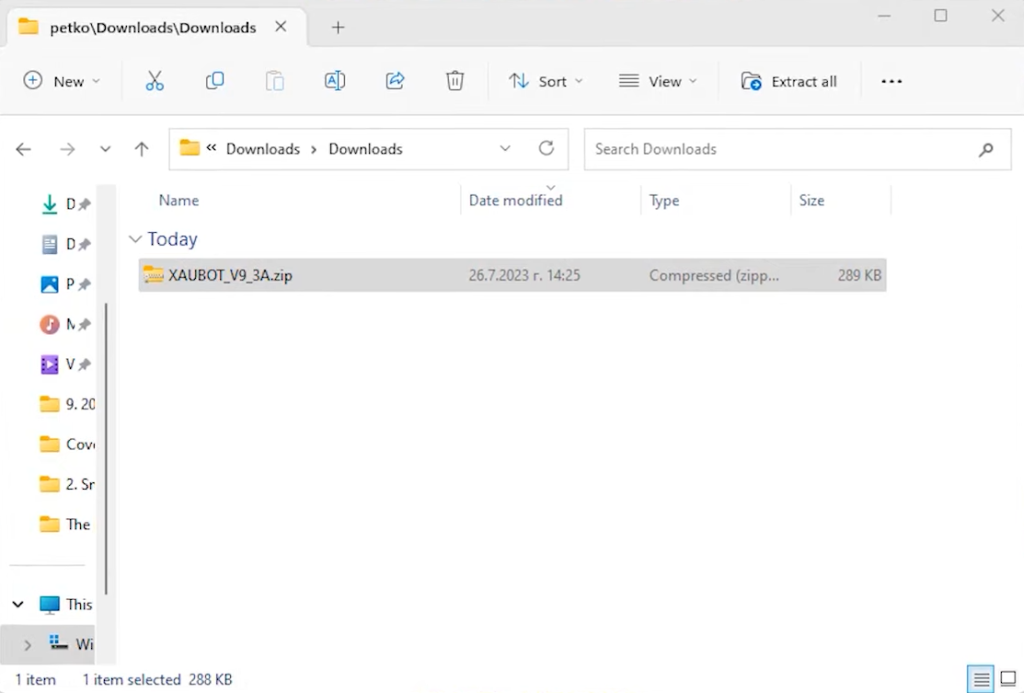
    Thanks for reading, and stay tuned for future insights.

    Frequently Asked Questions

    How does Perceptrader compare to other “AI” robots on the market?

    Most robots claiming AI integration on the MQL5 marketplace use it purely as marketing. There’s no actual ChatGPT or machine learning happening, just regular technical indicators with AI buzzwords added.

    Perceptrader actually integrates ChatGPT and Bard for market forecasting on top of Waka Waka’s proven trading logic. The difference is that it builds on an EA with years of verified performance rather than starting from scratch. This combination approach makes more sense than trying to create an AI trading system from zero.

    What’s the advantage of starting tests with a $500 account?

    Testing with $500 limits your risk exposure while still showing realistic performance patterns. It’s large enough to handle the EA’s lot sizing properly, but small enough that you’re not risking significant capital during the evaluation phase.

    After running hundreds of backtests with different input settings on the $500 level, you can identify optimal configurations before scaling up. This progressive approach helps you understand the EA’s behavior across various risk parameters without potentially costly trial-and-error on larger accounts.

    Why should I trust an EA that just launched versus established robots?

    Perceptrader’s advantage is that it’s built on Waka Waka’s foundation, an EA with over 60 consecutive profitable months and one of the strongest track records on MyFXBook. You’re not trusting a completely new, unproven system.

    The base trading logic has years of live verification. The AI layer is the new addition, which you can test during the 15-day free trial to assess whether it genuinely improves performance or just adds complexity without value.