Some say we’ve reached the peak of cryptocurrencies and from here on out, we are in a downfall. Reality is quite different – we are just at the beginning of the crypto revolution. Investors, normal people, finance gurus, even governments and politicians like Donald Trump are all turning their focus on crypto.
The change is becoming more widespread as more people are more informed on how to acquire and invest in the long-term with crypto. If you are a newbie you feel quite overwhelmed – and with a good reason. There is tons of stuff that is unfamiliar to you like terms, exchanges, networks and so on. But, there is zero room for panicking – it’s not as complicated as it looks like. It is a natural instinct to be cautious when it comes to investing and finances, especially when it comes to exploring new territories that everyone speaks about so fondly. We will explore all things you need to enter this world, the rest of which you will learn as you get familiar with crypto.
Crypto HODL
During the start of the golden age of crypto, on social media and in news publications you’ve seen the use of the term HODL. It is defined as a process of keeping your digital assets (cryptocurrencies) for a longer period of time regardless of market movements. This means you won’t sell your crypto assets even if the market is going down. It is an approach for the ones who have patience and have done their homework on the potential value of crypto, because if it comes from a good developer and in a good eco-system – you will get most out of the investment in the long-run.
This strategy is backed by well-known investors like Warren Buffet, who have been in the investing game for decades, bringing attention to the importance of patience in playing smarter than the average investor on the market. The first cryptocurrency ever is, as you’ve already known, Bitcoin. Already, those investors that HODL have seen the fruits of this strategy. Despite the market fluctuations the ones who believed in it since the beginning, have seen enormous returns – going over 10,000% or even more. Back in the day, the value of Bitcoin was low $0.01 per coin and during the start of the golden crypto age the value increased enormously and reached over $70,000. As a long term investment Bitcoin has confirmed that HODL is a great strategy for the ones who wait. On the other hand, Ethereum (the second most valuable crypto), confirms the validity of this strategy as well. With many governments globally recognizing its influence over each transaction the crypto market has only one destination – going up, up to the moon!
Diversifying Your Crypto Investments
Now, purchasing and holding one crypto like Bitcoin without having a great amount of investment funds is not a good strategy for both the short and long-term. Same as with stock investing, the rule of diversifying your assets applies also in the crypto world. It is a really relevant strategy because the crypto market is rapidly and unpredictably changing, so in order to keep your returns safe from volatility, diversifying your digital assets is a must. The ideal portfolio should consist of different crypto assets that will not react the same to the market fluctuations. Moreover, by spreading out your investments, you reduce the impact of any single poorly performing asset on your overall portfolio. However, diversification doesn’t just mean investing in different coins all the time, there are many other crypto options you could explore such as decentralized finance (DeFi), investing in non-fungible tokens (NFTs), and much more. This approach is a perfect fit for both traditional and cryptocurrency investments.
Technical Analysis for Low-Cost Purchases
If you have basic knowledge in finance then you probably know the term technical analysis. For the ones who are totally new to this world, technical analysis is the process of monitoring historical price charts and trading volumes to predict future price movements. It is proved that past trading activity and price changes can indicate future trends. For beginners primarily we recommend starting from the basic concepts as support and resistance levels. Learning when to buy and when to sell is a key ability for successful trading.
Support Levels: These are points where prices tend to stop falling and bounce back, offering a good buying opportunity.
Resistance Levels: These are points where prices tend to peak and may start to fall, indicating a good time to sell.
Risk Management
A smart investor knows when to take risks and when to exit the market. Risk management in crypto investing and trading involves identifying, assessing, and reducing the impact of potential losses to protect your investments. Make sure you can handle the consequences if you lose the amount you invest. In order to cope with risky situations, here are the most effective risk strategies that each investor should be including in his financial decisions:
Stop-Loss Orders:Set predetermined exit points to sell your assets if their price falls to a certain level, preventing further losses.
Position Sizing: Limiting the amount of your portfolio you’re willing to risk on a single trade, typically no more than 1% of your total investment.
Psychotrading: Managing the psychological aspects of trading, such as fear and greed, to make rational decisions.
Cold Storage: Keep aside a portion of your crypto assets offline to protect them from hacks and cyber threats. Using a cold hardware wallet, as opposed to a hot online wallet, is the best way to safeguard your digital assets.
The Concept of Swing Trading with Crypto Contracts for Difference (CFDs)
Swing trading is a concept opposite of HODL, it aims to buy and hold a crypto asset for a short period, typically from a few days to several weeks, to profit from expected price fluctuations. If you don’t have the time to be glued to the computer 24/7 that it is the right strategy for you, because of the existence of CFD (Contract for Differences) which is an agreement between a buyer and a seller in which the buyer compensates the seller for the difference between the asset’s current value and its value at the time the contract was signed by both parties.
Understanding CFDs in swing trading is a game changer for each investor and could potentially lead to great gains. One thing to note is that exchanges play a crucial role in facilitating swing trading with crypto CFDs. They provide the platform where traders can access various CFDs and execute trades efficiently. These exchanges offer tools and resources to analyze market trends, set stop-loss orders, and manage trades effectively. By using reputable exchanges, traders can ensure secure transactions and access a wide range of crypto assets for CFD trading. To find more information about exchanges and their features, you can always check informative sources online.
Final Words
The opportunities that cryptocurrency trading offers to investors who embrace innovation are endless. Make sure to be one of those who could potentially be part of the 1% of the whole population by smart investing in crypto markets. Always keep in mind the rules we are sharing in this article, keep in mind that if you are aware of the basics nothing is impossible. Make sure to give them a try, and enjoy the returns on your account.
When trading with expert advisors, or so-called robots, we trade a strategy. Behind each expert advisor, there is a certain strategy that executes the trades: a strategy to open and close the trades. There are different types of strategies, and in this tutorial, we will have a deeper look at some of the main ones.
One of the most popular is the Grid Martingale strategy, which applies after the first trade is opened. The primary rule of this strategy is to enter long trades when the price touches the lower band and short trades when it reaches the upper band. However, it is important to note that while the Martingale strategy can be highly profitable, it carries substantial risks.
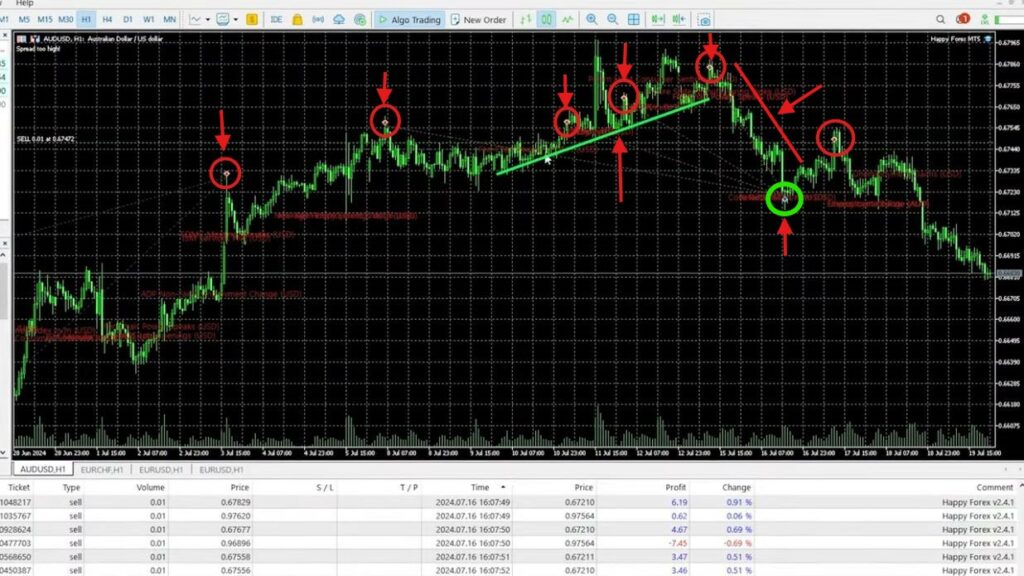
If we look at the above chart – we have a short trade, due to an indicator or a trading pattern. But once the price goes against the direction of the trade (green line), there are two options. One is to have a stop loss and to exit the trade with a certain amount of loss. Or two, to add to the position and improve the average price. In our case, it is more short trades, and the price keeps going upwards (red circles). The expert advisor is adding to the position, it is improving the average price.
But if the price keeps going upward, it might get risky for the account to run out of margin or to lose the account. In our case, the price went down (red line) and it was closed at a profit (green circle). This expert advisor on the chart is trading with 0.01 with every new order that is added to the position. So it’s not an aggressive grid trading expert advisor, which adds to the position a higher amount and a higher amount, which is riskier, but it brings more profits. There is also a Martingale expert advisor that is free but still risky, and it has actually brought a lot of profits to our accounts until the moment.
If you want to learn more about the grid trading expert advisor and the martingale strategy in depth, click here.
Scalping Strategy
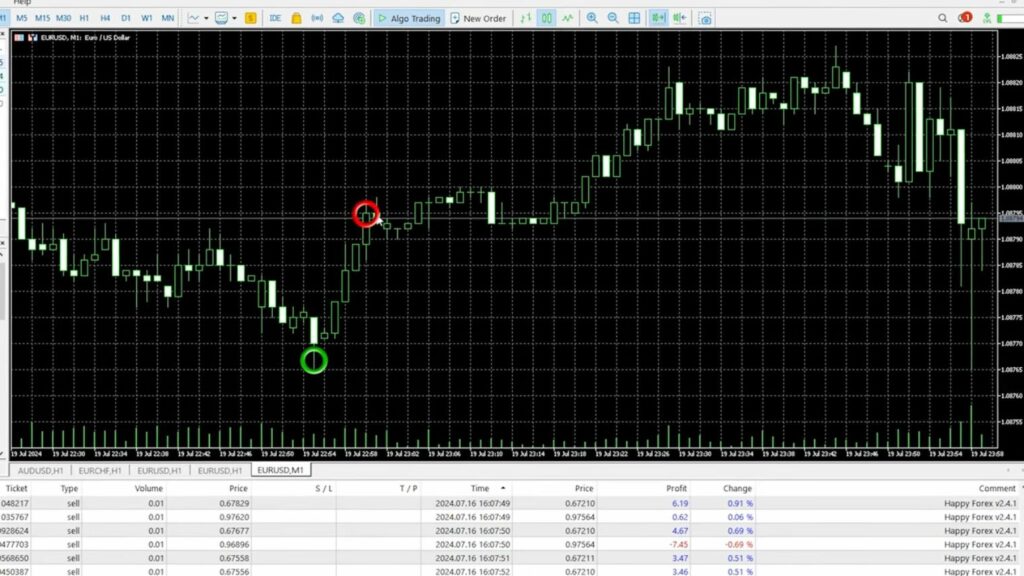
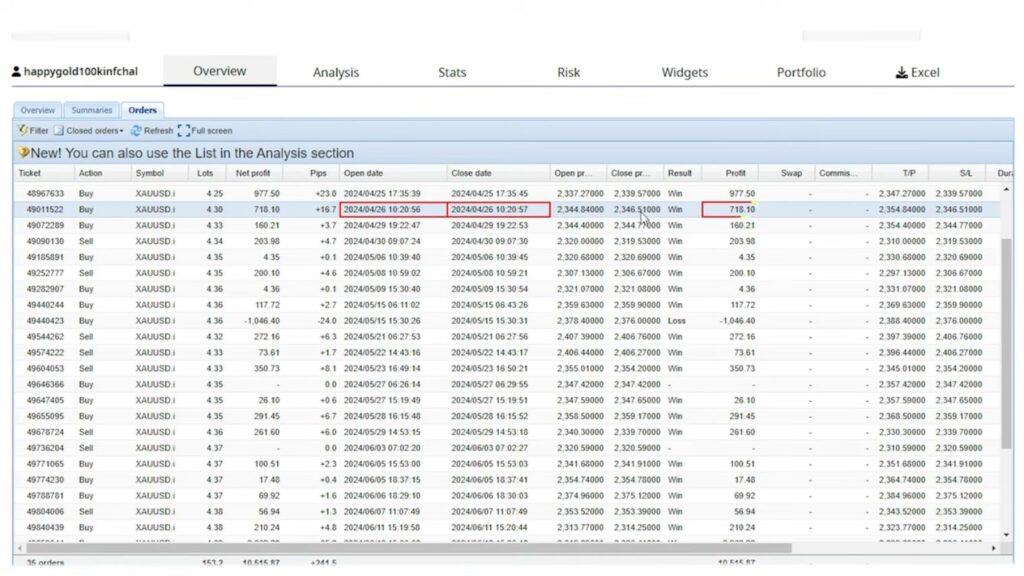
Strategy number two is scalping strategy. It is an expert advisor that is scalping the market. This is really easy to understand, but how to find a Scalping Robot that is profitable ? Let’s look at the Euro Dollar chart for example and switch to M1. This is where we have candlesticks for every one minute. Scalping EA usually would enter at one point, and would exit few minutes later, sometimes few seconds later. On our website, we have a section where we show our live accounts. We are showing our challenges, and we’ve been trading with one expert advisor called Happy Gold. This is probably one of the fastest robots. If you look at the closed orders, you will see the duration of the trades. It is mostly below 1 hour or even shorter.
But if we look closer, we will see that, for example, there is a trade opened at 9:07:24, and closed at 9:07:30. So the trade was open for just 6 seconds, and it brought $200 of a profit. There is another trade, again 6 seconds, with nearly $1,000 of a profit. Another one, pay attention to this one: 10:20:56, 10:20:57. It was a 1-second trade that brought in $718. Just one second; it enters the market, and it exits the market.
So for the good expert advisors, 1 minute is even a long time. And sometimes you won’t understand that the trade actually happened in your accounts because you won’t see it. It’s just so quick. The position opens and closes. But for this purpose, to trade such expert advisors, you need a very, very fast broker with super-fast execution speed because once the expert advisor places the order, it is a matter of speed that the broker will execute that order properly.
Trend-Following Strategy
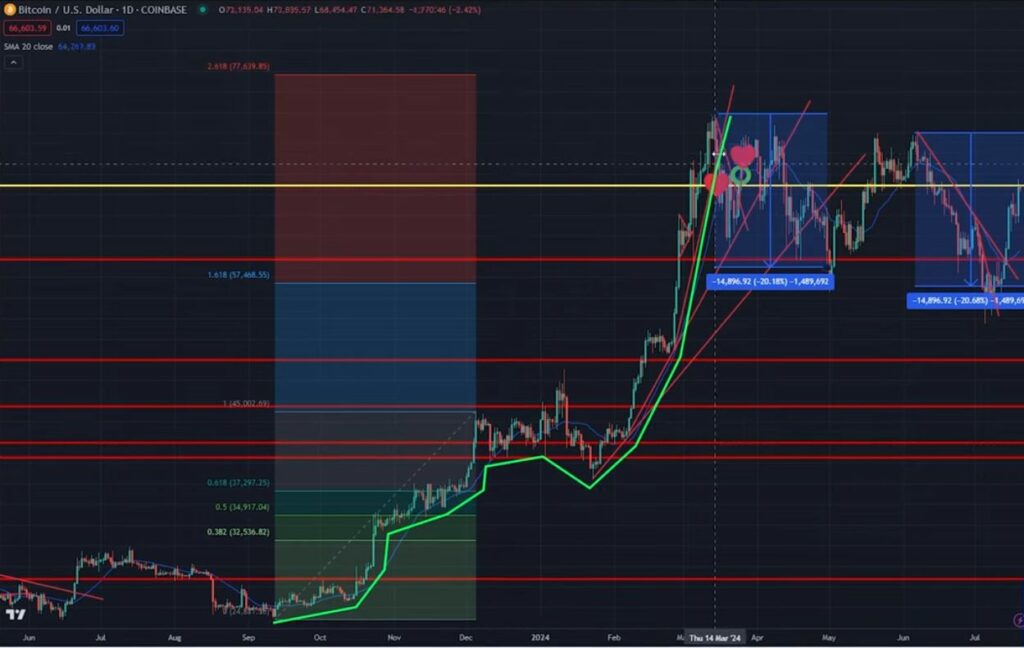
Number three as a trading strategy is the trend-following expert advisors. Okay, so these types of expert advisors are trying to follow the big trends. So, if Bitcoin is going just upwards, this expert advisor will aim to enter a long trade and exit it, but not open short trades. It’s using a filter that is usually on a higher time frame. For example, if we check below TradingView analysis for Bitcoin since September 2023 until the failure of the recent high, which happened in March this year, Bitcoin was in a very aggressive uptrend.
Normally, in such cases you would be looking for selling opportunities at the end. So, along the way, you would be looking for buying opportunities, but when the trend is over, you would be looking for selling opportunities. For example when you notice such failure of the recent high, which was with the levels of the all-time highs, you would notice and you would recognize that this is the end of the trend. Of course it is never 100% guaranteed, but that is one trend-following strategy that we applied for Bitcoin. It’s manual; it’s investment, but when we are trading with expert advisors, the expert will filter the long-term trend and will execute the trades on a minor time frame.
So the trend following strategies are the type of strategies when we buy together with the direction of the trend.
Keep an eye on the new updates from us in our YouTube channel, because we will show you such strategy, and we will give it to you for free in one of our next educational videos. You will get the ready-to-use robot, and you will be able to test it.
Range Trading Strategy
The long and short entry
Before we start exploring how Range Trading Strategy with EAs work, let’s try briefly to explain what is range trading in forex. Range trading in Forex is a strategy that involves identifying and capitalizing on price movements within a defined range, typically between a support level (the lower boundary) and a resistance level (the upper boundary). Support level is the level where the price tends to stop falling and may rebound upwards. And resistance level is the level where the price tends to stop rising and may reverse downwards. In a range-bound market, the price fluctuates between these two levels without breaking out in either direction.
Range trading is most effective in markets that lack a strong trend, where prices move sideways rather than trending up or down. This type of strategy is very, very appropriate when the market is in a range. Traders typically buy at the support level (expecting the price to rise) and sell at the resistance level (expecting the price to fall). Stop-loss orders are often placed just outside the range to protect against potential breakouts.
If you apply Range Trading, you would often use technical indicators like RSI (Relative Strength Index), Bollinger Bands, or stochastic oscillators to confirm overbought or oversold conditions within the range.
So with this type of strategy, the expert advisors will try to buy when the price is cheap and they will try to sell when the price is expensive.
News Trading Strategy
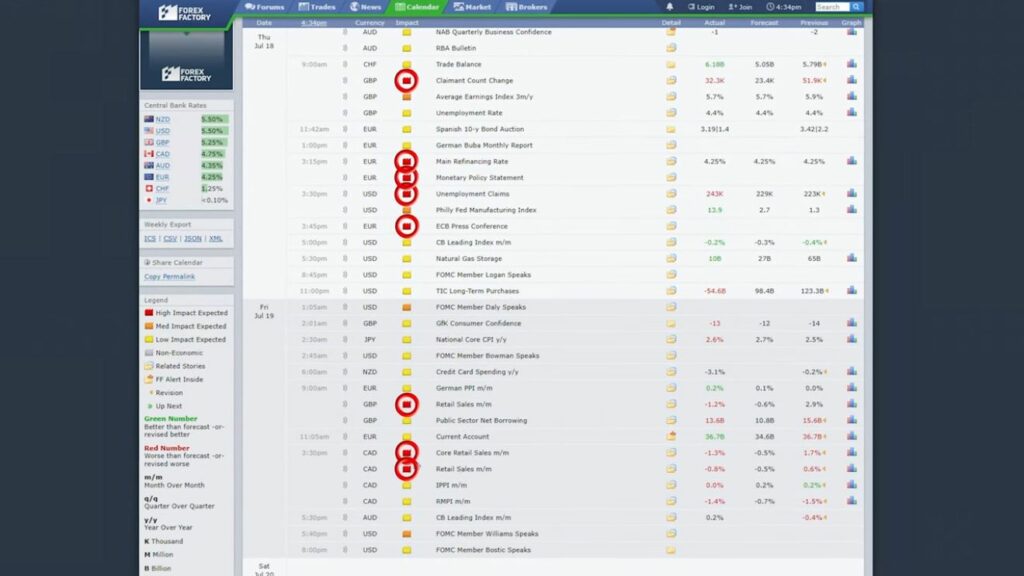
The next trading strategy and expert advisors are news trading, where we take advantage of the fundamental news, and we use those impulsive moves right before or after the news. But that’s risky. Like, that’s probably one of the riskiest approaches and strategies you can apply when trading.
There are plenty of websites where you can follow the fundamental news, for example here. Almost every week, there are plenty of red-hot news, and if the actual value is different from the forecast or from the previous value, it causes fluctuations in the market that we cannot really predict. Especially if we are trying to trade right at the news, there might be slippage, which means that the order might not be executed. This is why it is very risky to trade expert advisors on news. But we have a free robot which we are testing, and it works well so far. We will share it with you for free in one of our next videos as well.
Swing Trading Strategy
The next trading strategy that you can apply with expert advisors and the last one which we will explore today, is the Swing Trading strategy. Based on an article that we found, we can see that “swing traders aim to buy a security when they suspect that the market will rise. Otherwise, they can sell an asset when they suspect that the price will fall. Swing traders take advantage of the market’s oscillations as the price swings back and forth from an overbought to an oversold state”.
Or if we have to say it in very simple words, swing trading means that we want to buy the lows and sell the highs, buy the lows and sell the highs. In EA Trading Academy we have developed such a strategy, which again we will share with you as a free expert advisor in one of the next videos in our YouTube channel.
Selecting the Right Trading Strategy
Success in trading depends on selecting the right strategy. However, we cannot say that one strategy is better than the other. It is a complex question. Each strategy serves a unique purpose and caters to different trading styles and objectives. We recommend to consider few things when you select a trading strategy. Such as your personality type, level of discipline, available capital and risk tolerance. that aligns with your risk tolerance, market knowledge, and financial goals.
Final Thoughts
Understanding and applying various trading strategies is essential for navigating the financial markets effectively. Whether you prefer the quick decision-making of scalping or the longer-term approach of swing trading, a well-informed and disciplined strategy is key to achieving consistent results. By continuously refining your approach and adapting to market conditions, you can enhance your trading performance and achieve long-term success.
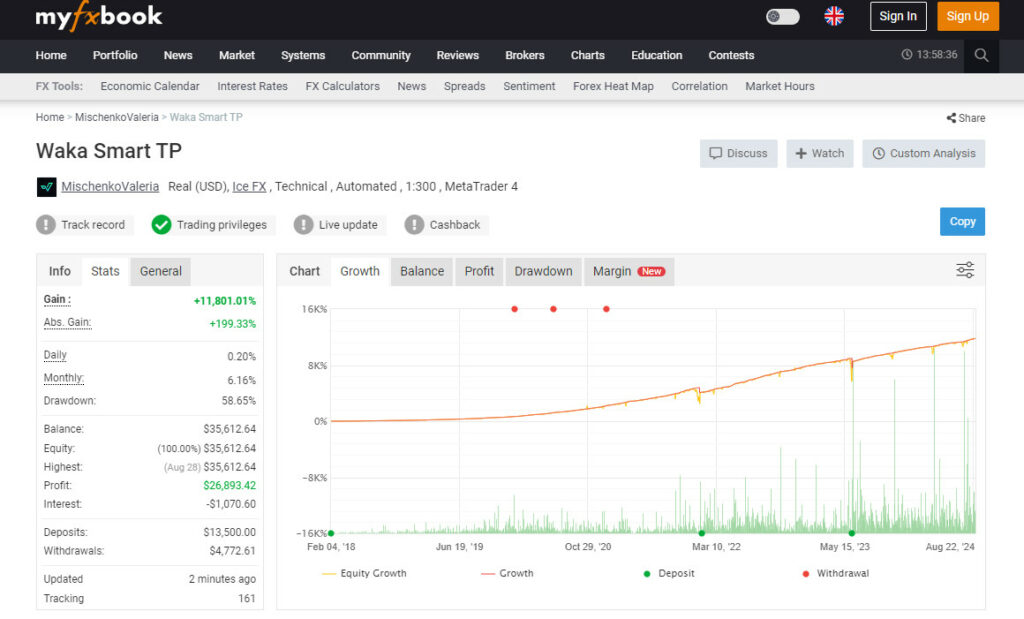
Can a fully automated trading robot really make over 11,000% profit? This is the claim that the developer of the Waka Waka EA makes. After extensive research and testing, the claims appear to be true. In this review, I will share my personal experience with Waka Waka. What it is all about, its performance in my account as well as the developer’s, and explain why it might just be the best robot for Forex trading.
What is Waka Waka EA?
Waka Waka EA is an advanced trading robot that has been on the market for several years. It is designed to trade the less popular currency pairs such as AUDCAD, AUDNZD, and NZDCAD on the M15 time frame. It was created by Valeria Mishchenko and works on both the Metatrader 4 and Metatrader 5 platforms. It’s particularly known for it’s consistent and steady profits and for holding the record for the most consecutive months on profit.
Simple Installation and Setup
One advantage of Waka Waka EA is its straightforward installation process. The download includes installation and setup instructions. The EA works on the M15 chart. It is highly recommended for trading the Aussie Dollar, New Zealand Dollar, and Canadian Dollar pairs.
You can fine-tune the settings to match your risk appetite. Because it is a grid trading system, it’s advisable to trade cautiously to protect your capital in the event of a long move in the direction opposite to your trades.
Proven Track Record
What truly sets Waka Waka EA apart is its verified track record on MyFXBook. The EA has shown consistent profits in the developer’s account for over 6 years, starting from February 2018. At the time of writing this post, the EA has gained over 11,500% in profit. Except for 1 unprofitable month, every month since February 2018 has closed on a profit.
Ease of Use and Customization
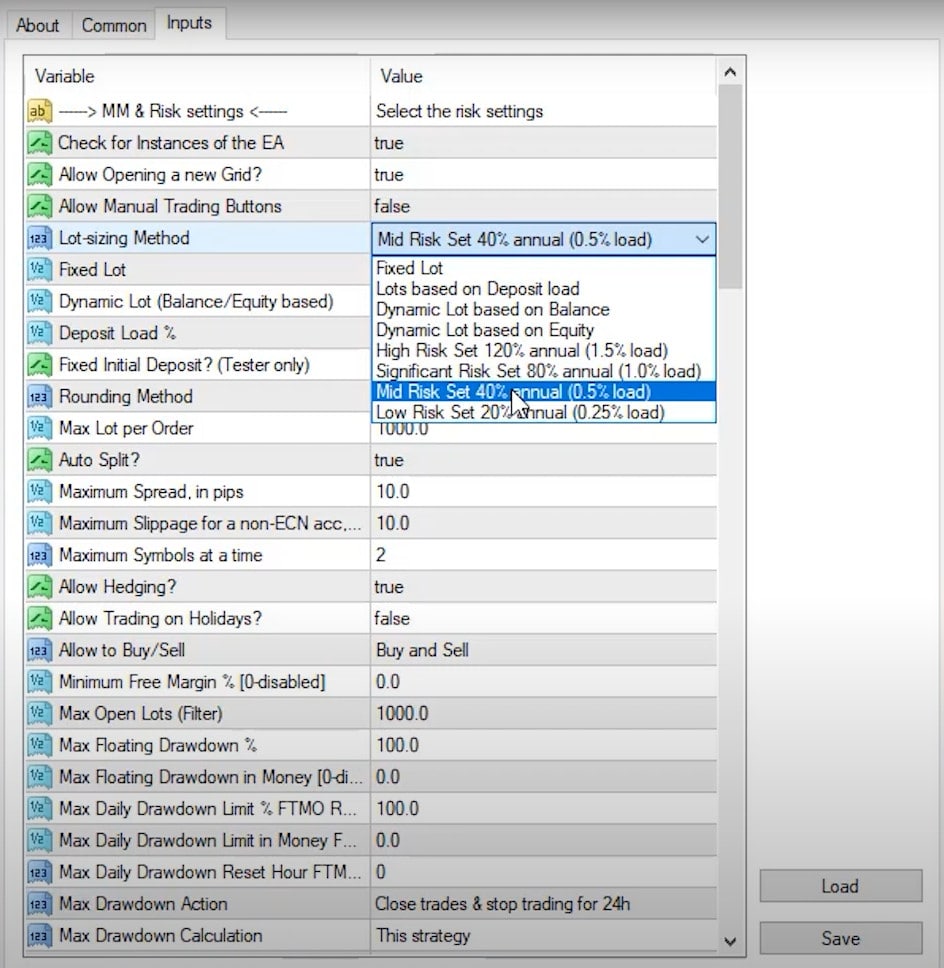
As mentioned above, one of Waka Waka EA’s advantages is its ease of installation. Traders can customize the risk settings according to their preferences, making it suitable for traders with differing risk appetites. Personally, I prefer to trade low-risk, and I aim for 2 – 3% per month. One trader reported profits of 436% in a year, which is truly incredible, but equally risky.
Waka Waka EA offers several input options, including lot sizing methods and risk levels. Traders can choose between low and mid-risk settings, depending on their profitability goals. The flexibility to adjust these settings allows traders to align the EA’s performance with their specific trading strategy.
Selecting the Right Broker
As with any trading strategy or robot, it is crucial to have a trading account with a regulated broker that offers the best possible trading conditions. These include tight spreads, low or no commissions, easy withdrawals and good customer support. If you don’t already have an account, check out the brokers we’re using in the Academy. If you plan to trade with Waka Waka, Metatrader 4 or 5 is required, and is offered free of charge by most brokers.
Instant Funding vs. Traditional Prop Firms for Grid Systems
Your article mentions funded accounts, but the video highlights something important: not all funded account structures work well with grid trading.
iFundTraders advantages:
Instant funding (no challenge phase)
Fewer trading restrictions
No maximum position limits
Flexible regarding lot sizing
Real withdrawable profits (verified in my account)
Traditional prop firm challenges often conflict with grid trading:
Daily loss limits (grid systems can have intraday equity dips)
Maximum open positions (grids need flexibility to add positions)
Strict lot size progression rules
Trading time requirements that don’t accommodate grid recovery periods
My iFundTraders account demonstrates this compatibility. The $437 profit isn’t large, but it’s withdrawable. The platform didn’t flag the trading pattern. No issues with position management or the grid’s natural equity fluctuations.
For traders specifically interested in running Waka Waka on funded accounts, instant funding platforms with minimal restrictions make more sense than traditional prop firm evaluation accounts.
Testing Waka Waka EA Before Going Live
Before using Waka Waka, or any EA on a live account, it’s crucial to test it thoroughly on a demo account. Regulated brokers will almost always have this option for you, and it allows you test the robot in a variety of conditions and with different settings to find the option that suits you best. Open a demo account with the same balance you plan on trading with in your live account, so you can simulate you planned live trading as accurately as possible. The Waka Waka EA also has a free 14 trial available, so you really can test it risk-free. More on this later.
In-Depth Analysis of Indicators and Risk Management
While the secret behind the Waka Waka is…well a secret, it includes a combination of advanced technical indicators and parameters to enter and exit trades. These include standard deviation, RSI (Relative Strength Index), and ADR (Average Daily Range), twice, with different parameters. The EA uses a grid system that adds new positions whenever the price moves against the initial trade, with the goal of improving the average price. The strategy aims to hit the take-profit level once the price recovers. Grid systems are inherently risky, so setting it up correctly is crucial.
Risk Management Features
Risk management is a critical aspect of Waka Waka EA’s design. The EA allows traders to set maximum drawdown limits, ensuring that trading stops if losses exceed a certain threshold. This feature is particularly important for traders who are risk-averse, prefer controlling losses, and those trading in environments with drawdown limits, like prop firm challenges, where exceeding the limit can result in losing the account.
Real Account Application and Live Trading Results
To really put the Waka Waka EA to the test, I installed it on a few of my accounts, including a $3000 live account and several FTMO funded accounts. The performance has been as expected with a steady 1 – 3% per month. While many newbie traders believe this is a too small and not worth the effort, I disagree.
A steady 2 – 3% per month equates to 24 – 36% per year, which by any standard is a solid investment. There are of course EAs, including this one, that can yield much higher returns, but the risk exposure is equally higher, and at least for me, not aligned to my long-term trading goals.
Tracking Performance Across Two Live Platforms
8Cap Live Account (5-Month Track Record):
Initial deposit: $3,000 (credited)
Current profit: Approximately $500
Total closed trades: 216
Performance: Published to FX Blue for verification
Duration: Nearly 5 months of continuous trading
iFundTraders Funded Account:
Starting balance: $10,000
Current profit: $437
Total closed trades: ~60
Broker: FXVM (BazX platform)
Status: Real withdrawable profits confirmed
Both accounts publish their results to FX Blue tracking. Anyone can verify these numbers independently; I’m not just claiming results without proof.
What’s interesting is the trade frequency difference. The 8Cap account, with its longer history, has executed 216 trades over five months. That’s roughly 43 trades per month, showing consistent activity. The iFundTraders account, being newer, has fewer closed positions but shows similar profit patterns.
The combined performance, $937 profit from $13,000 starting capital across both accounts, represents about 7.2% gain. Not spectacular when you see EAs claiming 50% monthly returns. But it’s real, verified, and sustainable. That’s what matters for long-term trading.
Expanding Possibilities with Multiple Accounts
One of the significant advantages of purchasing Waka Waka EA is the ability to use it on multiple accounts simultaneously. The EA provides 10 licenses, allowing traders to trade with different risks in their different accounts.
This is very useful if you plan to use the Waka Waka on a live account and a few funded accounts, for example. Getting multiple licenses really gives you more flexibility and changes the value considerably.
Consistent Profitability Over Time
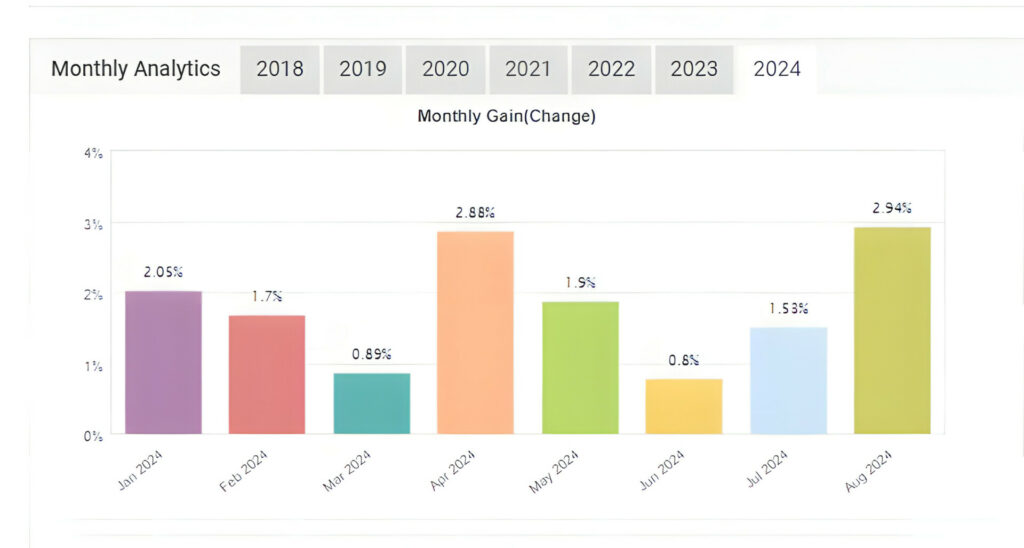
Waka Waka EA’s performance history is proof of its ability to generate steady profits. Looking back from 2018 to today, the EA has a remarkable track record with almost no losing months. Its consistent growth of around 1% – 3% per month (using conservative settings more recently) works well within the requirements of funded accounts.
This makes it a great choice for traders looking to grow their accounts steadily over time. This is in line wit the results I’ve been achieving in my live account.
Leverage Requirements
As with all grid trading systems, a higher leverage is recommended, and often, required. With grid trading, when the market moves against you, instead of closing the losing trade, the EA opens another trade, often in the same direction as the previous trades, at a new price level. The idea is that when the market eventually moves back in your favor, all those trades will close on profit.
As the market keeps moving against your initial trade, the system opens more trades, which means you’re using more and more of your available money to keep these trades open. Without higher leverage, you’d run out of money (or “margin”) to keep opening these new trades. Leverage from your broker lets you trade with a larger amount of money than you’ve actually deposited into your account.
This means that even as the grid-based EA adds more trades, you can continue trading without getting stopped out. This process helps you avoid a margin call, which would otherwise occur if your account’s equity falls below the required margin level.
But, and this is a big but, this also means there’s a higher risk of blowing your account if the market doesn’t turn around before there is a margin call. Higher leverage gives the EA some flexibility to withstand the move against you. But it also increases the risk, which is why it’s crucial to use it carefully. Your settings are critical to protect your account while staying profitable.
This also means that not all accounts are suitable for the Waka Waka to perform at it’s best, and it’s a factor that needs to be taken into account. Some brokers offer a maximum leverage of 1:30 which would limit the performance of the Waka Waka.
Understanding Risk and Drawdown
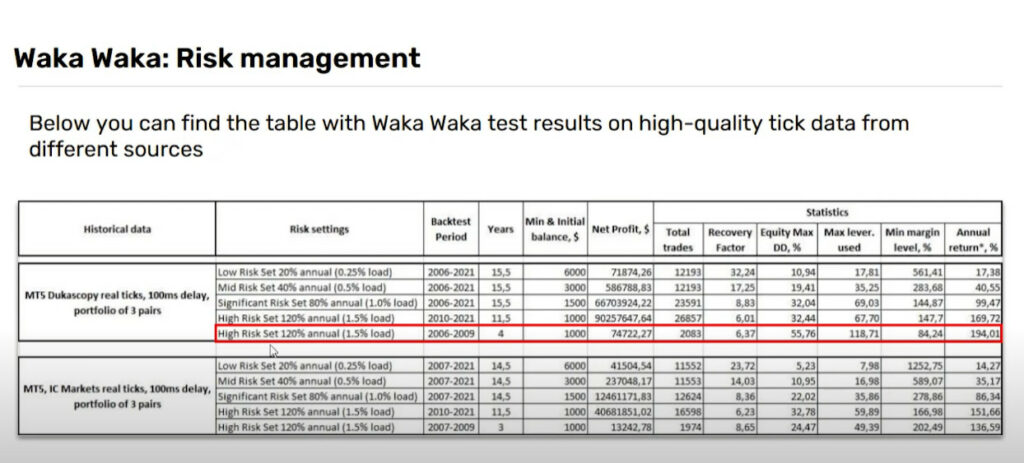
The included guide provided with Waka Waka EA, provides valuable information on risk management. The guide includes a table that suggests the minimum account balance for different risk settings.
This helps traders choose the most suitable risk level based on their goals and risk tolerance. As with all aspects of trading, balance is key. The drawdown, or maximum equity drawdown, is a setting that protects the trader against a loss that they may not be able to recover from, and as such, should be carefully considered. And again, testing this and all other settings is best done on a demo account with no risk.
What Seven Years of Backtest Data Actually Reveals
I ran backtests on Darwinex data covering 2017 through 2025, roughly seven years of varying market conditions. The results show exactly what you’d expect from the MyFXBook track record: smooth balance curves, consistent growth, thousands of trades.
But here’s what marketing materials don’t emphasize: equity drawdowns during backtest periods reached approximately twice the balance drawdown.
Let me explain what this means practically.
During adverse price movements, the grid system adds positions. Your balance stays relatively stable because trades haven’t closed yet. But your floating equity drops, sometimes significantly, as those open positions move further underwater.
Eventually (in successful grid trading), the price reverses. All those positions closed in profit. The equity curve recovers and continues upward. But during the drawdown period, you’re watching your account equity dip substantially below the balance line.
Why this matters:
My live accounts haven’t experienced these severe equity dips yet. Both show smooth curves over their respective timeframes. Beautiful, consistent growth. But the backtest data covering seven years shows these dips will eventually occur.
Too many traders, myself included, early in my career, see smooth performance during favorable periods and think, “This is how it always performs.” Then they increase risk parameters. When the inevitable drawdown arrives, the account can’t survive it.
The backtest is both encouraging and cautionary. Encouraging because it shows long-term profitability across multiple market cycles. Cautionary because it demonstrates the maximum stress levels your account needs to withstand.
Set your risk expecting those equity dips, even if you haven’t seen them yet in live trading.
Why Choose Waka Waka EA?
There are several reasons why Waka Waka EA is one of the most popular Expert Advisors (EAs) available on the market today.
Sophisticated Trading Strategy
Waka Waka EA uses an advanced algorithm combining technical and fundamental analysis to identify trading opportunities. It doesn’t just rely on quick profits but focuses on long-term stable growth. The EA’s strategy is designed to take advantage of opportunities in the market, allowing it to trade in all kind of market conditions successfully.
How Much Could You Make with Waka Waka EA?
This depends on many factors discussed throughout the post. As mentioned several times, settings, broker choice, your deposit amount, leverage and your risk tolerance are the determining factors. And of course, market conditions.
While traders like me prefer a more conservative, long-term view aiming for 2% – 3% per month, the more aggressive trader will put it all on the line, and aim for 20, 30 or even 50% per month. While it is possible to achieve these kinds of returns, the risks are exponentially higher.
Constant Updates and Support
The developer of Waka Waka EA is committed to maintaining its performance. The EA is regularly updated to ensure it remains effective under changing market conditions. Additionally, the exclusive Telegram group provides a place for users to share their experiences and get support directly from the developer.
There is also a dedicated support section on the developer’s website with the most commonly asked questions ranging from how to install the EA onto your preferred platform to dealing with licensing errors.
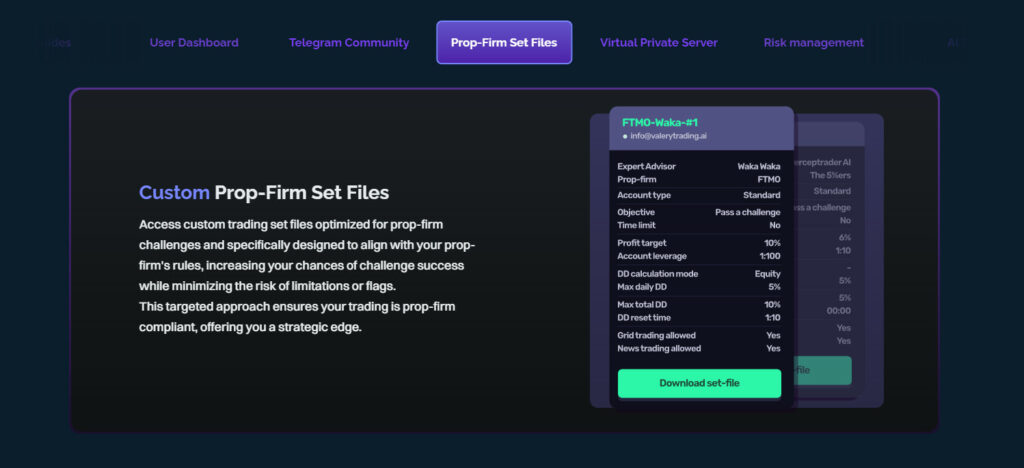
In addition to the community support, users can also request a custom set file that is suited to their particular trading style and goals. This is in an of itself a massive advantage and can save a trader months of testing to find the right settings.
About the Developer
The developer behind Waka Waka EA is a top-ranked MQL developer and has created some of the best-performing MetaTrader EAs on the market. With over 13 years of experience in retail trading and a proven track record, the developer has created sold thousands of copies of various EAs with different strategies and suitable for different assets and markets.
Moreover, she has received hundreds of 5-star reviews from customers around the world. This experience has allowed her to create and continuously update the Waka Waka EA with the most current parameters to keep the winning record going.
How to Get Started with Waka Waka EA
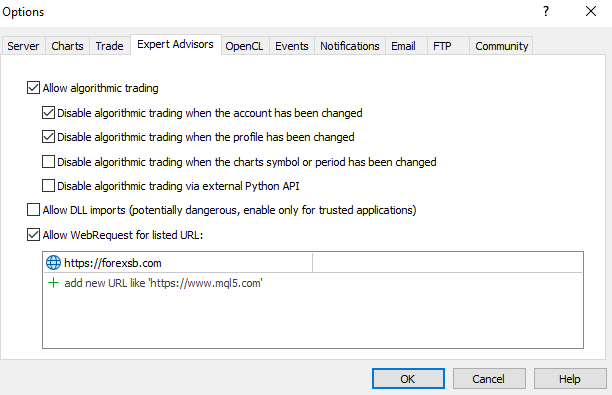
After buying a permanent license, you will receive the MetaTrader files and a step-by-step guide via email and access to your user dashboard. The installation process is simple: install Waka Waka on your MetaTrader 4 or 5 terminal following the prompts, activate your license, enable Auto or Algo Trading on your platform and drag Waka Waka onto your trading charts.
Be sure you have selected the correct assets and time frames (M15). If you have received a custom set file, load it. From there, the EA will open and close trades fully automatically. It is of course important to keep an eye on your account and make any adjustments you’d like to.
I’ve mentioned this before, but I can’t mention it enough. Run the Waka Waka on a demo account first. Even as an experienced trader with more than a decade of trading under my belt, every time I trade with a new EA, or with new settings, I ALWAYS test it on a demo account first.
Money-Back Guarantee
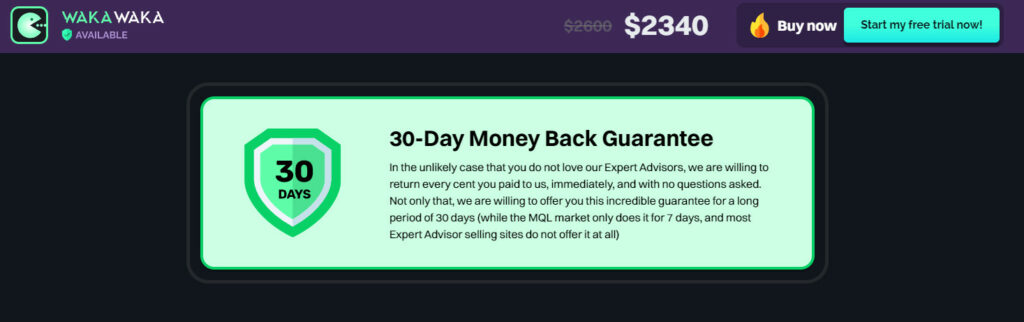
Even after a 14 day trial, The developer of Waka Waka EA is includes a 100% money-back guarantee. If you are not satisfied with Waka Waka, the developer promises to refund every cent you paid, no questions asked, within 30 days of purchase.
This is unusual in the industry. EA developers usually offer a 7-day conditional refund, or in most cases, no refund option at all. What this means is that between the 14-day trial and 30-day refund policy, you get 6 weeks to trade with the Waka Waka EA, risk-free.
Conclusion: The Final Verdict on Waka Waka EA
If you’re looking for a reliable and proven automated trading solution, the Waka Waka EA could be a great option for you. With its record-breaking performance, extensive risk management features, community and developer support, the Waka Waka EA offers more than most other EAs.
Slow and steady profits, or aggressive, risky trading. The choice is yours. The combination of a proven track record, continuous updates, and a money-back guarantee makes it an investment option with the potential for high rewards.
For traders interested in deeper insights, Algo Trading Space offers a VIP Club that provides exclusive access to our complete trading results dashboard, priority support, and early intelligence on high-performing EAs before they become public knowledge. Members also get downloadable set files, access to our private Discord community, and our full course library.
Frequently Asked Questions
Can Waka Waka manage multiple currency pairs from a single chart?
Yes, Waka Waka can trade multiple pairs simultaneously from one chart attachment. Unlike most EAs requiring separate installations per pair, attach Waka Waka once on an M15 chart and configure which pairs to trade in the settings.
Both my live accounts use this single-chart approach to manage three pairs (AUDCAD, AUDNZD, NZDCAD), which simplifies setup and reduces visual clutter when monitoring multiple VPS instances or accounts.
What’s the difference between the smooth MyFXBook curves and real trading experience?
The MyFXBook track record shows the balance curve, closed trades only. In live trading, you’ll see both balance and equity curves. Equity includes floating profit/loss from open positions, which can dip below the balance when the grid adds positions during adverse moves.
Backtests from 2017-2025 show equity drawdowns reaching approximately twice the balance drawdowns during stress periods. My live accounts haven’t experienced severe equity dips yet, but longer-term data suggests they’ll eventually occur.
Why is iFundTraders recommended over traditional prop firms for Waka Waka?
iFundTraders offers instant funding with fewer restrictions conflicting with grid trading strategies. Traditional prop challenges often impose daily loss limits, maximum position counts, and strict lot sizing rules incompatible with how grid systems operate.
My iFundTraders account demonstrates this compatibility, $437 in real withdrawable profits without platform restrictions or trading pattern flags. Grid systems need flexibility to add positions and manage temporary equity dips, which instant funding platforms accommodate better.
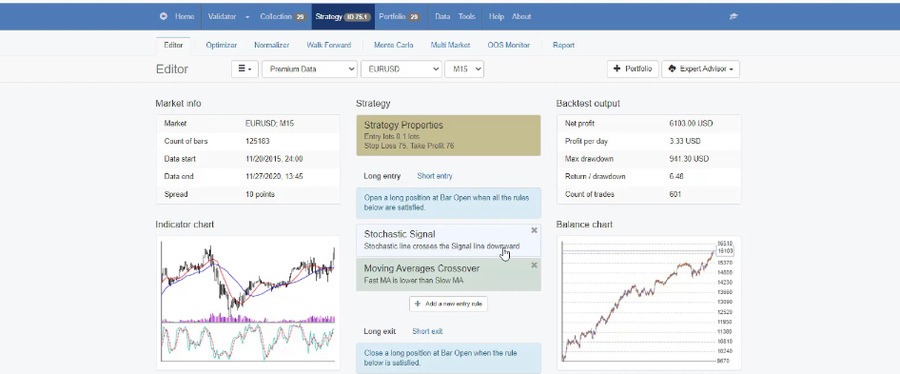
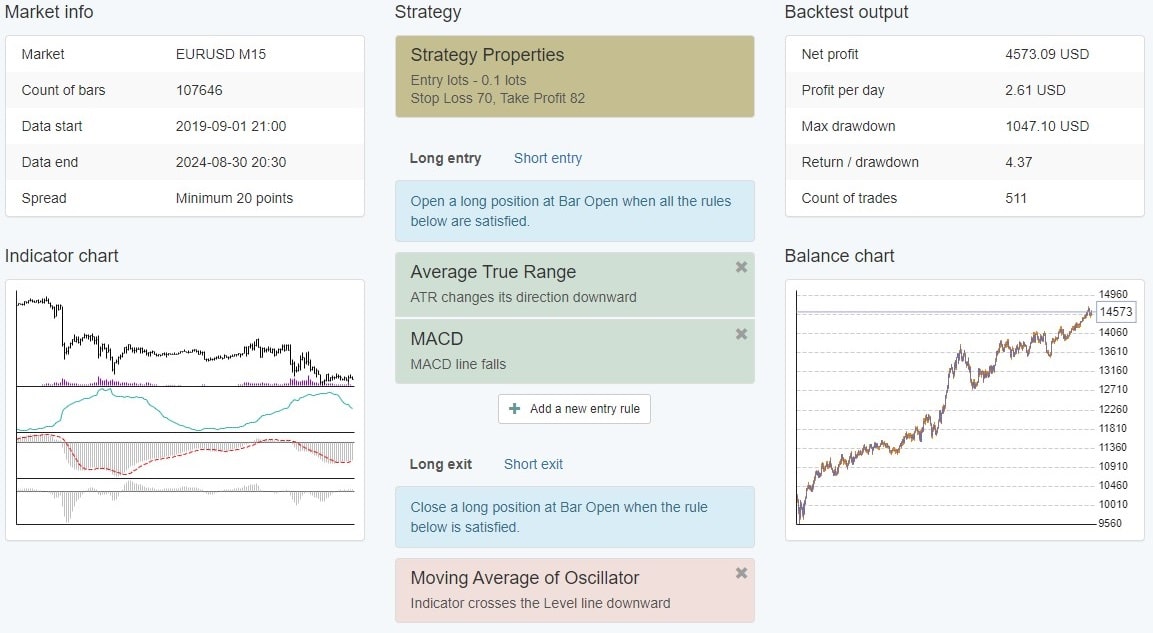
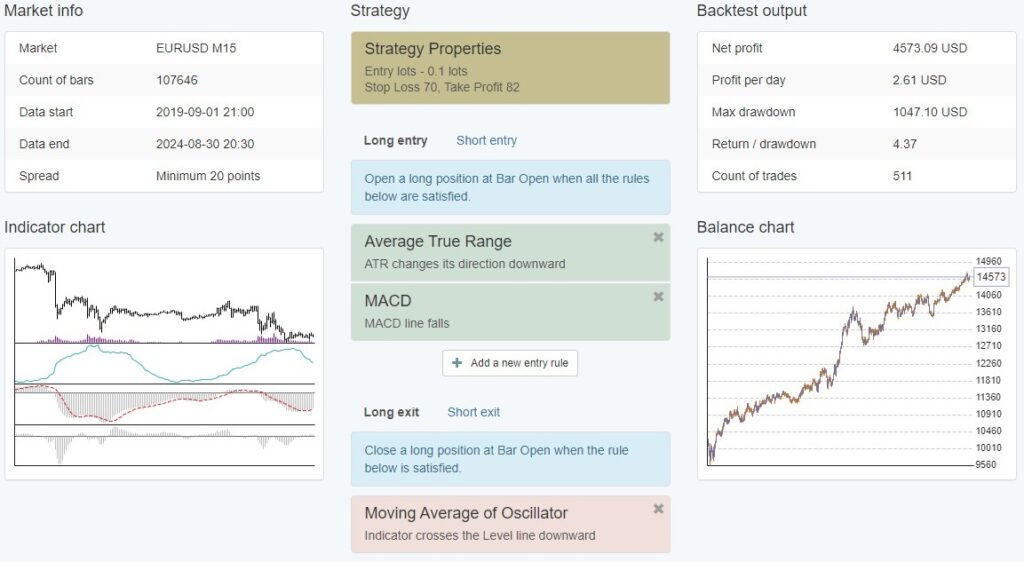
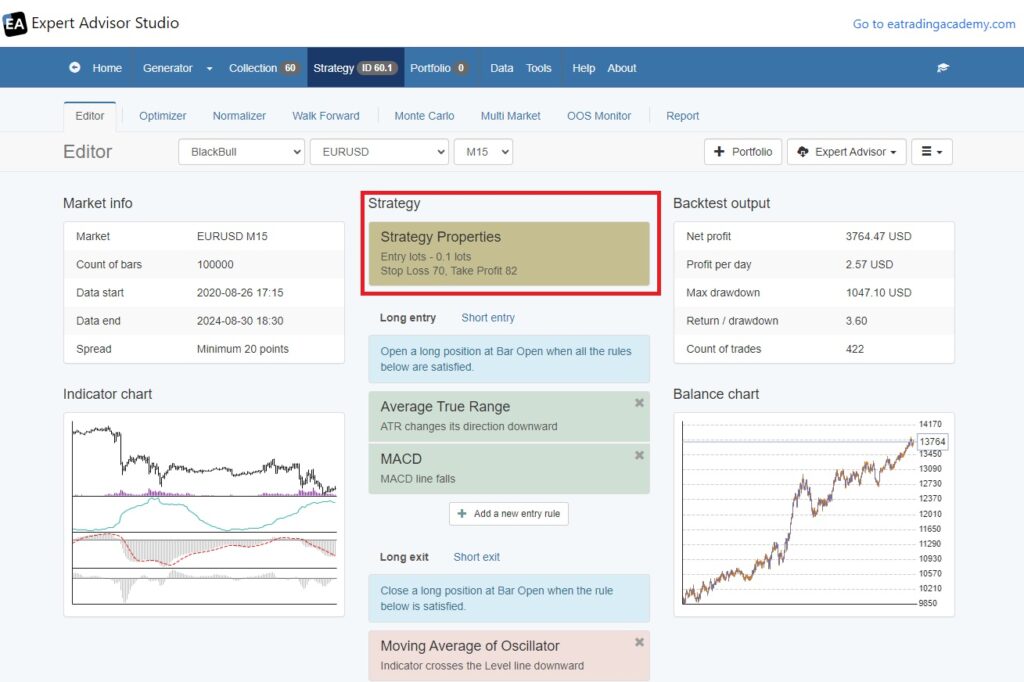
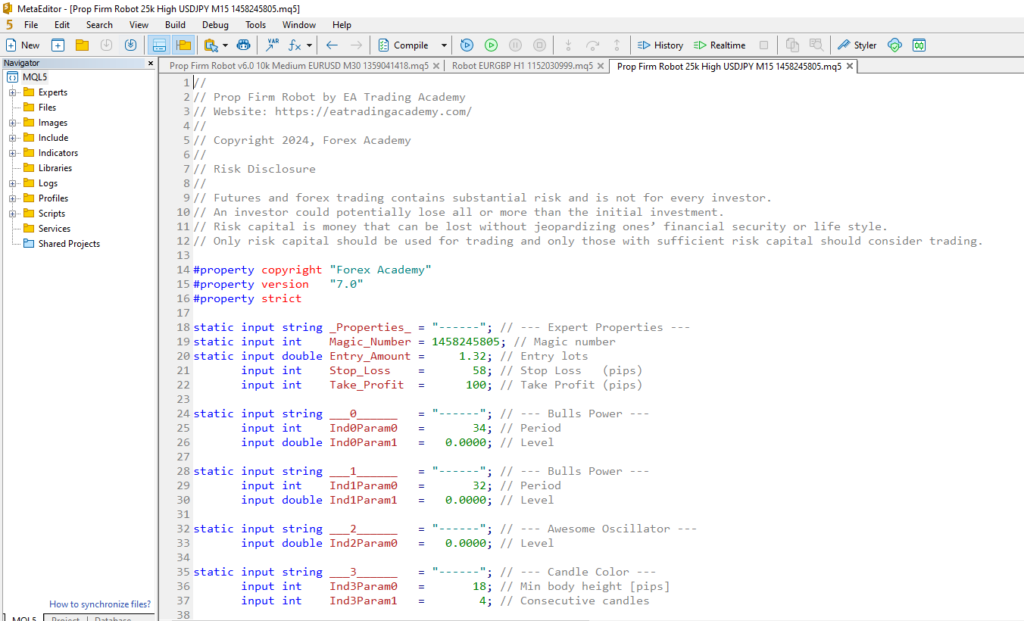
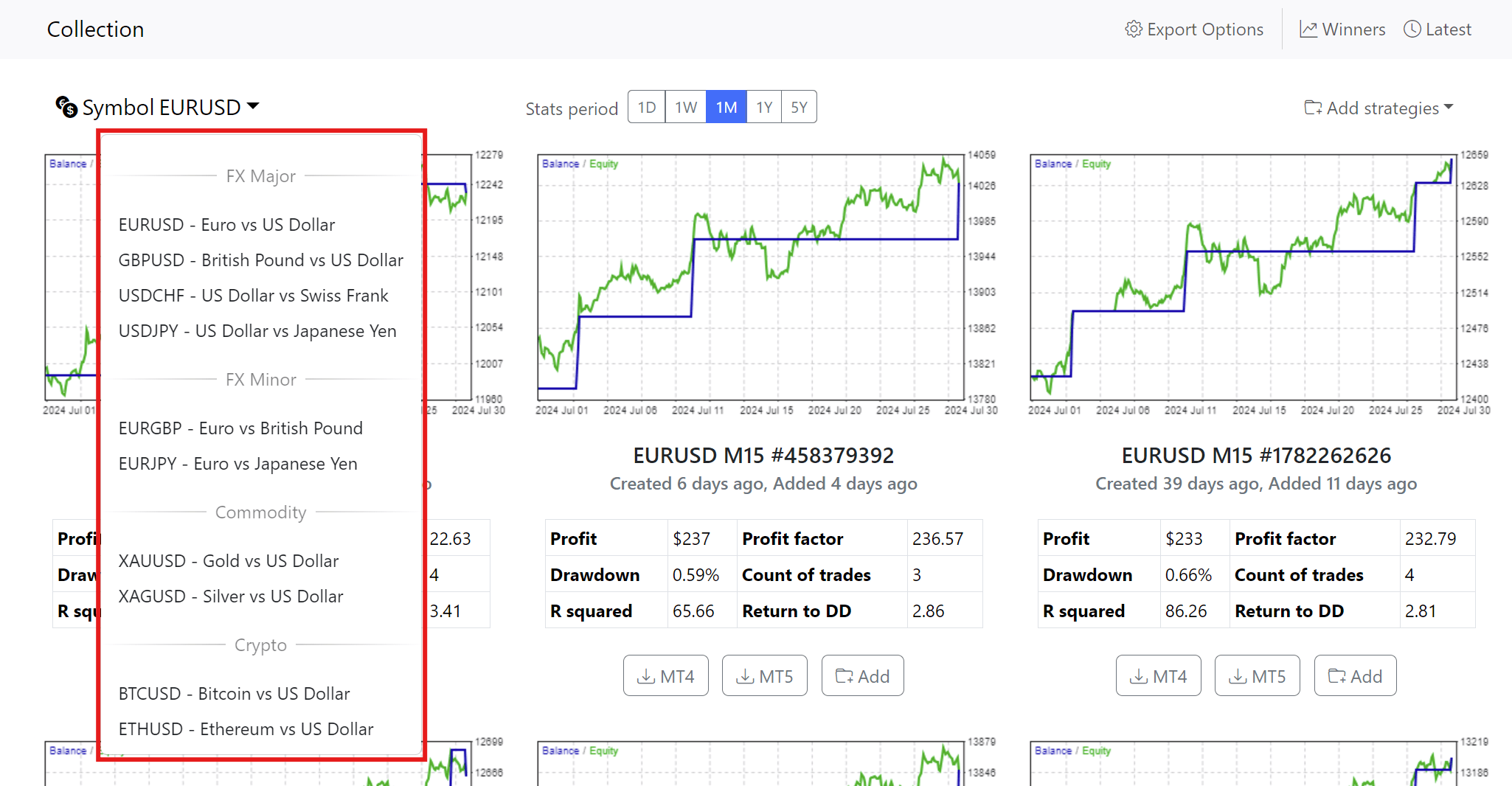
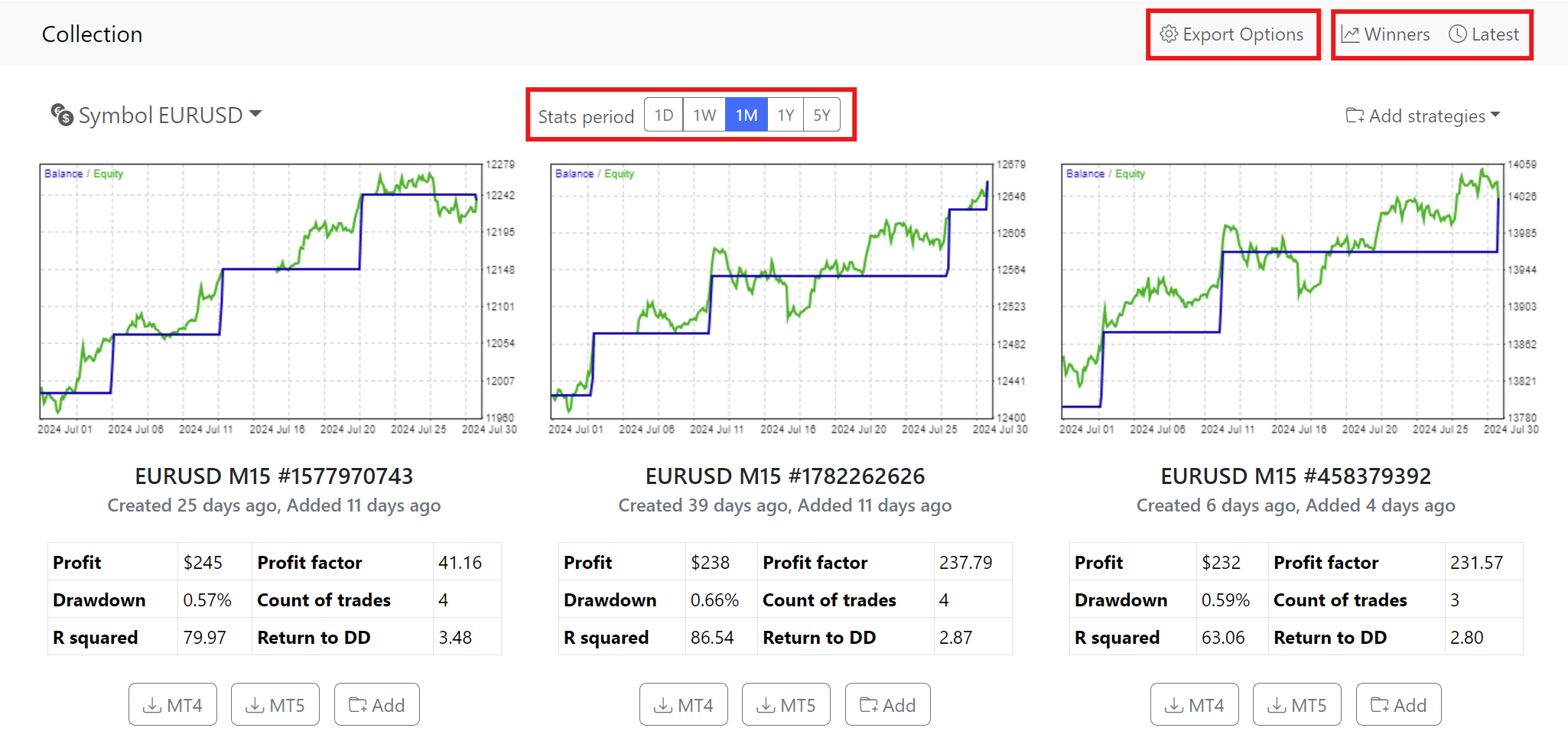
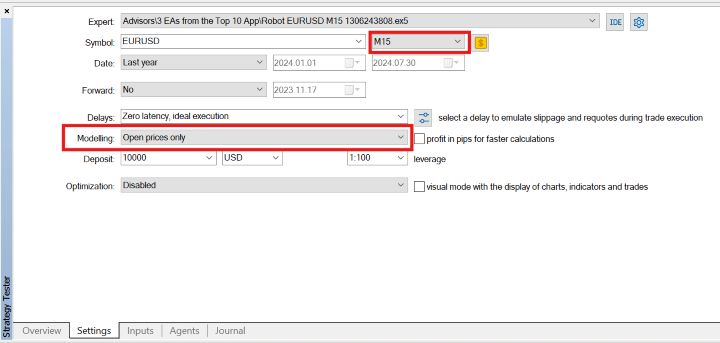
To find a reliable and profitable trading robot can be challenging. That’s why here, at EA Trading Academy, we worked hard to make sure you guys are equipped with the best possible trading solutions. And we created the Top 10 Robots App. A software where we test and present only the most reliable and effective trading bots. So we decided to show you more in depth and analyze one of the apps trading strategies. A trend following expert advisor. It is a specialized trading strategy designed to operate on the EUR/USD currency pair using the M15 (15-minute) timeframe. This review will explore the core components of this trend following EA, including its strategy logic, the indicators it employs, and its effectiveness in the forex market.
Trading Strategy Overview
This trading robot is a sophisticated automated trading system tailored for short-term trading on the EUR/USD currency pair. It operates on the 15-minute timeframe, and it is structured to identify and capitalize on market trends. The trend following EA combines several technical indicators that collectively generate precise trading signals. The strategy is built around the principle of trend-following. It aims to enter trades that align with the prevailing market direction and momentum.
The robot integrates a robust risk management framework, which is critical for protecting capital in the volatile forex market. With fixed parameters for Stop Loss and Take Profit, the strategy ensures that every trade is executed with a clear risk-to-reward ratio. The primary goal of this Trend Following EA is to provide a disciplined trading approach that minimizes risk while maximizing potential returns.
The strategy’s reliance on technical indicators ensures that trade decisions are data-driven, reducing the likelihood of emotional or impulsive trades. In summary, the trend following EA is designed to offer traders a systematic and reliable method of engaging with the forex market, with an emphasis on trend identification and risk management.
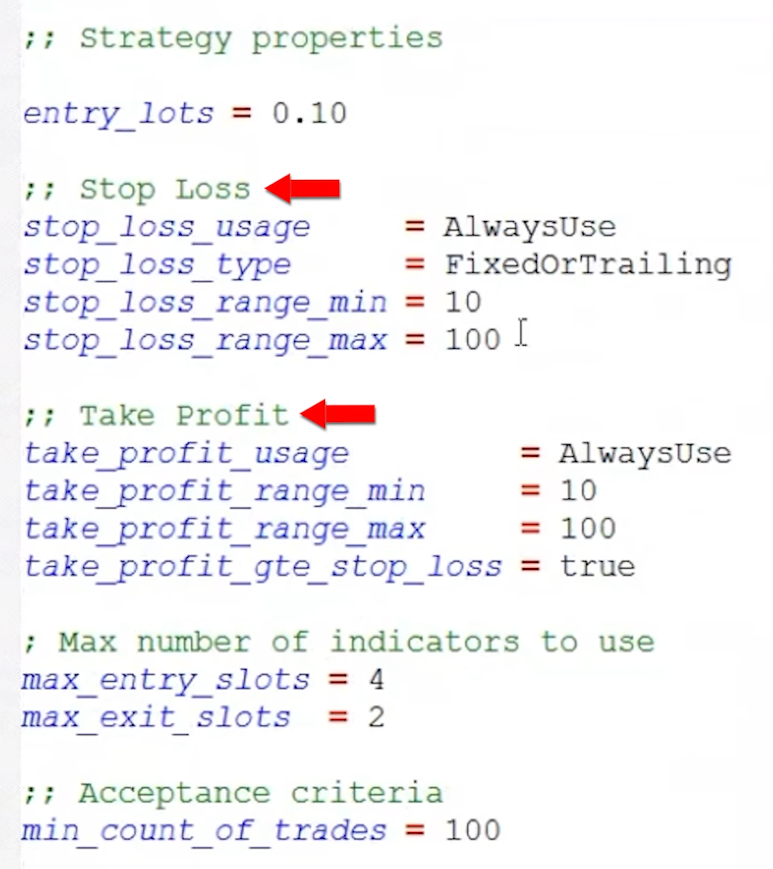
We want to ensure consistency and discipline in its approach. So the strategy operates with a set of predefined parameters that govern its trading behavior. These parameters are crucial for managing risk and defining the strategy’s potential profitability. The two primary parameters are the Entry Amount and the Stop Loss and Take Profit levels.
Entry Amount
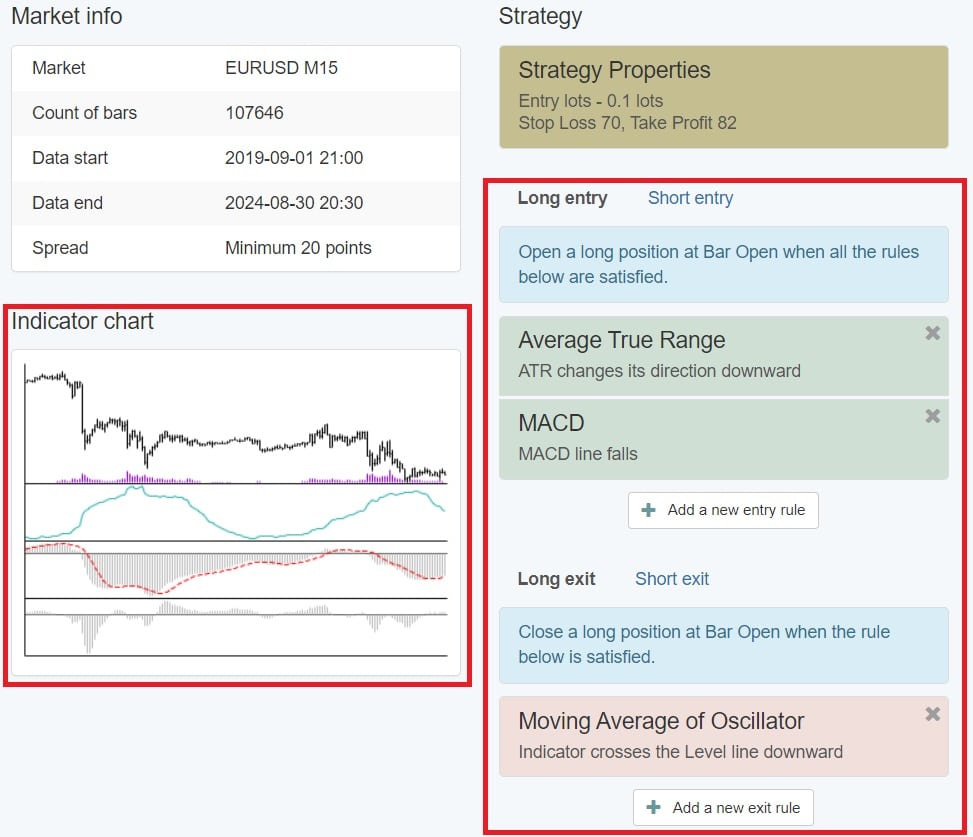
This trend following EA uses a fixed lot size of 0.10 lots for each trade. This standardized position size is essential for maintaining a consistent level of risk across all trades. This way, the strategy ensures that the potential risk and reward of each trade are predictable. This is vital for effective risk management. This approach also simplifies the trading process. Traders do not need to adjust their position size based on changing market conditions or account balance.
The fixed lot size is particularly important in a trend-following strategy, where the objective is to capture large price movements over time. By keeping the lot size consistent, the EA can systematically exploit these movements without exposing the trading account to excessive risk.
Stop Loss and Take Profit
Risk management is at the heart of the trading strategy. The trend following EA implements a Stop Loss of 70 pips and a Take Profit level of 82 pips. These fixed levels are here to provide a clear risk-to-reward ratio, where the potential reward slightly outweighs the potential risk.
The Stop Loss is set to limit the downside of any trade. It ensures that losses are capped at a manageable level. This is particularly important in the volatile forex market, where price movements can be unpredictable. The Take Profit level, on the other hand, is designed to lock in profits once the market moves in favor of the trade. By setting a Take Profit level that is slightly higher than the Stop Loss, the strategy aims to achieve a positive expectancy over the long term.
Together, these parameters form the backbone of the EA’s risk management framework. They make sure that each trade is executed with a clear plan for both loss limitation and profit realization.
Entry Amount: entry lot size of 0.10 lots.
Stop Loss and Take Profit:
Stop Loss: 70 pips
Take Profit: 82 pips
Indicators Used by the Trend Following EA
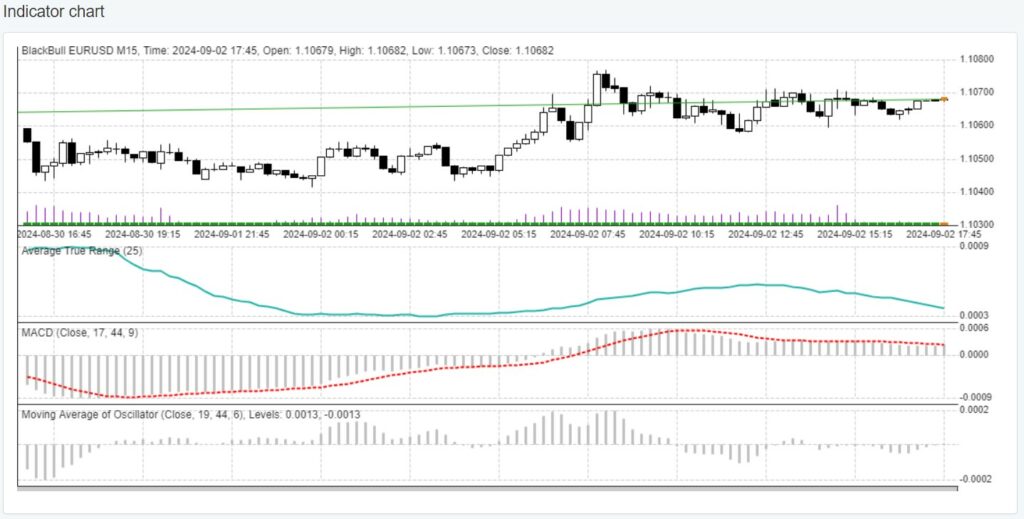
The effectiveness of this strategy largely depends on the technical indicators it uses to generate trading signals. These indicators are carefully selected to complement each other. They provide a comprehensive view of market conditions, including trend direction, momentum, and volatility. The three primary indicators used in this trend following strategy are the Average True Range (ATR), the Moving Average Convergence Divergence (MACD), and the Moving Average of Oscillator (OsMA).
Average True Range (ATR)
The ATR is a volatility indicator that measures the average range of price movement over a specified period. In this trend following strategy, the ATR is set with a Period of 25 and a Level of 0.0045. The ATR helps the trend following EA to determine the optimal placement of Stop Loss and Take Profit levels based on the current market volatility. By understanding the typical range of price movements, the EA can set these levels in a way that reduces the likelihood of being prematurely stopped out due to normal market fluctuations.
Moving Average Convergence Divergence (MACD)
The MACD is a momentum indicator that shows the relationship between two moving averages of a currency pair’s price. In this trend following strategy, the MACD settings are configured with a Fast EMA of 17, a Slow EMA of 44, and a MACD SMA of 9. The MACD is used to identify the strength and direction of a trend, with trade entries typically triggered when the MACD line crosses above or below the signal line. This crossover is a classic signal in trend-following strategies, indicating the start of a new trend or a potential reversal.
Moving Average of Oscillator (OsMA)
The OsMA is an extension of the MACD that further refines the trading signals by confirming trend direction and momentum. Here, the OsMA settings include a Fast EMA of 19, a Slow EMA of 44, a MACD SMA of 6, and a Level of 0.0013. The OsMA helps to validate the signals generated by the MACD. This makes sure that the trend following EA only enters trades when there is strong momentum in the direction of the trend.
By combining these three indicators, the trend following expert advisor is able to generate robust trading signals that are grounded in both trend identification and market volatility. It guarantees that each trade is based on a comprehensive analysis of current market conditions.
This trend following strategy employs a logical and systematic approach to trading. It relies on the combination of the ATR, MACD, and OsMA indicators to generate precise entry and exit signals. The strategy logic is designed to identify trends, confirm momentum, and manage risk effectively. This approach guarantees that the trend following EA operates with a clear set of rules. It reduces the influence of market noise and enhances the probability of successful trades.
Entry Signal
The entry signals in this EA are generated when the indicators align to confirm a trend with sufficient momentum. The MACD provides the initial signal. It indicates a trend change when the MACD line crosses above or below the signal line. The OsMA is then used to confirm the momentum behind this trend. It ensures that the trade is supported by strong market dynamics. Finally, the ATR verifies that the market volatility is within acceptable levels. This makes the trade viable in terms of risk management.
Long Trade Example
A long trade is triggered when the MACD line crosses above the signal line. This indicates the beginning of a bullish trend. The OsMA confirms this momentum by staying above the specified level of 0.0013. If the ATR indicates that market volatility is favorable, the EA will open a long position with a lot size of 0.10, a Stop Loss of 70 pips, and a Take Profit of 82 pips. This structured approach ensures that the trade is aligned with the prevailing market trend and that the risk is managed effectively.
Short Trade Example
Similarly, a short trade is triggered when the MACD line crosses below the signal line, signaling a bearish trend. The OsMA confirms the bearish momentum by remaining below the specified level of 0.0013. The ATR then checks that market volatility is conducive to the trade. Once these conditions are met, the EA opens a short position with a fixed lot size, Stop Loss, and Take Profit. This ensures consistency in execution and risk management.
Position Management
Position management is a critical aspect of the strategy. It ensures that trades are managed according to predefined rules that protect the trading account and maximize potential profits.
Closing Positions
Positions are closed automatically when the market price hits either the Stop Loss or Take Profit levels. The Stop Loss is set to close the trade if the market moves against it by 70 pips. This is to limit the potential loss on any single trade. Conversely, the Take Profit is set to close the trade when the market moves in favor of the trade by 82 pips. This secures the profit before the market has a chance to reverse. Such an automated approach to closing positions ensures that trades are managed objectively, without emotional interference.
Entry Protections
To further safeguard the trading process, this trend following strategy includes entry protections such as limiting the maximum spread at which trades can be opened. This prevents the trend following EA from entering trades during periods of high volatility or low liquidity, where the spread might widen and negatively impact trade execution. Additionally, this strategy limits the number of open positions and total lot size, preventing overexposure to the market and ensuring that the trading account remains within acceptable risk parameters.
Risk and Account Management
Risk and account management are fundamental components of any successful trading strategy. This strategy incorporates several layers of risk management to protect the trading account from significant losses. This helps to withstand the inherent volatility of the forex market.
While a maximum daily loss parameter is not in place here, such a feature is highly recommended. Implementing a maximum daily loss limit can help prevent substantial drawdowns in a single trading session. For example, a trader might set a daily loss limit of 3-5% of the account balance, at which point the EA would halt trading for the rest of the day if the limit is reached. This safeguard helps preserve capital and prevents the EA from continuing to trade in adverse market conditions.
Another important aspect of risk management is the use of a fixed lot size for each trade. By maintaining a consistent position size, the EA ensures that each trade carries a predictable level of risk, making it easier for traders to manage their overall exposure. This is particularly important in a trend-following strategy, where the goal is to capture large price movements while minimizing the impact of losing trades.
Additionally, the strategy includes protections such as limiting the maximum spread at which trades can be opened. This prevents the EA from entering trades during periods of high volatility or low liquidity, where the spread might widen and negatively impact trade execution. The EA also limits the number of open positions and total lot size. This prevents overexposure to the market and ensures that the trading account remains within acceptable risk parameters.
In summary, the strategy’s risk and account management features are designed to protect the trading account from significant losses, ensure consistent risk exposure, and maximize the potential for long-term profitability.
Summary of the Trend Following EA
This trend following strategy is a meticulously designed automated trading system. It combines trend-following and risk management principles to trade the EUR/USD currency pair on a 15-minute timeframe. By leveraging technical indicators such as the ATR, MACD, and OsMA, the EA is able to identify emerging trends and confirm their momentum before executing trades. This approach ensures that the EA only enters trades that align with the prevailing market direction and have a high probability of success.
The EA’s strategy is built around a fixed set of parameters, including a consistent lot size, predefined Stop Loss and Take Profit levels, and entry protections against high spreads. These features are crucial for maintaining discipline and consistency in trading, which are essential for long-term success in the forex market.
One of the key strengths of this trend following EA is its robust risk management framework. This includes protections against overexposure and the ability to set maximum daily loss limits. These features help to safeguard the trading account. Also to ensure that the EA can continue to operate effectively even in volatile market conditions.
In conclusion, this trend following Expert Advisor is a powerful tool for traders looking to automate their trading strategy and capitalize on short-term trends in the forex market. With its emphasis on trend-following, disciplined execution, and comprehensive risk management, this EA offers a systematic approach to trading that can help traders achieve consistent results over time.
Get your FREE trend following EA, using the link below.
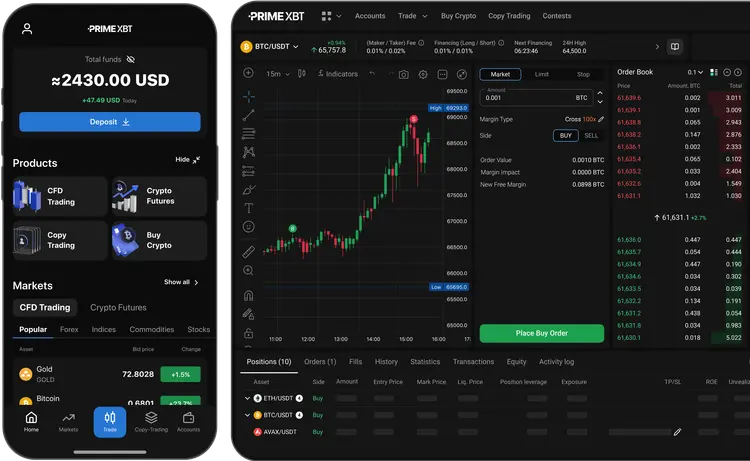
PrimeXBT is a leading cryptocurrency and multi-asset trading platform that offers users access to a wide range of markets, including cryptocurrencies, forex, commodities, and indices. Launched in 2018, the platform has quickly gained popularity due to its high leverage options, innovative features like the Covesting module, and a user-friendly interface. While it operates in the crowded trading landscape, PrimeXBT has built a solid reputation for its robust security measures, competitive fees, and 24/7 customer support, making it a compelling choice for traders seeking diverse trading opportunities on a single platform. This article provides a comprehensive PrimeXBT review.
Visit PrimeXBT to experience the platform’s cutting-edge financial technology.
We will start this PrimeXBT review with some words about the platform in general. PrimeXBT was founded in 2018 with the goal of providing traders with easy and immediate access to a wide range of global markets from a single platform as well as all the education and tools they need to succeed, regardless of their financial experience. Since its inception, PrimeXBT has focused on offering advanced trading solutions with a particular emphasis on high leverage, allowing traders to maximize their potential returns.
The platform quickly gained traction in the cryptocurrency trading community due to its user-friendly interface, competitive fees, and a strong suite of trading tools. Over the years, PrimeXBT has expanded its offerings to include traditional financial instruments like forex, commodities, and stock indices, further broadening its appeal. Despite operating in a highly competitive and rapidly evolving industry, PrimeXBT has managed to establish itself as a reliable and innovative trading platform, attracting a global user base.
In summary, PrimeXBT’s history is characterized by rapid growth, continuous innovation, and a steadfast commitment to providing a secure and comprehensive trading experience. The company’s foundation and evolution reflect its dedication to meeting the evolving needs of traders and maintaining a leading position in the competitive trading platform market.
PrimeXBT Review: Key Features of PrimeXBT
In the next section of this PrimeXBT review, we will look at the key features of the platform. It offers a robust and versatile trading platform designed to meet the needs of traders across various experience levels. The platform is known for its user-friendly interface, advanced trading tools, and high-performance execution. Key features of the PrimeXBT trading platform include:
Leverage Trading: PrimeXBT offers high leverage, up to 100x for cryptocurrencies and 1000x for forex. This allows traders to control larger positions with less capital. This feature is particularly beneficial for experienced traders looking to amplify their trading potential.
Covesting Module: This is one of PrimeXBT’s most innovative and standout features. It is designed to bridge the gap between novice and experienced traders. This social trading tool allows users to follow and automatically copy the trades of successful traders. They are known as strategy managers, on the platform. For beginners or those with limited time to actively manage their trades, Covesting provides an opportunity to benefit from the expertise of seasoned traders without needing to develop strategies from scratch.
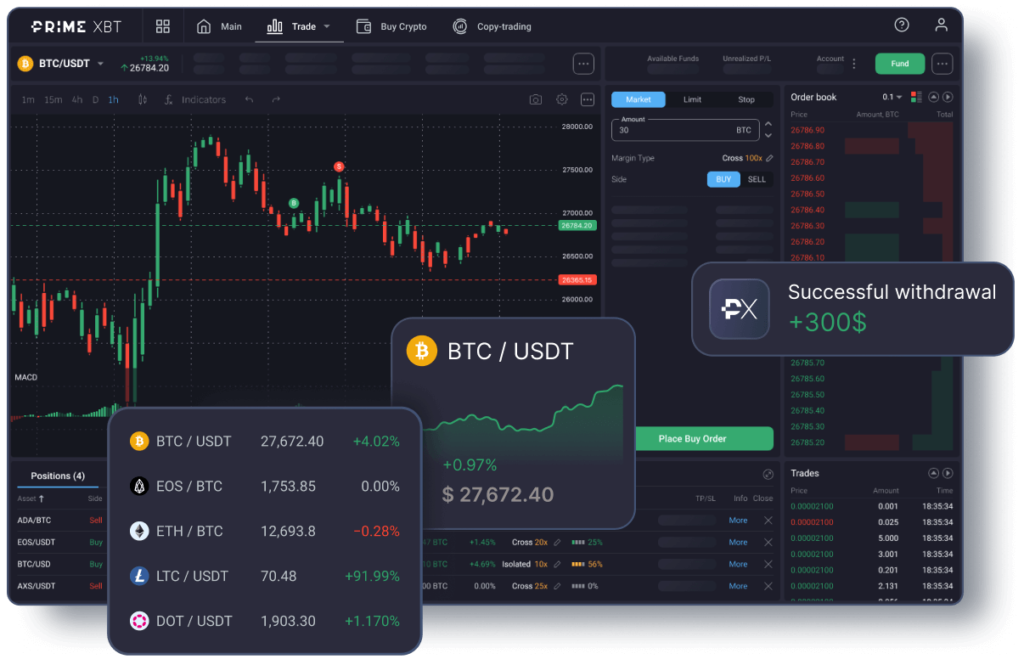
Intuitive User Interface: PrimeXBT’s interface is designed to be intuitive and user-friendly with advanced charting tools. This makes it accessible and efficient for both novice and experienced traders. The platform supports both web and mobile applications, ensuring that traders can access the markets from anywhere at any time.
TradingView Integration: Integration with TradingView provides users with enhanced charting capabilities and social trading features. This integration allows traders to benefit from the TradingView community’s insights and analysis.
Advanced Trading Tools: The platform is equipped with a suite of advanced trading tools such as customizable charts, technical indicators, and real-time market data. These tools enable traders to perform in-depth market analysis and execute sophisticated trading strategies.
PrimeXBT Review: Types of Assets Available for Trading
Within this part of our PrimeXBT review, we will talk about the different types of assets available for trading. PrimeXBT offers a diverse range of assets, including cryptocurrencies, forex, commodities, and indices. This makes it a versatile choice for traders seeking diverse opportunities.
Cryptocurrencies: PrimeXBT provides access to a wide variety of cryptocurrency trading pairs. Users can trade popular digital assets such like Bitcoin (BTC), Ethereum (ETH), Litecoin (LTC), and Ripple (XRP), as well as other popular altcoins. This range allows traders to engage with the highly dynamic and rapidly growing cryptocurrency market.
Forex: The platform offers extensive forex trading options, including major, minor, and exotic currency pairs. Some of the popular pairs available are EUR/USD, GBP/USD, and USD/JPY. With up to 1000x leverage available, PrimeXBT appeals to forex traders looking for significant trading opportunities across global currency markets.
Commodities: PrimeXBT also supports trading in key commodities such as gold, silver, crude oil, and natural gas. These assets provide an opportunity for traders to diversify their portfolios and hedge against market volatility.
Stock Indices: For those interested in traditional financial markets, PrimeXBT offers trading on popular stock indices like the S&P 500, FTSE 100, and NASDAQ. This allows traders to speculate on the performance of leading global economies.
Futures: PrimeXBT offers futures trading, allowing traders to speculate on the future price of an asset. This can include cryptocurrencies, commodities, and indices. Futures trading is beneficial for hedging and managing risk in volatile markets.
Visit PrimeXBT to explore platform’s multiple trading assets, including up to 1000x leverage available for Forex.
PrimeXBT Review: Security Measures within PrimeXBT
PrimeXBT places a strong emphasis on security, implementing multiple layers of protection to safeguard users’ funds and data. The platform’s robust security infrastructure ensures a safe trading environment for all users. Security measures include Two-Factor Authentication (2FA), Cold Storage as well as SSL Encryption.
Two-Factor Authentication (2FA): PrimeXBT offers two-factor authentication (2FA) as a key security measure. This provides an additional layer of protection beyond just a password.
Cold Storage: To further enhance the security of user funds, PrimeXBT employs cold storage for the majority of its assets. Cold storage refers to the practice of keeping cryptocurrencies offline, away from internet-connected systems. This minimizes the risk of hacking and unauthorized access. PrimeXBT keeps only a small portion of funds in hot wallets for immediate liquidity needs, ensuring that most assets remain secure from potential online threats.
SSL Encryption: PrimeXBT uses SSL (Secure Socket Layer) encryption to protect all data transmitted between users and the platform. SSL encryption ensures that any sensitive information, such as login credentials or personal details, is encrypted and secure from interception by malicious actors.
Regular Security Audits: PrimeXBT conducts regular security audits and vulnerability assessments to identify and address potential security threats. These proactive measures help maintain the integrity and security of the platform.
User Data Protection: All sensitive user data, including personal information and financial details, is encrypted using industry-standard encryption algorithms. The platform complies with global data protection regulations, such as the General Data Protection Regulation (GDPR) in the European Union.
These security features collectively ensure that PrimeXBT provides a secure trading environment, helping to protect users’ funds and personal information against potential threats.
PrimeXBT Review: Overview of Fees Structure
PrimeXBT offers a transparent fee structure that is competitive within the trading industry. It is designed to appeal to both high-frequency traders and those making occasional trades. Fees which traders should take into consideration are:
Trading Fees: The platform charges a flat trading fee of 0.05% per trade for cryptocurrency transactions. This rate is relatively low compared to industry standards, making it cost-effective for traders, especially those executing large volumes of trades. This fee applies to both market orders and limit orders.
Overnight Financing: For leveraged positions held overnight, PrimeXBT charges an overnight financing fee, also known as funding fee. These fees apply for positions held open overnight. They also vary depending on the asset being traded and the leverage used. Funding fees are calculated on an hourly basis and can be viewed directly on the trading platform.
Withdrawal Fees: PrimeXBT imposes a flat fee for withdrawals, with the amount varying based on the cryptocurrency being withdrawn. This fee structure is straightforward and transparent, ensuring users are aware of the costs associated with moving their funds off the platform. For example, the withdrawal fee for Bitcoin is typically 0.0005 BTC. These fees cover the transaction costs associated with processing the withdrawal on the blockchain network.
PrimeXBT does not charge inactivity fees, meaning there are no costs associated with maintaining an account that is not actively being used. Also, there are no fees for depositing cryptocurrencies. However, users should be aware that depositing fiat currencies through third-party payment processors may incur fees, which are determined by the payment provider.
PrimeXBT’s fee structure is competitive, particularly for active traders, with transparent trading and withdrawal fees that are in line with industry practices.
PrimeXBT Review: Account Tiers and Benefits
PrimeXBT offers different account levels, each providing a range of benefits and features to cater to various trading needs. Here’s an overview of the different account tiers and their associated benefits:
Standard Account
Access to All Trading Instruments: Standard account holders can trade across all available markets, including cryptocurrencies, forex, commodities, and indices.
Basic Trading Tools: Access to the essential trading tools and features, such as customizable charts and technical indicators.
Customer Support: Standard accounts have access to customer support via live chat and email.
Promotions and Bonuses: Eligibility for promotional offers, such as deposit bonuses and welcome bonuses.
Silver Account
Enhanced Trading Limits: Higher trading limits compared to the standard account, allowing for larger position sizes.
Priority Customer Support: Faster response times and priority handling of support inquiries.
Lower Fees: Reduced trading fees and commissions, providing cost savings on high-volume trades.
Exclusive Webinars and Tutorials: Access to advanced educational resources and webinars to improve trading skills.
Gold Account
Even Higher Trading Limits: Further increased trading limits, ideal for more experienced traders.
Dedicated Account Manager: Personalized support from a dedicated account manager to assist with trading strategies and account management.
VIP Events and Networking: Invitations to exclusive VIP events and networking opportunities with other high-level traders and industry experts.
Enhanced Security Features: Additional security measures to protect account and transaction information.
Platinum Account
Maximum Trading Limits: The highest trading limits available, suitable for professional traders and institutional clients.
Personalized Trading Insights: Customized market insights and trading signals provided by experts.
Fee Rebates and Rewards: Additional fee rebates and rewards based on trading volume and activity.
Comprehensive Insurance: Coverage for potential losses due to unforeseen events, enhancing security and peace of mind.
PrimeXBT’s tiered account structure ensures that traders of all levels have access to the tools and resources they need to succeed. From beginners with a standard account to seasoned professionals with platinum accounts, each tier is designed to provide specific benefits that enhance the trading experience. By offering a range of account types, PrimeXBT accommodates diverse trading needs and preferences, ensuring a tailored experience for every user.
Visit PrimeXBT to find out more about the different account types available and chose the one which suites you most.
PrimeXBT Review: Customer Support and Resources
Customer Service
PrimeXBT places a strong emphasis on providing excellent customer service to ensure a smooth and satisfying user experience. The platform offers multiple channels for customer support, ensuring that users can get the help they need quickly and efficiently.
Availability and Responsiveness of Support
24/7 Support: PrimeXBT offers round-the-clock customer support to cater to its global user base. This ensures that users can get assistance at any time, regardless of their time zone.
Quick Response Times: The support team is very responsive, as they address most queries within a few hours. They also prioritize urgent issues to minimize any disruption to trading activities.
Channels for Customer Support
Live Chat: The live chat feature on PrimeXBT’s website provides instant support for users. This real-time assistance is particularly useful for resolving urgent issues and answering quick questions.
Email Support: Users can also reach out to the support team via email for more detailed inquiries or if they prefer written communication. The email support team is efficient in handling a wide range of issues, from technical problems to account-related questions.
Help Center: The PrimeXBT Help Center is a comprehensive resource that includes FAQs, troubleshooting guides, and detailed articles on various aspects of the platform. It’s a great first stop for users looking to resolve common issues on their own.
Social Media: PrimeXBT maintains an active presence on social media platforms like Twitter and Telegram, where users can also seek support and stay updated on the latest news and updates.
Educational Resources
PrimeXBT provides a wealth of educational resources to help users enhance their trading skills and knowledge. These resources are here to cater to both beginners and experienced traders, ensuring that everyone can benefit from them.
Tutorials and Guides:
Getting Started Guides: For new users, PrimeXBT offers comprehensive getting started guides that cover the basics of account setup, platform navigation, and the first steps in trading.
Trading Tutorials: These tutorials provide step-by-step instructions on how to use various features of the PrimeXBT platform, including placing orders, using leverage, and managing positions. They are here to help users understand and utilize the platform’s capabilities effectively.
Technical Analysis Guides: PrimeXBT offers detailed guides on technical analysis, covering topics such as chart patterns, indicators, and trading strategies. These guides are invaluable for traders looking to improve their analytical skills and make more informed trading decisions.
Webinars and Training Sessions:
Live Webinars: PrimeXBT regularly hosts live webinars on various trading topics. These sessions are conducted by industry experts and cover a wide range of subjects, from market analysis to advanced trading strategies. Webinars provide an interactive learning experience, allowing users to ask questions and engage with the presenters.
On-Demand Webinars: Recordings of past webinars are available on-demand, allowing users to learn at their own pace. This library of recorded sessions covers a broad spectrum of topics, making it a valuable resource for continuous learning.
Training Courses: PrimeXBT offers structured training courses that cover different aspects of trading. These courses are here to provide a deep dive into specific topics, offering a more comprehensive learning experience. Users can follow these courses to systematically build their trading knowledge and skills.
PrimeXBT’s commitment to customer support and education ensures that users have access to the resources they need to succeed in trading. With multiple support channels and a rich array of educational materials, PrimeXBT provides a supportive and informative environment that caters to the needs of traders at all levels.
PrimeXBT Review: Regulation and Compliance
PrimeXBT operates in a wide range of global markets, offering its services to users in more than 150 countries around the world. The products and services featured within PrimeXBT web and mobile apps are provided by different entities, registered and/or regulated in various jurisdictions. PrimeXBT is committed to adhering to international regulations and implementing measures to ensure compliance with legal standards in the jurisdictions where it operates.
Global Accessibility: PrimeXBT is accessible to users in numerous countries, providing traders with the opportunity to engage in trading from virtually anywhere. The platform complies with local regulations in the regions it serves, allowing users to trade confidently within the legal frameworks of their respective jurisdictions.
Know Your Customer (KYC) and Anti-Money Laundering (AML): PrimeXBT follows stringent KYC and AML procedures to prevent fraud, money laundering, and other illicit activities. Users are required to verify their identities by providing valid identification documents and proof of address. These measures help ensure that the platform remains compliant with international financial regulations, protecting both the platform and its users.
Regular Compliance Audits: The platform undergoes regular compliance audits to ensure that its operations meet regulatory requirements. These audits help identify areas for improvement and ensure that PrimeXBT remains aligned with the latest regulatory standards.
Transparency and Fair Trading: PrimeXBT is committed to maintaining a transparent trading environment. It provides regular reports which includes public disclosures of security audits, compliance certifications, and other relevant information. This commitment to transparency helps build trust among its global user base.
PrimeXBT operates with a strong focus on global accessibility, ensuring compliance with local regulations in regions where its services are offered. The platform’s adherence to KYC and AML standards where required, along with its commitment to transparency, allows users to trade confidently and securely across multiple markets.
PrimeXBT Review: User Reviews and Reputation
PrimeXBT enjoys a solid reputation within the trading community, with users frequently praising the platform for its advanced trading tools, high leverage options, and responsive customer support. The Covesting module, in particular, is often highlighted as a valuable feature that allows users to follow and replicate the trades of successful traders, making it an attractive option for both beginners and experienced traders alike. The platform’s user-friendly interface and the ability to trade across multiple asset classes also contribute to its positive standing.
Common Praises from Users
User-Friendly Interface: Many users commend PrimeXBT for its intuitive and user-friendly interface. Both beginners and experienced traders appreciate the ease of navigation and the streamlined design that makes trading seamless and efficient.
Advanced Trading Tools: The availability of advanced trading tools, such as customizable charts and technical indicators, has received significant praise. Users value the integration with TradingView, which enhances their ability to perform in-depth market analysis.
High Leverage Options: PrimeXBT’s high leverage options is frequently one of the highlights as a key benefit. Traders appreciate the ability to maximize their market exposure with relatively small amounts of capital.
Security Measures: The platform’s robust security measures, part of which is SSL encryption, two-factor authentication (2FA), and cold storage for digital assets, are among the positive aspects which users mention. Users feel confident that their funds and personal information are well-protected.
Customer Support: The responsiveness and effectiveness of PrimeXBT’s customer support team often receives praise. Users find the support team to be helpful and quick in resolving issues, contributing to a positive overall experience.
Diverse Asset Selection: Users looking to diversify their trading portfolios appreciate the wide range of assets available for trading, including cryptocurrencies, forex, commodities, and indices.
Highlighted Standout Features
Covesting Module: The Covesting feature, which allows users to follow and copy the strategies of top-performing traders, is frequently mentioned as a standout feature. This module enables less experienced traders to benefit from the expertise of seasoned professionals.
Mobile App: The mobile trading app receives positive feedback for its functionality and convenience. Users appreciate being able to trade on the go without compromising on the platform’s features.
Educational Resources: The comprehensive educational resources, including tutorials, guides, webinars, and training sessions, are highly valued. Users find these resources helpful for improving their trading knowledge and skills.
Criticisms and Areas for Improvement
While PrimeXBT receives a lot of praises, there are a few areas where users have expressed concerns or suggested enhancements.
Common Complaints and Issues:
Withdrawal Times: Some users have reported delays in withdrawal processing, particularly during peak times, though these instances are not the norm.
Complexity for Beginners: Despite a user-friendly interface, beginners may find the platform’s advanced features overwhelming, indicating a learning curve for full utilization.
Limited Fiat Deposit Options: The platform primarily supports cryptocurrency deposits, with limited fiat currency options, which can be inconvenient for users preferring traditional payment methods.
Areas for Improvement:
Enhanced Customer Support Channels: Users have suggested adding more support options, such as phone support, to complement the existing channels and provide quicker assistance.
Fiat Integration: Expanding fiat deposit and withdrawal options could make the platform more accessible to a broader audience, addressing the current limitations.
User Experience for Beginners: Developing more beginner-friendly resources, like interactive tutorials or a guided onboarding process, could help new traders acclimate more easily.
Reduced Withdrawal Fees: Lowering withdrawal fees or increasing transparency around them could improve user satisfaction by better managing expectations regarding costs.
For those considering PrimeXBT, it’s advisable to consult user-generated platforms like Trustpilot for up-to-date ratings and reviews. Trustpilot provides a broad spectrum of user experiences, offering valuable insights into both the strengths and potential challenges of using PrimeXBT.
PrimeXBT Review: Pros and Cons
Here are some of the main Pros and Cons you should consider from this PrimeXBT review.
Pros:
High leverage options.
Diverse range of tradable assets.
Covesting feature for social trading.
User-friendly interface.
Cons:
Not regulated in some countries.
High-risk due to leverage.
Limited fiat deposit options.
Conclusion
PrimeXBT is a versatile and innovative trading platform that offers a wide range of features tailored to meet the needs of both beginners and experienced traders. With high leverage options, a unique Covesting module, and access to multiple asset classes, it provides ample opportunities for users to explore diverse trading strategies. The platform’s strong focus on security, user-friendly interface, and responsive customer support further enhance its appeal. While traders should be mindful of the risks associated with high leverage, PrimeXBT’s comprehensive offerings and positive user feedback make it a compelling choice for those looking to trade across global markets.
Hello traders and welcome to our ultimate guide on the Prop Firm Robots App. In this guide, we will show you how we use the app to find the best EAs to pass prop firms challenges. We will give you detailed information on everything you need – from navigating the app to effectively using Expert Advisors with prop firms. If you’re ready, let’s get started.
The Origin of the Prop Firm Robots App
The Prop Firm Robots App was inspired by the creation of the Top 10 Robots App, a web-based application available on the EA Trading Academy website. The initial idea came from using the EA Studio software, which creates trading strategies based on historical data from various brokers. By selecting a data source and starting the Generator, the software can create hundreds of strategies within seconds, which are then stored for further evaluation against a variety of metrics.
Creating and testing these strategies was time-consuming. We were placing the strategies on demo accounts and connecting them to FXBlue to monitor their performance. Then we would regularly move the best strategies in current market conditions into live accounts. Although the trading itself was automated, managing it still took a lot of effort. This challenge led to the idea of developing a more efficient solution.
The Birth of the Top 10 Robots App
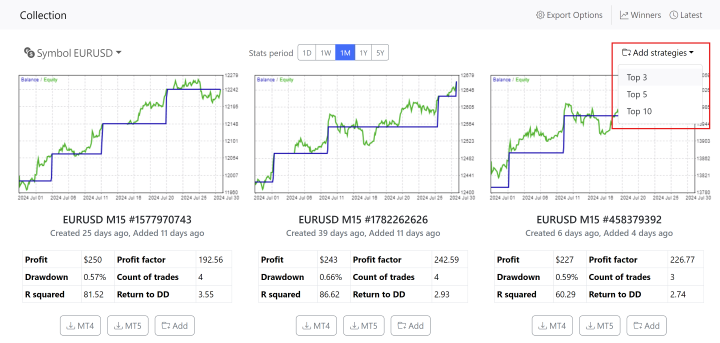
To simplify this process, our team created the Top 10 Robots App. This web app automated the generation and testing of strategies. Our servers generate strategies, around the clock which are then tested and validated using historical data from multiple brokers.
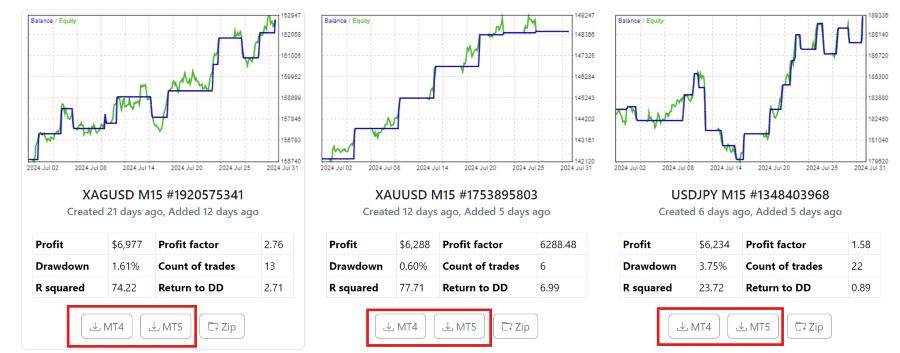
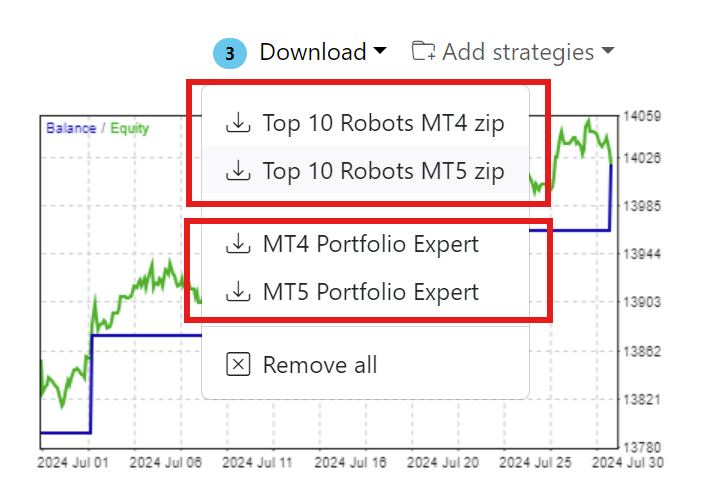
The top strategies are selected and displayed on the app and traders can instantly download the Expert Advisors for MetaTrader 4 or MetaTrader 5 with a single click, eliminating the need for programming knowledge and ensuring that advanced trading strategies are accessible to everyone. If you want to learn more about the strategy generation process check out our Top Robots 10 app guide.
Creation of the Prop Firm Robots App
The success of the Top 10 Robots App and feedback from users led to the creation of the Prop Firm Robots App. This new app builds on the strengths of Top 10 Robots App, incorporating strategy generation and selection processes designed specifically for prop firm trading challenges. The goal was to provide traders with a tool that simplifies the process of passing prop firm challenges.
Getting Started with Prop Firm Robots App
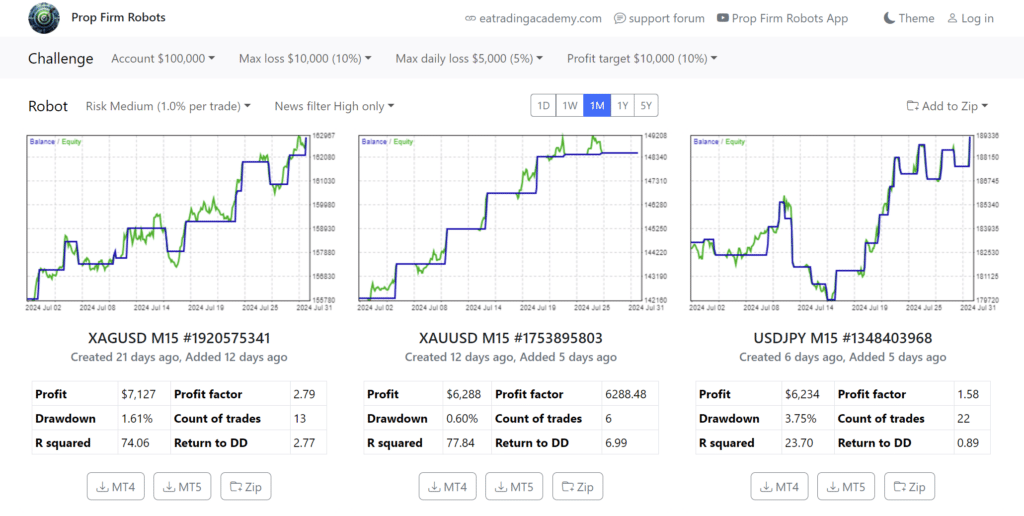
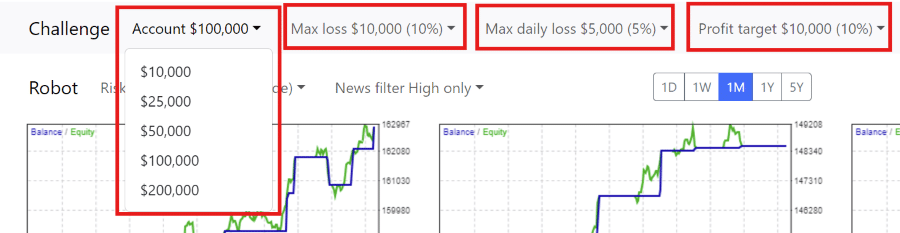
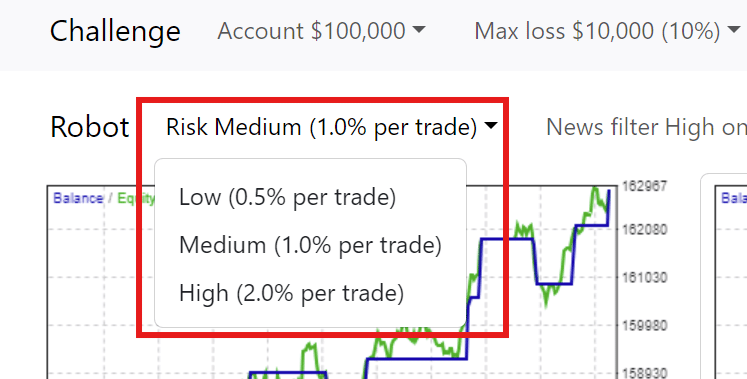
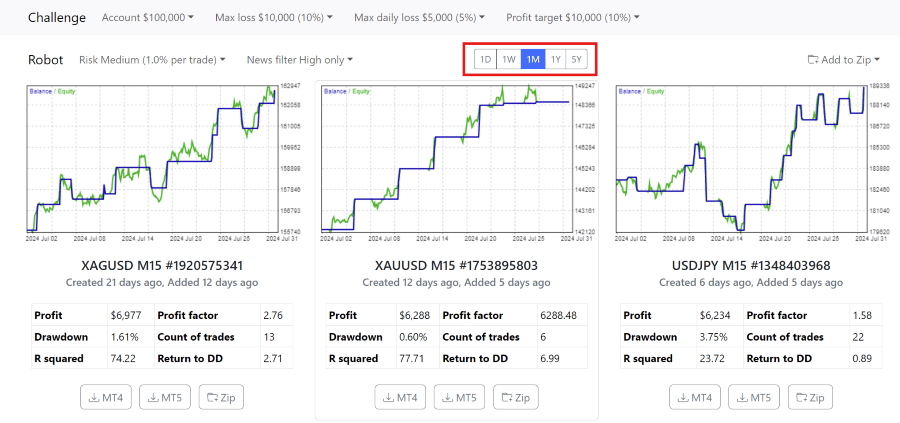
The Prop Firm Robots App is designed to help traders see the performance of various Expert Advisors. You can set your trading challenges, such as the initial balance and risk levels, and the app does the rest. For example, if you choose a $10,000 challenge with a 6% max loss, the app will automatically adjust its settings to fit these parameters.
Using the App for Darwinex Permanent Allocation
Here’s something that changed how we think about the Prop Firm Robots App, it’s not just for traditional prop firms anymore. Darwinex launched permanent allocations, and the app now optimizes strategies specifically for this opportunity.
The permanent allocation deal:
Sign up with coupon code PETKO_20, select the three-year subscription, and you pay €1,000 total. That purchase includes the 15% permanent allocation target (normally costs €200 extra, but it’s free with this deal).
What happens next matters. Once you reach 15% profit, Darwinex unlocks €100K in permanent allocation, and you keep it forever. When you’re profitable, withdraw earnings. When you’re not, you simply don’t make money, but the allocation doesn’t disappear like failed prop firm challenges.
App configuration for Darwinex:
In the export options, set your account to €100,000 (Darwinex’s standard allocation size). Then remove the drawdown protections, set max loss to zero, and max daily loss to zero. Darwinex doesn’t have those restrictions, so the protections become unnecessary.
Choose your profit target based on what you’re aiming for. Perhaps 15% initially to unlock that permanent allocation, then adjust your goals once you’ve secured it.
The Prop Firm Robots App’s servers test strategies across multiple data sources, including Darwinex feeds. This cross-validation means you’re getting EAs that already proved themselves on Darwinex-style execution, not just standard prop firm conditions.
1. Setting Up Your Trading Challenge
First, open the Prop Firm Robots App. Choose your desired challenge size and set the maximum daily loss and overall loss limits. For a $10,000 challenge, you might set a daily loss limit of $500 and a total loss limit of $1,000. The app will then adjust the profit target and other settings accordingly.
To select the EAs to use with your specific challenge, navigate to the challenges section near the top of the app. Here, you can select the challenge and your trading goals and risk appetite. Setting the correct parameters is crucial to ensure you select the correct EAs and settings for your particular needs. As you select the options available, you’ll see the backtest results may change accordingly.
Recovering Partially-Blown Accounts
Students frequently ask: “Can I recover a $93,000 account that started at $100,000?” The export options now support custom account sizes for exactly this scenario.
Set your current balance as the account size, adjust risk parameters accordingly, and the app calculates appropriate lot sizing for your actual remaining capital. The drawdown protection recalculates based on where you stand now, not where you started.
This gives you a realistic chance at recovery instead of continuing with lot sizes designed for the original balance. Risk management scales to your current situation.
2. Choosing Your Risk Level
Decide on your risk level: low, medium, or high. If you choose medium risk, each trade that hits the stop loss will lose no more than 1% of your account. Higher risk levels will increase this percentage, but also the potential profits. Understanding your risk tolerance is essential for long-term success in trading.
Medium risk is often a balanced approach for many traders. It allows for reasonable gains without exposing the account to excessive risk. On the other hand, low risk is suitable for conservative traders who prefer steady growth over time. High risk is for aggressive traders aiming for significant returns but prepared to handle higher volatility.
Why Trading Multiple EAs Reduces Overall Risk
The app contains hundreds of strategies specifically so you can run several simultaneously. Even at high-risk settings (2% per trade), combining multiple EAs creates portfolio-level protection that individual strategies can’t provide.
The compensation effect:
When one EA opens a losing trade, another is often profitable at the same moment. Different strategies trade different markets using different logic, USDJPY momentum scalper, the EURUSD mean reversion system, and the gold breakout strategy. They don’t correlate.
The probability that all strategies simultaneously hit losing trades drops dramatically compared to single-strategy risk. You’re building genuine portfolio differentiation, not just running copies of the same approach with slightly different parameters.
Real challenge examples from our testing:
Looking at passed challenges on the platform’s results page, you’ll notice patterns:
Top 5 Forex Expert Advisors challenge
Top 3 Expert Advisors from last month’s performance
Top 3 yearly performers with monthly cross-validation
Top Gold EAs only
Specific currency pair combinations
In one challenge, using three different currency pairs,the risk split is roughly 50% USDJPY, 25% EURUSD, 25% EURJPY. The trades compensated for each other throughout the challenge period, keeping drawdown within prop firm limits even when individual trades lost.
At medium risk (1% per trade), multiple EAs become even safer. That’s our typical approach when combining several strategies in one challenge account.
3. Using the News Filter
To avoid high-impact news events that can cause market fluctuations, use the news filter. Set it to disable trading during these times, ensuring your strategies remain effective and your risk is minimized. The news filter is a valuable tool that prevents the EAs from opening new positions when significant economic announcements are expected.
This helps to avoid unexpected market movements that could negatively impact your trades. Check out our Knowledge Base section about the News Filter to see all the options explained in detail.
The news filter settings can be adjusted to account for high and medium-priority news. For instance, you can set the filter to prevent trades two minutes before and five minutes after high-impact news events. This buffer period ensures that the market has time to stabilize before the EAs resume trading.
To use the News Filter, on your MetaTrader platform, click on Tools -> Option. Navigate to the Expert Advisors tab. Enable the check box “Allow WebRequest for listed URL“. Add the following URL in the box below: https://forexsb.com. This is the URL of our news service. Note, you only need to do this once. It will apply to all EAs installed, and all of those that will be installed.
The Stats Period
One of the great features of the Prop Firm Robot App is the stats period which allows users to effortlessly identify top-performing Expert Advisors based on their performance over different time frames, eliminating the need for manual testing and tracking.
Users can now make informed trading decisions using real-time data on EA performance for daily (1D), weekly (1W), monthly (1M), yearly (1Y) and 5 years (5Y) periods. This feature is very useful when understanding how a strategy has performed, and is currently performing.
Out-of-Sample Data: Virtual Live Trading Since Creation
The backtest charts show more than historical performance. Notice the green portion? That’s forward testing, what we call out-of-sample data, and it’s genuinely important.
How forward testing works:
When the app creates a strategy, that moment becomes a dividing line. Everything before the creation date? That’s optimization data the strategy “knew about” during development. Everything after? Unknown data that the strategy has never seen.
Take this example from the app. A Bitcoin strategy created 71 days ago now shows 71 days of forward test performance. The strategy has been trading virtually on live data from multiple prop firms and brokers, processing price movements it couldn’t have optimized for.
Why this matters more than backtest results:
Backtests can look perfect because strategies optimize on that exact data. Forward tests prove the strategy works on data it’s never encountered, exactly like live trading conditions you’ll face.
A golden strategy created 5 months ago? You can see its complete forward performance from creation to today. If it stayed profitable throughout those 5 months of unseen data, that’s genuine evidence of robustness.
This isn’t demo trading on one broker. The app runs virtual trades across data feeds from several prop firms simultaneously, cross-validating that performance translates across different execution environments.
Downloading & Installing Expert Advisors
With the Prop Firm Robots app, you can easily download EAs for various currency pairs. To do this, you can select the top-performing Expert Advisors from the desired stats period and download them for use in MetaTrader 4 or MetaTrader 5.
Furthermore, you can download the EAs you need from the Prop Firm Robots App individually or all at once as a zip file.
Setting Up Your MetaTrader Platform
If you select to download more than one EA at a time, you have the option to download these as a Zip file. After downloading the compressed files, unzip them by right-clicking and selecting “Extract All.” Choose a folder to store them and click “Extract.” Once the Expert Advisors are ready, open a demo account with any regulated broker offering the MetaTrader platform or from your chosen Prop Firm. Demo trading is always recommended initially until you become familiar and comfortable with trading on MetaTrader with EAs.
Next, install the MetaTrader platform on your computer or Virtual Private Server. You can install multiple platforms by changing the destination folder during installation. For instance, add a number to the installation folder name to differentiate them. Once installed, open MetaTrader and log into your demo or live prop firm challenge trading account. You’ll know you’re connected when you see the bid and ask prices in the Market Watch window.
Install the EAs on MetaTrader
To install the EAs on MetaTrader, follow these steps:
Download the EAs from the app.
Open MetaTrader and go to “File” > “Open Data Folder.”
Navigate to the “MQL4” (for MetaTrader 4) or “MQL5” (for MetaTrader 5) directory and then to “Experts”, and “Advisors” (For MT5)
Paste the downloaded EAs into this folder.
Restart MetaTrader to see the EAs listed in the “Navigator” panel.
Next, compile the EAs if necessary. Normally, MetaTrader will do this automatically when the platform starts. If you don’t see your EAs in the Navigator window, you can access the source code in MetaEditor and compile the EAs easily to create the ready-to-use file.
To do this, simply double-click on the EA in the ‘Experts” or “Advisors” directory, and the associated app, MetaEditor will open the file and the source code will be displayed. You’ll see a button named “Compile” on the top. Simply click on, and the EA will compile in 1 or 2 seconds.
To use the EAs, enable Auto/ Algo Trading, drag and drop them onto the M15 time frame charts, and adjust the settings as needed. Repeat this process for each EA. It is critical to enable the Auto / Algo Trading before placing your EAs onto the charts. This is covered in more detail a little further down in the post.
Using a VPS for Continuous Trading
A Virtual Private Server (VPS) ensures your trading platform runs 24/7. This is important because if your computer disconnects from the internet, the EAs will stop working. A VPS keeps everything running smoothly, even if your home computer is off. Many traders use a VPS because it provides a stable and continuous trading environment.
There are several VPS providers to choose from, offering different levels of performance and pricing. When selecting a VPS, consider factors like uptime guarantee, server location, and customer support. A reliable VPS will help your trading experience by making sure your EAs run without interruption.
Understanding Expert Properties
Each EA has specific settings that can to be adjusted to match your trading strategy. These settings include lot size, stop loss, take profit, and trading hours. It’s important to review and customize these settings before starting the EAs to ensure they align with your trading goals.
Each EA has specific properties you can adjust:
Entry Lots: Set the lot size for new positions. This is crucial for managing risk and ensuring that your trades are sized appropriately for your account.
Max Spread: Prevents new entries if the spread exceeds a set value. This helps avoid entering trades during periods of low liquidity or high volatility.
Max Open Positions: Limits the number of open trades. This prevents overexposure to the market and helps manage risk.
Max Open Lots: Limits the total volume of open trades. This ensures that your account doesn’t take on too much risk at any given time.
Daily & Account Protections
These settings help manage risk by closing all trades if certain conditions are met:
Maximum Daily Loss: Closes all trades if the account reaches a specified loss for the day. This helps prevent significant losses in a single trading session.
Minimum Equity: Stops trading if the account equity falls below a set amount. This protects your account from further losses if the market moves against you.
Maximum Equity: Closes all trades if the account equity exceeds a specified value. This locks in profits and prevents over trading.
Implementing these protections ensures that your account is kept within the rules of the prop firm in the event of unexpected market movements and potential large drawdowns. It’s essential to set these parameters according to your risk tolerance and the rules of the prop firm you have selected to trade with.
News Filter Settings
Adjust news filters to prevent new trades during significant economic events. You can set filters for high-priority news or both high and medium-priority news, ensuring your EAs avoid periods of high volatility. It’s worth noting that in the Prop Firm Robots App, the news filter type you selected will already be set up in the EA, but you can change it in the properties of the EA.
For example, setting the filter to disable trading two minutes before and after medium-impact news events provides a buffer period that allows the market to react and stabilize. This minimizes the risk of entering trades during volatile periods caused by news announcements.
If you wish to use the news filter, in your MetaTrader platform, select Tools ->Options. Navigate to the Expert Advisors tab. Select the check box: Allow WebRequests for listed URL. Add the following URL: https://forexsb.com. Click OK.
News filters are essential for preventing trades during volatile periods caused by economic announcements. You can set the filter to account for:
News Priority: Choose between high-priority news only or both high and medium-priority news.
News Currencies: Specify which currencies the filter should consider.
Timing: Set how long before and after news events the filter should be active. For medium news, a common setting is 2 minutes before and after. For high news, it’s typically 2 minutes before and 5 minutes after.
Placing Expert Advisors on Charts
Attach each EA to its respective chart in MetaTrader. Customize the chart settings to your preference, but the most important element is the EA itself. Configure the EA properties such as entry lots, stop loss, and take profit levels, if you wish to change any settings. Again, this has been per-configured by the app, so there is no need to change anything unless you want to.
To attach an EA to a chart:
Open a chart for the desired currency pair or asset.
Enable Auto Trading / Algo Trading. – This step is crucial. If you enable Auto / Algo Trading after placing the EAs onto the chart, they won’t trade automatically.
Drag the EA from the “Navigator” panel onto the chart.
Adjust the EA settings in the properties window that appears (if you wish to).
Click “OK” to apply the settings and start the EA.
Ensure that the chart’s timeframe matches the EA’s recommended timeframe for optimal performance.
Backtesting EAs with the Prop Firm Robots App
Backtesting is a crucial step in evaluating the performance of an Expert Advisor. It involves running the EA on historical data to see how it would have performed under past market conditions. This helps traders understand the potential profitability and risks associated with a particular strategy before using it in a live trading environment.
The Prop Firm Robots App simplifies this process significantly. With the app, there is no longer a need for manual backtesting. The app’s servers continuously generate and test hundreds of strategies using historical data from multiple brokers. The results displayed on the app are essentially comprehensive backtests that show how each EA has performed over different time frames.
This automation saves traders a considerable amount of time and effort. Instead of conducting their own backtests, traders can rely on the app’s rigorous testing process. The app presents the best-performing strategies, allowing traders to select and deploy them with confidence. This approach ensures that the chosen EAs are robust and well-tested, providing a reliable foundation for live trading.
Best EA for Prop Firms: Tracking Performance
Tracking performance helps you easily get a general and very specific overview of your EA and account performance. Regularly reviewing the performance metrics allows you to make necessary adjustments to improve your trading results.
Selecting the best EAs is done by analyzing their historical performance, potential returns, and consistency. We choose EAs that have performed best over a certain period – for example, over the past week or month. This gives us a good idea of which EAs are performing best in current market conditions.
By using the Prop Firm Robots App’s built-in statistics we see which EAs have been most profitable over the past day, week, month, year, or more long term. We monitor the performance of all EAs and choose the top performers for our trading challenges.
The Scaling System
As our account grows, sometimes we consider scaling our lot sizes. We start with a medium risk setting and increase to high risk once we’ve achieved a certain profit level. This helps to accelerate our progress but remember to manage your risk carefully if you follow the same approach.
Scaling your strategy involves gradually increasing your trade sizes as your account balance grows. This approach allows you to capitalize on your success while maintaining control over your risk exposure.
Real-Life Success Stories
Our traders have successfully used the Prop Firm Robots App to pass trading challenges. For example, in one of the challenges we used several EAs from the best-performing assets for prop firms and passed a $100,000 challenge in just 10 trading days. By carefully selecting and managing EAs using criteria based on our goals, we maximized our profits while minimizing risk.
Advanced Tips & Tricks
Regular Updates
The Prop Firm Robots App gets updated over the weekend with new and improved strategies. Join our community forum to find out when any major updates have been implemented.
Continuous improvement involves staying updated with the latest developments in the app and the trading industry. Regularly review and adapt your trading strategies to maintain a competitive edge.
Managing EAs Daily
We check the Prop Firm Robots App daily to see which EAs are performing best. Then replace under-performing EAs with new ones to keep our strategy fresh and effective.
Daily management ensures that our trading strategy remains optimized. Regularly reviewing and updating our EAs helps maintain strong performance and adapt to changing market conditions.
Advanced users can customize EAs to enhance their functionality and better align with specific trading strategies. However, be cautious and only make changes if you are confident in your coding abilities.
Common Issues & Troubleshooting
Common issues include connection problems, incorrect settings, or unexpected market behavior. Double-check your setup and consult the app’s support resources. Regular updates and reviews help resolve common problems and maintain optimal performance. We also have a large and growing community of traders and mentors that are always happy to share and assist in solving any issues that may arise. Join our specific forum topic and post any questions you may have.
Making Your Strategies Undetectable to Prop Firms
Many prop firms prohibit multiple traders from using identical strategies. If they detect you’re running the same robot as dozens of other participants, you risk account termination regardless of profitability.
The app includes a randomization tool that solves this problem by creating unique variations of each strategy.
What gets randomized:
Stop Loss Range: If your strategy uses a 50-pip stop loss and you set the randomization range to 20, the export generates a random stop loss somewhere between 30-70 pips. Your specific version becomes unique.
Take Profit Range: The same principle applies to profit targets, creating exit points different from other traders’ versions.
Indicator Parameters: The entry rules themselves get randomized. Maybe your moving average crossover uses periods of 8 and 19. Randomization adjusts those values slightly, creating unique entry signals.
Magic Numbers: Either create new random magic numbers for trade identification, keep the original if trading solo, or set to zero so prop firms think you’re trading manually.
EA Studio integration for testing:
Before deploying randomized versions, you can upload them to EA Studio (no license required for uploads) to see exactly how parameter changes affect performance. Check the balance curves, verify the strategy still works with adjusted values, then deploy with confidence.
The randomization ranges need careful selection. Too wide and you destroy the strategy’s core logic. Too narrow, and detection remains possible. The app provides reasonable default ranges that maintain strategy integrity while creating sufficient variation.
Conclusion
The Prop Firm Robots App is a user-friendly tool designed to help traders pass prop firm challenges. It offers trading strategies that are accessible to both beginners and experienced traders. With its simple interface, you can set up, manage, and optimize your trading strategy without needing programming knowledge. The app updates regularly, providing top-performing Expert Advisors based on current market conditions.
Its risk management features, such as adjustable risk levels and news filters, allow you to align your trading approach with your specific goals and risk tolerance. The supportive community and success stories offer valuable insights and encouragement. By using the Prop Firm Robots App, you can improve your trading strategies, manage risks effectively, and increase your chances of passing trading challenges.
For deeper insights, Algo Trading Space offers a VIP Club with exclusive access to our trading results dashboard, priority support, early intelligence on high-performing EAs, downloadable set files, private Discord community, and course library.
Frequently Asked Questions
How does the randomization tool prevent prop firm detection without breaking the strategy?
The randomization tool adjusts stop loss, take profit, and indicator parameters within controlled ranges that maintain strategy profitability while creating unique trade patterns. For example, a 50-pip stop loss randomized with a 20-pip range generates stops between 30-70 pips, enough variation to appear different from other traders’ versions without destroying the strategy’s risk-reward profile.
You can test randomized versions in EA Studio before deployment to verify performance remains acceptable. Set magic numbers to zero for a completely undetectable manual-style trading appearance.
What’s the actual financial benefit of using the app for Darwinex permanent allocation?
Using coupon code PETKO_20 with a three-year Darwinex subscription (€1,000 total) includes the 15% permanent allocation target, normally costing €200 extra, you get it free. Reaching 15% profit unlocks €100K permanent allocation that stays active forever. Unlike traditional prop firms, where failed challenges lose your account, Darwinex’s permanent allocation remains regardless of future drawdowns.
Profitable months generate withdrawable income; unprofitable months simply produce no earnings. The app optimizes strategies specifically for Darwinex by removing daily drawdown and max loss protections that don’t apply to their model.
Why does forward testing (out-of-sample data) matter more than backtest results?
Forward testing shows strategy performance on data that didn’t exist when the strategy was created, exactly like live trading conditions you’ll face. A strategy created 71 days ago, trading virtually on live feeds from multiple prop firms for those 71 days, proves it works on unseen data, not just optimized historical patterns. Backtests can appear perfect because strategies optimize specifically on that data.
The green line on app charts represents genuine unknown-data performance, providing realistic expectations for live deployment. This virtual live trading across multiple broker feeds simultaneously also cross-validates that performance translates across different execution environments.
Passing a prop firm challenge can be…well, challenging. Many developers have created robots or tools with claims ranging from assisting a trader to pass to guaranteeing a pass. One such robot is the Prop EA. I’ve been using it as an automated trading system specifically designed to assist in passing these challenges. I’d like to share my experience with its performance, features, and practical application in this Prop EA review.
Introduction to Prop EA
The Prop EA is an Expert Advisor (EA), commonly referred to as a robot or more casually, bot. It’s been designed to help traders pass Prop Firm Challenges by using a unique hedging strategy. This involves having 2 accounts trading simultaneously – a challenge (master) account and a live (slave) trading account. When a trade is opened on your Prop Firm Challenge account, the Prop EA simultaneously opens the opposite trade on your live account.
If the challenge account experiences a loss, the live account compensates with a win, and vice versa. This review focuses on how the Prop EA performs in real-world trading situations. Particularly in helping traders pass Prop Firm Challenges without breaking the rules and meeting the required goals.
How Prop EA Works
Trade Execution and Hedging Strategy
The core functionality of the Prop EA lies in its hedging strategy. This strategy involves opening opposite trades on two accounts: the Prop Firm Challenge account and a live trading account. For example, if a buy position is initiated on the challenge account, the EA will execute a sell position on the live account simultaneously.
This mirroring of trades ensures that any loss on the challenge account is offset by a corresponding gain on the live account, and vice versa. The result is a balanced approach that reduces overall risk while meeting the specific profit targets set by the Prop Firm.
Specification
Details
Platform Compatibility
MetaTrader 4 (MT4) and MetaTrader 5 (MT5)
Strategy Type
Hedging strategy (master/slave account system)
Accounts Required
2 (Prop challenge + Live account)
Live Account Size
2-3× challenge fee (varies by phases)
Supported Prop Firms
All firms allowing hedging/EAs (FTMO, FX2, Infinity FF, etc.)
The effectiveness of the Prop EA is best explained through actual trading scenarios. In one instance, I used the Prop EA to pass a $200,000 Prop Firm Challenge. The EA initially opened a short trade on the challenge account, which unfortunately resulted in a loss. However, at the same time, the EA executed a long trade on my live account.
This generated a profit of $596. As trading continued in the accounts, the EA executed additional trades, resulting in a significant, and importantly, the required passing amount with a profit of $20,390 on the challenge account. Despite this success, my live account incurred a loss of $2,180 from the opposite trades.
During the second phase of the same challenge, the Prop EA managed to produce a profit of $10,019 on the challenge account. This time, the corresponding loss on the live account was $1,627. The cumulative cost of using the EA, considering both the challenge fees and the losses on the live account, amounted to $4,371. These examples demonstrate how the Prop EA can help traders achieve the profit targets required by Prop Firm Challenges while effectively managing risk through its hedging strategy.
It’s important to note at this stage, that while I did incur losses in my live account, these are acceptable to me, and I believe I can recover these losses fairly quickly through trading in my newly-acquired funded account. Let’s take a closer look at the total costs.
Cost Analysis
One of the most critical aspects of using the Prop EA is understanding the associated costs. As mentioned above, the total cost of using the Prop EA for the $200,000 Prop Firm Challenge was $4,371. This amount includes both the fee for the challenge itself, which was $1,160, and the cumulative losses incurred on the live account during both phases of the challenge.
Despite these expenses, the Prop EA allowed me to meet the challenge’s profit targets. It worked within the rules set by the Prop Firm. This would have been difficult to achieve through manual or algorithmic trading alone. The EA’s hedging strategy effectively spread the risk between the two accounts. This made the overall trading process more manageable and increased the chances of success in the Prop Firm Challenge.
It’s crucial to understand that the Prop EA does not guarantee that you will pass your Prop Firm Challenge on the first try. The idea is that even if you fail the challenge, you will recover the cost of the challenge through the profits in your live account. Should you pass a challenge, you will incur costs in your live account, which can later be recovered through profits earned in your funded account. An example of this is included later in the post.
Not all prop firms cost the same when using Prop EA. Because the EA’s live account losses scale with the number of challenge phases, one-phase challenges are significantly cheaper than two-phase challenges.
Here’s my actual cost comparison across three firms:
Prop Firm
Account Size
Challenge Fee
Phases
Live Account Loss
Total Cost
FTMO
$200,000
$1,160
2
$3,211
$4,371
FX2 Funding
$200,000
$925
1
$1,725
$2,650
Infinity Forex Funds (est.)
$200,000
$1,769
1
~$1,769
~$3,538
Key Insight: One-phase challenges reduce total costs by approximately 40% compared to two-phase challenges. FX2 Funding’s single-phase structure saved me $1,721 compared to FTMO, both providing the same $200K funded account.
Why Phase Count Matters So Much
Each challenge phase requires the EA to execute hedging trades on your live account. When you pass Phase 1, your live account takes losses. Then when you enter Phase 2, you must “reload” your live account cost into the EA’s settings as the new baseline to recover. This compounding effect makes two-phase challenges substantially more expensive.
With a single-phase challenge, your live account only hedges once. You either pass immediately (incurring one set of losses) or fail immediately (recovering your challenge fee). There’s no intermediate phase where losses accumulate before you’ve secured funding.
Strategic Recommendation
When using Prop EA, prioritize prop firms offering:
One-phase challenges (lower live account losses)
Lower challenge fees (base cost reduction)
Higher profit splits (faster recovery of costs)
Flexible drawdown limits (15% is safer than 10%)
My testing showed one-phase firms like FX2 Funding and Infinity Forex Funds offer the best cost-efficiency when combined with Prop EA’s hedging strategy.
Infinity Forex Funds particularly intrigued me because they offer “algo evaluation” accounts with 15% maximum drawdown instead of the standard 10%. This larger buffer provides more room for the EA to operate, reducing the risk of hitting drawdown limits during volatile market conditions. While their challenge fee is higher ($1,769 vs FX2’s $925), the additional safety margin might justify the premium for risk-averse traders.
Cost Recovery Timeline
Remember that these costs aren’t permanent losses, they’re investments in funded accounts. Based on my Waka Waka EA performance generating 2-3% monthly returns, a $200K funded account produces approximately $4,000 monthly profit before profit splits. After an 85-90% profit split, you retain $3,400-$3,600.
This means:
FTMO challenge ($4,371): Recovered in ~1.3 months
FX2 Funding challenge ($2,650): Recovered in ~0.8 months
Infinity Forex Funds challenge ($3,538): Recovered in ~1.0 month
The faster recovery timeline with FX2 Funding becomes even more attractive when considering opportunity cost. Every month sooner you recover costs represents a month sooner you’re generating pure profit.
Risk Management and Performance
Managing Losses
The primary function of the Prop EA is to manage risk by balancing losses between the challenge and live accounts. This is crucial when dealing with the strict rules of Prop Firm Challenges. Breaching daily or monthly drawdown rules can result in failure. For instance, in the earlier scenario, the EA generated a substantial profit on the challenge account.
However, this was balanced by a loss on the live account. This system ensures that even if the challenge account suffers losses, the overall impact on your trading capital is minimized through opposing trades in your live account.
Performance Consistency
My experience using the Prop EA has been balanced with consistent performance across various trading conditions and Prop Firm Challenges. This consistency is due to the EA’s ability to dynamically adjust trade sizes and positions based on real-time market conditions.
For example, during the second phase of the $200,000 challenge, the EA adjusted its trades to secure the required $10,019 profit on the challenge account. It managed the corresponding loss on the live account automatically. This adaptability is critical for maintaining steady performance, particularly in the volatile Forex trading environment. Conditions can change quickly, often before a trader has time to react.
Adaptability and Strategy
One of the key strengths of the Prop EA is its adaptability. The EA automatically adjusts its trading strategy based on the account’s history and the current market conditions. For instance, the EA is designed to detect losses and re-calibrate the trade sizes to either recover the costs or achieve the target profit. This capability was evident in the scenario where the EA opened a series of trades that led to a $20,390 profit on the challenge account, despite the challenging market conditions.
The EA also adjusts its strategy by varying trade sizes and positions depending on the market environment. In more stable markets, the EA might increase the trade size to take advantage of favorable conditions. Conversely, in volatile markets, it may reduce trade sizes to limit potential losses and protect the account. This makes the Prop EA unique, not only in it’s approach as a hedging strategy, but also in it’s ability to automatically adjust to changing conditions to achieve the trader’s desired results.
Example of a Losing Trade Scenario
Like any trading environment, not all scenarios result in profits, and it’s essential to understand how the Prop EA handles losses. In one case, the EA was used on a $100,000 Prop Firm Challenge account that had already lost nearly 4%. The EA opened a short trade on the challenge account and a corresponding long trade on the live account.
Despite the EA’s efforts, the challenge account ultimately failed, breaching the challenge rules and incurring a loss of $15,244. However, the live account managed to recover the cost of the challenge by generating $650 from the opposite trades. This example illustrates the EA’s ability to mitigate losses even in unfavorable market conditions, proving its risk management capabilities.
Meeting Minimum Trading Days Requirements
Beyond profit targets and drawdown limits, prop firms require minimum trading days, typically 4-5 days. Prop EA automatically monitors your trading day count and ensures compliance even after you’ve hit your profit target.
In my $200K FTMO verification phase, I reached the $10,000 profit target in just 2 trading days. However, FTMO requires 4 minimum trading days. Rather than manually placing trades, Prop EA automatically opened small trades (0.01 lots) to generate the additional trading days needed without risking the account.
This automation removes another common failure point. Manual traders often forget about minimum trading day requirements or risk their profits by placing unnecessary trades. Prop EA handles this systematically, opening minimal-risk positions solely to satisfy the rule.
The EA monitors your progress continuously. Once you’ve achieved your profit target but haven’t met minimum trading days, it calculates the safest approach: opening the smallest possible positions that create a “trading day” according to your prop firm’s definition. Typically, this means a brief position that gets closed within the same day, resulting in just a few cents of profit or loss, negligible compared to your overall challenge profit.
What impressed me most was the intelligence behind this feature. The EA doesn’t just randomly open trades. It analyzes your remaining drawdown buffer, ensures each trade stays well within risk limits, and spaces them appropriately to generate distinct trading days. This level of automation prevents a common scenario: traders manually placing larger-than-necessary trades out of impatience, accidentally triggering a drawdown violation just before receiving their funded account.
Customizing the Prop EA for Optimal Use
Adjusting Trade Parameters
The Prop EA offers a range of customization options that allow traders to tailor its performance to their specific needs including challenge sizes, drawdown rules and challenge costs. One of the most important aspects of customization is adjusting the trade parameters, such as lot sizes and stop-loss levels.
For example, when markets are volatile, for example after major news events, reducing the lot sizes can help minimize potential losses. Conversely, in more stable market conditions, increasing the lot sizes can enhance profitability.
Real-World Example of Adjusting Settings
In a practical scenario, I set the Prop EA to target a $10,000 profit on a $200,000 funded account. The EA automatically adjusted the live account’s trades to ensure that if the funded account reached this target, the live account would incur a $3,000 loss. While there was a chance I would incur this loss, the overall results would be a substantial profit which, in anyone’s book, is a win.
Another example of customization involves setting the EA’s stop-loss levels. By adjusting the stop-loss to suit your personal risk tolerance, you can ensure that the EA exits trades before losses become too large and stressful. This feature is particularly useful for traders who want to maintain tighter control over their trading activities, especially during volatile market conditions.
Example of Using the EA Across Multiple Challenges
The flexibility of the Prop EA also extends to its use across multiple Prop Firm Challenges. For instance, after successfully using the EA to pass a $200,000 challenge, I applied the same strategy to a different Prop Firm’s challenge.
By adjusting the EA’s settings to match the new challenge’s specific rules and conditions, I was able to achieve similar success. This adaptability makes the Prop EA a valuable tool for traders who’ frequently participate in various Prop Firm Challenges.’s goal it is to take, and pass multiple Prop Firm Challenges.
Final Thoughts On Prop EA
The Prop EA is a specialized tool designed to help traders pass Prop Firm Challenges by using a hedging strategy. At worst, it can help recover the cost of the challenge and provide funds to take another. Through real-world examples, we’ve seen how the Prop EA can effectively manage risk and meet the profit targets required by Prop Firms. Despite the associated costs on the live account, the Prop EA has proven to be a practical and efficient solution for traders aiming to succeed in these challenges.
For those serious about passing Prop Firm Challenges, the Prop EA offers a unique and customizable approach to trading. It can improve your chances of success. By understanding how the Prop EA works, customizing its settings to fit your trading style, and applying it strategically across different challenges, you can maximize its potential. This can significantly enhance your overall trading performance.
Prop EA Pricing & License Options
License Tier
Duration
Price
Cost Per Month
Best For
Starter
3 months (+2 week trial)
$399
$133/month
Testing Prop EA on 1-2 challenges
Advanced
6 months (+2 week trial)
$499
$83/month
Passing 3-5 challenges
Ultimate
12 months (+2 week trial)
$749
$62/month
Scaling to multiple funded accounts
FAQs
1. What is PropEA?
PropEA is an expert advisor designed to help traders pass Prop firm challenges and manage funded accounts efficiently. It is compatible with MetaTrader 4 (MT4) and MetaTrader 5 (MT5), offering automated trading solutions tailored to meet the specific requirements of various Prop firms.
2. How does PropEA work?
PropEA operates by executing trades automatically based on pre-configured settings, which align with the trading rules of your chosen Prop firm. It manages both your Prop (master) account and your Slave (real) account, ensuring that the trading strategies and risk management protocols are adhered to consistently.
3. What are the key features of PropEA?
Automated Trading: PropEA can place and manage trades on your behalf, based on your trading rules.
Drawdown Calculation: It supports different drawdown calculation modes tailored to your Prop firm’s requirements.
Compatibility: Works with both MT4 and MT5 platforms.
Account Management: Simultaneously manages both Prop and Slave accounts, maintaining consistent trading actions across both.
Customizable Settings: You can adjust trading speeds, SL/TP settings, and more to suit your trading style and the Prop firm’s rules.
4. How do I install PropEA?
After purchasing a license, you will receive a confirmation email with a download link. Once downloaded, you need to install it on both your Slave (real) and Prop (master) accounts. Installation involves copying the PropEA file to the respective MT4/MT5 folders and configuring the settings in the terminal as per your trading strategy.
5. Does PropEA support all types of Prop firm challenges?
PropEA supports 1-phase and 2-phase Prop firm challenges but does not support 3-phase challenges. Additionally, it doesn’t support certain drawdown types like Trailing/Relative/Smart Max Drawdown and consistency rules, so it’s important to confirm the compatibility of your Prop firm’s rules with PropEA before using it.
6. What should I do if I encounter issues during setup?
Ensure all installation steps are followed correctly, particularly the configuration of your Prop and Slave accounts. If you encounter issues like license validation errors or insufficient margin alerts, double-check that all required settings are correctly applied, and both accounts are on the same VPS without other terminals running.
7. How do I update PropEA?
PropEA offers an auto-update feature, allowing you to receive new versions automatically. It’s advisable to enable this to ensure you are always using the latest version with the most up-to-date features and fixes.
As one of the most dynamic financial markets globally, Forex trading offers countless opportunities for those looking to diversify their investment portfolios. However, for successful trading, it is essential to understand the concept of trading lots. Whether you’re just starting or have some experience, understanding how lot sizes work will significantly impact your trading strategies and risk management. In this guide, we will go through what Forex trading lots are, why they matter, and how to choose the right lot size for your trading approach.
In Forex trading, the term “lot” refers to a standardized unit of measurement for currency trading. When you place a trade in the Forex market, you do so in a specific amount, and that amount is defined by the lot size. Simply put, a lot determines the number of units of the base currency (the first currency in a pair) you are buying or selling.
The concept of lots is central to Forex trading because it standardizes trade sizes, making it easier for traders to manage their positions and risk. Unlike other financial markets where you can trade any amount you like, Forex trading uses these fixed amounts to ensure liquidity and ease of trade execution. The lot size also plays a crucial role in determining the value of a pip (the smallest price move that an exchange rate can make) and, consequently, the potential profit or loss on a trade.
Why Does Forex Trading Lot Size Matter?
Understanding lot sizes is vital for several reasons. First, the lot size you choose directly influences the amount of capital you need to invest in a trade. A larger lot size requires more capital and carries higher potential risk and reward. Conversely, smaller lot sizes involve less capital but also offer lower risk and reward.
Secondly, the lot size impacts the pip value, which is essential in calculating your potential gains or losses. For instance, a standard lot has a pip value of $10, meaning that a one-pip move in the currency pair’s price would result in a $10 change in your trade’s value. Smaller lot sizes, such as mini, micro, or nano lots, have proportionately lower pip values, reducing both potential profits and losses.
The Four Major Types of Forex Trading Lots
Forex trading offers various lot sizes to accommodate different levels of trading experience, risk tolerance, and capital availability. The four main types of Forex trading lots are Standard, Mini, Micro, and Nano. Each of these lot sizes has a specific number of units, and understanding the differences between them will help you choose the most suitable one for your trading needs.
The table might be useful for understanding how much of the units of base currency each lot size represents and the corresponding volume (in lots) that traders typically use:
Lot Size
Units of Base Currency
Volume
Standard Lot
100,000 units
1.00 lot
Mini Lot
10,000 units
0.1 lot
Micro Lot
1,000 units
0.01 lot
Nano Lot
Below 1,000 units
0.001 lot
1. Standard Lots in Forex
A standard lot is the most commonly used lot size in Forex trading, especially among professional and experienced traders. It represents 100,000 units of the base currency in a currency pair. This means that if you are trading a currency pair such as EUR/USD (Euro vs. US Dollar), a standard lot would involve buying or selling 100,000 euros.
Why Choose a Standard Lot?
Standard lots are typically chosen by traders with substantial capital and a solid understanding of the market. The pip value for a standard lot is approximately $10, meaning that for every pip the currency pair moves, your trade’s value will increase or decrease by $10. This can lead to significant profits or losses, depending on the market’s direction and volatility.
For example, let’s say you decide to buy a standard lot of EUR/USD at an exchange rate of 1.10. In this case, you are purchasing 100,000 euros, and the trade’s value in US dollars would be $110,000. If the price moves in your favor by 50 pips, your profit would be $500 (50 pips x $10 per pip).
Who Should Use Standard Lots?
Standard lots are best suited for traders who have a well-established Forex strategy, a deep understanding of the market, and the ability to manage significant risk. This lot size is not recommended for beginners or those with limited capital, as the potential for large losses is high if the market moves against your position.
2. Mini Lots in Forex
A mini lot is the next step down from a standard lot, representing 10,000 units of the base currency. This lot size is popular among beginner traders who want to start with smaller investments and lower risk. Despite being smaller than a standard lot, a mini lot still requires a considerable amount of capital and can yield significant returns.
Why Choose a Mini Lot?
The pip value for a mini lot is $1, making it a more manageable option for those who are still honing their trading skills. With a mini lot, each pip movement in the currency pair’s price will result in a $1 change in your trade’s value. This lower pip value reduces the risk of large losses while still providing the opportunity for reasonable gains.
For example, if you buy a mini lot of EUR/USD at an exchange rate of 1.10, you are purchasing 10,000 euros, and the trade’s value in US dollars would be $11,000. If the price moves in your favor by 50 pips, your profit would be $50 (50 pips x $1 per pip).
Who Should Use Mini Lots?
Mini lots are ideal for beginner traders who want to test their strategies in the live market without risking too much capital. This lot size is also suitable for traders who are transitioning from a demo account to live trading and want to gradually increase their trade sizes as they gain more experience.
3. Micro Lots in Forex
Micro lots are even smaller than mini lots, representing 1,000 units of the base currency. This lot size is particularly appealing to new traders who want to start with the smallest possible investments while still participating in live market conditions.
Why Choose a Micro Lot?
The pip value for a micro lot is $0.10, making it an excellent choice for those who want to minimize their risk while gaining practical experience. With a micro lot, each pip movement in the currency pair’s price will result in a $0.10 change in your trade’s value. This low pip value allows you to test different trading strategies with minimal financial risk.
For instance, if you buy a micro lot of EUR/USD at an exchange rate of 1.10, you are purchasing 1,000 euros, and the trade’s value in US dollars would be $1,100. If the price moves in your favor by 50 pips, your profit would be $5 (50 pips x $0.10 per pip).
Who Should Use Micro Lots?
Micro lots are perfect for novice traders who are just getting started in Forex and want to build their confidence before moving on to larger trade sizes. This lot size is also beneficial for traders who want to experiment with new strategies or trading styles without putting a significant amount of capital at risk.
4. Nano Lots in Forex
Nano lots are the smallest lot size available in Forex trading, representing just 100 units of the base currency. Trading nano lots is almost like trading with a demo account, but with real money. The financial risk is minimal, making it an excellent choice for complete beginners or those looking to trade very small amounts of money.
Why Choose a Nano Lot?
The pip value for a nano lot is $0.01, meaning that each pip movement in the currency pair’s price will result in a $0.01 change in your trade’s value. While the potential profits are small, so too are the potential losses, allowing traders to engage in the market with virtually no financial stress.
For example, if you buy a nano lot of EUR/USD at an exchange rate of 1.10, you are purchasing 100 euros, and the trade’s value in US dollars would be $110. If the price moves in your favor by 50 pips, your profit would be $0.50 (50 pips x $0.01 per pip).
Who Should Use Nano Lots?
Nano lots are designed for traders who are entirely new to Forex trading and want to start with the smallest possible risk. They are also useful for experienced traders who want to test new strategies or automate trading systems with minimal financial exposure.
How to Choose the Right Lot Size in Forex Trading
Choosing the right lot size is a critical decision that depends on several factors, including your trading experience, risk tolerance, and financial goals.
Here are some key considerations to help you make an informed choice:
1. Assess Your Risk Tolerance
Your risk tolerance is one of the most important factors to consider when choosing a lot size. Larger lot sizes, such as standard lots, carry higher risk because each pip movement has a more significant financial impact. If you have a low risk tolerance or are new to trading, it’s wise to start with smaller lot sizes like mini, micro, or nano lots. As you gain more experience and confidence, you can gradually increase your lot size.
2. Consider Your Trading Capital
The amount of capital you have available for trading is another crucial factor. Forex brokers often recommend having at least the equivalent amount of the lot size in your trading account. For example, if you plan to trade a standard lot, you should have at least $100,000 in your account to cover potential losses and maintain sufficient margin. Similarly, for a mini lot, you should have at least $10,000, and so on.
Starting with smaller lot sizes allows you to trade with less capital while still gaining valuable experience. As your trading capital grows, you can consider increasing your lot size to take advantage of larger market movements.
3. Develop a Solid Trading Strategy
Your trading strategy should align with the lot size you choose. For example, if you are using a scalping strategy that involves making multiple small trades throughout the day, smaller lot sizes like mini or micro lots may be more suitable. On the other hand, if you are a swing trader who holds positions for days or weeks, larger lot sizes like standard lots may be more appropriate, provided you have the capital and risk tolerance to support them.
4. Practice with a Demo Account
Before committing to a particular lot size, it’s a good idea to practice with a demo account. Most Forex brokers offer demo accounts that allow you to trade with virtual money in real market conditions. This is an excellent way to test different lot sizes and see how they impact your trades without risking any real money. Once you feel comfortable with a specific lot size in the demo account, you can transition to live trading with greater confidence.
Conclusion: The Importance of Lot Size in Forex Trading
Lot size is a fundamental concept in Forex trading that directly impacts your risk, profit potential, and overall trading experience. Whether you choose a standard, mini, micro, or nano lot, the key is to select a lot size that aligns with your trading goals, experience level, and risk tolerance. By understanding how different lot sizes work and how they affect your trades, you can make more informed decisions and improve your chances of success in the Forex market.
As you continue to develop your trading skills and strategies, remember that the Forex market is highly dynamic and constantly evolving. Stay informed, keep practicing, and always manage your risk effectively. With time and experience, you’ll be better equipped to choose the right lot size for each trade and achieve your financial objectives in the exciting world of Forex trading.
Crypto trading can be exciting and potentially very profitable, but it can also be confusing and complicated, especially for novice investors. There is a wealth of online information to help, as well as a mass of tools that can help. But, with such a selection, it can even be difficult to find the right tools to help. Below, we look at websites, apps, and software that can help with every element of crypto trading from research to taxes, suitable for users from beginner to expert.
Cryptocurrency is highly volatile. That means traders can lose a lot of money, but it also means there is the potential for huge potential profits. The likes of Bitcoin and Ethereum are the most popular currencies and the most easily traded, but some of the best meme coins have seen the greatest gains in the past couple of years. According to crypto writer Kane Pepi, some meme coins have experienced explosive growth and have gone on to have multi-billion dollar market capitalizations. Traders should know their risk aversion level and only trade with money they can afford to lose, but having access to the right tools can help.
Wallet
You can store your crypto balances on exchanges. But, just because you can doesn’t mean you should. Storing your coins in a decentralized wallet offers greater security and it means you own the keys to your own cryptocurrency.
There are a lot of different wallets, including hardware wallets as well as those that are installed on your PC or cell phone, and you will need one that is appropriate for the cryptocurrency or currencies you intend to hold, or choose a multi-chain wallet that offers support for thousands of different coins.
Crypto Exchange
The exchange is where you will exchange fiat currency for crypto and where you will trade one crypto for another. Centralized exchanges like Coinbase offer a simple buying process but it can be expensive. If you’re looking to get in on currencies that have yet to hit major exchanges, you might need to look at decentralized exchanges.
Exchanges like Uniswap don’t have the tutorials or the educational tools of Coinbase and Binance, but they do offer access to lesser-known coins.
AI Trading Tools
AI trading tools use historical data and learning algorithms to help them identify potential signals. They can be set to automatically buy and sell cryptocurrency for the trader and have the potential to bring in profits. However, they aren’t infallible and traders use them at their own risk. They can be a good way to learn signals and further your education on cryptocurrency trading, by following signals without necessarily automatically trading them.
Some major exchanges, like Kraken, incorporate AI trading features. The exchange still makes money, whether you make a profit or loss, so just because a trading bot is made available by an exchange does not guarantee success. As well as those found on major exchanges, there are both free and paid Bitcoin trading bots.
Crypto Tax Management
Crypto traders are subject to tax in most if not all countries and jurisdictions. Failing to pay these taxes could land you with a significant fine and potentially even other penalties. As such, as well as learning about the tax laws for your region, it can be beneficial to use a tax management tool that calculates profits and losses, tax exposure, and capital gains levels.
Make sure you use a tax management tool that is relevant to your jurisdiction, or that enables you to choose appropriate tax laws. CoinTracking is a useful tool that manages many elements of your portfolio including tax exposure.
Charting
If you’re looking to buy Bitcoin and hold it until it reaches the $1 million price, you don’t necessarily need powerful charting tools. If you want to learn Elliot Wave Theory or trade head and shoulders chart patterns, you will need advanced charting software.
Charting software like Tradingview lets you study technical charts, add alerts, and even look at the charts of other users who might have identified potential buy and sell signals. Beginners will need to learn how to use charting software because it can be overwhelmingly complicated at first glance, but there are lots of sites and tutorials out there.
Portfolio Management
There are more than 13,000 cryptocurrencies on the market, although that figure does include more than 3,000 dead and defunct tokens. There are also presales for new tokens launching nearly every month. And, most investors find, after dabbling in a bit of Bitcoin, they want to expand their horizons and enhance their crypto portfolio with a wider variety of coins.
Your wallet and exchange balance will give you some information regarding your portfolio, but a tool like CoinTracking gives more in-depth data and can even help with calculating your crypto portfolio taxes, and monitoring your overall performance.
Education
Before you even invest in your first Satoshi, you should research cryptocurrency and learn as much as possible about the technology. You will also need to learn about exchanges, wallets, and coins. Even experienced traders benefit from picking up new knowledge. Fortunately, there are a lot of useful educational tools and websites out there.
99Bitcoins was launched in 2013 and, as well as already having considerable information for the would-be trader, it is also launching its own cryptocurrency, having just completed the presale stage. The learn-to-earn token will incentivize cryptocurrency education by giving rewards to those who complete courses and other educational content on the site.
Research And Analytics
Investors are not only encouraged to check out the past performance of coins they invest in, but also to look at details like the management team, tokenomics of a project, the whitepaper, news, and more. Social media sentiment can also prove a major driving force behind cryptocurrency price movements, especially when it comes to meme coins.
Most projects have websites that offer access to all the information required, but it would take a long time to sift through thousands of project websites to find the information you’re looking for, and even longer to determine social media sentiment. Token Metrics is one of several useful research tools that bring all of this information together for better fundamental analysis.
Community Tools
The crypto community is a thriving one, and there are a lot of people that have strong opinions. Some of those opinions can be beneficial and may help drive you towards better investments, although you should always do your own research before investing in any trade.
Telegram is an extremely popular communication tool used in the cryptocurrency industry, and users can find trading groups, meme coin groups, and groups specific to individual coins or projects. It can be downloaded on phones and other mobile devices and is a convenient way to become part of the cryptocurrency community.
Conclusion
Whether you’re investing in cryptocurrency to benefit from greater privacy and anonymity, to make online purchases, or to profit from the latest meme coins, efficient trading is important. There are a lot of tools that can be beneficial to cryptocurrency traders from those designed to enhance communication and collaboration to charting and research tools. These tools can help improve knowledge while others can improve your trades to minimize losses or improve gains. Some are more administrative, assisting with important facets of trading like taxes.
Welcome to the innovative world of automated trading! Choosing a reliable trading robot can be long and exhausting process. If you are looking for time-saving solution, we are thrilled to introduce you to our Top 10 Robots App – a significant advancement in automated trading technology, where we select our top 10 trading robots for you.
This web-based application provides users with an immediate look at the effectiveness of various strategies across multiple currencies and assets. The main purpose of the Top 10 Robots App is to streamline the time-consuming process of selecting, testing, and deploying Expert Advisors. With robust back-testing capabilities and real-time performance metrics, the Top 10 Robots App ensures that only the most reliable and effective trading bots are included in the solution. In this guide, we’ll look into how to seamlessly integrate the 10 top trading robots into your MetaTrader platform, maximizing your trading potential across various markets. Discover how the Top 10 Robots App can become your essential partner in achieving trading success.
The Top 10 Robots App was born from a desire to simplify the complexities of using trading robots. Initially we were using EA Studio – a strategy builder that allows you to create strategies based on different historical data. We were creating hundreds of strategies, then placing them on demo accounts and connecting these accounts to FXBlue, from where we could follow the performance of the different Expert Advisors using the magic number. Then we were selecting the best ones to put on a live account. A process which was really time-consuming. Even though it is algo trading – just following the strategies, following the results, picking which ones to trade on a live account really takes time.
We decided to visualize all of that and to be useful to everyone who wants to follow our process into one app and just to make it easier. And we created the Top 10 Robots App, which replicates the whole process. Hundreds of strategies are being generated on our server, actually a few powerful servers and automatically we select the top 10 trading robots for Euro Dollar, Dollar Pound, Dollar Swiss, Dollar Yen, Euro Pound, Euro Yen (which turned out to be a great currency pair for our algo trading), for the Commodities, and for the cryptos. What you see on the app is the result of the generated strategies and the result of those being tested and selected.
Core Features of the Top 10 Robots App
Once you land on the Top 10 Robots app, you will see that you can select between plenty of assets. For example, you can select to trade Gold, and you can see the performance of the Expert Advisors for the last 5 years, last one year, last one month, last one week, and the last one day. The backtest displayed on the app helps you select which of the top 10 trading robots you might trade on your live account. However, we would always suggest that you first trade on a demo account.
With the “Export Options” feature you can gain more control over your EAs. Now you can customize entry lots, set expert protections, and adjust news filter settings before downloading your chosen robots. Another feature of the app is a “Winners” section which showcases the best-performing strategies across all symbols. We’ve added various sorting options based on metrics like Profit Factor and Count of Traders to allow you to easily identify potential market leaders. You can also explore strategies based on different statistical periods, giving you a more granular view of their performance. And finally, the “Latest” section highlights the newest robots we’ve added to the app. Be sure to check it out regularly to discover fresh trading opportunities.
Strategy Generation Process
The Top 10 Robots App transforms complex market data into actionable trading strategies. This sophisticated tool leverages historical data provided by trusted brokers, ensuring that each strategy is grounded in realistic market conditions. We have several servers running 24/7, and those are generating strategies continuously. At the beginning of the process the platform utilizes Express Generator – an offline software that generates strategies.
The generation of strategies occurs in three distinct stages:
In the first stage the Express Generator downloads fresh historical data with the updated symbol settings from the brokers. Then for 90 minutes, it generates 1,000 strategies for each symbol. Or in other words, it generates 10,000 strategies for all of the symbols in the app. 10,000 strategies every 90 minutes. All of these strategies use Stop Loss and Take Profit in the range between 10 and 100 pips. The strategies use a maximum of four entry indicators and a maximum of two exit indicators. In this stage, the only requirement is to have 100 trades as a minimum.
In the second stage there is a stricter Acceptance Criteria. Strategies undergo a rigorous filtering process – minimum profit factor of 1.1, a minimum R-squared of 50, a maximum drawdown percentage of 10. Also, profit factor 1.1 must be in the last one year and there are at least three trades in the last one month. This is to avoid strategies that have been profitable in the past and now they’re just going sideways or even losing. The last one month must have been profitable too.
In the third stage of the generation process, the app applies Monte Carlo validation method. It leaves in the collection just the robust strategies. It is trying to break the strategies prior to even testing them virtually. The Monte Carlo validation is a must if you are using any other strategy builder.
How to Start with the Top 10 Robots App
There are few things you would need to perform, before you start trading with our top 10 trading robots. Let’s have a detailed look at those steps separately.
Downloading the Expert Advisors
For example, if you want to trade Euro Dollar, you can select the top three performers in the last one month, and you can download these Expert Advisors for MetaTrader 4 or for MetaTrader 5. But this is just an example; you can trade all of them. You can download all the Expert Advisors from Euro Dollar, Pound Dollar, and the rest of the currency pairs.
Or you can put all of the robots from one asset into a portfolio robot by adding them to a zip file. You add the top 10, and you can download them as a zip, or you can download them as a Portfolio of Expert Advisors.
Installing MetaTrader and Connecting to Broker Server
The first thing you need to do after you download the compressed files is to unzip them. Right-click over the file hit on extract all. You can select the folder where you want to store them, and just click on extract. Once you have the Expert Advisors ready, what you need to do is to open a demo account with any regulated broker that offers MetaTrader platform.
After you register for a demo account, you need to install the MetaTrader platform on your computer or VPS server. You can install more than one platform on your computer if you just change the destination. For example, you can add a number to the name of the installation folder, and this way, you can install many platforms on your computer.
Once it’s installed, open the MetaTrader platform and login into your trading account. This will connect the account to the server of the broker. A good indication that you’re connected with the server of the broker is to see the bid and the ask prices, or the quotes provided from the broker.
Installing EA’s on MetaTrader
To put the trading robots on MetaTrader, select the MT4 or MT5 Expert Advisors. Copy all of them and paste them in “File -> Open data folder -> MQL5 -> Experts. In MetaTrader 4 the process is similar, just instead of MQL5, the folder is called MQL4.
For detailed step-by-step instructions and troubleshooting tips on using MetaTrader, check out our in-depth MetaTrader course.
From the Top 10 Robots app you will get the source code of the Expert Advisor. If you double click on it, you can see all of the code behind the robot. Which means that we will provide you with the source code. There is nothing hidden, and you can see what is inside. If you’re an experienced developer, you can modify or change anything you decide. If you are not, you need to compile it, and this will create the ready-to-use file. You need to do the very same thing for the rest.
Next step is to start placing the robots on the charts. All of them should be on the M15 time frame. First, you need to enable the algo trading, and then just drag and drop the first Expert Advisor. You can see the inputs of the Expert Advisor. Just click on okay and you will see how the indicators are displayed over the charts.
So you can follow along with the strategy that executes the trades, and there is some information about the expert, the stats, which you will see from the inputs. Once you click on okay, all changes will be saved and displayed on the chart.
And it’s the very same thing you have to do for the other nine Expert Advisors. First, open a new chart window, switch to M15 and drag and drop it over the chart and click on okay. This will display the indicators and it will attach the expert on the chart. So once you set it, you don’t need to do anything else, and it takes just a few minutes.
Trading with the Portfolio Expert Advisor
The easier option is to trade the Portfolio Expert Advisor. Copy it, go to “File-> Open Data Folder” and put it together with the rest of the Expert Advisors and double click on it. Just compile it, and you will also see it in the Navigator. Open one more chart window, and just switch to M15, and double click on it. If you click on okay, it will attach the Portfolio Expert Advisor on one chart, which means that all of the 10 strategies or the 10 robots will trade on one single chart.
Tracking Performance with Magic Number Series
The Portfolio Expert Advisors use a magic number system that makes performance tracking incredibly simple when you’re running multiple asset packages.
How the numbering works:
EUR/USD strategies use magic numbers starting with 100 (100, 101, 102… through 109 for the 10 strategies). Gold strategies start with 200 (200-209). Bitcoin begins at 300. This systematic numbering lets you instantly identify which asset and which specific strategy executed each trade.
When you connect your MetaTrader account to MyFXBook or FXBlue, these magic numbers appear in your trade history. Filter by magic number range, and you immediately see performance broken down by asset type and individual strategy within each package.
This becomes crucial when you’re testing 30 EAs simultaneously (Top 10 EUR/USD, Top 10 Gold, Top 10 Bitcoin). Without a magic number organization, tracking which strategies profit and which lose becomes nearly impossible. With it? You check MyFXBook weekly, sort by magic number, and identify top performers instantly.
Activating Only Top Performers in Portfolio EAs
The Portfolio Expert Advisor contains code for all 10 strategies. By default, every strategy activates when you attach it to a chart. But you don’t want that after identifying top performers through your testing account.
The modification process:
Right-click on the Portfolio EA in Navigator, select “Modify.” MetaEditor opens, displaying the source code. You’ll see sections for each of the 10 strategies within the package.
Each strategy has two forward slashes at the beginning of certain lines; these comment out the code, deactivating that strategy. By default, most strategies lack these slashes, meaning they’re active.
To deactivate a strategy:
Add two forward slashes (//) at the start of the relevant code lines for that strategy. This comments out the code without deleting it.
To activate a strategy:
Remove the two forward slashes if present. The code becomes active again.
After making changes, click “Compile” in MetaEditor. The modifications save, and only your selected strategies will trade when you attach the EA to charts.
Practical application:
Your testing account identifies that EUR/USD strategies ending in 06 and 08 currently perform best. Open your live account’s Portfolio EA code, deactivate all strategies except 06 and 08 by adding comment slashes to the others. Compile, attach to the chart, now only proven performers trade live.
Check the testing account performance weekly. If strategy 06 weakens and strategy 04 strengthens, modify the code again. Remove slashes from 04, add them to 06. This rotation keeps your live account trading only current top performers.
Using the News Filter
To avoid high-impact news events that can cause market fluctuations, you can use the News filter. Set it to disable trading during these times, ensuring your strategies remain effective and your risk is minimized. The news filter is a valuable tool that prevents the EAs from trading when significant economic announcements are expected. This helps to avoid unexpected market movements that could negatively impact your trades. Check out our Knowledge Base section about the News Filter to see all the options explained.
The news filter settings can be adjusted to account for high and medium-priority news. For instance, you can set the filter to prevent trades two minutes before and five minutes after high-impact news events. This buffer period ensures that the market has time to stabilize before the EAs resume trading.
To use the News Filter, on your MetaTrader platform, click on Tools -> Option. Navigate to the Expert Advisors tab. Enable the check box “Allow WebRequest for listed URL“. Add the following URL in the box below: https://forexsb.com. This is the URL of our news service. Note, you only need to do this once. It will apply to all EAs installed, and all of those that will be installed.
Backtesting the Expert Advisors
Now we will cover the process of backtesting the Top 10 Robots on MetaTrader.
Right-click on any of the EAs in the Navigator and press on test. The Strategy Tester will open below, and you have the Expert you’ll be testing, the symbol, the time frame. You can select if you want to test it for the entire history that the broker provides, or for the last one month, last one year, or you can select a custom period.
As modeling, we suggest you use “Open prices only” because the strategies behind the robots work at the opening of the bar. Then click on start at the bottom right corner. The backtest is usually very quick, and if you look at the backtest outcome, you can see the results. If you want to test any of the other expert advisors, simply select the arrow for the drop-down menu and select it. Press start on the right side and you will see the graph for the selected expert advisor.
The Over-Optimization Problem
Looking at backtest results, you might notice the equity curves aren’t perfectly smooth upward lines. That’s intentional, and here’s why it matters.
Perfect backtest lines typically indicate over-optimization. Strategies become so precisely fitted to historical data that they fail when market conditions shift even slightly. You’ve seen EAs on MQL5 Marketplace with flawless backtests; they sell better because perfect curves attract buyers.
But as actual traders testing these systems, we prefer logical strategy rules over a perfect historical fit. A strategy using reasonable stop loss levels (10-100 pips), standard indicators, and sensible entry logic will show realistic drawdown periods in backtests.
Those drawdown periods? They’ll likely appear in live trading too. Better to see them in backtests and prepare mentally than encounter unexpected losses live after being conditioned by perfect curves.
Our focus: current profitability
We test EAs on demo accounts and track which ones profit now, not which ones show the prettiest historical charts. Market conditions change. Strategies that worked perfectly in 2020 might struggle today. Rather than chasing historical perfection, we rotate based on current performance data from our testing accounts.
This philosophy explains why we check MyFXBook weekly and swap underperformers for new top-ranked strategies. We want EAs profitable in today’s markets, not yesterday’s perfectly-fitted backtests.
Approach
Account Type
Strategies Active
Purpose
Connected To
Full Testing
Demo
All 30 EAs (3 packages × 10 strategies)
Identify current top performers
MyFXbook/FXBlue with magic number tracking
Selective Deployment
Demo or Live
Top 3-5 performers only
Trade proven winners
Optional tracking for verification
Weekly Rotation
Live
Updated based on testing results
Maintain edge with current market conditions
Modify Portfolio EA code to activate/deactivate
Continuous Updates and Live Trading Simulation
What makes The Top 10 Robots App one of the best automated trading app, emphasizes continual refinement and relevance through daily updates with new historical data. At the end of the generating process, the software merges and revalidates all of the strategies. This means that the app validates the existing strategies but it adds new strategies to the collection. The platform does not change existing strategies – if they perform well, the app will display them. If they are profitable, they will stay on the app. The app add new ones if simply there are better strategies.
The key point here is that the app tests these strategies with new historical data every day. This is a pure simulation of live trading. How this works ? Each of the three servers sends all of the strategies into a central server. There the software validates the strategies or this is where this simulation happens. That central server keeps the top 100 strategies for each asset, but the app displays just the top 10 trading bots. As a result, we see the most stable strategies, the ones that were profitable in the past and they are profitable in the current market conditions.
The Demo-to-Live Selection Process
Here’s the testing approach that actually works in practice. You need two accounts, one for comprehensive testing, one for deploying winners.
Account 1: Full Testing Environment
Open a demo account and place all 30 Portfolio EAs if you’re trading three asset packages (EUR/USD, Gold, Bitcoin). Every strategy runs continuously, generating trade data across all 30 robots.
Connect this account to MyFXBook or FXBlue. Let it run for at least one week, preferably longer. The account will open and close numerous trades as all strategies execute their signals.
The weekly review process:
Check MyFXBook at week’s end. Filter trades by magic number to see individual strategy performance. Perhaps the EUR/USD strategy ending in 06 generated strong profits, while strategy 03 lost. Gold strategy 08 performed well. Bitcoin strategy 01 showed consistency.
Identify the top three to five performers across your testing period, maybe one week, perhaps one month, depending on your preference.
Account 2: Selected Winners Only
Now comes the interesting part. In your second account (can be another demo or move straight to live), deploy only Portfolio EAs with top-performing strategies activated.
Real example from actual testing:
During the week of November 27 to December 1, a full testing account with all 30 strategies showed a declining balance. Not unusual, when you test everything, losing weeks happen.
But by filtering MyFXBook data, specific strategies remained profitable during that exact period. Deploying only those top three strategies on a separate Darwinex live account produced positive results for the same timeframe.
The testing account dropped. The selective live account profited. Same week, different outcomes based on strategy selection.
Conclusion
In wrapping up, the Top 10 Robots App stands as a testament to the power of automation in trading. By leveraging cutting-edge technology, this app simplifies the complex world of trading robots, making it accessible for traders at all levels.
With features designed to save time and enhance accuracy—such as backtesting, performance metrics, and a straightforward download process—traders are equipped to make informed decisions swiftly. This app not only streamlines the setup and deployment of trading strategies across various assets but also ensures that these strategies are robust, tested, and ready for the dynamic nature of global markets. As trading evolves, the Top 10 Robots App continues to be an invaluable tool for achieving trading efficacy and success.
If you want to see how the Top 10 Robots App works and what other possibility gives you, we encourage you to test it out here.
For traders interested in deeper insights, Algo Trading Space offers a VIP Club that provides exclusive access to our complete trading results dashboard, priority support, and early intelligence on high-performing EAs before they become public knowledge. Members also get downloadable set files, access to our private Discord community, and our full course library.
Frequently Asked Questions
How do I know which strategies in my Portfolio EA are currently trading?
Right-click the Portfolio EA in Navigator, select “Modify” to open MetaEditor, and view source code. Active strategies lack two forward slashes (//) at the start of their code sections. Deactivated strategies show // commenting out their code. You can also check your MyFXBook or FXBlue account filtered by magic numbers; only active strategies will show recent trades. For the EUR/USD Portfolio EA, magic numbers 100-109 correspond to strategies 01-10, allowing precise identification of which strategies executed recent trades.
Should I test all 30 EAs on a live account or start with just the top performers?
Start with two demo accounts, one testing all 30 EAs, one deploying only the top 3-5 performers identified through MyFXBook weekly analysis. This approach proved profitable during the November 27-December 1 testing period when the full demo account declined, but the selective account remained profitable using only verified top performers. Once comfortable with the selection process and seeing consistent results on your selective demo account, move to live trading with the proven top performers only, not all 30 strategies.
How often should I rotate strategies between testing and live accounts?
Check MyFXBook or FXBlue weekly to review strategy performance filtered by magic numbers. If a strategy in your live account weakens while a different strategy in your testing account strengthens, modify your Portfolio EA code by commenting/uncommenting the relevant strategies. Most traders rotate weekly or bi-weekly based on performance data. The Top 10 Robots App updates strategies regularly, so checking for new top performers weekly ensures you’re always trading current market leaders rather than outdated strategies.