This is the name of our new course, and in this article, we will share more of our experience in algorithmic trading with cryptocurrency.
Challenges of Trading Cryptocurrency After the Boom
Cryptocurrency became popular after the boom in the last two years, but this is also the challenge. Only a few people benefited from holding cheap Bitcoin for years. The question now is, how can we trade it now that it’s already expensive?
Why Algorithmic Trading is the Solution
Algorithmic trading is the answer, especially as many brokers now provide access to popular cryptocurrencies like Bitcoin, Ethereum, and Ripple. It’s time to collect enough historical data to create robust trading strategies.
Collecting Historical Data from Brokers
To create successful strategies, it is crucial to collect historical bars from the broker we use. Open your MetaTrader platform and press the Home Key on each time frame. This action forces MetaTrader to load more bars. However, for cryptocurrency, you might get only up to 100,000 bars on the M1 timeframe, which isn’t enough. To gather more data, you’ll need to leave MetaTrader running for weeks or months.
Inconsistent Broker Data and Its Impact on Expert Advisors (EAs)
Different brokers offer varying daily prices for Bitcoin, Ethereum, and Ripple. This disparity can make using EAs (Expert Advisors) purchased online almost impossible. Traders may see some profits at first but later start losing, not because the EA is unprofitable, but because it was created on a different broker with different price feeds.
Creating Hundreds of Strategies for Cryptocurrency Trading
Once enough history data is collected, the next step is creating hundreds of strategies. This is possible with professional strategy builders like EA Studio and FSB Pro. These tools feature powerful functions like the Generator and Reactor, which create strategies using the history data and predefined conditions. With just one click, you can export a strategy as an EA without needing to hire developers.
Testing and Diversifying Strategies
By having hundreds of cryptocurrency strategies, we can test them on demo accounts and only trade live with the top performers. The goal is to avoid relying on just one EA for Bitcoin, Ethereum, or Ripple. Diversifying strategies allows us to mitigate risk; if one strategy starts losing, we can replace it with others that are still profitable.
Selecting Cryptocurrencies for Algorithmic Trading
In the course, we focus on Bitcoin, Ethereum, and Ripple for a few reasons. This diversification spreads the risk across three different cryptocurrencies. We also look for other cryptocurrencies with significant volatility, not just Bitcoin.
Ethereum offers moderate volatility, an affordable price, and a medium spread, making it an ideal option. Ripple, currently inexpensive with a small spread, is another viable choice. This mix covers different risk levels and opportunities for algorithmic trading.
Course Overview and Conclusion
In the course, you’ll learn the entire process—from collecting data to testing strategies. We chose Bitcoin, Ethereum, and Ripple because of their volatility and potential for algorithmic trading. Cryptocurrency is a perfect asset for algorithmic trading, and our course will show you why.
The course is available here: Cryptocurrency Algorithmic Trading – The Revolution. We named it this way because we demonstrate how cryptocurrency’s volatility makes it an ideal candidate for algorithmic trading.
Forex Strategy Builder Pro – automate Forex strategies without programming skills
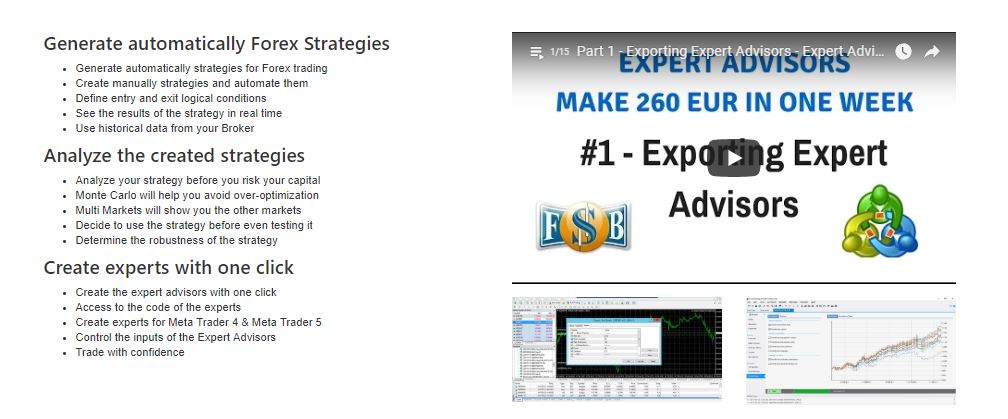
Forex Strategy Builder is a professional program to:
Create manually or generate an automatically trading strategy and see the results immediately.
Analyze the created strategy before testing it on the live market and lose money
Trade with the exported strategy on Meta Trader 4 or Meta Trader 5. Also, you have access to the code of the strategy.
In this article, we are going to talk about the trader’s favorite product, Forex strategy builder Pro. The software comes with14 Days Free Trail, which is a perfect opportunity for everyone interested in testing and seeing how the Forex strategy builder Pro works.
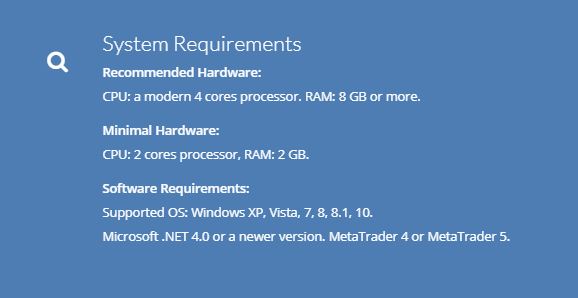
Software Requirements: Supported OS: Windows XP, Vista, 7, 8, 8.1, 10. Microsoft .NET 4.0 or a newer version. MetaTrader 4 or MetaTrader 5.
Forex Strategy Builder is a world Top product, and so far, we use it very successfully in EA Forex Academy. We are always looking for the best software to use in trading and educating our students. But so far, no competition for Forex Strategy Builder Pro. Also, we have dedicated one of our course Forex strategy course – Portfolio trading, how we use it and how we use EA Studio.
How to use Forex strategy builder?
install it on your computer to test it
import the Historical data from your broker
generate strategies with rules that you decide to use
analyze and choose which ones you want to trade with
export with one click the strategies as Expert Advisors
Forex strategy builder is a program that could be used by beginners and advanced traders. It does not require any trading skills, and it is useful to automate trading strategies.
Forex Strategy Builder Pro provides the opportunity to optimize the strategy and test the robustness. This is essentially important before start trading with Expert Adviser.
The software provides us with the chance to see the chart with the indicators that caused the trade to open:
That is something missing with all the other Builders. Basically, when you create a strategy with Forex Strategy Builder Pro, no matter manually or automatically, you can see from which point to which point the trade is open. And that gives you a higher chance to improve your strategy.
How to start working with Forex strategy builder Pro?
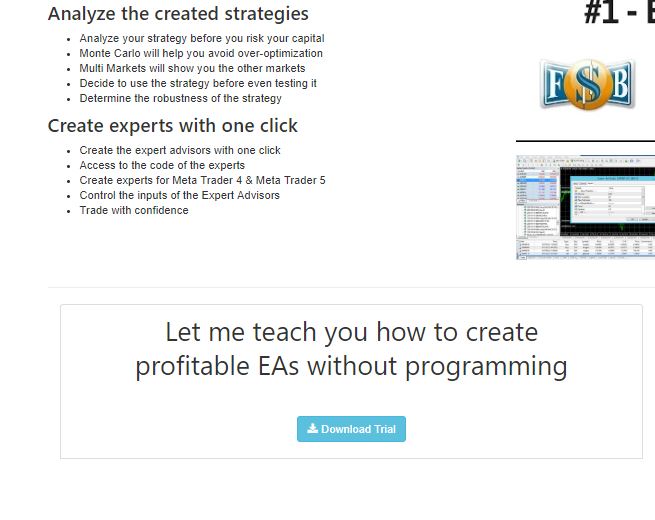
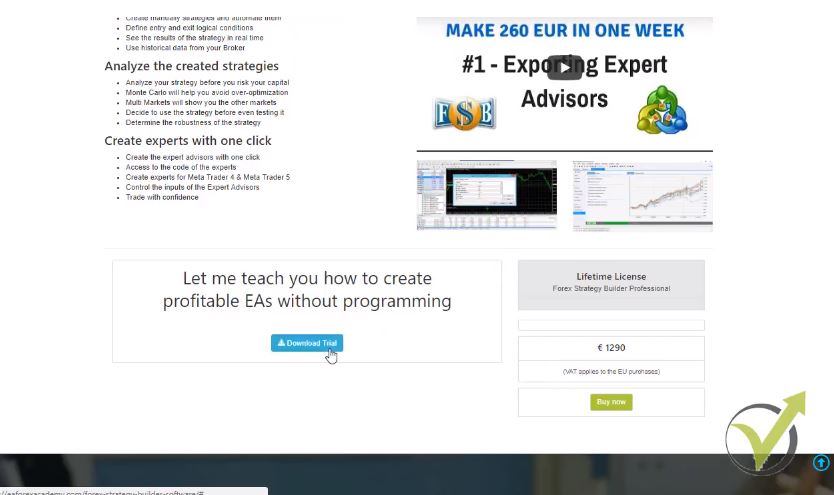
The first thing you need to do is download the software from our website EA Forex Academy. You need to click the download trial button:
Once you install the program on your computer, you will start your 14 days free trial. Before you begin using the software, there are a couple of things that you need to do.
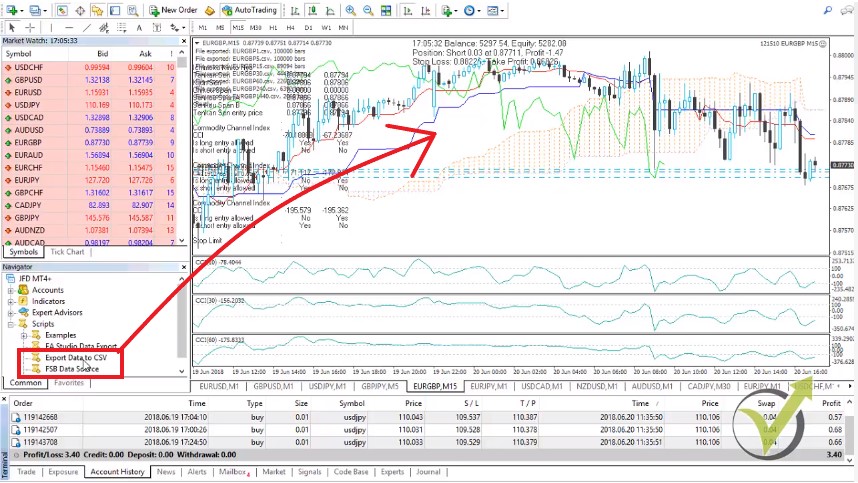
You will need to open your Meta Trader and place it inside the FSB data source. And export data to CSV files, which you can find on the official website of the software company, or you can drop us an e-mail at [email protected]. And we will send you the scripts.
When you copy the scripts, you need to go to file, open the data folder, and place the FSB data source file in MQL4 scripts. And paste it together with export data to CSV. After that, close the folder and refresh scripts. This way, you will see the scripts below.
The next step is to drag Forex strategy builder pro data source over your chart:
You will generate the information for all the symbols of your Meta Trader. In this case, I have 384 symbols. You are producing all the information as swap, spread, commissions if your broker has, and so on.
After that, go to file, open the data folder, and go to MQL4 and files. Then copy this data source file and paste it in Forex Strategy Builder Pro. Where exactly do you need to place it? Go to File and click on the user files folder. After that, click on system and paste here the data source file.
Make sure to close Forex Strategy Builder Pro when you are pasting the data source file.
After that, reopen it again and what you will see? You will have the information for all of the currency pairs on your Meta Trader.
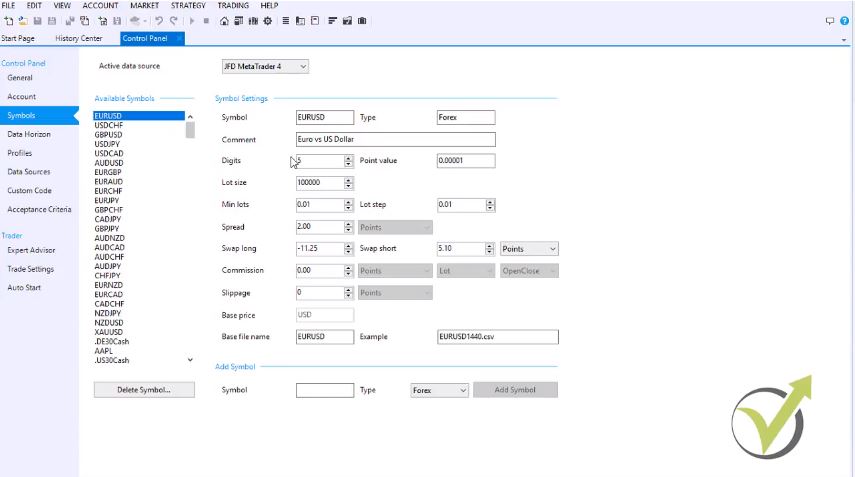
Just go to symbols, and you will see all of the 384 symbols with the digit size, the point value, minimum lot, spread, swap long, swap short and commission if there is one with your broker:
The next thing you need to do, go back to Meta Trader and drag over the chart, export data to CSV file for the currency pairs that you want to export the historical data. Let’s do it for EURUSD, for GBPUSD, for GBPUSD for USDJPY, GBPJPY, and as well for EURGBP. I have exported the historical data for these 5 symbols.
If you have just installed Meta Trader, make sure before you drag the script export data to CSV to press the HOME key on your keyboard and hold it. This way, you will force Meta Trader to load as maximum bars as possible on the different time frames. This is essentially important. So, you will have substantial historical data for your broker. Now, whenever I drag the export data to CSV over the chart
I will automatically have the data into the Forex Strategy Builder Pro.
This is because the first file that we have placed all the symbols with is giving a signal to the second script where the data are stored.
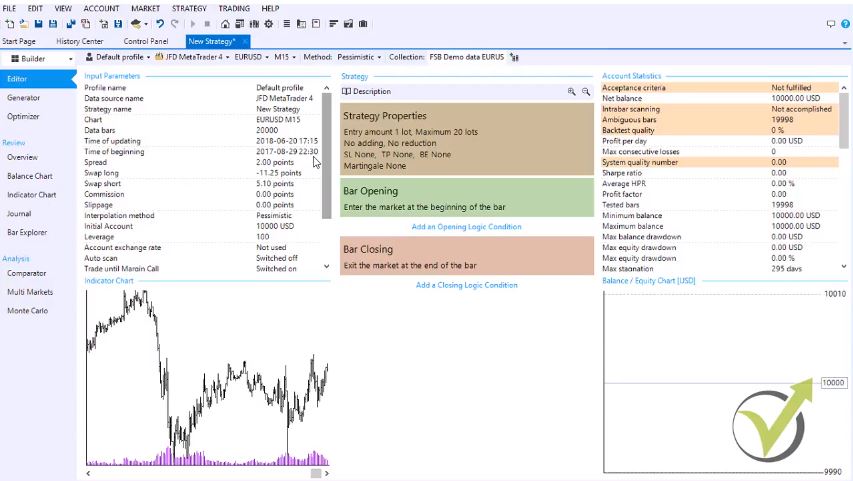
If I click to open new strategy you will see that I have the very recent data for the EURUSD symbol and if I do it on M15 you can see this is just the current hour now:
This way, I have exported the historical data for each symbol that I would be trading on, and this is very important before you create any strategies or Expert Advisors to work on the historical data from your broker.
There are many functions in Forex Strategy Builder Professional.
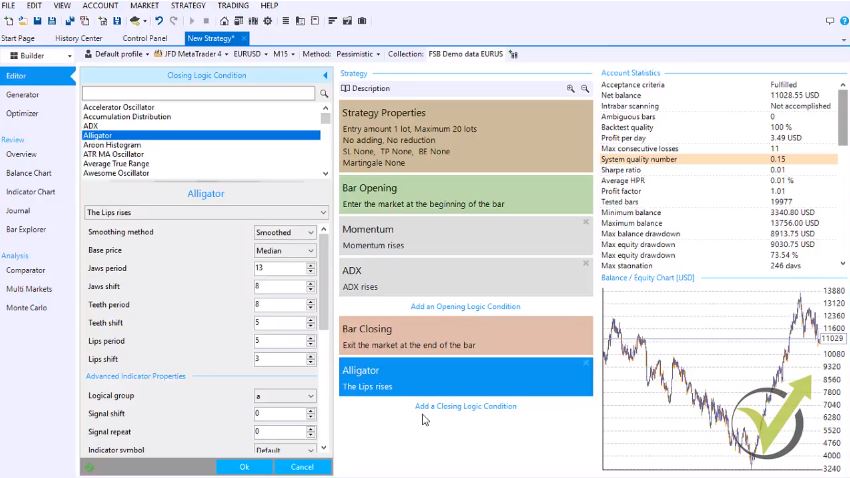
The first one is the editor. Here you can automate your existing strategies by adding an initial logic condition and adding a closing logic condition. If I click on that, you will see that I have a variety of indicators. More Forex Strategy Builder Pro has custom indicators.
Let’s take any random indicator from the list as the momentum. If I select a momentum period of 20, you can see that I see the results immediately on the moment. This saves a lot of time for the traders to test the strategies on the demo account because whatever strategy you have, you can place the entry conditions, and you will see the results immediately.
Even you change the parameters, you will see the result. As well, if I place a closing condition, for example, the alligator you can see that by chance I have a strategy that is profiting during the last months and I have selected these opening and closing conditions randomly:
The idea here is that we are saving so much time to see if a strategy is profitable or not. Whatever parameter of the indicators I change, I will see the results immediately.
After that, by one click, I can export this strategy as an Expert Advisor. And this is the unique thing of Forex Strategy Builder Professional. We can export hundreds of strategies just with one click of the mouse because we have the option to export all strategies for Meta Trader 4 or Meta Trader 5.
The next powerful tool is the generator.
The generator works on the historical data that we have predefined for the asset. In this case, I have EURUSD, M15, for 20 000 bars. If you click on the control panel and you go to data horizon, you can increase the maximum data bars, and the maximum setting is 50 000.
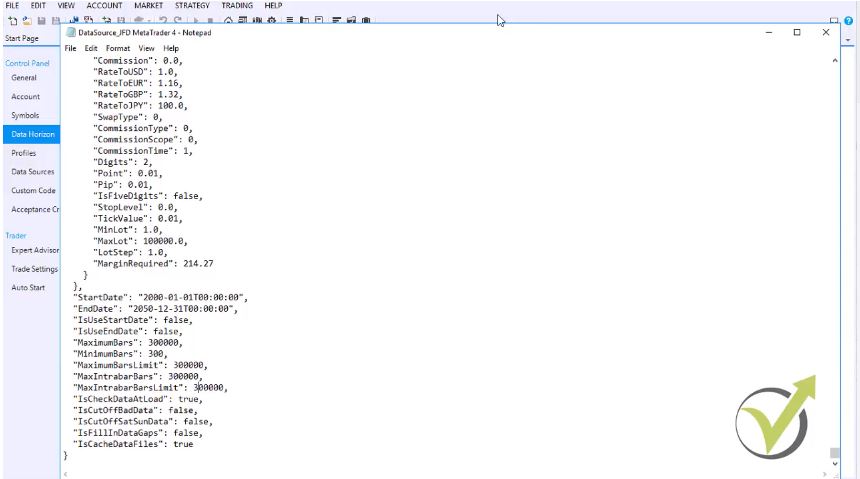
How you can increase the 50 000 is if you go to file, and then you open again the user files folder, you click on system and you will need to go to the data source file that you have imported. And use, for example, notepad to open the file.
When you go to the bottom of the file, you will see maximum bars make it, for example, 300 000. As well, make 300 000 the maximum bars limit and make maximum intra bars 300 000.
That is a good number even you are trading on the M1 chart.
Make sure you close the Forex Strategy Builder Professional before you save this file. After that, close the folder and select to save it.
We open the Forex Strategy Builder, Professional, and you will see that already I have 300 000 bars is maximum data bars. Now, if I open a strategy again, I will show you the other possibilities with Forex Strategy Builder Professional below, you can see the generator. The generator is a handy thing I can say:
The smart intellect behind the Forex Strategy Builder Professional
Because I can generate strategies based on the data that I am having and more, I can predefine some rules.
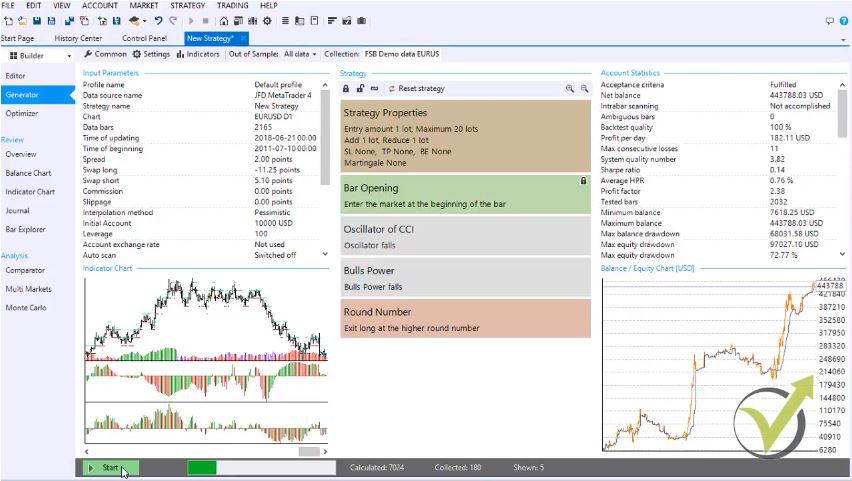
For example, if I add some indicators, I can lock it as in this case that I want to enter the market at the beginning of the bar. When I click on start, you will see how quickly the generator is working,, and already, I have strategies into the Forex strategy builder collection.
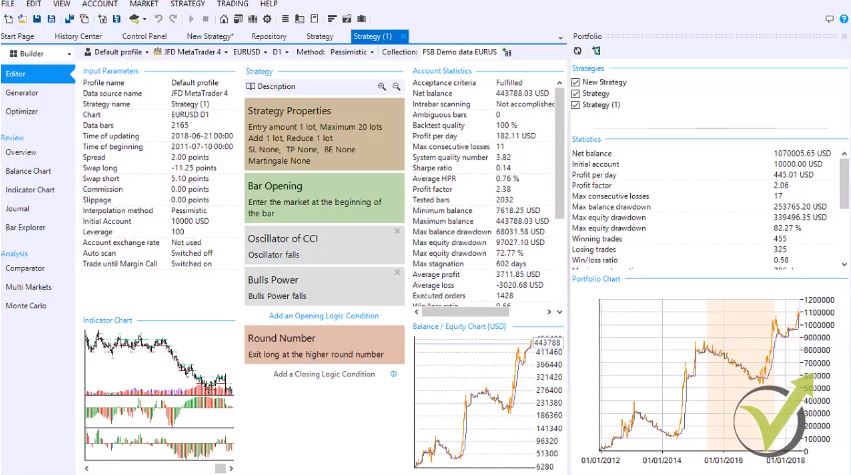
All of these strategies are going to the collection with the name FSB Demo Data EURUSD. Of course, you can change the name of the collections. For every strategy, we have very detailed account statistics. Where we see the net balance, the backtesting quality number, profit per day, maximum consecutive loss, system quality number, and many more details:
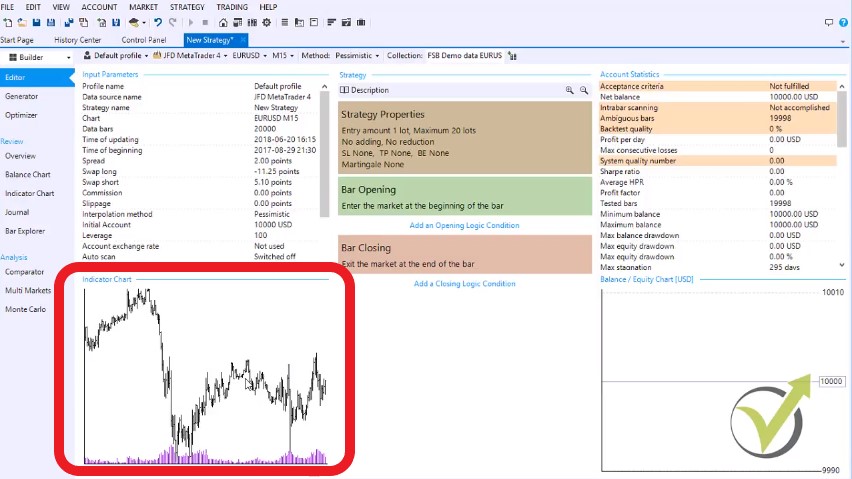
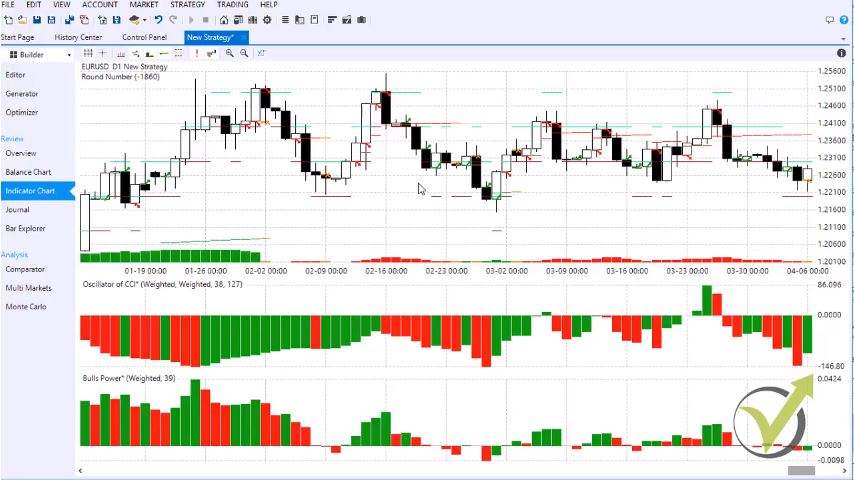
You can see a balance chart showing exactly how the equity line went and a very detailed indicator chart. Let’s stop the generator and click on the indicator chart:
You can see where exactly the trades were opened and where correctly they were closed; this gives us a great view of the strategy and allows us to analyze the strategy in detail. As well, we have in Forex strategy builder pro:
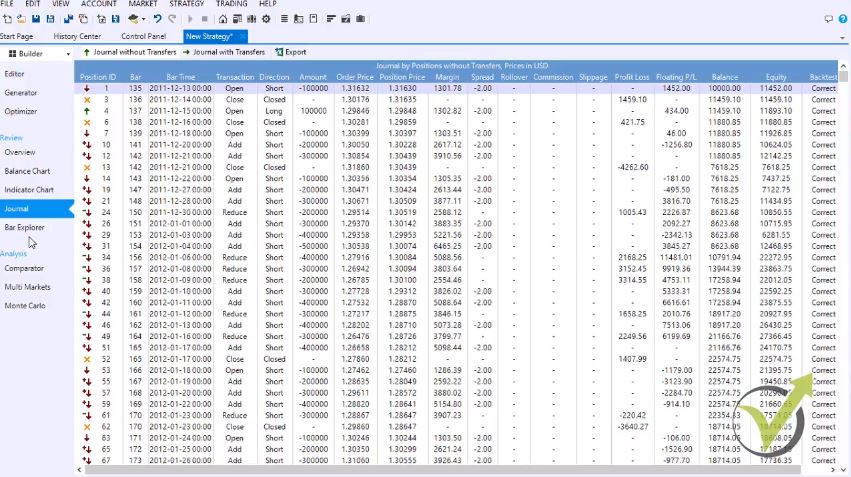
Journal which shows precisely where the trades were opened and closed:
And with the overview of the strategy, you will see a detailed description of the strategy. Where we are adding to the position. And where the trades were opening and closing, so this is an excellent document for each strategy.
Below are the analyzing tools as a comparator, which makes backtesting on different methods. Such as pessimistic method, optimistic method, nearest method, shortest method, random method, mean line method. If I click on start, it will perform random method tests – 20, as you can see, very same balance chart remains.
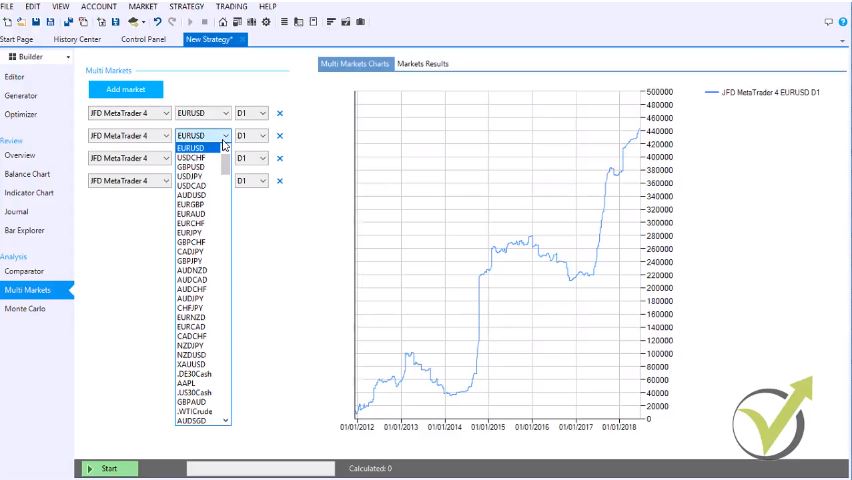
The Multi market in Forex strategy builder pro allows us to add a couple of markets:
For example, if I am building a EURUSD strategy, I can test how this strategy performs on GBPUSD, on USDJPY, and EURGBP. When I click on start, I will be able to see the results for the other markets. As you can see, immediately they are losing. Anyway, I have picked quickly just one random strategy.
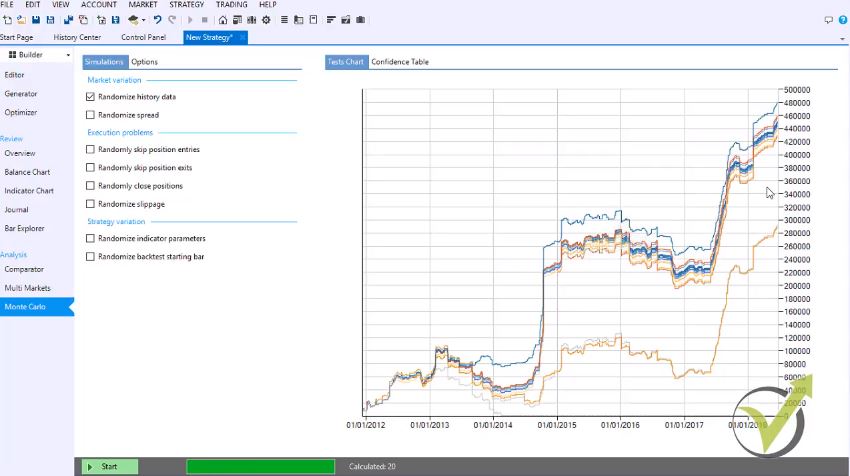
Monte Carlo is a powerful robustness test.
We can test the market variation, execution problems, and strategy variation. As you can see in the market variation, we can test:
the randomized history data and randomized spread,
randomly skip positions entry
randomly skip positions exits
and randomly closed position
randomize slippage.
Below for the strategy variation, we can test randomize indicator parameters and randomize the backtest starting bar. Let’s check only the randomize history data. If I click on start, you will see that all strategy variations remained positive.
This way, we can test the robustness of the strategies with Forex Strategy Builder Professional before we place them on the market for trading. Forex Strategy Builder Pro is a unique software because it allows us to select more extended time frames for each indicator.
This means that I can select any of the indicators to be following the market on the higher time frames. If I am trading on M1, for example, I can use indicators that are scanning the market on M15 or M30, H1, or any other time frame. This is something unique that no other strategy builder has in the current days. As well we can have logical groups for the indicators we can have signal shifts, and signal repeat. And we have many more possibilities with the Forex Strategy Builder Professional.
The last thing I would like to mention is that we have a strategy portfolio:
When we generate a couple of strategies, we can place them in a portfolio. And see how these strategies would perform together. So, you can load many strategies from the repository. And put them in the collection, and you will see statistics for the strategy if you are trading them together.
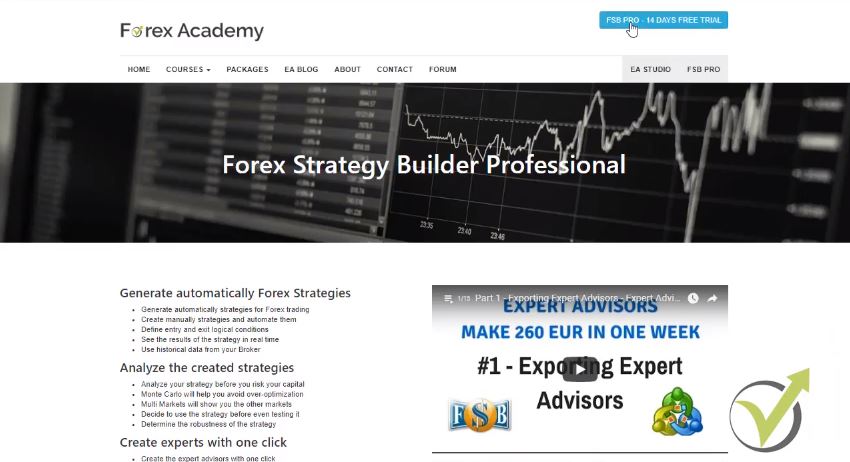
The best way to test the value of the Forex Strategy Builder Professional is to prove it. There are the 14 days free trial that you can take advantage of if you go to our website www.eaforexacademy.comand on the top right corner you will see
Forex Strategy Builder Pro 14 days free trial:
Click on that and download the trial version to test it out.
As well, if you are already our student at EA Forex Academy, you can drop us an e-mail for discounts. And we will arrange a discount from the Forex software company.
Please click the link below to download Forex Strategy Builder and have a two weeks Free Trial:
We are glad to say that we launched our new course Forex strategy course. The main idea behind this course is that we create hundreds of strategies using Forex Strategy Builder and EA Studio and we trade them simultaneously.
We go through 3 main steps:
Testing the Created Strategies
1st step is we test the created strategies on small live accounts with the minimum lot allowed of 0.01. We have few different systems to follow as testing periods of time and they are well described in the course.
Removing and Replacing Failed Strategy
2nd step is when a strategy fails, we simply remove it and replace it with one that we have already created. And this is very normal. That is the power of Forex Strategy Builder and EA Studio because we do not have limits creating strategies. This way we are testing it for over optimization 3rd time after Monte Carlo and Multi Markets test.
Placing the Good Performing Strategies on Bigger Live Account
3rd step is to place the good performing strategies on bigger live account
That is not an easy job at all. People should not think that when they buy any strategy builder such as Forex Strategy Builder and EA Studio, this software will do all the job for them. Its a lot of work after that as well. That is the reason we created the Forex Strategy course to help the traders with the whole process.
In the course we describe how to collect historical data, how to use it and what is the appropriate period of history bars to work on. Also you will see how we manage to follow 100s of strategies and to make correct analysis. Also you will learn how long time you need to test a strategy in order to consider it as stable for trading.
We show as well how we use the Reactor – the new feature in EA Studio that saves us a lot of time. In Forex Strategy Builder you will see how we use higher time frames as filters. This is essentially important when you are following the major trend. The course is being updated at all times.
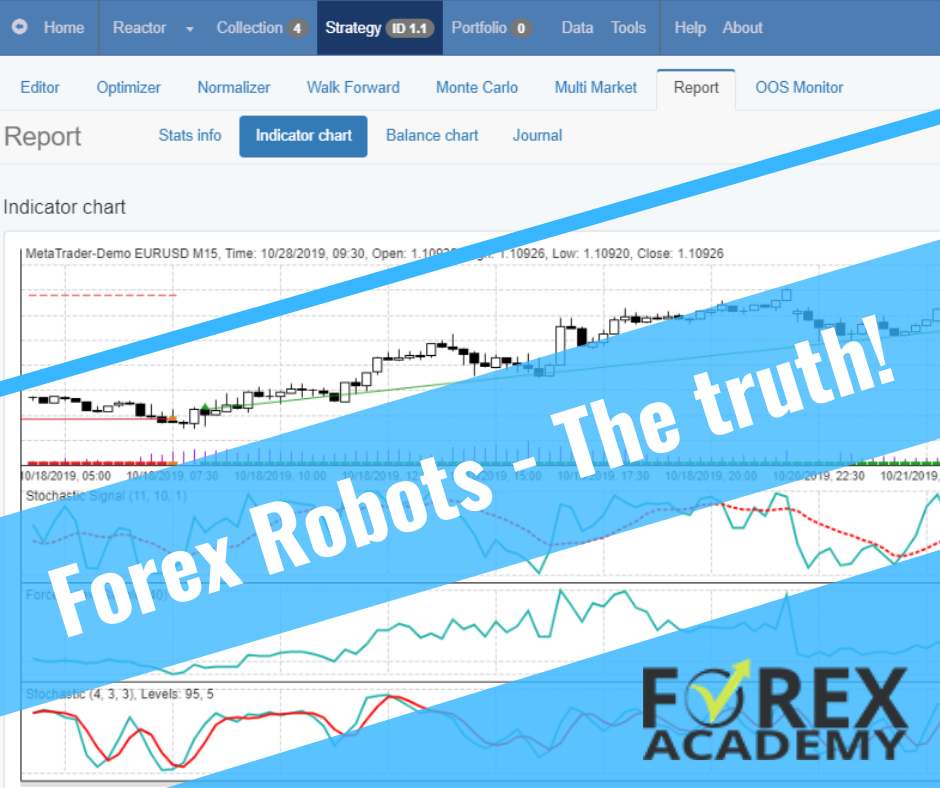
Forex Robot reality: Many traders say, ” I have bought Forex Robot and it stopped working after time”. And they are right, but!
Expert Advisors are not humans
EA Trading Academy is a place where traders learn to trade with Robots. There are a few things that you need to know and have in mind before making the conclusion that your Forex robot stopped working.
First of all, if the EA’s are appropriately programmed with no mistakes in the code, there should be no technical reason the Forex Robots to stop working.
What happens then? Pretty simple – the markets change. We can not expect experts or Forex Robot generated over historical data for some time, to continue with the same results forever. Let’s have a good example so everyone can understand.
EURUSD is in the nasty rough range of 1.0400-1.2500 for the last three years. If we generate an expert based on that period and shortly EURUSD breaks above or below that range, obviously there will be a new trend direction.
EURUSD 2015-2020
And we can not expect that the EA’s designed and created over historical range data, to have the same success when the market on which it is trading is not in range anymore.
How to create a pro EA that will persist over time?
Well, it is nearly impossible. And do not lose time looking for this perfect pro Forex robot that will bring you profits all the time. The better thing to do is to trade with many Expert Advisors and select which one is profitable for the current market conditions. Some people will say “I can not code, how to make many Expert Advisors?”
What is the solution? There are two problems to resolve. First is to have EA with no mistakes in the code and second not to trade with old EAs. And guess what? In EA Forex Robot Academy we have solved it.
We use FSB Pro and EA Studio strategy builders because, with these two pieces of software, we have 100% correct code in the Forex robots. We create 100’s of strategies monthly, and when a strategy/robot stops working, we change it with a new one that we have already designed and tested.
Each one has a 15-days free trial which is you can use to create your own Expert Advisors, and there is not limit of how many Forex Robots you will export. This happens with one click.
With these two programs, we have the possibility to create an unlimited number of strategies and Expert Advisors. Once again, when Forex Robot stops working, we have many more to replace them!
To learn more about how we create 100’s of Forex Robots, please check out our new FREE course.
[sc_fs_multi_faq headline-0=”h2″ question-0=”Do Forex robots work?” answer-0=”The Forex robots or the Expert Advisors are code that stands behind the strategy. If you have a profitable strategy with 100% correct code, it will work.” image-0=”” headline-1=”h2″ question-1=”How to find a pro Forex robot?” answer-1=”When we say a professional robot, we talk about every robot that brings profits. If you look for Forex robot used by professional traders, you should try using Forex Strategy Builder, Pro software to create one. ” image-1=”” headline-2=”h2″ question-2=”What is a Robot in Forex? ” answer-2=”This is a strategy programmed usually in MQL. This is the language used in the MetaTrader platform. The Robot could be attached to the chart, and it manages the trades.” image-2=”” headline-3=”h2″ question-3=”Are Forex Robots profitable? ” answer-3=”Of course, not all of them. It is not easy to find beneficial robots. Many sellers of Forex Robots are just selling their products. The best option is to create one by yourself.” image-3=”” count=”4″ html=”true” css_class=””]
Forex strategy courses is what EA Forex Academy is specialized in.
Forex Strategy courses are the courses you can find on EA Forex Academy wesbite, and those willt each you not only how to create your own strategies but how to create your oun Expert Advisors without programming skills.
With simple words, we will teach you to create Forex strtegies and to automate them as Robots without programming skills needed.
We launched our first Forex strategy course in 2017. Guess what? Still great interest on it! ANd we have re-recorded in in 2020 to make sure that we show the best 5 Forex strategies inside.
Naturally, it is a result of many years of experience. We have created all Forex strategy courses using different currencies so that we diversify the risk between them.
Which is the best one among all Forex strategy courses?
It depends on what you are looking for in a Forex course
We combined all Forex strategies from all the 30 online courses
The students receive tested Expert Advisors
We update the Forex courses monthly to keep it fresh to the recent market
Each Forex strategy uses different indicators, time frames, filters, and inputs so that it is unique by itself. We have combined scalping following the trend strategies and ones that are suitable for a sideways market. This way we cover all the market.
If you decide to get the first course, you will receive in this Forex Strategy course:
A full explanation of how to trade each Forex strategy manually
The 5 Expert Advisers if you wish to trade them automatically on MT4 or MT5
Lifetime updates to this Forex Strategy course
What will you learn?
how to trade with 5 different strategies manually
perform backtest with Expert Advisors
trade automatically with ready EAs
optimize the strategies for your trading broker
generate your own strategies and Experts
These 5 Forex trading strategies are a result of testing many EAs:
Results from many EAs
We update the course every month and this is what makes it one of the best Forex strategy courses that we have.
Once you have it, you will be updated with new parameters every month that show better results.
We already have many students joining the course, just because we provide this course at an extremely cheap price, and we include the 5 EAs for Free. Also, we will save you a lot of time and work. You don’t need to go and do it by yourself because it will take you years of effort.
Also, we will update the optimization process in the Forex strategy courses. As you know, the markets change and we need to be in tune with it. Every month we do optimization of each Forex Strategy, and if there should be a change in the inputs, we will let you know.
FX stands for a few things but why it is written like that? Forex slang is used by traders and mentors in order to speak faster. All the webinars, live sessions and 1:1 education normally are limited with time. And the reason the slang came is that the traders try to fit in the time and have to speak quickly.
FX stands for?
Foreign exchange market – the biggest market in the world
Foreign exchange – terms in banks for exchanging currencies
Forward exchange rate or this is known as forwarding price
There are many slang words all over the internet, and it is especially important to know what they mean especially if it is connected to your business or the way you make money. And FX stands for theForex market where thousands of people and companies trade daily.
Below we will go over some other slang words that will help you understand better the language in trading.
For example, EA fx stands for Expert Adviser for the Forex market:
Example of many EA FX trading in one account
EA FX or Forex EA is used more and more on the Forex market for all of the currencies. Automated trading is part of our education in EA Forex Academy. We create portfolios of Expert Advisors and we select the best performers. We use the two professional automated software – FSB Pro and EA Studio. You can look at our course Algorithmic trading courses to have an idea of how we do the whole process to select the best Expert Advisors.
Many students ask us what FX stands for, but actually, the most frequent questions are about the currencies:
EURO stands for the pair EURUSD. So if you hear or see ” EURO is going up” means that EURUSD is going up.
CABLE stands for GBPUSD – the exchange rate between the pound and the dollar. This slang word came during 19th century when the exchange rate between the dollar and the pound began to be transmitted across the Atlantic by a submarine communications cable.
KIWI stands for NZDUSD. It derives its name from New Zealand’s national icon – a flightless bird called a kiwi which is placed on one side of their national currency $1 coin.
AUSSIE stands for the Australian Dollar. It is used to distinguish the Australian dollar from the other dollars. If you see ” ea fx for Aussie”, this would mean that this expert adviser is created for the Australian dollar against the American dollar (in most cases stands for AUDUSD).
FX stands for Foreign Exchange but how this is implemented in Algorithmic trading?
Algorithmic trading is done with expert advisors or this is code for trading strategies. Even you don’t have any trading experience or programming skills you can still trade with expert advisors on the forex market. FX stands for foreign exchange but with the brokers, we can trade on the foreign exchange even with the expert advisors.
How we can trade with Expert Advisors on the foreign exchange?
With the brokers, we can trade on the foreign exchange market which FX stands for. They provide the so-called CFD trading. This means that we don’t really buy the asset but we are trading on the value of the price.
Let’s say EURUSD is at 1.1355 and we buy the asset. If the price reaches 1.1375 and we close the position we will be 20 pips on profit. If the price goes against us down to 1.1335 we will be 20 peeps on a loss.
This way we can buy any trading asset on the market that is provided from the broker and we will be trading on the value of its price. We don’t physically by the asset, for example, we don’t buy gold oil stocks futures and this is one of the great ways to be participants on the forex market.
What is the easiest way to participate in the foreign exchange market?
Especially if you are a beginner Trader, you can take advantage of the Forex market trading with a Forex broker. The Forex brokers are huge companies that stand between us and the market. FX stands for foreign exchange but it’s not only between huge banks and corporations. It is also between the small players like the traders.
The easiest and free way to get access to the market is to open a demo account with such a broker. Now there are thousands of brokers so you need to be very careful which one you will choose.
There are many scam brokers which we explain how to avoid in our forum.
You should always look for the regulated brokers.
Now when we are talking about free access this means that if you open a Demo account with such a broker you will trade with virtual money. For example, you can open a demo account with $1,000 and practice trading. You will have access to the very same price quotes that everyone else has.
This way you will not risk any real capital and you will be able to trade While You Learn. It is essentially important to take education before participating in the Forex market. Many Traders lose their capital because they are not prepared to trade.
Also, trading with a demo account does not have a time limitation and you can practice as long as you wish. The problem is that when people start trading they involve emotions. This is where we can say that FX stands for a frustrating experience.
Why do traders lose on the Forex market?
One of the emotions that makes the Trader lose is FEAR. The Beginner Traders feel fear when they see their position going on a negative. They who it to close the trade so they will not have bigger losses. This way the Trader does not give the opportunity to the traits to go in the right direction.
Also, the traders feel fear when they are on a profit. They are afraid that the price will go against them and they will lose the small profit they already have. This way they don’t allow the price to bring them a bigger profit.
The other emotion that is involved in Trading is GREED. People are greedy for money. FX stands for foreign exchange and greedy is there. When the Trader is on a profit after a few consecutive trades he increases the trading amount. Every strategy has its profitable moments and its losing moments. After consecutive profitable trades, it is expected to hit the negative trades.
What is our trading strategy?
One of the most common platforms for trading is called MetaTrader.
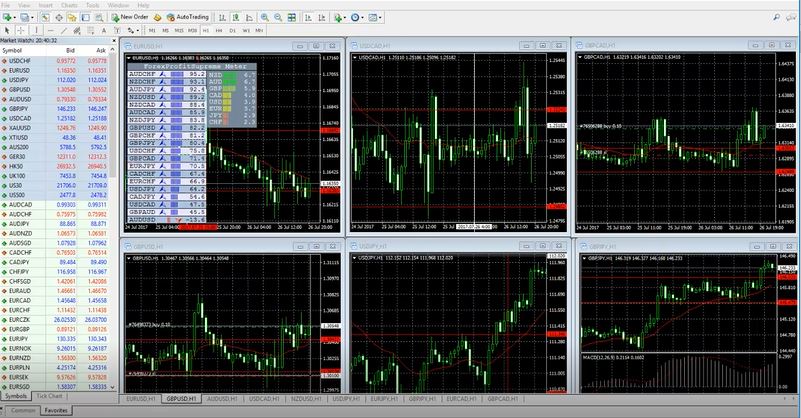
Meta Trader platform
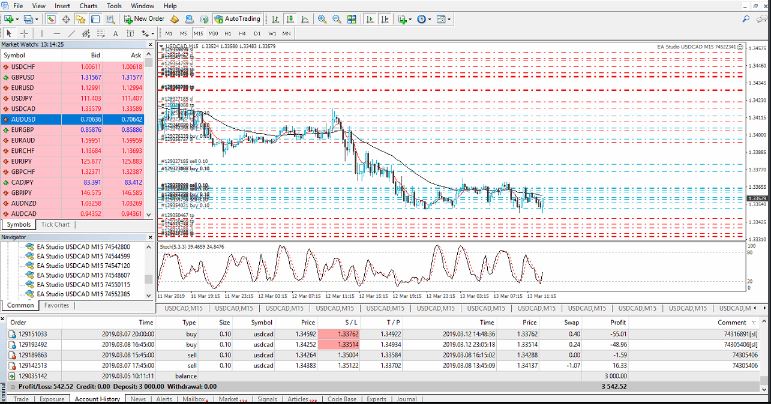
On this platform we can place many expert advisors as shown in the picture above. This way we don’t rely on a single strategy or on a single expert advisor. We diversify the risk between many expert advisors and we achieve more stable results.
How we can afford trade with many EAs?
There are three different ways to create many expert advisors:
Hire a developer – if you have manual strategies you can hire a developer to call them as an expert advisor so you can trade these strategies automatically. Of course this is quite expensive because the developer will charge you with about $30 per hour. If the strategy uses few different entry and exit rules such an expert advisor will cost you about $500. So if you want to build a portfolio of expert advisors hiring a developer you will spend a couple of thousands of dollars.
Learn to code – if you have the patience and the time to learn coding by yourself you will chef expert advisors for free. Of course, this will take a couple of years where are you will not have any income. Also if you learn to code you will not be able to create profitable strategies. You will code the strategies but you do not have a guarantee that the strategies will be profitable.
Use strategy builders – this method requires an initial investment to buy a strategy Builder but it allows the Trader to create an unlimited number of expert advisors with the time. Most of that strategy builders come with lifetime license which gives the Trader all the time he needs. Also with the strategy builders, we can analyze the strategies before we export them as expert advisors and trade them on the MetaTrader platform. More, the strategy builders allow us to generate profitable strategies.
We succeed to trade with many expert advisors in one account because we use the strategy builders EA studio and FSB Pro.
These are pieces of software that allows the Trader to alternate strategies and to generate strategies. If you have a manual strategy that you are trading on the forex exchange which we said FX stands for, you can build your strategy into an expert advisor.
You will see immediately what is the result for the last couple of years and you will decide if you want to continue trading with this strategy. The problem in manual trading is that many people start to believe in a strategy when they see a few consecutive profits. Normally when the traders build their strategies in the strategy builder they see that their strategies are losing.
This is why there is a generator.
The generator allows the Trader to trade with profitable strategies. It generates hundreds of strategies based on the historical data from the broker we have selected to use.
Now EA studio has a quick generator because it is based online. It generates thousands of strategies for minutes and if you leave it working for more than 10 hours you will see more than millions of strategies calculated. There are some great features inside which allow you to filter the strategies and select only the most profitable and robust strategies:
EA Studio comes with 15 days free trial for everyone who wants to test EA studio. This means that during this. You can create as many experts advisors as you wish. The best thing is that you export the expert advisors with one click and you don’t need to have any coding experience.
FSB Pro stands for Forex strategy builder professional. This is one of the most camels where is for algorithmic trading nowadays and it is a little bit slower than EA studio because you need to install it on your computer. However, the FSB pro provides more opportunities for the Trader because it allows trading using longer time frames.
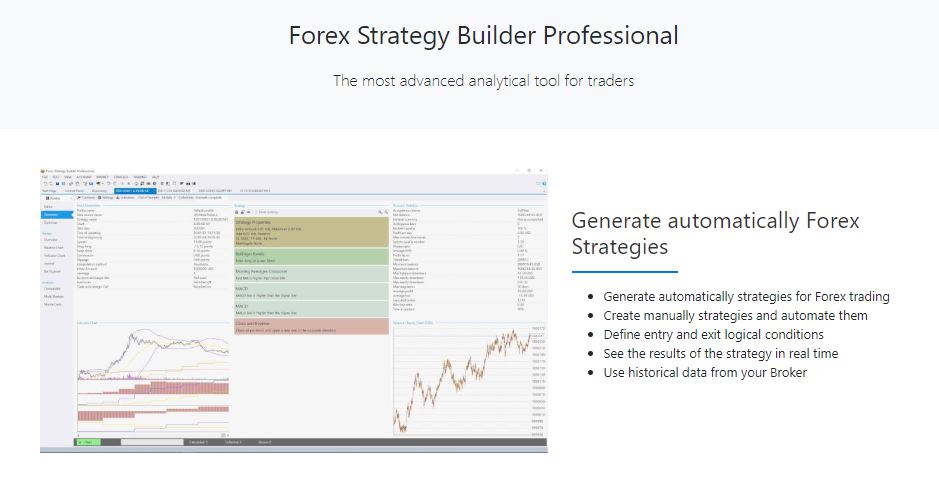
FSB Pro page
For example, if you have a strategy trading on M5 you can set different indicators that will filter the entries on the longer time frames for example on H1 and H4.
At EA forex Academy we are looking for the best software to use for algorithmic trading. As we set FX stands for foreign exchange but with a small capital it is very hard to trade as the banks do. This is why we need to use software which will automate our trading and it will make possible our participation on the market with small capital.
When we trade with expert advisors we can trade with 0.1 lot which is $10,000 other currency or even with most of the brokers we can trade with 0.01 lot which is $1,000.
The brokers provide us with leverage which allows us to trade bigger amount then what we have in our account. For example, we can have an account of $1,000 what we can open trades for $10,000. Of course, this way we have a huge risk in our account but at the same time, we have a huge opportunity to profit on the foreign exchange market(which fx stands for).
Trading on the FX market is not easy and everyone should understand that there is a huge risk. There are huge players on the market such as Banks, institutional funds, brokerages, and international companies. All of those create the Forex market, which we said FX stands for.
If you are interested to learn more about the Forex trading you can look at our trading education.
We have three different sections:
Algorithmic trading
Manual trading
Cryptocurrency trading
In the algorithmic trading section, you will find courses where I include hundreds of expert advisors and more I update them every month. You will learn how to use the strategy builders and how to generate Strategies by yourself.
In the manual trading section, you will find courses where you will learn how to trade on the Forex market by yourself and not to depend on expert advisors. FX stands for foreign exchange and this is exactly what you will learn and it’s courses. You will learn how to buy and sell currencies and how to benefit from it.
In the cryptocurrency trading section, you will find courses that are based on the most preferable cryptocurrencies. These are the Bitcoin, the Ethereum, the Ripple, the Litecoin, the Dash.
Algorithmic trading is also possible with the cryptocurrencies. This is because the brokers provide CFD trading also for the cryptocurrencies. However, the cryptocurrencies are not yet part of the foreign exchange market.
If you have any questions, you can always drop them in our trading Forum.
[sc_fs_multi_faq headline-0=”h2″ question-0=”What does FX mean?” answer-0=”FX is the slang word for Forex. And Forex is the biggest market where thousands of people and companies exchange currencies daily.” image-0=”” headline-1=”h2″ question-1=”Is the FX market decentralized?” answer-1=”Yes, it is decentralized and it is a global market where buyers and sellers meet and form the prices of the currency pairs.” image-1=”” headline-2=”h2″ question-2=”How to trade on the FX?” answer-2=”There are different ways to participate in the foreign exchange market. Most popular among the retail traders is by using FX brokers which offer the trading platforms.” image-2=”” headline-3=”h2″ question-3=”FX stands for what?” answer-3=”FX stands for different things, but regarding the trading, it stands for Forex. Which on its side stands for Foreign Exchange Market.” image-3=”” count=”4″ html=”true” css_class=””]
Trading Software EA Studio professional tool for every trader
Trading software or a strategy builder is what traders need nowadays in the volatile Forex and Crypto market. With these builders, the traders can automate strategies without programming skill and trading experience. The process of hiring developers to program trading strategies is time-consuming and expensive.
Also, huge mistakes are possible when a developer program an Expert Advisors, which might cost funds to the trader. That is why trading software is the better solution.
One of the latest versions of the trading software EA Studio was released withthe feature Reactor. It’s really awesome. The first reactions of the traders using it were: “What I will do now?”, “I have to find how to spend my time” and “Great that I will do nothing now”.
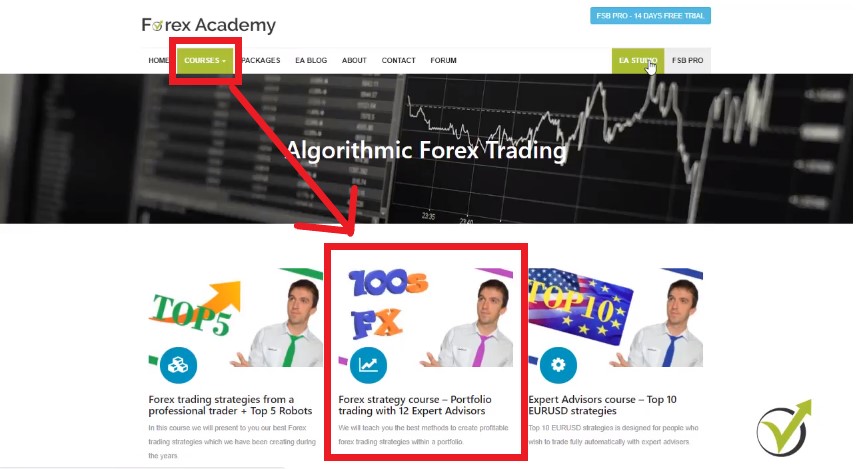
Simply said The Reactor does automatically everything we were doing so far manually. We have already updated our courses with lectures on how to use them. Especially more information you can find in the Forex strategy course portfolio trading with 12 Expert Advisors. You can find it in the algorithmic trading section:
The courses are arranged in sections.
The Generator in the trading software has the power to generate automatically strategies with predefined rules
After that we were going manually to check the robustness of each strategy from the portfolio. We were testing it with the Monte Carlo and Multi Market tools. Monte Carlo tries to break the strategy using different parameters for the indicators. Much better to fail during the creation rather than trading in live account. This way we know if the strategy is over optimized or not. This is one of the coolest tools in this trading software.
Multi Market is where we see immediately the results of the strategies on the other markets. This way we know if we can use the same strategy on the other pairs as well. We have three things here for the trading software with the Multi Markets. One, creating one expert that has good results on another 5 markets so I can add a market from the plus button. And, we will end up with six experts and diversified the risk between the currency pairs.
If a strategy fails in all other markets, we consider it as over optimized for the market it was created for. If the strategy works fine on other markets, it will cost us just two clicks to export it for all of them, using the trading software. So basically I’ll be just changing the currency where it shows profit and I will export it.
The Reactor now does all automatically and we can happily say that EA Studio now is professional trading software.
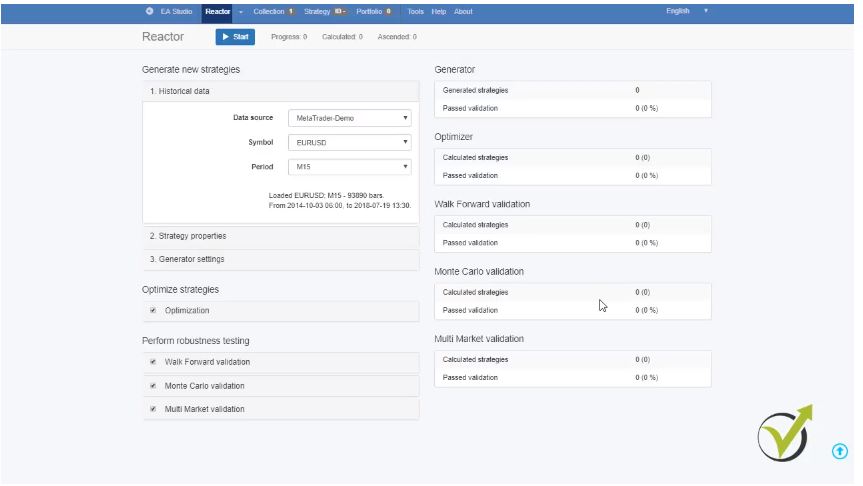
Basically we just set which tools would like the strategy to pass, so that we will not do anything manually. If we select to use all the tools once the strategy is generated, it will go through the optimization. And, if it passes the acceptance criteria that we predefined, it will go to the next tool Walk Forward validation. And then, if it passes, it will go to the Monte Carlo and if it passes all, we will have it on our screen just ready to use.
Trading software EA Studio – Reactor.
Great applause from our traders’ team to the team of developers that updated EA Studio and turned it into unique trading software. And, actually, they keep updating it all the time which really worths the investment to have a license for it.
So basically if I start from the beginning, you will see that I can predefine the historical data. At this moment I have placed some data for PepperStone demo account, JFD demo account, Ava demo account. PepperStone demo 02 – this is another server from Pepper Stone and Ava. This is data source from their live account. So all of these Brokers please don’t take it as a recommendation, we are not connected to any of the brokers.
The trading software comes with free script
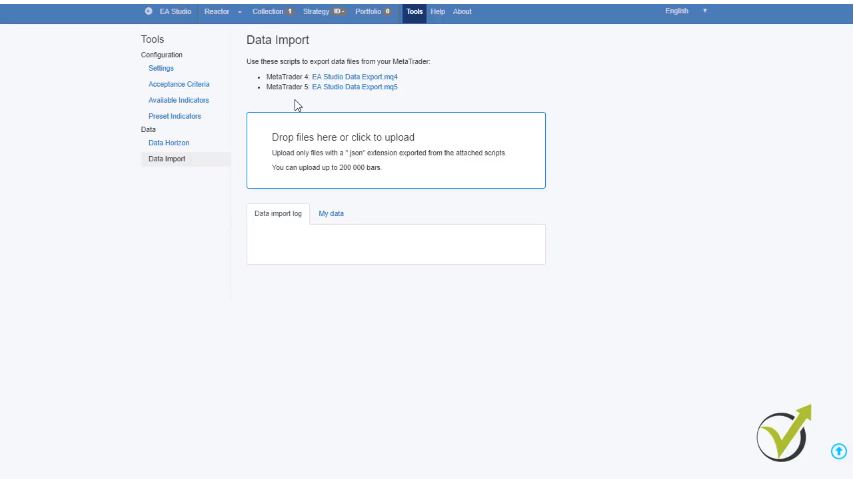
If you go to Tools and then you go to Data Import, you can download free script to export your historical data from the broker that you have selected to use. So we can choose if you are trading with MetaTrader 4 or with MetaTrader 5. Below you will see the box where we need to drop the files that you have exported from the MetaTrader:
Historical data
If you haven’t done that you can have a look at our video on youtube.com. It is called “Forex historical data – how to export properly for EA Studio“. After that, you predefine the symbol and here you will see the symbols that you have exported as historical data. As well you can trade cryptocurrencies, stocks, indexes, anything that you will see on the MetaTrader platform. Below is the trading period, so you can choose any time frame between M1 to daily chart.
After that you can set up the strategy properties
The first line is the entry lot that you would like to trade with. You can predefine if you want the trading software to set Stop Loss and Take Profit for your strategies. As a Stop Loss you can choose from Fixed, Trailing, Fixed or Trailing and you can set the minimum and maximum.
In Generator settings you will set how long time you wish the trading software to work. Normally I set it to work during the night and I set it for about 8 hours – 480 minutes. And, in the morning I have a ready collection with strategies to work on during the day. As a method you can select Net balance, Return to draw down ratio, System quality number, Win/Loss ratio, Sharpe ratio, Profit factor and Profit.
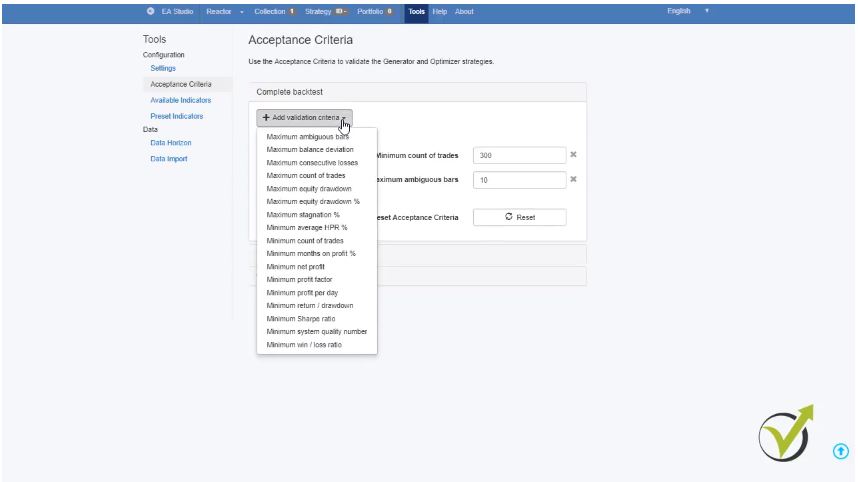
This is the way that you want to see the strategies into the collection ordered by any of these criterias. Our sample is a very well known method to analyze the strategies for a last period of time. Below is the acceptance criteria which is very important. If I click on it you can add any validation criteria for the trading software as: Minimum count of trades, Maximum stagnation in percentage and so on:
The user can predefine the rules to filter strategies.
So only the strategies that pass these validation criteria will show into the collection
Below is the new tool Preset Indicators which you can find normally in tools. You can preset any indicators as a part of your strategy.
As an optimization, you can choose whether you would like to optimize the Stop Loss and Take Profit numeric values range. These are the steps that the trading software will take when it is optimizing your strategy. It is very similar to how MetaTrader works but actually, it is much more reliable and faster. Below you have also search best criteria and Out of sample and In sample, if you would like to use it or not.
And, again acceptance criteria to pass through the optimization, so when the strategy starts to generate they go through each of these features and the trading software tests them according to the acceptance criteria that you have predefined. If they pass the optimization and acceptance criteria they will go to the robustness testing.
What are the robustness tests for the trading software EA Studio?
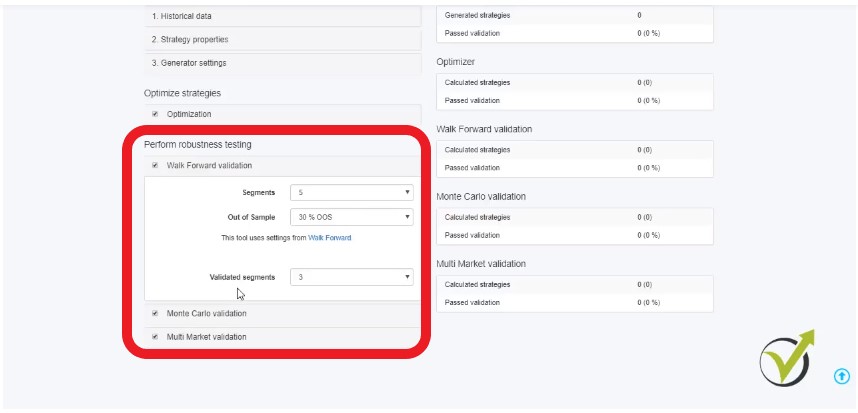
Walk Forward validation
Monte Carlo Validation
Multi Market Validation
Robustness test is key point in building Expert Advisors.
One is Walk Forward validation which is a new feature from 2018. And, actually, I don’t know any other trading software with this feature. And this feature helps a lot to make our strategy more robust.
Below is the Monte Carlo which I have already explained. Here you can clarify how many counts of tests you’d like to take and below is how many of those tests to be validated. So, if I choose 10 tests and I wish 80 percent of those to be validated by the trading software, this means 8 out of the 10 should be validated. And if I select 20 obviously 16 out of the 20 should be validated.
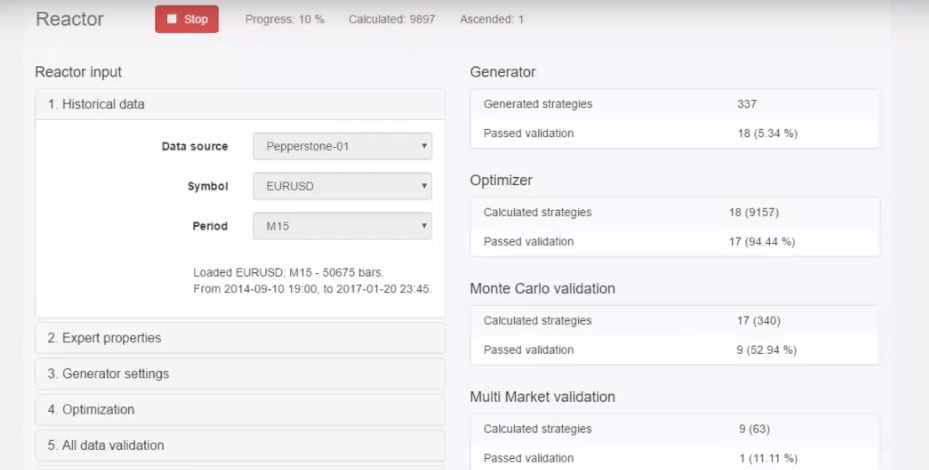
Multi Market is below. You can set how many markets out of all tested markets should pass the validation. So if I click on start you will see the Reactor working and already strategies are generated. So those who pass the validation will go to the Optimizer and then they will go to Walk Forward validation and to Monte Carlo validation and Multi Market validation.
At the end of the day, I will have strategies into the collection that have passed all of these features
And briefly, for each strategy you will see statistics from the trading software, such as Net profit, Profit per day, Maximum drawdown, Return to drawdown ratio, Count of trades. If you have too many strategies into the collection (the maximum is 100) you can use filters on the filtered records, which is on the left side of the trading software, and you can add some more filters that you have missed to add in the acceptance criteria. So this way you will limit your strategies of the training portfolio.
You can find The Reactor on the menu of the trading software EA Studio. And it is just below The Generator and above The Validator. The validator is a pretty similar tool where we drop ready Expert Advisors, Collections, Portfolio Experts. You can upload whole folders and recalculate them just as The Reactor does. So it will work only over ready strategies.
Basically, it will just miss The Generator but it will work on the files that you upload. This is a very useful tool if the trader saves the work from the trading software in collections or folders. And after time he can just drop them over here.
It will recalculate according to the recent market conditions. Of course with fresh historical data that it has uploaded
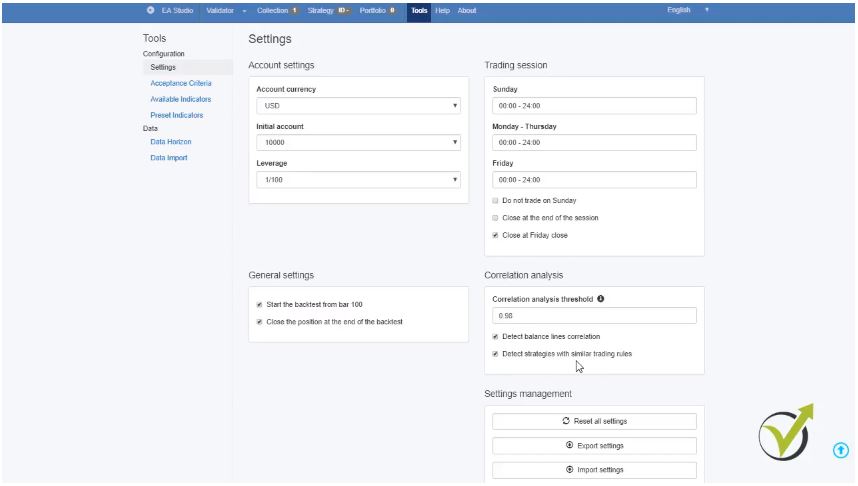
The last thing I’d like to mention is about the settings that you can find in Tools. From here you can predefine the trading session. From what time to what time would you like to trade? The Reactor will follow exactly the rules that you have set. Also, you can choose to close your trades on Friday. So the trading software will generate strategies that will close on Friday closed.
Below is the correlation analysis which detects balanced lines correlation. It means that The Reactor will generate strategies. And, if any of those have similar balance lines with more than 98%, it will remove it. You can select to use the tech strategies with similar trading rules, the trading software will remove it as well:
Custom properties for the settings.
This means, if you have a strategy with similar trading rules and by similar we accept same entry condition. fFor example Accelerator Oscilator rises but with different level, this would be accepted as a similar trading rule. If any other strategy has the very same entry condition but with different parameters inside it will take it as a similar strategy. And, it will be removed from the collection.
We would like to trade different strategies to have better diversification of our risk
The idea is when we are trading portfolio of strategies we would like to trade different strategies to have better diversification of our risk. And this is how trading software EA Studio becomes very useful and practical as a professional tool for every trader. It gives us the opportunity to create a variety of Expert Advisors, trading strategies with different parameters, different indicators. With different entry rules and exit rules, and strategies trading on all market conditions.
If you have any questions about The Reactor you are very welcome to write at our support forum which you can find on our website and I will be very happy to assist you.
If you are interested in the trading software EA Studio, you can receive a discount as our student. EA Studio is included in our optimal pack and in the mega pack in packages.
So if you decide to enroll in any of those you will receive added value as courses from EA Trading Academy. If you are already our students you will receive a discount from the Forex software company.
We wish you save trading and let us know if you have any questions.