Forex strategies course is the first course launched with the 5 most stable Forex strategies
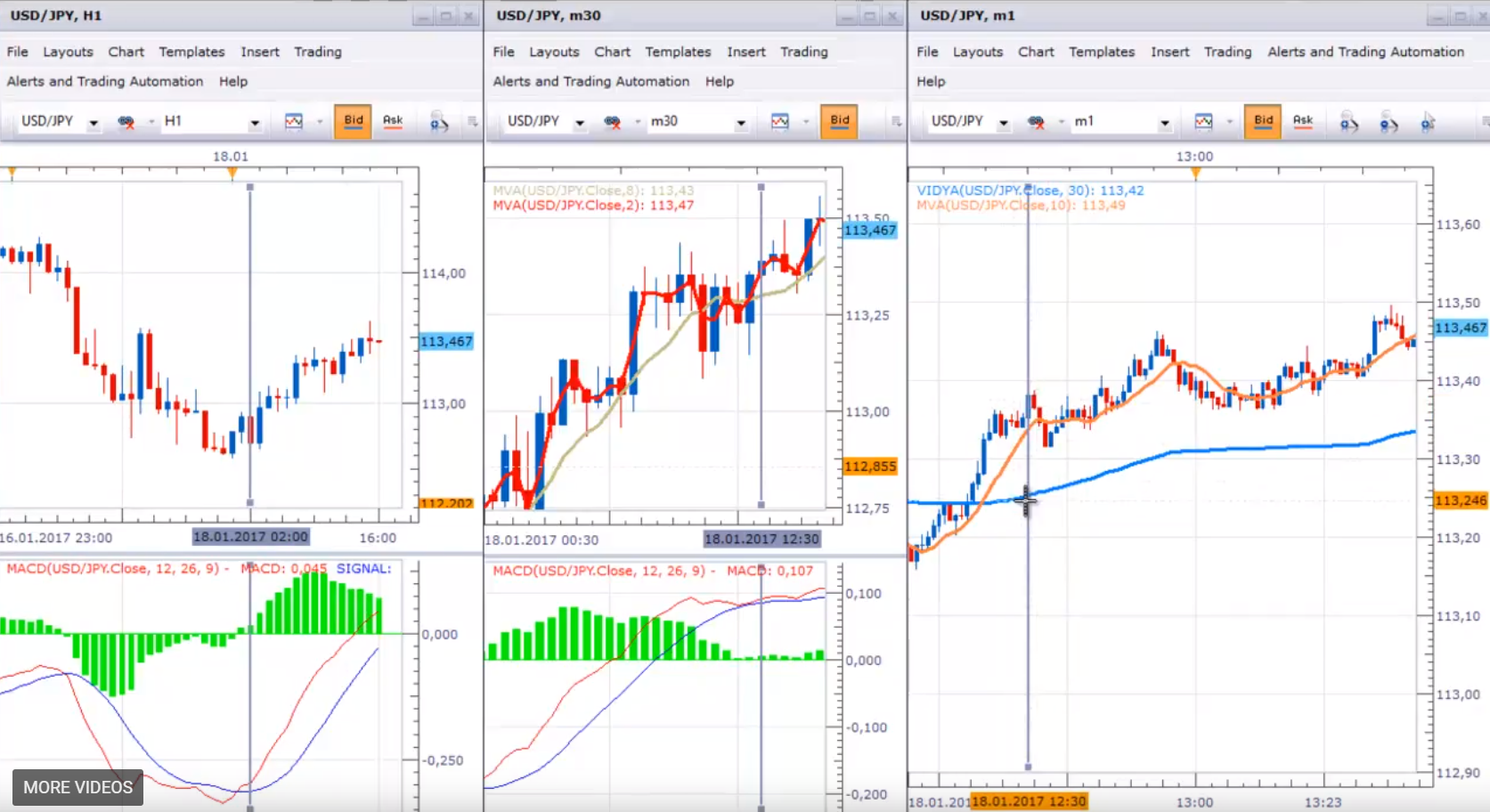
Forex strategies Top 5 course. Dear traders, I continue with my second Forex strategy using M1 chart + M30 and H1 chart as filters to follow the bigger trend. I call it Vidya 1 since I’m using on M1 chart the Vidya indicator + moving average also to enter in the trade.
On H1 you need to have the MACD indicator for filter and I use the standard inputs of 12, 26 and 9. On M30 chart you need to put also the MACD indicator + moving average crossover the MACD with the standard inputs and the moving average crossover you need to have two simple moving averages:
one with period of two, I will put red color since it’s a fast one
and the other one is period of eight you can put any color you’d like but it’s better to be different, so you know which one is the fast one and which one is the slower one.
I will keep here the default color and actually I will make it bigger, so you know exactly where they are crossing I will do the same for the two periods. Any platform you’re using you can try to make it as much visible as possible, so you’re sure when the crossing is happening and on M1 chart you need to have your Vidya indicator, not all the platforms are using this indicator but make sure you have it and you’re not using any other moving averages for these Forex strategies.
It’s kind of moving average but it’s a little bit more complicated when it’s created the formula is different and here I will use period of 30, not the standard 9 and I will keep the same color but I will just make it a little bit more solid. This is the 30 period Vidya and I will use also a simple moving average with period of 10 and I will use orange color since this is not very fast moving average.
Pretty much this is the setup for this Forex strategy and in the next video I will show you how we trigger the trades. Also, in the course Top 5 Forex strategies, you will learn how to set up each one.
For Vidya 1 the parameters and the indicators needed, as I`ve said I used best on USDPY, Stop Loss of 75 pips and Take profit of 25 pips.
For all of the five Forex srategies, we use different SLes and TPs. It’s also possible to add to the position but don’t forget to reverse if there is an opposite signal. What are the parameters on H1 use the standard MACD, on M30 the standard MACD plus 2 simple moving averages with periods of 2 and 8 and on M1 chart you need to have simple moving average period of 10 plus the Vidya on period of 30 and the rule here is that the Vidya needs to rises, so this is the rule to enter in the trade and I will explain it in the next video.
We continue with Vidya one system and the execution of the trades. I will show you what happened today, we can have a lot of examples but I like to see always the latest one.
Only here I will make more visible the moving average, so I will put line width of 3. It’s very clear when the price actually is crossing the line and this is actually the rule here for this Forex strategy. I execute the trades when I have confirmation from H1 and M30 and on M1 I see the price crossing the 10 moving average plus Vidya rises.
What’s the condition Vidya rises?
Very simple actually Vidya or any simple moving average or any moving average is rising when the price is above this line. It doesn’t matter how you say it, do you say Vidya rises or the price is above the video – it’s one and the same thing.
I will look what happened this morning from 1 o’clock in the morning I had the confirmation from MACD on H1 to trade long and on M30 We are looking for the same conformation on the other two Forex strategies on GBPUSD and USDJPY.
I had it also around this time I think even a little bit earlier from midnight and 30 minutes, so I had a confirmation from MACD but with this Forex strategy using the periods of 2 and 8 you can see that they’re crossing during the London opening exactly at 10 o’clock and then there is a little hesitation and then after 12:30 I had again the confirmation to trade long.
And during midnight till London opening there were a lot of opportunities, so they were taken by the automated trading. But for manual trading I trade only after London is open, so here I had the confirmation after 12:30 and I will put one vertical line there, so you can have an idea what time I had the confirmation to trade. From H1 and M30 chart after 12:30 this morning I had the opportunity to trade.
Let’s go back now on M1 chart and see where exactly is this and what happened
It’s around here I will put also a vertical line here. I’m just putting this vertical line so you can have a better idea. You don’t need to do it, but it’s very easy to follow if you have these vertical lines. At 12:30 the price is already above the moving average of 10 and you can see that the Vidya is rising, so I’m ready to trade once the price crosses the moving average of 10 and it happens just few minutes later.
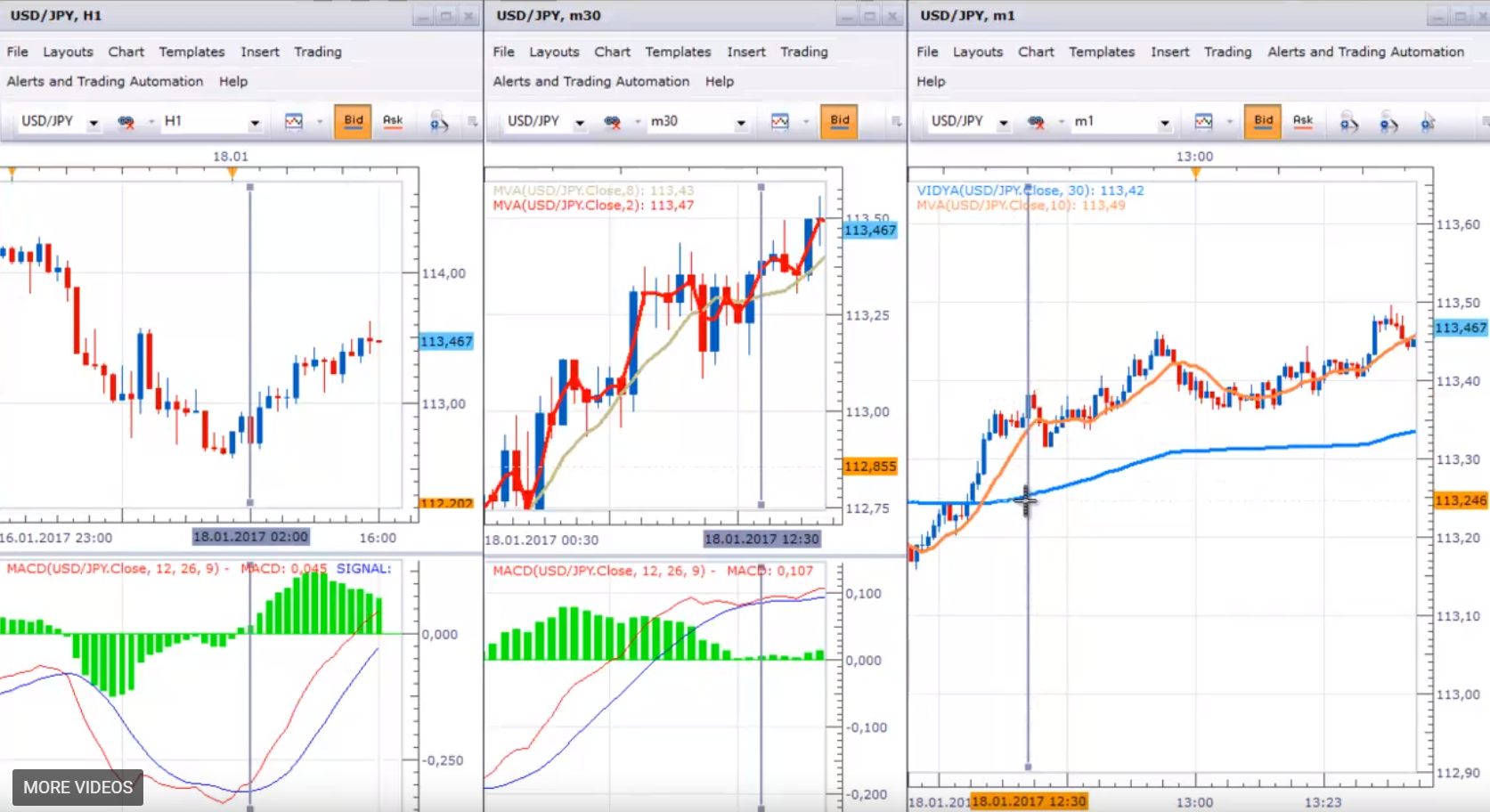
This is how your chart should look like
I will place this vertical line on the moment of the entry and I will place also one horizontal line. You know exactly at what price was the entry, it’s 113.35 and your Take profit should be 25 pips higher and this is the price of 113.60 I will put one horizontal line there as well.
Make sure you place always the lines on the exact price
And I will make actually this line green, so this is our Take profit line. Let’s follow along, if you want to add to the position you have many opportunities with this system. With all of the Forex strategies presented in the course, you can add to the position, but make sure to keep a low risk.
You can see that after that at 13:06 you have one more entry, you have a couple of more entries after that but you should be very careful when adding to the position and I recommend no more than 3 times again.
If you have an opposite signal you have to reverse your position. What means opposite signal here, is not only that the price will cross down the moving average of 10 and the video will be falling down. But you need to have also confirmation from M30 and H1 chart.
Opposite trades or reversed are taken
When you have sell signal on MACD, sell signal on MACD, moving average crossing and the conditions for M1 chart. Basically you add to the trades, and when you have the opposite trade, reverse the positions. As you can see with our trade this morning, it had the Take Profit at 15:30. It’s very simple Forex strategy, gives you a lot of opportunities to enter but as I have said be careful entering too many times I recommend no more than 3 times. Let us know if you have questions about any of the Forex strategies.
For more Forex strategies educational courses, please click on the course section.
If you have any questions, please write in the support FORUM
Day trading is a professional method to trade within the same day, and not keeping trades overnight
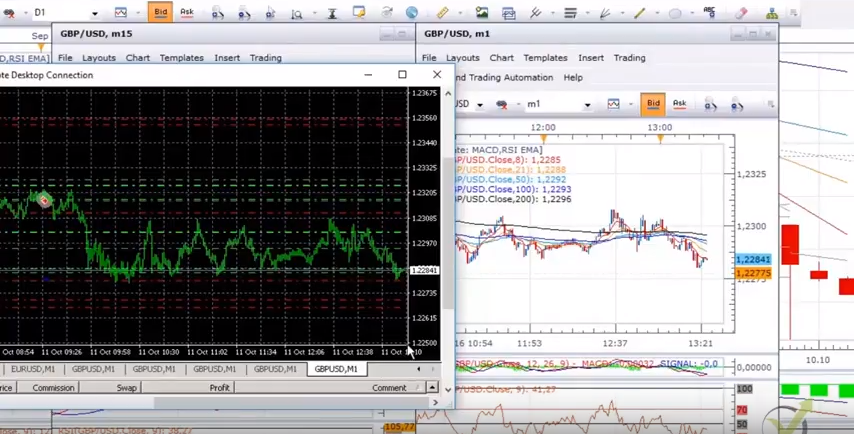
Day trading from EA Forex Academy: Hello, it is Petko Aleksandrov, today is 12 of October. Today is a brilliant day for the GBP even during the London session we have GBPUSD in a range it is just between 1.2280-85 to 1.2305.
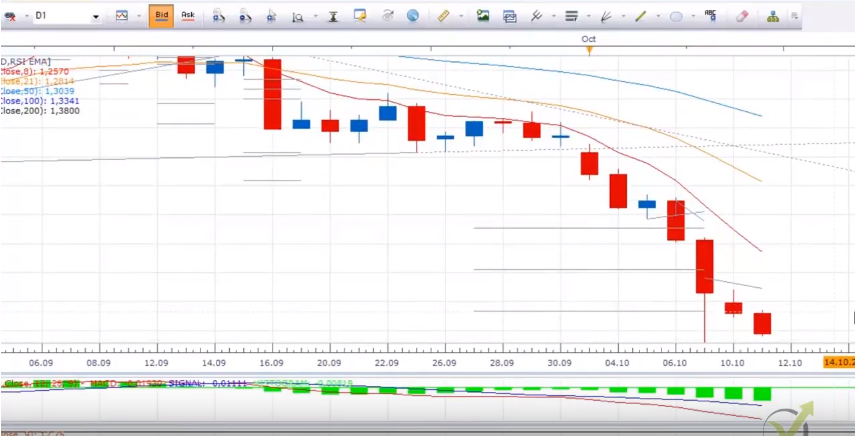
At the moment I have many short trades opened, my Stop Losses are above 1.2350 you can see higher on 58 I have more on above 60. I do expect it to go further below to 1.2270-75. What do we see on a daily chart is that after the huge drop that we had last week during the Asian session we had a very negative day and today as well is another negative day.
This is so-called dead cat bounce and it is very useful in day trading.
Dead cat bounce example on a very negative market
Even we had bounced during last week but the next days are very negative and the dead cat bounce means that after a huge drop during the next days there is no any pullback, there is no any bounce and the market continues to be negative. In the same time, we see that we have a very strong USD the whole morning versus all the currencies as you know in one of my monitors, I have the 6 majors always open.
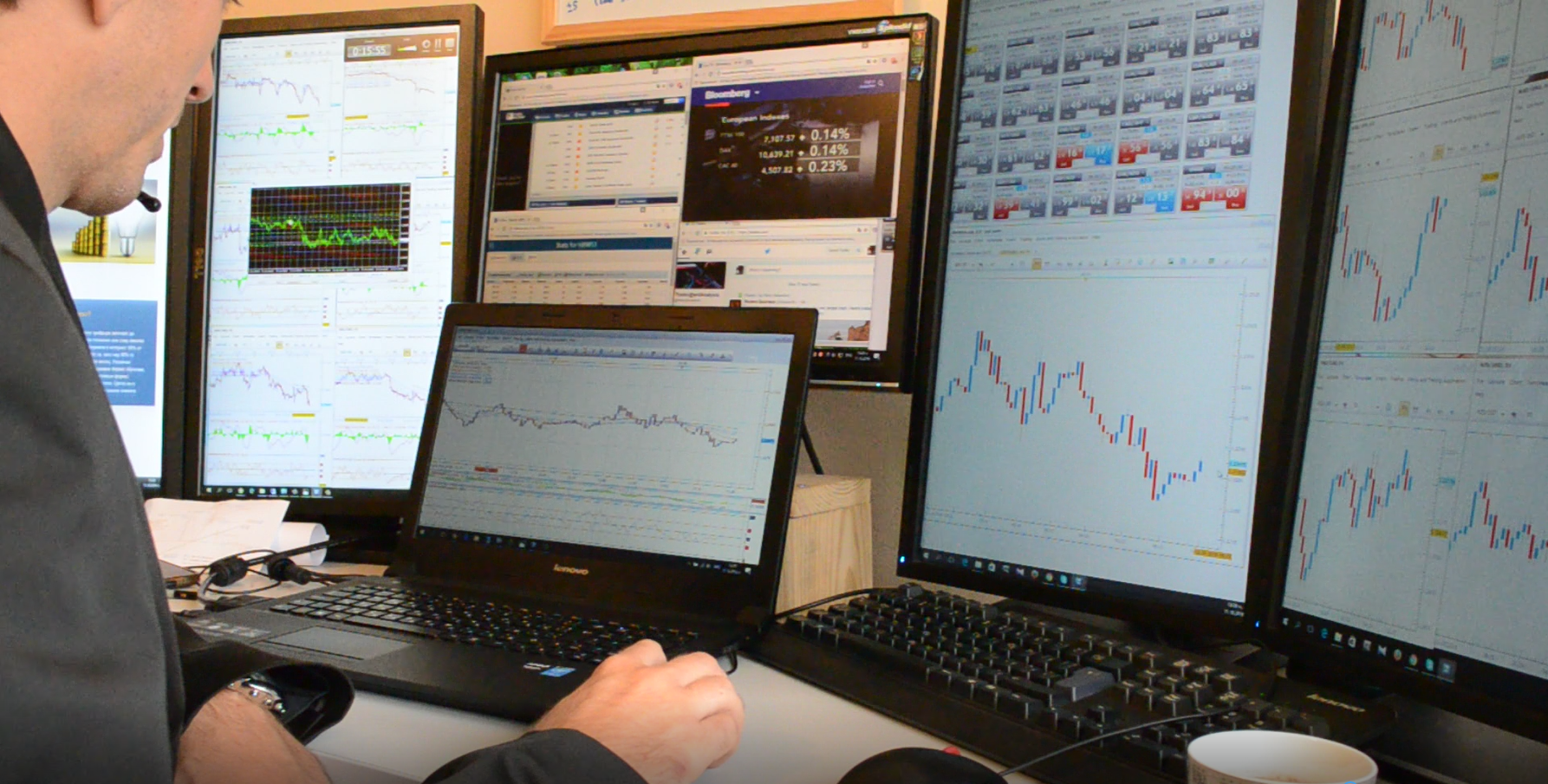
I know which one is strongest and so I’m selling it versus the GBP. I do expect another 20 pips lower down till the end of the London session, if not I will take my profit which is not really bad. Till the moment I have around 600 pips which is not a bad profit but I want to reach 1000 which is my target every day-1000 pips. Of course, not everyday trading I can succeed it, but that’s my target. So, how I do it, guys?
I sell every pullback during the day trading!
The smaller time frame should confirm the direction
It’s not a swing trading because I’m doing it on M1 chart, it’s more of a scalping trading something between scalping trading and swing trading. So, what I’m looking for is the strong trend and I’m just looking to sell it when the trend is going down but this range, this morning is kind of messy and it just goes sideways but I really expected any moment to drop lower. What I can expect is another test of 1.23.
Anyway, my fib at the moment it’s exactly there at 0.382 on a daily chart you can see there. Right now we have the drop, the price starts to go down now 1.2284. My first Take profit is very close few pips below it is 1.2283, I think that’s it the price will break down now. It is just testing the 1.2280. My next to Take profits are at 70 and 65.
The GBP is at record low levels after the Brexit for the last three decades and this way fundamentally and technically I sell it the last days and I succeed to take great profits over here!
Diversify the risk in many positions and achieve bigger profits.
And my results during the last week are just great. The last candle that closed on M15 you can see it right over here it’s a very negative one, it closed nearly on the zero, but you can see previously even one closed on the lowest point after that we had a move up. What I can draw is a counter trend line over here, you can see it was broken very impulsively. When we do day trading, we are looking for the impulsive breaks.
In the next minutes, I do expect it to go below, but it is 1:30 UK time right now, guys, because by 1:30 UK time I want to stop my trading for today. Usually, I do trade on only during the London session because it’s crucially important for the Forex market. Of course, the others are great to trade it, especially the New York, the Tokyo but if I make a great result during London I take a break on the afternoon or I just do mentor and teaching. I do prefer to have two hours great trading with a good profit instead of trading the whole day.
So, normally what I do? I open many positions in one direction, so I do not rely on a single entry or on a single Take profit. Of course, it depends on your broker if you can hide unit or if you can add to the positions or reduce the positions.
What I do doesn’t matter which broker I’m using:
I open many trades, many orders on different levels, so each one that I have opened is according to a different strategy
it’s the same direction for all the trades
I use hedging positions on the other side to limit the risk while Day trading
this way I have a portfolio of different strategies not only one
If one starts losing if I didn’t enter the right price the other well compensated and this way the losses are less and my profit line gets more stable. The price stopped again at 1.2280 but it doesn’t go higher it just to 1.2285 and the same time I have a couple of positions open at the USDJPY, of course long because of the
USDJPY crossed a very important trend line.
Daily chart for USDJPY
We have a trend line from the beginning of.. what is it January 2016 and it was broken last week. Very impulsively broken and now the USDJPY is very positive, so we are looking to buy it. This impulsive break was according to all conditions for an impulsive break that we educate in EA Forex Academy and as well in H4 chart we had this counter trend line, that was broken impulsively as well.
All trades here are on positive with me, but I do expect it to go above 1.0415 before reaching 1.0450-60. Anyway, most of my positions today are on the Cable. I have around 17 open positions and I have few hedging positions on the long side and I will close those if 1.2280 is closed. Definitely, strong support we have at 1.2270 and this is just for the day because anyway, this is record levels for the GBP and this level doesn’t mean anything really.
The resistance is at 1.2307, 1.2310 before you can see it was support then it became a resistance, a strong resistance. My Stop Loss is above 1.2350-60 higher. It’s very risky if I place them below this level.
What I was expecting during the London day trading session was this counter trend line to be broken
Break out of the support line
because the thing I want to see right now is the price to retest it and to go further below because normally when an important level or important counter trend line breaks we expect retest just what we see after that and then it will go further below today we don’t have any important news that might interfere my trading and change the direction of the trading.
At 12 we were expecting sounders to talk, but he didn’t say anything important that interfere the market. Huge movement on EURUSD as well I have 4-5 positions here even a little bit more EURUSD you can see actually they were closed right here, you can see here was the entry and then my Take profit was hit. I did not expect that it will go below 111 anyway I expected to go further below and you can see this was a very short trade with just 9 pips of Take profit but now I have some other that is with much bigger Take profit where the Take profit is at 1.1060.
You can see what’s going on now with the GBP 1.2260-68, very close to my Take profit. One was closed, the next is just a few pips 1.2268, 1.2267 very, very close I’m just waiting a couple of seconds and I think it will be broken. You can see the retest was exactly what I did expect and then the price continued lower.
I do believe I already have a thousand pips in my pocket I will just wait a little bit more and here it is 1.2267, 62 even and I had my Take profits. Great day trading day!
Results with the last 6 days
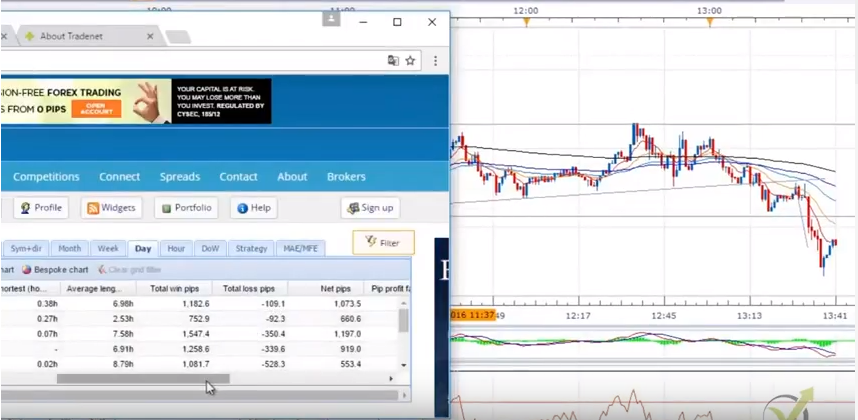
The price even continued to 1.2260, 1.2262 and the price continues lower. However, my Take Profit was reached so I’m not going to trade there. You can see here are the profits, so it is totally 1182 pips and I have 109 or 109 losses. These were the hedging positions that I have but at the total I have is 1073.5. This is the Net pips 1073.5 this is the total result that I have. You can see yesterday is 660 but the day before it was 1197 and then you see the results from the previous day trading. Obviously, my target is always 1000 pips and I always wish you to have great trading days and always trade safe and smart.
Price action trading is a simple method that represents market behavior
Price action trading, and the counter trend line is the topic of this lecture, which is a free lecture from the Basic cryptocurrency trading course. We have one whole course called The never losing formula – Bitcoin trading and it is based on the counter trend line which actually gives us fantastic entry point for the trades and I will show you an example here in this course as well.
I will continue now with the Ethereum
I draw lines and trend lines and I will leave the others for you as practical activities just to practice to draw the trend lines, the counter trend lines over the chart which are actual price action trading.
So, what is the counter trend line?
From the name obviously you understand that this is a line that is opposite the trend. And the trend line is the line which gives us the sign that the price continues the trend.
Watch out for the important support and resistance levels
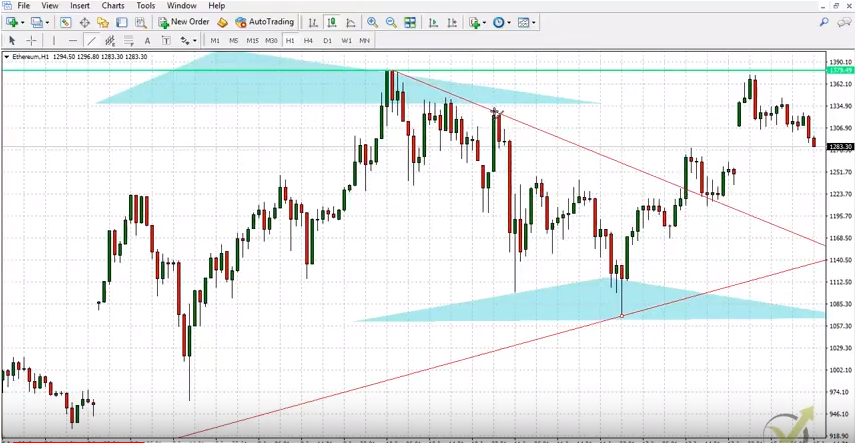
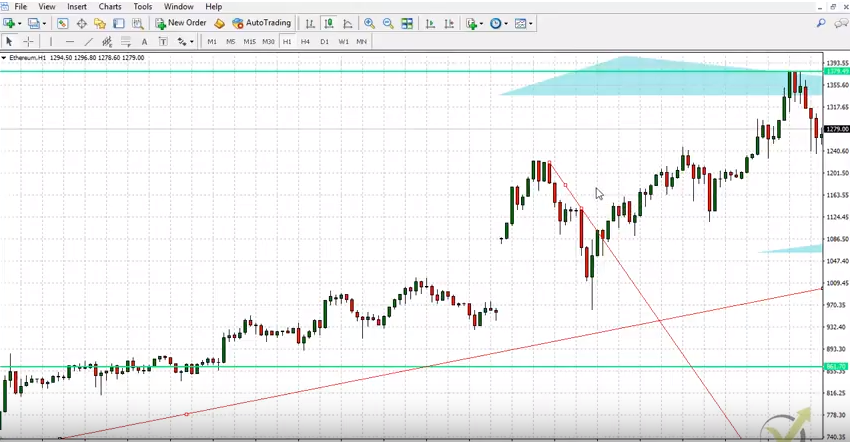
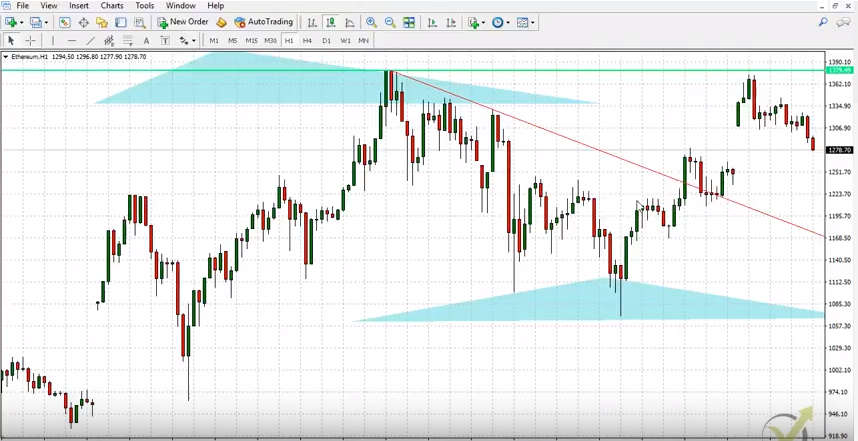
Now if I take this most recent high actually this is the record high that we have on the Ethereum, I will draw the counter trend line on the opposite direction and you can see for example if I connect it with this high over here, here I have a great entry, guys. You see very impulsive break. What we were saying that impulsive break when we have a long candle closes on the high and the bigger part of the candle is above the line. So, it’s the same rule when we do counter trend line. When we do price action trading we follow simply the traders behavior.
If I come back here you see I have my counter trend line and if I just move it slowly you will see that what happened is the price broke it, retested it very same thing what I said with the support and resistance when any line is important to the market it’s very possible that the price will retest it and it will continue higher. Now if I go back you will see that this counter trend line could be actually on many places, right?
Any line could be drown between two points.
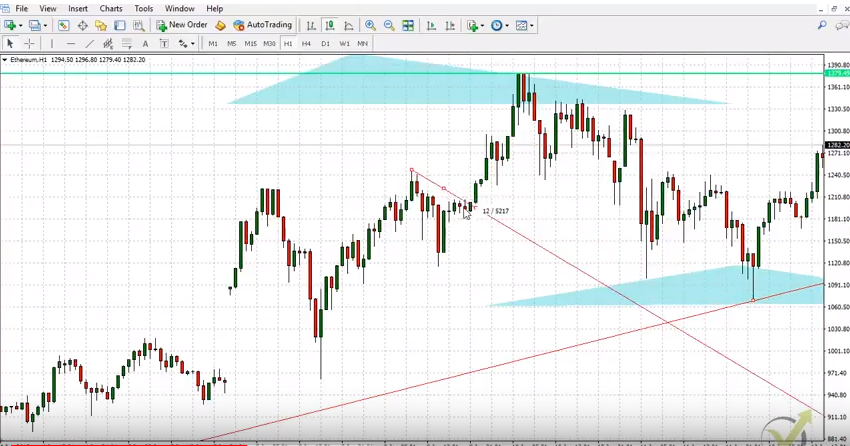
It could be here connecting some of this high or I can put it here and draw it here you will see it will give me another great entry.
So, what’s the idea here?
We are in an uptrend, the price reverses. But we don’t know how far it will go down, we can use the support, we can use the trend line, but the important is that we want to enter with the trend just when the price starts to go up again. It is starts to follow the trend again.
The counter trend line gives us many possibilities.
I will have this great entry at this level over here and as you can see you would have great profits if you have entered there. Now I can draw it here, you can draw it on so many places. Obviously here another great entry and then you can go back and back and you can go much lower. In the price action trading you will see that there are some great, great opportunities using the counter trend line, that’s why I will leave it to you with other cryptos, just to draw it by yourself, to see it by yourself.
When we have a recent high, guys, just connect it with the other ones and you need minimum two and this example here is great, because you can see that here I have one touch, two touch and three touches nearly here which makes the counter trend line very sustainable, very strong and it makes the counter trend line important to the market, and a great tool when we do price action trading. And as you can see here if you enter here your Stop Loss would be great to keep it just below the trend line.
I really don’t want to give examples over history data
Many instructors are doing that, they will give you so many examples it’s great to enter here, it’s great to do this, it’s great to do this. Obviously it’s very easy when you know what happened. So, I will go back to the recent moves, the ones that we have from today, from the last days and as we said the recent counter trend line was this one over here.
The distanced between the lines is where we want to trade
Which gave this great opportunity to enter. I actually record it with the other Ethereum trading course that I launched recently, here an example where the price broke exactly this level, but it was because of the trend on the lower time frame. It’s totally different system, I don’t want to make it confusing here for you, guys. So, let’s focus on this counter trend line.
What we have when we have counter trend line, is that we have aggressive counter trend line
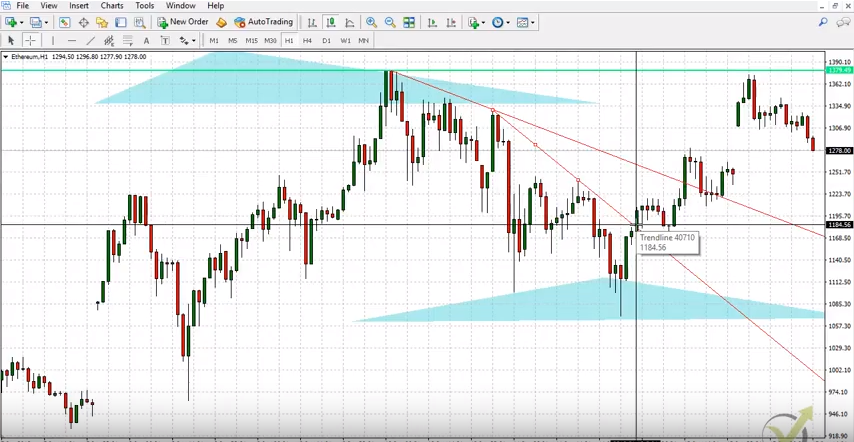
This is again price action trading tool. This means that this is a great opportunity to enter at this price when the price breaks the counter trend line, but we can draw more aggressive counter trend line which will be from this top connecting this top over here. Now you can see that if I entered here I would enter in a long position in a buy position on much cheaper price.
We have the better entry with the CTL
Instead of entering at around 1240 I would be entering at 1184. As I said, I don’t want to give examples over the chart, so let’s go to the most recent movement that we have from today. I will just zoom it a little bit even more and you see these are the last hours from today and let me just take the line and you see from here I can draw this counter trend line. Now if the price breaks above I can enter or if the price just forms another lower high I can draw more aggressive counter trend line and enter into the trade. Now this is the example strategy, guys, that I want to show you for manual trading.
For this strategy we will need actually three things:
we follow the trend on the daily chart, let me just show you where is it. We follow the trend on daily chart, we have series of higher highs and higher lows
when I go to H1 chart, we are having the counter trend line, as you can have different price action trading tools used
we are looking for the more aggressive counter trend line to enter into the trade with the direction of the trend.
Now obviously, if I just zoom out a little bit you can see that this is already aggressive counter trend line, because the counter trend line would be this one over here connecting this record high that we have and the most recent one. But this is nearly, nearly a support and resistance. You can see it’s very close to a horizontal line, anyway it’s not a horizontal line, so we can consider that this line is a counter trend line, as well and here we have this aggressive counter trend line. So, if the price now goes lower and forms another lower high I will have another more aggressive counter trend line and I will be able to show you an example with this aggressive counter trend line and I will do this in the next lecture.
The professional traders use MQL4 Scripts. You need it as well
MQL4 scripts, EAs, and trading platform is the first important step in algo trading! My name is Petko Aleksandrov from Trading Academy. And in this video, I will show you exactly how to export the Data for EA Studio (the professional strategy builder).
Because this is very important when you’re creating strategies over there, and you export them in MetaTrader, to have the same results in MetaTrader backtest, and the same results in your EA studio. Also, I’ll update all previous courses with this video that I am using EA Studio.
Get the MQL4 scripts data for free from us!
The code to export the Historical data
Once you have the MQL4 scripts and you need to copy it. And you need to go to file, open data folder, and you go to MQL4, you go to scripts, and then you paste it. Close the folder, go to scripts, and refresh.
After that, it will show over here. Let’s make it just a little bigger, and I click the plus. This is the script that we are using for EA Studio – EA Studio data export.
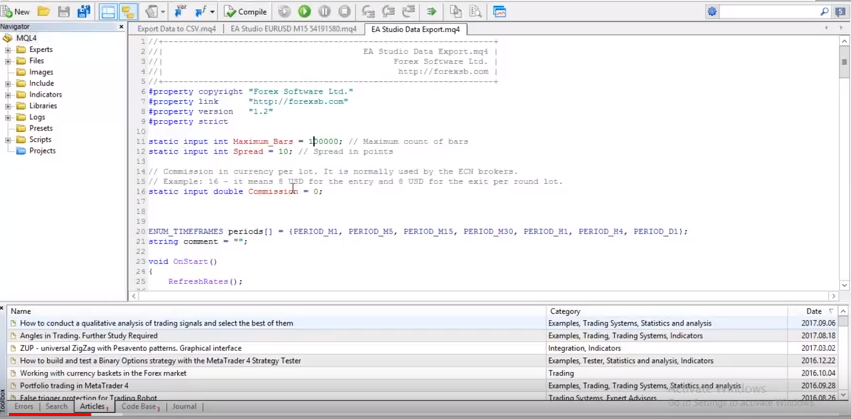
That is the script that will export your Forex Data. What you need to do is you click the right button of your mouse, you go to modify, and here you will see all the settings for the EA Studio.
Here are the maximum bars that you would like to export. Here is the spread, and here is the Commission.
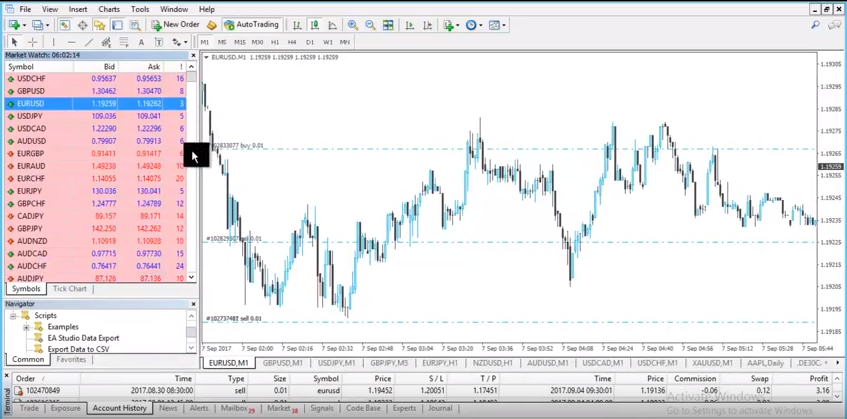
These are the three most important things that you need to set up. Now I will minimise that, I will go for example to EURUSD, and I will click right button, and I will click on the spread. Now, you can see the spread for all of your instruments going up and down.
What do you need to do?
Variety of instruments with MetaTrader.
Since most of the brokers are having floating spread, as you can see at the moment is 3, is changing to 4, 5 sometimes it’s coming lowered two and to 1. That’s why EA Studio by default it comes with 10. So, the strategies that we will be building, will be skeptical with the highest spread in the data.
This is the worst-case scenario for the spread.
Meaning that the strategies that we will create in EA studio, they will be with the higher spread of 10 and in the normal situation on the average market after that, you will have less spread. Of course, you can set it precisely if your range is stable, but what I suggest to you?
Give it always a little bit bigger. So, the results in the EA studio will be the worst-case scenario for the spread. When you put the Expert Advisor after that in your MetaTrader, you will be expecting better results, because the range will be less. This way, we will have skeptical data.
The Commission in the MQL4 scripts.
As you see in the account history of this account I have for 0.01 lot size I have 0.06 as a commission. The commission comes from the broker. Not all brokers have commissions. Mostly the ECN brokers have commissions.
But if you have it, you should put it as well in your script. So, you will have precise results. As you can see here what it says in the code is that commission in currency per lot.
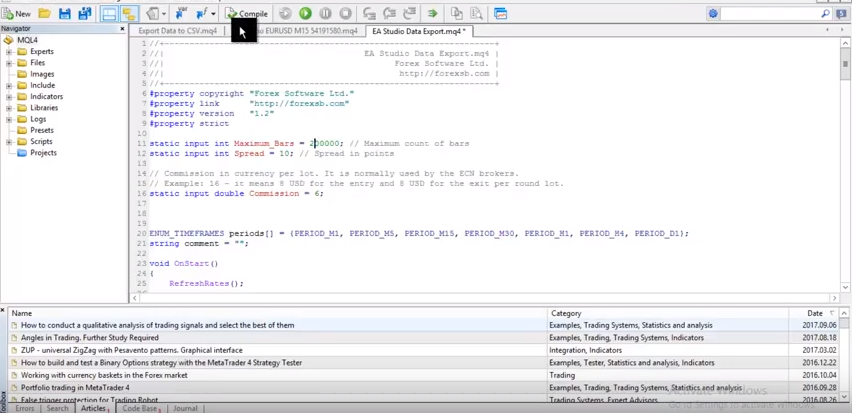
So, what I have to write over here is 6. Because 0.06 I have for 0.01, so for 0.1 it will be 0.6 and for one lot size trading, it will be 6. And the other thing again is the spread. If you have the floating spread 5, 6, 7, going to 10, as you can see here the most traded currency they have spread below 10, this is in points. So, I will leave it to 10. And as well I will put the maximum bar to 200.
So once again, you need to set up only the values in red:
the maximum bars for the MQL4 scripts
the spread
the commission
Compile the script with the details filled
After that, you click on compile and your EA studio data export script is ready. So, what I will do? I will click on the EA studio data export, I will drag it over the chart and as you can see all the bars were exported on your EURUSD M1 I have 200 000 bars, and for the others, I have more.
So basically, what you need to do before that, actually if you download it your MetaTrader and you just installed your MetaTrader.
You need to go to all time frames, and you need to press the HOME key of your keyboard.
So you are on M1, press the HOME key, and the chart will be loaded over here. And until the maximum Forex data, you can have from your broker, then you go to M5, and you press the HOME key again. Then go to M15, you press the HOME key, M30, I have already done that.
That’s why it’s not loading anymore, but this is the thing you need to do every time in the beginning. And of course, you need to do it for the rest of the currencies that you want to trade or any other instruments that you wish to trade.
Keep in mind that some pairs have a higher spread. So, if you are trading, for example, these over here, you should be placing at least spread of 20. Or if you have some currency as AUDCHF for instance, I don’t think anybody would be trading AUDCHF, but if you are, you should have spread even above 20. So, after that you go to file, open data folder, you go to MQL4 and to file.
Organise your work in folders
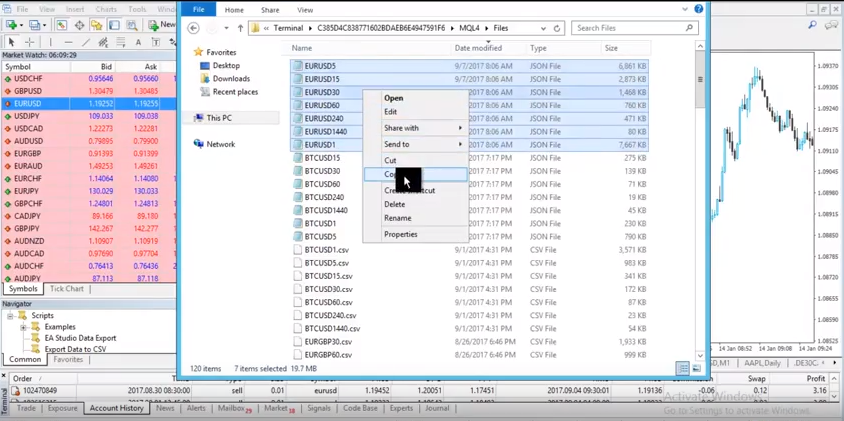
This is the recent EURUSD that we have exported with the MQL4 scripts. So, I will copy that, and I will leave them in a file called Forex data. But you can copy this in any way you wish.
Just collect your data in one folder and after that, guys, what you need to do is actually to test if everything you set is correctly and if you will be receiving the
Same results in your EA studio and the MetaTrader back tester when using the MQL4 scripts.
Import the most recent data to work on
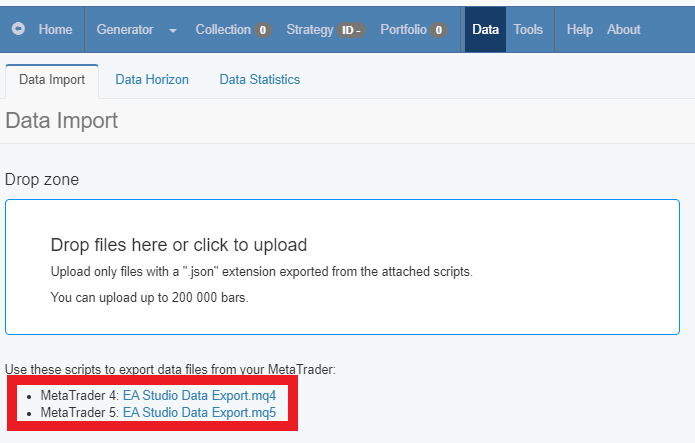
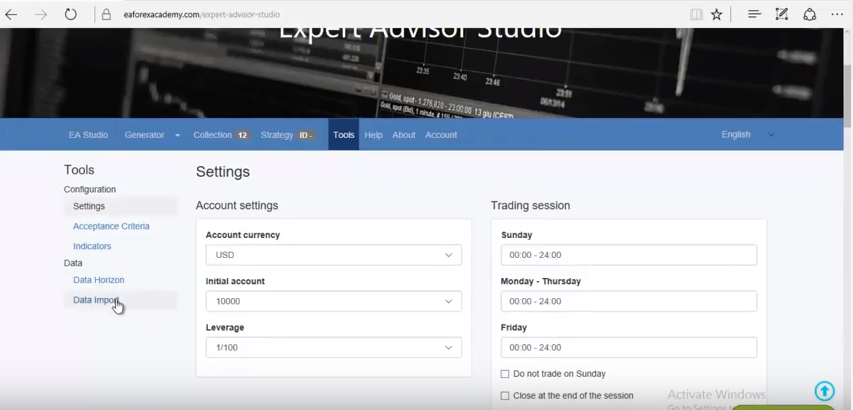
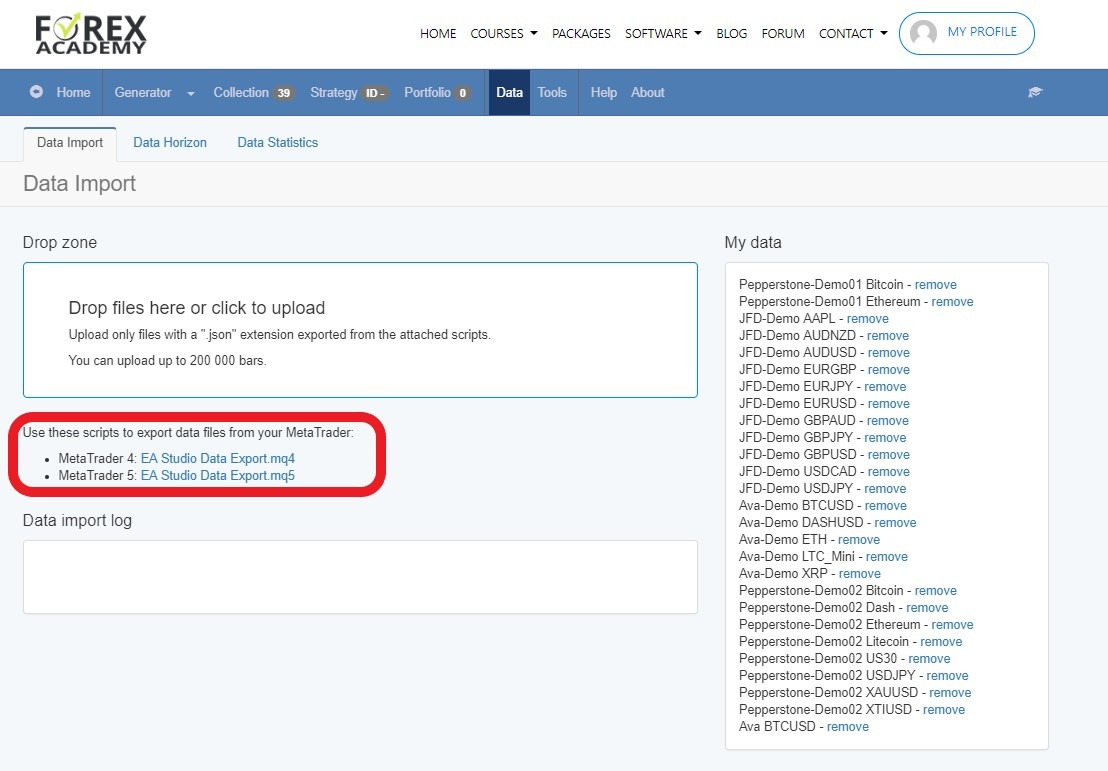
I will go now to EA studio I will click on tools and in data import is where you need to import your data from the folder. These files over here what you need to do, is you select them and you drag them over here in this field. As you can see your data is uploaded over here first is imported then is uploaded. But I see here now a limitation of 100,000. This comes from EA studio. When you go to the data horizon, you can change the maximum data bars to 200,000.
This is the maximum you can have in Expert Advisor Studio. From over here is if you want to use start date limit or use and day limit. And now again I will be importing just the data for M1 and M5 because these were bigger than 100,000.
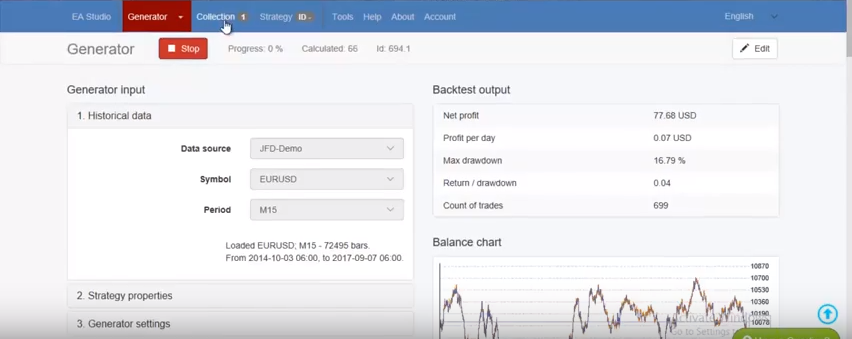
I will put this one over here, and I will drag this one over here. As you can see on M1, I have 200,000, and on M5 I have 175,578. So, after that I will go to the Generator I have some strategies here in the Collection.
I will remove them, and I will go to the Generator, you select your broker. For this video, I’m using the JFD broker in the demo. And here you choose the currency that you wish, now we import it, let’s see precisely this is the time.
And what I will do right now to show you how essential this Data is?
The generation is a quick process
I will click start, and I wish the generator to create just some strategy. Doesn’t matter what is it, as you can see I have already in the collection some strategy. So, I will stop the generator, and I will click on this strategy. It doesn’t matter what entry conditions it has or exit conditions.
All you need to do is now to export this strategy(not by using MQL4 scripts, but from the EA Studio itself). And I will save it in the folder where is my data, for example.
I will open, and I will copy this strategy, then I will go to my MetaTrader. I’m going again to file, open data folder, I go to MQL4, and I go to experts. Then I will be pasting this strategy over there.
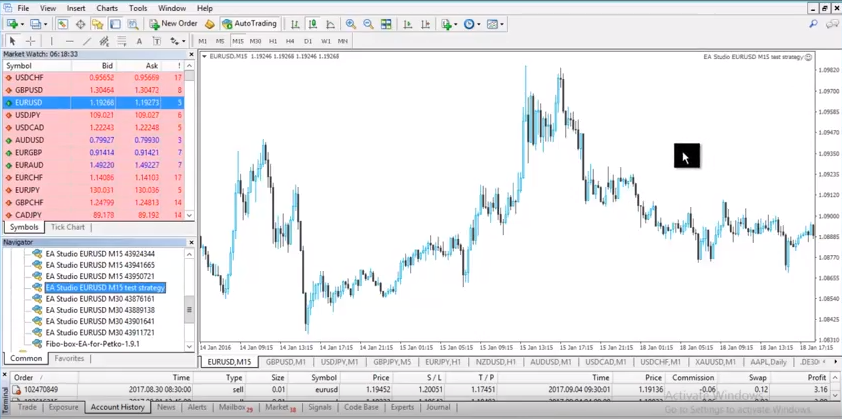
I have a lot of strategies here testing at the moment. So, this is the strategy of M15 ending. Now, I will rename it to make sure I don’t miss taking it. So, I will say just test strategy.
I will close this folder, I will go to experts right over here on the Navigator menu, and I will click on refresh.
Compile Expert Advisors just like compile MQL4 scripts
Once it’s ready I will look for it, let’s make it a little bit bigger. So, I can see where is this test strategy, it’s right over here, but this is on M15, so I go to M15 and
I will put this strategy over the chart to trade
Drag and drop the strategies over the chart
The first thing you need to see that everything is working. You have the smiley face over here, and of course, you need to wait a little bit to see if your MetaTrader will open the positions. But if you have done everything correctly, it should open them.
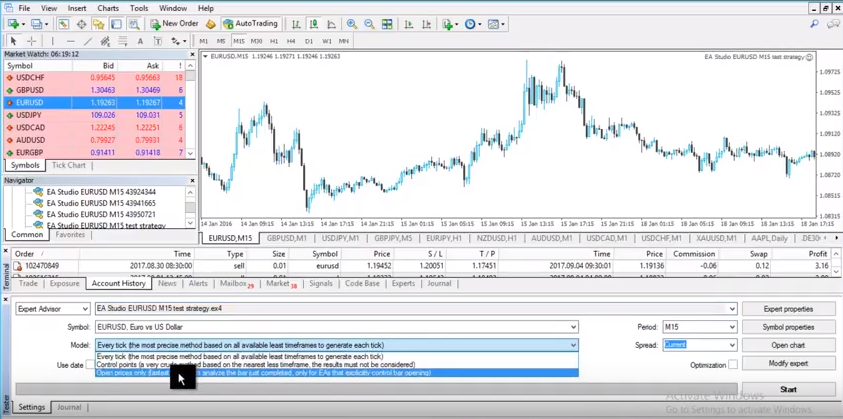
And then what you need to do? You click right button, you go to Expert Advisors, and then you go to strategy tester. So, right over here I will select, it’s already there actually. Because I choose it from the chart, it’s your strategy. It’s EURUSD.
The model you need to choose, guys, open price only.
Open prices are the only trusted model for backtesting.
Every tick model it’s not real from MetaTrader, it’s a great thing to talk about. But I don’t want to speak in this video about it. It’s just the best thing you can do is to test by open prices only. And spread you need to do it the same way that you select it to do it in your script. So, I will choose ten, and I will press Start.
Using the MQL4 scripts properly, allows you to have the same results.
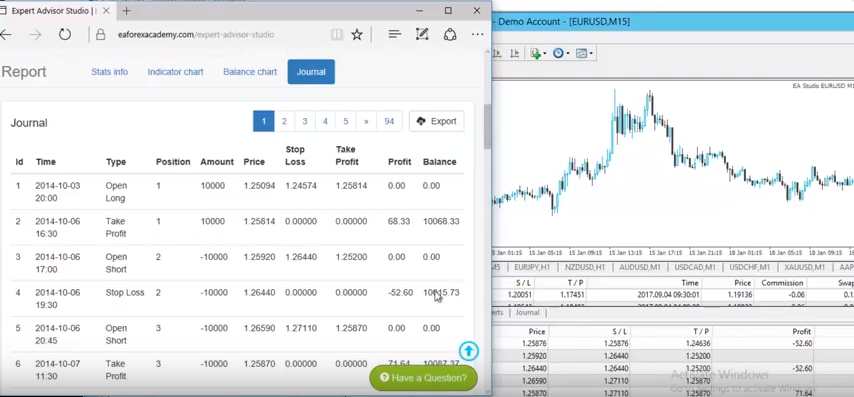
Let’s see what the result is. I think this is very similar to what I had actually in the EA Studio. It’s hard to say because it’s just up and down; this was just the first strategy that we selected. But to make sure we have the same results, I will click on the balance chart and then I will go to the journal.
This is where you see all the results from the strategy. And I will look as well in results over here. This is where you see also the results from MetaTrader. Once again I will open it right over here
Let’s make it the way that we can see both.
Results should match
This is in EA studio. As you can see we have the very same results – 52.6. And we have effect after that 71.64. Let’s see lower – 52.36. Is just the same thing.
What you can see sometimes is a difference in the very first trade that you have. Here is 68.33 and here is… Let’s see how much it is. It’s again, -52. This comes because MetaTrader is designed to start the backtesting from the 101 bar. No matter what is the first date on the first bar of your final test. It will just begin to calculating from the 101.
That’s why EA studio back tester is more precise.
Because it starts calculating immediately, but as you can see after that we have the same results. Let’s compare the date, and the time, I will leave it this way.
We ignore the first trade over here, and we focus on the second one. On the second trade, you can see this is 2014, 6th of October 2014, 6th of October at 7:00 hours. So, it’s a short position as you can see the price 125.92, stop loss everything is the same.
All right, guys, this is very important to be done before you start doing anything with your EA studio. So, if you miss entering the Commission here, I would be having the difference of this 0.60 which is precisely actually the Commission in this case with 0.1 and 0.06, as we said if your entry lot is 0.01.
I hope everything is clear. Make sure you set in your EA Studio script exactly the spread and the commission and the maximum bars that you want to export. But once again this video is proof of how good is Expert Advisor Studio as a strategy creator because it shows precisely the same, same entries and exits.
And MetaTrader meaning that the strategies that you are creating, the portfolios that we are doing are the very same thing that has happened. You see immediately here the balance chart, the statistics. After you do this check, you can be sure that the strategies that you create with EA studio, with the Expert Advisor studio are realistic and you can trade on your MetaTrader.
If you have any questions about how to use MQL4 scripts data, you can always write in the support Forum.
Expert Advisors – Interview with Petko Alekandrov by Mubarak Shah
Expert advisors trading is the key point on the financial markets nowadays. Mubarak takes an interview from Petko to reveal the sicrets.
Mubarak:Hey Petko, welcome to the InvestHQ podcast. Thanks for joining us today.
Petko: Hello, nice meeting and how are you?
Mubarak: Good, good I’m doing great. What time is it over there where you’re.
Petko: Right here it is 5:00 p.m. local Bulgarian time.
Mubarak: God it, god it Bulgaria well. It’s 11 a.m. here in New York. So, definitely appreciate you taking the time to join us right before the weekend hits for you.
Petko: It’s a pleasure.
Mubarak: Awesome, awesome yeah. So, I love kind of what I’ve seen from your website and your background and just for our listeners that don’t know about you why don’t you take this opportunity to just introduce yourself and give us some background and kind of how you got into the industry.
Petko: Well, I`ve started many years ago going into Forex and started trading. I’ve worked for a couple of brokers, some banks and institutions. I always wanted to trade even when I was small, but I didn’t have a great opportunity to study in Bulgaria, so I went to London. I graduated there and I was actually invited there to stay in the Academy as a mentor. But I wanted to do it by myself in Bulgaria. Because during this time there was no any place in Bulgaria, in my own country to study Forex trading anything about it. And I actually started the first academy in Bulgaria. And now I’m having students from all over the worlds which makes me very happy.
Mubarak: Well that’s awesome, that’s awesome! So, this Trading Academy that you attended in London is it still around?
Petko: Yeah, it is still around, I had a very good basic skills there. What I was missing there was the algorithmic trading and this was my passion actually. So, I developed myself a lot I can say in algorithmic trading and now I’m teaching algorithmic trading. I do believe this is one of the ways nowadays people can make stable profits.
Mubarak: Wow OK, interesting! So, could you explain to us what exactly algorithmic trading is? And how it’s different from you know normal stock trading or Forex trading?
Petko: Sure, algorithmic actually is nothing really hard. People in the beginning think they need to have some background before that on trading, but in trading, but actually everybody can do it from the beginning.
Long story short algorithmic trading is when we trade certain strategy without any interfere from us.
We place the so called expert advisors or as the people know-robots and they trade for them. There are many different expert advisors nowadays. People buy expert advisors and they lose, they win, it’s really a huge world with expert advisors.
The thing is, the most important thing actually is the people to get use making their own expert advisors. And first there is no need to have any programming skills, because nowadays there are many strategy builders.
So, people can just put entry and exit conditions, stop-loss, take profit, the basic rules they have on their strategy and they can automate this strategy int an expert advisor using this strategy builders, this robot builders an they don’t need to hire programmers developers and so on they can do it by themselves.
Mubarak: Wow OK, so it’s for people who say they don’t have any experience to the algorithmic trading. But they know a little bit about trading stocks. How would you recommend they get started and what do you feel? So, you brought up the advantages of, you know, kind of that expert robot or expert advisor, what do you think gives them those strengths over normal people?
Petko: Well, the advantages is that we can trade with exper advisors first of all all day long 24 hours, 5 days a week, for example if we talk about the Forex. Something we cannot do manually and if we have a success rate with manual trading, let’s say any, any success rate, doesn’t matter. If we trade it 7 hours per day 8 hours and with algorithmic trading we can trade 24 hours. Because we don’t need to stay in front of the computer normally the human gets tired you know, needs to sleep. But the expert advisors doesn`t need to do that. So it is very useful when you have a strategy that it can run all the time on your computer.
How the people should start it? There are many courses. I have nearly 11 courses for algorithmic trading already launched. So, I show it there from the very basics the most advanced things. We use for example, in EA Forex Academy two strategy builders,EA studio and FSB Pro, these are very professional softwares:
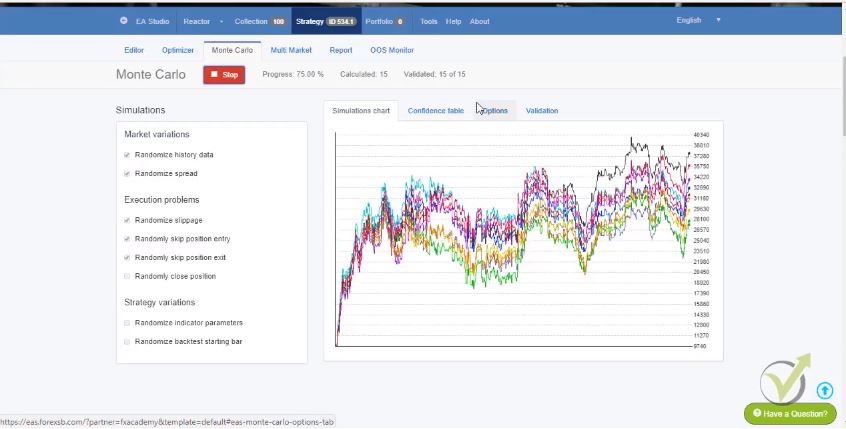
Monte Carlo tools shows the robustness of the Expert Advisors
We are actually always looking for the best expert advisors, studios or strategy builders, because we want to use the best softwares.
So, with these softwares people can just automate their strategies. And as well they have this, let’s called it smart intellect inside, and they can generate strategies for the people as well.
Mubarak: Wow, OK! So, if I use one of these softwares there’s no way I can lose money. Or is it still built into normal like I put in my strategy somehow and they’ll trade on the half of me pretty much of what I would have done if I was there. How does it work if you could give some more insight to that?
Petko: Yeah, actually if you have a strategy that you’re using on manual trading you can automate your strategy with these expert advisors. And you can automate it as an expert advisor and it will trade for you on your behalf when you’re not in front the computer. The great thing is that you can see actually if your strategies losing or winning. Because common problem is that people find let’s say in YouTube or anywhere any strategy, they start trading for month or two, they have losses, they have profits. But they’re not sure if the strategy is making profit, because they don’t see it in the past.
What was the result from this strategy? And when we do algorithmic trading when we built the expert advisors we see a very precise statistic. For example, for the last five years, how this strategy performed, what profits it did, what are the risk involved. And this is something much more than what we have in manual trading.
Mubarak: Definitely yeah, that sounds like a great advantage to have. So, would you recommend everybody who wants to start investing in the stock market? Or in Forex to go into algorithmic trading, or is there only a certain sub sector of people that should do that?
Petko: Well, I can say in the last ten to… probably last five years the algorithmic trading changed a lot the market itself. Because huge institutions and banks are already using robots and expert advisors. That’s why the markets are much more volatile every day. We saw what happened with the cryptocurrencies for example these moves were well this was just something unbelievable that happened especially with the Bitcoin. But I’m not going into there.
Even from the very beginning when I started it I did algorithmic trading with the Bitcoin. And I do believe that I did much better than the people that just bought on exchanges. Because you know some people bought it already late when it was very expensive and lost a lot of money. So, algorithmic brings you the the chance to trade any assets no matter is it expensive or is it cheap. Because it is it’s taking profits quickly. It trades much more often and it brings you more stable results.
Mubarak: Got it, got it, that makes sense. And so, you trade exclusively Forex now, or what do you find out the advantages of Forex over other types of investments that people can do?
Petko: Forex is one of the easiest way actually to trade. And there are many brokers that provide you on your phone application. Of course I don’t recommend trading from the phone even a lot of people are doing it. But even many people are doing it, and Forex is easy because there is a huge variety of currency pairs to trade. The spreads are very small, very tight most of the brokers already don’t have commissions. So, it’s very easy for people to fund their account and start the trading.
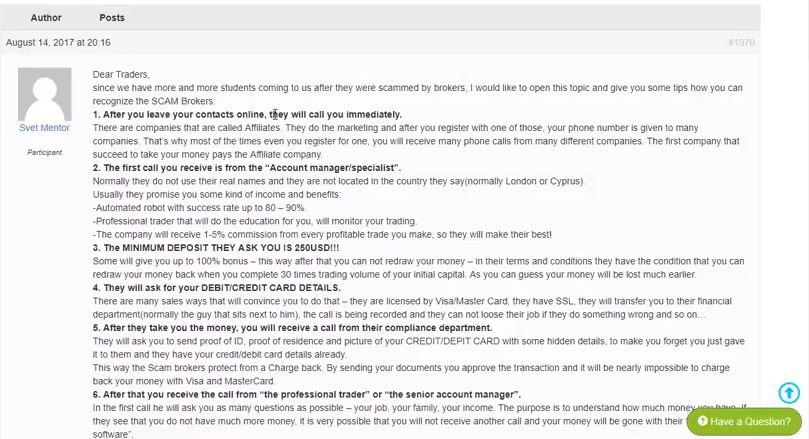
One point here many scam brokers recently around the world, many people get scammed every day. And actually we placed a nice topic in our forum in
EA Forest Academy where we describe exactly how the scam brokers are working. No matter are they for Forex, Stocks or anything.
Take 5 minutes to read the topic
And we have protected actually many students and many students as well shared with us their bad experience with the brokers so one note to everybody: Be very careful when you choose your broker to be a regulated one.
Mubarak: Got it,got it, yeah, that definitely makes sense. And I know you know I’m gonna link to the podcast notes and in the show notes to your Academy so people can check out he courses. Before our listeners, right? Who might not have gotten into Forex yet or have ran into that same problem with the brokers. Do you have any recommended brokers that people should use? Is there any global ones that are used or is it based upon the country you’re in? How should people start their search for the right broker?
Petko: Yeah, well we are not connected to any broker. We receive daily e-mails from our students how to choose the broker. And we always respond to one and the same thing that is a personal choice which broker they want to use. We explained them how to avoid the scam brokers, and of course we recommend the some names that are regulated well. And we have tried these brokers I mean there are many brokers. If I have to mention some names these are the JFD, Pepperstone, FXCM.Ava trade. Basically all brokers that have the FCA regulation.
For example, in Europe is one of the biggest regulations. And if they see it into their website then this means this is a regulated broker. And I mean there are hundreds of brokers depends where you are. If you’re in the States it’s one regulation, in Europe, Asia, Australia is different. So, just spend a little bit more time on looking for the broker because this is essentially important. It does not matter you are trading manually or algorithmically after that.
Mubarak: Got it, I see. From all the students that you’ve taught in the past and currently, you know? What is the number one reason people fail or people lose money or people get burned by the forex market, besides the scam brokers what else do you think it is that would lead people to fail or you know what can they do to make sure they succeed?
Petko: Unfortunately the statistics here are very bad. When I worked for a few brokers as I mentioned in the beginning we had bad statistic that more than 90-95 % of the people are losing when they start initially. I mean most of the people in the beginning, in the first month they lose all their money into the account. One, only reason there is they lack of education. People start trading without any idea what they are doing, they don’t realize they need education until the moment they lose money actually.
And once again education, as with everything else, education is very important. We started actually the Academy by providing online sessions in the morning, in the lunch, evening time, talking with the traders but that was not enough. So, what we did recently is we launched our courses online. And people can actually enroll and they can watch the course at any moment anywhere they are. Even they’re going to the work by the train or anything, they can watch the course.
And we update the course so we stay with the latest updates around the expert advisors, around the strategy builders or if we find something more profitable we update the course. And we give full supports as well to the students if they have any questions about the market, about the broker. So, unfortunately once again I say, people start learning once they lose money.
Mubarak: I see, I see that makes sense, yeah! I’ve seen that too in the stock market and penny stocks that people always just think that they can just do it with luck. And then they lose a little bit of money. But they’re still interested and then they’ll try sort of focus on getting smarter. So that definitely makes sense.
Petko: Yeah,absolutely!
Mubarak: How much money do people need to get started with Forex? Is there a minimum or what would you recommend?
Petko: That’s another question I always avoid to answer because I don’t want anybody to take it as a recommendation. It’s totally personal choice I mean 100 dollars for some people or nothing. For some people are their monthly leaving. The most important thing here I can say is not how much they need to start with but what percentage of the account they should trade. Let’s give an example of $1,000 and again nobody to take it as a recommendation but in $1,000 people should not risk more than 5% normally I say to my traders no more than 2%.
So, in a single trade they open on a thousand dollars in account they should not lose more than twenty to fifty dollars. OK. So, the money management is the key point here it’s not about the account some people are trading with millions huge investors. And they can afford to trade big money, and to open huge positions but the common mistake here and this probably answers one of your previous questions about why the people lose, is because they open small accounts and they want with these small accounts to make big profits. Which unfortunately is not possible or yeah maybe few people did it with a Bitcoin. But I don’t really believe these stories.
Mubarak: Yeah, yeah. definitely, yeah these are, usually those are just out of the blue luck but those are never the rule they’re always the exception. So, that makes sense. So can people say, I’m working full-time, right? And I want to start investing, can I start learning Forex? Is it something I can do while working a full-time job? Because the markets are open 24/7, right?
Petko: Yeah especially.. actually the Forex market is from Monday till Friday evening. And there is a little bit trading on Sunday evening but it’s with some of the paid platforms and few brokers provide it, and so what you, everybody actually can study it. And if someone is working full-time I’ll then strongly recommend looking into algorithmic trading. Because the expert advisors can trade on your behalf while you’re working. This is the huge advantage because anyway if you’re taking manual trades and you’re on work you can miss many things on the market, if you’re not watching over the market.
Actually what we put the pressure on and what we focus on, is that we don’t treat the only one robot only one expert advisor in one account.
Take many trades and diversify the risk
We put many expert advisors. So for example, in a few of my courses I show how I place 99 robots trading in one of the same account. This way we diversify the risk, if any of the strategies are losing the others will be profiting at this moment. And this is how we have stable results and of course I provide my students with these expert advisors. And it’s very important as well to trade with expert advisors that are according to the latest market conditions and are fit to the market.
So, I update the courses every month with new 99 expert advisors and the traders just place them, for example in virtual account. And they choose every month their best expert advisor, their best strategy, and place it on a separate live account. So, this way we always trade strategies that are currently making profits and they don’t get old this way.
Mubarak: Wow, okay yeah, I see how that works.
Petko: Because it’s a common mistake and I hear it most of the time. People buy expert advisor, they buy robots, and they say I bought this robot it did some profit after that it stopped working. Actually the robot didn’t stop working because it’s a pure code. What happened is the market changed, and just people need always to have fresh expert advisor, fresh strategies that are working on the current market conditions.
Mubarak: Got it, got it,that makes sense! And so are these algorithmic trading software as they run on is it all pretty much just technical indicators? So it’s a strategy based on different technical analysis that you put in?
Petko: Yeah these are indicators, there could be some price action involved in strategy, it could be anything. I mean the traders predefine their rules, how they wants to trade, what they want to use. They see the backtest, they see how this strategy performed during the last months or years. And they decide if you want to use it or not. Of course it’s never guaranteed that if a strategy makes profit the last five years it will continue making profit as well. But obviously if a strategy made profits for five years and if another strategy made profit for one month the one from the five years will be more reliable on.
Mubarak: Yeah, yeah. Where would I go if I wanted to buy one of these get start with the algorithmic software, where would I go?
Petko: Well, there is a huge market for software’s and expert advisors. The question is that a lot of people are just selling the expert advisors. And they purely, they do it’s actually just as sales men. They just sell it, and after that they leave you with the expert advisor. Again I say probably it will make some profit for some time after that it will loose. So, that’s what we do…. this is what we don’t do it Academy.
We don’t sell expert advisors. What we sell is actually education and this is our main activity here. Just now in some of our courses we include expert advisors. But after that we maintain these expert advisors, we send to the students new expert advisors. Let’s say refreshed the expert advisors according to the latest market conditions. So, they can continue trading. Anyway if you just buy one expert advisor from the market first of all you will give a lot of money for that. And second there is no any guarantee that someone will take care for this expert advisor in the future.
Mubarak: I see, I see. Awesome, well I appreciate you know everything you’ve talked about so far it’s been super informative. One of the things I’d like to ask as we reach the end of the show is, if you could send a message to yourself ten years ago what would it say?
Petko: Wow, that’s very interesting well, well, I would probably say that if I look from my pure trading side. I would say that I will send to myself that the Bitcoin in 2017 end will reach nearly twenty thousand dollars. And I would have warned the world, you know? Now if I’m serious I I’ll just, I’ll just say that… actually I’m very happy what I’m doing recently. Because for the last six months I have more than 10,000 students which makes me very happy!
Mubarak: Yeah that’s awesome!
Petko: It gives me the energy to continue so probably I would just say keep doing what you were doing, and the people will like it, and you will be happy…yeah.
Mubarak: That’s awesome! I love, I love to hear that. So yeah, where can our listeners find you, where can people find you? If they want to learn more?
Petko: Well our website isEAForexAcademy.com. EA comes from expert advisor EAForexacademy.com. Our email is [email protected]. They can write any questions, we have phone number as well there,or they can just call and ask to talk with me. I will always find time to talk with everybody, it’s a pleasure speaking. And I like when people are connecting us. I really like when people are connecting us to study because this is the huge difference from us and most brokers and institutions that are just selling their platforms. And they push the traders to open real accounts and to invest some money.
What we do is pure education here we want our traders to get ready for the trading. And of course if some of the students perform well we are always pleased to invite them to stay with us in the Academy, to trade with us, to be part of our Academy.
Mubarak: Awesome, awesome that sounds fantastic!. And I’ll include all those links in the show notes. But Petko thank you again so much for your time definitely would love to do this again in the future sometime.
Petko: Thank you Mubarak, it was pleasure speaking
to you.
Currency trading courses – the difference between the algorithmic courses in EA Forex Academy.
Currency trading courses and their difference is the thing I would like to talk about in this video because many students and traders are writing us e-mails and asking what the difference between each course is. How one is more useful than the other one, and which courses will be more helpful.
To make it clear all the courses are very different and in each class there is a different trading system with a lot of information and examples. It depends on what Currency trading courses you’re looking for.
Now, if I start with the algorithmic Currency trading courses, you will see that currently we have five classes, and the sixth one is coming up this month.
I have shown manually how to trade 5 Forex strategies into one trading account. Here I have combined five different strategies over five different currencies trading on three different time frames.
This way, we achieve better risk diversification, and we can make better results because if any of the strategies start to lose, the other ones will compensate for it. The other thing is that in this course, I have shown the strategies trading manually and at the same time, trading with expert advisors if you want to go for algorithmic trading.
This is a complete guide for algorithmic trading. Here we have focused more on the process itself, how we generate the strategies, how we actually create portfolios of different trading strategies, and test them on a demo account. After that, we select the best performers, and we place them on a separate trading account.
Here I have included a lot of information about historical data, how important it is, and how you need to avoid the over-optimization. As with my other Currency trading courses, I have included 12 Expert Advisors as practical activity, and I have shown the whole process if you want to generate and create your strategies.
This Forex trading courses are focusing on the one currency- the EURUSD, and the other one is for the GBPUSD. In each class I have included Expert Advisors that were tested for their robustness, and these strategies showed pretty good results. The idea is that we have attached the expert advisors in the courses, and you need to follow a couple of steps to trade the best Expert Advisors:
place the Expert Advisors on a demo account
connect your Meta Trader with external website where you can follow the performance of each Expert Advisor
separate the best Expert Advisors for the current moment on another account
manage these two accounts, the one where you are testing the strategies, and the second one where you are always placing the expert advisors that are currently making profit on the current market conditions. This way, you will always be trading the strategies that are presently making a profit according to the current market conditions.
In this course, we have succeeded in creating an exciting trading system where we trade different currencies over the various trading sessions. We have two currencies trading for the London Stock Exchange, two currencies trading over the New York Stock Exchange, and two currencies trading over the Tokyo Stock Exchange.
And they are trading only within these hours, and if the trades are not closed until the moment the last bell rings, the expert advisors are closing the deals automatically. This way, we catch the volatility on each Stock Exchange, and we achieve excellent results by taking quick profits and trade only over the volatility in each Stock Exchange.
Massive diversification between 99 expert advisors and I will include these 99 expert advisors into the course. I have created 33 strategies for three currencies, and in this Currency trading course, I will show how to trade 99 expert advisors into the same trading account. And you will learn how to filter the strategies and how to select the best ones, OK?
99 Expert Advisors included
These are our algorithmic Forex trading courses in the Academy, and these are the differences between each of them, so it depends on what kind of Forex trading courses you’re looking at, and what kind of trading you want to do.
This depends a lot on your free time, how much time you can afford to spend in front of the computer, but the whole idea in automated trading is that the trader doesn’t need time to spend in front of the screen to monitor the markets but to use the expert advisors.
Of course, there is some work be done, and it’s not the thing where you will place just one expert advisor to trade, and it will make you continuously profit. I explained this more in one of my other articles, Expert Advisor – the reality, where you can read precisely what an expert advisor is. OK, guys?
These are our Currency trading courses for the moment.
Let us know if you have any questions at our support FORUM.
Profitable Expert Advisor is one of the best and most powerful tools that we have nowadays in trading.
Do you want to download a free Forex Expert Advisor and test if it is profitable for you? Scroll down to the bottom of this lecture and leave your email to get the trading robot.
Expert Advisor allows you to became profitable nowadays in trading as a professional
This is a code-behind each strategy that allows us to trade fully automatically. Many students are writing us e-mails and sharing with us their experience. What we hear most of the time is that people are buying Expert Advisors, and they say they stopped working.
The truth is that the Expert Advisor doesn’t stop working because it trades on predefined entry and exit conditions that it has in the code.
Profitable Expert Advisor trading on MetaTrader 4
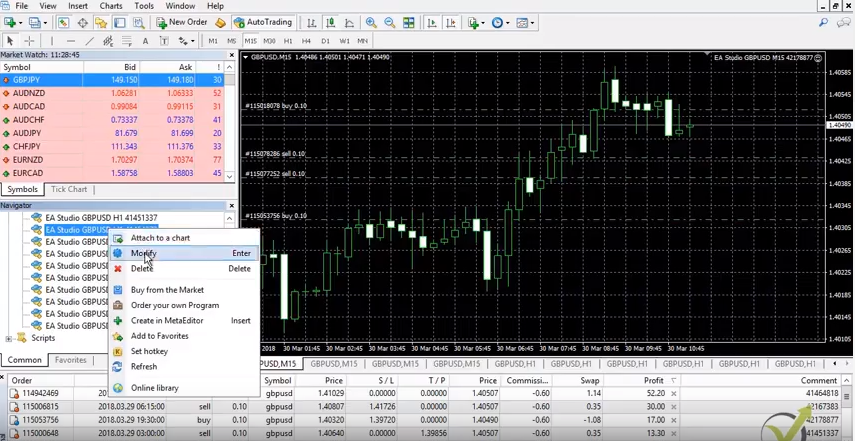
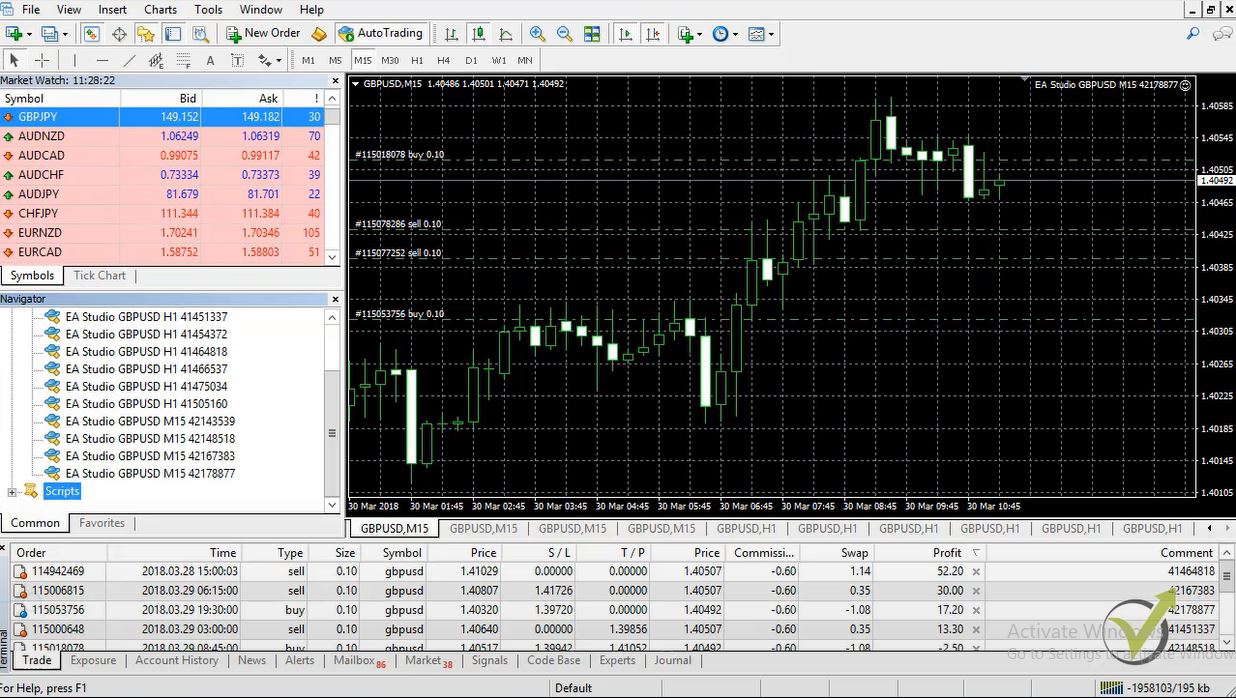
For example, if I modify any of the profitable Expert Advisors that I have into my account, you will see in the code that there are exact rules for entry and exit. So, there is no way that this profitable Expert Advisor will stop working. What happens is that the market is changing.
And here comes the big illusion where people think that when they buy an Expert Advisor, it will make them profit. Basically, they will not need to do any trading. They will not need to do any work, and this Expert Advisor will bring them constant profits.
Actually, this is not reality.
The market of Expert Advisors
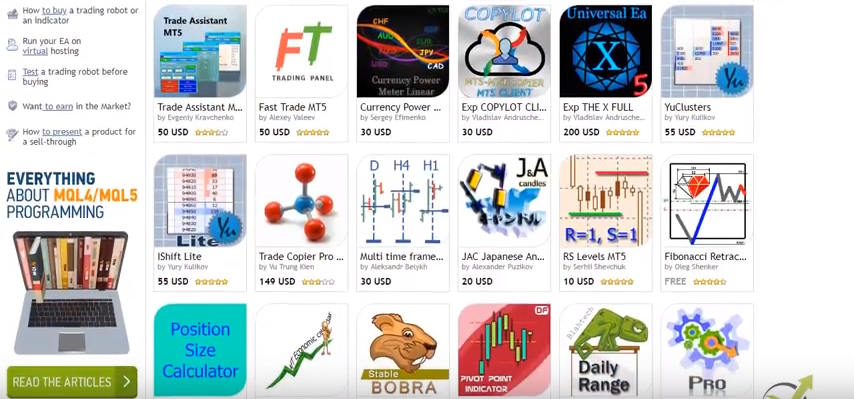
If I show you the Meta Quotes official website and I go to market, you will see there are so many Expert Advisors. Some are very cheap. Some are more expensive. Some are extremely expensive. I can say a thousand dollars. But here all is commercial, guys.
The people are trying to sell their robots, their strategies which are very reasonable on nowadays markets.
The idea is that you don’t have any guarantee if this Expert Advisor will be profitable for you or not.
Most of the time, what the people see is that it makes some profit and then it starts losing.
One of the illusions is that when you buy an Expert Advisor, you see this perfect balance line on the backtest. And you can say “OK, this Expert Advisor didn’t lose for the last 2 years, I will expect it to continue being profitable.”
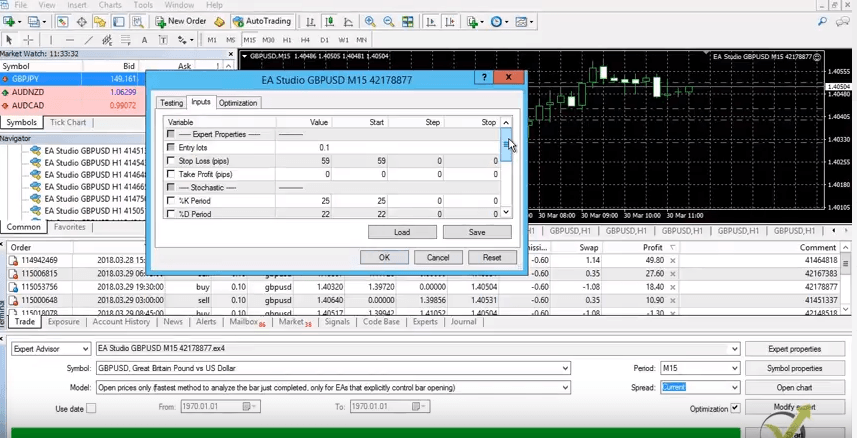
The reality is actually that these Expert Advisors are over-optimized. As you know, each Expert Advisor can be optimized. If I go to the Strategy Tester, there is the Optimization. And if I go to Expert Properties, you will see that in the inputs we can optimize this strategy.
By using the MetaTrader Optimizer, I will be able actually to optimize the strategy.
Meta Trader optimizer
And this means that I can find the best input for this strategy for the pretty find period. And if I leave it to step 1 most of the time, it will find exact properties. Or correct set up for the strategy and this will show us a high-profit line.
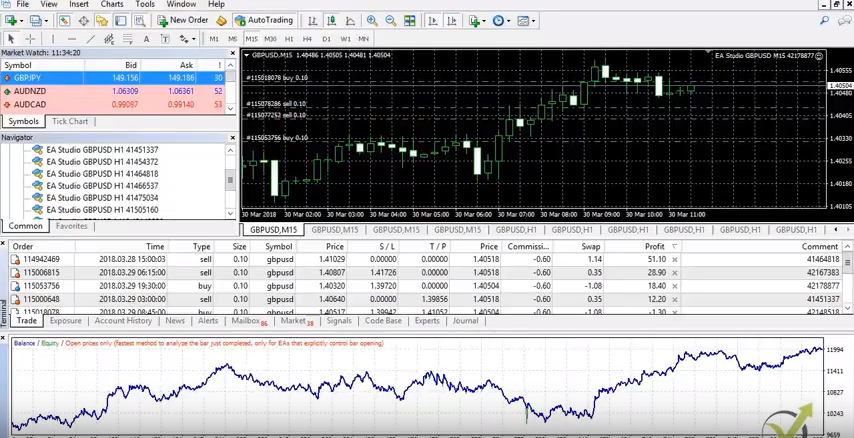
Now let me take any of these strategies that I have on my screen, and I do a final test. I will click on start, and you will see that the results I’m having here are profitable. But I don’t know such an equity line that says there will be no losses. And this is another illusion that you will buy an Expert Advisor, and they will tell you this Expert Advisor is profitable and it never had losses because this is merely impossible.
Every strategy has profitable and losing trades.
Backtesting results
When you see such a backtest on an Expert Advisor, this is more realistic, and this is not an over-optimized strategy. And what happens most of the time when you place such an over-optimized strategy with a perfect backtest line? You will see that this strategy will start losing. Because it was over-optimized for the tested period and the inputs are not robust enough. They are not stable enough to hold on to the future Market data.
Now what we do in EA Trading Academy is actually to trade many Expert Advisors into one trading account. So, we don’t rely on one single Expert Advisor. This is very important, because as I have said the markets are changing.
In this account, I have the ten strategies from my Top 10 GBPUSD Expert Advisors course. And actually, to build this account I have created 60 Expert Advisors for the GBPUSD, and I have tested them.
Trading one currency pair with many strategies
The top 10 performers, the top 10 most profitable Expert Advisors I have separated into a different trading account. And I have provided these 10 Expert Advisors into my course. Now the idea is that we filter many strategies, and we select the best ones.
When the trader has 10 strategies into his collection:
He doesn’t rely on one Expert Advisor to be profitable.
When any of the strategies is losing the others will be profiting. This way, we compensate the loss.
By having 10 Expert Advisors, the trader can select the top 3, the top 5, or the best Expert Advisor that is currently making a profit. And this is very important because once again the markets are changing.
The idea is that we trade these Expert Advisors simultaneously, and we followed their performance. And the trader can place on a separate account the Expert Advisors that are currently profitable.
For example, if the top 3 Expert Advisors here are making a profit currently, and we place them on a separate account. If any of these Expert Advisor goes to the 4th or to the 5th place any of the others will replace it and it will take its place.
What did we do?
We replace this Expert Advisor. And we will be still trading the ones that are currently making profits. Now, the whole process is described in many of our courses. I describe it very well in the classes:
In this course, I have built a portfolio of Expert Advisors that are trading during the different Stock exchanges. I have currencies trading only on the London Stock Exchange. Another currency is trading on the New York Stock Exchange and other for the Asian market.
The idea is that we trade different Expert Advisors to profit on the various stock exchanges hours. So, we can catch the volatility there.
Trading hours do matter!
To summarize it, the idea is that we don’t rely on a single Expert Advisor to be profitable, we trade many Expert Advisors to diversify risk and achieve better results, and we follow the process we:
Export the history data from our brokers
Generate 100 of strategies over this history data
Filter the strategies and export them as Expert Advisors. And we do this by strategy builders, so no programming skills are needed
Trade these Expert Advisors on a demo account
Separate the top performance on another account
Manage this account
If any Expert Advisor starts losing, we will replace it with another one that we have already created, tested, and automated.
So, it’s not really the thing that you will buy one Expert Advisor, and you will leave it trading, and it will bring you consistent profits, there are no such profitable Expert Advisors, guys, you need to do some work when you’re doing algorithmic trading.
And it’s not hard work. Just it’s the process that you need to follow and the process of managing many Expert Advisors into one account or another word saying we filter to find the best most profitable Expert Advisor for the current market conditions.
If you are looking to test trading with Expert Advisors, please, have a look at our courseAutomated Forex trading + 99 Expert Advisors. In this course, you will receive 99 new updated Expert Advisors every new month.
If you have any questions, please, write to me in our Community Forum. We will answer you as soon as possible. If you want to download our Expert Advisor and test it to see is it profitable, just leave your email below. See you in another lecture.
EA Forex stands for Expert Advisor on the Forex market. If we have any strategy that we trade manually we can automated into an Expert Advisor or EA Forex Robot. So, for example if I take this strategy that I have from one of my courses – Forex Algorithmic Trading Top 10 GBPUSD Expert Advisors where I have created hundreds of strategies.
I have selected only 60 and I tested these 60 strategies and I have selected the top 10 Expert Advisors or the top 10 EA Forex strategies. So for example, the strategy that is on GBPUSD on M15 chart, it has these 2 indicators the Bollinger Bands and the Stochastic. The Stochastic is used as an entry condition and Bollinger Band is used as exit condition. So, instead of trading them manually and looking into the chart all the time to see where we will have Sell or Buy signals and where we need to exit, what we do?
We do it fully automatically by using EA Robot, so here are these Expert Advisors and if I click on modify you will see:
the code for the strategy
the entry conditions
the exit conditions
the stop losses
the parameters of the EA Forex strategy
The code is pretty long. We don’t need actually to have any programming skills for that, because we use strategy builders like EA studio and Forex strategy builder and this way we automate the strategy into EA Forex robot or the so called Expert Advisors.
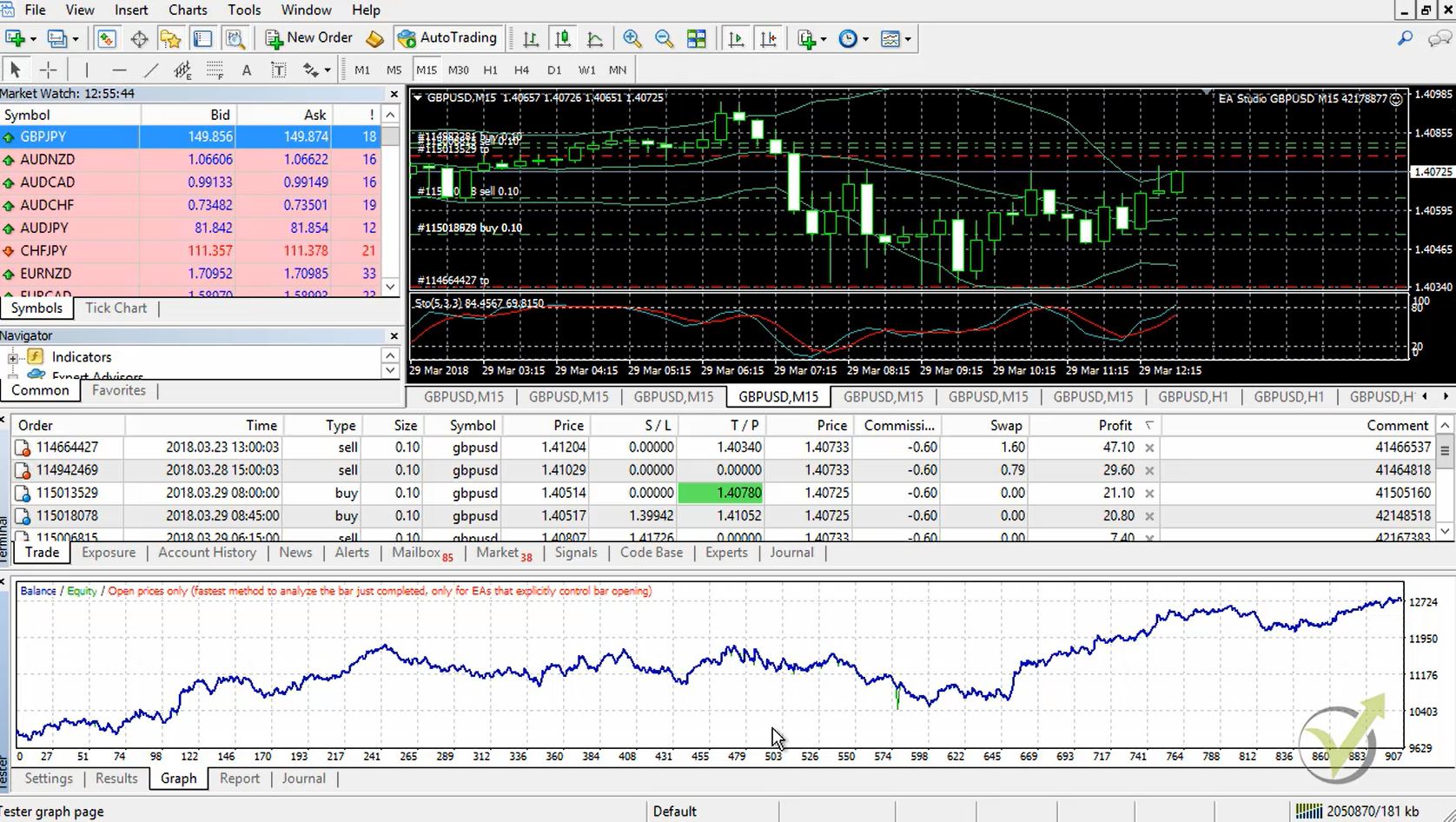
Once attached to the chart you can see that strategies are trading fully automatically all these trades that were opened were opened by these Expert Advisors. So, if I click right mouse and I go to Expert Advisors and I select Strategy Tester I will be able to back test this EA Robot. As a model I select open prices only, the current M15 chart spread current as well and if I press Start you will see the results and the graph of this strategy that performed more than 900 trades.
This is the useful thing by trading with EA robot or with automated strategies, because we are able to trade fully automatically, no need for any trading experience previously or for programming skills. What we do? We attach many robots into one in the same trading account this way we diversify the risk and we achieve better results. So, one more time EA Forex stands for Expert Advisor on the Forex market or the other name is Expert Advisors
Forex Robot software is the ultimate tool to create profitable strategies.
The most efficient way to create a Forex trading strategy is by using Forex Robot software. Daily, we receive many e-mails from students that are looking for good software for Forex traders.
Petko Aleksandrov is the Chief Mentor at Forex Academy and during the years he has tested different software for Forex traders. In order to be profitable, he always uses the best ones on the market.
Of course, the technologies, programming and software development improves daily. That is why for us is a key point to use the most useful Forex software.
One is called Expert Advisor Studio and the other one is Forex Strategy Builder Professional. Both programs are very useful and at the same time very different. They generate different types of strategies and automate them as EAs with one click. And that is exactly the key point – no programming skills are needed. Also, both programs come with a 15-day free trial.
What is a Forex Robot software?
This is a type of computer program or software that is used in algorithmic trading to create Forex trading robots, also knows as Expert Advisors or EAs.
The Forex robot software generates the robots which later do the trades based on a set of trading signals. By following the trading signals, the trading robots buy or sell the currency pairs automatically, without the need for a constant intervention by the trader.
Why we need robot software in our trading?
The answer is very simple – algorithmic trading is impossible nowadays without Forex Robot software.
Expert Advisor Studio
Let’s say you have a manual strategy for Forex trading, found somewhere over the internet. It may be even shared with you by a friend or you have read it in the book etc. The first thing is that without a Forex Robot Software, you have no idea if this strategy is profitable at all.
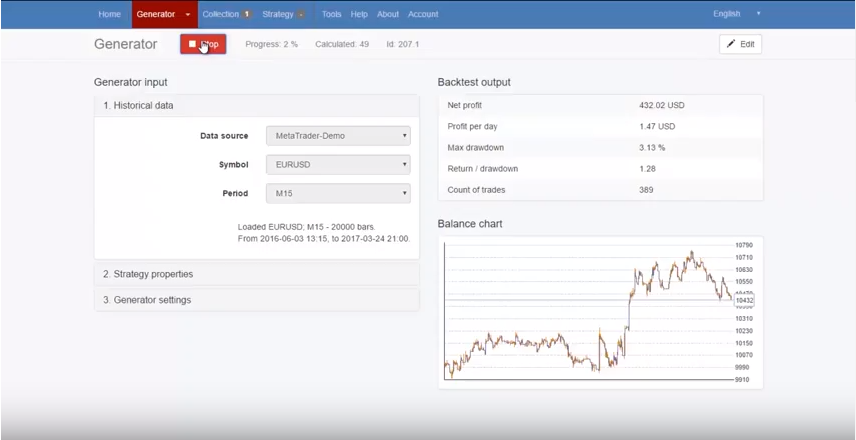
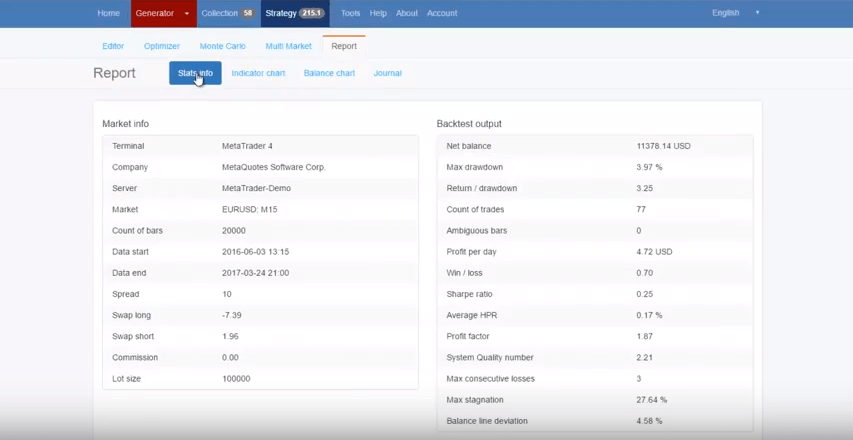
You do not know any statistics about it, as Profit per day, max drawdown, Return/drawdown, etc. And this is because when trading manually, you can not catch 100% of the entries.
Even you try to do it for a month or two, this is a short period to have good statistics. The result normally is some winning trades, some losing, then there comes the frustration.
The next step is to try to automate the Forex strategy
So you start looking for a developer. It is not a hard thing to find one, even a few are good in it. Normally it will take 2-3 weeks of time if the Forex strategy has 2-3 entry conditions. Such an Expert Advisor will cost you 200-300 dollars. And if you add some trailing SL, or some money management percentage, it will become more expensive and it will take more time.
Do not think that this developer will spend 2-3 weeks time for 200-300 dollars.
He is doing it using Forex Robot Software, just adding some lines in the code to fit your requirements. Obviously, if he gives you the EA after an hour, he can not ask for that amount of money.
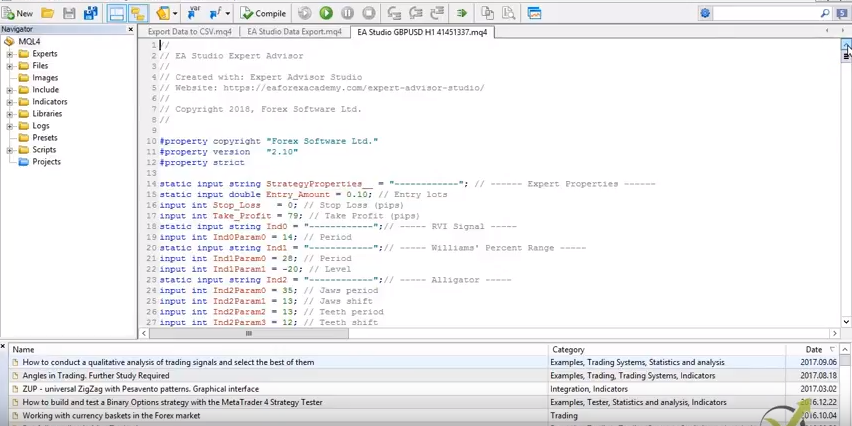
Code of the Expert Advisors
And let’s say everything is OK till here, the developer is great, and made no mistakes (which happens very rarely). Then you make the backtest and realize that this strategy is actually not making a profit. You can optimize it, but in most of the cases, the traders are over-optimizing it.
This means that they use the Optimizer, but it finds the best parameters for this period of time over your historical data. You can guess what will happen when you start trading with this Forex strategy – it will lose money.
The same thing when you buy a Forex strategy as Expert Advisor over the market. You see the perfect backtest, and when you start trading, it starts losing. In other words, the backtest you see is just an over-optimized Forex Strategy.
With Forex Robot Software, we eliminate all the problems mentioned above:
it has a generator which generates your strategies over the history data from your broker, which as we said, is essentially important
you don’t need programming skills – you can export the strategy with one click of the mouse, with a perfect code behind
you can test the robustness of the Forex strategy with the Monte Carlo and Multi-Market test
in the Forex Robot Software, you have complete statistics, journal, chart, and equity line from each Forex Strategy
if you change a parameter, you see the results immediately, which takes time with the back tester in MetaTrader
you are able to trade a portfolio of Forex strategy, and even to export many strategies as one Expert Advisor
Detailed statistics for each strategy
With the Forex Robot Software called EA studio, you can export 100s of Forex strategy daily, and test them on MetaTrader.
After that, you can select the best performers. If any of the chosen strategies start to lose, you can replace it with another one that you have already generated, tested and exported.
We have recorded a free online course committed to EA Studio. It will show you how to use the robot software for trading automation and how to create thousands of Expert Advisors on your own.
Forex Robot Software gives you the freedom to be independent. The cost for a lifetime license in long term trading is a great investment, because you will not pay any money to e developer, and you will be able to create 100s of EAs daily. You can become a seller as well.
If you want to test a professional Forex Robot Software, you can sign up for 15 days Free Trial.
Automated trading software – create Expert Advisors without programming skills.
Automated trading software is something trendy in the Forex market from the beginning of this century. Algorithmic trading is more preferable the traders because it eliminates emotions in trading. Nowadays, you do not need to be a developer or to learn coding to build a website, a simple calculator online, or a trading robot. There is the auto trading software which we can use to automate our trading strategies. But why do we need to do it?
When traders do manual trading, two emotions make them lose.
These are fear and greed.
Emotions make people lose.
Fear comes when we are on the negative with our current opened trades. We close the position before it reaches the stop loss order take profit. We are afraid that the price will go more negative and we will have a more significant loss in our account. Also, fear could be seen when we are on a profit with our position, and we hurry to close the trade because we don’t want to lose this profit. We are afraid to lose the profit, and we close the trade. This way, we don’t give a chance to the price to reach our take profit.
Automated trading software does not have any emotions. It follows the exact extry and exit rules that are inside the code. So what are the other feelings?
Greed is the feeling that the trader feels when having a couple of consecutive trades.
When we do profitable trades, we get greedy to trade with a higher lot. Many beginner traders break their risk management and place higher lots on the next trades. Every strategy has losing trades, and after having consecutive profitable trades, the chance to hit a losing trade with the higher lot is enormous. Usually the losses at this moment are higher than the profits with the previous trades.
There are many more emotions that are involved in trading, and even you have a profitable strategy, sometimes the fault is not with the market, not with your broker, not with the strategy, but with yourself.
The solution is trading with Еxpert Аdvisors. When we trade with Expert Advisors, we don’t do any manual trading, and we depend on these automated strategies.
There are different methods to create your Expert Advisor, but the easiest is to use a professional Automated Forex Trading Software. It will allow you to build EAs even you have 0 IT skills. With such a program, you can place different entry and exit conditions, you can create the strategy from scratch. After you are ready and satisfied with the backtest statistics, you can export it with one click as Expert Advisors. Available code!
That is the easiest and fastest way, and still, a limited number of traders are using such Automated Forex Trading Software.
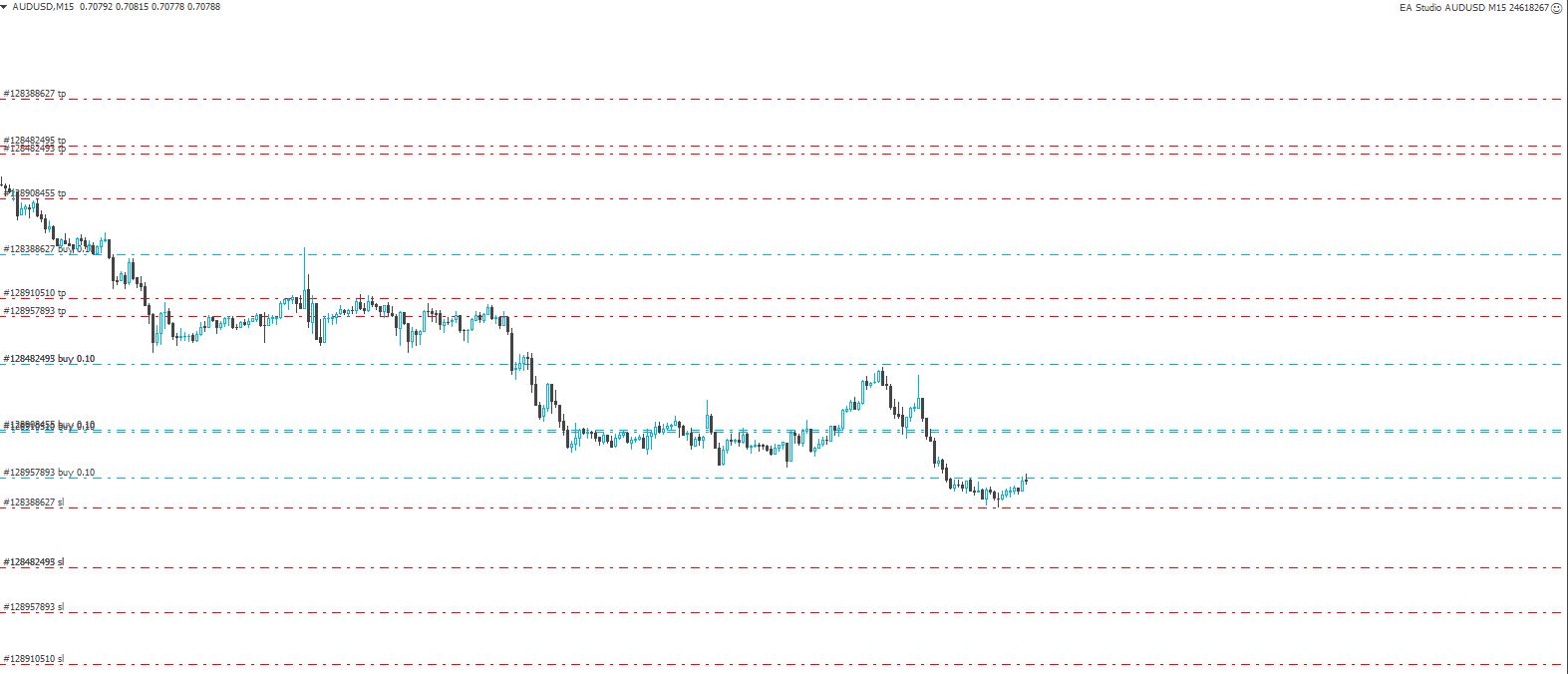
These are the very same strategies for manual trading, but they are coded, and once attached to the trading chart they trade alone:
Many strategies are trading simultaneously.
How to create Expert Advisors?
You are a developer, and you can code your Forex strategy
Hire a developer to code the expert advisor for you
Use automated trading software
Automated trading software has an important first step that many beginner traders and developers miss. That is the proper Historical data.
How to download the right Forex Historical Data?
First of all, Meta Trader does not load all the historical data available what you need to do it to go to each time frame and each pair that you like to use and press Home Key. Hold it until Meta Trader stops loading. Usually the brokers provide between 2 and 6 months of data on M1 and more extended periods on the higher time frames.
Second, if you use automated trading software, you need to export the data from the platform. If you use the download button in the History center, you will end up having data from Meta Quotes and not from your broker. Why is it essential to have the date from your broker? When using automated trading software, it is essential to use historical data not only from your broker but from the same server that you will trade with your live account. There is always a difference between each server’s data on the same broker.
The next important thing you need to keep in mind is to collect historical data. If you want to generate profitable strategies, you need to have created the strategies with the Automated trading software on a more significant number of bars. If you are using 20 000 – 50 000 bars on the small time frames, you will end up with an over-optimized strategy. For example, on the M1 chart, we suggest you go for a minimum of 200 000 bars data.
How do we export the Historical data for the Automated trading software?
If you use FSB Pro – the professional automated trading software, we receive two scripts also. With the first one, we export the details from the server – the spreads, swaps, commissions, etc. It is very important to have the exact parameters of your broker. We place the file in the System folder of our Automated trading software. This way, you will see all the pairs from your broker with the exact parameters in FSB Pro.
With the second script, we export the historical data ( after we have loaded it on each time frame on each pair with the Home Key. Since we keep the platforms running 24 hours, we collect the data with the time. All we need to do is to drag the script over the chart, and it updates the new data on our Automated trading software.
Make sure to use the right historical data. For more information on how we collect the data, please check our course Portfolio of 100s Forex Strategies.
If you use EA studio – you can download from the app the two scripts for Metatrader 4 and Metatrader 5. What you need to do is to place them in the Script folder in Metatrader.
Scripts to Export the Historical data
After that, drag it over the chart once you see the Script displayed.
With the script of EA studio, you will export the number of bars, the commission, and the spread.
After that, you need to drop the exported files in the box where you see drop files here or click to upload. Your data will be loaded, and you will be able to generate strategies over this data.
How many bars do you need to generate strategies with Automated trading software?
Keep in mind that the brokers at the beginning don’t provide a vast number of bars, which is an issue for the beginner traders. If you load your historical data for the first time, you will notice that on the M1 chart, there are a maximum of 65000 to 75000 bars. And this is normal. Obviously the broker does not want us to have a vast number of bars when we start algorithmic trading. On the higher time frames, you will see even a lower number of bars.
What you can do is to leave your Metatrader opened. For a couple of months, it will collect for you enough bars to trade all time frames.