Blog

  • Trading screen – Forex trading course – London, NY, Tokyo trading system

    Trading screen – Forex trading course – London, NY, Tokyo trading system

    .

    Trading screen – the importance of what the trader sees.

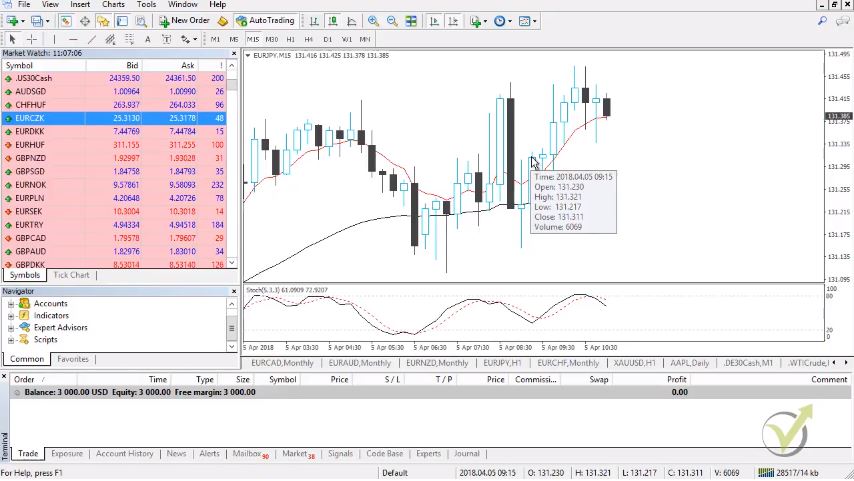
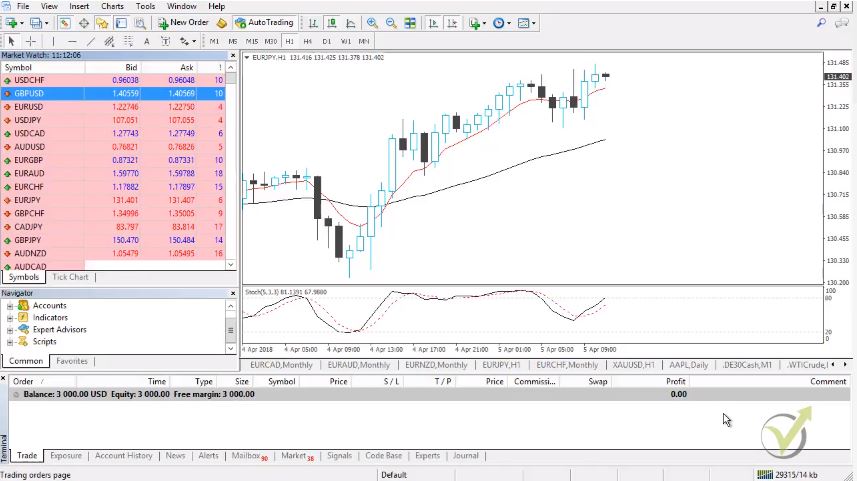
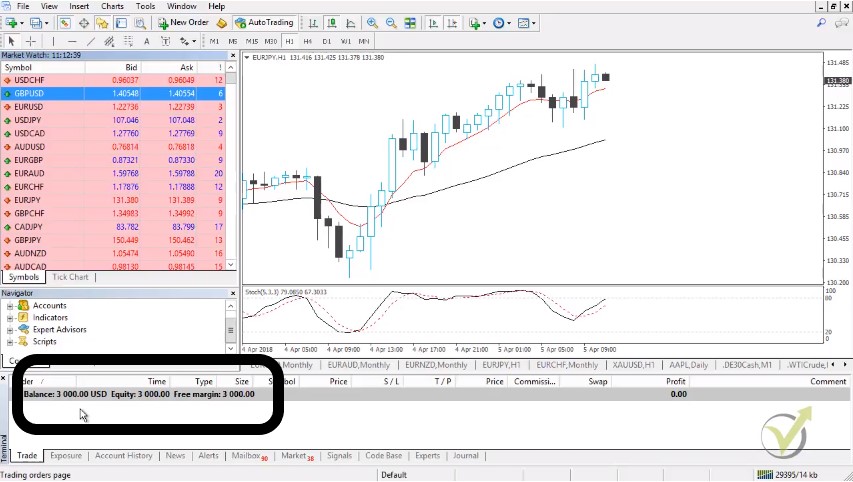
    Trading screen and its set up is the very first step a trader should take before start trading with a particular system for trading. In this article, you will learn how Petko Aleksandrov, the Head Trader and Mentor at EA Forex Academy sets up one of his trading screens.

    He uses the platform Meta Trader. It is one of the most common and most reliable platforms for algorithmic trading. It comes for free. The brokers pay to the Meta Quote company, and this way provide the platform for free to their clients. Also, this platform is suitable for manual trading, and now you will learn how the trader uses this platform to set up his trading screen.

    This lecture is part of one of Petko’s courses about manual Forex trading. Some of the lectures are free, so the students can decide if this course is for them. In this course, he will provide you with a unique indicator to recognize the best currency pair to trade at every moment. Enjoy the lecture!

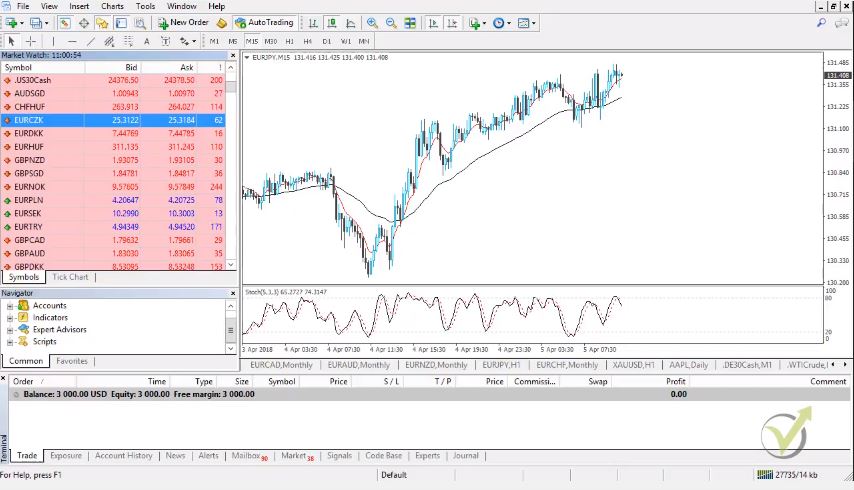
    Hello traders, I will begin the Forex trading course – London, NY & Tokyo trading system with a setup that you need to have on your screen, how you need to prepare your trading screen.

    Actually, I always have in this way one of my trading screens. Because I always want to know which currency is strong and which currency is weak at the moment. And I will show you how I do that.

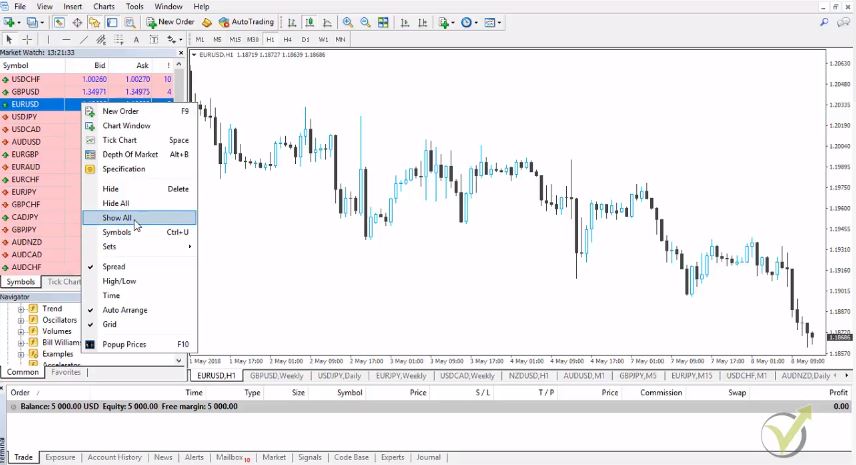
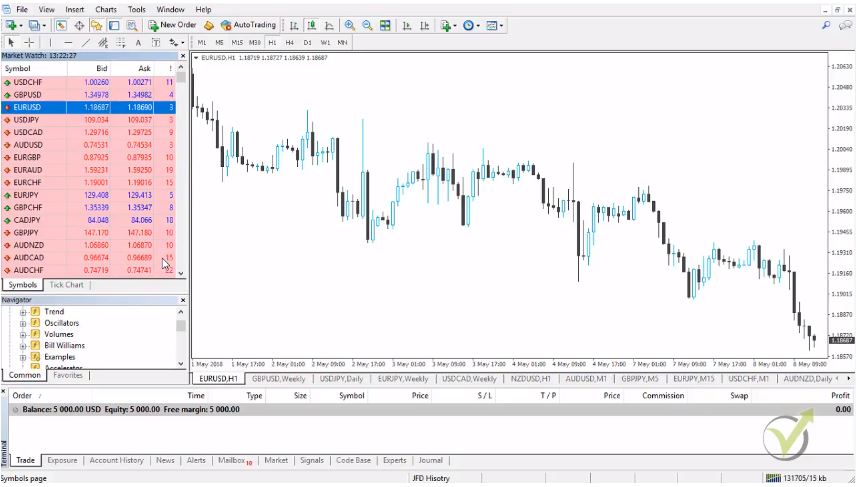
    How to make a trading screen with the major currencies?

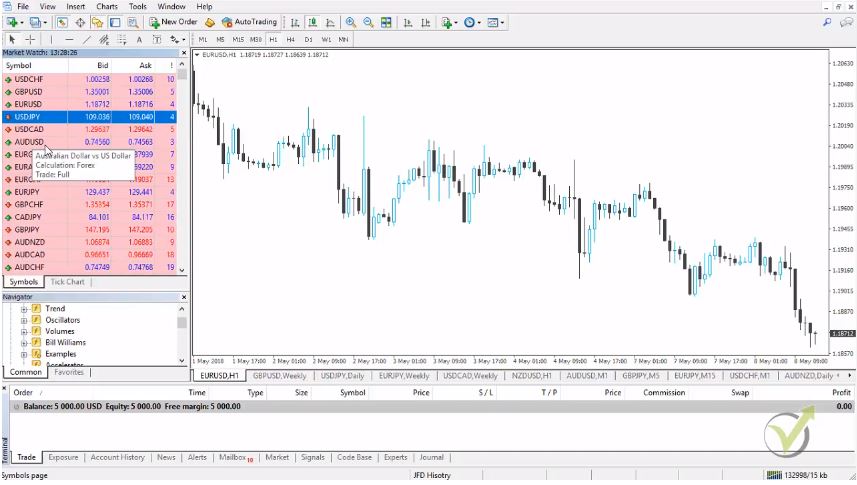
    • we have the EURUSD;
    • I will add as well the Cable;
    • I will add as well the AUDUSD;
    • lest have the USDCAD;
    • I will need as well the NZDUSD;
    • the JPY, so I would look for USDJPY.

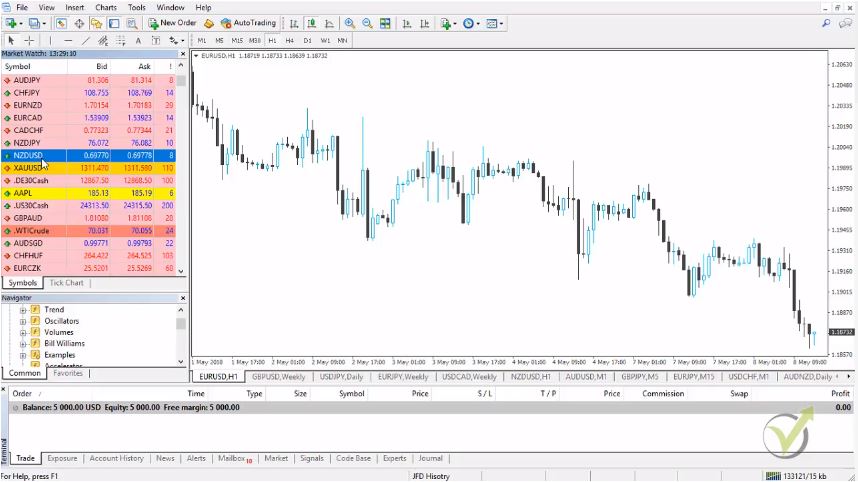
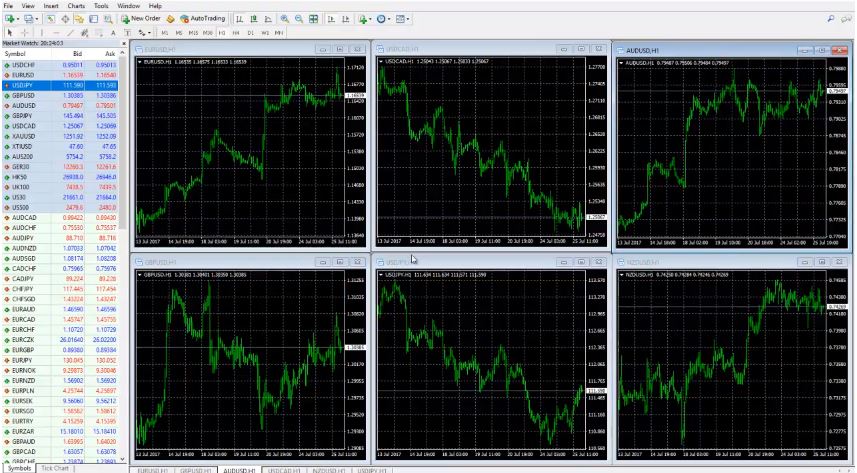
    As you can see I am having 6 currencies on my trading screen.
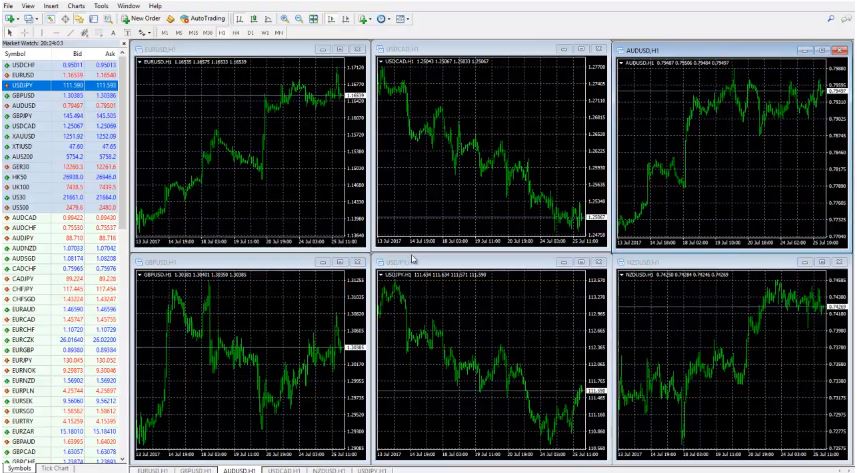
     

    Trading screen set up
    The 6 major currencies.

    Basically, these are the 6 major currencies. Of course, there is some debates about USDCHF. But after what happened with the CHF and the EUR we don’t consider the CHF as a major currency, not so far. Because actually after it was unleashed I can say from the EUR, it’s not any more historical data behind.

    What I mean, is it’s like building its own historical data right now. And there is no huge amount of historical data from this time. We just avoid it and it’s not only us in the Academy but most of the traders are not looking the same way at USDCHF. It’s considered not certain, not sure currency anymore. That is the way I do not place it on my trading screen.

    There are many other currencies we can trade. Like:

    • EURUSD;
    • GBPUSD;
    • AUDUSD;
    • USDCAD;
    • NZDUSD;
    • USDJPY.

    After that what I do?

    I just separate them in 6 windows. And how I actually ordered them, is my own way. Of course, you can change it or you can do it anything convenient to you. But basically, I leave the AUD and the NZD on the right side on my trading screen.

    USDCAD I put up in the middle. USDJPY I put down in the middle. AUD is up and NZD is down. I have my reasons probably, I don’t know. I just got used with that. This is how I organize it. EUR is first up, then is the GBP. Basically, this is the European market over here.

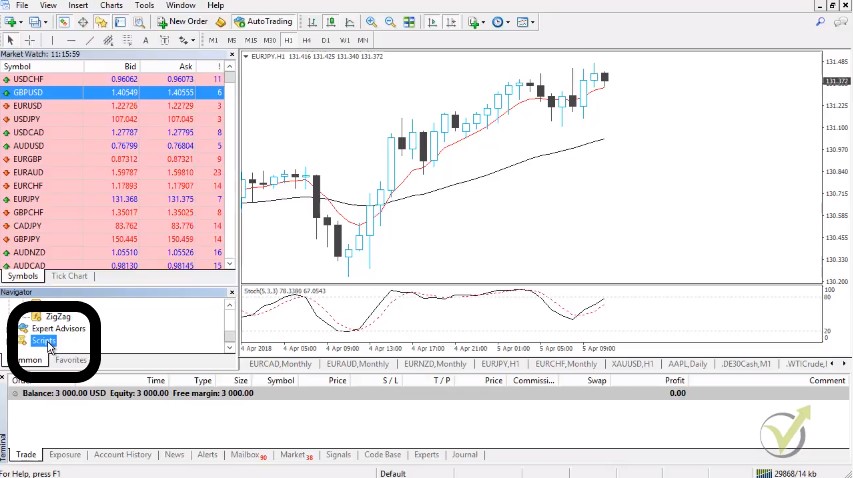
    We have the USDCAD over here which is basically connected more to the New York opening. And as well the USDJPY, which is USDJPY we can trade it all the time. I love USDJPY. And all the currencies are connected with the JPY. Here is the AUD and the NZD. Basically, this is the Asian market.

    Again I say, you can change it as you wish, it doesn’t matter. The idea is that on one of my trading screen I always have these 6 pairs to know which one is strong and which one is weak at the moment.

    In the Forex trading course – London, NY & Tokyo trading system I will show you a great indicator for that. But first of all I want you to catch the idea.

    What I will do now on my trading screen?

    I will put 1 indicator and simply this is the 21 EMA.
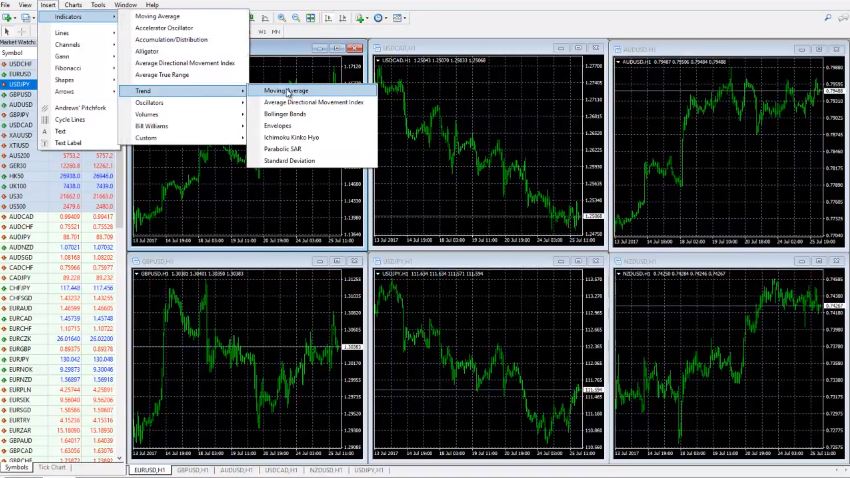
     

    Inserting the MA
    The path to insert indicators.

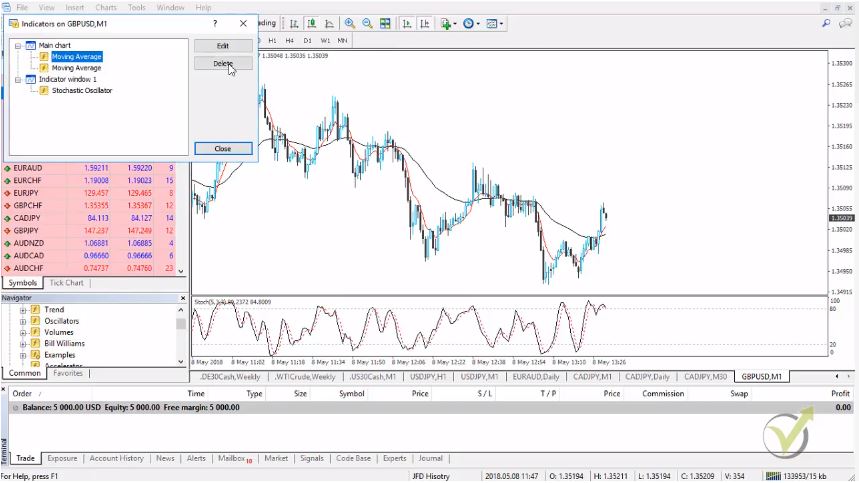
    We go to Insert, Indicators, go to Trend and go to Moving averages and 21. And as MA method is the exponential moving average. I click OK and then I would like to zoom in a little bit. And I would like to see the bars. Basically, this is my template. I think I already have it actually. It’s the EMA 21. This way I build the trading screen easier.

    If you don’t know how to do it click right button, then you go to templates, save a template and then you write the name of the template. In this case, I wrote it the EMA 21. And then when I click the right button again and I go to the template, and I choose the EMA 21 it will be the same way. It’s much easier you don’t need to do it all over again.

    Of course, in this case, is just 1 indicator. But if you have 4, 5, 6 or more indicators it will take you a long time to prepare all the screens. And especially when you choose another currency, you need to act fast. And to enter into the trade you need to have the template to set up the trading screen faster. I will add as well on the NZDUSD and I will explain to you what I’m doing after that.

    What I do every morning on my trading screen?

    I place the overnight range. Overnight range I consider from the closing of New York to the opening of London time.
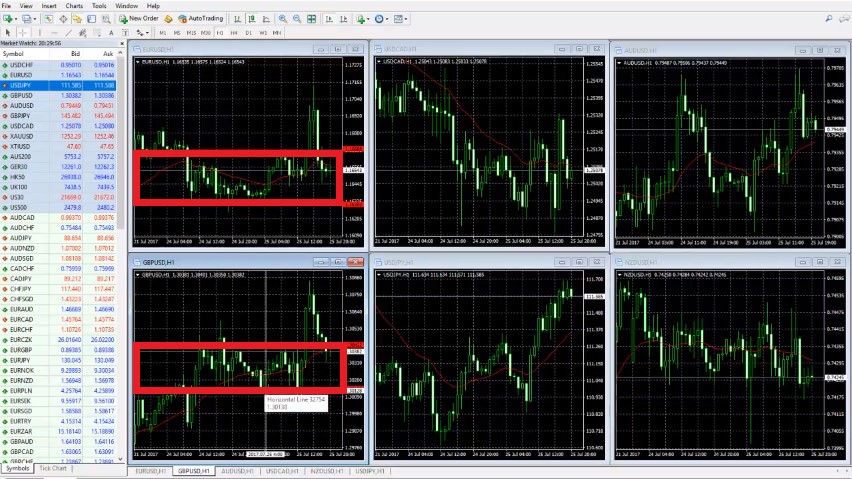
     

    trading screen with overnight range
    Overnight range.

    Basically, this is the Asian session. But since we’re in Europe we consider that to be the overnight range. As you can see here this is the hour at 9:00. London is opening at 10:00 o’clock our time, Bulgarian time. As you know we are located in Bulgaria.

    So, 10:00 o’clock is the time when London opens with us. You need to check actually with your time zone when the London market is opening. Be careful as well with the summer, winter times that you won’t be mistaken. And I’ll go with 1 line above and 1 line below. Here is EURUSD at 9:00 o’clock and then here is a 3:00 o’clock midnight. Make sure to use the clear drawing on your trading screen to make it visual.

    Basically, this is the overnight range visualized on the trading screen.

    And then you can see EUR is breaking above and then it’s going back down. But right now we just place the lines. Every morning I just change them, just move them. Because it’s different from yesterday. But in this case, I will show you how to put it and after that what we do every day is just we move it. Basically, this is 9:00 o’clock and this is overnight range over here.

    And now it’s New York time. This is the overnight range. I will show you from over here to from over here, to this point of 10:00 o’clock. This here is the overnight range. I put one line below, one line above. Try to put it exactly on the tails and the wicks. And then I will go to USDCAD. I will place the lines there as well.

    One more time it’s different from every time zone. You need to check first when London is opening when the New York market is closing. No offenses to anyone from Asia, it’s a great market as well but especially for manual trading, we cannot afford to trade over the night. Because we need to sleep and to have some rest of course. That’s why we are trading manually during the London session and the trading screen is set up for London.

    And as you know London is considered as the currency market center, I can say. And the market is most volatile during this time. Of course, it’s volatile during the Asian market. But again I say it’s night over here, we trade on the Asian market but only with the automated strategies and with the Expert Advisors.

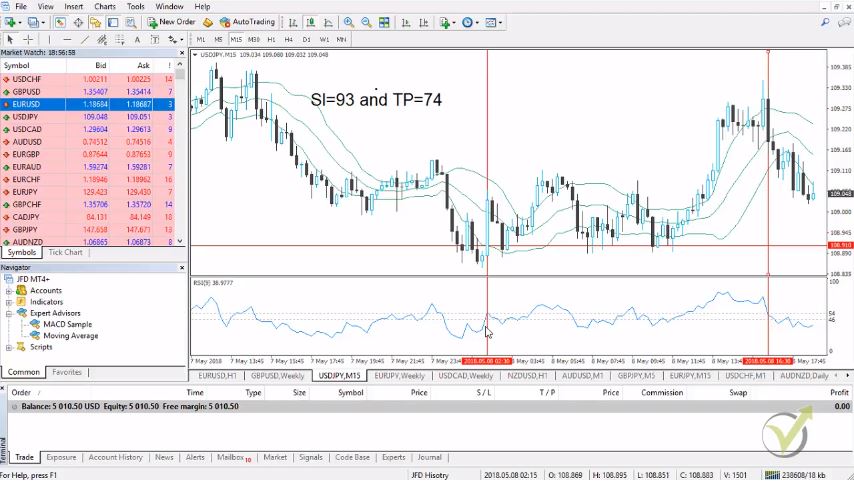
    Let’s see USDJPY where it is t my trading screen?
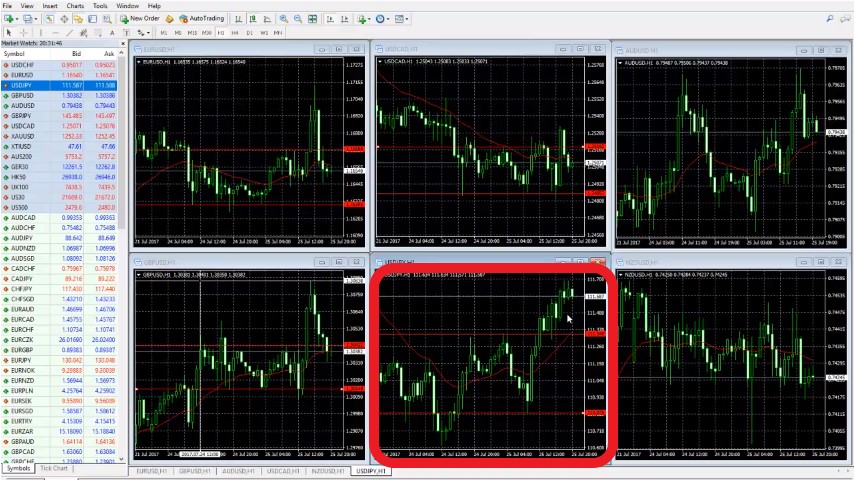
     

    USDJPY overnight range
    USDJPY breakout.

    This is 10:00 o’clock. Basically, this is where London opened and USDJPY you can see reversed after London open. This is the lowest point it went and the JPY is actually pretty, pretty weak against the USD today. And then I will go as well for the AUD, pretty volatile AUD overnight. Let’s see this is the lowest point over here. I will recheck it one more time.

    But that is 01:00, 02:00, 03:00, 4:00, 5:00 o’clock. Then London opens at 10:00 over here. We have the upper line over here on the top of this bar. And then the last one is NZDUSD and this volatility as well is over here. And I will have the line on the upper side I believe it’s on this bar. That’s 9:00 o’clock, so 10:00 o’clock is over here.

    This is the overnight range that we used today on our trading screen…

    Actually, I already recorded 2 of the trades that I had with the system today, and I will put it in the course. Because I want you to see how first we are setting up the trading screen, what is the system. And then I will do my best to record as many examples as possible. That’s all you need to have the 6 pairs on your trading screen.

    Put the 21 EMA on your trading screen to fold the short-term direction on H1. 21 EMA is a fantastic indicator, it’s included a lot of strategies. If you’re a beginner you will need it very often to a lot of strategies. Because it’s just a fantastic indicator.

    It shows you in a short-term direction. It just shows you where the market is going right now, where is the USDJPY right now.

    It’s going up, 21 EMA is going up, the market is going up. 

    When it’s a sideways market like this case with NZD, this is just going sideways. Obviously, it’s not a very good time to enter and it is actually there are a lot of range strategies. But we are not going now on this side.

    What we are following with these 6 pairs is I will show you how to catch the volatility, how to catch the strongest and the weakest currency and how to take advantage of that. We are using the volatility after the London market is open. And I will show you in the course how we identify which currency is strong and which currency is weak according to the trading screen with the major currency pairs.

    This is possible since every currency has a direction at the current moment that we can easily detect with this set up on our trading screen. In the Forex trading course – London, NY & Tokyo trading system I describe exactly how to follow the movement of the major currency pairs and how to select the best one to trade.

    Also, in this course, I have included a fantastic indicator that you can place on your trading screen and it will show you which currency is strongest and which is weakest. This way you will know at every moment the best pair to trade, which is a result of the strongest and the weakest currency.

    In this course, we use the volatility that comes after the Stock Exchange market opens. The opening causes volatile movements on the currency pairs which we use to take quick profits. By using pending order on our trading screen, we enter and exit quickly. We do not hold positions overnight and tremble where the market will go.

    With a particular and exact system, it is much easier to achieve stable results and to avoid emotions into trading.

    Thank you for reading, guys, I wish you safe trading.

    If you have some questions don`t hesitate to ask me in our SUPPORT FORUM.

    For more Forex manual trading courses please click here: https://eatradingacademy.com/tracks/manual-trading/.

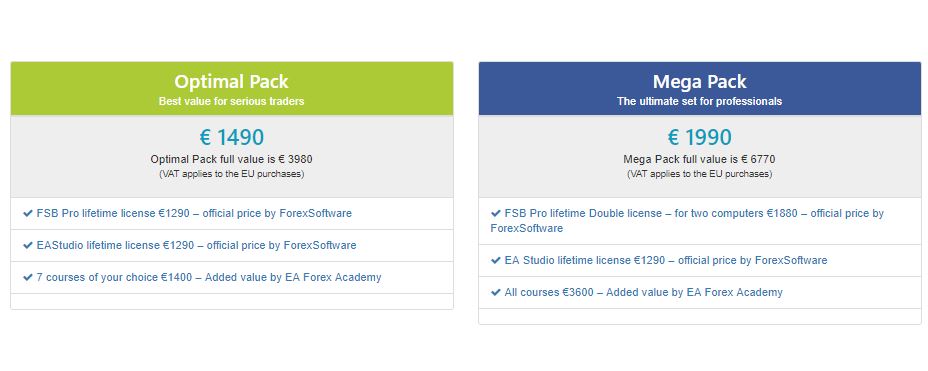
    The Forex trading course – London, NY & Tokyo trading system is included in our Mega and Optimal pack.
     

  • Introduction to EA Builders for MetaTrader: How to Choose One?

    What is an EA Builder?

    In this Introduction to EA Builders for MetaTrader, we’re going to explore the exciting and fast-paced world of Forex trading, focusing on the role and benefits of using Expert Advisors and specifically, Expert Advisor Builders. We’ll see how using automation has changed the game for traders. An Expert Advisor (EA) Builder is a really useful tool. It lets traders set up their trading strategies to work automatically. The best part? You don’t need to know any programming to use it.

    These EA Builders are especially popular with people who use MetaTrader. MetaTrader is one of the most common platforms for trading out there. What the EA Builder does is pretty cool. It takes your trading strategies and turns them into Expert Advisors. These are special programs that can do trades all by themselves, based on the rules you set. This means your trading can happen automatically, following the plan you created. It’s a big help for traders, making things simpler and more efficient. This is especially true in Forex trading, where things can move really quickly.

    Introduction to Expert Advisor Builders for MetaTrader: Why Choose an EA Builder for MetaTrader?

    1. Automating Trading Strategies

    Traders often choose EA Builders for a key reason: to automate their trading strategies. Automation plays a vital role, especially for those struggling with manual trading. Many traders have bought EAs but are still losing money. This situation leads them to seek more reliable solutions. Additionally, some traders have tried other methods to automate their strategies but without success. Therefore, they turn to EA Builders as a more effective alternative.

    Moreover, the EA Builder for MT4 stands out for its compatibility. It enables the creation of EAs that integrate smoothly with the MetaTrader platform. This compatibility is essential for traders using MetaTrader. It ensures that their automated strategies function well within the platform’s environment. The EA Builder’s user-friendly interface also makes it accessible. Even traders with limited technical skills can use it effectively. This ease of use is a significant advantage for those new to automated trading.

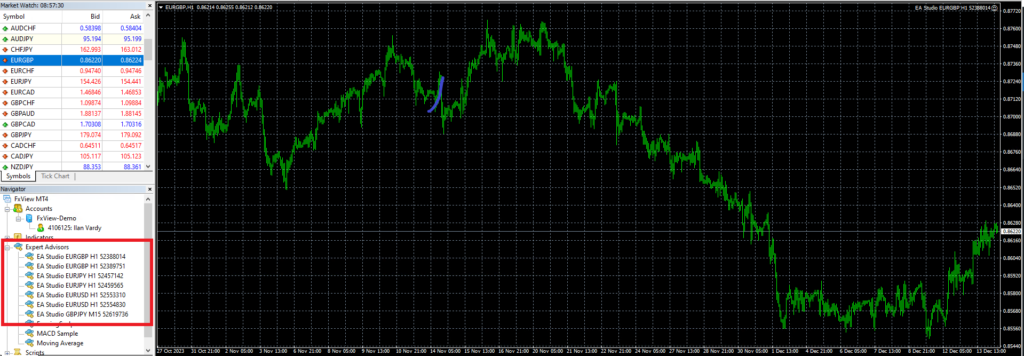
    Expert-Advisor-Builders-for-Metatrader-4-1

    2. No Programming Skills Required

    EA Builders are great because you don’t need to know programming. This is important because it lets more people try algorithmic trading. Now, anyone can use EA Builders, not just people who know how to code. This means more traders can use these tools to help them trade.

    Focus on Your Trading Plan

    Also, EA Builders let traders focus on making their trading plans better. They don’t have to worry about learning hard programming languages. They can spend their time looking at market trends and improving their trading strategies.

    In short, EA Builders make algorithmic trading easy for everyone. They take away the need to know programming. This helps many different traders get into automated trading easily. Now, traders can think more about their trading ideas and less about coding. This makes trading more open and easy for everyone.

    3. Introduction to Expert Advisor Builders for MetaTrader: Strategy Optimization and Testing

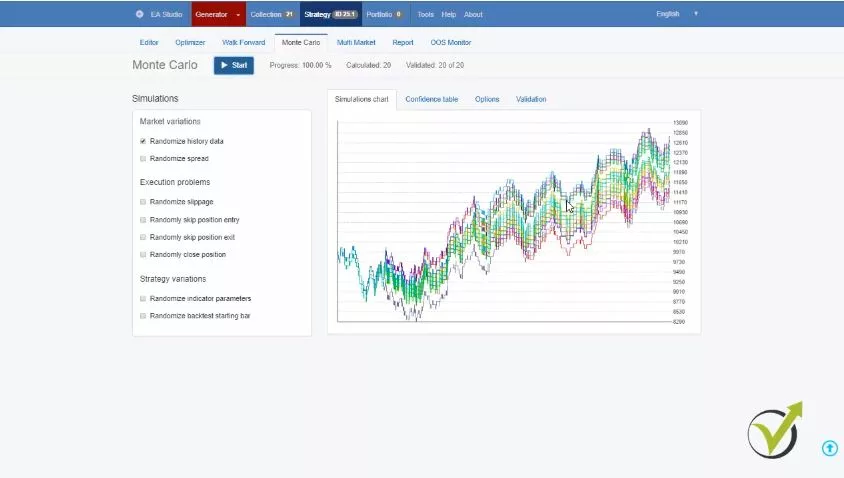
    EA Builders have special tools for testing how strong your strategy is. They have things like Monte Carlo and Multi-Market tools. These tools are really important. They make sure your trading plan is not too fine-tuned and can work well in different market situations.

    Making Sure Your Strategy Works Well

    These testing tools help you see if your strategy is good for various markets. They check that your trading plan is not just good for one type of market. This is key to having a strategy that can do well over time, no matter how the market changes.

    4. User-Friendly Interface

    Expert-Advisor-Builders-for-Metatrader-4-3

    Easy-to-Use EA Builders for MT4

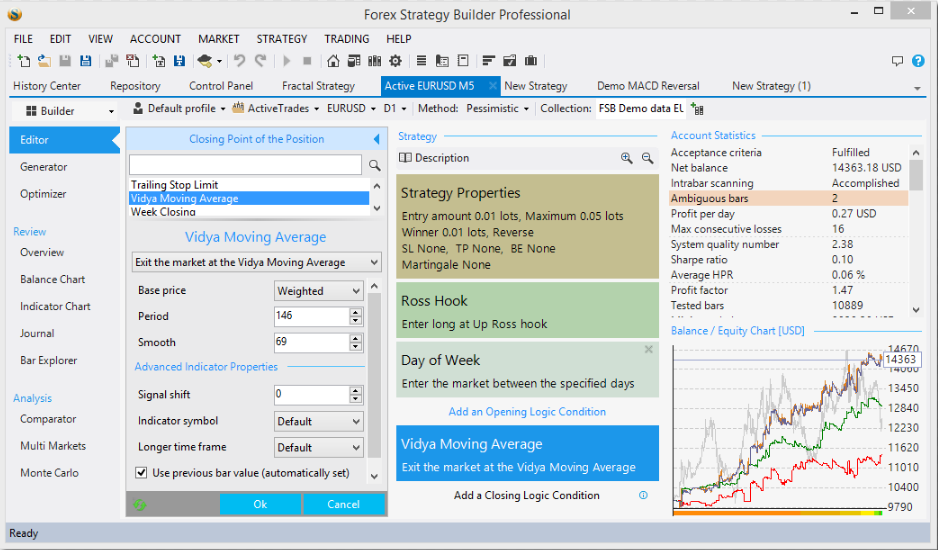
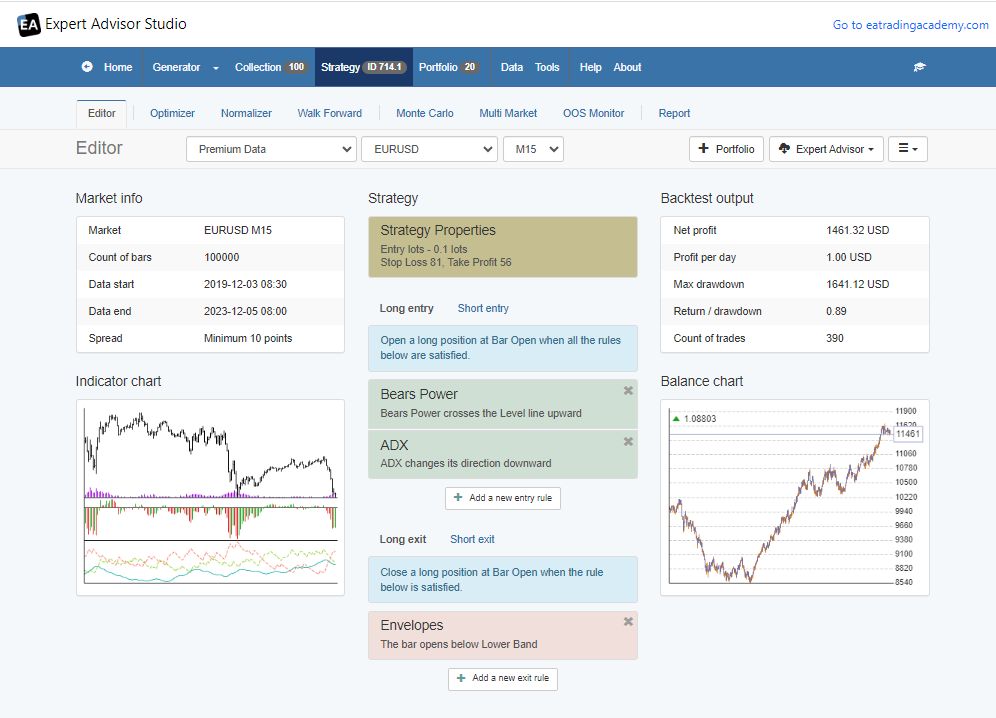
    EA Builders for MT4, such as Forex Strategy Builder Professional and Expert Advisor Studio, are easy to use. They have user-friendly interfaces. This means they are simple to understand and work with. They come with helpful features like strategy generators and strategy editors. These tools help you make and change your trading strategies easily.

    Tools for Creating and Testing EAs

    These EA Builders also have different testing tools. These tools make it easy and efficient to create and test your EAs. You can quickly see if your strategies work well. This makes the whole process of building and checking your EAs straightforward. You don’t have to spend a lot of time figuring things out.

    Introduction to Expert Advisor Builders for MetaTrader: The Process of Building an EA

    Strategy Creation

    Understanding Expert Advisor Builders for MetaTrader

    Expert Advisor Builders, especially for MetaTrader, simplify trading. They let you create strategies easily. First, you set rules for entering and exiting trades. You also decide your stop loss and take profit limits. This is crucial for managing risks and potential gains.

    EA Studio: Enhancing Your Trading Strategy

    EA Studio, a powerful EA building software, enhances this process. It helps you fine-tune your strategy. With EA Studio, you can adjust your trading rules for better outcomes. This tool is user-friendly, making it ideal for those new to trading. We’ll discuss this a little later in the blog post.

    Optimizing for Success

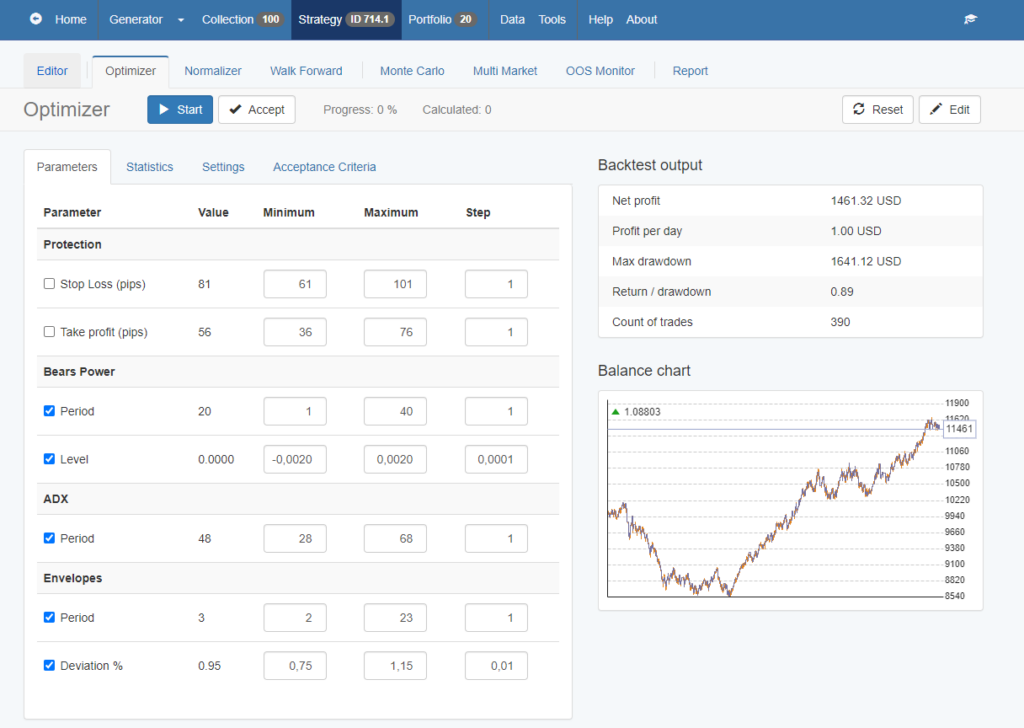
    After setting your strategy in the EA Builder, the next step is optimization. Here, you test and refine your rules. The goal is to improve your trading performance. EA Studio offers advanced features for this. It allows you to experiment and find the most effective approach for your trades.

    Introduction to Expert Advisor Builders for MetaTrader: Strategy Creation in EA Studio

    EA Studio is one of the most widely used EA Builders for MetaTrader, known for its efficiency and user-friendly interface. It plays a crucial role in strategy creation, allowing traders to automate their trading strategies with ease.

    • Automating Strategies: With EA Studio, traders can convert their trading ideas into automated strategies. The process involves defining entry and exit rules, setting stop loss and take profit levels, and other parameters that dictate how the strategy will operate.
    • Utilizing Indicators: EA Studio provides a wide range of indicators that traders can use to build their strategies. These indicators help in identifying market trends and making informed trading decisions.
    • Customization and Flexibility: The platform offers high customization, enabling traders to tweak their strategies according to their trading style and risk tolerance. This flexibility is vital for creating strategies that align with individual trading goals.
    Expert-Advisor-Builders-for-Metatrader-4-5

    Introduction to Expert Advisor Builders for MetaTrader: Backtesting

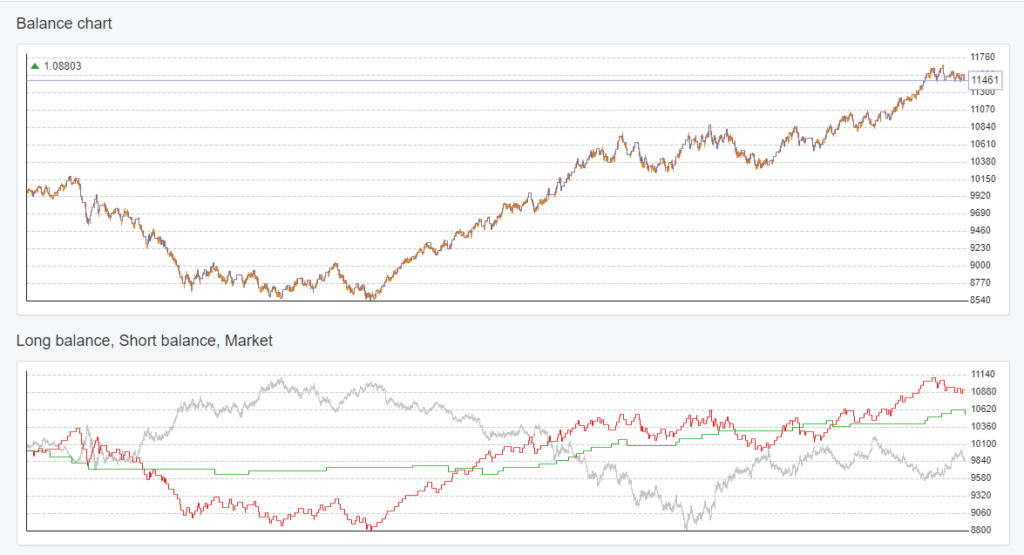
    After creating your strategy, backtesting it is vital. You use historical data for this. It shows how your strategy would have worked in the past. This step is important to predict how it might perform in the future.

    The Role of Historical Data in Backtesting

    Using past market data, backtesting evaluates your strategy’s effectiveness. It’s like a rehearsal for your trading plan. You get to see the strengths and weaknesses of your strategy. This insight is crucial for making informed trading decisions.

    Fine-Tuning for Future Success

    Backtesting helps you fine-tune your strategy. You learn from past market trends. This knowledge guides you in improving your strategy for future trading. It’s a step that cannot be overlooked for anyone serious about successful trading.

    Backtesting in Real-Time with EA Studio

    Backtesting is a critical step in the EA creation process, and EA Studio excels in this area by offering real-time backtesting capabilities.

    • Historical Data Analysis: EA Studio allows traders to test their strategies against historical market data. This feature is essential for understanding how a strategy would have performed under past market conditions.
    • Real-Time Testing: Unlike some other platforms, EA Studio provides the ability to backtest strategies in real-time. This means traders can see how their strategies are performing with current market data, giving them a more accurate picture of potential future performance.
    • Robustness Testing Tools: The platform includes tools like Monte Carlo simulations and Multi-Market testing. These tools help in assessing the robustness of a strategy by testing it under various market conditions and scenarios.

    3. Exporting and Implementing the EA

    Once you’ve tested and optimized your strategy, it’s time to export it to MT4. This step is usually simple. With just a few clicks, your EA is ready for live trading.

    Introduction to Expert Advisor Builders for MetaTrader: Ease of Integration with MT4

    Placing your Expert Advisor onto your MT4 chart is a straightforward and user-friendly experience. This ensures that your trading strategy transitions smoothly from the testing stage right into real trading. Such an easy and efficient shift from manual to algorithmic trading is crucial, especially for traders who prioritize quick and effective implementation of their strategies. This streamlined process helps in reducing any complexities, ensuring that traders can move their focus quickly from development to active trading in the market.

    One-Click Export:

    EA Studio streamlines the process of transforming your trading strategy into a functional Expert Advisor. With a simple, one-click export feature, it eliminates complex steps. This means you can quickly and effortlessly get your EA ready. Once you click to export your Expert Advisor, it is prepared to be used in MT4. This allows for swift transition to live trading, making it convenient and time-efficient for traders eager to test their strategies in real market conditions.

    Expert-Advisor-Builders-for-Metatrader-4-7

    Introduction to Expert Advisor Builders for MetaTrader: Compatibility and Efficiency:

    The Expert Advisors created in EA Studio work perfectly with MT4. This compatibility guarantees a seamless integration with the platform. The effectiveness of EA Studio in both developing and evaluating strategies greatly shortens the time it takes to go from an initial strategy idea to actively trading it in the live market. This efficiency is a major advantage for traders looking to quickly implement and benefit from their trading strategies.

    Ready for Live Trading

    Once you export your EA, it’s ready for the real market. This is when you move from just planning and testing to actually trading. It’s a very important step. It’s when your trading strategy starts working in the real trading world.

    Introduction to Expert Advisor Builders for MetaTrader: Starting Active Trading

    This step is like bringing your strategy to life. Now, you’re not just testing; you’re really trading. It’s a big change. Your strategy is now part of the fast-moving world of trading. This is where you see how your plan does in real market conditions.

    Conclusion: Embracing the Future of Trading

    EA Builders for MetaTrader have really changed how traders work in the Forex market. They make strategies automatic. They also give you strong tools to test your strategies. Plus, you don’t need to know how to program. All this has made trading with algorithms easier and more efficient.

    Whether you’ve been trading for a long time or are just starting, EA Builders can help a lot. They can make your trading strategy better. This could lead to you doing better in your trades. EA Builders are helpful for everyone in Forex trading.

  • How to trade the Top Expert Advisors?

    How to trade the Top Expert Advisors?

    .

    How to trade – the lecture where you will learn how to keep trading the best EAs

    How to trade with the Top Expert Advisors is a free lecture from the course Ethereum trading course + 99 Expert Advisors. In this lecture you will learn hоw to manage a portfolio of EAs and how to trade the best ones.

    Petko Aleksandrov, is the Head Mentor at EA Forex Academy, and he teaches thousand of students how to trade around the world with online courses. There is a simple idea that stands behind each course.

    He teaches that trading should be done with many strategies in one trading account. How to trade with many strategies in one account?

    This is possible with the automated Expert Advisors.

    For the beginner traders, this is the strategy as automated code. It trades the strategy automatically, so even a person does not have experience and does not know how to trade, he can use the Expert Advisors.

    In this course, Petko teaches the students how to trade the Ethereum. He has placed on a Demo account many strategies and follows their statistics precisely. In this lecture he demonstrates how to keep trading the best EAs.

    And by BEST, he means that ones that are currently making profit.

    Every strategy fails at one moment, and this is because the markets are changing. By the system you will see in this lecture, Petko always trades the strategies that are currently profiting. Enjoy the lecture!

    Hello dear traders, it’s Petko Aleksandrov speaking from EA Forex Academy. I continue now from the demo account where I have placed the top 3 performance.

    how to trade the etherem
    Separate Demo account.

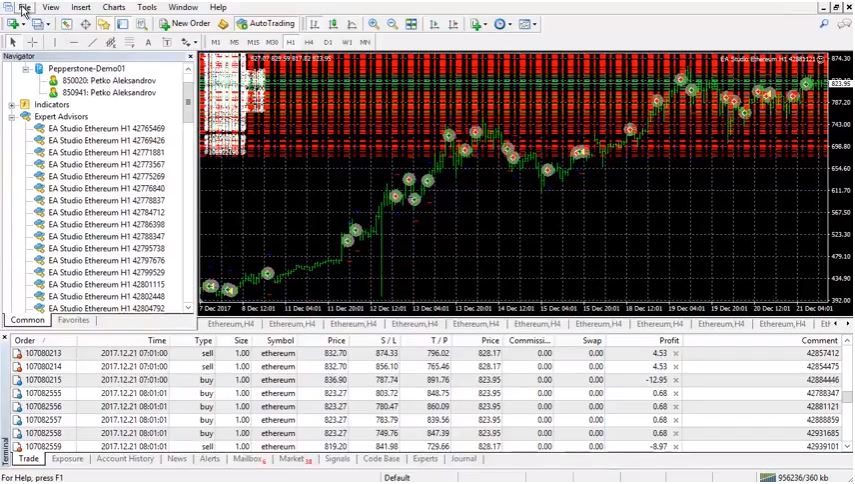
    And as you can see it has made profit of $114. But actually I have changed only one time two of the Expert Advisors. This Expert Advisor ending on 792 I didn’t change it. It shows great profit till the moment and the others two I have changed it. And I will just show you in a second with the statistics.

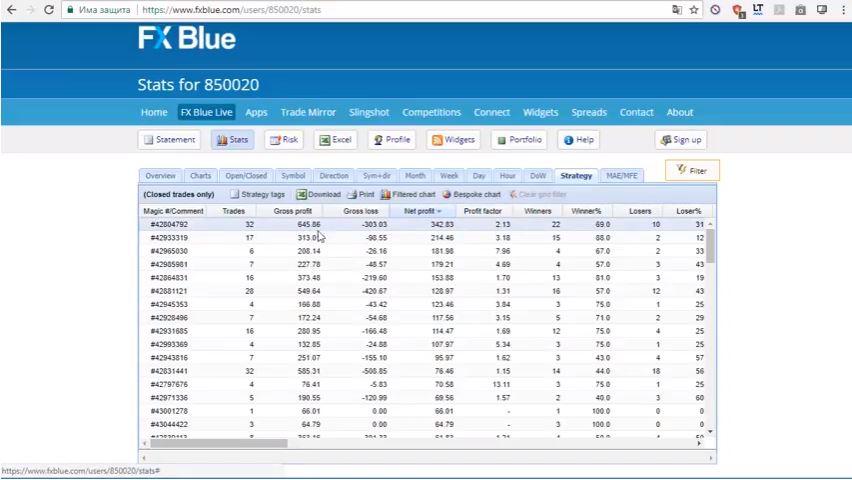
    Here are the statistics of the same account. You can see the first Expert Advisor is doing really great job. Net profit of $342, it has a very good profit factor of 213 and it has made totally 32 trades. Gross profit 645 and gross loss 303. It has 22 winners trade and 10 losers trades.

    statistics for the strategies
    Statistical website.

    But at the end of the day this is what we care about. It’s still on the first place according to the net profit. Ant that is a a great example how a trader with no experience can trade profitable, or even having no clue how to trade.

    I have replaced the other two and now actually I will need to do that again because you see that I will just put it this way. We can compare the Expert Advisors, so you see this 792 it’s still on the first place.

    I don’t need to change it.

    But you see the second and the third are not anymore this ending on 030. Actually, 030 is still on third place. I just didn’t see that on the first view. 030, this 42965030. It’s the same one it’s still on top 3, on third place, I will not change it. But this Expert Advisor ending on 981.

    It just went on the fourth place and this Expert Advisor ending on 319 is already on second place.  I will just remove this Expert Advisor that is on the fourth place. And I will place this one ending on 319.

    I will go now to the Meta Trader where are all of the Expert Advisors. That is a Demo account, where traders practice and learn how to trade.

    The 99 Expert Advisors you can see many trades open at the moment.

    Demo account, where people can learn how to trade
    Demo account with 99 EAs.

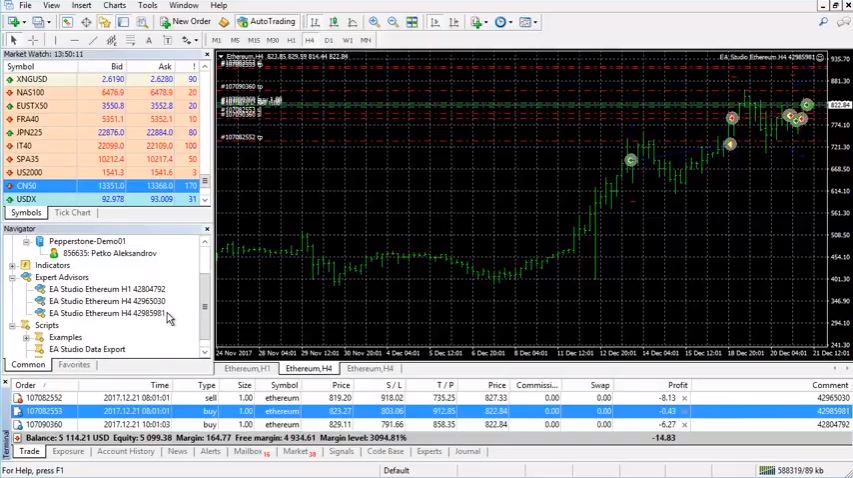
    I will go to File, Open data folder, MQL4, then I’m going to Experts and I’m looking for 42933319. And I will copy it and I’m going back to the other Meta Trader where are the top 3. Again I will go to File, Open data folder and I’m going to MQL4, I’m going to Experts and here they are. I will just paste this one here and we said that we will remove the one ending on 981. 981, so I will just delete it.

    And I have the new one here but I will close it and you need to refresh the Expert Advisor.

    It will force Meta Trader to compile the new one.

    The other thing is that I have an open position with the one that I have removed. 981, so it is this one here. Now it is your choice if you want to close this position or leave it go. But since this Expert Advisor has not really started to lose it just went to the fourth place it has a Stop Loss and it has a Take Profit.

    I am OK to leave this trade to go because it has a Stop Loss, it has a Take Profit, if you want of course you can just close it. Really not a huge importance here. The question is once again I say we trade the top 3. So even you have no idea how to trade, you can do it simply as that.

    So, you just saw how I exchanged this Expert Advisor ending on 981. It’s actually this one over here and I have placed the Expert Advisor ending on 309.

    What I will do now?

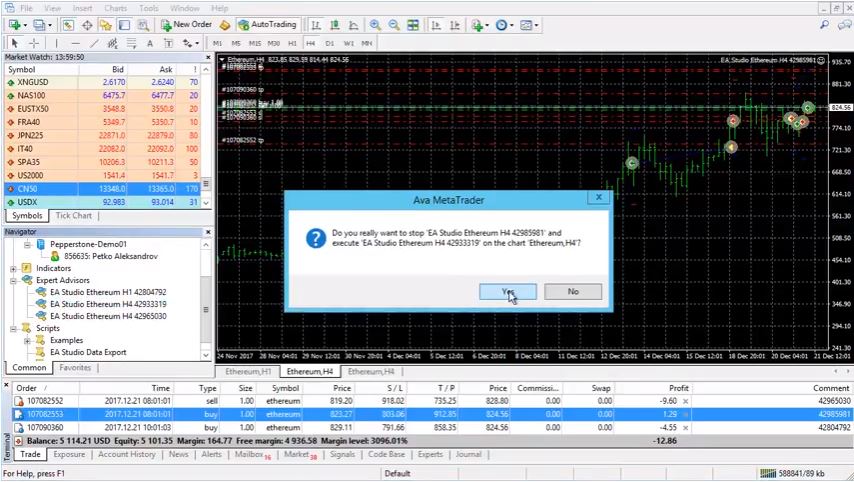
    I will just drag it over the chart the new one I will click on yes, I click on OK and it’s already this one that we are having.

    placing the EA over the chart
    A massage that appears when we replace Experts.

    Again I’m having the top 3 Expert Advisors. This is how it’s working you can see here something very realistic. I am just keeping the top performers, it is your choice if you want to keep the best one. As you can see this 792 Expert Advisor is making great job from the beginning you did great, great work actually.

    You can trade either the best performer as I told you or you can trade top 3, top 5 it is really up to you. I advise you to start simply like with top 3, top 5. It will be easier for you to follow their performance and with the time you can actually increase the number. I leave it totally on you, just when you learn how to trade with the EAs, you will know your number.

    And pretty much that’s it. I showed you the whole process, I showed you actually that you can have a very, very nice profit of $100 which I do believe it’s not small profit for fully algorithmic trading.

    You see I’m not staying in front of the screen to wonder when to buy, when to sell, what to do to, to shake or to tremble, to sweat myself. Now, I’m just following the statistics, I placing the top 3 Expert Advisors and it works fine. And the other thing I would like to do right here is I will just sign out and I will register with the new account where I have placed the 3 Expert Advisors.

    Let me just see what will be the result there.

    I didn’t register till the moment because I wanted to show you one more time how I’m doing it. I’m looking for Pepperstone and here it is Pepperstone-Demo01 and the account is 856635. Let me just paste here the investor password. And I click on I agree the terms and conditions. I will place the email [email protected]. And I click on register and you see that I will have now this registration already.

    results from the separate accoutn
    Statistics for the account.

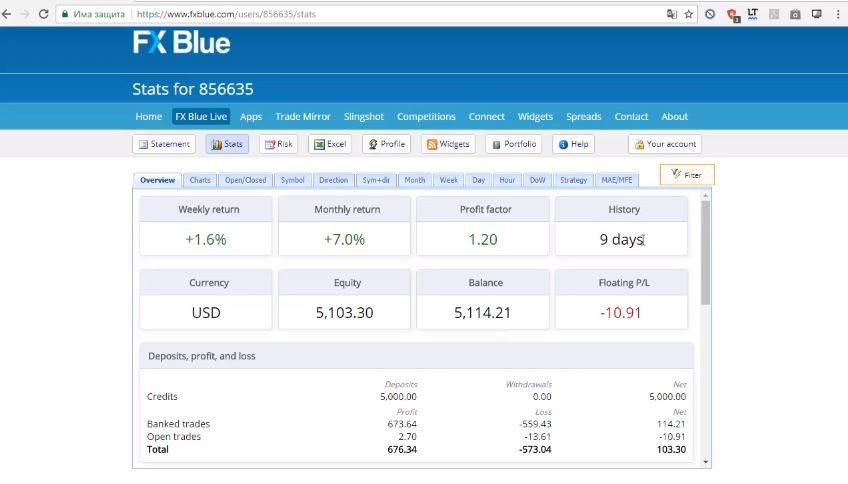
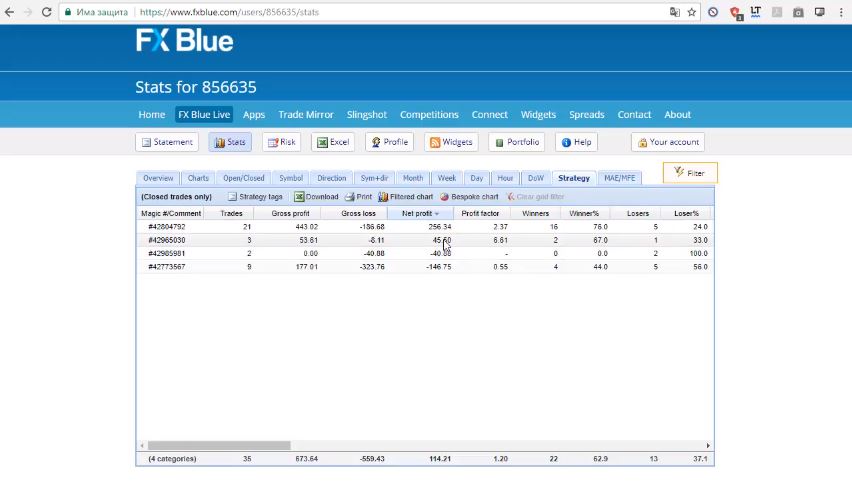
    I’m going to statistics and you can see that I’m having currently balance of 5114 and this is for 9 days. I am having monthly return of 7%, weekly of 1.6 and profit factor average is 1.20. I do believe that $100 with 9 days, with a small trading account having $100 of a profit it’s not really a bad thing. This is something very realistic that I’m showing you here.

    It’s not that I will promise you to make huge, huge profits. I never ever promise that. You will never hear me promising anything in my courses. I just want to show you some realistic trading that you can do, and learn how to trade with EA. Some system that is not really hard to follow and as you can see system that actually brings you profit on a fully automated mode.

    You don’t really spend time in front of the computer. Just with couple of minutes during the day you can have profits. Just to follow the statistics and to change it. You can see here on the net profit this best Expert Advisor that I’m having 792 have made profit of $256 and I have this one actually that was in the beginning where I have placed it, then I have removed it.

    So, what happened is, it made profit, it staied on the top, it made profit, I placed it.

    But then it made immediately losses, so I have removed it. You see the other two are basically equal:

    Trading results from the account
    Results from the separate account.

    It’s just one is having profits, the other one had losses. But overall I am on the profit. You will see this thing very often that one of the Expert Advisor in the beginning is showing profit. Then it starts to lose. The important thing here is to remove it. Not to leave it there to run actually losses into your account.

    So the question here is to learn to manage the accounts, and not so much to learn how to trade.

    Obviously from this statistic I can say that the best thing I would have done is to leave only the top performer. You can see it had made me $250 instead of having now just 114. You see this is the conclusion I can make so far even I am running it just for 9 days. But during this 9 days this Expert Advisor that is top have made more profit than the others have made.

    But sometimes you will see this, sometimes you will see that two or three just will show losses.

    What you need to do, is to remove them and place the other ones.

    Sometimes you will see that all of these Expert Advisors that are currently making profit they will only make profit. And they will really, really show you great profit. But overall you will see average result at the end of the day and you will make the conclusion for yourself.

    Here you need to find yourself, you need to find where you feel comfortable. If you feel comfortable to trade only the Expert Advisor that is on the top that is great. If you feel that you want to place 3 and just to change 1-2 from time to time as I have told you that is fine as well. You will have sometimes less result like what I’m having now.

    But sometimes you will have better and better results. How to trade, and how to manage it, it will come along with the time.

    It’s really up to you how you feel comfortable. I do believe that by having more than one Expert Advisor, like three or five you diversify the risk. Simply, we diversify the risk, because what could have happened is actually that I have placed the top Expert Advisor and it started losing I will have only losses into the account.
    If this Expert Advisor was in the beginning on the top and I decide to place the top performer I will place it in a different account. And it will only show me losses. And I will have no other Expert Advisors to cover this losses.

    This is the idea of diversification the risk.

    I place more Expert Advisor in one trading account just to diversify the risk. If one, by any reason, starts to lose the other will cover the losses just what happened here. This is what I’m doing. This is how we actually succeed to make profits into the Academy. I really hope that you will succeed to manage it, you will find yourself, and learn how to trade with it.

    It’s very important to find the way that fits your character, the way you want to trade:

    • are you more risky trader
    • or more conservative trader.

    But take it easy, practice it on demo accounts one more time I’m saying it. And you will feel yourself comfortable at one moment to go for real trading. And I really hope that you will make profits there as well.

    Let me, guys, know if you have any questions in our SUPPORT FORUM. I am always there to answer.

    Take it easy, start with few Expert Advisors to separate from the 99 and see how it works for you.

    It was really a pleasure recording the Ethereum trading course + 99 Algorithmic Trading Robots.  I will update it every month with new 99 Expert Advisors. You can select every month the new best Expert Advisor and to place on separate account if this works well for you then I would be very happy that I taught you how to trade.

    Thank you for reading!

    If you are interested for more cryptocurrency trading courses please click HERE.

    packages for trading
    The Packages in the academy.

    The Ethereum trading course + 99 Algorithmic Trading Robots is available also in our PACKAGES.

  • Top 10 Expert Advisors for EURUSD – Expert Advisors course

    Top 10 Expert Advisors for EURUSD – Expert Advisors course

    Top 10 EURUSD EA – the best way to find profitable strategies by EA Forex Academy

    Top 10 Expert Advisors course for the EURUSD was launched by EA Forex Academy. The trader Petko Aleksandrov has created a portfolio of strategies and traded them in one trading account. His idea was to extract the Top 10 Expert Advisors by following precise statistics, and he succeeded!

    In the course, you will see how he is following the stats and how he extracted the Top 10 EURUSD EA. And by Top, we mean the current Top performers.

    Below you will see a free lecture, and you will learn how he is doing it.

    Hello dear traders, this is Petko Aleksandrov from EA Forex Academy, I would like to welcome you one more time to our Expert Advisors course – Top 10 EURUSD strategies.

    The idea for this course came to me after I created the Forex strategy course – Portfolio trading strategies + 12 Expert Advisors with creating a portfolio of EURUSD ЕА strategies on different time frames like H1, M30, M1, M15, and M5.

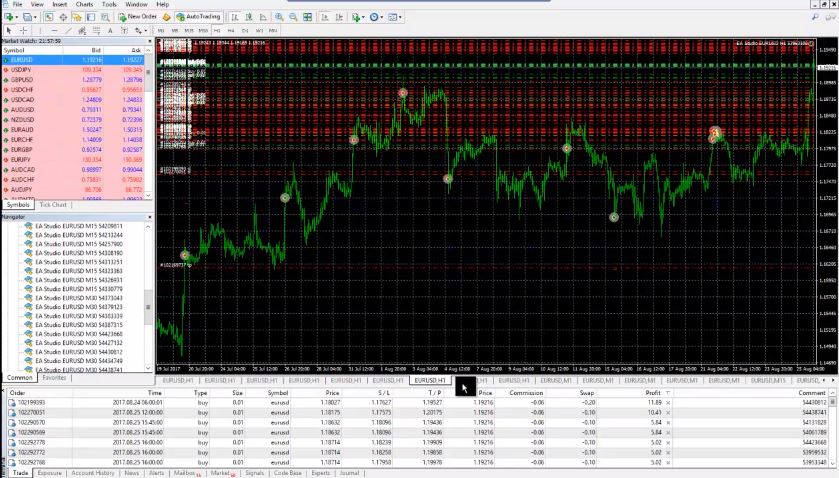
    And if you have watched this course I have placed them in one trading account. As you can see they are all over here:

    Top 10 Expert Advisors for EURUSD ЕА
    All Expert Advisors trade in one account.

    And for nearly 3 months, I didn’t touch this account. I didn’t touch a single trade, I didn’t pause during the news as well. This trading was running on my VPS all the way long for 3 months. I will show you the statistics now.

    And what I will do actually from now on?

    I will trade only the Top 10 Expert Advisors from these 40 strategies. Basically I will be trading on live account only the Top 10 strategies that perform the best. This demo account I will leave it on the VPS to run. And once again I will be selecting only the 10 strategies.

    And of course with this course, you will receive it and you receive the Top 10 Expert Advisors(EURUSD EA). You can trade as well if you wish these strategies.

    From now on I have decided not to show live results, not show live trading accounts to any of the students for one reason. What happened last week, was that one of my students came to me. He was very excited that he open a live trading account, the same size that I shoot to him in one private lesson and one personal lesson.

    And he actually told me that he took credit, he took a loan in order to trade the same volume as I did. I felt pretty bad about it because I never, never advise anybody to trade with a certain amount. Or to trade live trading account like I am. So basically, he just wanted to have the same trading live account as I did. And this made me feel pretty bad actually because he used money that he couldn’t afford.

    From now on I have decided not to show any live results. I mean I will show you the results on the statistics of the trades but I will not show you any live trading accounts. Because some of the students take it as a piece of trading advice, as trading advice for live accounts. And I don’t want this to happen anymore.

    Basically I will just show you statistics from the EURUSD EA, how the system is working. And how I select the profitable strategies out of the portfolios.

    I hope everybody understands and everybody is clear with that. And one more time, I never advise you to do any trading. At the end of the day, it is your choice how much would trade if you decide to use these Top 10 Expert Advisors. If you will be trading demo or a live account and if it’s a live account – how much. Once again don’t trade money you can not afford to lose first of all. Then it is your own choice how much you will be trading. And open clear with that.

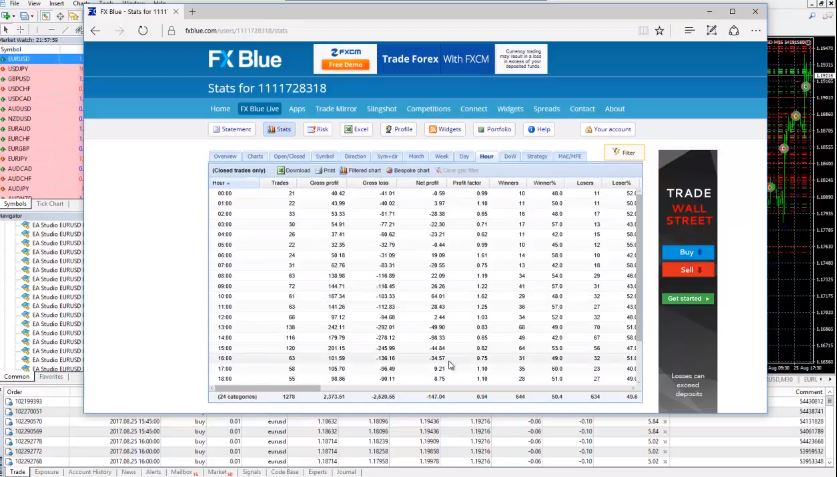
    Let’s go now to the statistics of the system. In order to find the 10 Expert advisors out of the whole portfolio what I do? I go to the web site fxblue.com. Here is my registration already. If you don’t have a registration, if you have created portfolio of strategies with EA Studio all you need to do is to register or of course with Forex Strategy Builder.

    How they need to do, is to register. The registration is pretty easy.

    You select your broker over here and then you go to register, enter your e-mail as well. Accept the terms and conditions nothing special there and then you go to log in. And after you log in, you go to stats. And as you can see, for history of 87 days in this account, the equity and the balance right now are the equity actually is 9955. Once again I say I didn’t touch anything for these 3 months.

    Basically, this is a little bit below 0. As you can see I have a total profit of 2498 and I had total loss of 2542. Here you can see the symbol. The symbol is on EURUSD at this account because I trade it with EURUSD EA. And the Net profit, the profit factor, you can see the results:

    • every week
    • every day 
    • hourly, if you wish
    • during the day
    • which hours actually the Top 10 Expert Advisors profit
    • and which hours you are having losses
    website for stats
    Statistics for the Expert Advisors.

    This is pretty interesting as well. And many people are following this. If they see that they’re losing for example between 1 o’clock and between 4 o’clock in the afternoon they just stop the EAs during this time and they trade only on the profitable hours. That’s another thing but a little bit more complicated it, advanced to be done, so I’m not going over there.

    As you know we’re focusing on the automated systems. And how to trade fully automatically without interfering there on the market and only for the news with some of the systems. But right here we are focusing on fully automated trading.

    Here are the strategies.

    I will just click on Net profit because at the end of the day this is the most important. And I want the strategies to be in order, so I will see the Top 10 Expert Advisors, the Top 10 performers. For these 87 days, for these 3 months. So, as you can see this is 1, 2, 3, 4, 5, 6, 7, 8, 9, 10. These are the 10 strategies that I would like to trade on my live account.

    I will show you how I will take them out from here. And then I will continue once again to trade with this demo account and to follow the statistics. If 1 of these 10 strategies goes below this strategy, below the tenth one and one of these comes up obviously I will exchange them.

    Simply said I want in my trading account to be trading only with the top 10 Expert Advisors.

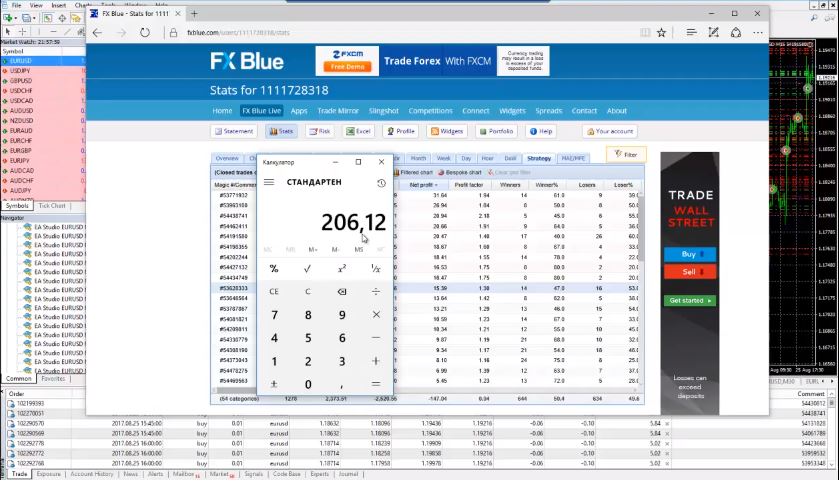
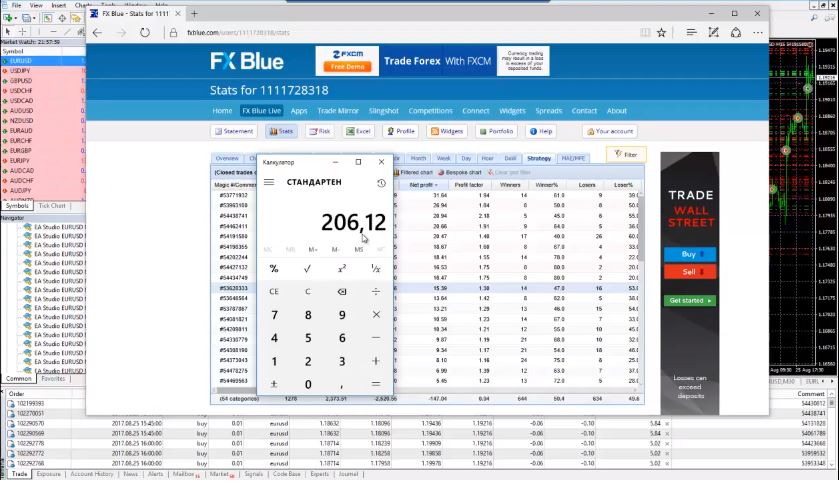
    And if there is any change I will just change it. I will replace it but at every moment I wish to trade with the top 10 Expert Advisors out of these 40 strategies. As you can see for this 3 months these top 10 strategies made me a profit of $206. Let’s just calculate it very quickly, how much exactly was the profit from the 10 strategies.

    I have 15,39 + 16,47 + 16,53 + 18,41 + 18,67 + 20,47 + 20,66 + 20,94 + 26,94 + 31,64. And the total is result for the top 10 Expert Advisors is $206. And this is trading with 0.01 lot size as you can see:

    Result for the top 10 Expert Advisors
    Trading results from the Top performers.

    Approximately said we can say this is 2000 pips. You can say that if you are trading with 0.1 lot size which is the standard for trading. Again this is not a piece of trading advice. Trade as much as you decide. And so that would be $2000 of result if you are trading the Top 10 Expert Advisors with the standard lot.

    And if you’re trading with the micro lot of 0.01 that would be $200 of profit for the last 3 months. Not for the very beginners:

    What is the EURUSD EA?

    • An automated strategy that executes the trades alone
    • Expert Advisor that is attached to the chart
    • If it is developed for EURUSD it should be traded on this currency pair
    • a robot that is designed to trade on EURUSD
    • a backtested strategy with a proven track record

    In the next lectures in the course Expert Advisors course – Top 10 EURUSD strategies I will show you these Top 10 Expert Advisors. I will take them out from here. And I will put them in a separate account to trade the 10 strategies. From now on my job is just to follow the statistic. And of course to trade in my live account only the top 10 Expert Advisors out of these 40. Thank you for reading!

    So that is the idea trading with many strategies in one trading account. It is easy to see the current top performance. This is very important because the markets are changing all the time. We can not expect to have Top 10 Expert advisors that will be trading all the time with the same parameters and show same results. That is not the reality in nowadays market.

    The trader used the strategy builder EA Studio to generate the strategies. That is a professional tool that we use in EA Forex Academy, and it is developed by Forex Software LTD. This is a web-based strategy builder which helps the trader to generate strategies over the historical data of the broker they have selected.

    Thank you for reading. I hope everything is clear here. If you have questions please write me in our SUPPORT FORUM where I will answer you as soon as possible.

    If you are interested in more Forex Algorithmic trading courses please click here: https://eatradingacademy.com/courses/algorithmic-trading/

  • Crypto trading – the idea in Never Losing Formula

    Crypto trading – the idea in Never Losing Formula

    Crypto trading is the only way we can benefit when others loose on exchanges.

    Crypto trading is what Petko Aleksandrov, head trader and mentor, at EA Forex Academy, teaches in his classes. There is a single reason behind that. When using contracts for difference, profits can be made when the crypto market is going down. Many people believed in the Bitcoin as quick way to profit, but it turned out that many lost all of their savings.

    Crypto trading with the proper strategy and money management is much smarter choice.

    In this lecture from Petko Aleksandrov, you will teach you a crypto trading system that he has called the “Never losing formula”. This is a free lecture from the course Ethereum trading robot course – Cryptocurrency never losing formula. This is a method that protects the trader when the price goes against him. With every crypto trading system, and with every цръпто trading position, there are always the times when the price goes against the initial direction.

    The formula is based on pure mathematical calculations. In this course, you will learn how the trader calculates the lot sizes and the distances. This is very important part in order at the end of the equation to be out with zero losses. The idea of the formula is not to benefit from it, but to exit the negative trades with zero losses. So if only the profitable ones are left, this is not bad, isn’t it?

    Petko combines an Expert Advisors for crypto trading, and in this case the Ethereum, with the major trend of the price. This way he increases the profit factor, and the TP is reached much more often.

    The formula plays the role of a SL. But instead of a SL, it is a pending order on the opposite direction. Bellow you will find the lecture where all of that is explained. Enjoy!

    Hello dear traders, I continue now with the Never losing formula for crypto trading.

    crypto trading the ethereum
    Ethereum trading robot course – Cryptocurrency never losing formula.

    It’s a formula that I have shown in some of my previous courses for the Bitcoin – Bitcoin trading course – Cryptocurrency never losing formula and Bitcoin Trading Robot – Cryptocurrency never losing formula.

    But since the Bitcoin became a little bit expensive the spread is much bigger than with the Ethereum. And I have decided to launch this Ethereum trading robot course, where I will show you again the Never losing formula.

    And of course I will explain it in details. I will do my best actually to explain it easier, simpler. Because I have received so many questions from beginner traders that didn’t understand how it works. And I will do my best to explain it as clear as possible, as simpler as possible.

    I will start from white screen and I will do some drawings, and I will do some calculations. I really hope that everybody will understand. If you have already watched the course for the Bitcoin where I explain the formula or the Cryptocurrency Algorithmic Trading course – The Revolution where I have included as well and actually there is a crypto trading example with the Ethereum there.

    In this course you will see more examples with the Ethereum, I’m focusing on the Ethereum right now.

    Because it’s cheaper to be traded, since the spread is nearly 10 times smaller than the spread with the Bitcoin.

    So, to make it clear now for the students who have not watched the previous course with the Bitcoin and this is the first course they are taking the Never losing formula is something that protects us from the bad trades. We will be using the Expert Advisor to enter into the trade. But after that if the price goes against us we will use this formula in order to exit the bad trade with zero.

    How is it working?

    The Expert Advisor is taking the trade if it goes to the Take Profit and hits the Take Profit, that’s fantastic. I don’t need even to give an examples with that. You place the Expert Advisor on the chart, it hits your Take Profit – fantastic.

    What happens if the price goes against our direction?

    There is no Stop Loss, so our capital is at risk. We need to protect it. Crypto trading is very volatile, and protection is a must!

    Here comes the formula which will actually exit the trade with 0 losses or even a small profit.

    One more time, I will do my best to explain it as simplier as possible and if you have any questions of course at any moment let me know at our SUPPORT FORUM. I will do my best to answer you quickly and in details.

    But here really I will put my best effort to explain it clearer and simple, so everyone should understand it. Also, this formula can be used for any other crypto trading asset. It is easy to modify, and once you learn to calculate it, you will be bale to use it for any other crypto trading asset.

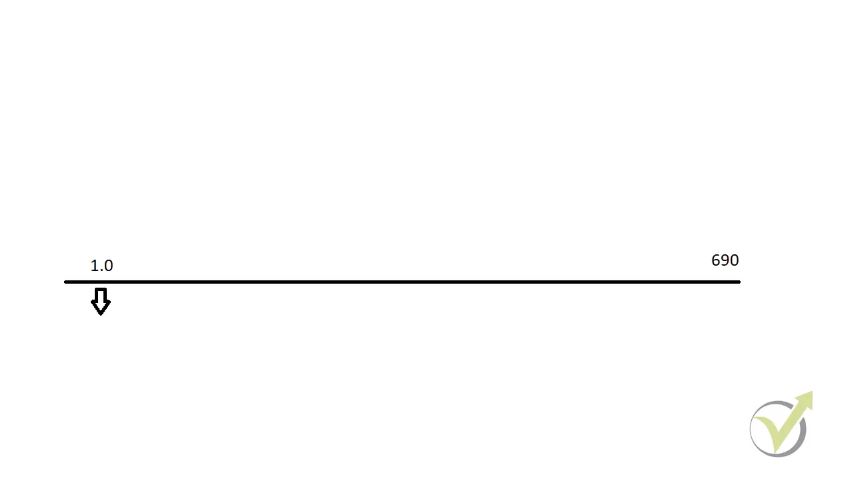
    Let’s say we have placed the Expert Advisor and it opened a trade at the price of 690.

    trade opened
    1 lot size trade opened short.

    So, at 690 we have sold. The Expert Advisor has sold. I will use very simple drawing tools just to show you what happens.

    At this moment the Expert Advisor has sold 1 lot size. At the price of 690. As you know the Take Profit of the strategy is $100. When I am using the Never losing formula with the Ethereum I modify it to $90 instead of $100. The volatility in crypto trading recently fell down.

    Make sure not to place unrealistic and huge Take Profits. That probably will not be reached.

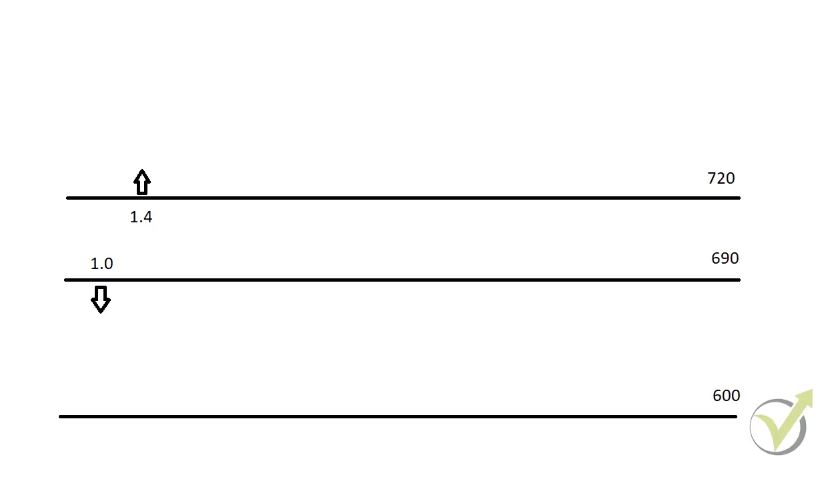
    If you keep your Take Profit closer the more you will hit it. This is simply logical. Once again once the trade is opened with the Expert Advisor, let’s assume it is at 690, it opens a trade with 1 lot. And I modify this order manually to make it $90 of profit and not $100. Just I’m taking it a little bit closer and this means that here my Take Profit will be at $600.

    As I have said if the price hits my Take Profit that’s great, you don’t need to worry about nothing. These ofcourse are the best examples for Crypto trading.

    And I will do my best to record more examples. But even as said I don’t need to record such examples because this is the best case. This is thing we are looking for, if it happens it’s great.

    Now, what happens if the price goes against us?

    You sell, the Expert Advisor sell but then the price goes higher. Obviously, you will start to lose from your account. Now, what I will do? I will place a buy stop once the trade is open. Once the first trade is open, this one over here immediately I place a buy stop $30 higher. This means that it will be at the price of 720:

    crypto trading on both directions
    Pending order $30 dollars higher.

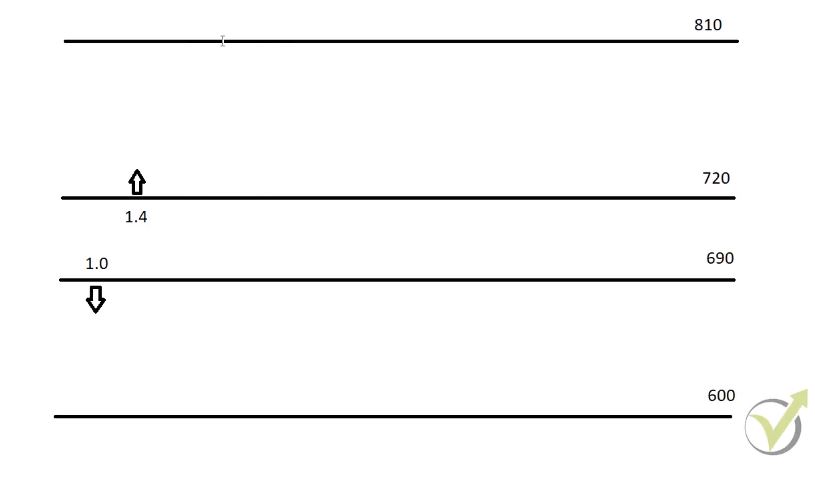
    At 720 I will place a buy stop and this is a pending order which means when the price reaches this level it will enter into the trade automatically. But here my pending order will be with 1.4 lot size. At this moment I will have this initial negative trade. And in the same time if my buy stop is hit I will have this positive trade if the price goes higher. Keep in mind that this is crypto trading, and we can do this. Something that is impossible on exchanges.

    And this buy stop will have the very same Take Profit as the sell position. This will be at the price of 810.

    One more time let’s summarize it, so if you apply on any other crypto trading currency, you will know the idea.

    The Expert Advisor enters short trade here. We modify the Take Profit $90 instead of 100. After that if the price hits will be great. What I will have? $90 of profit. If the price goes against us I will enter $30 higher with a pending order buy stop with 1.4 lot size.

    If the price hits this target for the second order what I will have?

    I will have negative from the sell which will be $120. And then I will have positive of $126. Let me show you why is that.

    This is because if I bring up the calculator if I have distance of $90 times 1.4 lot size what I will have? 126. As you can see at this moment I will be out with $6 of profit. The price went against me and I will be on profit. This is one more time the case when the trade is opened I place a buy stop.

    Just in case if the price goes against me and if it does go against me I will have totally $6 of profit. And I will be out without losses even the price went against me. At this moment I will be out without losses and I will place the Expert Advisor again for crypto trading.

    Same Take Profit
    Crypto trading with the Mid Zone

    Normally what I do?

    When I place the Expert Advisor and it opens a trade and I want to combine it with a Never losing formula I remove after that the Expert Advisor from the chart. Because as you saw the Expert Advisor has an exit rule. It is very possible that it will exit somewhere while I am still in a loss.

    The idea here, is that I’m using the Expert Advisor only to enter into the trade. Only to give me the signal and not only to give me the signal but to execute the trade for me automatically. After that I take over, I take control of it.

    Probably for the people who are just first time watching this, who don’t know the formula what will say? Will say:

    “OK, what happens if I enter the buy stop but the price goes again lower?

    And this is the subject of my next lecture of the Ethereum trading robot course– Cryptocurrency never losing formula. I will explain you how we manage the formula if the price goes in this range and hits this level couple of times. And this is actually what I call the mid zone.

    In the course I will explain you what we do after the buy stop is hit but the price goes down again.

    This is very important, this is unique thing that will save you a lot of losses. And if you manage it properly you will have only the good, the profitable trades and you will exit the bad trades without losses.

    That was the lecture from Petko Aleksandrov, the head trader at EA Forex Academy. We have launched already many crypto trading courses for Bitcoin, Ethereum and Ripple.

    Most of the systems are suitable for any of the other crypto trading currencies.

    If you prefer to trade any other, you can apply the same methods, just you need to modify the formula according to the volatility of the crypto trading asset.

    Also, if you use the Expert Advisor, make sure you optimize it. This is very important step in algorithmic crypto trading. One and the same Expert Advisor for crypto trading can not be used for different cryptocurrencies.

    What you need to do?

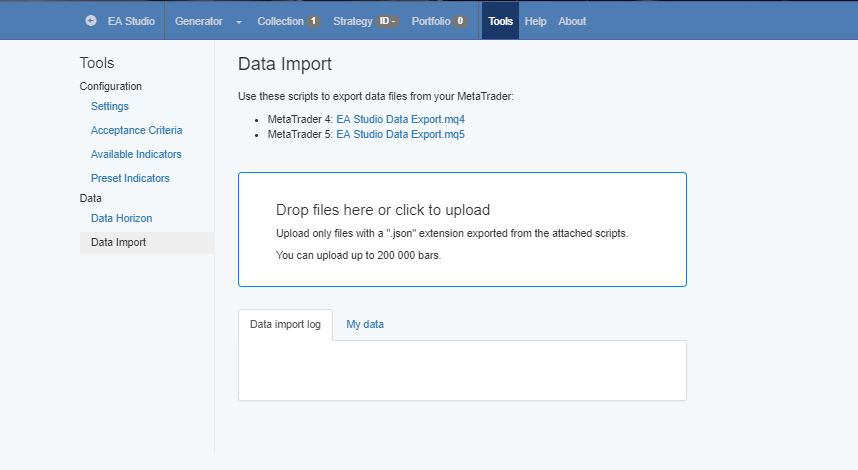
    Place back the Expert Advisor in EA Studio and import the historical data from your crypto trading broker. This can be done with the script which exports data from Meta Trader. The script can be found for free in tools of EA Studio. Click on Data Import, and click on the script according to which platform you have selected to use – Meta Trader 4 or Meta Trader 5:

    EA Studio tools
    Scripts to export Historical Data.

    Place the script, in the scripts folder of Meta Trader, and refresh. Drag it over the chart. Make sure to press the Home key before that, which will force Meta Trader download load more historical bars.

    After that, drag the exported files to the same page of EA Studio from where you have downloaded the scripts. You will see your server name, and you will be able to make an optimization for the crypto trading asset that you have selected.

    Here are some useful topics that will improve you crypto trading:

    You are very welcome to share your experience, or ask any questions. There you will receive personal support by Petko Aleksandrov always with 12 hours.

    Safe trading, and make sure always to practice on Demo account.

  • EA Trading Strategy – Select the TOP from EA Studio

    EA Trading Strategy – Select the TOP from EA Studio

    EA Trading strategy – how to start trading with proven results

    Trading strategies and their creation are among the hardest things for traders. No matter you are a beginner or advanced trader, trading for 1 or 10 years. The question about the Forex EA strategy is always the same. Do I have an EA trading strategy that I can depend on in my trading?

    Many traders use strategies that they have found over the internet, bought in the market place, or developed by themselves. The questions that they do not know if these trading strategies will show robustness in the future. They do not know what results this trading strategy showed in the past.

    In this lecture, you will learn how Petko Aleksandrov, the head trader at EA Forex Academy, uses the professional strategy builder EA Studio to generate 100s of trading strategies. That is not the only thing. To select the best performance need some attention and techniques, which he will share in this lecture. Enjoy!

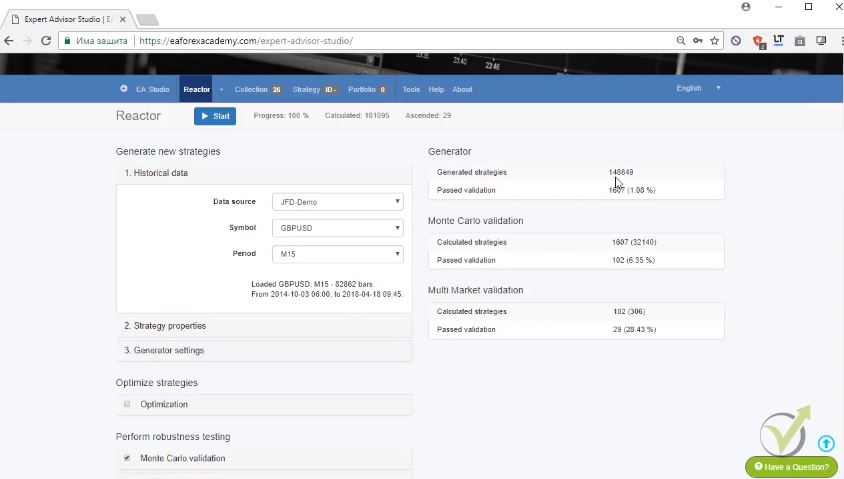
    I continue with the results from the Reactor:

    trading strategies
    Results from the reactor

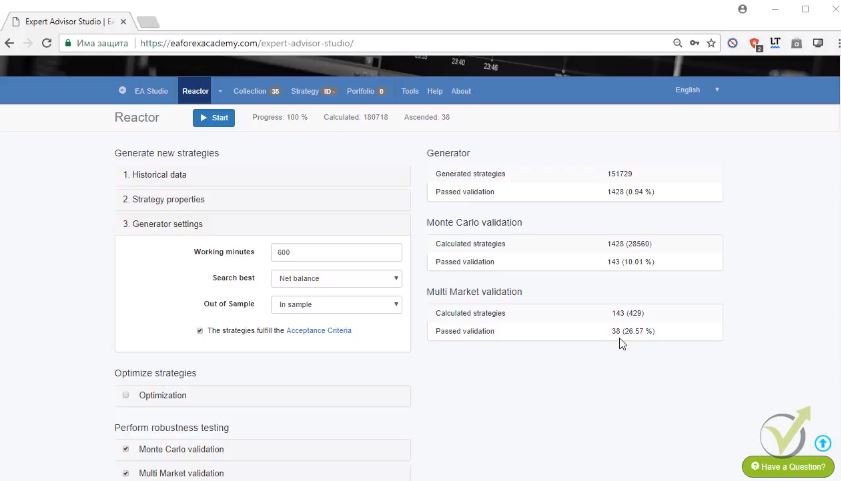
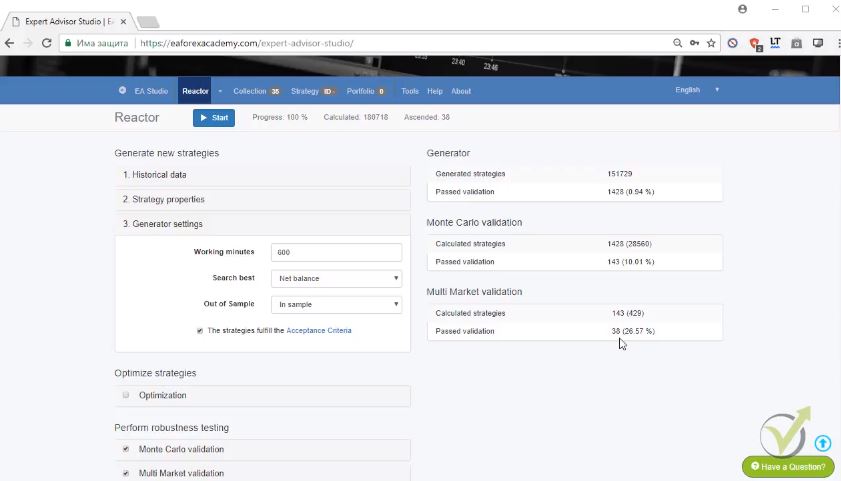
    As you can see only 38 strategies pass the validation from 151 729 trading strategies, less than 1% passed the validation. And then I have the Monte Carlo which filters more the strategies, totally 143. And from these 143 strategies, only 38 passed the Multi Market validation.

    When I go to Collection you will see here that 35 trading strategies are here and this is because we had some resolved correlation.

    What is the resolved correlation?

    If I go to tools there are the settings. Here below you will see detect balance lines correlation. This means that the collections are filtered with strategies that are having very similar balance lines. Similar trading strategies and they remove.

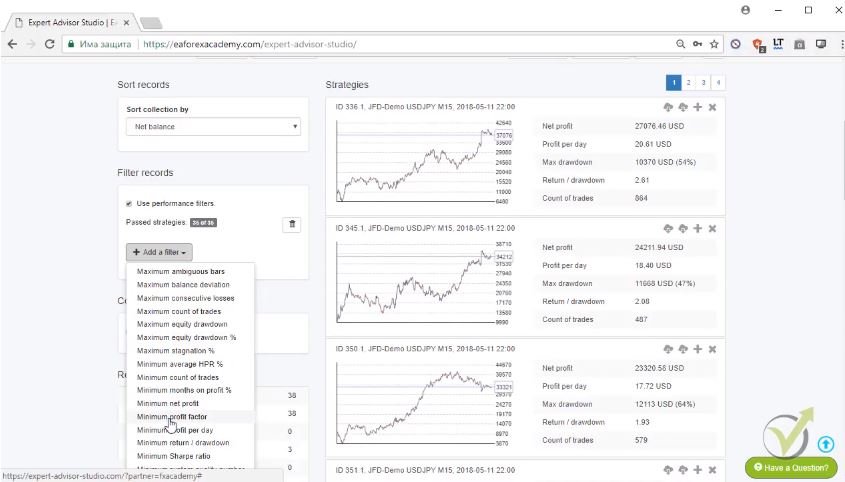
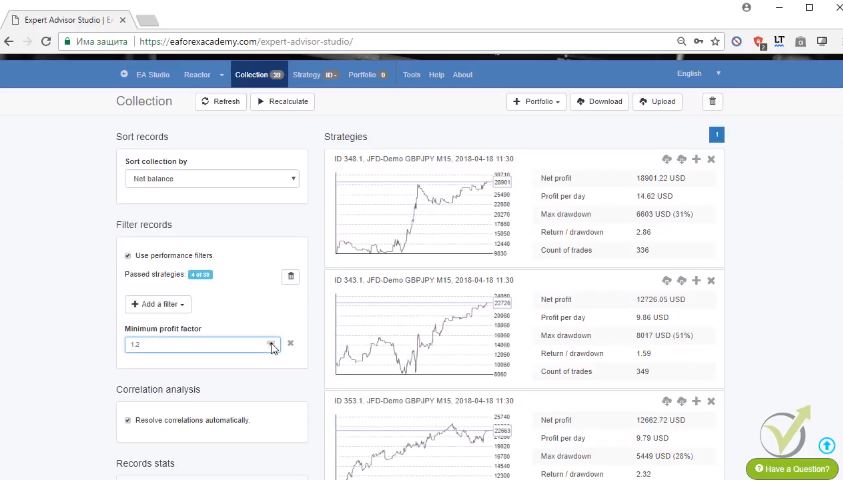
    The idea is to have a portfolio of different Forex trading strategies. Anyway, from these 35 I will select only the best performing EA trading strategy. And I will go now to Add a filter. On the left side, you can see here filter records. And I will go to maximum equity drawdown, it’s a very nice filter stagnation. Actually, all of the filters are very useful. One of my favorite to use is the minimum profit factor:

    collection of EA trading strategies
    Filters for the trading strategies.

    The profit factor is the gross profit divided by gross losses. This is very, very simply said. If I select one obviously all will remain but if I increase it you can see to 1.1, 1.2.

    What you can see here?

    Only 5 trading strategies out of the 35 are left into the collection. And you can see them right over here.

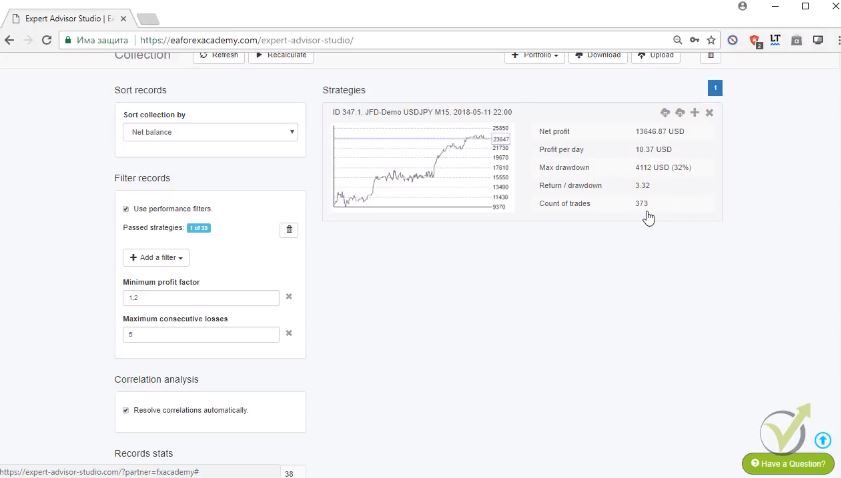
    The next thing is I will add another for example maximum equity draw down in percentage. For example, maximum consecutive losses. If I select 10 you will see 3 trading strategies are left into the collection. And if I decrease the number 987 no change. Let me decrease it more 2 and if I decrease more 1. And you can see 1 EA trading strategy strategy is left now in the collection with minimum profit factor of 1.2 and maximum consecutive losses of 5:

    statistics for the trading startegies
    The best strategies is quickly selected.

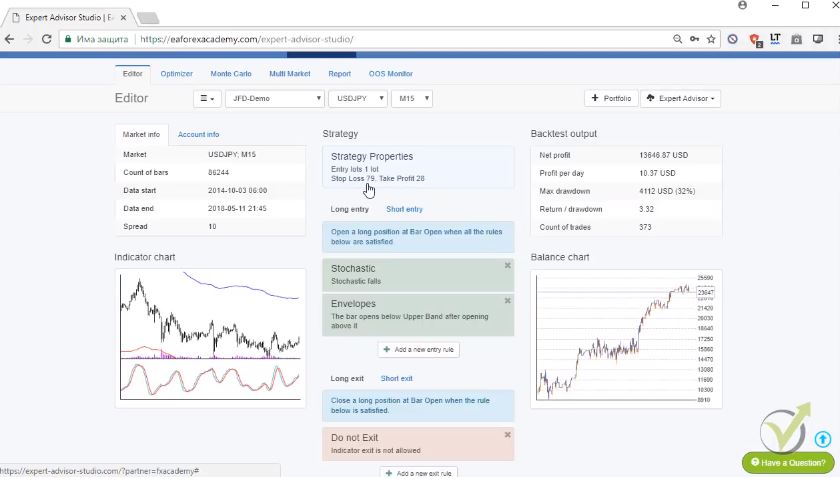
    This means that for the 373 trades there are no more than 5 consecutive losses. And this is very important as well. Let me click over the strategy and you will see here are the entry rules, the stochastic and envelopes. We don’t have an exit condition. What we have is actually a Stop Loss and Take Profit.

    You can see Take Profit much smaller than the Stop Loss if you remember what I’ve said in the beginning of the course that with algorithmic trading I proved long time ago to many traders that it is better to have a smaller Take Profit than the Stop Loss.  Obviously, in any trading strategies,  if your Stop Loss is smaller than the Take Profit you give bigger chance that the price will first hit the Stop Loss:

    parameters of the strategy
    Entry and exit rules for the strategy.

    Simply, it is closer to the entry price.

    When the Take Profit is close obviously we have bigger chance hitting first the Take Profit.

    There is an old rule that the SL should be 3 times smaller the the Take profit. Many people follow it just because this is what they read or saw in some article, video or in some strategy description. Most of the people that start using EA Studio, realize that this is not the reality.

    This is the EA trading strategy. And what I do now?

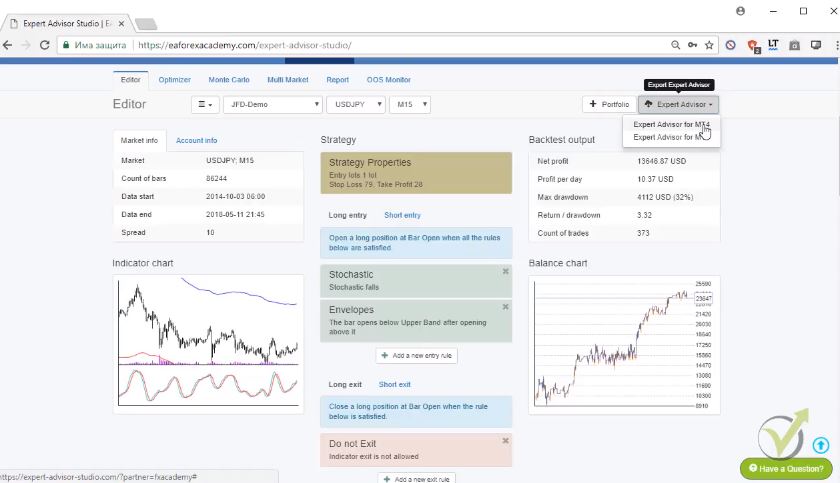
    Exporting EA trading strategy
    One click action to export a strategy.

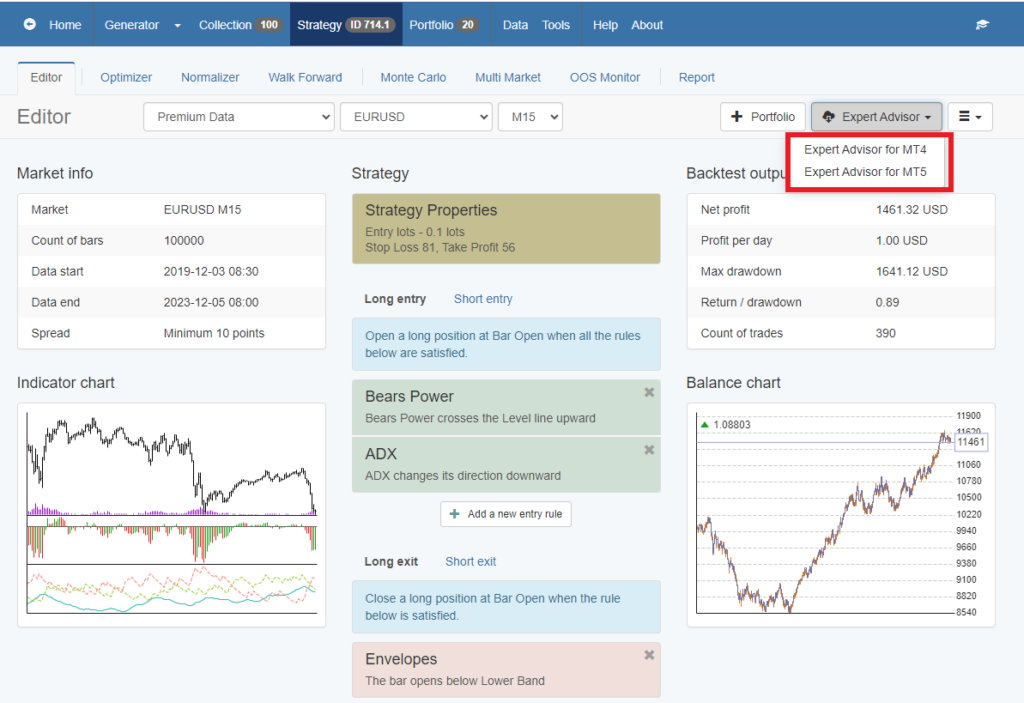
    Very simply is I will go to Expert Advisor and I will click this button that says Expert Advisor for MT4. I will click on that and this is the very powerful tool of EA Studio that with one click I can export this strategy as Expert Advisor for Meta Trader 4 and for Meta Trader 5. One click and you will see here is actually the code and we have the Expert Advisor ready.

    We don’t need to hire developers, we don’t need to pay any money to someone to develop the trading strategy. Because it just exports very quickly and easily as Expert Advisor and let me now just select the other ones and after that, I will show you how to place them on the Meta Trader in the next lectures of  Basic algorithmic trading course + 3 Robots.

    What I have here? The GBPUSD.

    from 1000 strategies only the best one are shown
    The reactor does a fantastic job.

    You can see how many trading strategies were totally generated and in the end of the day I have 29. I’m going to the collection again, 26 that were resolved correlations as well and actually 27, yeah 26, 1 resolved correlation. Here is minimum count of trades, this is actually in our acceptance criteria, so I will remove it.

    Minimum profit factor, let’s increase it to 1.2 and you can see 2 trading strategies very quickly into the collection left. And if I compare the profit lines I prefer the first one, because you can see the second one it is recently not losing but going sideways.

    It’s not really making profit recently.

    I will delete from here from this X button that says remove, I will remove this Forex EA strategy. And here is the strategy that I will select for the GBPUSD. RSI, Bollinger bands, momentum as the exit, there is the Stop Loss and the Take Profit. Another proof here that the Take Profit is 2 times nearly smaller than the Stop Loss. And from here I will just export these trading strategies as Meta Trader 4 expert and Meta Trader 5 expert.

    Because I will attach in the course the Expert Advisors and I will attach them for Meta Trader 4 and Meta Trader 5. If you decide to test and see how it’s working on Meta Trader 5 you will have the Expert Advisor.

    The last one that I’m having is for the currency. What do we have here?

    GBPJPY, we have 82 000 trading strategies here generated and 38 passed all the validations. If I go to the Collection you will see here the strategies. All trading strategies are ordered on pages and on each page you can see 10 trading strategies.

    What I have here with these trading strategies?

    filtering Forex EA strategy
    Easy way to filter the trading strategies.

    The minimum profit factor, let me increase it to 1.2.

    What I have? 4 Forex EA strategies from the 39.

    You can see here the strategies, they are very good trading strategies. This one and this one even recently you can see a small pullback here on the equity but that is just fine. There is a huge drawdown here. So, I normally prefer not to guess which strategy is better but to use another filter. I will go to consecutive losses for example one more time and I will start to decrease them.

    If I go down, what is it? 765. I have 1 Forex EA strategy left into the collection and if I click on it you can see again the entry rules. Here we have 3 entry rules and we have 1 exit rule plus Take Profit and Stop Loss.

    Quickly if I go to the Monte Carlo, if I run Monte Carlo for example as randomize indicator parameters you will see that it will pass this test. Because it already passed it while creation. When the reactor was running automatically it went through the Monte Carlo and you can see we have positive results here, validated tests 20 from 20.

    This is the idea of using the Reactor for generating the trading strategies:

    Robustness tests for the trading strategies.
    Monte carlo results

    Once you have the reactor done you don’t need to do manually Monte Carlo, Multi Market because they went already through these tests and ready trading strategies. I will export as well this strategy for Meta Trader 4 and for Meta Trader 5 and I will attach these Expert Advisors in the Basic algorithmic trading course + 3 Robots.

    And as well in the course I will show you how we place them correctly on the Meta Trader. You will see some results after that. You will see that it’s not really a hard process.

    Thank you, for reading! If you have questions you can always write in our SUPPORT FORUM where I will answer you as soon as possible.

    For more Forex Algorithmic trading courses please visit this page of our web site: https://eatradingacademy.com/courses/algorithmic-trading/

    The EA Studio is available also in our website, and you can use it for 14 days free trial. If you are interested in a lifetime license, you can write to our e-mail [email protected], and as our student, you can receive a discount.

    More information about EA Studio and its features:

    The reactor

    That is a combination of generator and robustness tools as Monte Carlo, Multi Market and OOS. With the reactor, you can redefine rules for the trading strategies, and automate the whole process. Before 2017, we were using the generator. After that we had to go over the robustness tools for each Forex EA strategy manually. This was a time-consuming process. Now it is all automatic. We can generate 100s of trading strategies that are ready for trading because they were tested by the reactor.

    The Collection

    as demonstrated in this video, the collection is very friendly to use and the filters help the trader to select the best trading strategies very quickly. The trader can download the whole collection which is very useful and save it. This way he can go back to this collection after time and test it with fresh historical data. All the work this way is combined and with the time, with well organized job, the trader can collect collections with the time and use them continuously.

    Monte Carlo

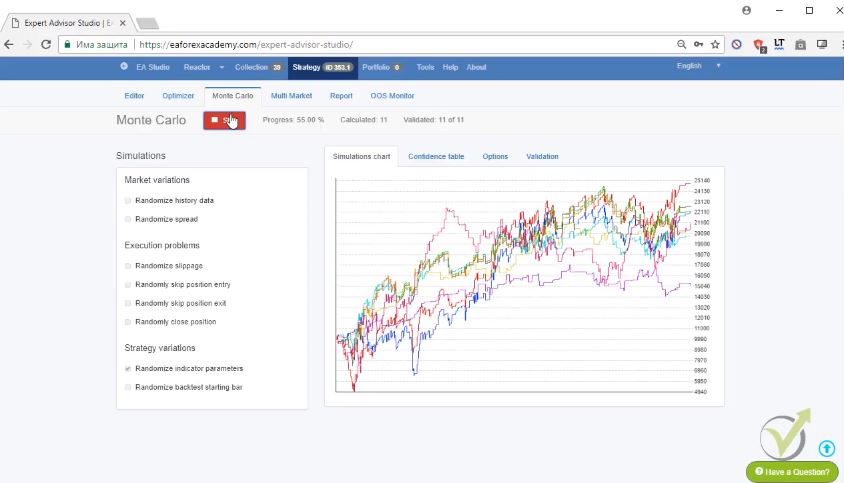
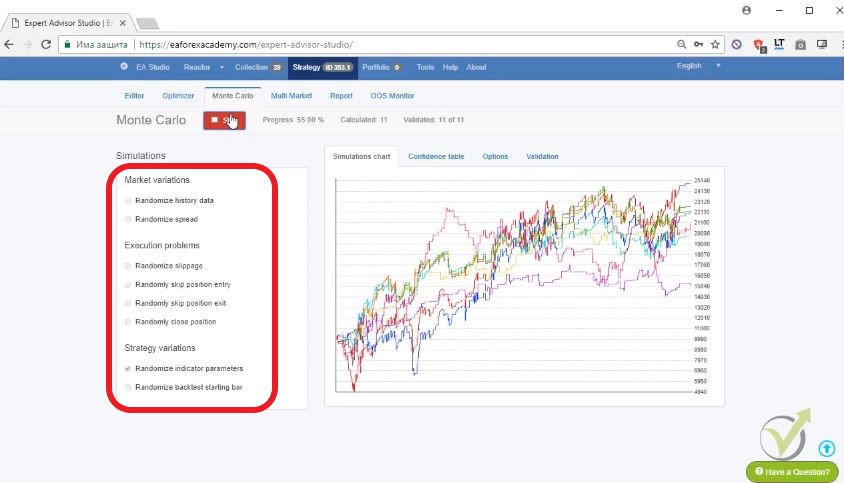
    the robustness tool for proving that the trading strategies are ready for real trading. It nearly eliminates the Demo account. This is because Monte Carlo performs variety of tests that the trader can predefine from the settings.  One of those is to run tests with different spread. It can run 20 back tests with variety of 10 pips spread. The trader can select what percentage of past test will satisfy him. If he choose 75%, this means that 15 out of the 20 tests should pass. Same thing for the other tests as Random history data, Randomize spread, Randomize slippage, Randomize back test starting bar and more:

    menu for Monte Carlo
    Monte Carlo tests settings.

    Multi Market

    is the robustness test that shows if the trading strategies are profitable on other trading assets. This is suitable for Forex trading. if the trade has a profitable strategy on one currency as GBPJPY, he can check with Multi Market if this Forex EA strategy is profitable on the other currency pairs. There comes the question: Why should this strategy work on the other markets? This comes as a super interesting debate because this Expert Advisor strategy was created for the asset GBPJPY. It is not necessary to trade on other currency pairs. As a conclusion, we can say, that if a Forex EA strategy is profitable on one asset but it fails on all the others, then probably there is something wrong with it, as over-optimization.

    What is the over-optimization i the trading strategies?

    These are the trading strategies that perform great in the past and when the trader places them on demo/live trading account, they start to lose. The reason is that he has over-optimized the parameters of the indicators for that past period of time.

    How do we avoid that?

    By using round numbers in the parameters, id we do optimization. This way we do not allow the optimizer to has the huge variaety of parameters, and to match the parameters according to the Historical data.

    The second and better solution are exactly the robustness tools like Monte Carlo and Multi Market.

  • Forex EA – How to trade the best Expert Advisors

    Forex EA – How to trade the best Expert Advisors

    Forex EA – the professional method to trade on the market nowadays

    Forex EA is the topic of this article from Petko Aleksandrov, Head trader and mentor at EA Forex Academy.  This lecture is called Keeping the top 3 EAs and managing the accounts. And it is a free lecture from the Automated Forex trading + 99 Forex EA course.

    In this course, the mentor demonstrates trading with many Forex ea in one account, and more he provides 99 Forex ea to the class. His method is based on testing each Forex EA on a Demo account, all together, and following the statistics:

    Forex ea stats
    Fx blue website(we are not connected to it)

    This way Petko is capable of selecting the best Forex EA or few to trade on a separate live account:

    Enjoy the lecture:

    Today I will continue with the monitoring of the two accounts.

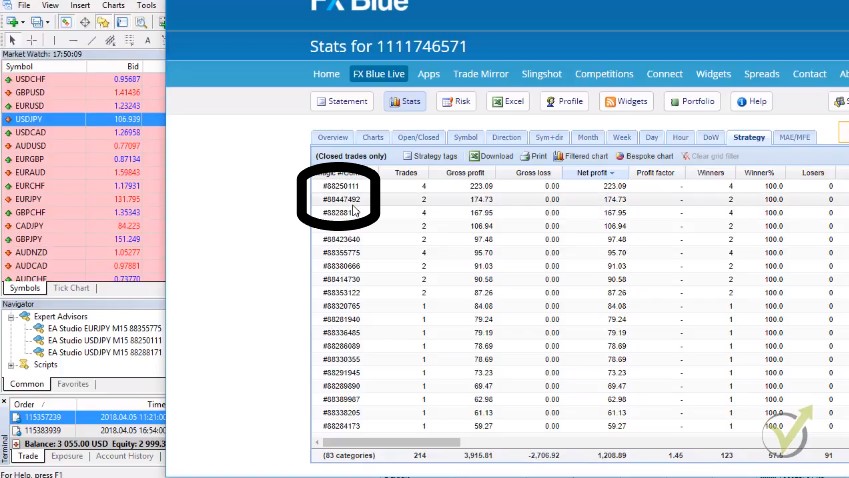
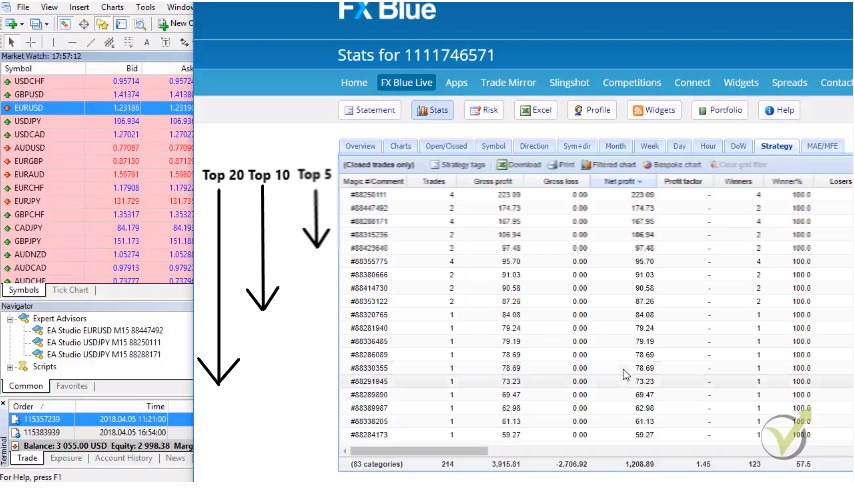
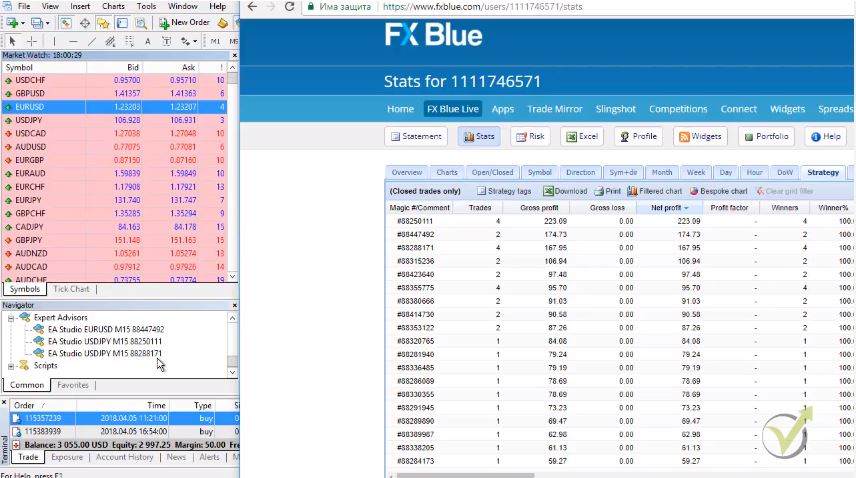
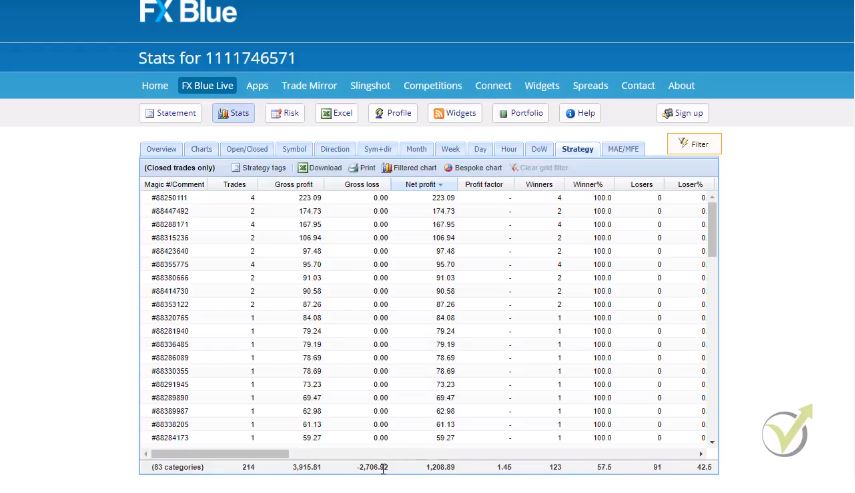
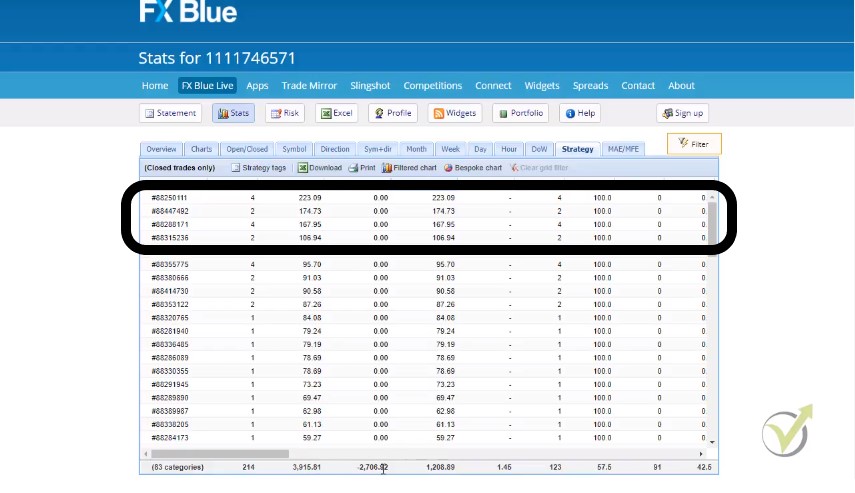
    I will show you how we replace some Forex ea if it is needed, of course. I’m right here at the statistics. I will go to net profit to order the strategies again according to the ones that are making the most profit. And you can see on the top I have these three strategies, total net profit for seven days I have 1208.89.

    You can see 3915 of gross profit and 2706.92 as total loss. Now, you can see on the top I have 4 strategies that made already more than $100 as net profit.

    Or this is also more than 100 pips.

    results from the eas
    Best four strategies.

    Because when we trade with 0.1 lot size, we can consider the result as pips as well.

    What will I do now?

    I will see if these three strategies are still making profit most or some other Forex ea went on the top 3 places. You can see this Forex ea ending on 111, 111 is always on the top. Then I have the one 492, this one I don’t have it. And then I have the one with 171. It is right over here.

    What happened here?

    best 3 forex ea
    The magic number helps us to identify each Forex ea

    This Forex ea ending on 492 replaced the one 775. You can see 775 went lower, still positive but already not on the top 3.

    This is precisely what I do every other day, or you can follow it as well every day. But it is OK as I said to do it on Monday, Wednesday and Friday. Or during the weekend, of course, depends on how much free time you have.

    What do I do?

    I need to place this Forex ea 492. I will go to the other account where are the 99 Forex ea. As you can see, I have already $1221, nearly $22 of net profit in the account history trading with the 99 Forex ea which is excellent.

    But what I need to do now? I will need to go to File, Open data folder, and then I will go to MQL4, Experts. And I need to look here for the Forex ea with the magic number 88447492.

    I will copy this Forex ea, and I will go to the other account where are the 3 Forex ea.

    separate account
    That is the separate account where the Top 3 Forex EA is trading

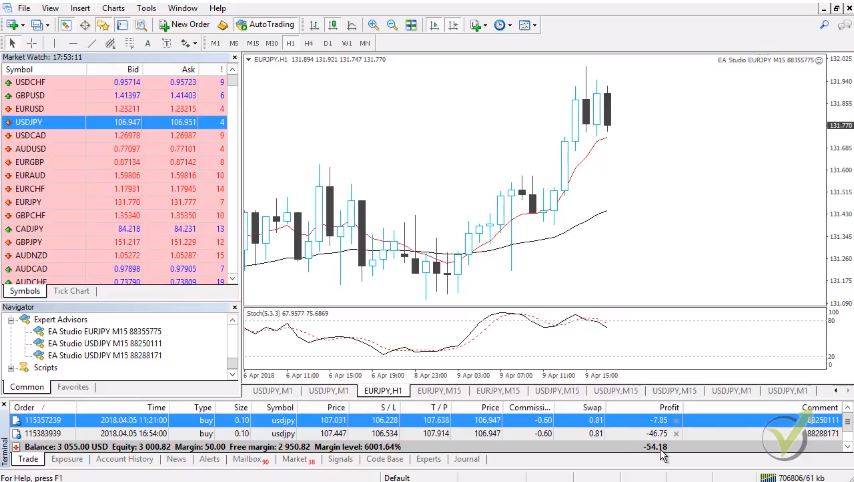
    Actually, in this account, you can see I have closed $55 of a profit and equity is nearly 0, negative of 54 running currently. But as we said, we are not taking into consideration the open profit when we are managing the trades. But we are looking at the closed orders, at the closed trades.

    I will go to File, Open data folder, and then I will go to MQL4. I will go to Experts. And I need to remove now the Forex ea with a magic number ending on 775. 775, so it is the first one. I will delete it, it’s the EURJPY one, and I will paste the other one.

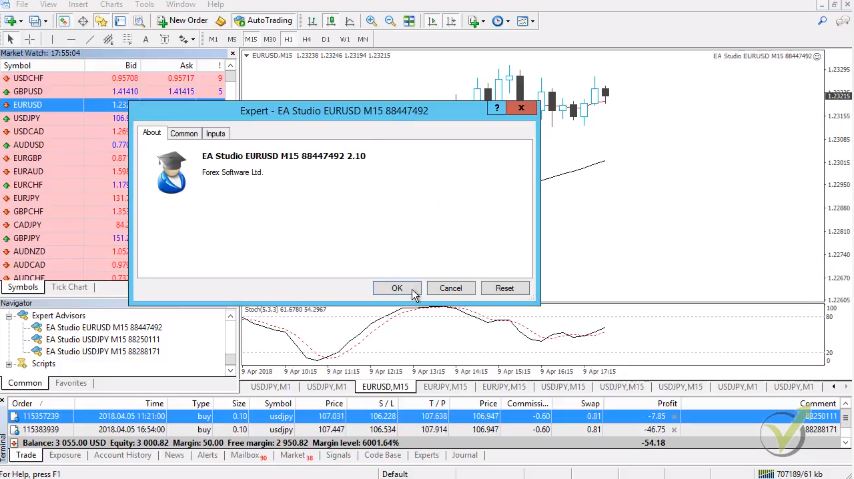
    It is the EURUSD, so this way, I will have currently the top 3 in my statistics. I will close that, and I will need to go to Expert Advisors and click on refresh. This will make Meta Trader compile the last Forex ea that I have pasted. And once it’s ready, you will see that the other one is removed, and I have this one over here.

    What do I need to do? I need to go to Expert Advisors, and I need to remove the one on EURJPY. And I need as well to make this chart as EURUSD. I will drag EURUSD over the chart, I will go to M15, and then I will pull the Forex ea over the chart.

    expert advisor menu
    Click OK to activate the Fore EA

    I click on OK, and you can see I have already the other one running into the separate account.

    This is how I’m following the statistic. This is how I’m checking the results.

    Once again, it is your choice how many Forex ea you want to trade. If you wish to, of course, you can trade the 99 in 1 account, test it out, see if it’s going well. You can see that it’s making outstanding profits.

    I mean this for seven days to have $1208.

    For me it is a fantastic profit, and this is once again because I’m trading 99 Forex EAs. You can see some are losing, but more are profiting. And on an average basis, I have an excellent profit over here.

    With trading the top Forex ea, I want to use the strategies that are making currently for the current market conditions good profit on a separate account. And of course, this way, I am limiting the risk. But again, you can see the difference only $55 here because I’m trading with 3 Forex ea.

    And here I have a great result of 1208, but here I’m trading the 99. This is my system. I follow the best Forex ea, and I separate them in another account where this way, I achieve less risk stable profits.

    But of course, as I said, it’s your choice. I provide you with the EAs. Anyway, it’s for the educational purpose of the course. So, take it easy, test it out, see how it’s going, and see how you will feel comfortable. Maybe you want to trade the top 5 or the top 10, top 20 Forex ea. It depends on you:

    Choice of eas to trade with
    Vast choice of trading EAs.

    Of course, if you’re following the top 20, it’s much more work to follow every day which Forex ea went on the top and which went down. We are doing on many accounts, different combinations.

    So, we diversify the risk.

    I mean in some accounts we trade with the top 3 and some we trade with top 10, with high 99. We have many accounts trading, and in some accounts, we place the top 99. We reach better diversification. But I am pleased to see this result which is more than 10% or 12% for seven days from the whole account, which is just great on $10 000 of account when I make 1200 for seven days.

    This makes me happy, and this is the whole idea. And this is why I’m sharing the system, guys. Because of this system, we make a significant diversification of the risk. We don’t rely on one single Forex EA. Because it can start losing, it can make a profit. It depends on the market.

    Sometimes it’s not our fault.

    Our job is to follow the performance, to see which Forex ea is doing a good job. And to place them on a separate account. But once again, you have the freedom to make any combinations to trade the top 3, the top 5, the top 10 Forex EAs if you wish or you can trade with the 99. 

    And since I said, I will update the course every month with the new 99 Forex EA. You can choose the top Forex EA from each month. And make a combined account of 99 Forex EA. And to trade there the best performance from each month. But this is just an idea you need to find yourself comfortable trading with that.

    As I said it is your freedom how to do that. But keep in mind it is your risk as well especially when you’re trading with real money. Be careful because sometimes things can turn against you, and this happens quite often in the trading. That’s why we diversify the risk by trading many Forex EA. And by placing the top Forex EAs into separate account, we lower the risk as well.

    Pretty much that’s it.

    Take it easy, spend time on testing, devote time to demo:

    trading on Demo with Forex EA
    Practice on the Demo account first.

    Don’t hurry to a live account. I’ve been testing on demo for quite, quite a lot of time before I started real trading. But this is my job. I mean, I’m doing this daily everyday. And of course, I have my team, and they helped me a lot, of course, in managing the accounts and managing the Forex EA.

    Especially when you’re starting if you’re newbie take your time. I suggest you start with the top 3 or even the top 1 Forex EA. You can see this top 1 Forex ea made a high profit so far. You have a lot of possibilities, take your time.

    I know it is very, very helpful when we see profits in the demo account. And many people hurry immediately to place the Forex EA on a live account. But it’s not exactly like that you need to spend some time to get used to it to see how much you can afford to trade, to have good money management and not to risk a lot.

    If you have any questions, I will be very, very happy to answer you in our SUPPORT FORUM. And as promised, I will update the course with new 99 Forex EAs every month in the Automated Forex trading course + 99 Expert Advisors.

    You can have a vast choice, and you can have an excellent diversification of the risk because this is the crucial point here.

    We trade many Forex ea, and we select the ones that are currently making profits. 

    For more Algorithmic Forex Trading courses, please click the link: https://eatradingacademy.com/tracks/algorithmic-trading/.

    More information about making a manual trading strategy in Forex EA:

    Many traders start trading with Forex EA are getting frustrated if they have previous experience in manual trading. Why is that? Simply because they do not see what they expected to see.

    The reasons for that are two:

    • Not everything you are used to doing in manual trading, you will be able to automate at 100%.
    • not everything that you were doing on manual trading was correct and you realize it just when you start with the Forex Expert A

    Let’s have an example. You are a manual trader with 2-3 years of experience. You are using a strategy that brings you profits and losses. And you want to automate in a Forex EA because you believe the strategy is profitable, but you are having losses because you can not control your emotions and, most of all, the fear and the greed.

    And you find a good developer, and he automates your strategy, but… it is not working? Here are the reasons for that:

    • you just now realize that all the indicators are lagging and you were seeing on the chart what you wanted to see but far actually what had happened(all the fake signals)
    • The Forex EA will open a trade when all the entry conditions are true. And you have always made an exception for one or two of them to enter
    • just now you see that there are so much better inputs for the indicators that you were using and you try your strategy with the better inputs, but you change it

    We can give you dozens of other reasons that are always there and makes you frustrated. The critical point here that using Forex EA, you will be able to improve your manual trading, and at the same time, your experience in manual trading will help you build better Forex EA.

    So what we suggest you do. Have a look at our course:

    https://eatradingacademy.com/courses/top-5-forex-strategies/

    and you will have an idea of what kind of strategies actually can be automated and used as manual and as Forex EA.

  • Metatrader – intro for the new traders from Automated Forex trading + 99 Expert Advisors course

    Metatrader – intro for the new traders from Automated Forex trading + 99 Expert Advisors course

    Metatrader is the most common platform for Forex trading.

    Metatrader is free platform for trading, and that is the reason why it is used in this lecture. In this article Petko Aleksandrov, Head mentor at EA Forex Academy will demonstrate to you the basics for metatrader. This lecture is part of the course Automated Forex trading+ 99 Expert Advisors,  where the mentor shares 99 Expert Advisors for Forex trading every new month.

    I start with the first lecture in the course.

    I will dedicate it for the very newbie traders that are just starting, that don’t have any experience in trading. And I will show the most important things in trading with Metatrader, with algorithmic trading. You will see the basic specifications and terminology that you need to know.

    But of course I’m not going into any theories and hard things to remember. I will just show you the very, very practical thing what you need to know before start trading.

    The platform that I have opened in front of me is called Metatrader:


    metatrader outlook
    Metatrader platform

    This is one of the most common platforms among the brokers nowadays. For the clients, for us – the traders it comes for free. The brokers are paying to the MetaQuotes company which has developed the Metatrader. And the brokers are offering it to the clients, the traders for free.

    So, we don’t need to pay using the platform.

    What makes this platform different from the web based platforms, is that we can attach the Expert Advisors to the trading chart and they will trade for us.

    What is Expert Advisor in Metatrader?

    I have written one article actually recently about it. Actually you can find many of my articles for free and there are videos inside. If you go to EA blog you can see here the article.

    You can see the recent one is Expert Advisor- the reality and there is video free in YouTube and there is the article below. And you can read more about it and get familiar with the algorithmic trading with the Expert Advisors:


    another article
    Learn what is Expert Advisor and the truth about it.

    Or you can have a look at the other articles that we have over here.

    And we do our best to upload couple of articles every week. You have free access to it and you can read more about it.

    Now, with simply words Expert Advisor is the automated strategy in Metatrader. When you have any trading strategy which opens the trades according to some indicators or conditions you can always automate this strategy. But here we don’t do this.

    In this Automated Forex trading + 99 Expert Advisors course I will provide the Expert Advisors and I will just show you the whole process how we are generating strategies over the history data that we have. But the whole idea is that when we place Expert Advisor over the chart in Metatrader or the so called robot you can trade automatically without the need to stay in front of the computer and to execute the orders manually.

    Now, what you have on the chart in Metatrader?


    time and prce
    Time and price matter

    On the right side is the price and down is the time. If you take the cross here you can see at any moment what was exactly the price. There are some indicators here. They are just random indicators that came with the Metatrader.

    These are the candles here, you can see these black and blue candles. You see four important values of each candlestick, this is:

    • the opening
    • the close
    • the high
    • the low

    And when I put the mouse on the closing you can see the values exactly. Each one represents 15 minutes if we are on M15 chart. If I go to H1, each one candlestick will represent 1 hour


    the four values
    Open,close,high and low

    On the left side in Metatrader, what we have, is the market watch.

    Here are all the symbols that we can trade with this broker. If you don’t see too many, you can right click, select show all. This will show all the symbols that your broker is offering. By dragging it over the chart you can open it or right click and chart window.

    And here what we have are two columns- the bid and the ask, and the third one is the spread. You can actually hide it with right mouse again. But I prefer to see the spread at any moment.

    The spread is the difference between the bid and the ask price. Normally, when we execute any order we buy on the ask price and we close on the bid price. And the other way around- when we sell, we sell on the bid price and when we close the position we close it on the ask price.

    The spread is how the broker benefits. Of course, if it is not a market maker broker with metatrader. Now, you can see with this broker that I have chosen the spread for the currencies is very small below one pip.

    What is the pip?

    Here I will explain as well, the pips are the third and the fourth digit. If you see at GBPUSD I have a price of 1.4060-61. This 60, 61 these are the pips. And the last one, the fifth digit this is the point. Normally when we pronounce the price we say 1.4060. We don’t say the last digit:


    GBPUSD
    Meta trader Market Watch

    And you should look for brokers that are having smaller spread and especially for the major currencies it should be not more than one pip. The other cost that we pay to the broker is the commission. But not all of the brokers have commission. For every trade opened they will charge you a very small fee.

    But normally what happens is that the brokers that have commission, they have small spread. And the ones that don’t have commission are having a little bit higher spread. At the end of the day it’s one and the same thing. But look for the brokers that have very small spread.

    This is very important when it comes to algorithmic trading in Metatrader. The other cost that we pay is the swap.

    When you keep a position overnight if I open a trade today and it closes tomorrow I will be charged as well from the broker with a very small fee that they transfer to the position for the next day.

    Now, here you see this columns type size, symbol price, top loss, Take Profit. This is where we will see in the course the open positions. And as well here you see the balance, this is a demo account that I have opened. Where later on in the course I will place the top Expert Advisors.

    And here you have the balance, the equity and the margin in Metatrader:


    Metatrader balance
    Money management is very important

    When we have positions opened you will see your equity growing or going down according to your profit. And the margin is how much is blocked from your account when you are trading.

    This is a leverage account, with leverage 1-2000 which means that I can open positions 200 times bigger than my balance. Of course, we don’t do that. We always trade with small risk from our account.

    We don’t risk all of the money because obviously this is very risky.

    The leverage allows us to trade bigger amounts but we don’t risk all of the money. We always try to stay with risk below 5% and even 2%. This is very, very important. Now, in this navigator is the place where we have our accounts.

    For this course I have selected to use JFD broker. It’s a regulated broker, but don’t take it as a recommendation. It’s a personal choice with which broker you want to trade. Just look for the regulated brokers. And I would like to show you as well in our website if you go to the forum, there is a nice topic that says “How to recognize the scam brokers?”.:


    useful article
    How to avoid the scam brokers

    Because nowadays there were many scam brokers and we have written this few months ago. And it turned out to be very useful for many traders because below you can read more that many people suffered actually from the scam brokers. And it’s really horrible because people are just losing money.

    Take a minute to look at it, it’s very useful. You will know if you meet a scam broker actually how to recognize it. I’m not going to read it now but it’s very useful and of course if you have hard times to find a broker drop us an e-mail, write at [email protected] and my team will help you with finding some good broker that is using metatrader.

    And we will be very happy to protect you from the scam brokers. We have done it already actually with thousands of students which makes me very happy by the way. And one more time please don’t take this broker as a recommendation I just had to pick one in order to shoot this course and of course the other courses.

    But the most important thing is to look for regulated broker with small spread, and using metatrader. Now, the other thing here you can see is the accounts of the broker that you have, the indicators. You can use, but we are not going to use any indicators to place over the chart and to trade with them because as we said we will be trading with the Expert Advisors.

    Here is where we will place the 99 Expert Advisors in Metatrader:


    Metatrader expert advisors
    Expert advisors in Metatrader

    And below is the scripts folder where you can use different scripts and I will show you how to use one and actually I will attach to the course one. And this script will help you to export the history data from the broker.

    So, pretty much that’s it.

    This is the Metatrader platform, many free videos over internet how to use it. That’s why I am not going in details how to use the Metatrader. Anyway, later on in the course you will see much more things about it and if you have questions of course you can always ask me. And in the course I will show you in another $10 000 of a demo account how we do the whole process of creating the strategies.

    Thank you very much for reading.

    For more algorithmic trading courses please visit: https://eatradingacademy.com/tracks/algorithmic-trading/.

    The course is included also in our Packages.

  • Forex Trading Robot – Why Do We Need It?

    Forex Trading Robot – Why Do We Need It?

    Forex trading robot – the proof that a trader needs it

    Forex trading robot is the subject of this free lecture from EA Forex Academy. The mentor Petko Aleksandrov explains the importance of using Forex trading robot, and why the traders need it. In the lecture you will learn the benefits and the advantages using them. Enjoy!

    Hello traders, I continue now with the next lecture where I will explain you why we trade with Forex trading robot and why it is so important.

    Because probably many people would say now OK I have the trading strategy, I see clearly where I have to buy, where I have to sell and why should I place Forex trading robot when I can do this manually and I can actually execute the trades by myself. And they would be right.

    But the question is how would you know if this strategy is profitable?

    Maybe I am lying to you. Because many people are lying over the Internet. You will see so many strategies and you will see so many people that are selling strategies, they are selling systems and they sell them so expensive. Hundreds of dollars, thousands of dollars for a single strategy, for a single Forex trading robot for example, or whatever is it.

    But how would you know if this strategy is profitable without Forex trading robot?

    The thing you can do, is you can go back in the chart and you will start. Here is a buy signal with the Bollinger Band but I don’t have the RSI, and you will place here a line and you will place the Stop Loss and the Take Profit. For example, let’s take these two entries that I have:

    Forex trading robot set up
    Example set up for the system

    If I enter here buy and then I will place a Take Profit 74 pips higher. So, here the price is 108.91, so plus $74 that would be 109.65. Let me put it just a little bit higher 109.65. Where is it? It’s right over here a little bit higher. And you will place your Stop Loss somewhere down 93 the lower.

    But after that what you have, is a sell signal. Actually you will notice that there are many more entries. How would you know which one was the first? How would you check that? You can enter short here, you can sale over here. Because I can see there is confirmation not over here but over here with the Bollinger Bands and with the RSI(with the Forex trading robot you know exactly where the entry happened)

    And then you have buy somewhere over here and then you have sale over here. And then you have buy over here and if I go back to the chart you will know where is the beginning, how would you know that?

    We don’t know where the trade was first open because this depends where you were in front of the computer. And here comes the huge question and a huge, huge frustration for many traders that they just realize they cannot check actually if this strategy is profitable or not.

    Because how would you know when would you have been in front of the computer? You don’t know that. Even you decide “OK, doesn’t matter what happened in the past, let’s see what will happen now. ” And you start the trading:

    trading with the system
    Following the system

    You will follow it and for example you catch this trade, you sold here, you will have profit, then you will have your Stop Loss hit, then maybe two-three times you will have your Take Profit. And then what will happen, is you will stand up because you cannot stay in front of the screen all the time, and you will eat, go out, do your job, do your activities, you will go to sleep.

    And what happens during this time with the strategy?

    You will miss many entries and finally you will realize that you cannot understand is this strategy profitable or not. And this is one of the huge, huge problems in manual trading. Plus that we cannot stay in front of the computer 24/7. Or let’s say from Monday to Friday, because the Forex market is closed during the weekend. But the Forex trading robot can make it 24 hours, 5 days a week, and the whole year.

    There is a small trading over there in Sunday night with some of the paid platforms but we don’t trade during these times. Anyway, their volatility is not huge.

    You are not a machine, you cannot stay in front of the computer 24 hours. And you will start wondering if your strategy is profitable-you will make profits, you will make losses and you cannot really prove to yourself that this strategy is profitable.

    Here comes the Forex trading robot.

    Actually by having a Forex trading robot, by having this strategy automated we can see perfect result in the past. We can see how this strategy performed and we can trade it automatically 24 from Monday to Friday.

    And you don’t need to stay in front of the computer. You don’t need to follow and to wonder do this indicators match, is the one first and then the other one is not, and what actually is misleading you, and what you are missing. And actually you will have very quickly the answer is this strategy profitable at the moment or is it not:

    Forex trading robot
    The solution is the Forex trading robot

    In the Basic algorithmic trading course + 3 Robots I will talk a little bit more about that and I will explain you as well what means repeating indicators and how misleading they could be when you are trying to prove to yourself if one strategy is profitable or not.

    I really hope you understand what I meant so far because it’s very important. It will save you a lot of work and believe me money because many people are losing money when they are trying to trade with strategies manually.

    Thank you for reading, for any question please write in our SUPPORT FORUM, on our website.

    If you are interested in Expert Advisor Studio software please visit the EA Studio page, where you can test it for 14 days absolutely free. 

    More algo trading courses you can find in the Algorithmic trading courses section.

    Looking for a Forex trading robot to download with no strings attached? Download our free Forex trading robot and try it out!

    Enter your email address to receive the free Forex robot download link.

    * indicates required
  • Forex Bid-Ask Spread Explained

    Forex Bid-Ask Spread Explained

    Bid ask spread specifications – make sure to understand the basics

    Bid ask spread is the top of this lecture from Petko Aleksandrov, Head Mentor at EA Forex Academy. The lecture is part of the Basic algorithmic trading course + 3 Robots  course. Enjoy!

    Hello, dear traders, we continue now with the market watch where I will explain more about the bid ask spread specifications.

    Normally it is on the left side and you see here all the trading assets that you can trade with your broker. When you install the Meta Trader initially you will not see too many assets.

    What you need to do, is you right click over any of the assets and you select show all.

    bid ask spread in currencies
    Make sure to see all the trading assets

    This way I see all assets provided by this broker. Now, if I go to the top, normally are the currencies, normally is the Forex market. Below you can see some indexes, then we have some stocks and you will see some commodities, futures cryptocurrencies. It really depends what your broker provides as trading assets.

    But normally the huge, the regulated brokers are providing hundreds of assets and the competition between the brokers brings them to the point where they want to provide more and more assets and on a lower spread.

    What is the spread, guys?

    The spread is this third column that you see here and this is the difference between the bid and the ask price.

    spread is the 3rd column
    Spread is the 3rd column

    It is the very same thing like if you go to the exchange bureau to exchange some currency if you go for a vacation or for a holiday and you want to exchange your currency with the currency of the country where you are going. And what you see in the exchange bureau is that there is difference between the bid and the ask price. Or normally there they say the buy and the sell.

    The difference in the exchange bureaus obviously is much bigger than the one over here because here is very, very small. If you see EURUSD 1.1870 and on the exchange bureau you will see there are 2-3 sands or even bigger difference. So, it’s possible that the buy price for example will be 1.1875 and the sale price will be 1.1870.

    It could be even much, much bigger depending on the currencies that you’re exchanging but here the difference is few points. You see the EURUSD price at the current moment is 1.1870 and there is one last digit that we call point. And with the regulated brokers, with the huge brokers the difference between the ask and the bid price within this last fifth digit which is the point.

    It’s a very, very small spread and this is of course very good when you are trading with Expert Advisors. Because you will have many trades opened and we don’t want to pay a spread. Actually, we don’t pay the spread, everybody says pay spread, I use it also but normally we don’t pay the spread.

    Because when we buy an asset, when we buy EURUSD for example, we buy on the ask price. And when we sell, we sell on the bid price.

    So, the difference is the spread. That is why the bid ask spread are so close connected.

    We just buy at a little bit higher price and we sell on the lower price.

    For example, if I buy at 1.18716 and I close the position I will close it on the bid price because when I close a buy obviously this is a sell. One more time I buy on the ask price and I sell on the bid price. Also, when I buy on the ask price and I close the position I will close it on the bid price.

    And the same thing if I sell on the bid price and I close the position I will close it on the ask price, on the higher price. Basically this is how we pay the spread when we execute the orders on the bid and the ask price. There is no physical payment of the spread, you cannot see it anywhere here in the terminal which I will explain you a little bit later.

    But simply we pay it because we buy on the ask price and we sell on the bid price. And the recent years most of the brokers are having five digits. After the point you see 1.1871 – 1.1872 and there is one more digit at the end. The third and the fourth are the pips. You can see here 1870, so 70 are the pips and the last one is the point.

    And for example, if you buy at 1.1870 and you close at 1.19, you will have 30 pips profit. And the JPY currencies, you can see USDJPY below are having three digits after the point. So, 04 are the pips and the last one is the point.

    For example, if you sell now on the bid price and you close it on ask price 109.000 you will benefit these four pips. I hope this is clear.

    Now, if you don’t see this third column and normally you will not see it when you install the Meta Trader you need to go right mouse and spread. If you don’t see it, click right mouse and go to spread, you will see it over here. And you can see the major currencies, what we consider to be major currencies are:

    • GBPUSD
    • EURUSD
    • USDJPY
    • USDCAD
    • AUDUSD
    • NZDUSD
    bid ask spread major
    The most traded currency pairs are with smaller spread

    AUDUSD is slang for Australian Dollar versus the American Dollar.

    There are a couple of slang words, so for example GBPUSD is called to be the Cable. EURUSD you can call it just Euro. USDJPY you can just call it the Yen, the CAD. The Aussie, Aussie is Australian Dollar versus the American Dollar and the New Zealand actually is called Kiwi this one over here. New Zealand versus the American Dollar.

    Sometimes you can hear or read in analysis, or traders, or mentors that they say Kiwi. The most traded currencies are versus the American Dollar and they have lower spread:

    kiwi trading
    NZDUSD is called Kiwi

    It’s essentially imported when we trade with Expert Advisors to have lower spread to the minimum. 

    This means that bid ask spread distance is very tiny. Small, small spread. Because the Expert Advisors open many trades and when we have huge spread it can reflect actually the result and it happens very often to me. With some of the courses I provide Expert Advisors. I will provide Expert Advisors in this Basic algorithmic trading course + 3 Robots as well. So, you can practice and see how they work.

    But it happens very often that I have been testing Expert Advisor and it shows good profit and students are writing me back that they don’t show good profit. And more than 90% of the time this is because they have very huge spread with their broker and finally the result is negative instead of positive.

    If you want to open any asset you just click right mouse and you go to chart window and it will open. I have actually now too many over here, so it will go to the end. You can see there are small arrows and I can click to find it-this one over here that open. You can see it came by default with some indicators.

    If you want to remove right click, indicators list and you remove the indicators.:

    You have the pure chart over your screen at this case for the GBPUSD.

    This is the market watch.

    This is what we see the bid ask spread. One more time we buy on the ask price and we sell on the bid price.

    When we buy on the ask price, we close the position on the bid price. And when we sell on the bid price we close the position on the ask price. And the difference is the spread, this is where the broker benefits.

    The broker will benefit obviously this spread and this is inevitable of course for us. And when there is no volatility even sometimes for EURUSD with some of the brokers you will see zero spread. But this is very rare. You will see normally small, small spread with a regulated broker and this is very normal.

    Thank you for reading and I will continue with more information in the Basic algorithmic trading course + 3 course.

    If you are interested for more algorithmic trading courses please visit: https://eatradingacademy.com/tracks/algorithmic-trading/.

    For any questions you can always write in our support FORUM.