Blog

  • MT4 Expert Advisor Builder: EA Studio

    MT4 Expert Advisor Builder: EA Studio


    MT4 Expert Advisor Builder – EA Studio.

    MT4 Expert Advisor Builder is what we will talk about in this article. Hello, dear students, this is Petko Aleksandrov from EA Forex Academy, and I will talk about the Strategy Builder that I have been using and that I will use in my course Walk Forward optimization: Forex trading with Portfolio EAs to create the Portfolio Expert Advisors.

    What is the Strategy Builder?

    This is a software or program, or you can call it a web-based app because this one particularly is web-based.

    We use it to automate our strategies. Now, I am not a developer. I don’t know how to code Expert Advisors, and I don’t need to know that:

    • it will take me quite a long time to learn how to do it.
    • I will spend time on coding and not on trading. This is the thing I am concentrated on daily.
    • We have the Strategy Builders, which automate the strategies with one click, and we don’t need to spend time coding.

    So some time ago,  about 5 or 6 years, even a little bit longer, I was working for a company where I was between the traders and the developers. So I was filtering all the strategies that the traders in the company were using. I was using those strategies as well, and I was giving those strategies to developers to code them.

    Why have we integrated Forex Strategy Builder Professional and EA Studio on our website?

    We were paying the developers. It was a tough process. It was taking a long time. It was costly. Then when I quit working with the company, I continued doing that alone for my trading.

    One day I figured out it’s not the way I wanted to continue, so I started looking for Strategy Builders. And I have tested, I can say, nearly all the Strategy Builders that are available on the market or at least the ones that I know about. And I have chosen two.

    One is the Forex Strategy Builder Professional, and the other one is EA Studio. They are coming from the same company. And now we have integrated them on our website, which makes it easier to be used by our traders, by our students, by me and it is effortless to use them once you are used to that.

    Anyway, I will demonstrate to you in this article how I am using the EA Studio Strategy Builder, and if you want to give it a try and see how it’s working, you can do that. But the idea, one more time, is that we automate the strategies, we don’t spend money to buy Expert Advisors from the market, to pay developers to code our strategies, and of course, there are many other advantages using MT4 Expert Advisor Builder.

    You will receive ready trading robots in the course.

    I will include the Expert Advisors, the Portfolio Expert Advisors, ready for trading, so you don’t need to go through the whole process. But I want to show you how I am creating the Portfolio Expert Advisors, what is the idea behind how I have tested them and this way, you will know better how to use them, and how to check them, and how to trade with them.

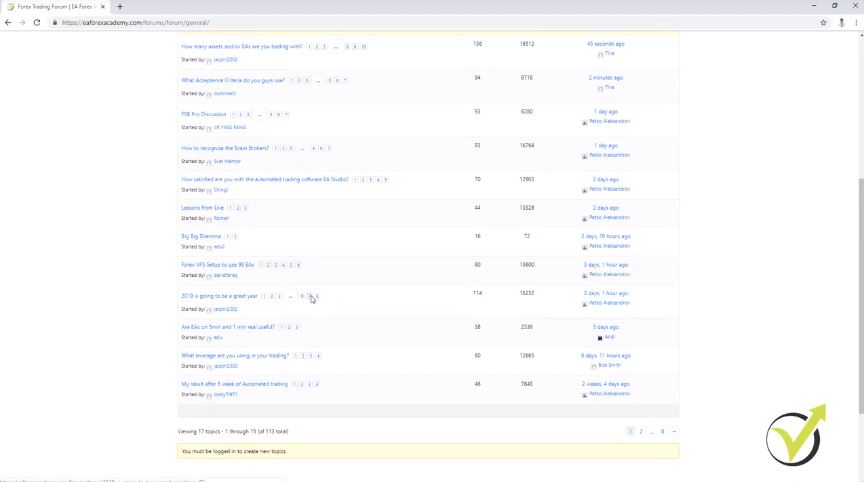
    So if you look at our website at EA Forex Academy, we have our training education, our courses, and you will meet my team at the moment. You can see how many students joined the academy, how many lectures we have. We have a great forum where you can join, and it’s free.

    And, in the forum, there is one exciting topic that is called How to Recognize the Scam Brokers, something I was talking about. So it is very recommendable to look always for regulated brokers when you are trading Forex. And here, we have this topic called How to Recognize the Scam Brokers.
    MT4 Expert Advisor Builder.
    The Forum at EA Forex Academy

    And especially if you’re a beginner trader, you can go over it. It’s beneficial, and you will know how these scam brokers work. And below, you will see so many comments, people suffering from scam brokers.

    It is essential to choose the right broker for trading.

    So you must know how to choose your broker and how to avoid the scam brokers. On the top menu, you see we have software. And if I click on it, there is Expert Advisor Studio.

    This is the MT4 Expert Advisor Builder that I will use in this course, and we have Forex Strategy Builder. So these are two different Strategy Builders; they have various features. You can test them both.

    They come with 15 days of free trial, which you can use. And during this time, you can export as many Expert Advisors as you wish. So let me log in to my account, and I will show you what the Strategy Builder Expert Advisor Studio is. So it is something not hard to use.

    We have the generator where we create the strategies. After that, they go to the collection so we can choose which one to use. And if you click on any of those, I will show you how that works later. You open the strategy tab.

    You can build your Expert Advisors with this MT4 Expert Advisor Builder.

    You can add whichever entry and exit conditions, and Stop Loss and Take Profit, whatever your strategy is. And you will see immediately the result or the backtest. And if you make any change, you will see it as well at the moment.

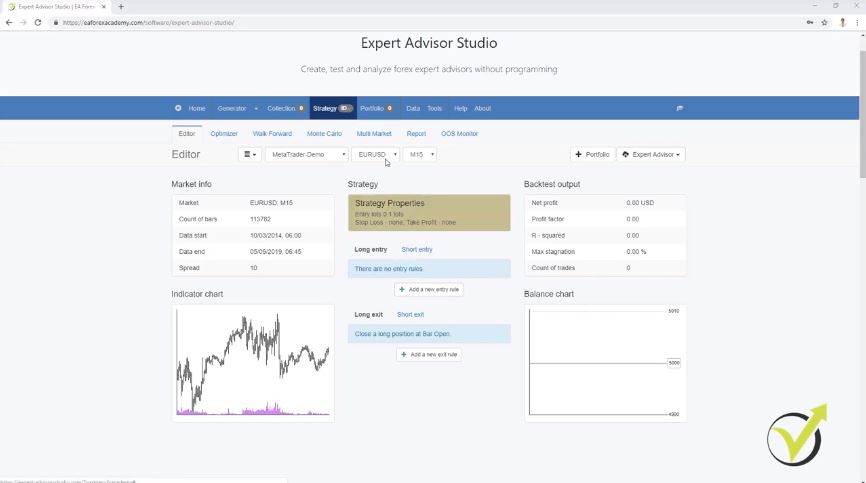
    Something very useful, something that saves a lot of time. So let me demonstrate it to you very quickly. Let’s say you have a strategy on EURUSD for the M30 chart.
    place the Expert Advisors rules
    The Strategy Editor in EA Studio

    And here are the strategy properties, so you can enter with how much you want to trade. If you’re going to use Stop Loss, you can choose between fixed and trailing, and I will leave it to 100. And then we have Take Profit. I will leave it to fix, then I will leave it to 100 pips as well, just as an example here.

    So let’s choose an entry indicator like RVI Crosses the level line, for example, crosses the level line downwards. And here, you can use the default settings.

    The parameters of the indicators are what make the strategy profitable.

    I will click on accept, and I will see immediately that I have the balance chart which is losing. I have a very stable line going down. But this is just because I have only one indicator and Stop Loss and Take Profit.

    So as an exit condition, let me add, for example, the MACD, moving average, RSI. Let’s go to RSI. And what condition to choose, RSI, for example, crosses the level line upwards. And if I click on accept, I will see that already I have a profitable strategy.

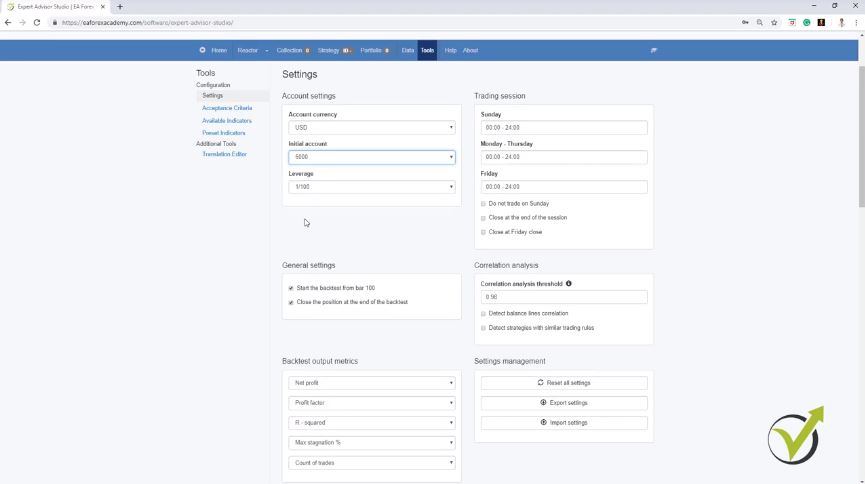
    Even if it goes up and down at the end of the day, it is a little bit of a profit. And here I’m starting from 5,000 actually, just as I have in my Demo account on Meta Trader. And you can set the settings from tools, where you have the account currency, first account, and you have the leverage.

    So it is good to set it just the way you have your account in Meta Trader. So let’s go back to the strategy. Now, this is an example strategy with a Stop Loss, Take Profit, one entry condition, and one exit condition.

    Changing the parameters show immediate backtest on the MT4 Expert Advisor builder.

    Now, if I make any change on the RVI, I will see immediately the difference on the balance chart. So let me increase it to 11, and I click on accept, and I can see there was a change. Let me increase it again to 12, and I click on accept, I see there is a change.

    So I will increase it one more time to 13, alright a little bit better strategy over here. Let’s change the RSI. For example, I will change RSI, let’s increase the period to 15, I click on accept, and I see there is a change.

    Let me change it a little bit more aggressively, like 220 and level 250. What will we have? All we have is a losing strategy. Let’s go to 30, and I will go to 80, what I will have, again a losing strategy.

    Let me decrease it a little bit, for example, 227, and here I will reduce as well the 80, and still, you see there is no huge change. Now, let’s change the RVI level. For example, I will go to negative.

    Do not use the default parameters for the indicators.

    Let’s make it negative of 0.05, and I click on accept, and you see here, the strategy improves. Let me decrease it more. Let me try with negative 0.1.

    What I have, a much better strategy, and probably if I play around more, I will have some better strategy, and I will find a better strategy. But this is just because I have been using it a lot. I know how the indicators work –  when changed to negative of 15, it has a great balance line.
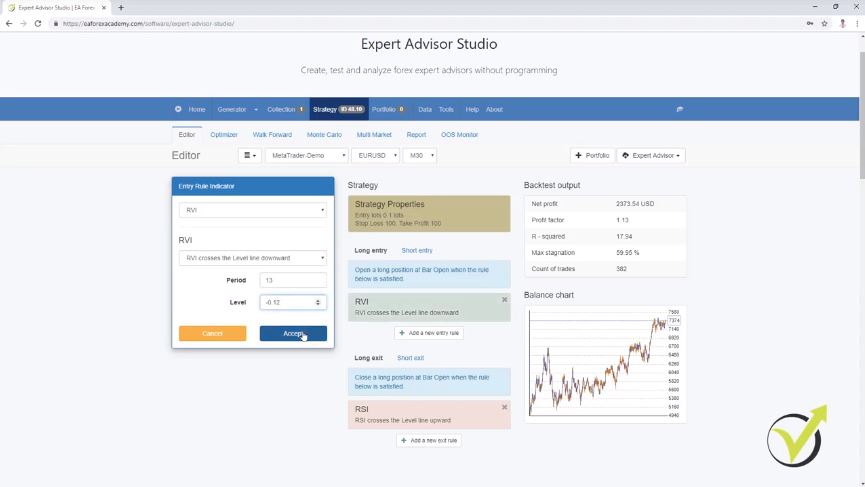
    MT4 Expert Advisor Builder for strategies
    The Balance line is already positive.

    Not like a fantastic equity line, but it is much better than it was.

    So I can play around with that for a longer time, and I can build some positive strategies because I have been using it a lot. I know what the parameters for most of the indicators are, and guys, we don’t use the default parameters for the indicators. You cannot expect to make some profit with the default parameters of the indicators.

    Strategy Builders do the tests automatically for us.

    Anyway, we don’t do this manually here. I just wanted to show you that whatever change we make on the parameters, we see the result immediately. And if I change it a little bit more and you will see some dramatic difference here.

    So whatever change I make, I can see the backtest. Now, if you do this manually, I will need to test this strategy with some parameters, for example, for 1, for 2 months. Then you will need to check it with another setting, and with someone, it will take me months, maybe years to test just one strategy, and still, you will not be able to find the best solution, the best combination of indicator parameters.

    But with the MT4 Expert Advisor Builder, we do this all automatically. We have the optimizer, which helps precisely to find the best parameters for a strategy. So if I click on start, I can see how quickly it calculates the strategies.

    And it found already new parameters, so I have the original line that I had and here is the much better one. And I click on edit, and I will see that we have different parameters for the RVI, RSI, okay a little bit closer we have Stop Loss of 104, Take Profit of 99 and so on.

    How to avoid over-optimization with the MT4 Expert Advisor Builder.

    Now here comes a thing that when we use the optimizer for the whole backtested period, which in this case is from 18th of September 2014 till 9th of Nov 2019, which is today. And when we use optimizer for the whole period, there is the risk to over-optimize the strategy. So the optimizer will find the very best parameters for this period.

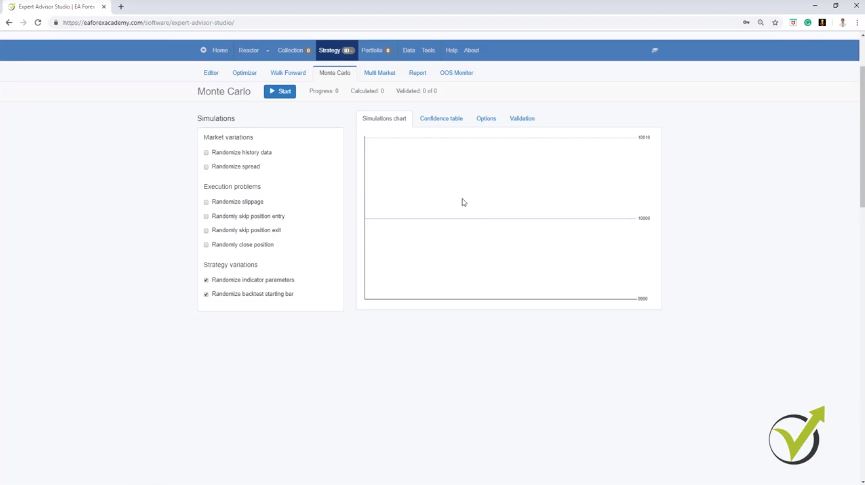
    But there is no guarantee that these parameters will continue in the future. And I will show you in this course exactly how to avoid this over-optimization. And this we do with the different robustness tests like the Walk Forward validation, something exciting that I will cover in this course, the Monte Carlo. As well we have Multi Market where we can see if the strategy is profitable on the other markets.
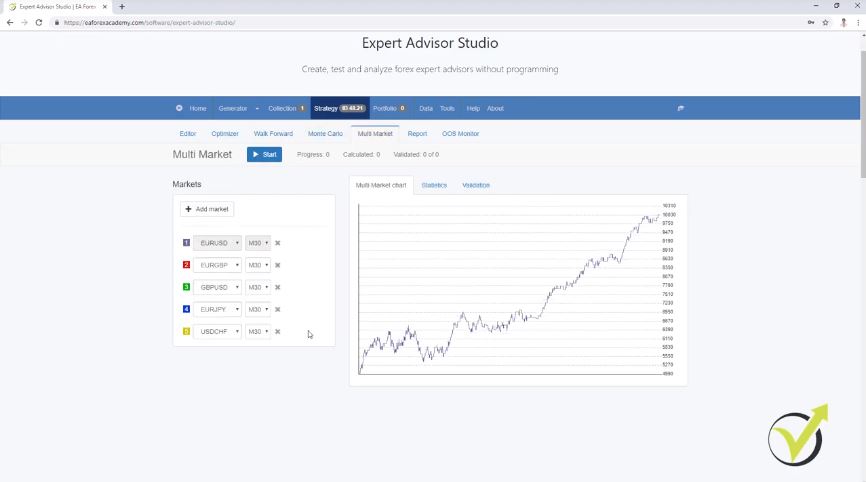
    Avoiding over-optimization with the MT4 Expert Advisor Builder
    Multi Market validation

    If I click on start, I will see that it is profitable in three markets. On two, it’s losing. So it’s profitable on EURUSD, the green is GBPUSD, and the blue is EURJPY. So here we can see how many markets the strategy is useful on and on how many it’s losing.

    And of course, if it is losing on all the other markets, the strategies over-optimize for EURUSD. And you can add different markets if you want below. So when you build your strategy, we have the button to export the Expert Advisor.

    You can export the strategy as an Expert Advisor for Meta Trader 4 or Meta Trader 5.

    And this is great because, with one click, I export the strategy as an Expert Advisor. If I click on it, I will see the code of the strategy.
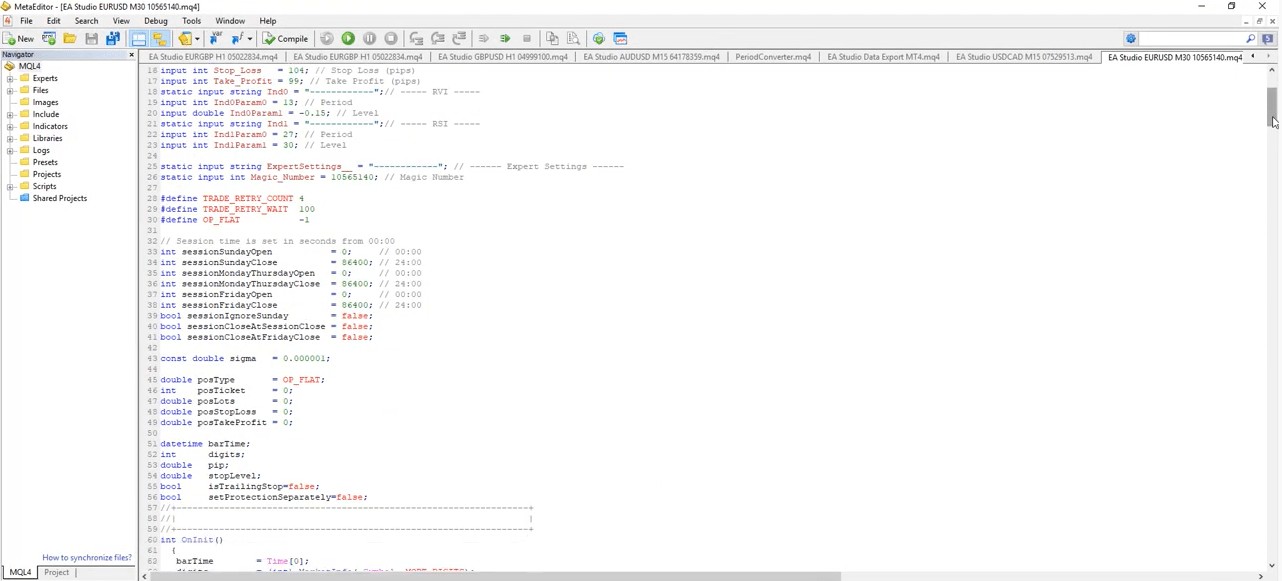
    code for the Expert Advisor
    Meta editor code

    So this is the very best thing with the MT4 Expert Advisor Builder EA Studio, that with one click, we can export the strategy as an Expert Advisor. No need to hire a developer to do this for us. And basically, we can export as many Expert Advisors as we wish.

    And on the blue bar on the top, we have the portfolio, something I will show you later on. Which means that we can build a couple of strategies or even many strategies, place them in the portfolio, we will see the combined backtests and we can export all of them into one Expert Advisor.

    So this is what exactly is Portfolio Expert Advisors. With one Expert Advisor, we can trade many strategies, or we can say many Expert Advisors. Then we have the data, something I will cover in the next lecture.

    The generator is the most powerful tool in MT4 Expert Advisor Builder.

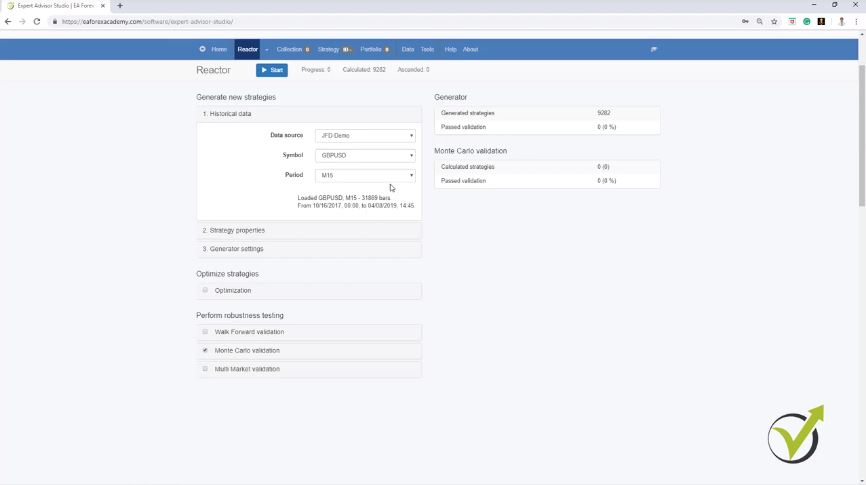
    We have different tools. You can set the trading session, correlation analysis, which helps us to detect balance line correlations or strategies with similar trading rules. So basically, when we run the generator, it will generate for us strategies with different parameters in the indicators, different conditions for entry and exit, which brings better diversification.

    And the generator works extremely quick. If I press on start with any random settings, I can see the calculated strategies. This is the actual speed, how many strategies are being calculated.

    And I can see that already I have one strategy, actually two strategies into the collection. So with predefined rules, we can generate strategies. For example, here I have said that I want a minimum of 10 pips and a maximum of 100 pips for Stop Loss and Take Profit, and it finds strategies within this range.

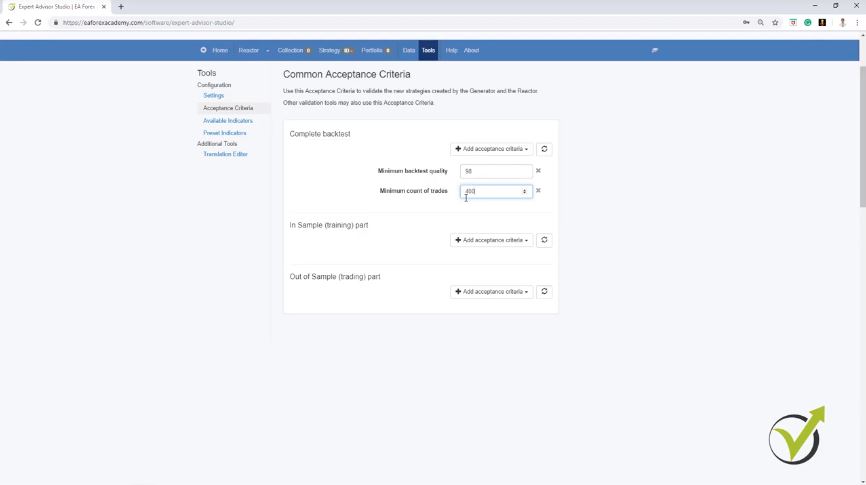
    Then I have in the Acceptance criteria some more filters which I want to have. And the generator works over the historical data from the broker. And I have used here the default Meta Trader historical data, but in the next lecture, I will show you how to export your historical data from your broker and how to put it in EA Studio if you want to generate strategies by yourself.
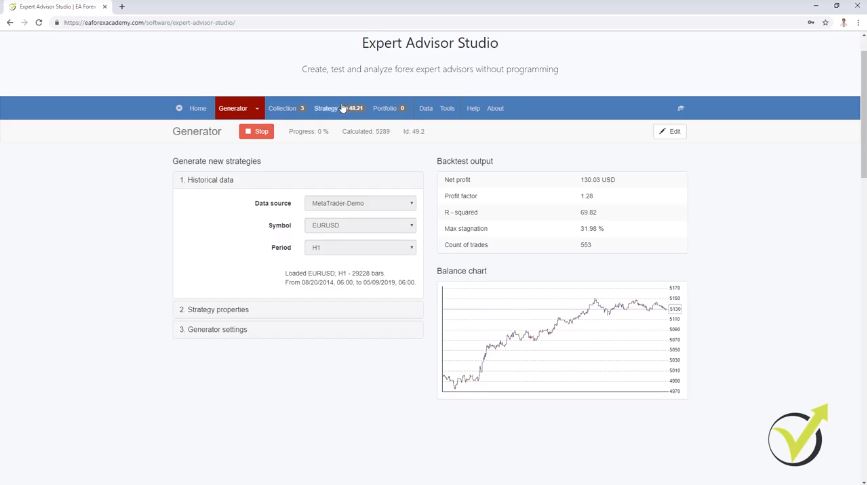
    Generator of EA Studio
    The Generator in MT4 Expert Advisor builder

    The indicator chart is a great feature.

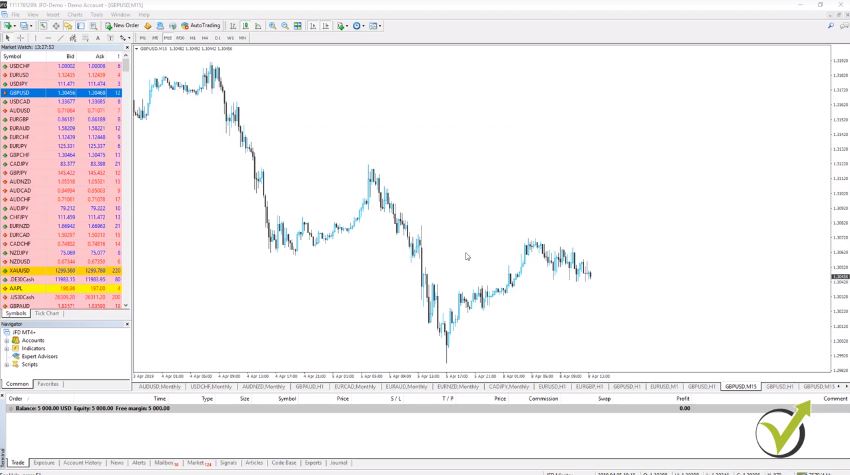
    And this is very important, actually, to work over your historical data. Because you need to keep something in mind, all the brokers provide different bid and ask price for the assets. And even if there is a minimal difference, this forms different historical data.

    It forms different bars and candlesticks, which is the actual historical data. So we have the current price at the moment, and all the rest behind is historical data. And correctly we use this data for backtesting the trading strategies.

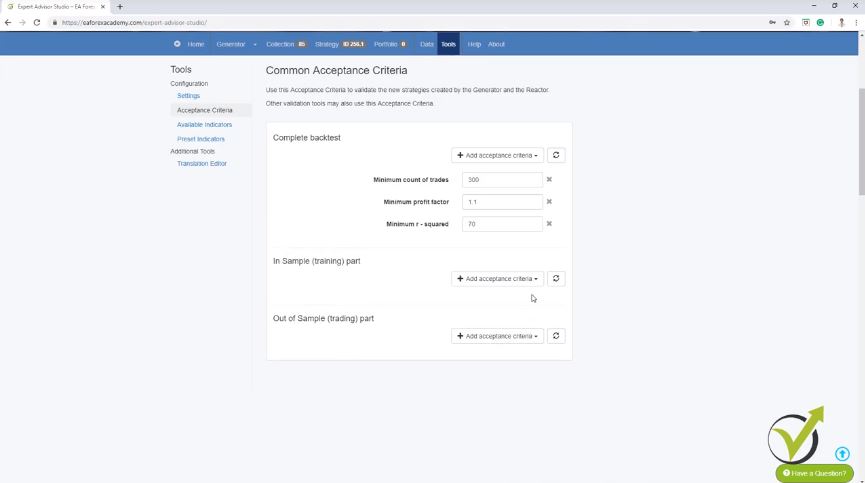
    Already over 20,000 strategies are generated, and from this 20,000 or even 21,000 strategies generated just for a couple of minutes, we have only 15 strategies into the collection. This is because I have set Acceptance criteria, and I filter these strategies. And here I have from my previous work minimum count of trades 350, minimum Profit factor of 1.2, minimum R-squared of 50.

    So all of the strategies are now into the collection, and if I click on any of those I can see what are the entry rules, the exit rules. I have a very detailed indicator chart, which shows me where the strategy is taking the trades.

    Visit our free forum for questions.

    We have statistical information, detailed statistical information about the strategy. Many things that are not available in Meta Trader, and there we don’t have the generator at all.

    So we cannot generate strategies there. And in the next lecture, I will teach you how to export the historical data from your broker, which is very important to be used if you want to generate your strategies using EA Studio MT4 Expert Advisor Builder, or if you’re going to use the optimizer in EA Studio, or anything else.

    If you have any questions, feel free to ask in our forum, and I will answer you.

    Cheers.
  • What is Walk Forward optimization in Forex trading?

    What is Walk Forward optimization in Forex trading?

    Walk Forward is Forex trading is an innovative method to find robust strategies for trading.

    My name is Petko Aleksandrov, and I have decided to write an article about the recent update we have in EA Studio for the Walk Forward and especially for the Walk Forward optimization. And I have just created some remarkable strategies for trading using the Walk Foreward tool, and I want to share my experience with it.

    And for the beginner traders, EA Studio is a strategy builder that we use on our website, which allows the traders to automate their trading without any experience in programming. There are Free videos about how to use it.

    Let’s take any trading strategy as an example and use the currency pair GBPJPY on M15. And I will explain to you first what is the update in the optimizer.

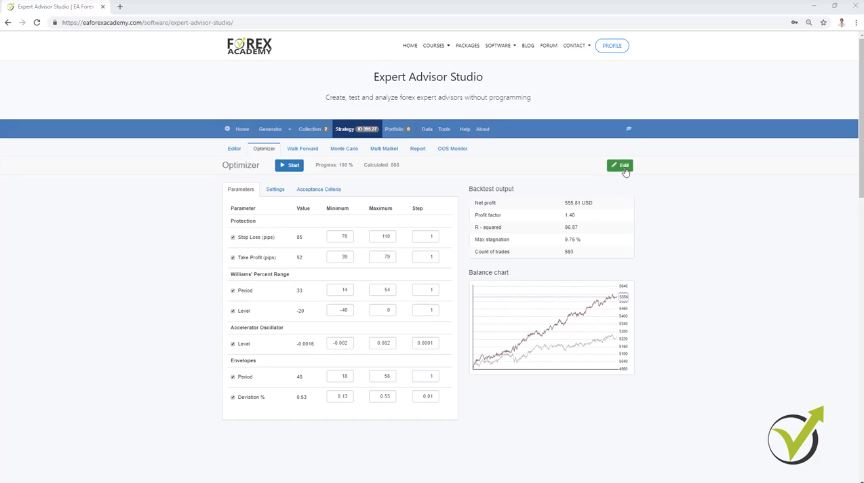
    If I just run the optimizer in EA Studio without changing anything, there will be two different balance charts or two equity lines. One is with the old strategy or with the initial strategy, which is the grey color line. And the new one, normally higher, shows the strategy results after the optimization. When you do that, you can see the numbers of strategies, but they are not going into the collection.

    If you want to use the optimized strategy, press the green Edit button. You will see something very similar to in the Walk Forward.

    After the optimizer is ready, we will see the new inputs of the indicators. And we will see the difference between the new strategy or the optimized strategy, and the initial strategy. And this is very nice because we can see the difference. We can also decide if we want to use it or we don’t want to use it.

    Now because I have selected to use a step of one during the optimization probably, this will go to an over-optimized strategy. A good indication of that is if you see a really nice equity line for the new strategy.

    When you are ready with the optimization, you can select if you want to use the optimized parameters on not. If you’re going to use them, press the Green button Edit. If you do not wish to use them, go back to the editor, and you will see the initial strategy.  So this is the update in the optimizer, and now let’s go to the Walk Forward.

    Walk Forward optimization updated
    The Optimizer in EA Studio

    Walk Forward: 30% Out of Sample means 70% of the strategy will be optimized, and the rest will be tested as real trading

    What the Walk Forward does, it divides the whole backtested period into different segments. By default, it divides the period into five segments, and if I click on Start, it starts to optimize the strategy for the 70% of the first period, and this is if you have selected to use 30% Out of Sample. Then it will simulate trading for the rest 30% of the first segment.

    And when it is ready, it will start the new optimization so that it will be from the beginning of the second purple line until the end of it, and then it will perform trading, or it will simulate trading for the next zone. This is how Walk Forward works. I have explained it in more detail in the course Top 10 USDCAD Expert Advisors.

    And this process repeats till the end. It optimizes for the period, and then it simulates trading for the next zone or the next segment. And after that, we see the results with the new parameters. Now, what is the update with the Walk Forward?

    The update with the Walk Forward is very visual, and it makes it even better.

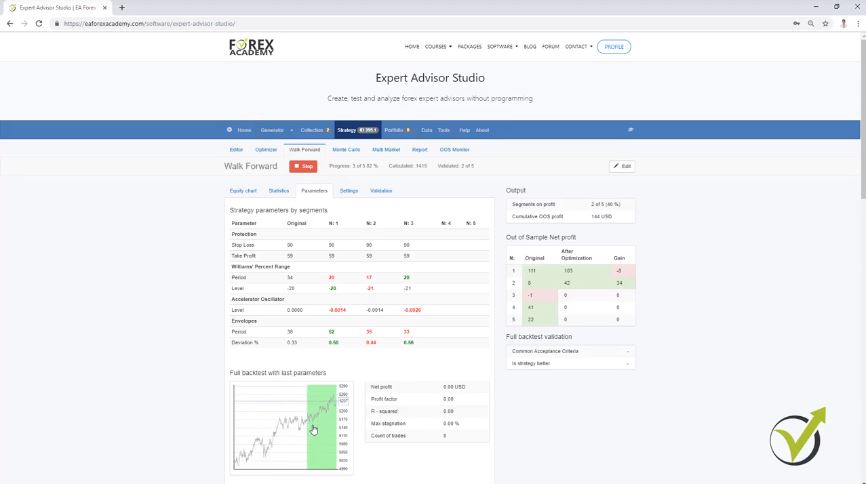
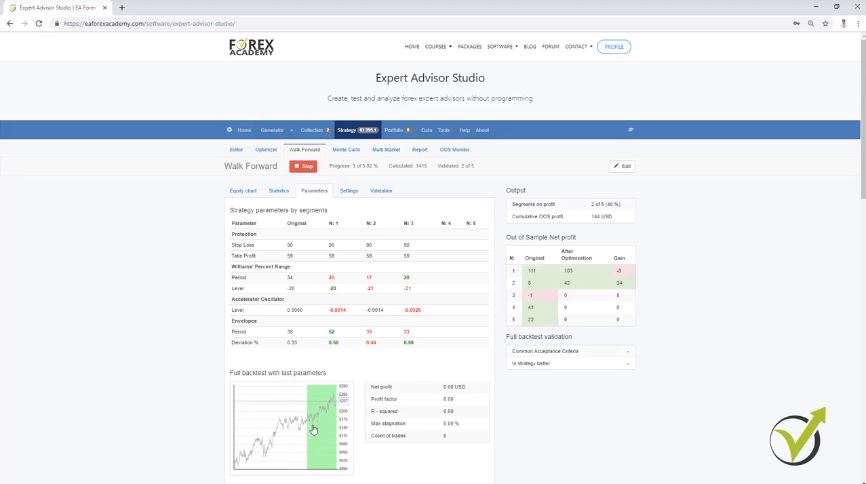
    When you go the parameters of the strategy, you can see that now the parameters of the different segments are available. Something that was not visual, and we didn’t see before what are the settings. Now we see here the original parameters of the strategy, and then after the first optimization, we see the parameters of the segment.

    If it is a smaller number we see it in red, and if it is a bigger number we see it in green. If it is equal again, it is in green, but let’s say we have envelopes period of 38, and it changes to 52, you will be able to see it in green. But after the next optimization, it can go down to 35, and you will see it in red.

    Now with the Walk Forward optimization, we have very visually how the parameters change for each segment. Then on the right side, we have the Out of Sample Net profit where we see the original strategy, how it performed in the different segments, and after the optimization, what is the result. This way we can see that in the first segment it made a worse result, for example, with the second one it could be better.

    We have a better strategy if the new strategy with recent parameters shows better results.

    We have a full backtest with the last parameters. In grey color, we see the initial strategy, and in the end, when the Walk Forward is ready, it will perform a backtest with the last parameters, and this is the critical point here.

    Full backtest with the strategy
    The parameters in Walk Forward are visual.

    After the optimization is ready using the Out of Sample, with the last parameters, we can see if the result is better or not? The final parameters are the parameters from the last segment, but the complete backtest is done over all the Historical data we have.

    We can see the new equity line compared to the original backtest. And what is the idea here? Very simply, if the new strategy with the recent parameters shows better results, we have a better strategy.

    I am having filtered Acceptance criteria.

    Another update that we recently had is the possibility to filter the strategies with the Out of Sample of the Acceptance criteria. This means that we can select what criteria to have in the Out of Sample and in the In Sample. For example, let’s use a 1.1 Profit factor for the complete backtest, alright?

    Also, let’s say we want to have 1.1 Profit factor for the In Sample part and the Out of Sample part. We can filter the strategies when we use the Walk Forward optimization in the Reactor.

    From the validation, you can set what criteria to use.

    Sometimes you will see all of the parameters changed during the Walk Forward, and if you see that only the Stop Loss and Take Profit were not changed, it means that they were not selected from the Settings.

    There will be strategies where the Walk Forward makes worse profit. If it is much below the equity line of the original strategy, this gives us the sign that the initial strategy might be over-optimized.

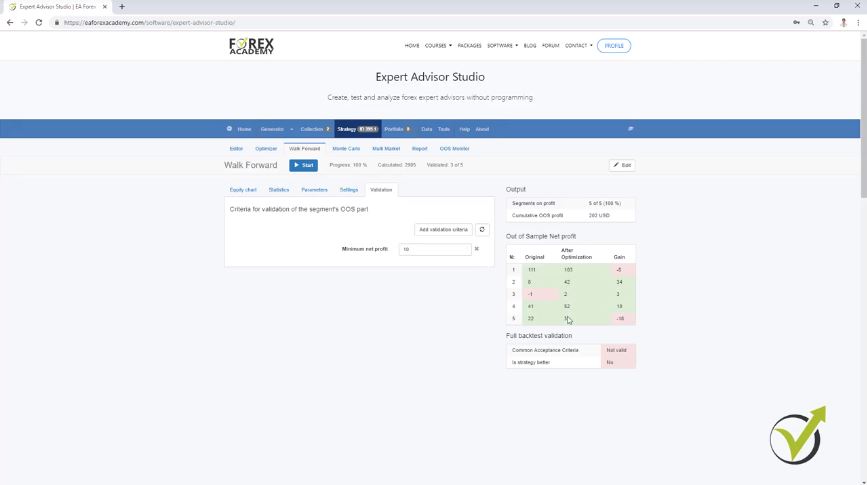
    And from validation, you can set what to be the criteria. And I usually use $10 as a minimum, so I want to see strategies with a tiny profit, or let’s say I want to see the positive strategies and not the negative strategies. So to summarize it one more time, after the Walk Forward is ready, it takes the last parameters from the previous segment, and it performs a complete backtest.

    Validation of Walk Forward.

    • It compares the complete backtest with the original strategy
    • if the common Acceptance criteria were validated for the backtest with the last parameters
    • do we have a better strategy or not?

    Anyway, you can sometimes see the outcome of each segment to be positive but it’s not validated as well because, in Validation, we need to see minimum $10 of a profit and if in any of the segments we have $2, or we have $3, it will be still below that $10:

    The validation in Walk Forward
    The validation is quite important

    And now, to compare it with the equity chart of the different segments, you can see in the Walk Forward if it succeeds in making a better equity line. But this is the result of the Walk Forward when it’s optimizing one segment, testing the strategy for the next one, then adding the data and testing it until the end. And if you get a better strategy, this gives you a sign that the strategy is not over-optimized.

    But in parameters, we see that with the last inputs of the indicators, the strategy made worse results than the original strategy. So in order to say that the strategy was validated, we want to see a better strategy than the original one. Also, the common Acceptance criteria to be validated, and in this case, it’s not validated, and at the same time, we want to see all segments validated.

    A better strategy makes more profits than the initial one.

    In the Out of Sample Net Profit table, there are green boxes that mean they are positive, but according to the validation, they could not be validated because I requested a minimum of $10 of a profit. These are the criteria for validation of the segment Out of Sample part. Alright? And if you check that on different strategies you will see what the difference is.

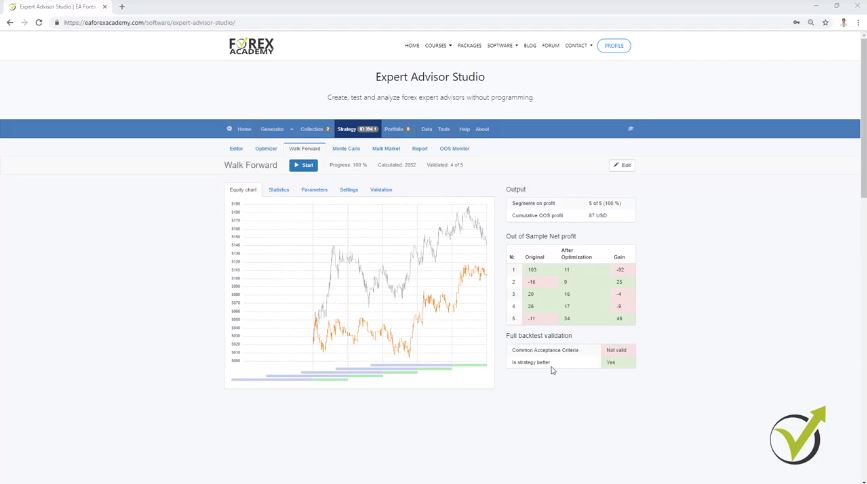
    In the picture below, you can see a different strategy where I want to show what is the difference with the Walk Forward with different strategies. You see is that the Walk Forward failed to show a better strategy when it went through the different segments.

    But you can see that in full backtest validation, we have a better strategy. Is strategy better; yes. This is because if I go to parameters in the full backtest with the last parameters, we have a strategy with more profit. OK?

    A better strategy makes more profits than the initial one.
    Equity chart.

    Successful strategy validation.

    So the Walk Forward takes the last parameters from the last segment. After that, it performs a backtest for the entire period for the whole historical data, and it shows the results. And sometimes you will see strategies on profit in the Out of Sample, better than the initial strategy.

    With the Walk Forward, we have the same strategy but with better parameters. And it’s up to you if you want to use this strategy. EA Studio will now allow you to use the new parameters if the Edit button is not in green.

    The strategy is validated, or the Walk Forward validation or the Walk Forward optimization was successful when:

    • All segments to be validated.
    • second is to have the whole backtest with the last parameters to be verified with the Acceptance criteria
    • better trading strategy than the original one

    What I see from the statistic is that we have a Profit factor 1.71 with the original strategy. And then we have after optimization 1.09, which is less than 1.1, which is what I have selected in the Acceptance criteria. As well, the second segment is not validated.

    It has only $9, and I want to have a minimum of $10.

    Walk Forward is included now in the reactor so that you can use it.

    But I have tested it already, and I can tell you that it is tough to get strategies.

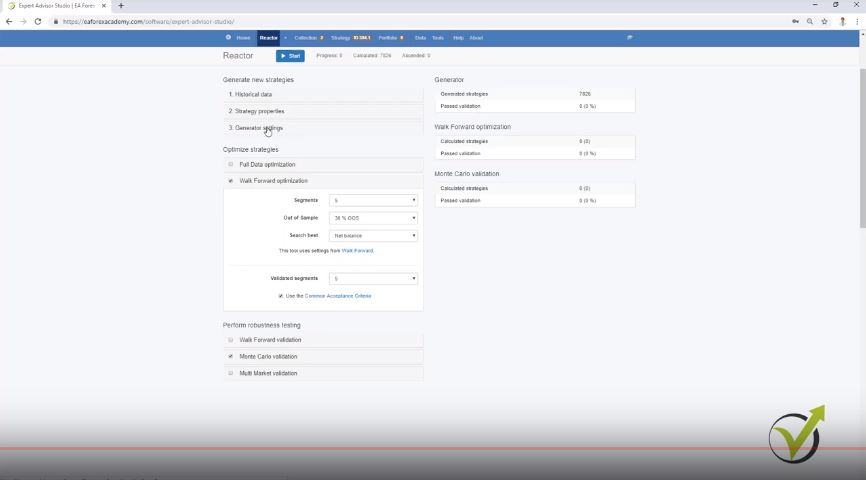
    But this is the idea, and it filters the strategies very well because it uses many things. So, for example, in the generator settings, if you use Out of Sample, it will run the generator with Out of Sample. It will pass the strategies down according to the Acceptance criteria, they will go to the Walk Forward optimization, and there you can choose what Out of Sample to use.

    You can use the same one. You can use it if you want to fulfill the Acceptance criteria, and you can use the segments. And I can tell you that I have run reactors for a couple of hours. I get just two, three strategies at the end of the day.

    And this is great because it filters the strategies a lot. This way, they go one time through the Out of Sample with the generator, then they are screened with the common Acceptance criteria. Then they will go to the Walk Forward, where it does Out of Sample for the different segments. It backtests with Out of Sample for the parameters of the last segments. If the three things are satisfied, which I have said, then it will go to the Monte Carlo.

    Walk Forward.
    The Reactor.

    What is the difference between Walk Forward optimization and the Walk Forward validation?

    What is the difference between the Walk Forward optimization and the Walk Forward validation? The Walk Forward validation validates the strategies. So if you want to verify the strategy that is coming from the generator, you can validate it with the Walk Forward or with the Monte Carlo. But they don’t change the strategy.

    They don’t change the parameters of the strategy. And if you want to use the Walk Forward optimization, then it will change the strategy with the last settings from the last segment. And if you validate the strategy it will proceed further.

    So it is up to you how you want to use it. And here, we have Full Data optimization, which is the regular optimizer that we had so far. Full Data is the name to make clear that this is an optimizer using the complete historical data. And with the Walk Forward, we use different segments.

    Use one of the three, not all of them.

    And the best thing is to use one of the three. No need to use the Full Data optimization, the Walk Forward optimization, and the Walk Forward validation. From the tests that I did so far to use the Walk Forward optimization. Of course, I will test it more. And if I have something new to share with you, I will do that.

    I will appreciate if you share your opinion on the FORUM. Don’t hesitate to drop some pictures, ask questions. But so far, what I saw, it just gives better strategies at the end of the day when it uses the last parameters. It validates, it uses the Out of Sample at the same time for the segments and the complete backtest. And when we use it in the reactor, we filter a lot of strategies until they come into the collection.

    If you have not yet tested EA Studio with a 15-day free trial, you are welcome to do that

    Cheers.

  • 6 Steps to Designing a Forex Strategy  

    6 Steps to Designing a Forex Strategy  

    Designing a Forex strategy – the first step before trading

    One of the worst things that can happen to a novice Forex trader is that they achieve big profits virtually instantly. Saying that this is something to be avoided may seem counter-intuitive, but there is logic to the position. It should be pointed out that it only applies if the trader in question hasn’t taken the time and put in the work needed to create a coherent trading strategy. All too often, however, traders decide to ‘have a go’ at dealing on the Forex markets having been seduced by the many articles and websites claiming that they offer a chance to get rich quickly and easily. Beginners luck can sometimes result in early gains and, before they know it, novice traders have put more of their money on the line, haven’t worried about safety nets like stop-loss mechanisms, have failed to take the multiplying impact of leverage into account – all of this on top of the many expenses incurred in simply running an account – and are staring down the barrel of substantial losses.

    It can be very different of course, but only if you take the time to do some planning before putting your money where your trading instincts are (and the first lesson to learn would be that you should never rely purely on your instincts). The Forex markets offer global, round the clock opportunities for traders of every type and size, with excellent liquidity meaning that trades can be carried out quickly and simply. The relative volatility of the markets is what drives much of the activity, as traders from every corner of the globe seek to take advantage of often very small shifts in the relative values of currency pairs. All of these are plus points, but they also represent potential hazards; ease of access means it’s simple to keep chasing losses, high liquidity means you’ll never have any trouble finding currencies to spend your money on and the volatility that drives profits can also sometimes create losses that run out of control to devastating effect. All of which is another way of saying that you should never sit down to actually trade without first designing your own Forex trading strategy. These are six steps toward designing a Forex strategy:

    1. Decide on your time frame

    Forex trading involves work such as checking charts, reviewing data, following the markets and monitoring external factors which might impact on the value of the currency. Ask yourself how often you want to have to do all of that work and how long you’re planning on holding the positions you take. In simple terms, the question is whether you’re a day trader or a swing trader. A day trader often adopts a ‘scalping’ technique, making multiple small trades during the course of a single day, opening and closing positions quickly to take advantage of small shifts in currency and then moving on to the next. A swing trader, on the other hand, uses the data available to try to identify bigger shifts in the value of currencies and to set up positions that can profit from these shifts for as long as they last.

    1. Look for indicators

    Designing a successful Forex strategy is based on identifying an emerging trend at the earliest possible stage, and making that identification is only possible using the available indicators. The most commonly used indicators are moving averages, which track the average price of a currency over a specific period of time, and in this way help to identify trends. In most cases, traders will track two moving averages, one based on a longer period of time and one on a more recent period. The time to open a position is when the more recent moving average moves above or below the more long term moving average. Using moving averages in this way is one of the simplest means of spotting a trend in Forex markets. With experience and a deeper understanding of the data, traders will develop their own additional indicators, but moving averages are a good place to start.

    1. Decide on risk

    Different traders have a different approach to risk. In many senses, this is simply a question of temperament, with some people able to handle bigger risks than others – usually in pursuit of bigger profits – while others prefer to opt for a small risk/small returns strategy. Neither approach is definitively better than the other, but designing a successful Forex strategy means deciding what level of risk you’re willing to cope with. Many inexperienced traders only start to think about losing money once it actually begins to happen, and this is why they often make the mistake of risking more of their capital by chasing their losses in a manner driven by emotion rather than logic. Think about how much money you’re willing to lose on each trade and on a full day’s trading and stick to these limits when designing Forex strategy. Set a percentage of your capital and, as soon as your losses hit that figure, withdraw from the day’s trading.

    1. Set your parameters

    One of the most important parts of any strategy involves setting stop-loss orders. These are tools that automatically take you out of a trade when a certain point is hit, protecting you from the risk of further losses. Setting stop-losses is vital for two reasons – it can stop your losses running out of control and it frees you from the responsibility of having to monitor every position for as long as it is open. You should be monitoring your account closely, of course, but the speed with which markets can move still makes it possible for losses to mount before you notice them.  Stop losses can be set using various criteria, including the price of a particular currency, a percentage of your overall account, the volatility of the market measured by how much it moves within certain price bands and even a specific time limit.

    1. Write your strategy down

    It may sound like a rather old fashioned process in this era of digital connections and automated processes, but writing your strategy down is by far the best way of making sure that the details are set in your mind. In addition to this, it will give you a resource to turn to when the ups and downs and stresses of trading make it difficult to stick properly to the rules you’ve drawn up for yourself. Seeing them set down in black and white can be a useful reminder of why you thought those rules were a good idea in the first place.

    1. Keep a detailed record 

    Having tested your strategy out using the free demos offered by many trading platforms, and then made any adjustments needed, you should keep a detailed record of every day’s trading after you complete designing the Forex strategy.  Record every position, how it played out and the amount of profit or loss generated. Write down why you made any decisions you made (i.e. why you chose to close a position or increase the amount invested) and be honest – if you closed a position too soon and lost the chance to make more money, then record the fact. It could be that you’re working with a short term strategy anyway, and you’re willing to give up the extra profits in order to pursue multiple smaller deals. If so, writing it down will solidify the strategy and establish whether it may be worth modifying. Try to honestly record any emotions which prompted decisions, as you may see a pattern, such as investing more when you’re angry, or panicking over losses and cutting other positions short.

  • Best 10 Forex strategies in 2020

    Best 10 Forex strategies in 2020

    Best Forex strategies are what everyone is looking for while trading.

    Best Forex strategies in 2019 are the subject of this lecture. Hello, dear traders, it’s Petko Aleksandrov and I continue now with the results that we got from the Generator that I started in the previous lecture. Over 600,000 strategies were generated for these 5 hours and in the collection, I see the best 100 strategies that I have over here. You can see some are having great Equity Lines, some are having some drawdown, some are losing recently.

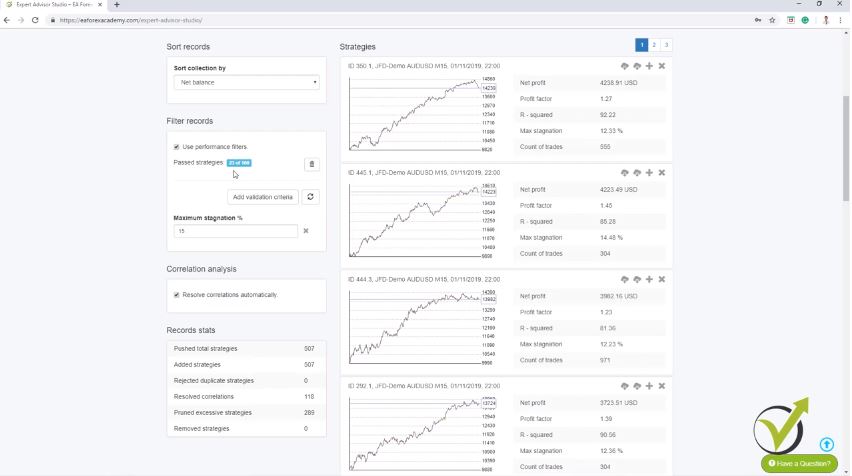
    So now, what I will do? I will use the filter records that we have in EA Studio right over here and using the performance filters we can add some validation criteria. So, we will filter these strategies. OK?

    But all of these strategies, if you look at them, they have higher criteria. From what I have said in the previous lecture with the Acceptance criteria, we have Profit factor above 1.1, R-squared above 70 with those strategies and we have over 300 count of trades for every strategy that you see right here into the collection. Aren’t these the best Forex strategies you have seen?

    What is stagnation and why it is important when selecting the Best Forex strategies?

    I will add some more validation criteria and for example, I will add the Maximum stagnation in percentage because I don’t want to have huge stagnation and what is the stagnation for the very newbie traders? This is when the strategy does not make any more profits than it had previously.

    So when it’s right here, it’s reaching to a point and then it’s going down it might go a little bit sideways and then it will go again on a profit and this period where we don’t have new profits higher than this top here, we call it stagnation. So we don’t want to have huge periods like that and you see by default comes 30% and 94 out of the 100 are with the stagnation that is below 30%. OK?

    For example, if I go down to 25 you will see that I have 81 and I will go down to 20 and you will see that I will have 49 strategies and I will go down to 15 and you will see I have 23 strategies passing the validation criteria here. OK? So you see the strategies that are left don’t have huge stagnation and are basically not having these drawdown in the Equity Line.


    Best Forex strategies with EA Studio
    23 strategies passing the validation criteria.


    This way you can filter the best Forex strategies that you have in the collection.

    This one is a bit of stagnation here, but you see it’s 14.48%. OK? And from here, I can add more criteria but I want to have at least 20 strategies left into the collection and now you see that I have 23 left. So, I will leave it this way, if you want to test it out, you can add different criteria.

    There are so many over here. There is the win/loss ratio which is great as well, return/drawdown ratio, months on profit in percentage and so many that I’m not going to explain in details but basically here you can filter the strategies that you have in the collection. Now, having this collection, first of all, I would download it because every time when I use the Generator, I download the collections. This way I save my best Forex strategies that I created.

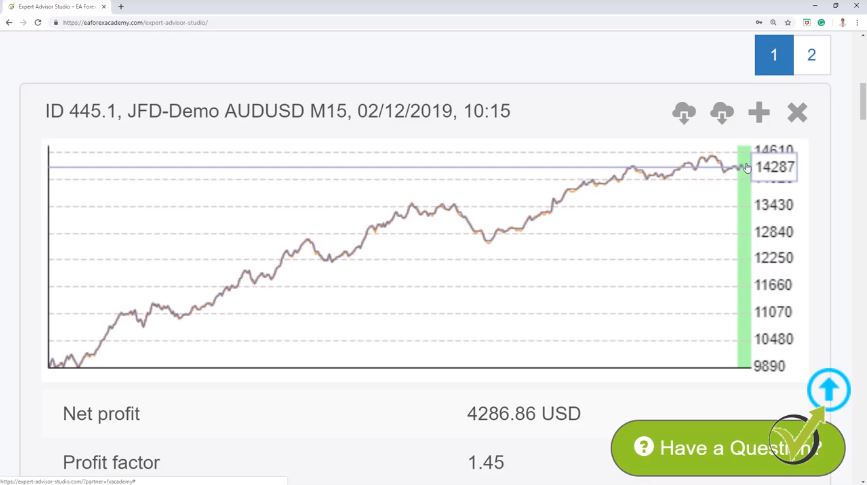
    So this way I’m not losing my work and my time for running the Generator and I will go to Tools and I will go to Data and then, I will go to Data Horizon and here, I will remove this tick. Use end date limit. So what this means is that now I will see what is the result with these 23 strategies left into the collection including the last one month from 12th of January 2019 till today, 12th of February 2019.

    The recalculate button is what will do the magic.

    Basically, I will do the very same thing if I have placed these strategies 1 month ago. OK? Instead of placing many strategies for testing on a Demo account, I have removed the last one month, I have generated the strategies using the historical data without the last one month and now, when I have the ready strategies into the collection, I am including again the last one month.

    By removing the tick. This means it’s not using end date limit and I’m using all of the historical data that I have. All of the historical bars that I have imported here in the Strategy Builder and if I go to the collection, you will see that I have this recalculate button.

    Now, if I click on it, it will recalculate the strategies including the last month but before I do that, I always visually delete some of the strategies that I have in the collection. Now, these strategies are having great Equity Lines. Their R-squared is big, they have low stagnation and Profit factor is good.

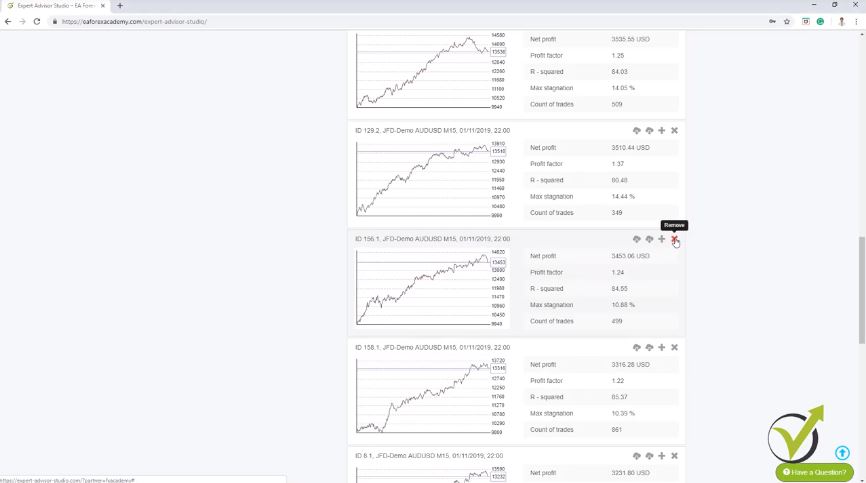
    Remove strategies that have recently been losing.

    Now, what I’m looking at is the most recent period. I don’t want to have strategies that are losing recently. So, you see the Equity Line has these curves up and down and it is normal to have such a move down on the Equity Line to have a losing period but I don’t want to have such a losing period just when I am placing the strategies for trading. OK?


    Remove strategies that have recently been losing.
    Click on the remove button.


    I don’t want this losing period to be right now, to be at the moment when I will be testing or when I will be trading the strategies. So if I see strategies that are losing recently, I simply remove them from over here. OK? You see this one as well is losing recently, I will remove it and this one is losing a little bit more recently, also this one and let’s have a look at some of the others.

    I will go to the second page; The first strategy is losing as well recently, I will remove it and I will go to the second page; You can see this strategy is losing recently, I will remove it as well, as well this one and this one, then, I am having this one; the last one and the others: this one, I think I will remove it as well and here is just fine.

    Zoom the strategy if anything is visually unnoticeable.

    Let’s go back to the first page. What we have here? We have a little bit of a loss.

    I will remove it as well, and this one, I will remove and this one, I will remove. I think I have about 10 strategies left; exactly 10 strategies left and you see that their Equity Lines are fine, not really losing at the end. I don’t have the strategies that are losing recently.

    So, now, what I will do? I will click on recalculate. This means that the software will recalculate the strategies, will backtest them again including this recent one month. From 12th of January till today, the 12th of February and I will click on the recalculate and you will see that all of the strategies will be actually recalculated that we had, even, we are having the filter criteria here and you will notice that this recent one month is colored in green and of course, one month is very small part of the whole trading period.

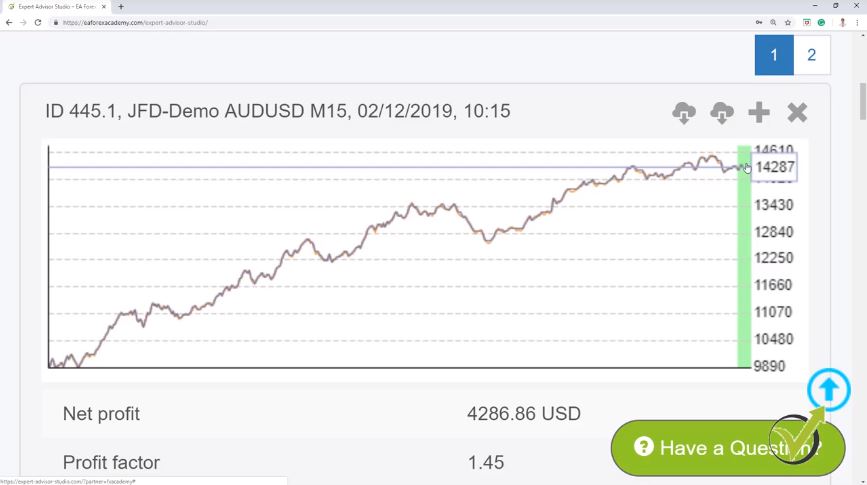
    That’s why it is very hard to notice what happens visually and that is why I normally zoom it over here.  I will zoom it a lot. I will make it more, I will go to 300 for example, and if I scroll down, I will see the strategies. OK? So this is the ending point which we used as end date limit for the generation and after that is the Equity Line where the strategy performed for the last one month.

    This is a great method to find the best Forex strategies automatically.

    So, one more time guys this period, the last 1 month was not used while I was generating the strategies. OK? Here we have basically tested the whole month very quickly just by adding the last one month to the historical data so this is how EA Studio will backtest it using the whole period. And just see the strategy went a little bit of a loss and then is on profit.


    Best Forex strategies.
    A zoomed strategy.


    So, it is just fine. What we are looking for, is to remove strategies which are having a dramatic loss during the testing period during the 1 month. This means that the strategy was over-optimized by the software and what is over-optimization?

    This is when we have the perfect parameters and indicators for this asset, for this timeframe, for this historical data and normally what we see when we test such over-optimized strategies is that we see a dramatic loss when we place it for real trading, or for Demo trading, or for testing which we said is absolutely the same with what we just did over here by including the last one month. OK?

    The Journal is where we see the details of the best Forex strategies.

    And if you look at the next strategy it went on a profit, then a little bit of a loss, still fine. It’s not really a dramatic loss and here, is what I’m talking about. This is what I don’t want to see in my best Forex strategies.

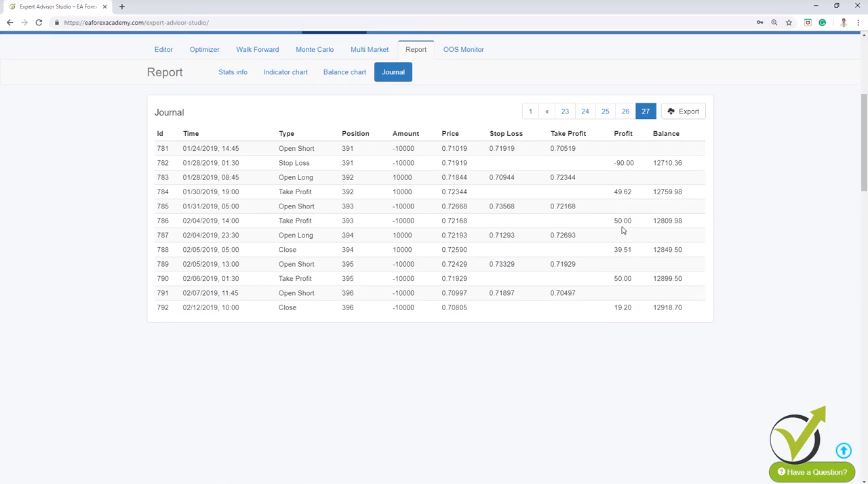
    At the moment of the test, the strategy is just losing. OK? So the whole time, it was just losing and if I click on this strategy, I will go to the report but let me zoom it out so I can see it better. I will go to the report of this strategy and I will go to the journal.

    So, if I go to the last page of the journal, you can see that the last trades here are just losses; two trades but they are losses. I don’t want to have strategies that just did losses during the tested period. And I will go back to the collection and I will zoom it a little bit more again and here, I will go to this third strategy.

    Don’t gamble whether you see a normal drawdown or an over-optimized strategy.

    I do believe it was. OK? Here it is, and I will remove it.  It could be that it is a normal drawdown in the Equity Line; Just what we are having here, what we have on many places but I don’t want to take this risk.

    I don’t want to gamble if this is a normal drawdown in the strategy or it is an over-optimized strategy. It is hard to say that. I don’t want to find out this in my real account or in my real testing. Alright?

    So that’s why I will just remove it. The next month you can see a little bit up, a little bit down. It is just fine and then, this one as well.

    Go for strategies with profits that you can depend on.

    A little bit down, a little bit up and I will go to the next one. What we have here, pretty much the same thing. And then you can see what a great test we had with this strategy right here. OK? It is just going on profit during this one month during the tested period and if I click on it and I will go to the report and I will see what the recent trades were. OK?

    Right over here on the report and I’m going to the last page and you can see recently it had only profitable trades in February. OK? During the testing period; it had 1, 2, 3, 4 profitable trades in a roll, not even 1 loss. These are really the strategies that I like. That when I test them, I see profits and I can depend on these strategies. Alright?


    EA Studio report
    The Report of the Best Forex strategies


    Let me zoom a little bit again and here they are. I will scroll down again, I will go to this strategy which showed a nice profit. Here it is, and I will continue lower. Then we have a little bit of a sideways, that’s just fine. Another strategy that during the tested period showed only profit. Then here, we had a little bit of a loss, profit, small loss and then, here again, you see the strategy keeps on profiting and pretty much these are the best Forex strategies guys, OK?

    How I came to prove the validity of this method?

    I will zoom out. This is the method that I have been using for quite a long time and it worked just fine. And of course, how I have proved to myself that this method works. I have generated strategies using the whole historical data.

    The whole period, I have been placing strategies for one month in Meta Trader to test them and after one month, what I was doing? I was adding the last one month, recalculating it and comparing the results that we have for each strategy with the history data in Meta Trader. And I saw that actually, these are the very same trades.

    So one more time here, it is the very same thing If I would have placed these strategies one month ago and testing them on a Demo account for 1 month and then, comparing the result and decide which strategy to remove and which strategy to keep in my portfolio or to generate the strategies without using the last one month and after I select which strategies to use with the validation criteria over here, I recalculate including the last one month and I see which strategies are actually profitable and which ones are losing during this time. OK?

    You can carry out a backtest for whatever duration you wish for these best Forex strategies.

    And this is an example method for one month. You can test it for two months, for three months. Just don’t include the recent two, three months or five months. Or if you want half a year it is up to you. And when you recalculate it, you will see how the strategy performed during this period of time. Alright, guys?

    So this is the method I have been using for quite a long time. And in the next two lectures, I will show you the second method which is now possible because of the update in EA Studio which is in the Acceptance criteria. For me, it was a really huge update they did from the first software company. Because if I go to the Acceptance criteria and show you, they have improved the In Sample and Out of Sample testing with individual Acceptance criteria for each other.


    Best Forex strategies.
    The Acceptance criteria.


    And by using these two, I have improved my method and actually, this is a totally different method from what I have already shown you. And after that, I will leave it on you to decide which method you want to use. For me, the second method that I will show you is the better one. It is the easier one because it saves us even this recent thing that I did in this video.

    If you have any question, we have the Forum for you.

    It saves us the moment to eliminate the last month and then to include it again and to compare the results. And I will show you how it is possible. Because for me it is the better method, I will select again 10 strategies with the second method and I will include those in the course. OK? Not these ones but the ones that I will show you in the next lecture. And by providing you with the Expert Advisors, you will be able to test them as well. Alright, guys?

    Thank you very much for reading and I will see you in the next lecture. If you have any question, feel free to drop it in our forum and I will answer you. Also, if you want to test 15-days trial with EA Studio, go ahead and do it.

    Cheers.
  • How to make money day trading in 2019 with many Forex strategies.

    How to make money day trading in 2019 with many Forex strategies.

    How to make money day trading with many Forex strategies.

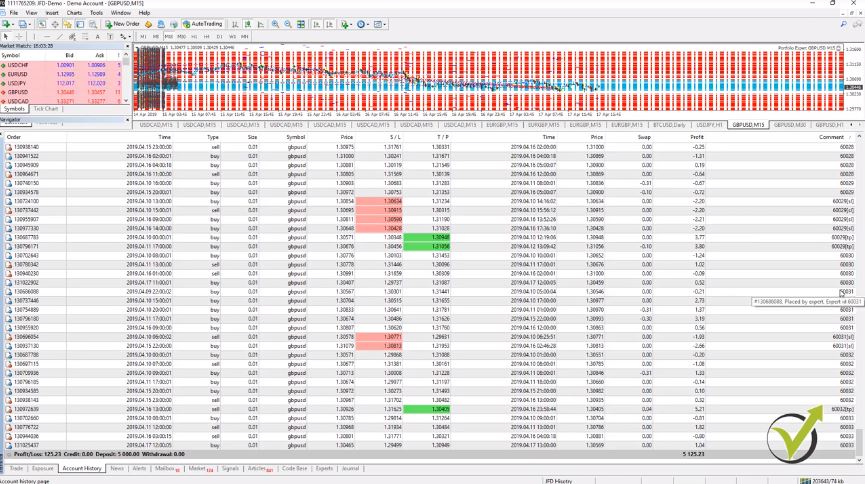
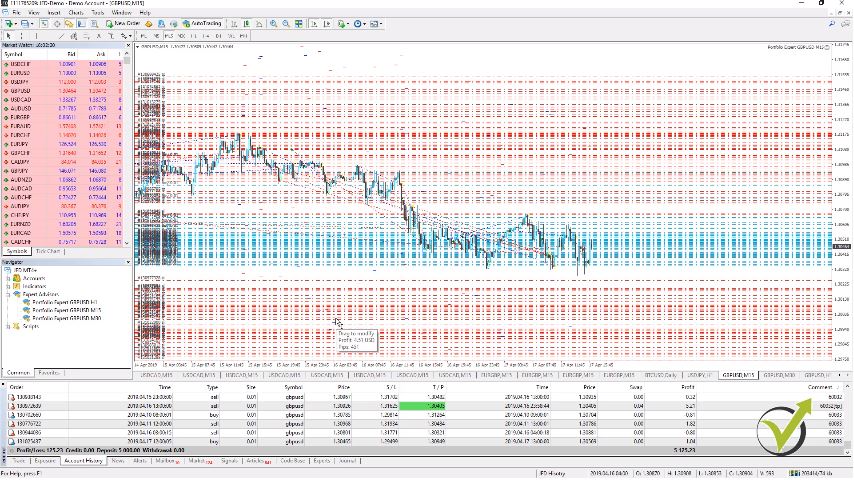
    How to make money day trading is a question that every trader asks himself even unconsciously. Hello, dear traders, this is Petko Alexandrov from EA Forex Academy. In this article,  I will share with you my experience in the account where I have left the 3 portfolio Expert Advisors. So you can see below how many trades are opened when I trade with Portfolio Experts. Really many.

    Basically, with the blue lines, you see the open trades or the open price and with the red lines, you see the Stop Loss and Take Profit. If I just zoom out a little bit you will see the range is really big. Some of the strategies have bigger Stop Loss some have smaller Stop Loss and Take Profit.

    So we are not really focusing on the opened trades, you can see them right over here. Currently, I have about the negative of 40 as a result and you can see too many trades are opened. But we are not looking at opened trades because the result changes.

    As a trading result, we consider the closed trades.

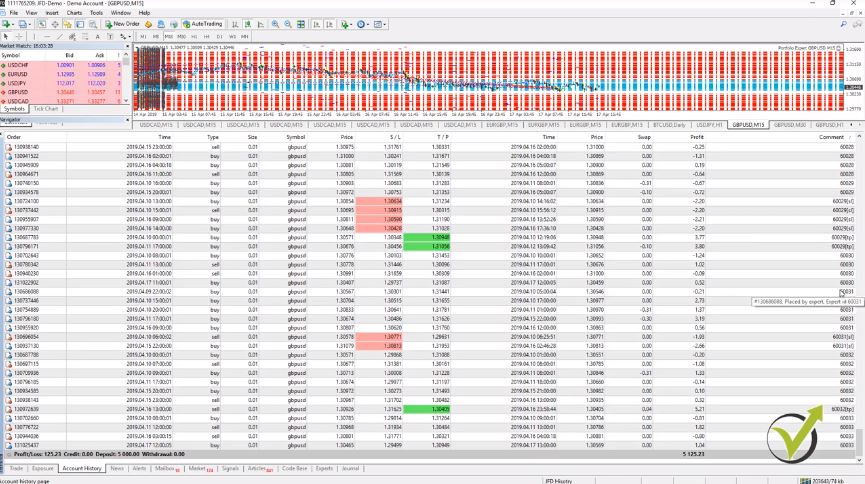
    But what we’re looking at is the account history where we have the closed trades. OK? The closed result. And you can see I have $125 with 0.01 lot.

    So with the account history, it is really hard to follow the performance of the Expert Advisors. Let me make it a little bit bigger. On the right side, we have the comment where we can recognize which Expert Advisor opened the trade and closed it, and they are arranged now by the comment.


    Day trading with many Forex strategies.
    Account history in Meta Trader


    So, for example, the Expert Advisor with magic number 60030 which is an Expert Advisor on H1 because with 60, we start the magic numbers for H1 chart. And this is strategy number 30 and then we have one, two, three, four trades and it is easy to calculate it. Right? But if I look at it tomorrow, or after some time, there will be more trades.

    Following the performance by looking at the results consumes time and calculations.

    I will need to recalculate it again. And doing that for hundreds of strategies is very hard. And actually the strategies on M15, of course, they open a lot of trades.

    It will take you a long time to calculate those. Alright? It is time-consuming to follow the performance by looking at the results in the account history. So what I do, and I have shown that in some of my courses, is I like to connect the account to a website called FX Blue.

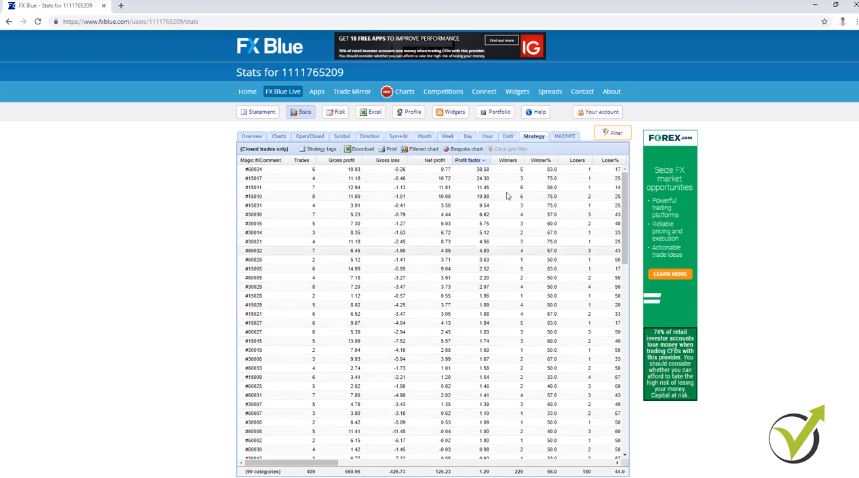
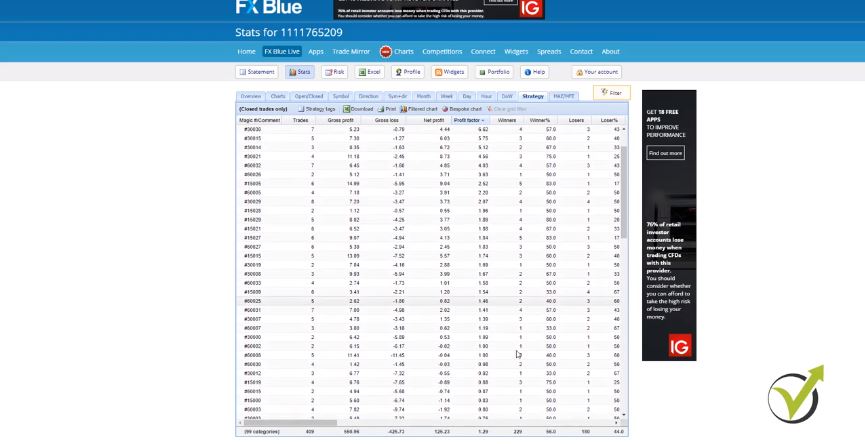
    So please don’t take this website as a recommendation because we are not connected to this website. And I just use it to follow the results of the account. And you can see here, I have a detailed statistic for all of the strategies. You are not going to fine the answer of the question How to make money day trading but you will find a lot of statistics which is the key to success.

    In the account history, we only see the results of all trades.

    I have a number of trades that were open and closed, gross profit, gross loss, I have the net profit which is the most important, I have Profit factor, winners, losers. And if I scroll to the right you will see that I have too many trades like average win trade, average loss, average trade, best trade, worst trade, longest, shortest and many others.


    trading results with accuracy
    FX Blue Stats.


    You have net pips which are very interesting, something I like to look at as well, and many others. Now, this thing we don’t have it in Meta Trader. What we have in the account history is where the trade was opened, where was the Stop Loss, where was the Take Profit, with green you will see where the trade hit the Take Profit, and in red, you will see where the trade hit the Stop Loss.

    And you see the time, and you see the price, and pretty much that’s it. We don’t see a lot. We just see the results there.

    In order to understand How to make money day trading, you need to accept one thin – Every strategy has its losing phase and it has its winning phase.

    Which makes it very hard to decide which strategies here are making profit currently and which strategies are losing. Because we said that every strategy has its losing phase and it has its winning phase. So we wanted to trade the strategies that are in their winning phase.

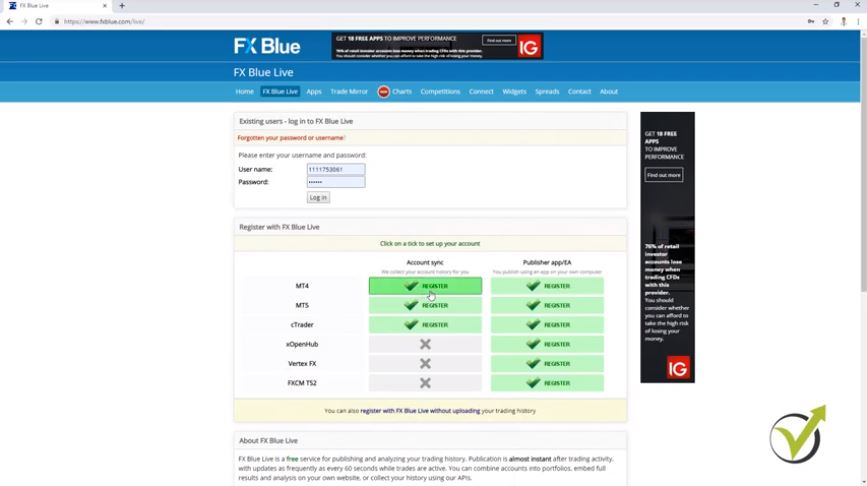
    Here, I will concentrate on the Profit factor and on the number of trades that were opened and closed. Now for those of you who didn’t watch any of my other courses where I show how to connect the account to this website, I will show it very quickly. You need to go to FX Blue Live, where you come to the website.


    Day trading with many Forex strategies and results
    Register from the front page in FX Blue Live.


    So let me log out and you will see that I have here account synchronization and I have the register option for Meta Trader 4, Meta Trader 5, depends on what you are using. It’s possible for cTrader as well, but at the moment I am using it for the purpose of this course Meta Trader 4 and account synchronization. So I click on register, and here I will need to enter the broker server that I have been using.

    Account synchronization is actually what I do with this website.

    After that, you enter your account number and the read-only password which normally comes when you register. They send it via the email or if they don’t you will need to ask them via the chat which is provided by the broker. Or write them an email anything they need to send you this read-only password it’s called investor password as well and it is needed to connect the website to your account.

    Below you enter your email and you click on register, that’s it. Then you will have one account synchronization button which you need to click. Nothing really complicated.

    You need to click on it and click on Save changes and it will be saved, and your account will be synchronized to the website. OK? So here you have the statistic, you can see that I am running the account for 10 days now and if I go to strategy, I see the statistic that I showed you.

    Symbol + Direction is quite interesting one

    You can look at the Symbol, obviously, I have only GBPUSD in this account, you can look at the direction. For example, at this time I have similar results to the long trades and the short trades. Symbol + Direction, month, still we are in the first month, week, you can see that the previous week was on positive and this week is still a little bit of a negative.

    In this FX Blue website statistics, you can see the day performance, Hourly performance and so on. So going to strategy, as I said, I will concentrate on the trades and on the Profit factor.

    So you can arrange the strategies according to the number of trades, according to the net profit, you will see the ones that have most losses on the top. Or if I click one more time I will see the strategies that have the most net profit at the moment, or you can arrange them by the Profit factor. And this is exactly what I want to do.

    How to make money day trading using the Profit factor.

    Now if you remember when I was generating the strategies, I selected in the Acceptance criteria to have strategies with Profit factor higher than 1.2. So one of the strategies is already 1.19 and the above one is 1.39. So all of these strategies, they have Profit factor higher than 1.2.

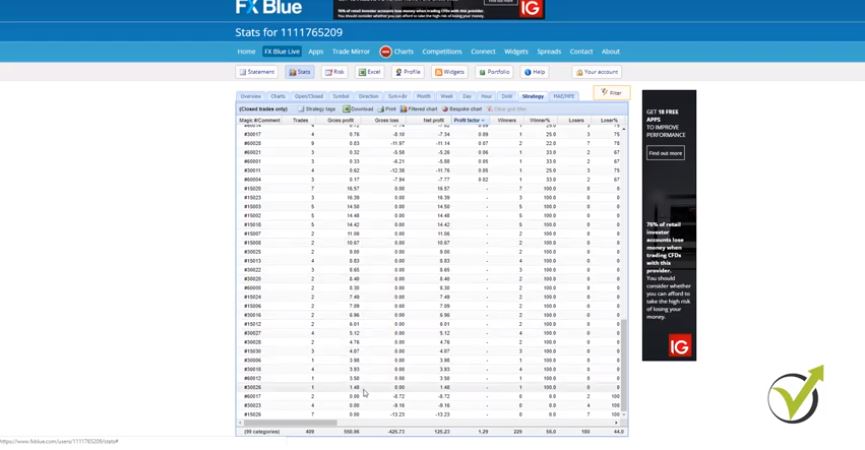
    Below are strategies that are with lower Profit factor, and you will see that most of them are having losses. Now more if I scroll down, you will see that for some strategies there is no Profit factor. And this is because these strategies have only profits, for example, you can see as well three strategies at the bottom that had only losses.


    FX Blue statistics an the Profit factor
    Profit factor is none if you have only profits


    So they don’t have a profit factor. A strategy needs to have profit and loss, so a Profit factor could be calculated. Now I want to remove from the account the strategies that have Profit factor lower than 1.2 but at the same time, to have more than 5 trades executed.

    Remove the strategies that have consistent losses from your account.

    So one of the answers to the question How to make money day trading is to remove the strategies that lose currently. Because obviously, if one strategy traded only two times, these are 2 consecutive trades and you can see the Profit factor here is 1.09. And 2 trades means one positive, one negative, it’s really hard to say if this strategy is in winning phase or it is in losing phase. But a strategy that has a lower Profit factor, and for example, let me find one.

    For example, one of the strategies over here already had 8 trades and it has negative of two which is still a very small loss. But having 8 trades and having this small Profit factor, it gives me a sign that the strategy could be in it’s losing phase. OK? And especially 3 strategies below which have only losses, and especially the last one which already has 7 trades and $13 of a loss, this is the strategy I want to remove from the account, alright?

    I don’t want it to continue trading. Could be the chance that the strategy now will switch and will start showing me profit. But I don’t want to hope on that, I don’t want to take this risk.

    How to make money day trading: Test every system on a Demo account first with a small trading lot.

    And below, you can see actually there the total Net profit is $125. But keep in mind that this is trading with 0.01 lot. If I have selected to trade with 0.1, that would be $1,252.

    And of course if you trade with a complete lot, that would be $12,523 but you need a huge account to trade with one complete lot. And I prefer to show in the courses trading with 0.01. So this way I want to encourage you to test every system with a small trading lot. And of course on a Demo account first.


    FX Blue statstical website
    How to make money day trading using results


    So this system is a system that I have been using recently and it works fine for me. That is why I decided to share it in this article. I keep the strategies that have Profit factor higher than 1.2 in my trading account.

    FX Blue is really useful when we follow trading results

    And the strategies that have Profit factor below 1.2 and have more than 5 trades, I will remove them from the account. And I will continue trading with the rest. OK? So this is how I filter the strategies with the FX Blue website.

    It is very easy. And especially when you’re having 100 strategies or even more, it is not possible to do that from the account history of the Meta Trader. It will take you a long time and you will need to calculate Profit factor.

    Calculating the Profit factor is too time-consuming if you do it from MetaTrader History.

    For example, you need to sum the profits, you need to sum the losses and then you calculate the Profit factor. It’s really time-consuming which is much easier with this website. And this is why I have been using it and I share it in this course as well. Alright?

    So thank you very much for reading. In the next lecture, I will show you how I remove the strategies that have Profit factor below 1.2 and already have 5 trades opened and closed or 5 executed orders. I will see you in the next lecture. If you have any question feel free to drop it in our forum and I will answer you.

    To get the complete course, and the complete answer to the question How to make money day trading click the link ahead:  How to trade Forex with 100 GBPUSD strategies in the account

    Cheers.
  • What impressed me the most during the Bitcoin trading seminars in Japan?

    What impressed me the most during the Bitcoin trading seminars in Japan?

    This is Petko Aleksandrov and I am recording from the Sky Tree in Japan. I’m on the 450th floor at 600 meters high. I had 2 Bitcoin trading seminars – one was in Osaka and yesterday was in Tokyo. One of the best experiences I ever had.

    The Bitcoin trading seminars in Japaned showed me that the people are so polite here, everyone smiles, everyone bows. And they have this great, great discipline. When I was coming to Tokyo with this bullet train, it does really 320 km/h but what impressed me the most is there are these policemen that they have their routines.
    And every 5 or 10 minutes they walk through the car and when they exit they bow! Even everyone sleeps and they walk even on the opposite way so everyone is looking forward but there is a guy who is coming backward. And I just put my phone with the camera because I wanted to see what he will do. And he bowed again when exiting the car. No one sees him, no cameras inside but he bowed. And one of the policemen stopped by me and I thought you will tell me something because I was talking on the phone and everybody was sleeping. The thing is he went down and he took a coin, one yen coin and he gave it to me, I’m not sure that it was mine but he gave it to me. I think this would never happen in Europe or anywhere else.

    And it’s so clean here.


    bitcoin trading seminars
    Streets of Japan


    You cannot see a single cigarette on the floor or a single piece of paper. I was waiting in front of the restaurant because everybody waits in a column to get into the restaurant. And I saw at the next restaurant which was like five meters away, the chef from the kitchen went out and he took from the ground one very small piece of paper. I even did not notice it. There are women who are riding their bicycle with these fancy gloves and umbrella somehow attached to their bicycles. Everything is like in order.

    There is nothing missing, there is nothing extra. Everything is where it is supposed to be. The Bitcoin trading seminar was organized perfectly.

    And today is actually Monday morning, I am done with the Bitcoin trading seminars and I was wondering whether to go out or not because I thought there will be huge traffic. Guess what? No traffic at all! Monday morning in Tokyo no traffic. There are no cars on the street. There are a few taxis, buses, everyone uses the subway, the metro, and the trains. And the first time I got into the subway I was waiting for the train to come and I looked on my left side there was a column of people waiting two by two was standing alone I looked at the right side and guess what? There was another column of two people waiting. They are waiting on the exact spot, there is a line where you need to wait and I was standing in the middle and what surprised me the most was that nobody looked at me with a bad eye even I was standing in front of them in the middle.

    Japan is really a fantastic place. People are so disciplined and everyone who comes here has a lot to learn from the people.

    It was a great pleasure for me leading these Bitcoin trading seminars and I Japan really impressed me. I will be uploading some parts of the seminar in the following Youtube playlist:


  • Best algorithmic trading software in 2019 – EA Studio

    Best algorithmic trading software in 2019 – EA Studio

    Best algorithmic trading software is the one that gives you freedom in trading.

    Best algorithmic trading software is what I was looking for for many years. And I found it. Hello, dear traders, in this lecture, I will introduce the new traders to the Strategy Builder EA Studio. And those of you who already have watched some of my courses or know the software from before, know that this is a software which we are using to generate and most of all, to export strategies as Expert Advisors without programming skills. So I will go through the whole process that I followed to create the Expert Advisors for the AUD vs USD and I will cover step by step each feature that I’m using in the Strategy Builder.

    So, if you want to do your own Expert Advisors, if you want to test the program, you can follow along with the course and create Expert Advisors for any other trading assets – like stocks, currencies, cryptocurrencies, indexes and so on. The Expert Advisors Studio has some great statistical features which are very important in algorithmic trading and when we are trading with Expert Advisors.

    How to choose the best algorithmic trading software?

    • a generator which works over predefined Historical data and acceptance criteria
    • analyses of all strategies generated
    • robustness tools that prove if the strategies are over-optimized
    • editor to build trading strategies as Expert Advisors
    • exporting EAs with one click

    All of that needs to be in the program so you can do literally anything with the strategies.

    We have integrated the EA Studio to our website.

    And as well, I will show you how to export the historical data from your broker into EA Studio which is a very important first step in algorithmic trading. As well, I will provide you with the script that you will need to have in order to export your historical data from your broker when you are generating or creating strategies with EA Studio.

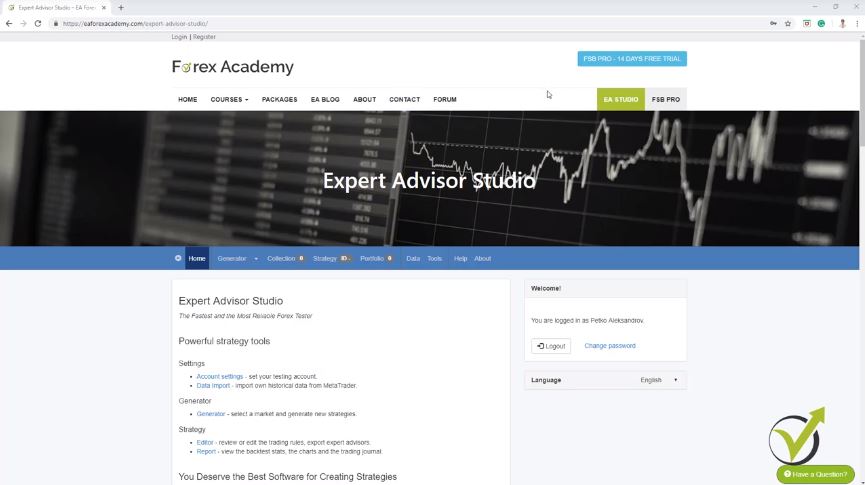
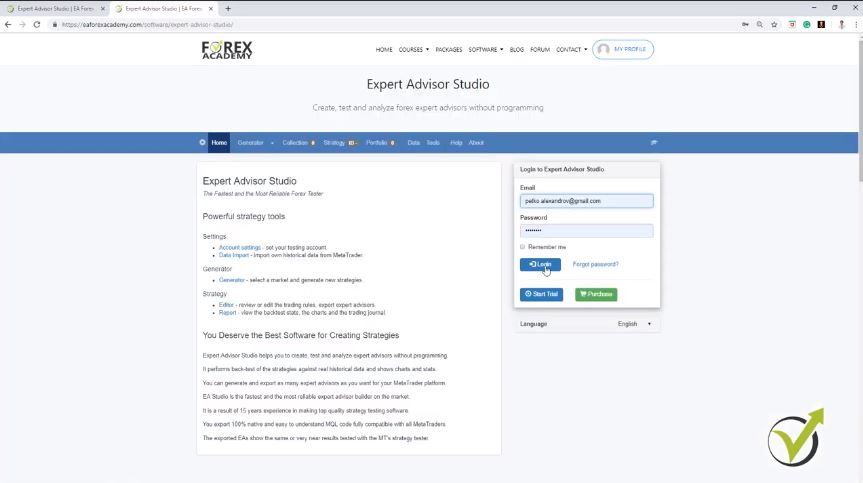
    So if you look now at our website EA Forex Academy, you will find that up in the menu we have the forum, the courses and our blog where you can read much more about algo trading. Now, I expect very soon the new design but still, EA Studio will be here right on the top. So, this is a Strategy Builder that we have integrated into our website to make it easier for our students and traders to use it very quickly. Actually, you can register for 14 days free trial and you can test it out.


    Best algorithmic trading software
    The EA Studio home page


    The reason for trading with the best algorithmic trading software EA Studio.

    So during this period, you will be able to export many Expert Advisors and you will be able to generate an unlimited number of strategies. What is the idea of having Strategy Builder when we are trading? What you can see if I go to strategy is that; I have a server over here, I have the currency pairs and I have the time frames.

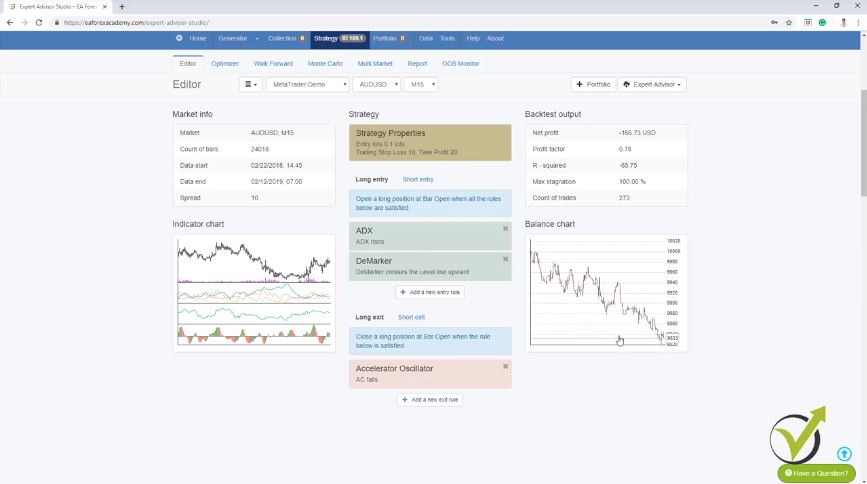
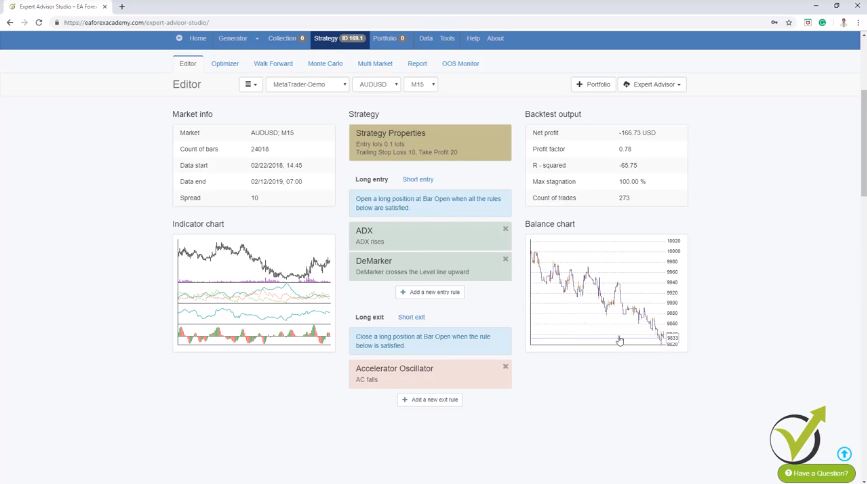
    Below, I have the strategy with Stop Loss, Take Profit, Long entry, Long exit. Here, you can build your strategy, if you have some manual strategy that you have been testing or using and you can export it as an Expert Advisor. So, for example, if I click on add a new entry rule and I go to ADX rises; let’s say a period of 20 just very randomly, I’m taking some indicators and then I will add another entry rule and I will say, DeMarker crosses the level line upwards and I will go with period of 20. Again, level of 0.3 and I will click on accept and the result is that so far it shows me that the strategy is losing. Alright?

    So, the unique thing for me with this best algorithmic trading software is that you will see immediately if your strategy is actually profitable or if it is losing. OK? Here, you can choose if you want to use the Stop Loss. So if it is not used, you are not using it, fixed; you are using a Stop Loss, Trailing Stop Loss. And let’s say, we will add some random Stop Loss and Take Profit again.

    Placing strategy indicators will show you the balance chart.

    So we’ll go to 50 with Trailing Stop Loss. Take Profit: Fixed. Let’s go to 100. I will click on accept and you see there is no difference with this strategy If I’m using this Trailing Stop Loss and this Fixed Take Profit.

    So, let’s make it smaller, 10 and 20. I will click on accept and you see there was some difference but still this strategy is losing. OK? And if I add an exit rule, let’s say Accelerator Oscillator falls and I will click on accept. You can see there was a change in the balance line but still, this strategy is losing.


    The trading indicators improve the strategies
    The Strategy Editor of EA Studio


    One more time, I have taken all of these very randomly. I just wanted to show you that if you place here the indicators of your strategy that you are using, you can see immediately what is the balance chart, and if you change any of the periods or the levels, so if I go down to 5, you will see immediately the difference.

    The indicator chart is very useful in this best algorithmic trading software.

    If I go to a higher number like 50, you will see again the difference. On the left side, we have the indicator chart. This is where we can see the chart with the indicators that are used in this strategy and we can see where the trades were opened and where the trades were closed.

    So, if we have these green bars below the chart we are in a long trade, we are buying, If we have the red ones, we are selling and there are the small arrows which show us when the trade was opened, where was the Take Profit? Here because we have a Trailing Stop Loss, you can see it’s moving a little bit and so on.

    Much information about the strategy of the indicators chart; We have statistical information, this is quite new actually in EA Studio. I have recorded already some free videos that you can find in our forum about the statistics and how useful they are. Then, we have the balanced charts in details, we have drawdown in percentage, we have drawdown in currency, the stagnation days, long balance, short balance.

    You can generate strategies using the Generator.

    There’s a lot of statistical information in EA Studio and we have the journal which shows all trades that were open, at what price? Where is the Stop Loss? Where is the Take Profit? What was the balance at the end? Alright?

    So, let me remove this strategy because as we said this was not actually a strategy but just randomly I have placed some indicators, Stop Losses and Take Profits just to demonstrate to you how you can build your own strategy. Now, if you don’t have a strategy what you can do is: you can generate your own strategies using the Generator.

    This is the great feature that we have in EA Studio algorithmic trading software and this is why I selected to use EA Studio a lot in our trading Academy. It gives us many possibilities and actually, you can read in the forum much more for EA Studio from our student and traders. Many people are now sharing results which is great and it makes me happy that more and more people are using it. It’s really the best algorithmic trading software.


    Best algorithmic trading software
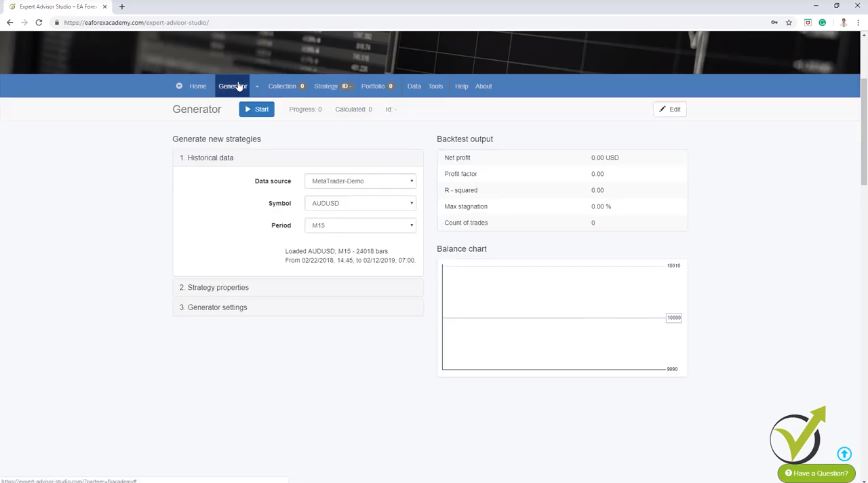
    The Generator in EA Studio


    The Symbol you want to trade.

    So, what we do with the Generator is to select the data source. This is normally the data that is coming from our broker and I will show you at the end of this video how to export historical data for your broker. Then we have the symbol so we can select which symbol we want to generate strategies for. I will stick with the AUDUSD and for the very newbie traders, the Australian vs. the American dollar is called Aussie.

    It’s a slang word for this currency pair so most of the time I call it AUDUSD. Alright? And then, we have the strategy properties. So here, you decide what lots to use in your trading strategy if you want to use a Stop Loss or not, what type? Is it trailing, fixed or trailing? Between what range you want to have your Stop Loss; between 10 and 100, for example.

    Take Profit; if you want to use Take Profit, if you do not want to use Take Profit, may use means that you will see generated strategies with the Take Profit, without the Take Profit. Basically, the program will decide if there will be a Take Profit or not and then with the Generator settings, we can set how many working minutes we want the Generator to be working and then, we have here Search best.

    In Sample in algorithmic trading.

    So if you leave it to net balance, it will show you first the strategies that are with the biggest balance and you can choose other criteria below. Then, we have Out of Sample and In Sample. This is what we will be talking about in this trading course.

    This will be part of one of the methods that I will show you how to avoid Demo testing. But right here, I will just leave it in In Sample. This means that I will be using the whole trading period that I have for the broker. And I will remove the Acceptance criteria which I will explain later on in more details. And if I press on start, you will see that I already have many strategies into the collection. OK?


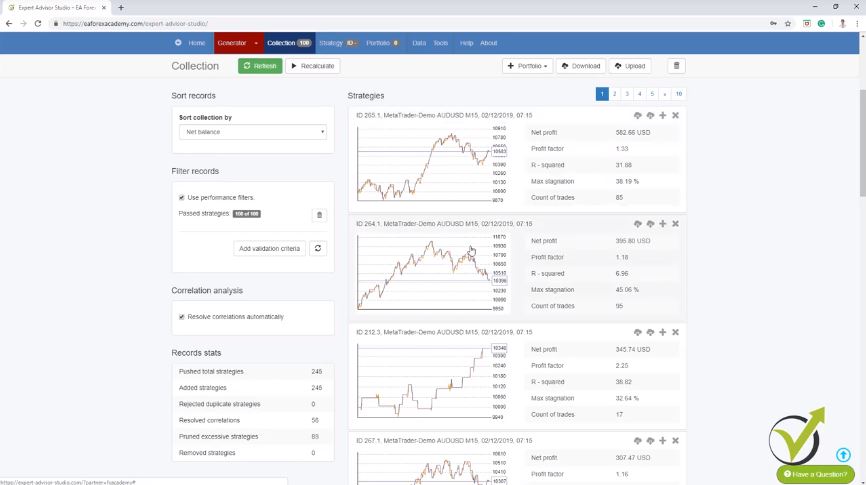
    The Collection in EA Studio
    The strategies display in a list.


    If I click on it, you will see how many strategies I have. So all of these strategies are for the AUDUSD on M15. And if I click on any of them, you will see their balance chart, what the entry rules and exit rules are. You can see details about the indicators and where the trades were opened and closed. And one more time, a lot of statistical information about this strategy over here and if I go back to the Generator, you will see what is the speed of EA Studio. This is the faster generator I know and this makes it the best algorithmic trading software.

    The best algorithmic trading software generates up to thousands or even millions of strategies.

    Just for a couple of seconds not even a minute yet we have more than 2,000 strategies right now. OK? 34%, so I guess it’s about 1 minute already that it’s been working. And much better strategy here was just generated. Now, EA Studio generates hundreds of strategies, thousands of strategies, and even millions.

    What we need to do is we need to learn how to filter them and this is where the Acceptance criteria come. So we can set different Acceptance criteria such as minimum net profit, minimum count of trades and many others that I will show you in the next lecture.

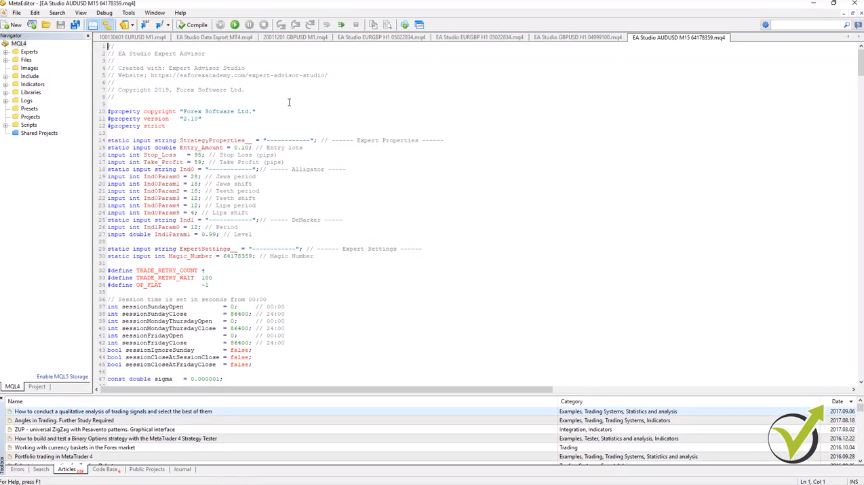
    So we will see less number of strategies but they will be with better Equity lines and they will be with better statistics. Now, I will stop this Generator. And what I want to show you is the key point here of using EA Studio. If you like any of the strategy you can export it with one click as an Expert Advisor for Meta Trader 4 or for Meta Trader 5.

    We do not need to write the code manually.

    So here is the beneficial thing of using the algorithmic trading software EA Studio. With one click, we export any strategy as an Expert Advisor. We don’t need to hire developers to do that for us, we don’t need to write the code manually. And I’m not a developer, I don’t know how to do that. And really, I don’t need to know how to do that.


    Best algorithmic trading software EA stdio
    The Expert Advisor code.’s


    It will take me years to learn how to do it. And it will take me a lot of money if I hire developers. Before the Strategy Builders were created, I actually hired two developers to code the strategies for me as Expert Advisor. It was really expensive because these guys take a lot of money.

    And at the end of the day, it’s very hard to come up with a profitable strategy. This is because even having the Expert Advisor, we didn’t have this statistical information that I told you which is very important. And we never know if a strategy is really profitable if we don’t place it in a Strategy Builder, and we don’t do backtesting, and we don’t see the actual results for the testing period.

    Historical data.

    So, for example, here you can see this is from last February till now, almost one year. These are thousands of bars. This is the historical data that we are using for the AUDUSD. And in the next lecture, I will show you how to download the historical data from your broker and how to import it in EA Studio. It is very important if you want to generate your own strategies, to use your own historical data. This is because the different brokers provide different bid and ask price which forms different historical data. OK?

    All of these, what you see on the chart before the current moment we call it historical data. I will provide you with the Script in the next lecture. You can use to export this data from your broker. Alright?

    Thank you very much for watching. This was a brief introduction to EA Studio Strategy Builder. A very useful software. Which I said you can test for 15 days. And you can export and generate and test as many strategies as you wish. Alright?

    See you in the next lecture.

    Cheers.
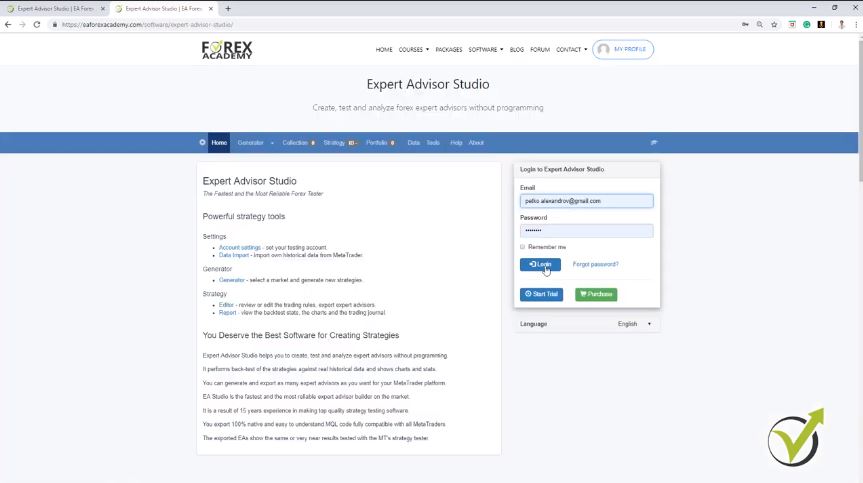
  • How to do Forex trading with many strategies

    How to do Forex trading with many strategies

    How to do Forex trading with many strategies and diversify the risk.

    How to do Forex trading, not with one but many strategies is what I am specialized in. Hello, dear traders, it’s Petko Alexandrov. And in this lecture, I will teach you how to create many strategies. This is a free lecture from the Forex Algorithmic trading course – Top 10 GBPUSD Expert Advisors.

    In the previous lectures I have placed the historical data from my broker, I have selected the Symbol, here I will show you how I generate strategies for different periods or for different time frames.

    Now I will start with M15. But instead of the generator, I will use the reactor which is generator + robustness testing. OK? Very same thing like the generator that I showed you, but as well we can add some robustness testing which validates the strategies if they are robust enough to trade with them. Alright?

    So let’s start step by step. I will go to strategy properties. Here, I will leave it the way it is.

    The Range for the SL and TP is important when you select the strategies on how to do Forex trading.

    Entry lots, 0.01. Stop Loss and Take Profit, I prefer to use and I give it the range between 10 to 100. This means that the generator will find me the value for the Stop Loss and the Take Profit according to the strategy, and I will see it later.

    And I don’t limit the generator with predefined Stop Loss or Take Profit but I give it a range between 10 pips and 100 pips. For generator settings, I will leave it for 600 minutes. This is normally how much I run it.

    And because it’s in the afternoon now, I will leave it to work till tomorrow morning. So this will be like 10 hours and this way the generator will calculate thousands of strategies, probably hundreds of thousands, or sometimes millions of strategies, depending on how much time you run the generator.

    The next thing is how I will filter the strategies

    And Search best, I will leave it to net balance. So on the top, I see the strategies with most balance. And here is the Out of Sample, something I have been using recently and I shared it already in one of my previous courses.


    How to do Forex trading with many strategies.
    Set up for the Reactor.


    So if I leave it In Sample, this means that the generator will use the whole data that I have. But if I select to use, for example, 20% Out of Sample, this means that the generator, let me demonstrate it to you very quickly. The generator will generate strategies which will be generated over 80% of the historical data, and with the rest 20%, it will simulate trading.  So this is how to do Forex trading with tested strategies.

    This is one of the very good ways to skip Demo trading and to go straight to live account. But this is for the more advanced traders of course, who are used to the process. And the idea here is that the generator works only on the white field, and in the green field, it simulates trading.

    Acceptance criteria are used to filter the strategies

    For example, you can see if I refresh and load the new strategies that were generated, the strategy was generated until 80%. And after that, it shows a profit. And this is simulated trading.

    So this is something like, we have placed this strategy for trading before some time or exactly before 20% of the whole period. Alright? Let me stop it and I will delete all of these strategies. And I will go to the reactor one more time, and in generator settings, I will leave it to 20% Out of Sample.

    And here I will select to use the common Acceptance criteria. So what is the Acceptance criteria? Basically, here I can place filters that will filter the strategies before going into the collection.

    Minimum backtest quality is the first one I choose

    Because I don’t want to have hundreds and hundreds of strategies randomly generated. I want to see strategies that pass predefined rules or they fit my trading style because when I’m trading with Expert Advisors or with strategies I want them to have minimum criteria. And here I will add some of the Acceptance criteria and this is the best way how to do Forex trading with selected strategies.

    For example, I like to have minimum backtest quality, I will leave it to 98. I’m not going to explain it in details but it is a criterion connected to the historical bars that we have imported. And if there are some bars when there is uncertainty, if the trade was opened within one bar and the Stop Loss, our Take Profit is within this bar, the Expert Advisor Studio will take it as a negative.

    So it will be a more skeptical way of backtesting. Now the next thing I will choose is a minimum count of trades. This is very important in algorithmic trading.

    As more count of trades we have, the more reliable the strategy is.

    Normally I keep it to 300. I want to see in the collection, strategies that have minimum 300 counts of trades but now I will increase it even to 400. So this means that all the strategies that will pass these Acceptance criteria, they will be strategies with above 400 count of trades.


    The Acceptance criteria in EA Studio
    Count of trades


    This means that for the period that we are testing the strategy we want to see a minimum of 400 times this strategy executed. Which is a great sign of robust strategy because if we have a strategy that opens just 2, 3, 5, 10, or 20 trades for this period it means this is actually not an active strategy. It opens rarely.

    How to do Forex trading with many strategies?

    • use the Historical data if your broker
    • EA Studio to generate the strategies
    • filter them with acceptance criteria
    • minimum of 400 count of trades
    • profit factor above 1.2

    And if we ignore the backtesting period and we just focus on the count of trades, obviously we don’t want to base our trading on a strategy that opened just a couple of trades. But when it opened 400 times the trades according to the entry and exit conditions, this gives us a sign that this strategy might continue being profitable in the future. And I will add another Acceptance criteria here which is the Profit factor.

    How to do Forex trading: strategies with good Profit factor

    This is one of my favorite criteria and I will increase it to 1.2. And for the newbie traders, the Profit factor is defined as the gross profit divided by the gross loss. And we’re including commissions or any taxes if we have spread in Forex or anything.

    Just the gross profit divided by the gross loss. This is the minimum Profit factor and I want it to be 1.2. And this Acceptance criteria is for the complete backtest.

    For all the historical data that we have. Now below we have the In Sample and Out of Sample part. Which means that we can add different or same Acceptance criteria, and they will be related to the In Sample, which is the training part where the strategy is being generated.

    You can add any Acceptance criteria.

    In this case, I said it will be 80% of the time. And separately, we can add the Acceptance criteria for the Out of Sample part or the rest 20%, where the software will simulate trading just as if the strategy was on the trading account. So here, I will add the very same minimum Profit factor of 1.2. One more time, you can add any of these Acceptance criteria. This will assure that the strategies that will be tested will have a good equity line – the way I found how to do Forex trading with many strategies.

    But for the purpose of this course, I will stick to the minimum Profit factor. Here it is and I will increase it again to 1.2. And as well here, Profit factor, I will increase it to 1.2. OK?

    So this is the Acceptance criteria that I will use. I want for the complete backtest for the whole time to have 98 minimum backtest quality, 400 Minimum count of trades, minimum Profit factor of 1.2, and a minimum Profit factor of 1.2 for the In Sample and for the Out of Sample part. Now going back to the reactor, I will not use the optimizer because I want to avoid having over-optimized strategies.

    How to do Forex trading:Walk Forward validation is the key thing.

    Below I have 3 robustness testing. One is the Walk Forward validation, which is a little bit advanced tool. And I have described it in details in the last course “The USDCAD” where I shared my top 10 USDCAD Expert Advisors.

    And in this course, I want to make it a little bit simpler and easier for the beginner traders. But in a few words, the Walk Forward validation proves to us if the strategy is over-optimized. But here, I am using the Out of Sample, which is very similar.

    And basically, Walk Forward validation, it uses Out of Sample. So when I am using Out of Sample I actually don’t use the Walk Forward validation. Now below is the Monte Carlo which I will use and I will tell you what is that.

    The Monte Carlo – the tool that tries to break the strategy

    The Monte Carlo runs a variety of tests. By default, we have 20 tests and it’s just fine. And validated tests 80% which means that the strategy will be validated if 80% of the simulated tests are on profit. OK?


    How to do Forex trading with robust strategies
    Monte Carlo runs a variety of tests


    And here we have different simulations that we can run. For example, we can run simulations with randomized history data, with a randomized spread. So it will run simulations with higher or with a lower spread.

    You can choose execution problems, Randomize slippage, Randomly skip positions, but I don’t have such problems with the broker. So normally I don’t test those. What I like to test are the last two, Strategy variations.

    How to do Forex trading when we are testing the strategies?

    I want to have simulations with randomized indicator parameters. So, for example, if I have the RSI indicator it will perform tests with RSI 9, 10, 11, 8, 7, 6. OK? Different variations for the parameters.

    And I want to see that 80% out of the 20 tests, so this is 16 out of the 20 tests to be validated. And as well, I want to have a randomized backtest starting bar which will show us backtests with different backtest starting bar. Because we want to make sure that whenever we place this Expert Advisor, this strategy on the market it will still perform well and it’s not over-optimized exactly for the trading period.

    And later when I have strategies in the generator, I will show you what exactly is the Monte Carlo. Below we have Multi Market validation which is pretty interesting as well. You can select how many markets you want this strategy to be profitable.

    Multi Market validation test one and the same strategy on different markets

    For example, if I add a few more, let me remove the APPL because it’s not a currency pair but if you have 1. 2, 3, 4, 5, 6, 7, for example, you can select that you want this strategy to be profitable at least on 4 markets out of the 7. OK? Or you can select 5 out of the 7 or 6 out of the 7, and you can add some more markets over here.

    Now having the Multi Market validation is really great, but when we are generating strategies for 1 asset, in this case for GBPUSD, I concentrate on the GBPUSD. OK? Even if this strategy fails on some of the other markets, it doesn’t mean that this will be a losing strategy for the GBPUSD because every currency pair is a different market. OK?

    So, for example, you can use this one if you want to trade some of the other markets as well or just as proof if this strategy will work on the other markets. And this time I will use only the Monte Carlo validation. So pretty much this is how I set up the reactor.

    Setting your trading account.

    Of course, I am testing all the time different Acceptance criteria to make it better and better. As well, after that when I update all of my courses I do my best to improve the performance and the backtests of all strategies. And the last thing before I run the reactor, I will go to Tools and I will go to Settings.

    And here, you can set your trading account. You can change the account currency, the initial account. For example, I will make it 5000 as I selected the Demo account.


    Setting your trading account as in the platform
    Tools in EA Studio


    You can change the leverage if it’s different. It is good to make it the same as your trading account but even if you miss to do that it’s not really important. You will still get strategies into the collection.

    Correlation analysis filters similar strategies

    And you have some additional tools about the trading session when you want to trade. If you want to close at the end of the session, or to close the trades on Friday. Then you have the General settings, start the backtest from the 100 bar.

    This is how Meta trader works. So you can see the very same backtest on Meta Trader and close the position at the end of the backtest. OK? Correlation analysis is pretty interesting. It detects balance lines correlation and it detects strategies with similar trading rules.

    So, for example, if you have as an entry rule RSI 9, for example, rises or crosses the level line and then you have another strategy with RSI 10 with different parameter, OK? It will remove the second strategy that comes to the collection because it’s a strategy with similar trading rules. Alright? Now going to the reactor I will press on start.

    How to do Forex trading with many strategies: Use the Reactor.

    And again you can see how fast the calculator is and how many strategies are being calculated. And those of them that pass the Acceptance criteria will show over here and then they will go to the Monte Carlo validation. If they are validated with these simulations that I was talking about in the Monte Carlo, I will see the strategy into the collection.

    Now you can see what is the difference when I run the reactor with Acceptance criteria, not like before when there were hundreds of strategies. And actually, in the collection, we always see the top 100 strategies that are being generated. OK? Now I will leave the reactor working for 600 minutes which is 10 hours.

    And yes you might see this note here. The generator cannot find strategies. Possible reasons, too strict Acceptance criteria, cannot make enough profit, improper range of Stop Loss or improper arrange of Take Profit.

    Separate EA Studio in a different browser to work faster.

    And this is normal because my Acceptance criteria are strict but it’s not too strict because I have tested it already of course and it will show me strategies with the time. You might see a warning from the software that you might have made your Acceptance criteria too strict. Alright? So I will leave it now to run till tomorrow morning and what I will do at the same time, I will run another reactor on Experts Advisor Studio on M30 and H1 charts. OK?


    How to do Forex trading with EAs
    Expert Advisor Studio trial period


    You can log in to your account and use it in a couple of browsers at the same time. You can register for 15 days free trial. So I will go to the reactor and the very same thing. I will just change M30 and I will have a quick look at the other settings. Normally they are saved so everything should be the same.

    Yes, it is. And we have the Monte Carlo 80%, 20 test so it is just fine. OK? And in order to work faster, I just separate it in a different browser.

    How to Forex trading with many strategies: use the Reactor on different browsers

    And I press on start and you can see it is still working very fast. And I will do the very same thing one more time. But this time, I will do it for H1 chart. So here I will just log in and I will go to the reactor and I will switch to H1 chart. OK?

    Same settings are there, 20% Out of Sample, the Acceptance criteria is the same. Just every time I would check if everything is fine and I click on Start and I will separate it actually in a different browser as well. So the 3 are working simultaneously. And after 10 hours I will have the first results.

    Thank you very much for reading. I will continue tomorrow morning with the results that I will have from the three reactors.

    If you want to get the 10 GBPUSD EAS you can enroll in the complete Forex Algorithmic trading course – Top 10 GBPUSD Expert Advisors.

    Cheers.
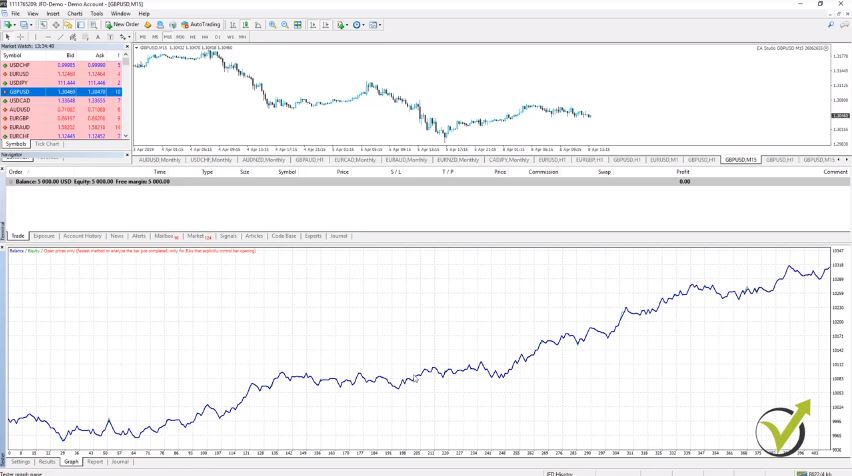
  • How to trade Forex successfully with many strategies in 2020

    How to trade Forex successfully with many strategies in 2020

    How to trade Forex successfully with many strategies.

    How to trade Forex successfully is one of the questions that every beginner trader asks daily and looks for the answer. Hello, dear traders, my name is Petko Aleksandrov, head trader at EA Forex Academy! In this lecture, I will share with you why we need to trade with many Expert Advisors, with many strategies in one trading account. It’s a common mistake for every beginner trader to depend on one single strategy. Now obviously every strategy has its losing phase and its winning phase.

    The losing phase could be one day, it could be one week, it could be longer. So you really don’t want to sit in front of the computer trading and one week to be on losses. Right? Nobody wants to have consecutive days of losses.

    By having many strategies, we diversify the risk. This is the first answer to the question of how to trade Forex successfully.

    That is why when we combine many strategies in one trading account when one strategy has its losing phase, the others will compensate for this loss. Because there are different strategies and at that moment they will have their winning phase.  So this way we diversified the risk between many strategies and we don’t depend on one single strategy that might lose for some time.

    And it’s normal because every strategy has its losing phase, its losing period. And I will show you that. If you look at my chart now, I will show you how to do a backtest for an Expert Advisor.

    And let’s make a backtest for any random Expert Advisor. And I will show you how to place one on Meta Trader for the people who didn’t do it so far. I will go to File, Open Data folder, and then I go to MQL4 and I go to Experts.


    How to trade Forex successfully with many strategies.
    MetaTrader platform.


    Developers program Expert Advisors on Meta editor.

    So this is the place where you need to put any Expert Advisor and the portfolio Expert Advisors that I will provide you with in this course. So I will copy and I will paste here randomly one Expert Advisor for GBPUSD, it is on M15. OK? I will double-click on it.

    And here we see the code of the Expert Advisor, all the parameters that we have, and if I scroll down you will see the complete code. Alright? Now I will compile the Expert Advisor. This is very important.


    Expert Advisor complete code.
    The Expert Advisor code.


    One click, it compiles. So basically, guys, the Meta editor is the place where developers program Expert Advisors and strategies for algorithmic trading.

    The problem when coding expert advisors is that developers don’t know if these strategies will be profitable or not. So they spend a couple of weeks to code the strategy and once it is ready they perform the backtest. This way they lose a lot of time and even months to find a profitable strategy. Normally this is possible if they use the optimizer in MetaTrader which leads to the risk of having over optimized strategies.

    How to trade Forex successfully if you hire a developer:

    • You can automate your trading by hiring a developer with mql experience but you will face a couple of problems
    • It will take you a long time to complete a single strategy into an expert advisor because normally the strategies come with a number of errors
    • After the expert advisor is ready you will spend time to check how it works and if there are errors you will need to send it back to the developer
    • This process might a couple of weeks or even months and in the end, you might end up without having a profitable strategy
    • This is expensive because the developers normally take between 30 to $50 for one hour. This means you will spend a couple of $100 for a single expert advisor.

    However, I don’t do this anymore. Years back I was hiring developing company too cold my strategies. This was very frustrating moments because it was taking a long time for a single strategy to be automated and the results were very slow. This is how I started to look for strategy builders and I found EA studio to work the best for me.

    We use Strategy Builders which I will show you later on. And we get the complete code ready without any errors as you see, without warning words. Just perfectly fine without any issues is the second answer to the question of how to trade Forex successfully.

    Enable Auto trading if you want to do actual trading with the Trading Robot.

    So all you need to do once you receive the Portfolio experts is to open it, compile it, and close it. And you will see here is the compiled version or this is the ready Trading Robot. Alright? I will close the folder and I will refresh here Expert Advisors and it will display below.

    Now if you want to do actual trading with this Robot, you need to enable the Auto trading. It needs to be green. For now, I will disable it because I just want to make a backtest. Alright?

    I will drag it over the chart. And here comes the menu where the common settings and the inputs, where you see the Stop Loss to Take Profit, the entry lots that you will be trading with. So, for example, here let’s make a 0.1.

    You can change the lot to what fits your money management best.

    You can change it to one lot if you wish, whatever size fits your money management or whatever size you want to test. And below are some indicators. In this case, this strategy uses the alligator and momentum and Stop Loss and Take Profit. And I click on OK and the Expert Advisor is over the chart. But you see I have a sad face, which means that the Expert Advisor is not trading because the Auto trading is disabled.

    And I keep it disabled because I don’t want to open any trades with this Expert Advisor. I just want to make a backtest. So I will right-click and go to Expert Advisors, and I will click on Strategy Tester.


    Expert Advisor Strategy Tester.
    The Strategy Tester.


    Here you have the chance to select the data. For example, here is from the 1st of January 2018. So last year, from the beginning of last year till today, let’s make it till today.

    One of the methods that I teach my courses on how to avoid trading on a demo account is using the backtest. Let’s say you have historical data from the last 2 years. These are 24 months. When you perform a backtest you can see how the strategy behaves during these 24 months where the trades were opened and closed, what is the profit and what is the Equity chart at the end.

    Now if you place end date for the backtest let’s say 4 months ago you will test your strategy over the rest 20 months. With the strategy builder EA studio you are able to generate strategies over these 20 months. After you choose the strategies you want to use you can include back the 4 months (the most recent 4 months) and perform the backtest again. If the strategy profits during these 4 months this is absolutely the same thing as if you have traded their strategy into your demo or live account. And this could be done in a couple of minutes no need to spend 4 months for demo trading.

    Performing a correct backtest is the third answer to the question of how to trade Forex successfully

    And we have M15, I will use the current spread. And here is the Symbol, the Expert Advisor, and I will just click on Start and you will see the results with the Expert Advisor. Here you see all trades that were opened and closed.

    You can see the graph. You can see a pretty stable graph over here and you can look at the Report for some statistics, the Journal. But what we focus is on the graph.

    Let’s look at this graph. It is a stable graph. This is the kind of Expert Advisors we want to trade where we have some losses, we have profits. At the end of the day, we have a stable equity line going upwards. Right? Let me make it a little bit bigger so you can see better.

    So these are the so-called robust strategies and this is not over optimized strategy. And what you will notice, overall, the strategy is good. It starts from over here and you see it makes a profit with the time.

    Each strategy has a profitable phase and a losing phase.

    But what you will notice, is that there are these periods when the strategy loses. This is very normal with every strategy. Every strategy will have a losing period, will have profitable periods.


    How to trade Forex successfully
    The backtest output.


    The important thing is that we are having the equity line going upwards and not downwards. Right? But if you focus more on the losing periods, you will see that it might look like very small periods here, but if I put the mouse on any of them, Right over here you will see that this is from 12th of September.

    Going down here which is the 20th of September. So this is like one week or even a little bit more. Now let’s have a look at some other period.

    It isn’t much you can do about the losing periods.

    For example, here we have December 17th to the 24th of December. Another 7 days when the strategy is losing. So if you are trading one strategy, for example, this strategy, you will have these weeks when you see only losses.

    And this makes the traders very discouraged. It made me unhappy at the beginning when I was doing algorithmic trading. And I said to myself, “Alright what do I need to do to avoid having these negative periods?”

    And the answer is nothing. I cannot do anything to avoid these periods because obviously, every strategy has these losing periods. Could be one week, could be two weeks.

    You can see in the beginning here we have an even longer period. Probably it’s a little bit longer like 10 to 15 days or 20 days. But what came to my mind is that I can trade many strategies into one account.

    I will teach you how to trade Forex successfully with many strategies into one trading account.

    So when this strategy has its losing phase, the other strategies during this time, for example, between 11th of September to the 20th of September. During these days it will have a profitable phase. Because it’s a different strategy it uses different indicators, different entry-exit conditions, different Stop Loss and different Take Profit.

    I saw that when I put, not just a couple but many strategies into one trading account, the equity line for the complete portfolio for all the strategies combined together gets much smoother. And there will be a losing phase but much smaller, much shorter. And this way I saw that the equity line of the whole portfolio is much better, much smoother than the equity line of a single strategy of a single Expert Advisor. Alright?

    And this is why in this course Walk Forward optimization: Forex trading with Portfolio EAs, I will teach you how to trade not only one Forex Strategy but many strategies into one trading account. And you will see what is the difference when we perform backtest with such portfolio Expert Advisor. Alright?

    How to trade Forex successfully is a question that I do my best to answer every day.

    My work is to test hundreds and thousands of strategies and expert advisors and to include the best ones in my courses, already above 14000 students joined the Academy and I am very happy that the content we produce is so likable. In every new course, I launch I put all of my new knowledge and experience about expert advisors and I am glad that the course has helped many traders around the world.

    Thank you for reading, and if you want to learn more about the robustness testing and the walk forward optimization you can learn it all from the course.

  • Why Forex traders lose money in 2019? Pro trader insights

    Why Forex traders lose money in 2019? Pro trader insights

    Why Forex traders lose money?

    Why Forex traders lose money? Well, probably this is one of the most common questions you will come across on the internet. Now with my experience, I have seen a lot. Especially when I was trading for different institutions and when I was working for a couple of brokers.
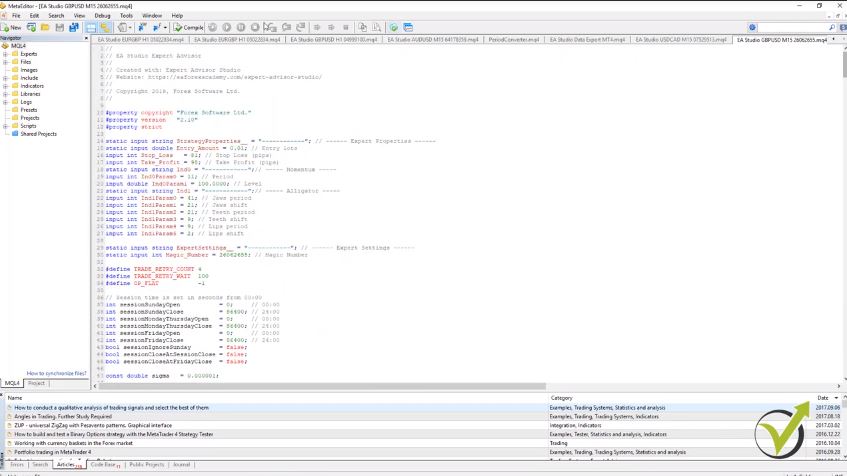
    So why Forex traders lose money. Well, probably that’s one of the most common questions you will come across over the internet. Now with my experience, I have seen a lot. Especially when I was trading for different institutions and when I worked for a couple of brokers.
    I dealt a lot with the clients, and I can tell you that, unfortunately, over 95 to 97% of the traders lose money, and over 70% of the traders zero their accounts during the first one month. And for me, this is unbelievable. Even I know that’s the truth. But it’s incredible because people jump into trading without having any idea what they’re doing.

    Why Forex traders lose money? People aren’t educated on how to trade.

    I can say this is one of the most important reasons, and I can say this is reason number one just because people lack education when it comes to trading. Now trading is like every other job.

    Doctors study for 10 years, teachers study for…what, 7, 8 years in different countries. And people do expect they will stay in front of the computer for 1, 2 days and they will learn how to trade just because they saw some free YouTube clips or they saw some education from their broker that teaches them nothing. So traders lack education and education is very easy nowadays, to be honest.
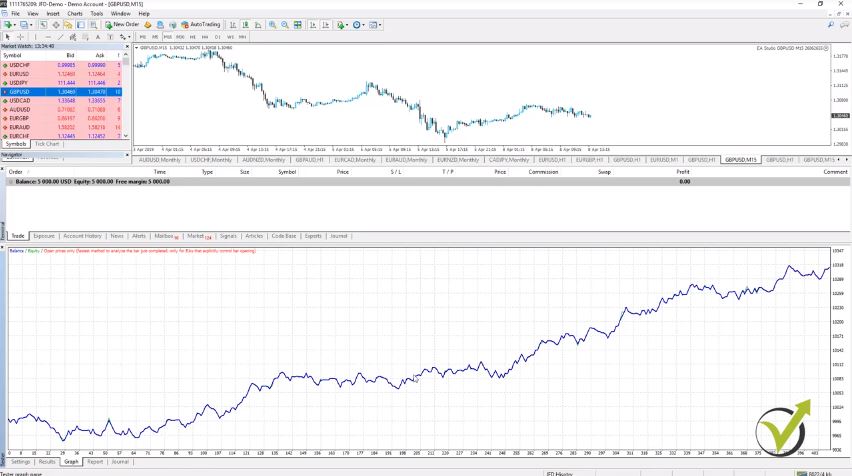
    Before, when I was studying there wasn’t much material over the internet, I was studying from books. It was time-consuming, it was nothing extraordinary that could be found really in books because the old methods don’t apply anymore. And this is probably reason number 2. I can say, everyone trades the same way using the same things and expects to have profits.

    Study the trading statistics to get insights.

    So head and shoulders, any pattern formations like a double top, triple bottom or whatever it is, normally these things are visible on the chart. And you can find so many patterns like that and it’s easy to learn those but obviously if everyone is using those they wouldn’t work. Right? And if the statistics are that 95% of the forex trader losing money, then you should think, alright, how this 5% are trading in order to have profitable results.

    Or the question is: Why Forex traders lose money if they know that they should not use what everyone tells them?

    This is the issue. When the beginner traders step on the market and they see this one and the same education about fancy patterns they accept it as the only proper way to do it. It is not about having the wrong education, it is about having this massive education that one finds everywhere.  So how the profitable traders do it?

    Now they don’t use all the famous and conventional methods in trading. So this 5% are different institutional brokers that have access to paid data. They have information about the news quite faster than what we see on the websites.

    And the others, I can say, 1 – 2% of the traders are the ones that are trading with the help of huge funds and institutions, where they have an unlimited number of funds, and they don’t think about having a tiny Stop Loss behind their position. Now the rest 1%, where I find myself, actually are those that trade for quite a long time having, let’s say, a regular trading account that allows them to trade regularly and those that are using algorithmic trading.

    Do not involve emotions while trading.

    That answers partially the question Why Forex traders lose money? So during the last five years, I have specialized in algorithmic trading, and with algorithmic trading, we succeed in avoiding the emotions. So when you’re staying in front of the screen you should be relaxed, no feelings involved. You should depend on the Expert Advisors, for example, on that screen, you can see I am trading with 100 strategies.

    And you can see how many trades are opened and how many trades are being opened nearly every 15 minutes. So here I am testing 100 strategies for GBPUSD at the moment, and I’m trading with them. And I recorded, recently, a course about this 100 GBPUSD strategies because it’s a great system that teaches the traders how to avoid emotions, how to trade fully automatically.:


    Why Forex traders lose money
    Trading with 100 strategies into Portfolio Experts


    And all we need to do is to follow the performance of these Expert Advisors and decide which strategies to leave in the account, which strategies to remove because everyone knows that the market changes. So we cannot expect to trade with the same strategy continuously. We trade with many Expert Advisors, and we see which ones are profitable for the current market conditions, and which ones are losing.

    Remove the losing strategies.

    So those that are losing, we remove them. Also, when we trade with many strategies, we diversify the risk. This way, I achieve more stable results, and if some strategy loses, the others compensate for this loss.

    Now every strategy has its losing phase. You won’t find any strategy that will make you a profit regularly, but the thing is that most of the people and most of the traders keep looking for this strategy that will bring them benefit like all the time, every day. And I will say that’s not the reality and that’s why when we have many strategies into the account and when one strategy is in the losing phase, the others compensate the loss, and we remove this strategy because we don’t want to trade it while it is in this losing phase.

    And what usually happens with the beginner traders that lose money is they test the strategy, no matter manual strategy or an Expert Advisor. If the strategy loses for a couple of days, they remove it, and they get upset, and they start looking for the new strategy. But all they need to do is to combine many Expert Advisors. So Why Forex trading lose money? They do not know how to diversify the risk.

    I use Strategy Builders to generate many Expert Advisors.

    So how I achieved that, I use Strategy Builders to generate me many Expert Advisors. One of the Strategy Builders I use is EA Studio. The other one is FSB Pro. So these are professional software, they cost a bit of money.

    Of course, for some people is not a bit of money but it’s professional software that I cannot trade without. And actually, when I am capable of generating many Expert Advisors and strategies, I have the freedom to trade with so many strategies and Expert Advisors in one account.

    So probably, this is the next reason why Forex traders lose money. They don’t use professional software, and they don’t have the chance to trade with so many strategies in one account. They depend only on one strategy, which is a huge mistake. You cannot depend on one strategy. It has it’s losing phase, and you don’t want to sit in front of the screen trading for a couple of days and have only losses.

    For beginner traders, have the tryout period first.

    This is where people get mad frustrated, and they lose themselves in trading. Now one of the next, I can say, is the tryout period. This is what I call it for beginner traders.

    So many traders want to see how it’s going in trading, you know beginner traders. So they open small accounts like $200, $500, they don’t put any effort to learn anything. They say, “Alright, I will test how the Forex market is at $200, it’s nothing to lose so much.”

    And they lose the money, and then they say, “Alright I learned that thing and that thing, and because I did this, this was wrong. I will open another account, let’s say, with 500 this time because I learned something already.” And they lose this account, and they fund again, and they usually do a couple of times, three to four times statistically, and they lose it. Why Forex traders lose money? They keep funding the account and lose it, instead of changing something.

    Why Forex traders lose money? Trade on a virtual account before trying out a live account.

    But they have already lost like $1000 or $2000, which is good money to start with trading. But I could tell you that less than 1% of the beginner traders start with such accounts. So it’s an illusion that you try how it’s going with a small account, that you don’t care about.

    Because then it will come to another account, and another account, and at one moment they get a little bit afraid. “Well, I lost like $2000, and I think this is not for me.” And they leave it.

    So it is possible as well to trade on a virtual account where you don’t risk a lot. And you can open an account with $5,000, for example, or $2,000, see how it’s going there but on the virtual account and not on the live account. So it is much much better to trade on the live account when you are having already the system and to see how things are going or to test it on the virtual account where you don’t lose actual money.

    Take caution about scam brokers.

    Now another very important reason is scam brokers. Unfortunately, nowadays, there are many scam brokers. These are companies that have no regulation. People fund their trading accounts, and they lose their money without having any chance of profiting.

    And in our forum actually at EA Forex academy, we have the topic that is called “How to Recognize the Scam Brokers”:


    share your experience
    Our trading Forum


    And if you have the time, you can spend just a couple of minutes reading it. So here we have described how exactly the scam brokers work. If this happens to you, you will recognize the steps, what they do.

    So, for example, you leave your contact online they start calling you immediately over the phone. They will ask you to deposit a minimum of $250, sometimes even less. They will ask your credit card and debit card details over the phone, which is illegal. Then after that, they will take your money.

    Why Forex traders lose money? Scammers make fraudulent calls.

    You will receive a call from the compliance department, and when you send your documents, you cannot do anything to chargeback. And then start the horrible thing when a more professional trader or so-called professional trader calls you and asks for more money. These people have no idea about trading, and they scam the people all the time.

    Unfortunately, it happens a lot daily. We have many students joining the Academy, where they share bad experiences with the scam brokers. Unfortunately, not too much could be done. But what we do is we try to protect our traders and students from the scam brokers as maximum as possible.

    And the other reason, I can say, is trying to stop trading manually. This is one of the biggest reasons why people lose money. They trade manually. They try to predict the market. They fall in love with the trades.

    People tend to become greedy after making a few profitable trades.

    There are so many reasons around with manual trading, but most importantly, there are emotions. People feel greedy when they make a couple of profitable trades. They say, “Wow my system is so profitable. I did three consecutive trades on a profit. It’s time to increase my trading capital, it’s time to increase the trading size.”

    And then, when the losing phase of the strategy comes, they lose their money very quickly. As well people are afraid when…I have seen so many times traders being on profit, and they hurry to close the trade because they are on a profit, and they are afraid not to lose this profit. Why Forex traders lose money? They do everything the opposite way because this is what their emotions say.

    And I had seen clients when I was working for one of the brokers that were keeping positions with months on a loss, and they have this risk tolerance to keep their trades for a couple of months hoping that the price will get to their entry-level. But when they are on a profit, they don’t even wait for a single day they see the profit, the small profit and they close the trade and they say, “Wow OK now I am out with zero losses and a small profit.”

    Why Forex traders lose money? Do not try making predictions.

    So they waited like, a couple of months to be out without profit so basically, they did nothing. And the next trade comes and again they have this tolerance for waiting for the huge loss for many months. And sometimes the price doesn’t reach to the level it was before, just like what happened with the Bitcoin and so many traders, people lost their money.

    Because they were buying when it was already expensive, and they were keeping their Bitcoins hoping that the price will reach the game to this level. That was at the beginning of 2018, but so far, it didn’t happen. It might happen, we don’t know. So we don’t do expectations.

    I don’t try to predict what will happen. I don’t know what will happen. The price now, I know, of GBPUSD is 129.55. I don’t know where it will be after 5 or 10 minutes. I don’t care where it will be.

    I depend totally on the Expert Advisors on the statistics I see from my trading, and I don’t put any emotions in trading to predict the market and not to fall into any feelings. This is crucially important in trading.

    Thanks for reading the article. If you have any questions, do not hesitate to ask me in our forum, and I will answer you.

    Cheers.