Blog

  • EURUSD Expert Advisor course: Top 10 EAs FAQ

    EURUSD Expert Advisor course: Top 10 EAs FAQ

    EURUSD Expert Advisor course is the topic of today’s FAQ session.

    Hello dear traders, it’s Petko Aleksandrov from EA Forex Academy. And today I will make a video and article where I will answer the 10 most frequently asked questions that I receive for the EURUSD Expert Advisor course Top 10 EURUSD strategies.

    1.” How to change the trading lot in the Expert Advisors?”

    When you drop the EURUSD Expert Advisor over the chart comes up a small menu for the inputs of the strategy and on the top, you will see the entry lot. And you can change it to whatever lot you are willing to trade with. Also, if you want to change it later you can change it from the properties of the Expert Advisor:
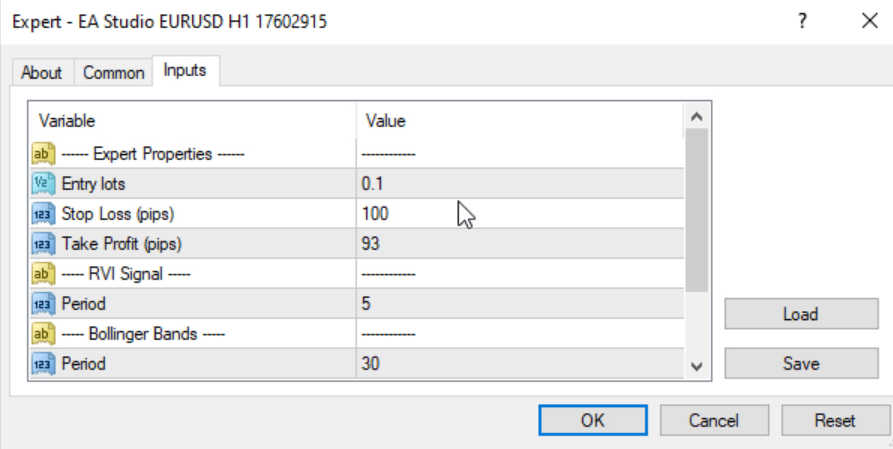
    eurusd expert adivosor inputs
    Inputs for the Expert Advisor

    2.”Why the EAs that I downloaded are different from the ones you showed in the EURUSD Expert Advisor course?”

    This is because I update the course with new 50 EURUSD Expert Advisor every month or two whenever it is needed. So, in the Expert Advisors course whenever you enroll you will see the new EAs with the new inputs. And every time I make an update I actually place the new Expert Advisors.

    The students can download them straight away and they don’t need to change the parameters in their Expert Advisors.

    3.”From where to download the .exe file for the EA Studio?”

    Here I have to say that EA Studio is a web-based Strategy Builder, so you don’t need to download it and install it on your computer. You can use it on your browser. So, you don’t need to install it, you don’t need to download it.

    What you need to do, is just to open it in your browser. You can do it from your desktop, from your laptop, from your tablet, even phone, whatever device with the Internet and the browser you can use EA Studio. So, you don’t really need to download it and to install it.

    4.” How should I know if optimization with my broker is needed?” 

    When you place the Expert Advisor on your chart what you can do is a backtest with Meta Trader. And you can do actually backtest with EA Studio, as well. It’s up to you which method you preferPersonally, I prefer the EA Studio because it works much faster than the Meta Trader back tester.

    And if you see that the results are not really promising with the backtest you will need to do optimization with your broker. So, you’ll make sure that these Expert Advisors are actually fit to your historical data of your broker. This is very important in algorithmic trading.

    5.”Do you update the Top 10 EURUSD Expert Advisor every month?”

    There is an old saying: When something works, do not touch it!

    In this EURUSD Expert Advisor course, I show that I update the Top 10 EAs EAs whenever it’s needed. But I will update the course every month with new 50 EAs.

    When I update them I will let you know, I will send you a notification and you will see in our Forum.  You will know that the EURUSD Expert Advisor course is updated and you can download the new versions.

    6.”How to download the EAs?”

    The EAs are attached to lecture where I show how to install them on the MetaTrader platform. Whenever I do update as well I replace the Expert Advisors there. You can download the new ones at any moment. They are as a resource file, so you can just download them straight away. I don’t need to send it to you.

    7.”I have a very good performance of the EURUSD Expert Advisor. When to place one on a real account?”

    This is a thing that I cannot really give a precise answer to. And this is because it depends a lot on the market. It depends a lot on you when you feel comfortable trading with these Expert Advisors on a real account. If you need more time on a demo then spend more time on a demo, practice it, follow the performance of the Expert Advisors.

    And see which ones are really the best Expert Advisors working for your broker over the historical data of your broker and the quotes. Because the brokers, they show so much different prices even for EURUSD or the currency pairs and really the performance of the Expert Advisor is really depending on the quotes of the broker, on the spread. This is the difference between the Bid and the Ask price for the very newbie traders.

    It really depends on you. I normally suggest people to start trading on a live account whenever they feel ready, whenever they feel comfortable with the system, with the Expert Advisors. This is the time when you need to start on a live account. And I always, always suggest spending more time on a demo account.

    8.”Why did you select EURUSD as a currency pair?”

    The very simple answer here. I have selected EURUSD because this is the cheapest currency pair to trade with all of the brokers. The spread for EURUSD is small with all, well with all regulated brokers of course.

    Some of the scam brokers offer such a huge spread even with EURUSD. So, stay away from these brokers. But the regulated brokers they offer really, really small spread with EURUSD. And when we create different strategies, trading for EURUSD we still have huge diversification even on the same asset.

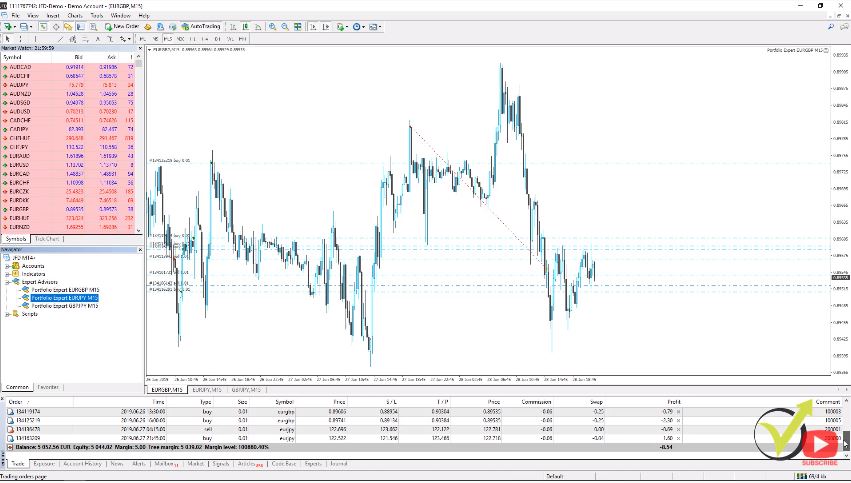
    And this is trading with different strategies for one in the same asset as the EURUSD. But you can see in one of my accounts how many orders I have only for EURUSD currently open. And this is with 100 strategies that I’m testing on EURUSD. Still, this is a huge diversification of the risk. Trading the cheapest currency on the market:
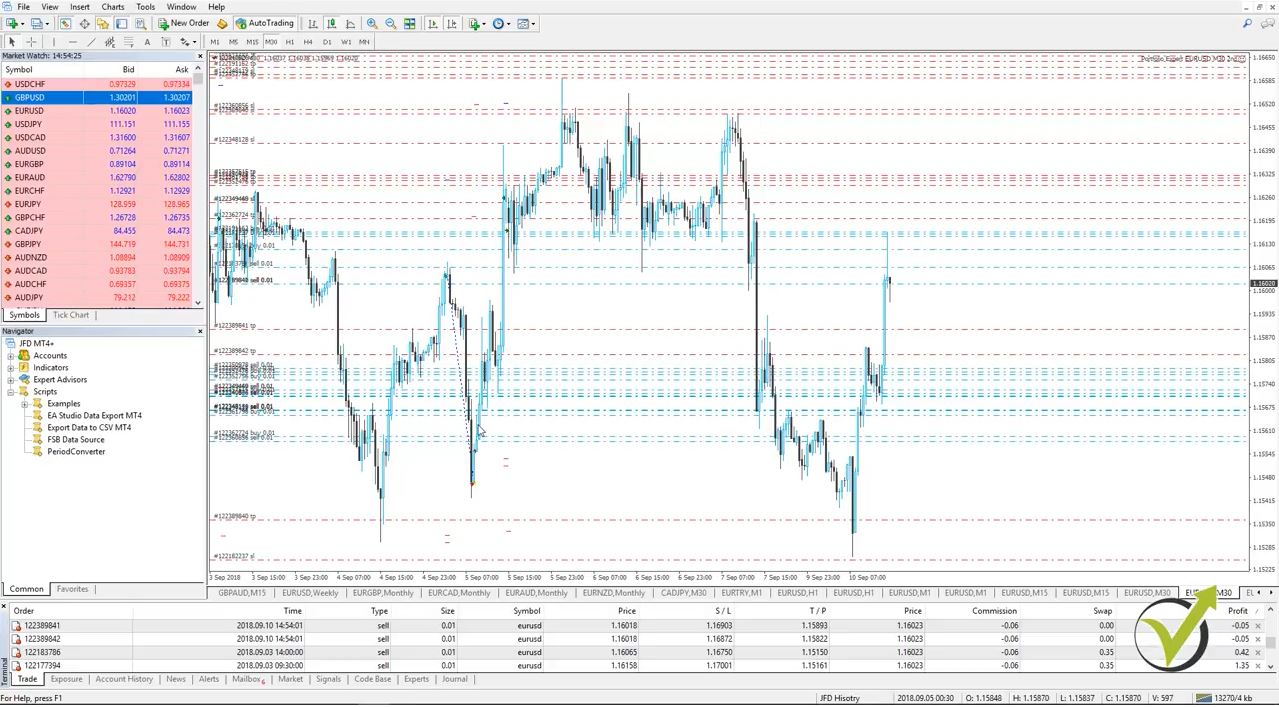
    eurusd expert advisor course
    Portfolio trading with many Expert Advisors in one trading account

    And I say cheapest because the spread one more time is small. It doesn’t mean that it’s cheap to buy EURUSD or to sell it. Like every other asset, it depends on the quantity that we are buying or selling, the trading lot that we are trading with. I say cheapest because we pay less spread to the broker compared with the other currency pairs.

    The next question that I frequently receive for the Expert Advisors course is:

    9.”Can I generate strategies the same way for other currency pairs?”

    Yes, you can generate strategies for any currency pair, for any trading asset that you see on Meta Trader. Just what you need to do is to import the historical data from your broker, for the asset that you want to trade into EA Studio. And it will generate strategies for you. You will be able to get an unlimited number of free expert advisors for 15 days.

    There are many free videos on YouTube about how I do that. So, you can just see those videos and you will learn to do it. It’s really, really easy. Probably, it will take you some time to get used to it but the generation process is so quick. Everything is nearly automatically. You don’t need to do too many things manually.

    10.”Can I use these EURUSD Expert Advisors on other currency pairs?”

    I would say here probably not. These strategies, these Expert Advisors, they are created for EURUSD. They were generated over the historical data of EURUSD. I have been testing them already for so long time, only over EURUSD. I didn’t even make any test trading on other currencies, because they were not created for other currency pairs.

    The proper way if you want to trade other currency pairs you should generate strategies for other currency pairs and export the EAs for other currency pairs, just as I teach in this Expert Advisors course. EA Studio comes with a 15-days free trial that you can use and during this period of time, you can export as many strategies/Expert Advisors as you wish.

    Can we use one Expert Advisor on different currency pairs?

    • every strategy/Expert is designed for one currency pair like in this Expert Advisors course
    • the different currency pairs are different markets because these are different quotes
    • the behavior of every currency pair is different ( it represents different economies)
    • the Expert Advisors show different backtest for the different currencies

    And actually, what I suggest to my students is to prepare the strategies. So, you can use EA Studio free as long as you wish. It needs enrollment when you want to export the strategies as Expert Advisors. You can generate strategies, you can test strategies for their robustness. Or you can test on different currency pairs or whatever you want to do with EA Studio.

    In this EURUSD Expert Advisor course, you will see the possibilities with EA Studio.

    And when you are ready to export the Expert Advisors, the strategies that you want to trade with. You can register for the 14 days free trial and during this period of time, you can export as many strategies as you have prepared. The program is really great.

    EA Studio provides the opportunity for us to generate strategies and with one click to export them as Expert Advisors.

    These are the 10 questions that I really receive nearly every day.

    And I really hope this information will help you to have a better idea about the Expert Advisor course. And of course, if you have any other questions drop us any questions on the Forum. There are many experienced traders there and they will assist you as well. I will assist you within 12 hours as always, and I will answer your questions.

    Have safe trading always and have a great day! Cheers!

  • Forex Trading Course – London, NY & Tokyo: 10 FAQ

    Forex Trading Course – London, NY & Tokyo: 10 FAQ

    Forex trading course London – the system you can use every morning

    Forex trading course London, NY, and Tokyo is one of my favorite systems! It is Petko Aleksandrov from EA Forex Academy, and today, I’ll answer the top 10 frequently asked questions we receive for the Forex trading course – London, New York, and Tokyo trading system.

    The first question that I will answer is:


    1. When do you break even with the system in this Forex trading course London, NY, and Tokyo?


    For the newbie traders break even is when you enter into a trade, and if you’re on the profit, you place your Stop Loss on the entry level. So, if the price reverses down, if you have bought, you will get out of the trade with zero losses. Now, break-even is very useful sometimes, but keep in mind that you don’t make profit. You don’t lose money, but you didn’t profit as well. So, it’s like you didn’t trade at all.

    I use Break Even only in the cases when I enter into the trade in the morning, catching the volatility, because this is the idea of the Forex trading course. And, if the price stays in a range, just very close to my entry, and I see that a couple of hours, there isn’t any volatility anymore with this currency pair. The Forex profit supreme meter changes, and at this moment, I don’t know what will happen till the end of the day.

    So, I prefer sometimes to place the break even, to make sure that if the price reverses, I will not have losses. And at the same time, I still give it a chance to reach my Take Profit and to go into my direction and to have some profits at the end of the day.


    2. If the overnight range is big, do you keep the same Stop Loss?


    That is an excellent question, by the way. It’s a common mistake for many new traders when you have a strategy with predefined Stop Loss, like the one that I demonstrate in the Forex trading course, you have to keep the Stop Loss. What you can do is, you can reduce the entry amount.

    So if your Stop Loss distance is too big, you have to keep it there. Because it should be there according to the system. So, what you can do is, you can reduce the trading amount that you were planning to trade with. You will enter with fewer lots, but you will still keep this same Stop Loss distance.


    3. Is the Forex profit supreme meter available for Meta Trader 5?


    To make it clear here, the Forex profit supreme meter is available for Meta Trader 4, and it’s not available for Meta Trader 5. Many students try to place it on Meta Trader 5, and it will not work there.


    Is the Forex trading course London is available for MetaTrader 5?

    • it is applicable for Meta Trader 5 and on any trading platform
    • the FPSM indicator is possible only for Meta Trader 4
    • the system uses indicators that are available on all platforms


    4. Why do you use the 21 EMA exactly in the Forex trading course?


    Well, the 21 EMA is a really old method in trading on the Forex market, so the EMA is a little bit more complicated formula than the Simple Moving Average. However, it is 21 period, and we are trading it on H1. So we are looking at the last 21 hours.

    And the EMA is placing a little bit more weight to the recent bars. So the idea is to catch the trend direction within the day. If it is longer, you will not be able to see the changes inside the day. The idea here is that 21 it’s less than one day, it’s within the day, and it catches changes in trend direction very quickly because it gives weight to the recent bars.

    You can Google the formula of the EMA easily it’s not complicated. It’s just a little bit more difficult than the Simple Moving Average, but I can say use 21 EMA very successfully. And, if you practice with it, you will see that it works great. Of course, if you find a better value, it will be even better for yourself.


    5. If you trade the London session, do you wait for the GBP news or for the news that is coming from the United Kingdom?


    Well, you have two choices here. If there are essential news that is coming up, usually two and a half hours after London is open, you better wait for the news. Because they might affect the market even before they were released.

    Now, the other thing is, if you see massive volatility with the pound, you see it on the top, or on the bottom of the Forex profit supreme meter, you can trade it as well. Just make sure that you will exit quickly before the news. I know many Forex trading courses London or other market-related trade the news, but with this system, I prefer to avoid it.


    6. Where can I find Meta Trader 4 anymore?


    Well, Meta Trader 4 is not available anymore at the official site of the Meta quote company, because they are trying to push the traders to Meta Trader 5. However, many traders still prefer to use Meta Trader 4.

    I still prefer to use Meta Trader 4, and it is available on the websites of the brokers. So when you choose a broker with Meta Trader, you can download Meta Trader 4 from the broker’s website.


    7. What to do if the MACD goes in the opposite direction?


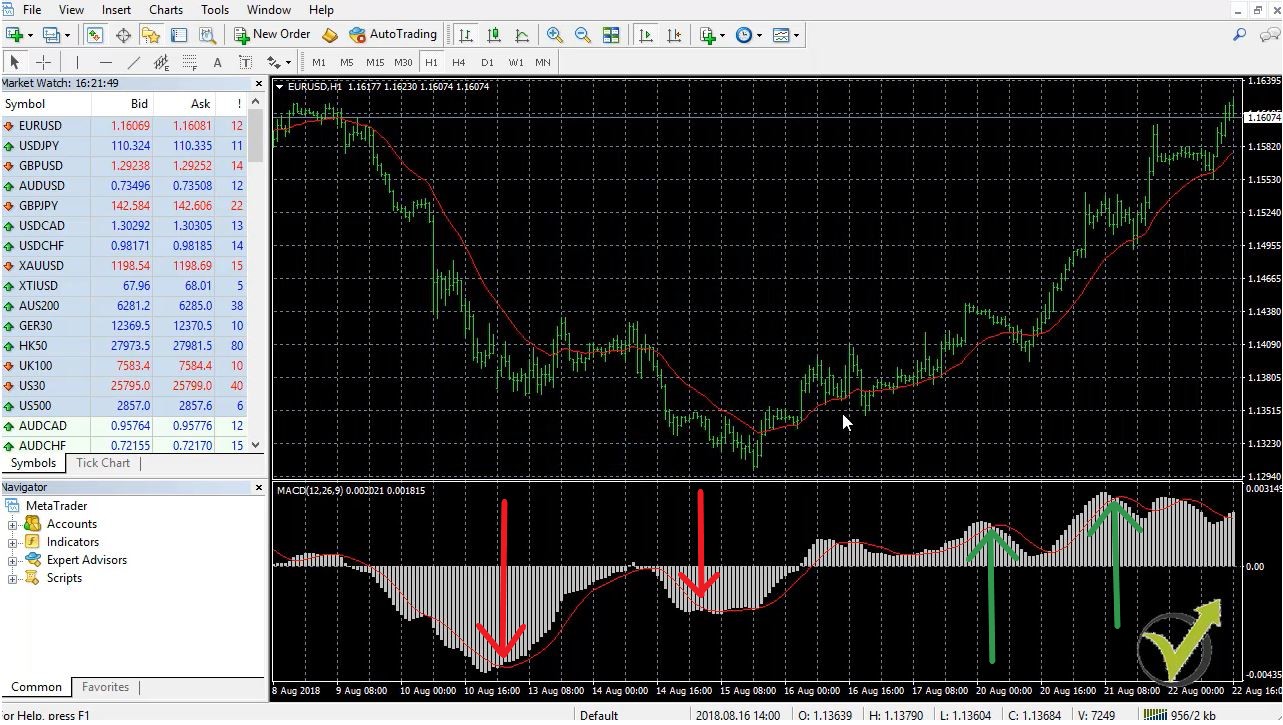
    If I place one MACD on my trading screen, you will see that it changes on an hourly chart pretty often within the same day. However, if any of the indicators, no matter is it the EMA, is it the MACD, or any other indicator that you are using, you better exit the position, if you see an opposite signal:


    Forex trading courses London
    Signals by MACD to Take Profit


    So, no matter which system we are using, the one from this Forex trading course, or any other. If you see that any of the indicators show the opposite signal, it is time for you to take your profit. And get out of the position.


    8. Do you use the trade sheet from the Forex trading course London for every trade?


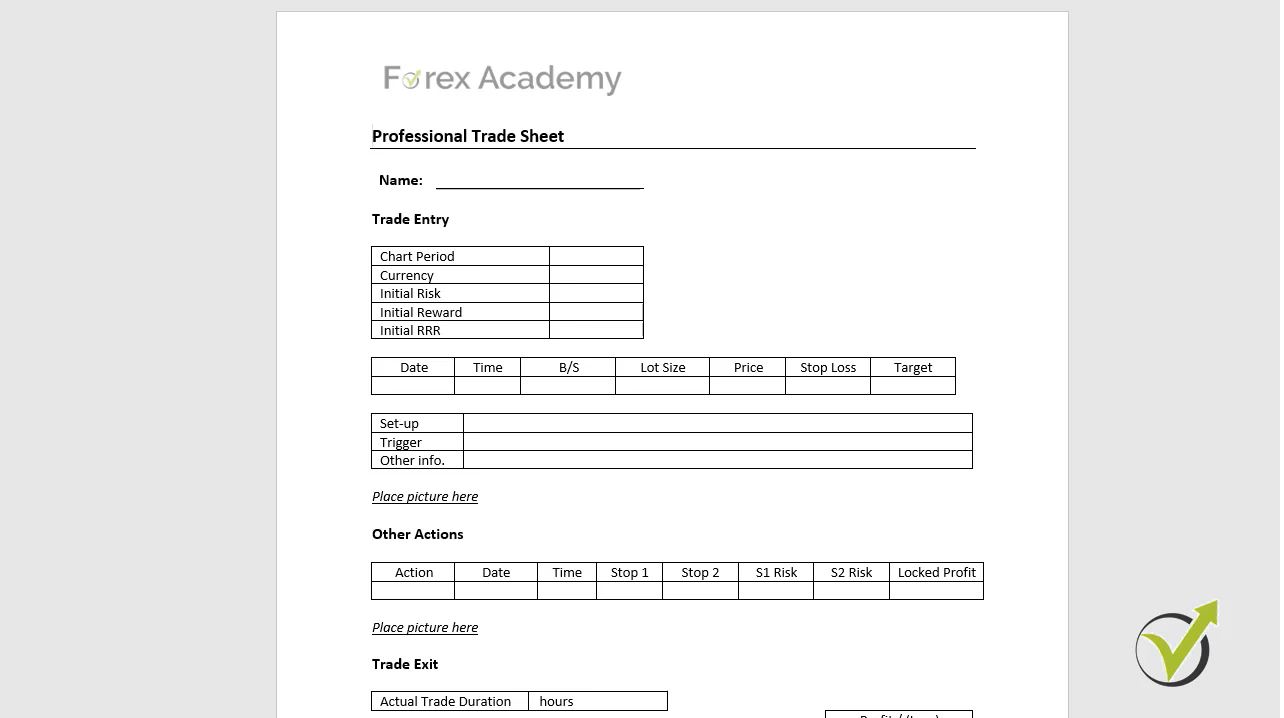
    Тhe trade sheet is handy even for advanced traders. Yes, I still use the trade sheet every day for the trades that I open, because this way we can improve my trading. We see what mistakes we have done along the week. We see what we have missed:


    Forex-trading-course-London
    Trade sheet to improve the trading.

    We see what we could improve, and of course, we see the good trades. But try to find even in the excellent trade some mistakes. Try to see how you could have done it better. And the trade sheet helps, because if you do it daily with every trade, you will see how useful it is.

    And I attached this trade sheet to the course so that every student can use it.

    Why do you need a trade sheet in this Forex trading course London?

    • learn from the mistakes you have done
    • see what you have missed in the last trades
    • have a statistic for all the trades you did

    9. Are some currencies not available on the Forex profit supreme meter indicator?


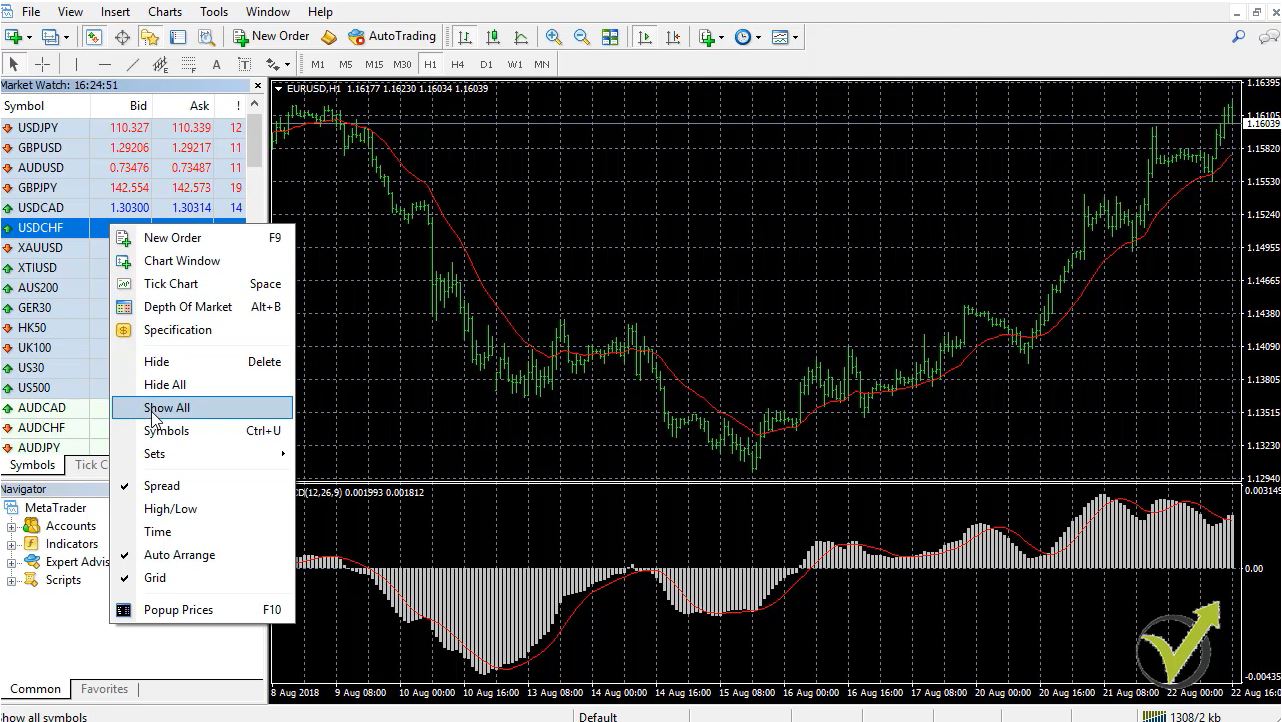
    Well, this is if you don’t have all of the currencies in your market watch. If you look at my screen, you will see that if I right-click over any of the currencies and I go to show all. This will force the Meta Trader to show all of the assets available for your broker:


    All of the currency pairs
    Right-click of the mouse and select show all

    I have done that already here, that’s why it is not showing any difference. But usually, when you open an account with the broker, you will not see all of the currency. So make sure that you see all of the currencies. And then drag the indicator once again over the chart.


    10. Why do you use the overnight range in this Forex trading course?


    The overnight range is a very old method, and this makes it important to the market. And this is very important for you to remember. When something is essential for the market, it impacts the market. When many people are looking at it, they take action when the price breaks, right?

    So, when something is important to the market, we have to take advantage of it. The overnight range is a really old method to use on the Forex market. I just have combined it with a couple of indicators to make it more profitable.

    If you have any questions, don’t hesitate to ask me.

    Write at our Support Forum.

    I’m always here to answer you. 

    I can’t wait to see you inside the class!

  • Professional Forex trading course: 10 FAQ

    Professional Forex trading course: 10 FAQ

    Professional Forex trading course – the most frequently asked questions

    Hello dear traders, it is Petko Aleksandrov, and in this video, I answer the FAQ for the Professional Forex trading course.

    Before getting into the 10 questions that I get nearly every day, I will answer questions that most traders ask themselves:

    How to master Forex trading?

    • like everything else in life you need to practice a lot
    • proper education is a must before trading
    • learn and copy the best traders you know
    • trust yourself and no one else

    The first question that I frequently receive is:

    1. Can I use the strategy from the professional trading course for different time frames?


    Well, I have created this professional Forex trading system, particularly on H1, and there is a reason behind that. With my experience, I have noticed that on H1 the indicators that I have selected with the parameters inside and the values, work the best. If you want to change it, you can, but you need to make sure that you observe well the market. You test it out and see if you will keep the same parameters for the indicators if you go to lower timeframes, for example as M15 or M30.


    2. Why can I not find EMA indicator in Meta Trader?


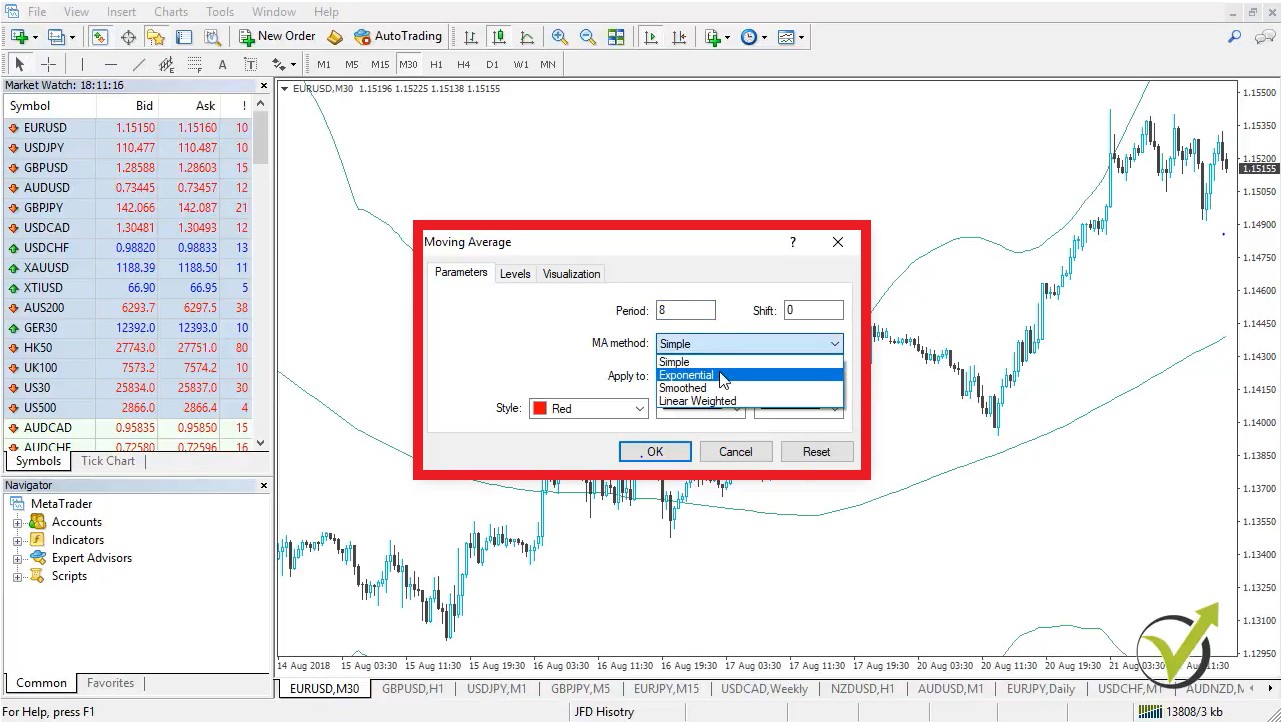
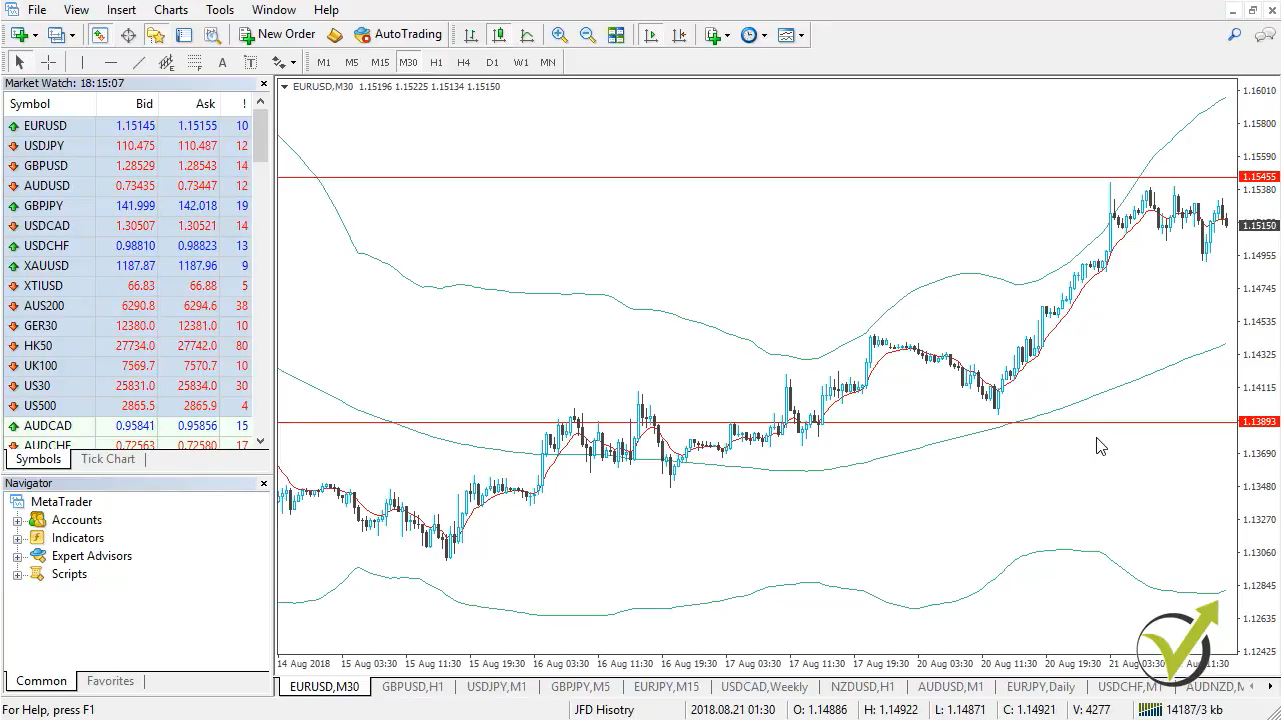
    EMA stands for Exponential Moving Average and it is available in Meta Trader. If you look at my screen and if I go to insert indicators and I go-to trend, this is where you will find the Moving Averages. Here as moving average method, you can select simple exponential, which is the EMA smooth it or the weighted. If I choose exponential, click on OK, I will have the eighth period of EMA Exponential Moving Average:


    Professional forex trading instruments
    EMA = Exponential Moving Average, Method = Exponential


    So, the Exponential Moving Average, this is just a Moving Average, but the method is exponential. It is available in Meta Trader.


    3. Can I use this Professional Forex trading course for cryptocurrency trading?


    Of course, this system can be used with many different assets. You can use it, as well, in the cryptocurrency market. It depends again on how you will be using it. If you want to go for cryptocurrencies, you should again observe the market well. And see, if these parameters for the indicators give it a good entry, or the entries are laid there or too early.

    So, you need to do a little bit of a job here to see if you will keep the very same parameters for the indicators or you’re about to change it. But yes, the system is based on the price section, which represents the market behaviour, the traders’ behaviour, so obviously it could be used as well on the cryptocurrencies.


    4. Should I choose the entry lot first or the Stop-Loss?


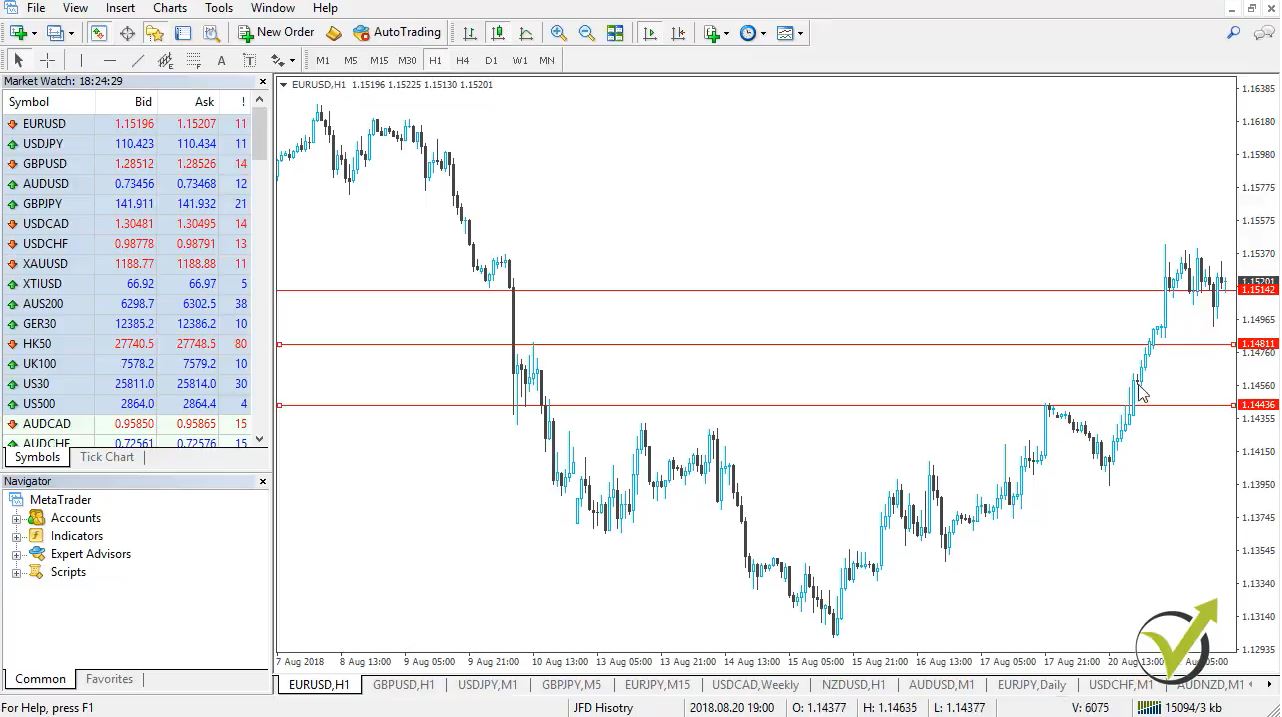
    If I place an example entry, let’s make it right over here above these highs. And then, if I choose Stop-Loss below, this recent low, let’s say, this is where I would like to have a Stop-Loss:


    stop loss and take profit
    An example set up for SL

    And, this is a classic example without any analysis I want to demonstrate it. So, if you have your entry somewhere,  and you’re planning to place your Stop-Loss over/below the recent lows/highs or support and resistance, or any other, doesn’t matter is it this strategy or not. Avoiding the strategy, the distance of the SL is connected to the trading amount.


    How do I calculate the Stop Loss in Forex?

    • how much can you afford to lose
    • at which price your trade will be disapproved
    • what is your money management for the account
    • calculate the distance according to the amount

    You will learn it all in this professional trading course.

    The important thing is that you need to calculate the lots that you can afford to trade, according to this Stop-Loss distance and according to your money management. It’s a common mistake that traders first decide how much they are willing to risk from their account.

    So, let’s say the trader has $1,000 of account and he’s willing to risk 5%. So what he can risk is $50. And, he places the trade first and then he places the Stop-Loss. But because he didn’t calculate the distance, it could cost him more, right? If the Stop-Loss with the quantity that he traded cost him $60-$70, he will move the Stop-Loss to unreasonable place.

    As I say “because the Stop-Loss should be where it needs to be”

    According to this professional Forex trading course or according to the strategy that the trader is following. Doesn’t matter is it the one from the Professional Forex trading course or any other method. The idea is that he will need to put his Stop Loss on a higher place if he bought or on a lower if he sold. But he will tie this distance to his entry because he decided that he will not risk more than $50. So, this is a mistake.

    The trader needs first to calculate how much is the distance from the place where he wants to place the Stop Loss. And then, he needs to calculate how much he can afford to trade in a particular trade to fit in this Stop Loss distance. I hope it’s clear here because it’s fundamentally important.


    5. Why do we need three entries?


    I will try to explain it in a very very simple way why we diversify the risk and why do we need three entries. And basically, this is the answer – we diversify the risk. Let’s say we are in an uptrend. I’m just looking at this chart; we avoid everything else. We avoid the indicators that we have, so I will remove these Bollinger Bands and the Moving Average.

    So, we have this pure chart and let’s say we are in a downtrend with the EURUSD. If I look at the hourly chart and on an hourly chart it is going higher, so if I want to sell together with the big trend, if I want to trade, for example, one complete lot. What can I do?

    I can do a pending order or sell position or any order, and I will sell one lot.

    What if the price continues against me? Now, in this case, I will get into a Loss. But if I divide this entry to three entries, for example, I will be entering 0.33 Lots(and this method is precisely what you will learn in this Professional Forex trading course). If the price goes higher and I have another entry condition, I will enter. And, if the price goes higher and I will enter a little bit higher:


    Professional Forex trading
    Meta Trader Support and Resistance lines


    Then, if the price goes into my direction together with the trend, obviously I will have an average price, and it will be a much better price than the one I would have had. Right? So, the other thing is, if from the first entry the price goes together with me if I enter two more times when I have the entry conditions Obviously, I will have a worse price, but at least I don’t place the whole position at one level.

    I diversify, I want to make sure that the price goes into my direction before entering the complete position.

    If the price goes against me, I enter on a better price and obviously, there is the Stop-Loss to protect my capital. So, with the three different entries, I want to diversify the risk. If the price goes against me and I want to confirm the direction of the price if it goes together with me. So, here I’m using three different entry conditions with a different impact.

    I put different values on each one depending on the indicators that I will be using. And you will see this in the course. The idea one more time is we diversify the risk, and we don’t want to place all of the trading amounts that we have decided to use into a single trade into a single position on an individual level. I hope it’s clear here.


    6. How long time it took you to create the system?


    Exciting question. I had created the system a long time ago when I was studying in London. It took me about three months so this system was the presentation that I had at the end of my education there. It turned out to be a beneficial system, and I’m still using it. Of course, I took a lot from many different traders I can say, I took the best things that I could take from the traders that I met in London. And the result is a great Forex professional trading system.


    7. How long should I practice the Professional Forex trading strategy before going on a real account?


    Well, that is a personal choice. It depends on you. It depends how long time you practising the system. If one practices a few hours a day it’s one thing if another trader practices let’s say 8 hours or 10 hours a day, he will get used to the system much faster.

    The best thing is to put some rule for yourself. Let’s say if you’re trading it one month on a demo account and you have made a target of 10%. Well, if you reach it with the system that is great because you have accomplished your goal. So you can give it a try on a real account. The most important thing as I always say is when you are comfortable trading when you feel safe trading a system.

    Then it means you are ready to practice it as well on a live account. I’ll suggest you go with a tiny account in the beginning just to get used, avoiding emotions that are involved in a live trading account.

    So if you ask me the question How to master Forex trading for a few days, weeks or month, I will answer you: You can not!


    8. Do you wait for the Bar to close to open the trade?


    Yes, that’s a lovely question – the closing of the bar. Well, there is something I need to clarify here. The closing of the bar is the very same thing as the opening of the next bar because this is the very same moment, especially with the Forex market. When one bar closes the next one opens, and this is the very same level.

    The closing of the bar is a nice confirmation but sometimes when we have a impulsive break, and you will learn this in the course, when we have an impulsive break, for example, the counter-trendline if you’re waiting for the close of the bar. It could be too late. It could be up with 20 with 50 pips, you will be too late to enter into the position. And you will miss the profit!

    What do I do personally if I see impulsive movement? I would enter on the break, and I will wait and see if it goes higher by some chance it pulls back. And, I know that it was a dramatic break or a false break, I can close the position and get out. Right? But, if I enter in the right moment and by the end of the bar, I could be already on a profit.

    So, sometimes I wait for confirmation. But sometimes I prefer to enter into the trade when I see the break. So I will not miss the move. So, when I see the impulsive movement, I prefer to enter into the trade. If I understand it was false, then I would exit the trade. All right?


    9. Can I trade the system on a different platform than the one shown in the Professional Forex trading course?


    Well, guys, you can trade the system with any platform that you like to use. The important thing is to have many drawing tools, not to be limited. Because many platforms place a limitation of drawing tools. And it’s tough to order or to arrange your charts and your screen. So, make sure you keep it simple.

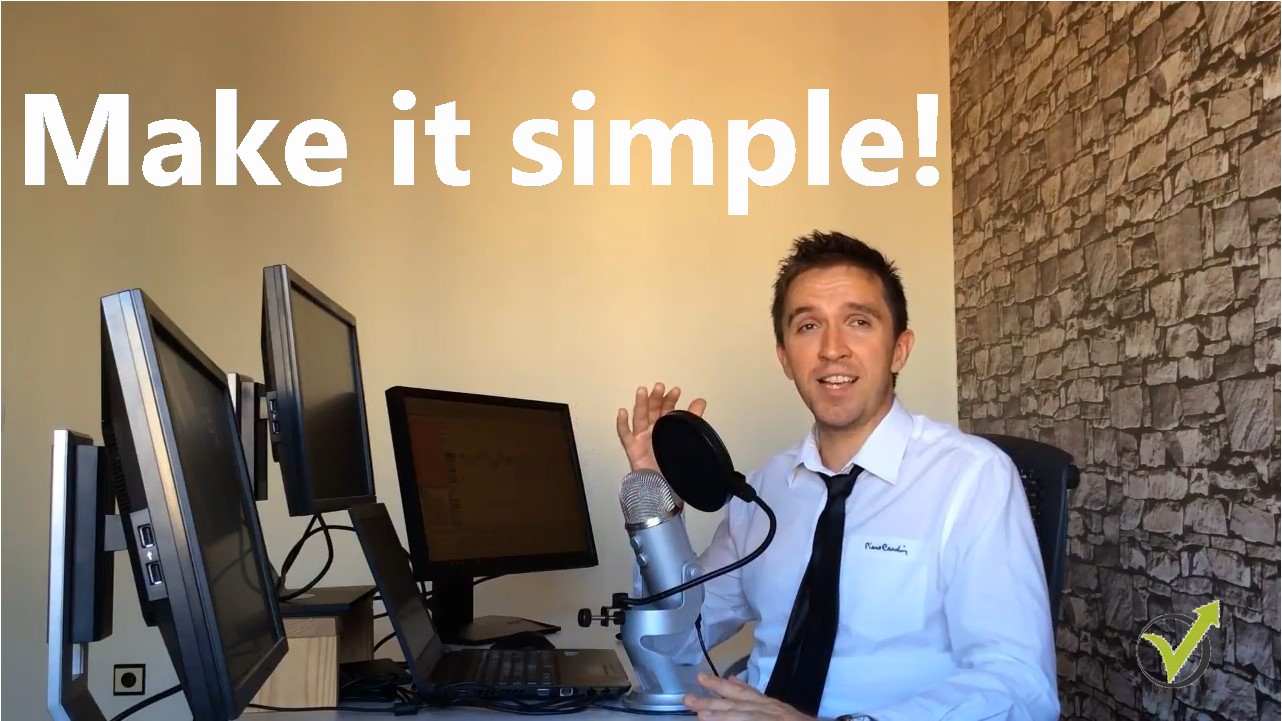
    Make sure you don’t place too many monitors. I can share with you I used to have 8 to 10 monitors on my table. I realised with the time, the more complicated you make it, the more difficult it will be for you to follow everything:


    apply daily what you learned in the course
    Professional Forex trading is when you trade Simple!


    And, it’s exhausting, so make it simple. If you have 1-2 monitors with a single platform and you follow it, it is enough, and you will get used to it so don’t try to make it complicated. Choose a system and a platform that is suitable for your trading style and that it will be easy for you.


    10. Should I do the whole analysis from the professional Forex trading masterclass to enter into the trade?


    Well, I do the complete analysis when I’m entering manually into the trade. Don’t try to make compromises because I have seen this so many times in traders.  For example, if you’re following five things from your system – Moving Averages, MACD Fibonacci support, and Resistance Counter Trend line.

    Then beginner traders start to trade they’re very eager to trade. They want to trade so much. They sit in front of the computer. And they’re just ready to trade. They want to trade, and they have decided that they will trade at this moment. If they see only three or four things they’ll say – okay I have four of the things, I want to get in. I will jump into the trade, and they ignore the last one, which is a mistake.

    If you don’t see your set up, if something is missing, take it easy, go out, relax. Come back in a few hours and see if we have your collection up. Or look at the other currency pairs to see if you have your set up. Don’t make compromises to skip some of the analysis that you’re making. Or to skip some of the entry rules that you want to see for your trading system. All right guys? These were the ten most frequently asked questions that I receive in the course Professional Forex Trading.

    If you have more questions, I’m here to answer you. Let me know, and I will be glad to assist you in our support forum

    If you want to enrol in the course, use the link below:

    Professional Forex trading: Masterclass with full analysis

    See you inside the class!

  • Automated Forex trading course – Top 10 FAQ

    Automated Forex trading course – the most wanted course from our students

    The automated forex trading course is the one that brought over 2000 Expert Advisors to our students for the last year and a half. Hello, dear traders, this is Petko Alexandrov from EA Forex Academy and in this article, I will answer the ten most frequently asked questions that I receive for the Automated Forex trading course + 99 Expert Advisors. These are questions that I receive daily, and this is why I want to create this article to give more details about each question and more details about the course.

    1. “With how much should I trade the 99 Expert Advisors?”

    Now the idea in the Automated Forex trading course is to test these 99 Expert Advisors in a Demo account. So you can open a Demo account with 5K, with 10K, with $50,000 or with $100,000, really doesn’t matter what amount you will choose. The idea is to place the 99 Expert Advisors to follow the performance and to select which ones you want to trade on the live account.

    Now you can maintain the top 3, the top 5, the top 10, so this is the crucial question with how much you will be trading. So first, decide how many EAs you want to take from the 99 and then calculate the lot according to the amount you are planning to trade with. And as I suggest in the course, the best practice is to start with 2 Demo accounts.

    One to test the 99 Expert Advisors and the other one to simulate the live account. So if you decide to trade the top 10 Expert Advisor, place them in a separate Demo account, and there you will see with how much you will feel comfortable trading.

    2. “Every month, we receive new 99 Expert Advisors with the Automated Forex trading course. What do you do with the old ones?”

    True, in the course, I say that I update the course with new 99 Expert Advisors every month, and I do that during the first week of the new month. So it’s up to you what you will do with the different Expert Advisors. You can switch every month with the new Expert Advisors.

    This is the most natural thing you can do. Or if you have the capability of testing a couple of trading accounts, if you have, for example, a powerful computer, you can have a couple of Meta Traders installed there trading together. You don’t need so much powerful equipment, but let’s say a random computer with suitable parameters will handle 3 – 4 Meta Traders without an issue. And if you have an additional computer or you have a laptop as well, you can place more Meta Traders.

    So, for example, you can have 3, 4 accounts with 99 Expert Advisors, and this way, you will have a more significant choice for the live account to take the best performers. So it is up to you how many you can install and how many you can follow. And as I said, the easiest thing to do is just every month remove the old ones and place the new ones and then separate the best performers from the latest months.

    3. “Do I need a virtual private server (VPS) for these 99 Expert Advisors?”

    As I said, it depends on your capability, what you have at home or work. It doesn’t matter where you are trading with the Expert Advisors. What you need is a constant internet connection. This is very important so you will be able to trade the Expert Advisors continuously. If you have a good internet connection at home and you have a computer, I would say that you don’t need a virtual private server because it is an extra cost that you will pay every month. And second, you can use your computer. You should not turn it off. It should run 24 hours during the week.

    4. “If the computer restarts for some reason, what do we do after that?”

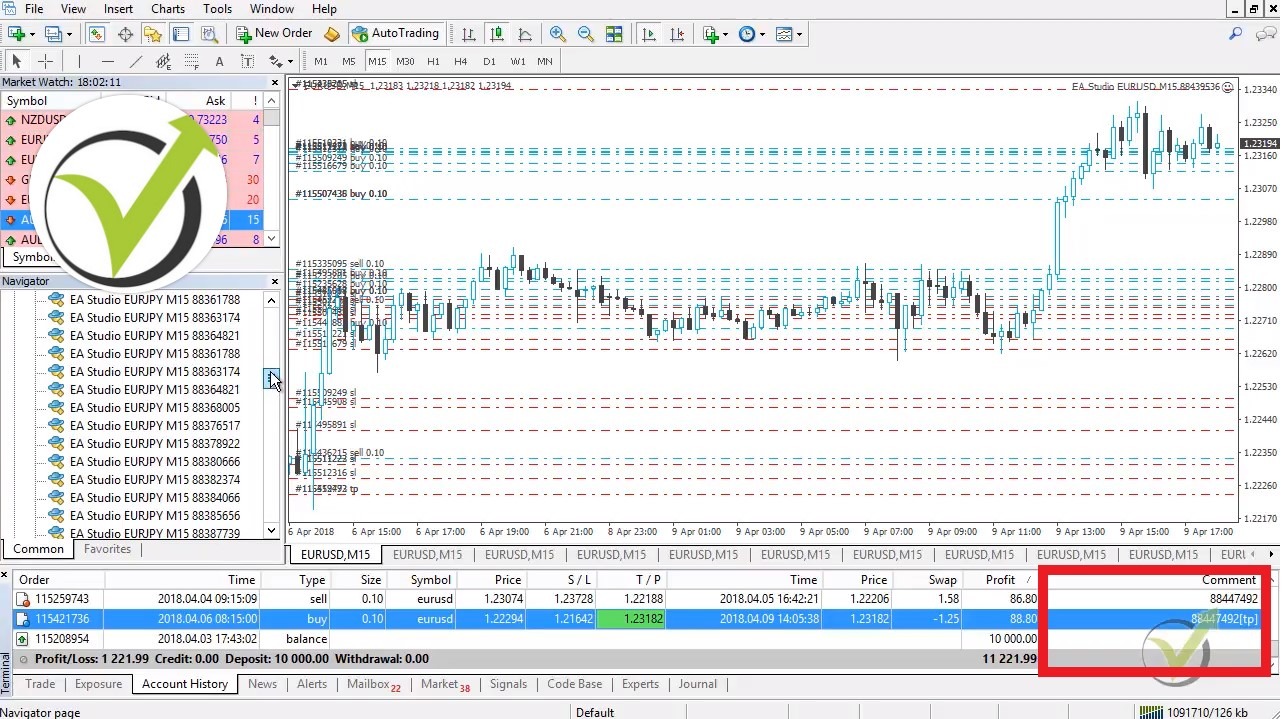
    Now if something happened with your computer, then it restarts or shuts down, or you’re on a laptop, and you have to travel for some time. Now, if it is a quick restart, so let’s say you make just a restart, a regular reboot, it’s not an issue. This is because the Expert Advisors will recognize the open trades according to and using the magic numbers:

    Autoamted Forex trading course results
    Magic numbers are displayed in the comment

    As you saw in the Automated Forex trading course, every Expert Advisor has its magic number. And when you turn off the platform for some reason, and you connect it again with the broker server, the Expert Advisors recognize the open trades, and they will continue to manage them. And if you pause your trading for a longer time as I said, for example, if you have the account on your laptop and you have to travel for a couple of hours, this is a little bit of an issue.

    It’s not a problem if your trades have Stop Losses and Take Profits.

    So either you can pause the trading, close all the trades and then continue. Or if your trades all of them have Stop Losses and Take Profits like the 99 I provide in the Automated Forex trading course, it’s not an issue. What will happen when you travel, or you are out for some time, the trades, the open trades, they will stay, some of them will close because of the Take Profit and the Stop Loss.

    But you’ll miss the new entries because obviously, the Expert Advisors will not work. And as well what you will miss is the exit conditions for the Expert Advisors. So some of the Expert Advisors, actually most of them they have exit conditions.

    These are indicators, just the same way they have entry conditions, they have exit conditions. And when the Experts Advisors are not working, not trading, not connected to the trading platform, you will miss the exit conditions. So you will depend only on the Stop Loss and Take Profit in this case for the opened trades.

    5. “How did you choose the Stop Loss for all of the Expert Advisors For Automated Forex Trading, and why is it different?”

    Now, if you have read the Automated Forex trading course description carefully, I did not place the Stop Loss manually. I didn’t decide what to be the Stop Loss. I depended totally on the generator of EA Studio.

    So the generator produces strategies with Stop Loss and Take Profit with the parameters of the indicator at all inputs based on the historical data that I have imported previously. So it’s not like I decide what Stop Loss to put. Well, I can set the range, for example. I can make it a smaller range like from 10 to 50 pips or 10 to 30 pips, and then the generator will give me Stop Loss within this range.

    But in this case, I give it a little bit of a more significant range. The generator finds me strategies with some Stop Loss there is inside. And I don’t touch it, I trust the generator, and I depend on it.

    Directly because I have been working with it for a long time, and I know it is okay.

    6. “Are the Expert Advisors designed to trade all day long, and is time-zone important?”

    Yes, these Expert Advisors are designed and meant to trade all day long. And the time-zone is not essential because we are trading on M15. Now, M15 is the same with every time zone.

    The M15 chart or the M15 bars are the same in every time-zone. Now the only difference comes on the longer time frames as H4 daily and weekly. OK? Because obviously, the H4 bar or Candlestick is different from me, where I’m in Bulgaria, Eastern European Time.

    And it’s different in GMT or London because we have a two-hour difference. So you understand that when I have the new bar opening, there in the UK, they have the bar just in the middle. And many traders do not realize that, and this is quite important in trading. The H4 bar is different, and many strategies are wrong because they use the H4 time frame. Same as the daily. That is why in the Automated Forex trading course, I have selected to use M15.

    The days close different, at a different price, with a different time zone. So this is where the difficulty comes and as well with the weekly, somewhere the market might close a little bit earlier or later because of the time difference. But at the end of the day, M15 is the same everywhere. This is why I prefer to trade M15 or the lower time frames below H4, OK?

    7. “How long is the historical data in the Automated Forex trading course that you use to backtest and generate the Expert Advisors?”

    Now I use about 2 to 3 years, 2 & 1/2 years.  I have concluded that we should not use too big historical data. Now some traders prefer to generate strategies over the last ten years.

    But guys, ten years ago, let’s say now we’re in 2019 we’re really in 2019. Ten years back was 2009, just after 2008. The market was different. Interest rates were down, and now we have already interest rates going up.

    Which makes the market different. We have the Brexit nowadays. We have various events happening all the great time because this calls the volatility on the market.

    But today, in 2019, I don’t want to base my strategies and my Expert Advisors on the historical data 10 years ago or 15 years ago or even five years ago. I want the Expert Advisors to be trading profitably, to have a good backtest on the last few years. 1, 2, 3, let’s say 2, between 3 years.

    This is what works best for me.

    8. “If I want to trade the 99 Expert Advisors with bigger lots, should I change it to all of them one by one?”

    Yeah, unfortunately, if you want to test with the different lots, you should change it because there is no option in Meta Trader that you will switch the trading lot. Just as when I generate strategies with EA Studio, there I said a lot, and all generated strategies are with this lot.

    But with Meta Trader, once the Expert Advisors are there when dragging the Expert Advisors over the chart, you need to set the trading lot, and you cannot do it for all of the Expert Advisors at once time. Now something here, as I said, the 99 Expert Advisors are meant to be tested. Go ahead with the lots that they can, and when you choose your top 4 performers, then you can change the lot.

    You will be just changing the lot for the top 5 for the top 10 or whatever number you choose — so no need to test it with different lots. The result will be absolutely the same.

    Not as money in the account. But as pips, you will see the same result no matter what lots you will choose. And the Profit factor will be the same, and the win-loss ratio will be the same. The Net profit will be different. But again, you will see on the top of FX blue, the top performers no matter with what lot you are trading.

    So go ahead, test it with the lot they can. Then when you separate the Expert Advisors, you can choose different lots.

    9. “I am trading in the United States, and because of the FIFO regulations, I cannot trade them all. What do you suggest?”

    Yes, in the U.S., there is the FIFO rule, which stands for First One In First One Out. And traders there cannot trade with many Expert Advisors in one trading account for one asset. For the same asset.

    Now there are a few solutions to that. If you succeed in opening an international Demo account to test the Expert Advisors, you can choose the top one for the different three currencies. So for each currency, you will select one senior Expert Advisor, which you will be able to trade in the U.S.

    The second thing you can do is to backtest all the Expert Advisors and see which one from the three currencies will give you the best result. Again you will trade 3 Expert Advisors in one account. But they will be with different currencies, which is just fine with the FIFO rule. Now from my students, I know that some brokers in the U.S. allow trading one asset in one account but with different lots.

    Which means that you can test the 99 Expert Advisors with different lots. So the first one you can experiment with 0.01, the next one with 0.02, 0.03, and so on. And then when you look at FX blue, you will not look at the net profit. You will look at the net pips, and still, you will see which are the top performers for you.

    Even if you tested them with different lots. So this is the most logical solution in this case. It allows you to open a Demo account with a local U.S. broker, and you will be within the rules. And of course, we always need to be within the rules.

    10. “How much time should we test the Expert Advisors from the Automated Forex trading course on a Demo before choosing top performers for the live account?”

    This is probably one of the most frequently asked questions that I receive for most of my courses. In the last course for the top 10 USDCAD Expert Advisors, I talked a little bit more about it. There is no precise answer to this question, guys. Sometimes I give some examples, some ideas, but I cannot come with an accurate and exact solution on how much time you should test the Expert Advisors on a Demo before moving to the live account.

    What I say is that it is better to have rules like minimum trades open and minimum Profit factors. So, for example, you want to trade on a live account only, the Expert Advisors that opened ten trades and made $200 of a profit if you trade it with 0.1 lot. Or you can wait for five trades and $100. Alternatively, you can trade with the Expert Advisors straightaway to the live account.

    Of course, if you have the opportunity and then remove those that are with Profit factor below 1.2, for example. And you will leave only the profitable Expert Advisors in your live account. But this is a little bit more of an aggressive way that recently I prefer to do.

    Time should not be a factor for testing.

    I don’t suggest you do it. You should always test the Expert Advisors on a Demo account but not with time because time is not precise. What I mean is you can check the Expert Advisors on a Demo account for two weeks. And sometimes, if there is no volatility on the market, you will see just a couple of trades opened. 1, 2, maybe none.

    And it is not enough for you. But if you say I will wait for at least ten trades and 100 pips of a profit, for example, this could happen in the next few days. It could happen in the next few weeks. So if you want to have some rule for testing on a Demo account before moving to the live account, you better not connect it with time.

    These are the ten frequently asked questions that I receive for the Automated Forex trading course + 99, Expert Advisors, every month course. Because I provide new 99 Expert Advisors in the class, if you have any other questions, don’t hesitate to drop them in our trading Forum at EA Forex Academy.

    I will always answer you there. We also have many experienced traders who share their experience there so you can ask any questions. If you liked the video, click on subscribe. You will be able to watch the new videos that I upload nearly every day.

    Thank you for watching, and I wish you, safe trading guys.

    See you inside the class!

    Cheers,

  • Strategy for Forex creation: 10 FAQ for the Forex strategy course

    Strategy for Forex creation: 10 FAQ for the Forex strategy course

    Strategy for Forex is what everyone wants to use. And this is the right approach.

    Strategy for Forex it will be then. Hello dear traders, it`s Petko Aleksandrov from EA Forex Academy. And now, I will answer the most frequently asked questions that I receive for the Forex Strategy course portfolio trading with 12 Expert Advisors.

    So, the first question that I will be answering is:

    1. “Why don’t you use tick data to create a strategy for Forex?”

    Well, the answer is straightforward; there is no tick data in Meta Trader.

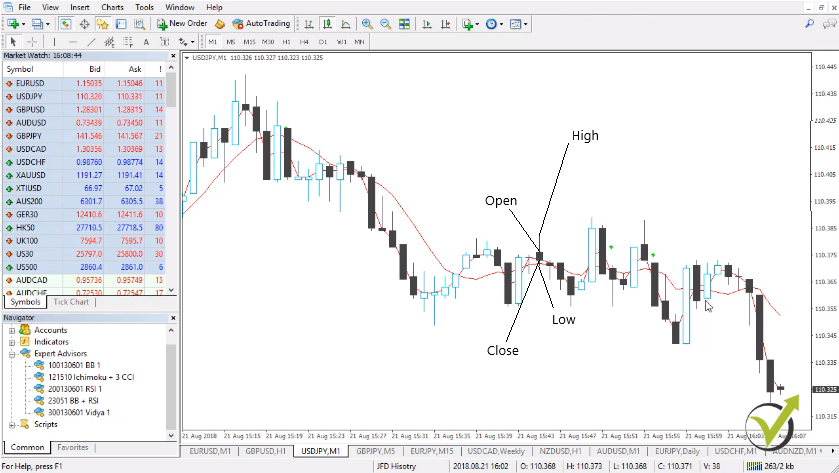
    What information do we get from the Candlesticks?

    • open price
    • close price
    • the lowest point
    • the highest point

    And this is the only information that we have on all time frames:

    Strategy for Forex FAQ
    The information available on the chart

    We don’t have the tick data. We don’t see what happens inside the bar. Yes, we know what happens in the current bar, but we don’t have this information what happened with every tick in the last bars. Or in all historical bars that we have in the past. So, tick data is pretty much an illusion in Meta Trader.

    So, don’t waste money to buy it from anywhere if any companies offered you tick data for Meta Trader. Probably, they have something but anyway you will not be able to use it because you cannot import it really into Meta Trader.

    Now, there is an update coming with EA Studio that will convert tick data to bars, and I hope this will be ready by mid-2020.

    2. “What is the difference between EA Studio and Forex Strategy Builder Professional, I see that you use both to create a strategy for Forex?”

    Well, this is a huge question, and I will answer it very directly. EA Studio is a web-based Strategy Builder that we use. It uses only the custom indicators for Meta Trader. But it has some different tools that are not available at Forex Strategy Builder. Such as the Reactor, and the Validator, tools that save a lot of time to us.

    The Forex Strategy Builder Professional needs to be installed on the computer. It works a little bit slower, but still, very fast, I can say. But it works a little bit slower than EA Studio, but this is just because it uses many custom indicators. And we can use a longer time frame. So, if we are trading, for example, on the M1 chart, we can add entry conditions on the higher time frames or on the more extended time frames.

    Such as M15, M30, H1, or any other time frame. So, the two Strategy Builders are pretty much different. They have just different capabilities, and you have a lot of possibilities with both of them. So, it’s a personal choice which one you want to use. Anyway, I will show most of the software in this Forex Strategy course. So if you ask your self the following question:

    How to create a strategy for Forex with the strategy builders?

    • export the Historical data from the broker
    • generate strategies with predefined criteria
    • use portfolio trading strategies to diversify the risk
    • select the best ones for the current market conditions
    • test on a virtual account and make your choice which EAs to trade

    3. “Do I need to keep opened all time frames for all pairs to collect bars?”

    Now, you need to keep only one chart open. And if you one time press the Home Key for all time frames and you keep this one chart, it will collect you the data with the time. But you don’t need to follow different tables on M1, on M5, on M15. And obviously, you cannot keep all the charts opened for all the assets that your broker offers.

    You’re not going to trade all the assets. Just keep open and collect the data for the assets that you’re going to trade for the currencies that you are planning to trade.

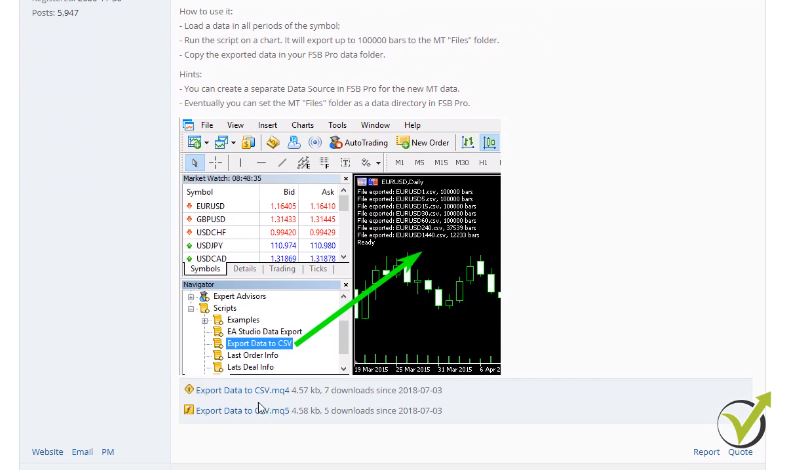
    4. “From where to download the scripts for EA Studio and that you show in the Forex strategy course?”

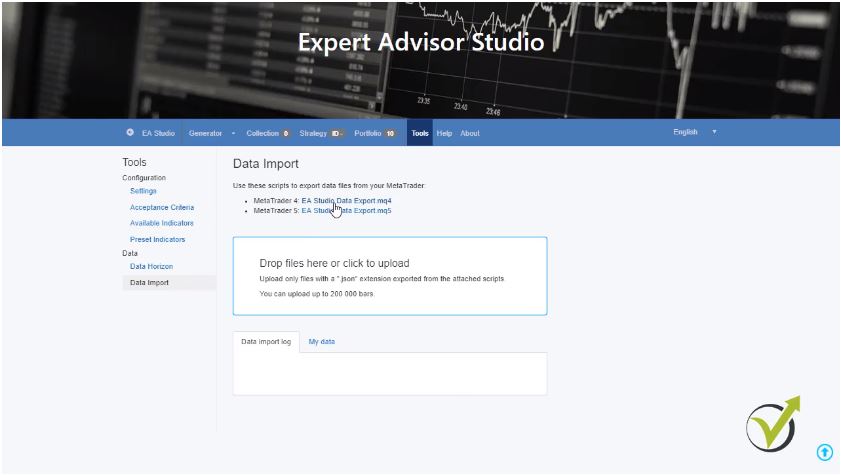
    Even I showed this in the course. I will make it clear one more time. If you click on EA Studio on our website and you go to tools right into the Data import, you will see the two scripts for EA Studio. There is one for Meta Trader 4 and one for Meta Trader 5. If you click on it you will be able to download it:

    scripts to download the data
    EA studio: Historical data scripts

    However, for the Forex Strategy Builder Pro, you need to go to the website of the company forexsb.com. If you click on the forum and then you go to the Premium Club and then you will need to go to Export symbols and settings from Meta Trader. The first one Meta Trader to FSB data export. If I click on this subject you will see right here the two scripts and instructions on how to use it:

    Forex strategy course materials
    FSB Pro: scripts to download Historical data

    5. “Is it better to wait for ten trades to be opened or to wait for one week?”

    This is an personal choice again. The methods that I show in the Forex strategy course on how I’m testing the strategies are very useful for me. And if you find them useful for you, it will be great. But if you find your methods of how you want to test the strategy for Forex trading, you are very welcome to do it. And you should have your methods because this way you will build your trading style.

    6. “Why do we need different magic numbers for the Experts?”

    The magic numbers – this is the unique number for each Expert. When you place the trading strategy for Forex on the Meta Trader, no matter it is a demo or a real account, and you want to follow statistics after that. Because obviously, statistics are vital to see which Experts are making a profit and which not. You need to identify them with something.

    Because if you place 99 Expert Advisors, which is possible as I show in some of my courses into your Meta Trader, there is no chance that you will understand after that from the Account History which one made a profit and which one made losses. What you need is the magic number.

    Don’t think it’s a waste of time. Just enter some magic number. You can have your system of magic numbers. In the Forex strategy course, I show how I am building my strategies with the magic numbers. So, I can easily understand after that which one makes a profit and which one loses.

    7. “Can I pay to the broker to send me historical data so I can build a better strategy for Forex?” 

    I do believe some brokers are offering that or you can download it free from their websites. However, I’m not sure that this is a proper historical data that you can use. And if this historical data matches with the server of your account. Keep in mind that the brokers have different servers.

    So, if you are trading with server number one, for example but you download historical data from server number two. Or maybe you will not be able to understand from where you download this data well. This data will not work for you. Just keep it simple. I know it’s a little bit more work to download and to collect the historical data. But this is the only way that you will know this is the historical data from your server of your broker.

    8. “Are the Strategy Builders being updated?”

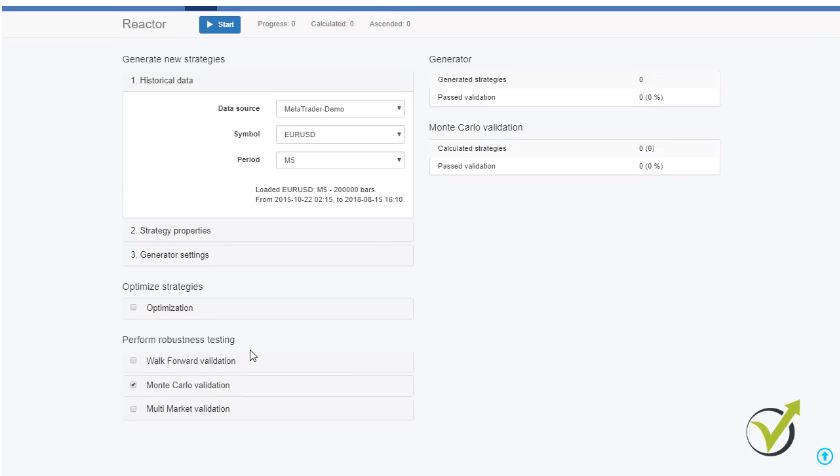
    Especially the EA Studio during the last year had so many updates that I tried to catch it up with the Forex strategy course. It improved a lot the methods that I showed in the course on how to create a strategy for Forex trading and how to use Expert Advisors. Because there are too many new features into this Strategy Builder. In the beginning, it was a simple online. I can say application where it was possible to generate some strategies. Now the trader can do so many things with the Expert Advisor Studio.

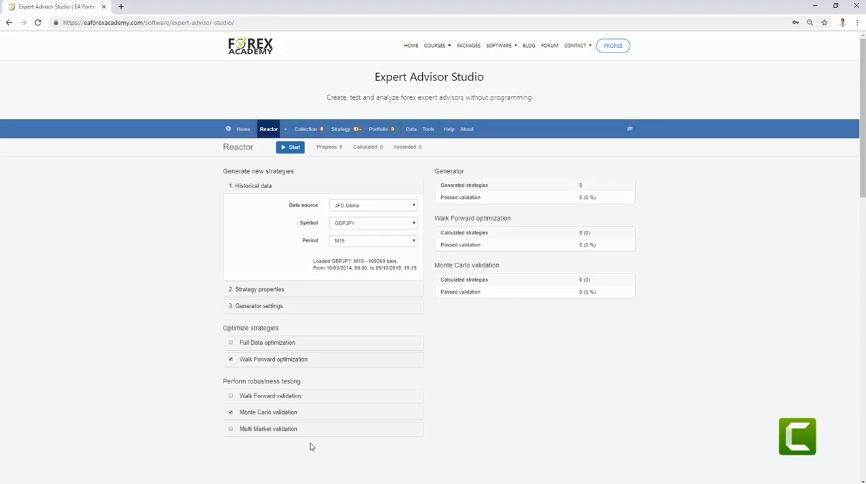
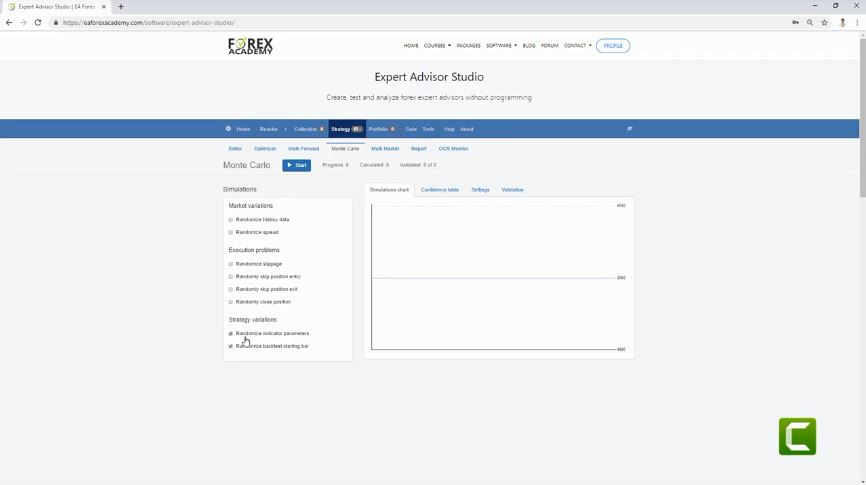
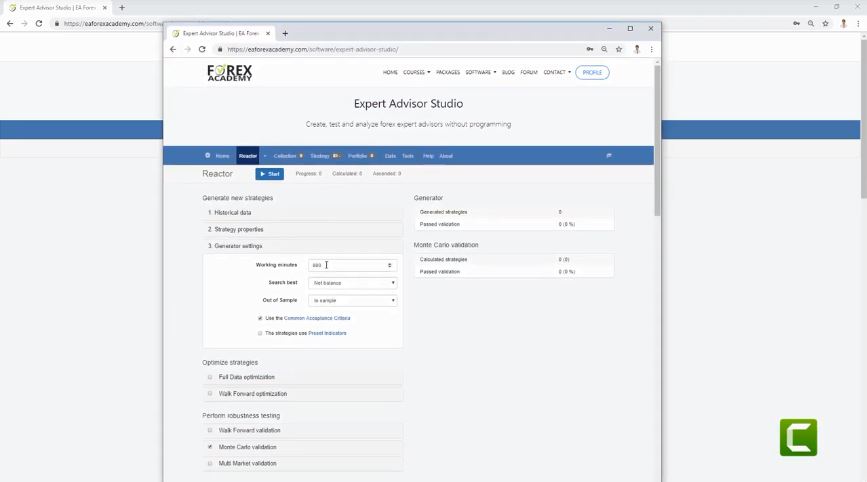
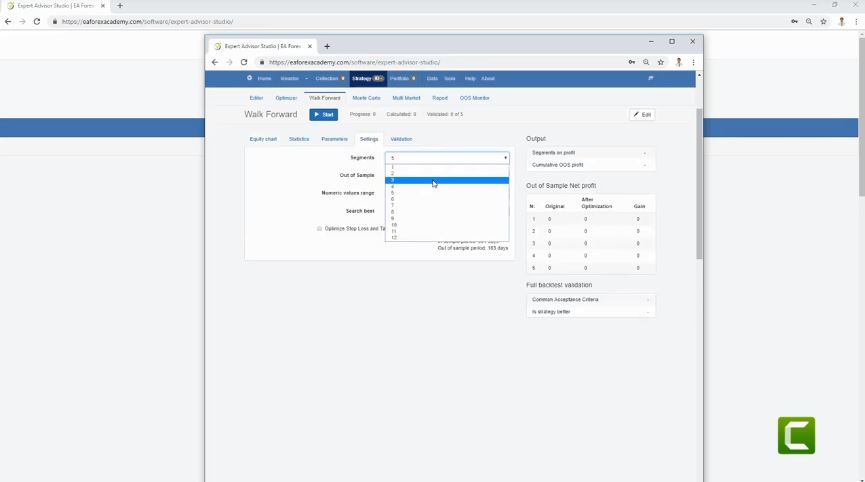
    Such as using the Reactor and going through the perform robustness testing:

    create strategy for Forex trading
    Robustness testing in EA Studio

    These are the Walk Forward validation – one of the latest updates that we had, the Monte Carlo validation, the Multi Market validation as well. If you look at tools, there is correlation analysis, which is also a recent update. As well, the trading session hours and there are the Preset Indicators.

    If you want to generate strategies only with specific indicators, you can add them here, and the Reactor or the Generator will work only with these strategies. There is as well the Validator, which is very useful when you have already many collections, portfolio Experts, Expert Advisors. So, you can drop them here and recalculate with recent historical data.

    9. “Do I need the practical activity to create a strategy for Forex market?”

    It’s a practical activity, and the idea is to practice. So, if you are an advanced trader, you don’t need to practice because you have already done that. But you can take advantage of the 12 Expert Advisors that I upload to the Forex strategy course every new month. I am sure you will find some profitable strategies in those 12.

    And the last question that I will answer too is:

    10. “How to manage the 12 EAs when new ones come?”

    Every month I update the Forex Strategy course with new 12 Expert Advisors, and it’s up to you how you want to manage it:

    expert advisors to get
    12 EAs every month with the practical activity

    What you can do, is making a combined account where every month you add the new Expert Advisors that you will receive with the actual activity of this course. But what you can do is filter them all the time.

    What I mean is you can test the 12 and select the best performers for you. And then you check the new 12 that are coming up, and you add them to the other ones. This way, you will be filtering all the time the Expert Advisors, and you will build an excellent portfolio trading strategy. You will choose which ones you want to trade and which ones you want to leave at the end of the live account. Also, you will not need to create your strategy for Forex because you will receive a new 12 EAs every month.

    Thank you very much for reading. These were the ten most frequently asked questions that I receive in this Forex Strategy course.

    If you have any questions about the course, don’t hesitate to contact us in our SUPPORT FORUM. I’m always there to answer. Have safe trading!

  • Forex trading daily strategies: 10 FAQ for the Top 5 Forex EAs

    Forex trading daily strategies: 10 FAQ for the Top 5 Forex EAs

    Forex trading daily strategies – the 10 FAQ from our students

    Forex trading daily strategies that might change your trading? Hello, dear traders! It’s Petko Aleksandrov from EA Forex Academy and in this video, I will answer the most frequently asked questions that I have for the course Forex trading strategies from a professional trader + top 5 robots. Or this is the course where I’m including 5 strategies with the Expert Advisors for the Forex market.
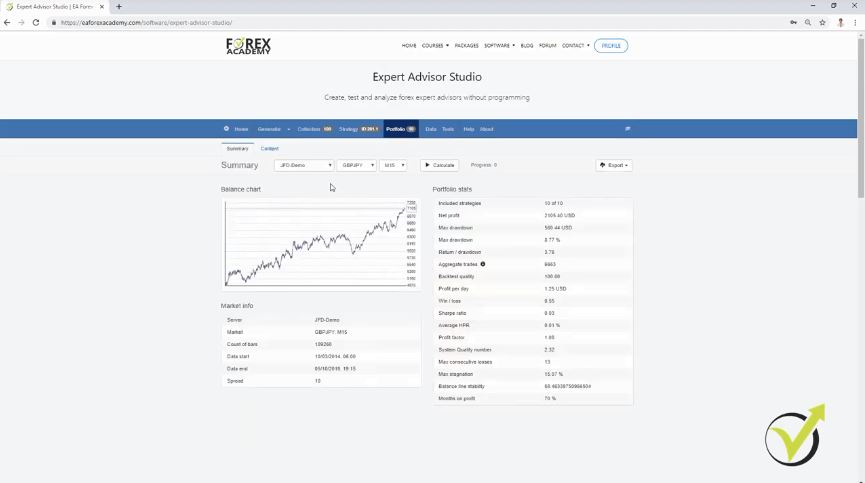
    The first question that I have very often is:

    1. Bars are not enough on my chart, why is that?

    Simply when the students are placing the Expert Advisor on the chart they see a message that there are not enough bars. Forex trading daily strategies for the USDJPY, GBPUSD, EURUSD, they follow the higher time frames on M30 and H1 and there is some number of minimum bars. Or it could be a message that bars are not enough. What you need to do, is simply to open these time frames M30 and H1.

    You can press the HOME key in order to force Meta Trader to load more bars for you. And you need to do this for H1 chart.

    Just make sure to open the M30 and H1 chart before you drag the Expert Advisor to the M1 chart. This way there will be enough bars on the higher time frames which the Expert Advisor is scanning as well before entering into the trade.

    2. Are the Forex trading daily strategies suitable for beginner traders?

    Absolutely! It’s a course that is suitable for advanced traders and for beginner traders. This is just because I explain in details all Forex trading daily strategies – how you can trade manually and how you can trade it with Expert Advisors. So, even you are a beginner trader, you can use the Expert Advisors. Place them on the charts the way I show and you can do trading. If you want to use these professional trading strategies manually, start just with one. When you are used with it, add the second one. This way you will increase your trading portfolio.
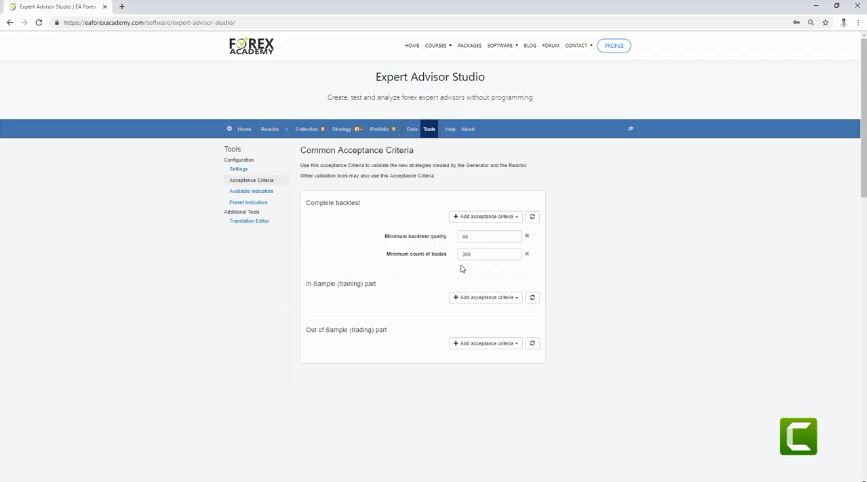
    3. Why I can not find the MA crossover indicator in Meta Trader?

    Well, the MA crossover is an indicator that is not available with the custom indicators in Meta Trader. Just in the course, I’m using a different platform, but you can have the very same effect.

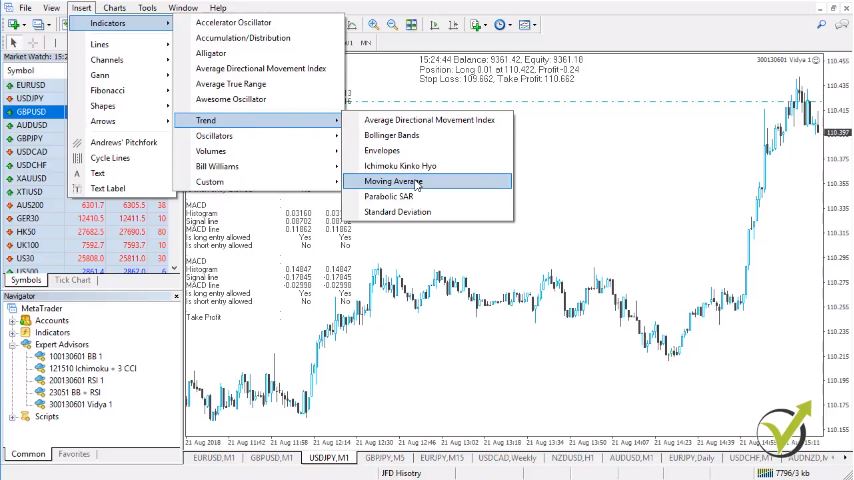
    And, if you open the Expert Advisor properties, you will see what are the current inputs that I’m using to MA crossover. How do you do that on Meta Trader? Very easy. You just insert indicators and you go to trend and go to Moving Average:

    Forex trading daily strategies FAQ
    The path to insert the Moving average indicator.

    If you put one Moving Average period of 2 and if you place one more with a period of 8, you will have the very same effect like the Moving Average crossover.


    4. Why the PDF files for the Forex trading daily strategies are different from the values shown in the course?

    Well, the PDF files are where I update the course and where I actually update the values of each indicator. So, whenever I do update on the Expert Advisors and the Forex trading daily strategies according to the recent market conditions, I place the new values inside these PDF files. When you enroll in the course, you need to look at PDF files.

    Whenever you see underlined values, it means you need to change the indicators value and the value of the parameters according to the most recent update in the course. This way the professional EA stays in tune with the recent market.

    5. Do I need to place the Expert Advisor on three different time frames for the Professional trading strategies EURUSD, GBPUSD, USDJPY?

    Well, we place it only on M1 and the Expert Advisor is scanning M30 and H1 for confirmation. But you don’t need to place it on a different chart – on M30 and H1. Because if you do that, it will start working on these time frames:

    Forex trading strategies as professional ea
    Expert Advisor in action

    Make sure you place it only on M1 chart. If you open the M30 and H1 just one time, it will load the bars there, that is just enough. So, we place it only on one chart on M1 and the Expert Advisor is scanning the M30 and the H1.

    6. Why I cannot optimize the Forex trading daily strategies with EA Studio?

    With EA Studio the traders can optimize only the professional EA for GBPJPY. The other four Forex trading daily strategies you can optimize with Forex Strategy Builder Professional and I show that at the end of the course. They are coded from different programs, and they should be optimized according to their origin.

    7. Should I exit the trades before red hot news?

    Well, that’s a personal choice. I prefer to exit any of the Forex trading daily strategies one hour before the red-hot economic news. Or even if this is NFP or rate decision. I prefer to exit two hours before the news and after that one hour or two hours. When volatility is back to normal I place the Expert Advisors again over the charts.

    8. Which MACD to use in Meta Trader?

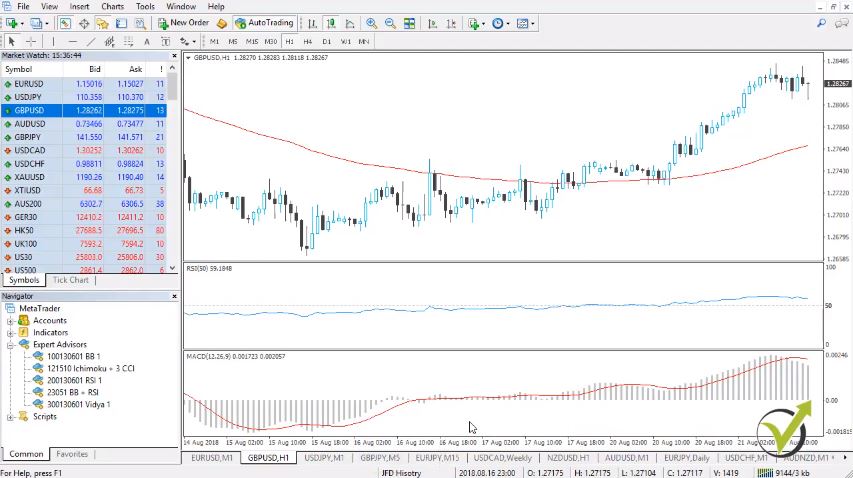
    In Meta Trader, if you go to insert indicators, custom. Then, you choose the Moving Average Convergence Divergence indicator, you will see it below the chart. And this is the very same MACD as the one I show into the course. Instead of the second line, there are the bars here.

    In the course, you will see that there are two lines MACD and bars below. It is the very same thing always with the Moving Average Convergence divergence or the MACD. And, it really doesn’t matter which one you will be using:

    Moving average convergence divergence
    MACD indicator in Meta Trader

    But keep in mind that if you are trading with Expert Advisors, you don’t need to place the Moving Average Convergence Divergence over the chart or any of the indicators. The indicators are inside the code of the Expert Advisors. So, even you keep an empty chart without any indicators, it will still work fine.

    9. What will happen if I close a trade manually by mistake?

    If you close a trade by mistake, what will happen? Basically, you will be out of the trade. If you place back the Expert Advisor over the chart, it will continue working. Right?

    And, it will open a new trade when the new entry conditions are met. So, the only thing that will happen is that you will mess a little bit the statistic of the Expert Advisor. But this is just fine. It happens from time to time, so don’t worry, it will not be a huge mistake.

    10. Do the Forex trading daily strategies work only when I’m in front of the computer?

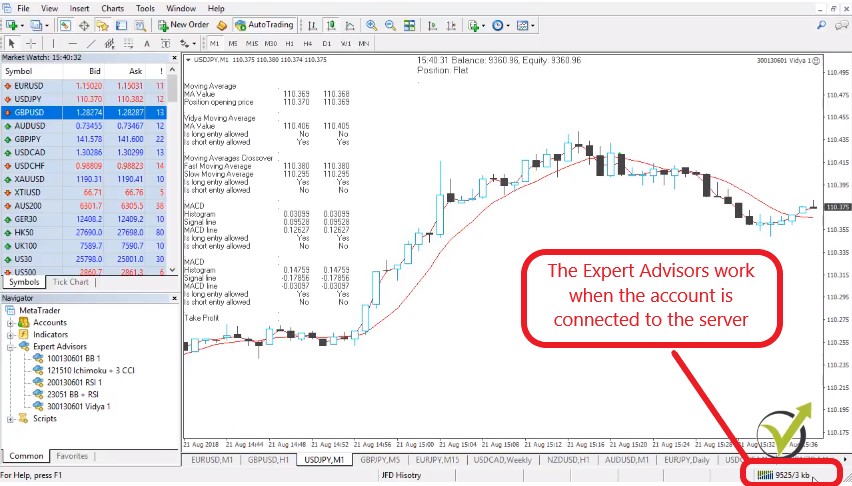
    Well, the Expert Advisors work when they are connected to the server. So, when they are on the Meta Trader and the Meta Trader is connected to the server of the broker. When you’re online, when you’re connected to the internet, you don’t need to stay in front of the computer obviously. The Forex trading daily strategies used in Expert Advisors is much easier, but a connection is required.

    And this is the idea of trading Expert Advisors that you can leave them trading. But make sure not to close your computer. Because this way you will turn it off, you will make it sleep and you will disconnect it from the server of your broker:

    Forex trading daily strategies with Expert Advisors are related to the connection of the server
    The connection to the server

    With simple words, the Expert Advisors work only when you are connected to the server of the broker. And, it should be green, down here in the right corner. If it is red, it means you are not connected to the server and obviously no trading will be done with the Expert Advisors.

    So, these are the 10 most frequently asked questions I receive for the course – Forex trading daily strategies from a professional trader + Top 5 robots. If you have more questions, of course, don’t hesitate to ask me in our trading Forum. It will be a pleasure for me to answer you.

  • Support and resistance: Price action trading

    Support and resistance: Price action trading


    Support and resistance – the most important levels on the market

    Support and resistance are the most popular price action techniques. Hello, dear traders, this is Petko Aleksandrov, head trader at Forex Academy and I continue now with the support and resistance, which are the critical levels on the market where we need to be careful. And if the price goes towards those levels, we need to pay a little bit more attention.

    This is a free lecture from the course Price action trading course: Bitcoin and the Cryptos.

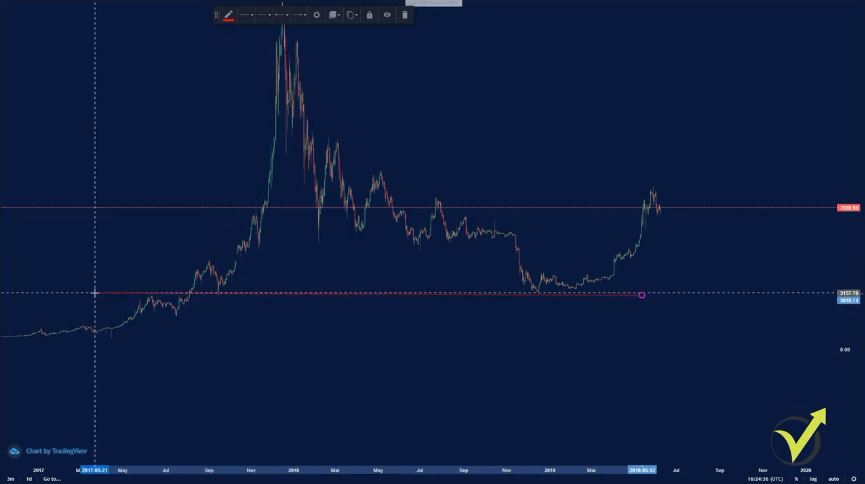
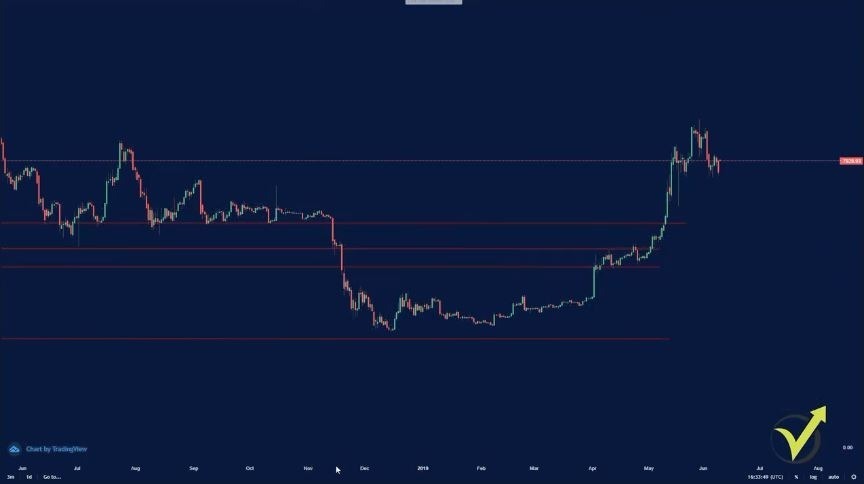
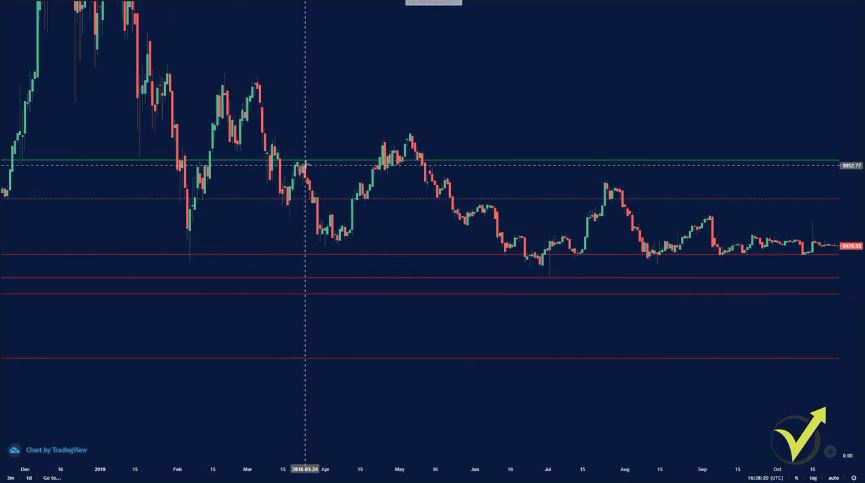
    I will make the chart big so you can see better.  I will place one support level just below the lowest price where the Bitcoin reached during 2019. So here it is just below the price.

    Now, keep in mind that I always draw the support and resistance lines on a daily chart. Now, let me increase this line, and I will go before the huge move in 2017 and the beginning of 2018, this one over here. And you can see that right here we have a significant level.


    support and resistance levels
    The red line is a support


    So how a support line should be drawn?

    • it should have been first a resistance
    • impulsive break
    • it should have been a support

    It should have been first resistance, and as you can see in the picture above, it was resistance. Then the price should break it impulsively. We have here the impulsive break.

    Do not look for the perfect support and resistance because you will not find it

    The impulsive break is when the price breaks the price with a huge candle and it closes on extreme.

    After that, it was support. You can see that the price retested this level, and then it continued higher. And now this level is a support again nearly after one year.

    We want to draw it just where the price stopped, and this level became resistance, and after that, the price retested it, and this line became support. So I will move it right precisely at the spot.

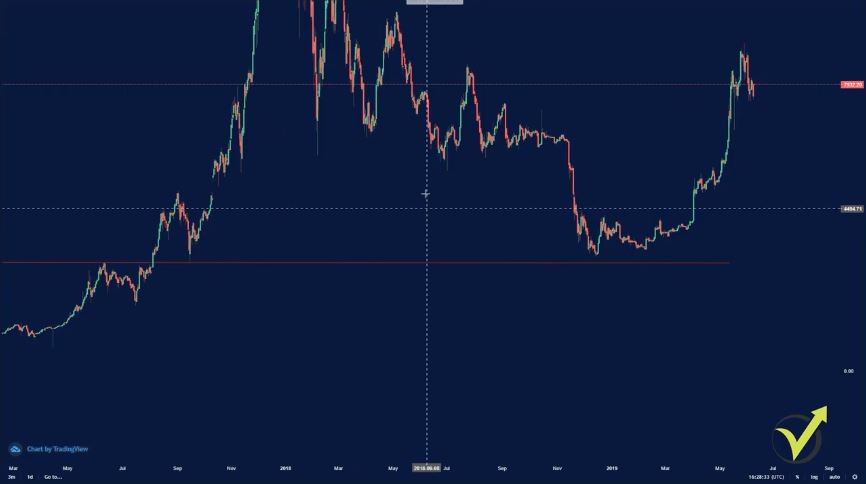
    You can see in the picture below this is an excellent example of critical support and then resistance line. First, the price stopped this level at about $3,000, and then it went below.

    We have an impulsive break, this is an impulsive break, and then the price retested this level again and continued higher. And 3,000 is a psychologically important level because it’s 3,000.

    Round numbers always matter.

    It’s a round number, and every round number matters on the market.


    horizontal lines are drawn
    Support and resistance persist in time


    And you can see that this year the price failed to take this level. Let me look now for a couple of more examples.

    I will copy this line, you can copy a line on the platform by pressing control + C and then control + V, and you’re just pasting it. We said an critical level is where the price first was support, then it was resistance. So somewhere here we can place another level, let me zoom in a little bit.

    You can see in the picture below the price first failed to take this level, and then it pulled back, it tested the other support line that I have placed and then broke aggressively, retested it again. So if you don’t see exactly the place between where the price failed from below and where the price failed from above, you just place it in the middle.

    So I will leave the line right over here. It is another round number of 5000, so I can leave it to 5,000. Even not precisely on the place, but I will leave it this way.

    With the recent market conditions, it changed from support to resistance.

    And you can see the price failed, and then went below down to 3,000, and then went above, retested, and continued higher. Now, let’s have a look at how this line affected the current market conditions. And you can see now with the recent move where the price went higher.

    Here, it had a hard time breaking the level. When it did, still the price retested and continued higher. So you can see that even after some time, nevertheless, this level is essential. It was at one time important. It is important again.


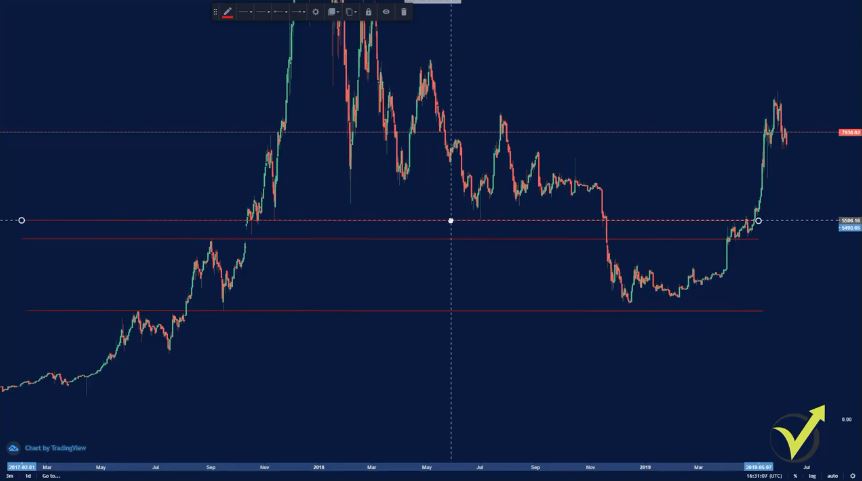
    support and resistance in many lines
    Draw 3 above and 3 below the current price

    And then I can see another level right over here. Let me take one more line. It is just over here. So you see at this level of 5,500 where we have one time, two times, three times, four times, being support, now with new market conditions it was resistance.

    Let me zoom in and try to make it in a better place. So it’s right over here, just a little bit higher. At 5,500. Another round number.

    These are the 3 important support lines for the market.

    As I’ve said even the hundreds matter and you can see that we have support a couple of times, it breaks impulsively lower, and then when the price went again higher it failed at this moment to take this level.

    Then it broke, failed again, retested the other line that I placed, and continued higher. So these are three essential support lines that we have for the market. Of course, you can draw more.

    You can see at this moment there is a new top, this is just above the level of 6,000 closer to 6,200. Then you can see the price broke, it retested it, but more it retested 5,500. And then you can see here it retested it one more time, the second time, third time, fourth time, fifth time, on the sixth it broke below, and here with the recent market conditions, it just broke back.


    price action support and resistance levels
    The recent price movements matter the most

    I keep the support lines red and the resistance lines green.

    Now, to make it clear, when we put these lines, it doesn’t mean that every time the price should stop there. But we’re looking for these lines, for these levels where the price stopped at least two times. One time is a resistance, one time being a support, and one time having an impulsive break.

    So you can leave a line as a support or as resistance if you see the level being one time support, one time resistance, and we have an impulsive break through this line. And of course, if it has more touches like this one over here, it makes this level even stronger. And getting closer to the current price, I don’t see a place right now where I might want to have another support.

    You can see they don’t match, and I don’t see a place where I have support and resistance at the same time, and where we have an impulsive breakthrough. So on the other side is the same. On the top, we have the resistance lines, and they’re drawn in the very same way.

    But in this case, I will make the line just green. And here we’re looking for the level where the price might stop if it is going up. While in the support lines, we are looking for the levels where the price might stop if it goes down.

    An impulsive break is what I am always looking for

    So I will place now one resistance line at about the $9.000, we can see that the price recently stopped. Let me put it precisely at 9.000. Let me try to put it a little bit closer to where the price stopped.

    Very close to the 9,000, actually closer to the 9,100. And so let’s have a look if this level was important in the past. Right here, we can see that this level was resistance. And right here we can see that this level was support.


    resitance level
    Green for resistance levels


    And going back, we can see that we have an impulsive break.

    So you can see the price stopped when it was going down in January 2018. And then we have an impulsive break right here, after being support. This level became a resistance. Another break, then the price failed.

    So we have a couple of times, and I can leave this level, which is just a little bit higher than the recent high that we had, and this is just fine. Now, I will leave only one resistance level, and I will leave it on you to build on your chart the other resistance lines.

    Usually, I keep about 3 to 4 resistance lines above, and 3 to 4 support lines below. Now, you don’t need to draw the lines that are very far from the current price. Because obviously, the price will not reach there in the next days. Or when the price goes towards these levels, you can add another resistance level.

    What you can do is to send me some pictures, how you draw them, and I can tell you if this is fine or not. But one more time, look for the levels where the price was support, was the resistance, and we have an impulsive break.

    You can post some support and resistance levels to our Forum, so I can tell if they are fine or not.

    If you want to learn more Price Action trading techniques, have a look at our Price Action trading course, Bitcoin and the Cryptos.

    Cheers.

  • Portfolio Expert Advisors: how to follow the results?

    Portfolio Expert Advisors: how to follow the results?

    Portfolio Expert Advisors: how to follow the results from so many strategies.

    Portfolio Expert Advisors is the topic of that article, and I will dive into a more in-depth explanation of how it works. Hello, dear traders, it’s Petko Aleksandrov and I today I will show you some more results from the account where I have three portfolio Experts Advisors for EURGBP, EURJPY, and GBPJPY.

    Portfolio Expert Advisor on MT
    Trading account with 100 strategies trading.

    You can see my balance is already 5,052.56 EUR. And I have currently some trades opened. This article is part of the course Walk Forward optimization: Forex trading with Portfolio EAs

    Today is Saturday, and the market is not open. So generally over the weekend and one time during the week, I check the account with the results that I have inside. And I will share some of the results with you.

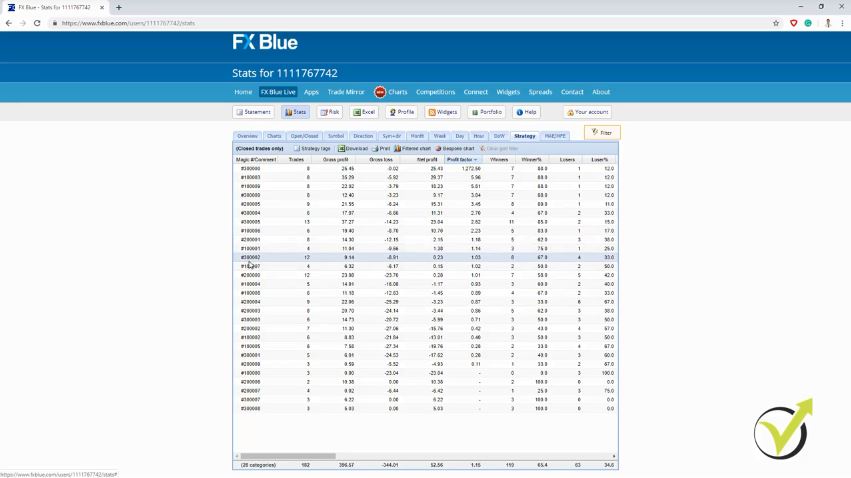
    So these are the results that are from all the strategies. Now, during the last week or 2, I have removed already some of the strategy that had already five trades and had Profit factor below 1.1. So I usually arrange the strategies according to the Profit factor.

    FX blue forex
    FX Blue website for statistics

    And you can see below this strategy, starting with three ending in 2, all the strategies below are with Profit factor below 1.1. And actually, here I have this strategy with only profits and no losses. This is why there is no Profit factor calculated.

    Practice the Portfolio Expert Advisors on a Demo account before trying a live account.

    And as well the last 2. So these are strategies that are still trading in the account. Generally, during the weekends and on Wednesday, I check the accounts, and if there are strategies that already did five trades and their Profit factor fell below 1.1, I remove them from the account.

    And this way, I leave the strategies that are currently in their profitable phase. And you can see already 52.56 EUR is my profit. Which is not a small profit because I’m trading with 0.01 lot size.

    This is the very minimum you can trade with. This is 798.2 pips, which are not a bad result for less than one month.

    Nearly 800 pips is not a bad profit at all. Of course, I trade with 0.01 because I don’t want to stimulate anybody trading with huge lots. You better start with the minimum, and one more time, you better practice the system first on a Demo account before going into the live account.

    With practice, you will get used to the system.

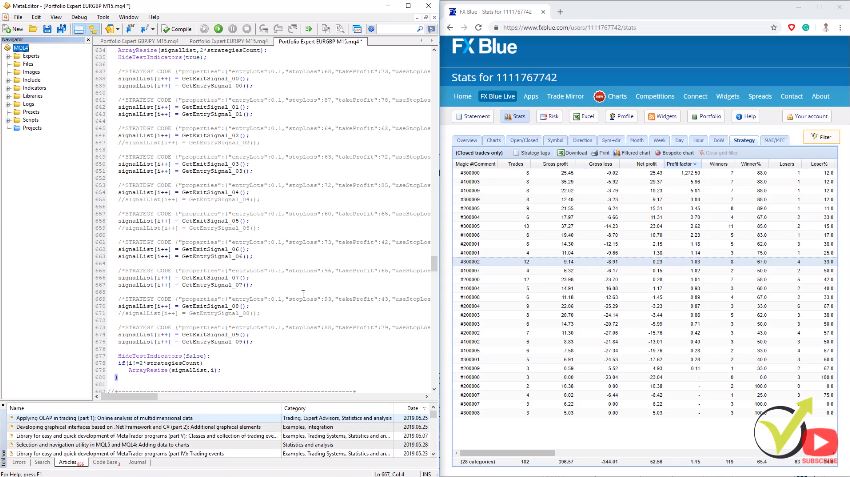
    Now let me open the MetaEditor as well. I will put it right over here, and I will try to put those on the same screen so I can better check the strategies. It takes just a couple of minutes.

    portfolio expert advisors selections
    Filtering the strategies in the Meta Editor

    And when you’re used to it, you will do it even faster.  And, for example, I will start with EURGBP, which are the strategies beginning with 1.

    One is the magic number for EURGBP. These first strategies for the EURGBP are doing just great. And their Profit factor is very high. But I don’t look at them. I look at the strategy that I want to remove.

    So I start from below with the strategies that have Profit factor below 1.1, and I’m looking now for the strategy starting with 1. One strategy ending in 7, this is for EURGBP, and it has a Profit factor of 1.02 but still only four trades, not 5. So I will see what will happen with the next trade.

    Probably if it is a profitable one, the Profit factor will go above 1.2. If it is a losing one, I will need to remove it because it will have already five trades, and the Profit factor will be below 1.1. And this is the criteria that I want to use.

    Filter the Portfolio Expert Advisors from the strategies that have PF below 1,1 and min 5 trades.

    The next one is with 004, and it had already five trades, and the Profit factor is below 1. Now let me have a look. The 4th strategy is right over here. I have already removed it.

    And then I go to the next one, the 81, I need to remove it as well. Let’s see if I have deleted it, yes it is already removed. And it is then going down 02.

    This one already removed. The next one is ending in 5. It is already removed. And here is the first strategy.

    So the first strategy is the one ending in 0. This is how magic numbers go. So the first one is the one starting with 0.

    I will not remove it because it has only three trades. The Profit factor is still not calculated because it made only losses until the moment. Three losing trades, no profits.

    The two times slash.

    But I stick to the system that I follow, and I will wait to see a minimum of 5 trades before I decide if I will remove it or not. And these are all the strategies from the EURGBP. So you know, I didn’t need to remove any of the strategy for the EURGBP.

    And then, I will go to the portfolio Expert Advisors for the EURJPY, and these are the strategies that start with 20. This is the magic number for the EURJPY. So you can see I have the one ending in 5, makes a good profit.

    And then I have the one ending in 1 as in my profitable zone with Profit factor above 1.1. And then let’s see which are the strategies that I have to remove, or I have already removed. So this one ending in 0, which is the first strategy, it has already 12 trades, and the Profit factor fell below 1.1.

    So I will need to remove it. I enter two times slash, and this strategy will not open any more trades. Now I go down. The fourth one should be already removed. Yes, it is.

    I remove the losing strategies from the Portfolio Expert Advisors with // in the code.

    Then the one ending in 3, actually this is not the fourth one, but this is the one ending on 4. Because we said, the first one is with 00.

    So 01 is the second, 02 is the third, 03 is the fourth, and 04 in the fifth. They start at 0. So it is more proper if I say the strategy that ends in 4. Because this is actually the fifth strategy. I hope it’s clear.

    So the one ending in 4 and the one ending in 3 are already removed. I had removed them from the previous times when I was checking the account. And let’s see the one ending in 2.

    It is removed already, as well. And then going down the one ending in 9, it still has three trades, so it is still in the account. Even if it makes more losses than profits till the moment, I will keep it until it makes five trades.

    And then its strategy ending in 6, still with two trades but this strategy makes an only profit, no losses. So I will leave it. And let’s see this one which ends in 7. And it’s not removed from the account because it has only four trades.

    It is all about filtering the account from the losing strategies.

    And this is it for EURJPY. I had to remove only this strategy. Don’t forget to compile it. The changes will be saved in the Meta Trader, and this strategy will not apply anymore.

    Only if there is opened trade, it will manage it. But no new trades will be opened. I go to GBPJPY. And let me find the strategies just a little bit higher.

    Here they are. And let’s go to the GBPJPY strategies. These are the strategies that start with 3 in their magic number. The best strategy so far made 25.43 EUR of a profit.

    The Profit factor is 1,272.50. Huge Profit factor because we have a very small loss of 2 cents with this strategy. Already eight trades, and it is still trading in the account — no reason to remove it so far.

    Then I will go to the next one. This is the strategy that ends in 9. Already eight trades and the Profit factor is excellent, 3.84. Then the one ending in 4, already above five trades, 11.31 EUR Profit factor to 70, which is fantastic as well.

    What is risk diversification when we trade with Portfolio Expert Advisors?

    When trading many strategies in one account, we diversify the risk. Some of the strategies are losing, but the others compensate for these losses. If we trade just with one strategy and it starts to lose, we will be only losing. So let’s keep ongoing…

    The one is ending in 5. Again we have a lot of trades here. This is the most active strategy for the moment, and it made already 23.4 EUR. And then, going down, this is the first strategy that is below 1.1 for the GBPJPY.

    This strategy is already removed from the portfolio. Let’s have a look at the others. This is the next one ending in 3. Already six trades, Profit factor below 1.1.

    But this strategy is well removed. And then this one ending in 1. It is removed. I can see five trades already, Profit factor of 0.28. And then we have this one over here, the last 2.

    So they end in 7 and 8, still three trades for both of them and they make only profits and no losses. They are still in the trading Portfolio Expert Advisors. So from the three portfolio Experts, I had to remove only one strategy for the EURJPY.

    Actually, from the overview that I just did, I saw that the most profitable strategies until the current moment are from the GBPJPY, which is very typical. But this is precisely the risk diversification. So we trade different assets with different strategies.

    It’s up to you how you will manage the portfolio Expert Advisors.

    When some strategies start to lose, the others compensate for the loss, but we are in a profit. So this is how I follow the results of the account. It is very easy and quick to monitor, which are the strategies that are performing with Profit factor below 1.1 and did already five trades.

    This is what I follow, the Profit factor, and the count of trades. But you’re very welcome to create your own rules, how you want to follow the strategies. One more time, this system for me is beneficial.

    It makes steady profits. You can see nearly 800 pips is an excellent result for me. And if you want to give it a try, you will decide how you will manage the portfolio Expert Advisors. In my course Walk-Forward optimization: Forex trading with Portfolio EAs, I will attach new three portfolio Expert Advisors for the GBPJPY, for the EURJPY, and EURGBP every month. So the best thing would be to leave the strategies that are still profitable and place on another account.

    Use different magic numbers when placing the portfolio Expert Advisors in the same account.

    Or in the same account, the new portfolio Expert Advisors that I will provide. But make sure to be with different magic numbers if you’re placing them in the same account. Anyway, you will mess up the statistic. If you put them in separate accounts, then you will not have a problem.

    But this means that you will need to install another Meta Trader on your computer. So if you want to use the same account, change the magic number. The first digit or the first two or three digits so you will make sure you know which strategies open the trade and especially from which portfolio Expert Advisor.

    Thank you very much for reading. This is the system I wanted to share with you. I found out that recently, trading the cross pairs works nice. Very steady profit into the account.

    But make sure to follow precisely the results. One more time, I do it with the number of trades and the Profit factor. But you can use anything else, especially in FX Blue. There are so many statistics. It’s up to you how you will be using it.

    Thanks for reading one more time, and I wish you to enjoy the trading.

    Cheers.

  • Why Trade Forex With Portfolio Trading Strategies?

    Why Trade Forex With Portfolio Trading Strategies?

    Portfolio of trading strategies – the smarter approach to algorithmic trading.

    Portfolio of trading strategies is what most algo traders are concentrated during 2019. Hello, dear traders, this is Petko Aleksandrov, and I will show you what is the difference when you are trading with one strategy and when you’re trading with many strategies. And I will use the EA Studio strategy builder to demonstrate to you how the balance line changes when we have many strategies in one Expert Advisor, also called portfolio Expert Advisor or Portfolio of trading strategies.

    For the beginner traders, the EA Studio is a professional trading software for algorithmic trading. There is a generator that we use to create EAs and many analytic tools. Also, with EA Studio, we can export the strategies as Expert Advisors with one click. No need to program anything.

    So I have the generator in front of me here, and I will run it very quickly to get some strategies. As a symbol, I will stay with GBPJPY. And periods M15, as strategy properties, I have the range between 10 and 100 pips for the Stop Loss and the Take Profit.

    Entry lot, a minimum of 0.01. And as generator settings, I will leave it just to 3 minutes and I will not use the common Acceptance criteria. So I will not filter the strategies in any way. I would want to generate some strategies, and for Out of Sample, I will stay with In Sample.

    Portfolio of trading strategies
    The generator in EA Studio

    So I’ll just run now the generator, and if you have tested it, you would know that it works fast. For seconds hundreds of strategies are calculated. And in the collection, I see already strategies, 18 and 19 and they’re increasing.

    If you haven’t tested EA Studio, there is 15-days free trial that you can take advantage of.

    Stagnation period is what we need to avoid.

    But these strategies that I just generated, they are not filtered. I didn’t put any Acceptance criteria. I just wanted to demonstrate the difference when we have one strategy and when we have many strategies.

    If I click on refresh, the new strategies will show. I will pick any of the strategies randomly, so let’s take the first one.

    You can see there are these vast drawdowns or stagnation periods in the strategy. Stagnation period is when in the balance chart, the profit reaches to one point and then for a long time, it does not make a better profit. You can see in the picture below that there are many stagnation periods in the Balance chart.

    Stagnation period in the equity line
    The strategy editor in EA Studio

    And we don’t want to have such huge stagnations. You can see that this strategy has some drawdowns, going down for quite a long time, not making a new profit. In the end, it’s a profitable strategy, but there are these huge drawdowns.

    The balance chart says a lot about the strategy. Let me go to the collection one more time, and I will choose some other strategies.

    What we have in EA Studio is a portfolio of trading strategies. And I can add to portfolio many strategies.

    For example, I will add the first ten strategies. 1, 2, 3. I use this + button, and it says add to the portfolio, and I have already three strategies in the portfolio. And I will go to the 4th, the 5th, the 6th, the 7th, the 8th, then 9th, and the last strategy.

    So the first ten strategies that I have for the current moment, just generated in less than 1 minute are now in the portfolio. If I click on it, you will see the balance chart. There is a massive difference between this balance chart and each balance chart into the collection.

    You can see each strategy has these huge drawdowns, losing sometimes, has stagnations, and when we are trading with the portfolio, we avoid these periods. In the portfolio strategy, I can see how stable the strategy goes. There is one stagnation over here, but it is much smaller than what we have in the other strategies:

    Portfolio of trading strategies is the best option
    The collection of individual strategies.

    Risk diversification is what we are looking for when trading with Portfolio of trading strategies.

    And this is because when one strategy loses at a current moment, the others will compensate for the loss. When the strategies have a stagnation period, the others will be in a profit at this moment. And this is visual in the collection picture above.

    When 1, 2, strategies are losing, the others will be profiting at this moment, and there will be less stagnation. Still, there will be some stagnation and drawdowns but not that huge as when we are trading with one strategy. This is why we say when we are trading with many strategies or with many Expert Advisors, we diversify the risk.

    We don’t rely on a single strategy because every strategy has its losing phase, and it’s not only one. Many losing phases could appear, and this is very normal with every strategy. As I always say, don’t look for the strategy that will bring you constantly profits because there is no such strategy simply because the market changes.

    Keep in mind that trading with many strategies simultaneously is hedging.

    So the difference, once again, is that when we combine many strategies in one portfolio Expert Advisor, and this is possible with the EA studio, you can see below that we have a much better, balanced chart. And actually, all of the statistics are much better. For example, you can see the maximum stagnation is 15% over here and with each strategy we have here 29%.

    Portfolio Expert Advisor.
    The Portfolio summary.

    Let’s have a look at the others, 58%, 60%, 46.8% and so on. So when we combine the strategies in 1 portfolio Expert Advisor, we have much better statistics and a much better balance chart. But keep in mind that this chart is a combination of all the strategies.

    It’s not a single strategy. It combines all the strategies that I have selected from the collection. And with EA Studio, we can export it as a portfolio Expert Hedging Meta Trader 4 Expert Advisor. So here we don’t have the Meta Trader 5 because most of the brokers on Meta Trader 5, they don’t allow hedging.

    That’s why it’s not available here. Probably if one day the brokers start to offer to hedge with Meta Trader 5, the option will be available as well in the software. And if I click on it, the portfolio Expert Advisor is exported, and I can put it on Meta Trader for trading.

    The code of the Portfolio Experts is similar to the single EA.

    So I will be trading these ten strategies on one chart in Meta Trader as a single Expert Advisor. Of course, I will not do that because I didn’t filter these strategies. I just wanted to show you the difference of the balance line of the statistical information when you are trading with one strategy and when we’re trading with a portfolio of strategies.

    Code of the Expert Advisors
    The Portfolio of trading strategies code.

    I will remove now this collection and the portfolio Expert. Also, I will delete the strategies, and I will continue now working with the Generator but using the Acceptance criteria. You can learn more about it in the free video:

    Generating strategies with EA Studio Expert Advisor builder

    Thank you for reading. If you have any question, drop it in our forum, and I will get back to you.

    Cheers.

  • How to become a successful Forex trader?

    How to become a successful Forex trader?

    How to become a successful Forex trader – quick tips and guides for algorithmic trading

    How to become a successful Forex trader is the thing every beginner trader looks for. Hello, dear traders, this is Petko Aleksandrov, and I will give some tips about the way I became successful in Forex trading with Expert Advisors. These are the trading Robots that become more and more popular nowadays.

    Because I am not a developer but a trader, I can not code Experts, and I never wanted to learn it because it takes a lot of time, and there is no need to do it. Today we have strategy builders which are professional software for automating and testing strategies.

    The favorite one that I use is called EA Studio, and it comes with a 15-days trial period.

    In this article, I will talk about one of the features in this program that changed my trading. Not only I became profitable, but now I work less than I used to before.

    The Reactor – the answer to How to become a successful Forex trader.

    This is the tool you can find. If you click the arrow next to the generator, there is the reactor, there is the validator. So the validator is where you can drop old strategies, collections, or complete folders with strategies.

    And you can validate them with new historical data or with data from a different broker. And it’s very helpful because when we generate strategies, we save them in collections and after that, we can validate them. So we don’t lose time again to generate new strategies.

    But we can filter them through the validator with the recent historical data. So the reactor is the tool where we do everything automatically. And we don’t need to perform robustness testing manually or Walk Forward optimisation and validation.

    Not only automated trading but an automated process to create EAs.

    Everything is done automatically by the software and by the reactor. So first, we have the generator settings. I will demonstrate it to you how it works, and I will select here the GBPJPY on the M15 chart.

    As strategy properties, I will keep 0.01 as the minimum lot. Then I will use range from 10 to 100 pips for the Stop Loss and same for the Take Profit. And as well in generator settings, I will keep it search best as a Net balance so I will see the strategies with the most balance on the top.

    I have the chance to choose Out of Sample and In Sample. But here I will stay with In Sample. So I will be using the Out of Sample in the Walk Forward optimisation.

    And below is the common Acceptance criteria. If I click on it, I have minimum backtest quality of 98 at the moment, Minimum count of trades 300, which is just fine. And I will add minimum Profit factor of 1.1.

    How to become a successful Forex trader.
    The Acceptance criteria in EA Studio

    The acceptance criteria are essential

    As well I will add minimum Profit factor for the In Sample part and for the Out of Sample part which I will use in the Walk Forward optimisation. Profit factor 1.1 and here as well I will choose Profit factor of 1.1.

    So I want to have a Profit factor of 1.1 for the complete backtest for the In Sample part and for the Out of Sample part. Now, going back to the reactor, I will go to the Walk Forward optimisation. I have the choice of whether to use it or not.

    All the tools below I can select if I want to use them or not. At the current moment, I have chosen the Walk Forward optimisation and the Monte Carlo validation, and this is what I will use now. So what is the idea of the reactor?

    Strategies that pass the Acceptance criteria go into the collection.

    When the strategies are being generated, they automatically go to the Walk Forward optimisation or the tool you have selected here to use. And if they pass this optimisation, or the validation, or whatever you choose to use, they will go to the next one. So from the Walk Forward optimisation, in this case, they will go to the Monte Carlo validation.

    And it will perform the variety of tests that I have shown in the previous lectures. And if the strategies pass, then I will see them in the collection. So here, the reactor does all the job automatically, and before we were doing it manually.

    For each strategy, we were performing optimisation, robustness testing, and now when the reactor is available (since 2018), it is effortless to do it because we need to set up the reactor and it filters the strategies automatically. And at the end, in the collection, we have the strategies that are within our Acceptance criteria.

    automated Expert Advisor trading
    The reactor in EA Studio

    For Walk-Forward optimisation, what I will be using is a lower number of segments. So I will go down to 3. So it will be the very same thing that I have already showed but with three segments.

    While generating your strategies, you can work with as many as you please.

    How to become a successful Forex trader if you trade with many EAs?

    • place them all on a Demo account and test
    • select which ones to place for real trading
    • follow the results and keep the top EAs from the Demo in the Live account

    My recent tests showed that it works a little bit faster to generate strategies, and personally I like it at the moment to work with three segments and not with 5. Of course, if you want to generate your strategies, you can test with 3, with 4, with 5, with any other number. For Out of Sample, I will stay with 30%, search best; net balance, and let me have a look at the settings that I have in the Walk Forward.

    In settings I will choose three segments. Out of Sample below is just fine, as validation I will stay with a minimum of $10, and here are the parameters, the statistics.  Going back to the reactor, I have the Out of Sample percentage, Net balance, the Walk Forward settings are fine, validated segments if I choose to use three then I want to have 3 out of the three segments validated.

    You can select if you want to use the common Acceptance criteria or not. Yes, I want the final backtest with the last parameters to be validated with the Acceptance Criteria.

    EA Studio is a web-based platform, and it is a crucial solution to how to become a successful Forex trader

    So I would like my strategies to have 1.1 Profit factor for the complete backtest for the training part and the trading part. And then we go to the Monte Carlo. I will stick with the default settings. And as I have shown, I usually use the strategy variations, the randomised indicator parameters, and the randomise backtest starting bar.

    How to become a successful Forex trader with software
    The Monte Carlo settings

    So this is how I set up the reactor, and this, of course, is an example. One more time, if you want to do it in a different way, you are very welcome to experiment. This is how traders learn to trade.

    I will click on start, and I will see the strategies are being calculated. So one more time, those of the strategies that pass the generator, they will go through the Walk Forward optimisation, and then if they pass the Walk Forward optimisation they will go to the Monte Carlo validation. So in the generator, the strategies need to pass the Acceptance criteria.

    The very same Acceptance criteria that are after that with the Walk Forward optimisation. Now, what is the great thing with EA Studio? It is web-based, and I can set the very same thing on another browser.

    Expert Advisor Studio is integrated into our website.

    We want to help our students with the question How to become a successful Forex trader. That is why we are always looking for the best programs on the market.

    So if I open one more time our website, Trading Academy, and I go to the Expert Advisor Studio which is integrated, and I log in to my account, I have some old work here with EURUSD strategy that loads automatically. And I will run now a reactor, but I will separate the tab. It works faster if I separate the tabs.

    So I have already done it for the GBPJPY, now what I will do, I will set it up for the EURGBP. I will stick on M15, and then the same settings should be saved, but I always check them one more time. And here, I will use working minutes 600.

    And I usually run the reactor at the end of the working day so the morning I have new strategies into the collection. So 600 minutes is precisely 10 hours, and it works fine for me to leave three reactors working overnight. So I will do the same thing here, 600 minutes for the EURGBP.

    The reactors work simultaneously.
    Two active reactor tabs.

    The reactors work simultaneously.

    The Acceptance criteria it did not save. In this case, I will need to do it one more time, so 300 counts of trades and a minimum Profit factor of 1.1. And I will do the same for the Acceptance criteria in the In Sample part, minimum Profit factor of 1.1.

    And then I will have a minimum Profit factor of 1.1 as well in the Out of Sample part. Here it is. And then for the reactor, I will choose to use Walk-Forward optimisation, which is right over here.

    And of course, I need to select three as well as validated segments. Let me have a look at the Walk Forward settings, here it should be 3.

    And the Monte Carlo is saved to 20 and 80%, same for the strategy variations. So I think I am ready now and I will click on start. And now both reactors work simultaneously.

    How to become successful Forex trading automatically? You need the ability to run several reactors because it saves time.

    This saves a lot of time because we can run a couple of reactors. I usually run 3 to 4. Just don’t make it too complicated. Make sure you organise your work if you decide to generate your strategies.

    So one more time, I will open the Expert Advisor Studio, separate tab, and I will have it for EURJPY, right?

    Let me check one more time, I have it for EURGBP, and I have it for GBPJPY, and I will have it for the EURJPY. On the H1 chart, strategy properties, it is the same. Minimum lot of 0.01, Stop Loss range from 10 to 100, Take Profit range from 10 to 100, and generator settings 600 minutes.

    Standard Acceptance criteria, let me do it, so it’s 1.1 Profit factor, 300 counts of trades, as well Profit factor of 1.1 for the In Sample part and 1.1 for the Out of Sample part. Here it is. Going back to the reactor, I will select the Walk Forward optimisation, where I said three segments out of the three should be validated.

    How to become a successful Forex trader.
    The Walk Forward optimisation settings

    The more reactors you run, the slower your computer becomes.

    And as well in settings, I will change to 3 segments. And now I am already with the last reactor. I will click on start and now that 3 of them are working simultaneously.

    I have selected the three currency pairs EURGBP on M15, GBPJPY on M15 and EURJPY because this way I have two times the EUR, two times the GBP, and two times the JPY.

    And if you run more, they might get a little bit slower.

    So ho to become a successful Forex trader with IT SKills? You already know the answer. It is easy. Just use strategy builders like EA Studio.

    Visit our Forum for any questions.

    But usually, I keep it 3 to 4 to make the best of it. And just a couple of seconds after I ran the reactor for the EURGBP, already one strategy passed the Acceptance criteria in the generator, or this is the standard Acceptance criteria. Then it went to the Walk Forward optimisation. It passed the Walk Forward optimisation.

    But then it couldn’t pass the Monte Carlo. So this is how it is working; it is straightforward to set it up. I will leave it now, and I will show you what the results that we generate are.

    Thank you for reading. If you have any question, feel free to drop it in our forum.