
Blog

  • FX Choice Review – PROs & CONs

    FX Choice Review – PROs & CONs

    FX Choice Review by Forex Academy team

    Overview

    FX Choice Review was written to give a better idea to our students and traders about the conditions of the broker. We will point out the Pros and Cons and it is a personal choice if one will choose it as a broker.

    FX Choice is a broker for Forex and CFD trading that is based in Belize and operated by the company FX Choice LTD. It started in 2010 and since then has become fairly popular, executing about 15,000 transactions a day.

    It allows traders to trade just under 40 different currency pairs and a variety of CFDs, including precious metals, energies, indices, and commodities. This review will take you through the various things you need to consider to help you decided if FX Choice is the right broker for you.

    Types of Accounts

    We always suggest our traders test a broker with a Demo account first. This way you can test the trading conditions of the broker and any type of strategy or Expert Advisors.

    In this FX Choice review, we will tell you in details the different type of trading accounts with the broker

    There are two types of accounts that you can open with FX Choice. You can open a Pro account or a Classic account. There are actually not very many huge differences between the two. Both accounts require a minimum deposit of 100 dollars and have a minimum trade size of 0.01, both of which are fairly standard things across various Forex brokers.
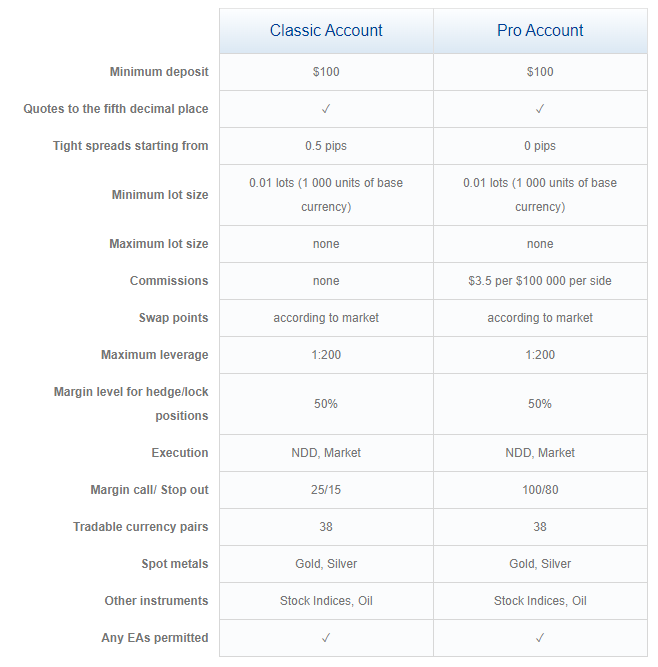
    FX Choice review for the accounts

    Before opening an account you might want to compare FX Choice broker with another recommended broker such as HotForex Broker.

    The important difference between the two is that the Classic account is commission-free and therefore offers higher spreads.

    On the other hand, the Pro account is based on commissions with tighter spreads due to ECN.

    The average spread for the Classic account is 1.2 pips on EUR/USD; the average spread for the Pro account is 0.5 pips on EUR/USD and $3.86 per lot. There are a few differences beyond that.

    If you decided to get a Pro account, you get a choice of desktop platforms. You will be able to use MetaTrader 4 and MetaTrader 5.

    Keep in mind that MetaTrader platforms are developed by third part company called Meta Quotes. All the brokers, just like FX Choice pay yearly fees to provide the platform to their clients. The fee is above $75 000.

    Anyway, if you find some issues with MetaTrader, do not hurry to blame the broker. MetaTrader 5 has still many bugs unfixed, and this is why many traders prefer to use MetaTrader 4.

    It is much more comfortable for algo trading. This is why our trader Petko Aleksandrov uses MetaTrader 4 n his courses. It provides a choice of direction for the Experts, compiling many EAs with one click and easier Magic numbers usage.

    So in this FX Choice Review, we will tell you more about the broker, and we will leave it up to you which type of account you prefer to use.

    Beyond the two different account types, you have the option to open a corporate or an individual account. Corporate accounts will allow multiple traders to use the account, while an individual account is designed for one person to use.

    This opens up more options beyond the Pro versus Classic to ensure that your account is exactly what you need it to be.

    FX Choice Review for the trading conditions

    The minimum initial deposit is the amount an FX broker requires you to deposit to get started. Different Forex brokers will all require different amounts. Most Forex brokers have various account options with different minimum requirements to cater to all types and expertise level traders.

    That is not the case for FX Choice. FX Choice requires a minimum 100 dollar initial deposit for both Classic and Pro account holders. This is a very reasonable requirement. You, of course, can go beyond that 100 dollars if you want to.

    The spreads for FX Choice vary based on what kind of account you use, but they do not differ all that much. A spread is the price difference between where a trader can purchase/sell an asset. The average for both the Pro and Classic accounts really good.

    Leverage in Forex trading allows you to use a small amount of your money to control/trade a larger sum. Different Forex brokers will provide different maximum leverage amounts. That is the largest ratio that you can control with your money.

    FX Choice has a maximum leverage level of 1:200. That is fairly average in forex trading. More expert traders may want the ability to have a higher leverage level, but 1:200 is good for most traders, especially newer traders who may not know all the ins and outs of forex trading yet.

    Platforms

    FX Choice is a broker that only uses MetaTrader platforms.

    That means it offers various platforms developed and released by MetaQuotes Software Corporation, such as MetaTrader 4 and MetaTrader5.

    Most of our traders prefer to use MetaTrader 4.
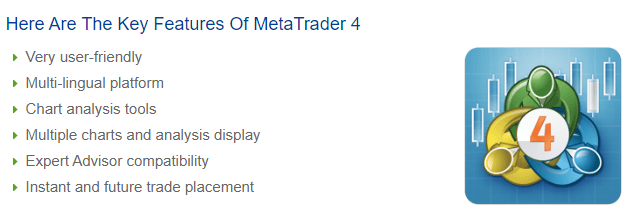
    MetaTrader 5 is preferable from many traders but it has the disadvantage that most brokers do not offer hedging on MetaTrader 5. This means that you can not trade many EAs on MT5.
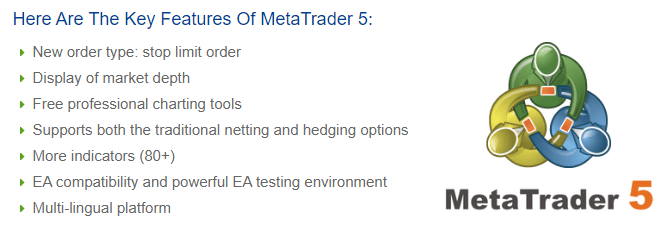
    FX choice review  MetaTrader

    If you want to test another broker that offers the MetaTrader platform you can give it a try with any of our Recommended brokers on the website of the Academy.

    This also means that if you want to use a non-MetaTrader platform, you need to find a different Forex trading broker.

    MetaTrader across various brokers is relatively the same, but there are some differences based on the trading spreads, execution, and tools.

    FX Choice review for the features offered with MetaTrader by the broker:

    • allows algorithmic trading with EAs
    • includes virtual trading
    • a desktop platform
    • a web platform
    • social and copy trading
    • 51 charting indicators/studies
    • seven watchlists
    • trailing stop

    Here are a few features that FX Choice does not offer. It does not have a proprietary platform, and it does not provide cTrader.

    FX Choice review: Payment Options

    One of the most significant benefits of FX Choice is the wide variety of payment options. Different Forex traders all have different preferences as to how they want to be paid, which can limit their options as far as websites/brokers can use.

    FX Choice offers:

    • wire transfers
    • credit/debit cards
    • various e-wallets.

    An e-wallet is an online storage of funds that a person can use to make online transactions. Most e-wallets will need to be connected to a valid bank account.

    Some of the methods are not available in particular countries. It depends where you live and what are the restrictions in your region.

    FX Choice review for the he e-wallets offered by the broker:

    • Skrill
    • Neteller
    • Bitcoin
    • ePayments
    • Astropay
    • Trustly,
    • FasaPay
    • Perfect Money
    • PaySafeCard.

    Payments can be in the form of the United States Dollar (USD), the Euro (EUR), the British pound sterling (GBD), the Australian Dollar (AUD), the Canadian dollar (CAD), and, of course, Bitcoin. This range of options should make it available to most Forex traders, and if you use a different currency, you can always convert afterward.

    Safety

    Because the broker has been operating for so long, it has built up a reputation with clients that newer programs have not.

    However, FX Choice is still considered high risk by many people in the field because of the lack of outside regulation.

    There are three tiers of regulation jurisdictions that a Forex trading broker/website can be regulated by.

    Tier-1 jurisdictions are considered to be the best, and if a company is regulated by a tier-1 regulator, it is generally considered trustworthy. Examples of tier-1 regulators are the Securities Features Commission, the Commodity Futures Trading Commission, and the Swiss Financial Market Supervisory Authority.

    Tier-2 jurisdictions are considered average. There are not as many restrictions and requirements as required by a tier-1 jurisdiction, but it still offers decent protection. Examples of tier-2 jurisdictions are the China Banking Regulatory Commission, the Israel Securities Authority, and the Securities and Exchange Commission.

    Finally. tier-3 jurisdictions are the easiest to be a part of and require the least. Examples of tier-3 jurisdictions are the BVI Financial Service Commission and Mauritius’ Financial Services Commission.

    FX Choice is not regulated by any tier-1 or tier-2 jurisdictions. It is a part of one tier-3 jurisdiction, the local International Financial Services Commission. They do have a code of conduct, but there is not a lot of enforced compliance-checking, reporting, or supervision.

    Some Forex traders are fine with a company that has a good reputation, but others need the added insurance of a tier-1 or tier-2 regulatory jurisdiction to feel safe. If you are one of the later, it is important to know that FX Choice does not have that, and therefore you may want to consider using a different platform.

    Research and Education

    FX Choice also offers MetaTrader 4 and MetaTrader 5 users, a virtual private server service (VPS).

    However, they do not offer things like daily market commentary and auto-chartist. The lack of research options may be a problem for some forex traders.
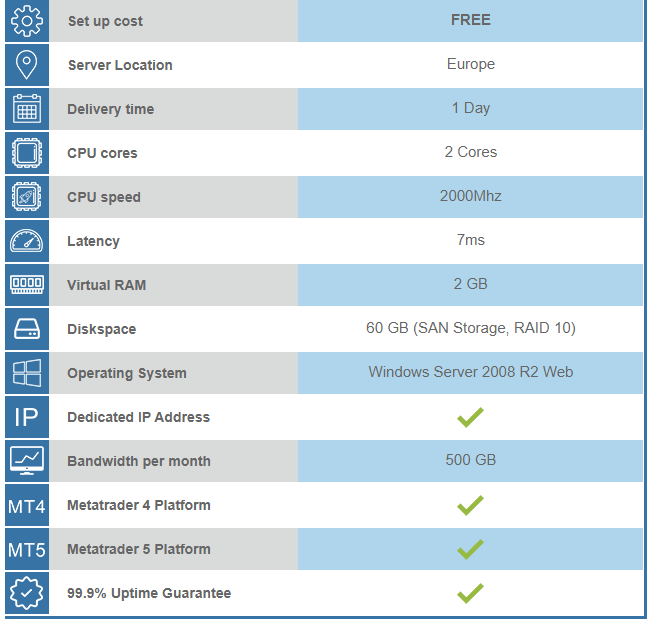
    Fx Review for VPS

    Besides research, FX Choice does offer a range of various types of educational content. Educational content helps a forex trader learn more about forex trading so they can get better at it.

    Not all brokers offer this kind of content, but many do. This kind of content generally appeals more to novice Forex traders as they try to figure out what they are doing and how to be profitable. Some experienced Forex traders may not be interested in this content and therefore, may not care whether or not it is offered, but educational content can appeal to more people than just novice traders.

    However, we would suggest you take a look at our Trading courses, and get more professional education which will lower the chance of losing money on the market.

    Lots of traders like to continue to learn about Forex trading, as there is almost always more to learn. More knowledge leads to better and more profitable trading.

    Mobile

    Most Forex traders do the majority of their trading on a computer of some sort, usually a desktop computer, but as it is impossible to be around said desktop all the time, having access to a mobile platform can be beneficial.

    It gives you the opportunity to check on your trading whenever you want, wherever you are. Mobile platforms are becoming more common, but not all brokers off them.

    FX Choice does offer a mobile platform available for both iOS and Android. You can download this platform directly from either the iTunes store (iOS users) and Google Play (Android users.)

    The platform is fairly basic, so you are limited in how much you can do from your phone. And you can not place Expert Advisors on your phone. But you can monitor the algo trading from the phone.

    The fact that mobile trading is an option with this broker is a benefit, but it is not the best mobile trading option out there. People looking to do lots of mobile trading may want to look for a different broker with a more advanced mobile service.

    Pros and Cons Summary

    With this FX Choice review we want to point out the Pros and the Cons so you can make your choice easier.

    PROs:

    • They do offer a commission discount for active traders. That means the more people trade, the more money they make. For people trading for fun or as a hobby when they have the time, this does not matter a whole lot as chances are they will not be trading enough to get the discount. However, people who spend a lot of time and effort trading, especially those who use it as a primary source of income, will find this extremely beneficial. It is not a huge discount, but every dollar counts.
    • It is regulated in Belize. While the regulation is fairly liberal, there is some which makes it more trustworthy than some other brokers. It has also been around for a decade, which means it has built up some credibility. It is known to have excellent service and support; LiveHelpNow has awarded it the Exceptional Customer Service award on multiple occasions.
    • It offers competitive spreads, which makes the pricing very much worth it. Spreads are one of the most important things to consider when picking a Forex broker. If a broker does not have goods spreads, it is not a good option.
    • For the ECN environment, it has a low initial deposit of only 100 dollars. Most traders will end up depositing more as time goes on, and possibly more from the beginning, but 100 dollars is a great starting point for new traders. You do not have to risk too much of your own money when you do not know what you are doing yet.
    • You can use both MetaTrader 4 and MetaTrader 5. They are the most popular trading platforms. Of course, if you are interested in a different platform, you need a different broker as FX Choice only offers platforms developed by MetaQuotes Software Corporation.
    • They do offer some extra tools such as a VPS. Extra tools are always as a benefit, as they are above and beyond what is required for you to be able to trade.
    • FX Choice has a positive price correction. This means that if a trader slips into negative balances due to special circumstances, FX Choice will zero out the balance. This prevents people from losing more money than what they originally plan to trade.

    CONs:

    • The biggest con for FX Choice is the fact that it is only regulated by a single tier-3 jurisdiction, which makes it riskier than some other trading platforms. There is always some risk in Forex trading, but when a broker is well regulated, it becomes substantially less risky. You have to decide if a good reputation is enough for you to trust a broker, or if you really would prefer tier-1 or at least tier-2 regulation.
    • FX Choice does not offer very many research tools. This may not matter to some people because they use research tools from another platform or simply do not want to use them at all. But for others, research tools are extremely important.
    • FX Choice only offers a small range of tradeable instruments. If they have the instruments you want to use, this will not be a problem, but if they do not, this is not the broker for you.

    We hope that this FX Choice review was useful to you, and we would appreciate it if you leave your review and experience with this broker. This will be useful to many other traders.

    If you are looking for a bigger choice of brokers, check out the Brokers Page.

    FX Choice is a preferred broker for many traders. It allows the traders to trade with a spread starting from 0.1 Pips. FX Choice offer MetaTrader and algo trading.

    FX Choice is a long time on the market and has built a good reputation. However, it is considered a risky broker by many traders because it lacks outside regulation.

    Recently FX Choice has introduced ePay to deposit and withdraw funds from the account without free. However, when withdrawing from ePay to a credit card, you will still pay a 1% fee.

    The minimum amount to deposit to a trading account with FX Choice is $100. No matter if it is a Pro account or Classic account.
  • Ethereum Course with 99 EAs: 10 FAQ

    Ethereum Course with 99 EAs: 10 FAQ

    Ethereum course with Expert Advisors is really what the crypto trader want. So we gave it to them!

    Ethereum course is launched and I will answer your questions today! Hello, dear traders, and welcome to the 10 most frequently asked questions for the Ethereum course in 2019 + 99 robots every month. I will answer the 10 questions that I receive the most and I hope I will give answers to other questions that you might have for this course.

    1.Should I turn off my computer when the Expert Advisors  from the Ethereum course are trading or not?”

    Now if you, guys, turn off your computer while you are trading with Expert Advisors, this will disconnect your Meta Trader from the server of your broker which basically will disable the Expert Advisors. So you should not really turn off your computer. Now the Expert Advisors have Stop Loss and Take Profit, which will execute when you turn off your computer.

    No new trades will open and if you have exit conditions with Expert Advisors, they will not be active. So basically you will just depend on the Stop Loss and Take Profit. So one of the solutions is to leave your computer, your laptop 24 hours opened.

    The other solution is to look for VPS service. This is a little bit of a cost which probably you don’t want to give in the beginning when you start trading. So the better choice, especially for beginner traders, is to leave their computers opened and connected to the Internet and to the server of the broker.

    2. “The generator cannot find my strategies for Ethereum trading?”

    The reason for that is that you have made the generator, the Acceptance criteria in the generator too strict.  So probably you have entered too many Count of trades. Or you have entered a very small range for Stop Loss and Take Profit or huge Profit factor like 1.5 or anything that just limits the generator. Try to give it a wide range, not too strict.

    So you better have more strategies into the collection as I show in the Ethereum course. Then, you will filter them through the collection and you will see the best Expert Advisors. What I mean is you better have more strategies into the collection when you’re generating. Don’t make it too strict and have no strategies at the end of the generator process.

    3. “How do I change the lot size in the order?”

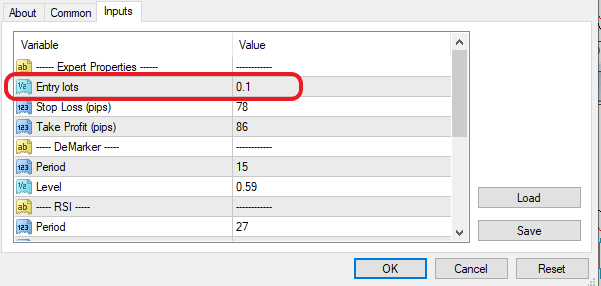
    You can change the lot size from the moment when you drop the Expert Advisor over the chart and inputs the first row that you will see on the top. It says a trading lot and from there you can choose whatever Ethereum trading lot you want to trade:

    Ethereum course
    Inputs for the parameters

    Now if you are trading with the 99 Expert Advisors from the Ethereum course, make sure to trade a really small lot in the beginning. If you place a huge lot and especially with 99 Expert Advisors, you will need to have a huge account. Of course, you can do it on a Demo account. But on a live account be very careful trading with huge lots especially with many Expert Advisors in one account.
    How can I change the lot for my Expert Advisor?

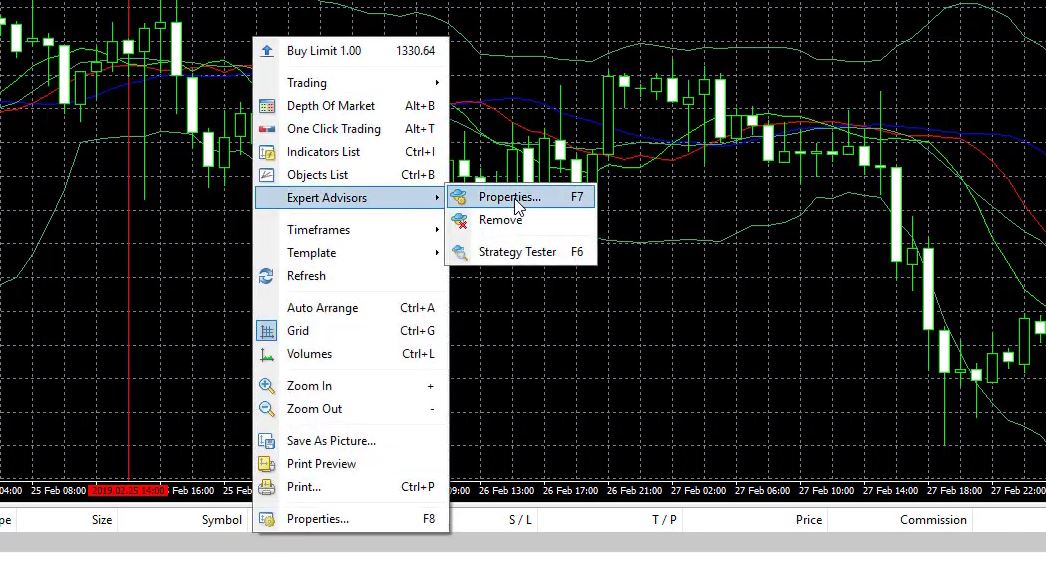
    • right click over the trading chart
    • Expert properties – properties
    • on the first raw you will see Entry lot
    • enter the new lot in Value column

    4. “Can I place the 10 best Expert Advisors and use them for 1 year?”

    Well, this really depends on the market but I don’t really think that 10 Expert Advisors will stay profitable for one year.

    The market changes.

    Now we are at the beginning of 2020, at the beginning of 2018 it was totally different.

    The cryptocurrency market was crazy and the Ethereum trading was adventure. The price was going up and then it fell like a stone. So we never know what happens especially with the cryptocurrencies. That’s why the idea is to test every month different Expert Advisors and to select those of them who are profiting at the current market.

    That is why I update the Ethereum course with new 99 Expert Advisors every month.  Now if you find a strategy that is profitable for many months that is great, don’t move it.  Don’t remove it from the live account because obviously if it makes profits that’s great.

    You don’t need to change it with another one, you can add another one but don’t remove the ones that are profitable.

    5.  “Are there special hardware requirements?”

    Not really, you don’t need to have a very powerful computer for Ethereum trading with 99 Expert Advisors.

    A random computer with standard parameters for nowadays, I can say, will work just fine. Of course, if you place a couple of Meta Traders like 2, 3, 4 it will make it slower for sure, but the execution of the orders does not really affect from that. It’s more from your server of the broker, from your broker basically.

    And just keep it simple, don’t place too many Meta Traders, just one you want to test the Expert Advisors. Another one with another Demo account where you will be placing the best Expert Advisors until you are satisfied and then one of the Meta Trader accounts you can make it as a live account so there you will be actually trading with live money. But, of course, first, always test on a Demo.

    6. “Should I replace the 99 Expert Advisors with new ones that come every month with the Ethereum course?”

    Well, I almost answered this question with the previous one by saying to keep it simple. So first what you can do is you can replace the 99 Expert Advisors every month when you receive them as an update to the course.

    Second, what you can do is you can have two accounts where you will have the Expert Advisors from the previous month and from the current month and you will have the best Expert Advisors from this 198 or you can have another Meta Trader with the older 99 Expert Advisors and you will have a huge portfolio from which you can choose. But one more time keep it as simple as possible. That is why I am providing you with new Expert Advisors every month, so you really don’t need to struggle too much with the old Expert Advisors.

    If you find Expert Advisors from the old ones that are profitable currently this is just great. Keep them trading but just replace with the new Expert Advisors I am providing you with, it will be much easier and simpler for you.

    7. “I have different results in the Demo and in the live account, why is that?”

    Most of the time the reason is with your broker.

    Not all of the brokers are really, I can say, honest with their demo trading and live trading. They have different spreads which actually changes  the historical data, changes the candles:

    meta trader platform
    Trading with 99 EAs on one account

    If the candles are different even with a few points, that will form different Historical data. And sometimes you might see a difference from your Demo and Live account.
    And sometimes the traders do not see the same results on the Demo and with the live account. This is why when I do Ethereum trading with a new broker the first thing I do is to test the broker. If it will show me the same results with Demo and live. Just some Expert Advisors I drop on the live account with 0.01. I wait for a couple of trades to be open and I compare the Demo and the live account.

    This is one of the signs that you can check your broker if it’s really legit if it is really honest and if you can actually depend on this broker. Now it’s not about the Expert Advisors, really doesn’t matter for the Expert Advisors if they are trading on a Demo account or on the live account. Wherever you place them they will trade, it depends more on your broker.
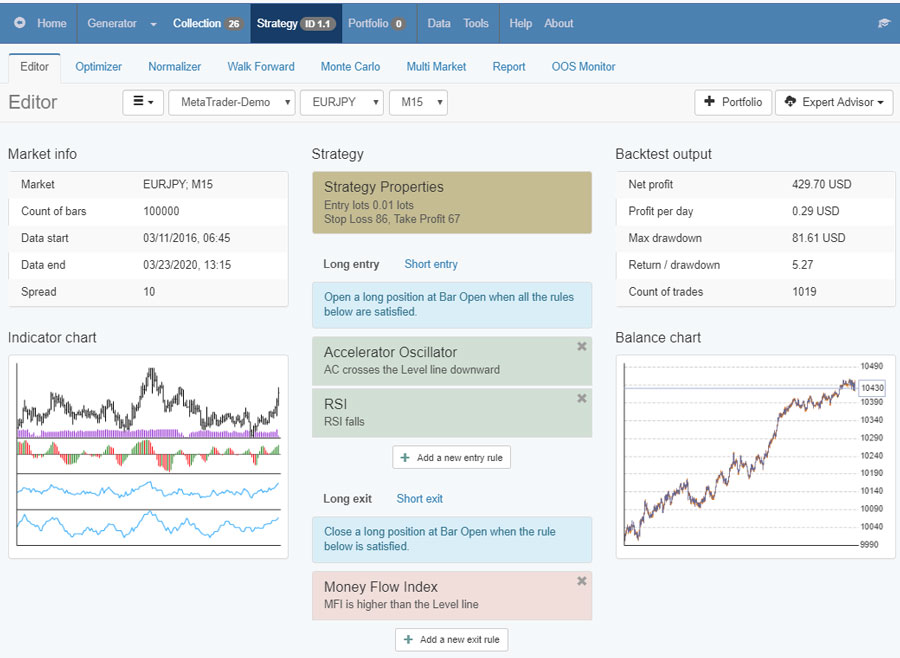
    8. “If I buy a more powerful computer, will it improve the generator of experts or not?”

    Now Expert Advisor Studio is so quick, basically, you don’t need to make it faster. You can have a better computer obviously, I always encourage traders to invest in their machines because in the long term it pays back.

    But you can start with your computer, whatever you have it will still work fast especially if you have the EA Studio on a separate browser, no other browsers together it will work fast. Now if you open a couple of browsers with generating, at the same time, probably it will make it slower. So you will find where works the best with your computer, with the time when you start earning you can, of course, invest in more powerful trading machines.
    9. “Can I install Meta Trader from another broker and use 2 Demo accounts from one broker?”

    Yes absolutely you can do that basically if you choose one broker and you want to have two Demo accounts; one to test the Expert Advisors, the other one to simulate live trading…you can download Meta Trader from another broker but register a second Demo account with the first broker and then just login to the other broker. It will work fine. Simply the Meta Trader, this is the platform and you can connect it to any broker’s server.

    10. “Can we do Ethereum trading with  Expert Advisors  from this Ethereum course on M1 chart to have more orders?”

    Yes, you can trade the Expert Advisors on M1 chart but I really don’t suggest you do that because the Expert Advisors for this course are for different time frames. OK? So it’s a common mistake among the traders that trade one Expert Advisor on different time frames and especially on different cryptocurrencies or Forex currency pairs.

    Now each Expert Advisor that we create is created over the historical data of 1 asset on 1 time frame. OK? This is why you should stick to it. If you want to trade on M1, you should generate new strategies using Expert Advisors Studio for M1 over the historical data of M1, this is the proper and the right way.

    If you have other questions about the Ethereum course,  don’t hesitate to ask me, I will always answer you. Drop your question in our forum.

    See you inside the class!

  • Best Forex EA: USDJPY Strategy

    Best Forex EA: USDJPY Strategy

    Best Forex EA in 2019 was the USDJPY strategy that we have in our courses.

    Best Forex EA is what the traders look for. And the only way to do it is by testing many EAs and follow the results.

    The best Forex EA 2019 was the USDJPY strategy that we have in our Top 10 USDJPY strategies course. And at the beginning of 2020, I have included that EA in the Top 5 Forex strategies course where I keep the best performers from all courses.

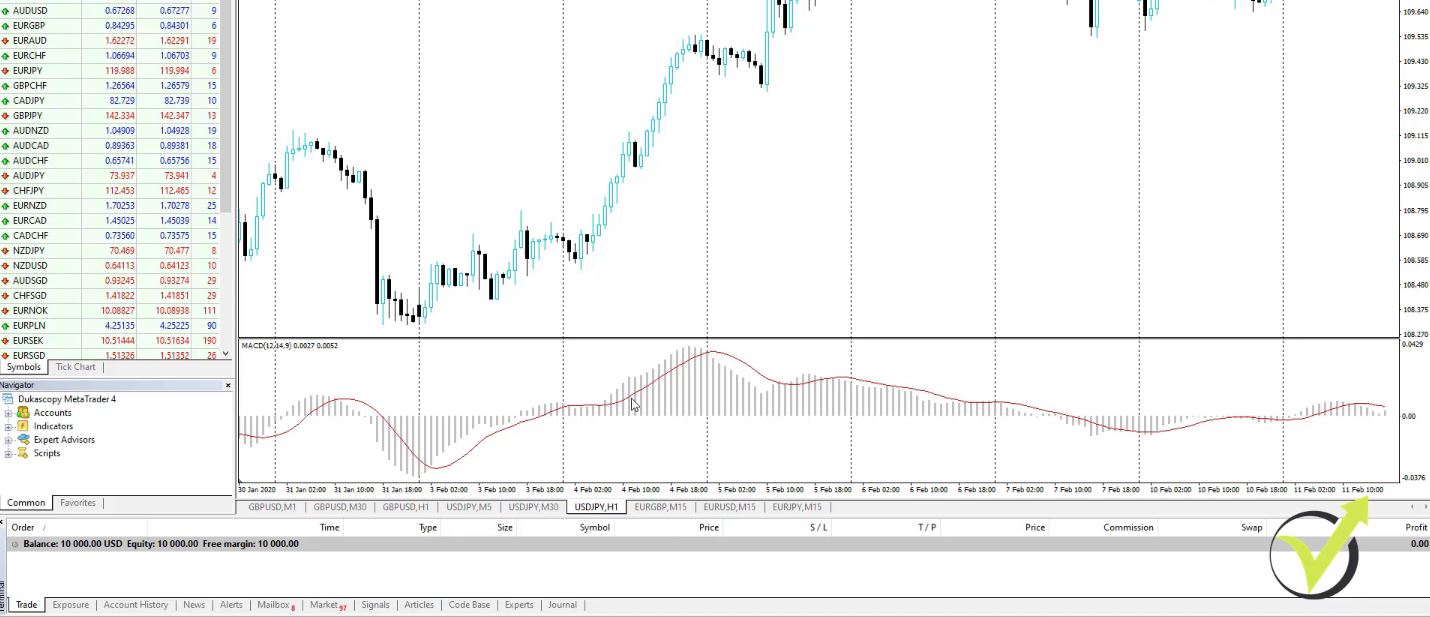
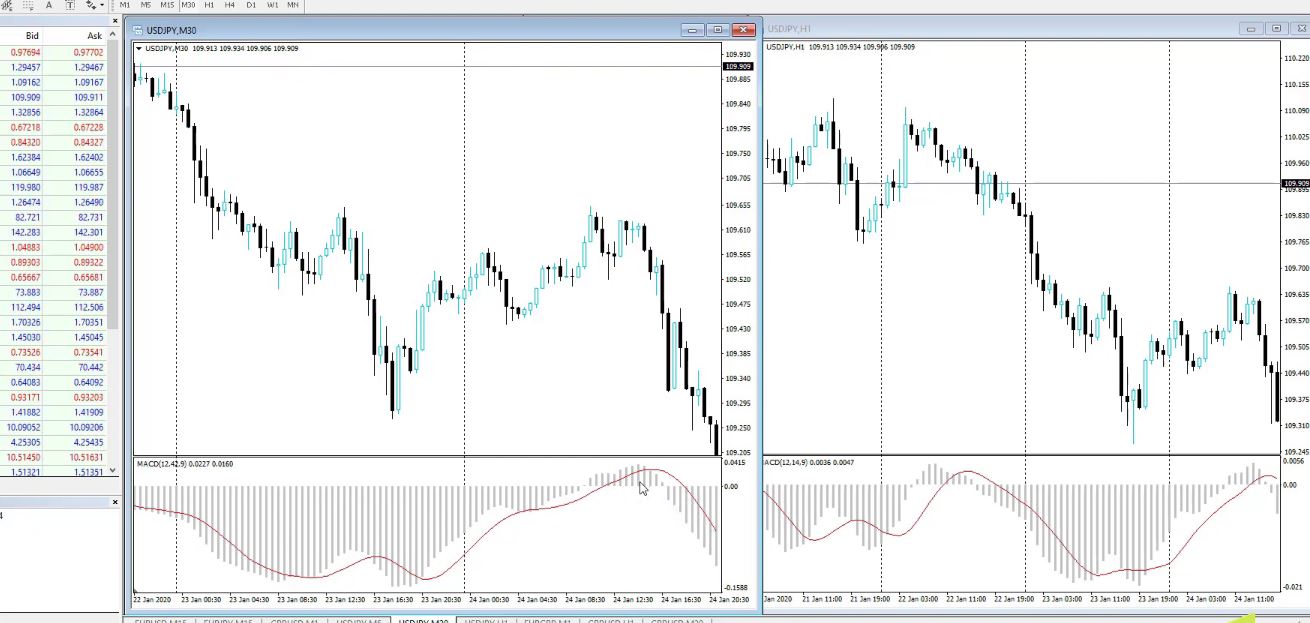
    Dear students, in this lecture I will explain how the best Forex EA 2019 in  USDJPY strategy works, what is the execution, and where exactly you need to enter if you are trading it manually. So we said, in the previous blog post that we have the MACD on H1:

    Best Forex EA 2019
    MACD on H1

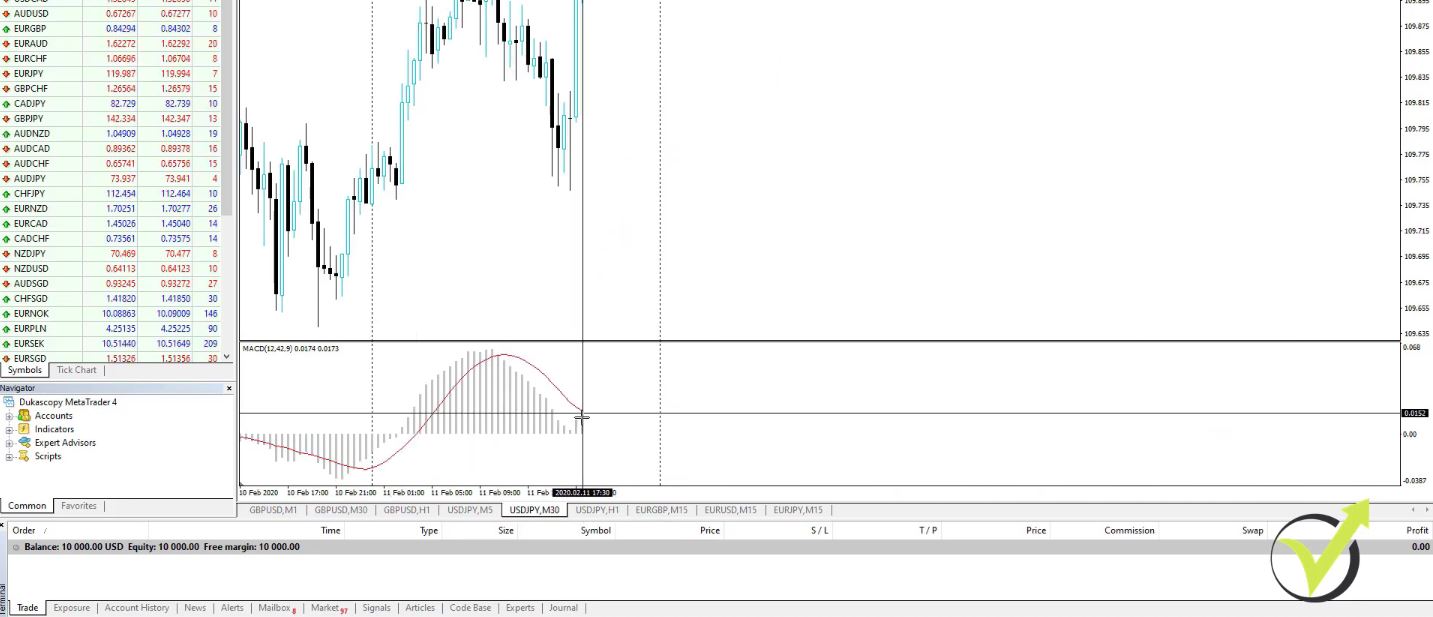
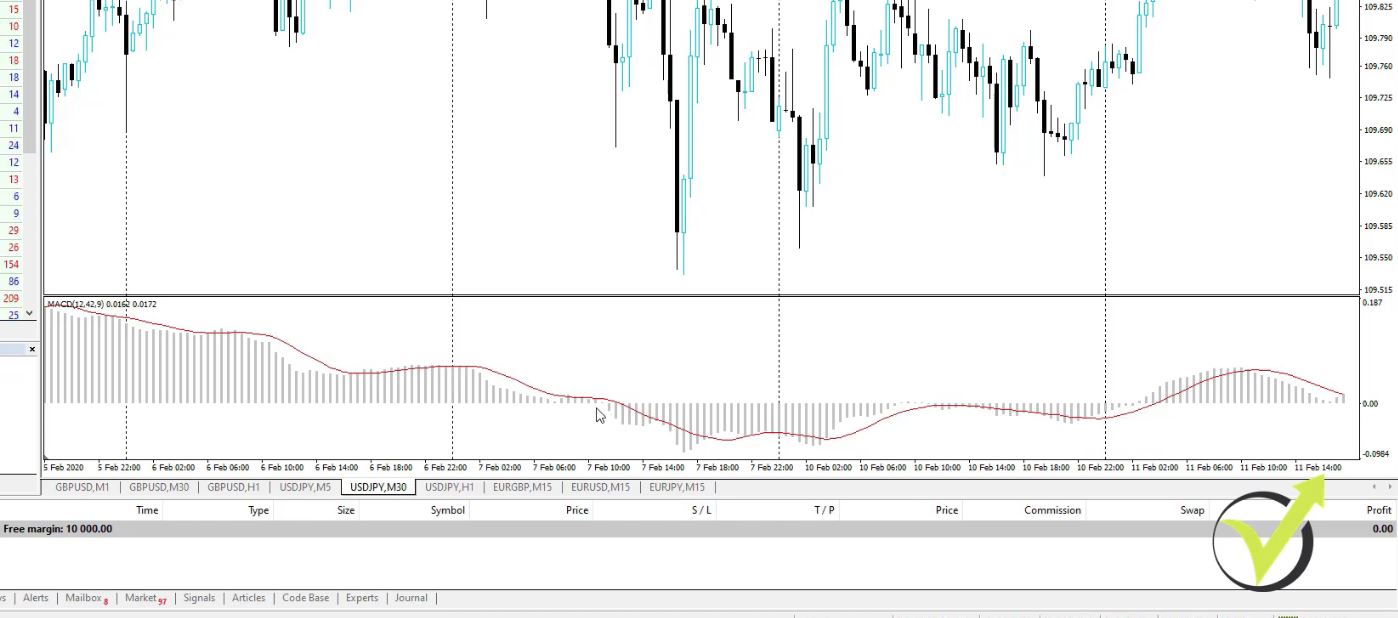
    and the MACD on M30.

    MACD on M30

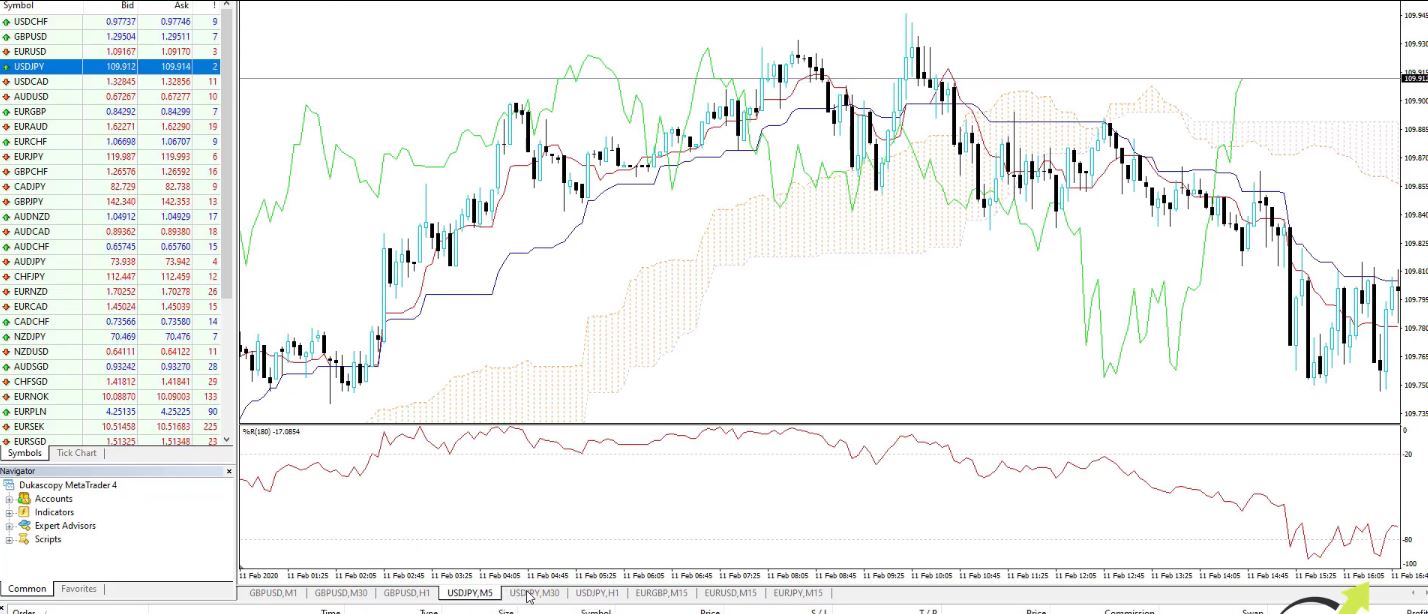
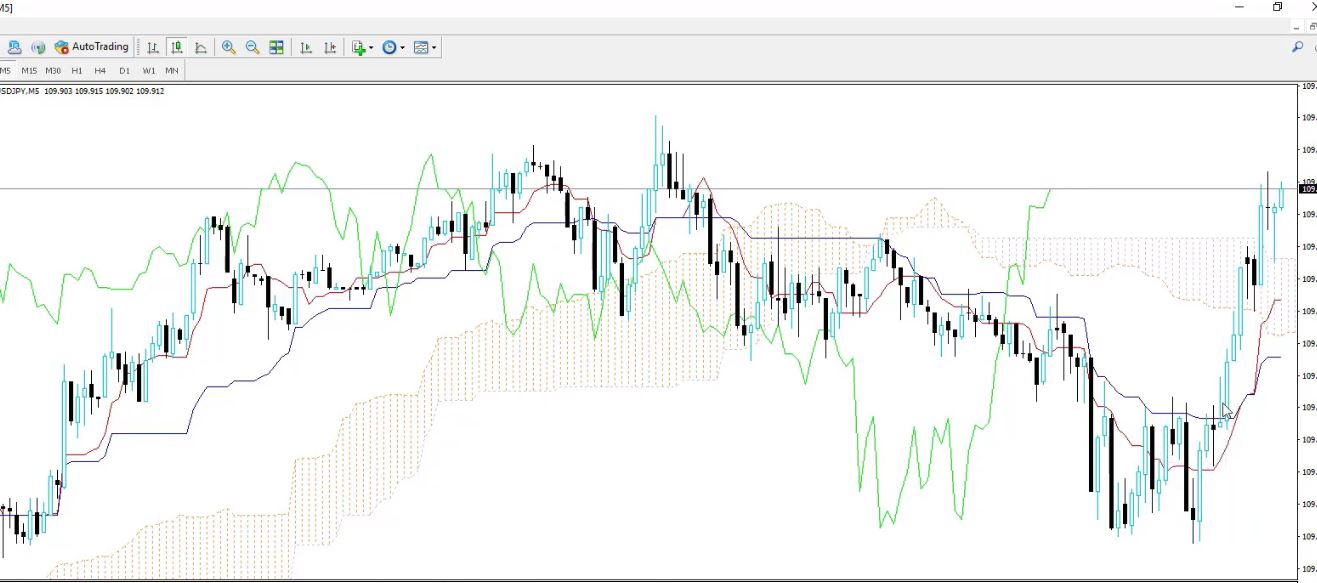
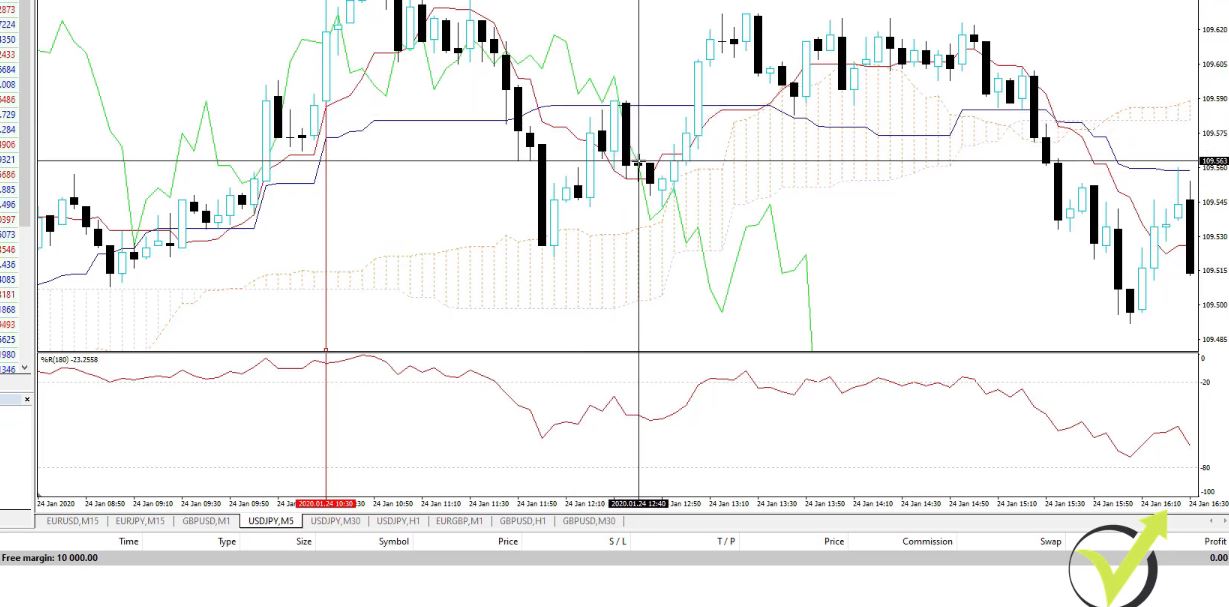
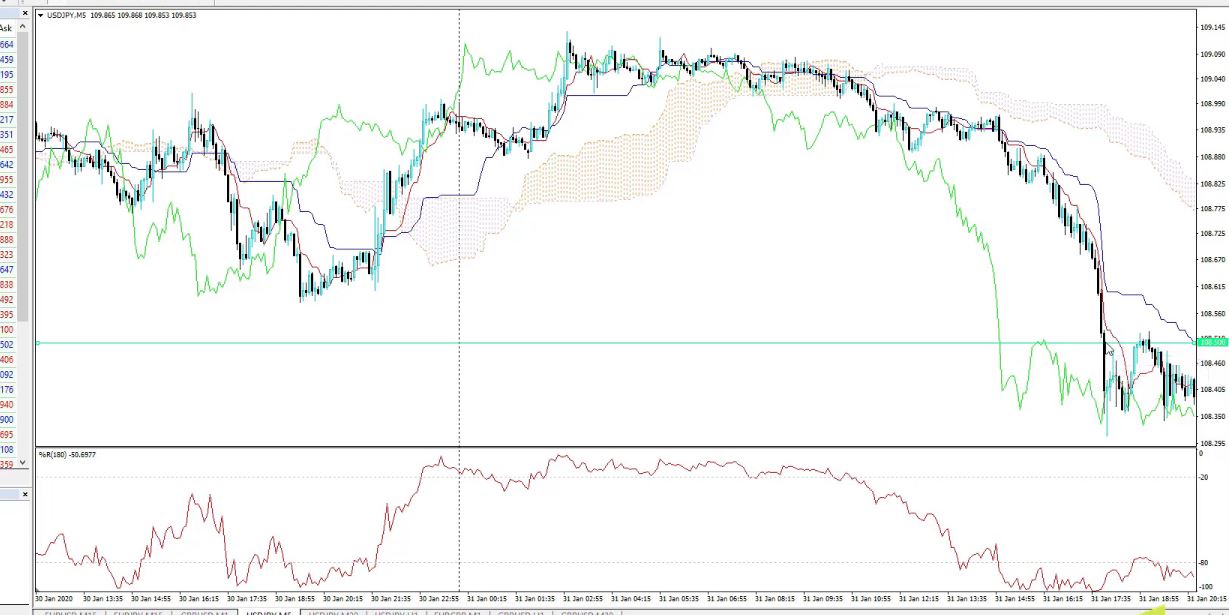
    And then we have the Ichimoku and the Williams Percent Range on M5.

    Best Forex EA 2019
    The Ichimoku and the Williams Percent Range on M5

    We use this M30 and H1 for confirmation but the trades are executed on M5.

    And actually, this is for 2 Forex EA strategies from the course, and the rest are on the M15 time frame. Trading on different time frames gives a bigger risk diversification.

    With the GBPUSD strategy, I said that we are looking to trade with the direction of the trend, the direction of the higher timeframe on M30 and H1. But on USDJPY strategy, it’s a different case. On USDJPY on H1, the MACD allows us to trade long or to buy when the MACD line is lower than the signal line.

    So that is the opposite thing. We can buy when the MACD line is below the signal line. And on M30, we can buy when the MACD line is below the 0 line, which is the line where the MACD becomes negative and positive. Below is the 0 line.

    The Zero line in MACD

    It’s really the opposite thing. And what is the idea? Simply, with the USDJPY, we are looking to buy on M5 when the price is cheap on the higher timeframes and we are looking to sell when the price is expensive.

    The USDJPY strategy that is behind the Best Forex EA 2019

    When the MACD is above the signal line, the price gets expensive. We want to sell it when it is expensive and we want to buy it when it is cheap.

    So the difference is that the GBPUSD strategy follows the trend, and the USDJPY strategy is more of a range strategy. In other words, more of a strategy that aims to buy, one more time, when the price is cheap and sell when the price is expensive. And you will see how that works. I will arrange the charts so they will be more visual.

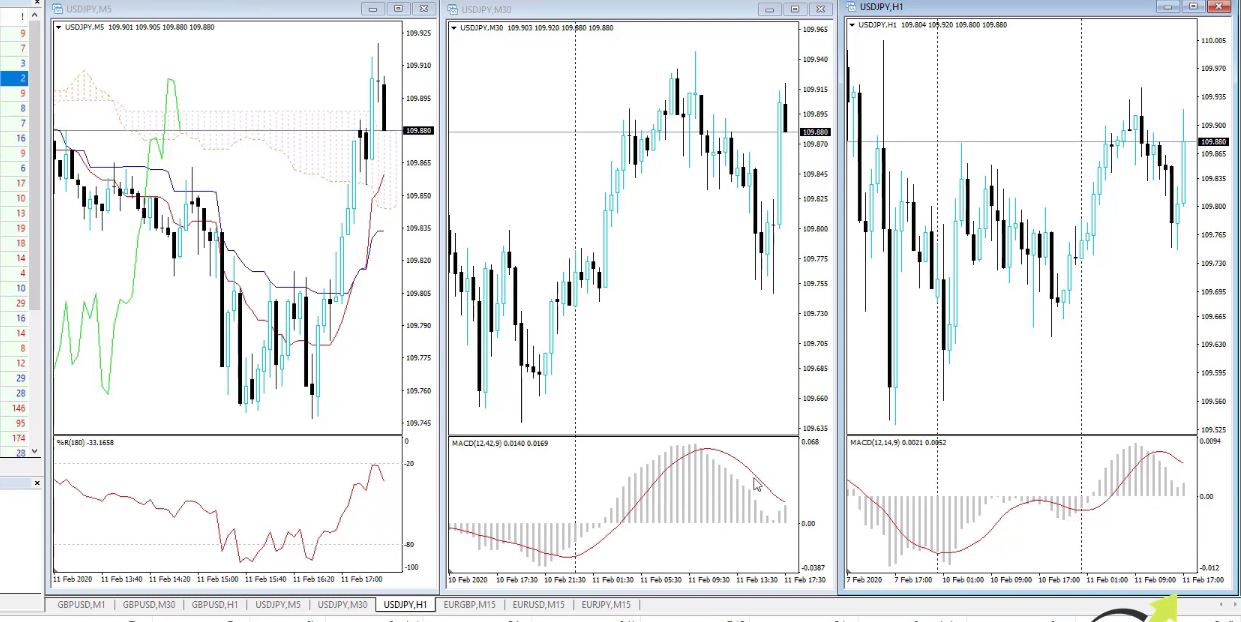
    Here is the H1 chart, the M30, and the M5 just like I did for the GBPUSD. I will move to the end, I just press the End button on my keyboard to go to the end or to the current price.

    Best Forex EA 2019
    M5, M30, and H1 charts respectively

    At the current moment, I don’t have confirmation to trade because on H1 I have the MACD below the signal line which means that I am allowed to buy. But on M30, the MACD line is above the 0 line.

    So these 2 don’t confirm each other. At this moment, I should not be looking at all at M5 because there is no confirmation. What is the entry condition on M5? We are looking to buy when the price crosses the Kijun-sen line, the blue line upwards.

    The entry condition on M5

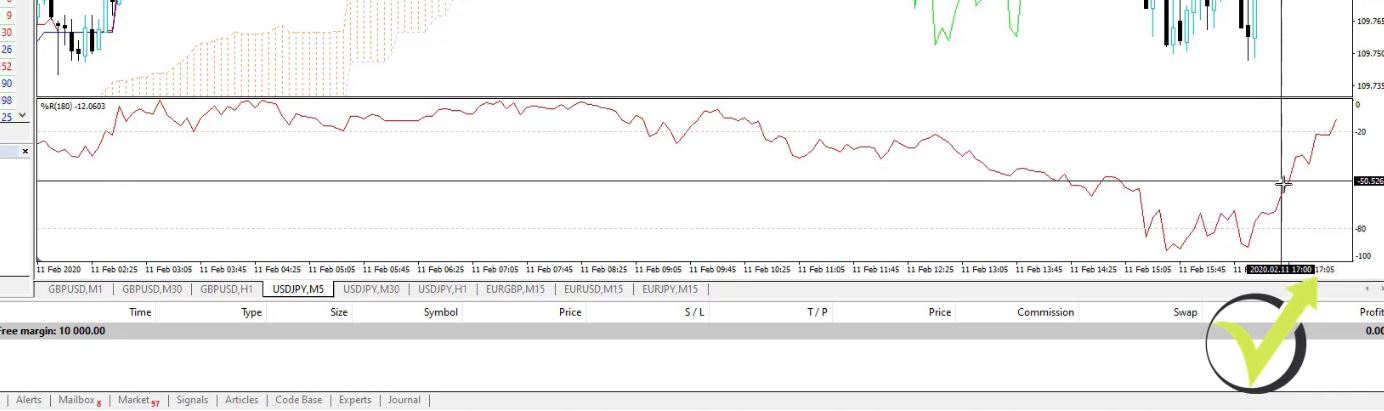
    When it crosses upwards we are looking to buy. But we need to have the confirmation that the Williams Percent Range changes its direction upwards at the same time.

    The Kijun-sen is the key factor in the Best Forex EA 2019 for the USDJPY strategy

    So if the price crosses the Kijun-sen, we need to see that the Williams Percent Range changes its direction upward.

    Best Forex EA 2019
    The Williams Percent Range changes its direction upward

    But as we said, we don’t have the confirmation from M30 because it’s above the 0 line. So this is when we are looking to buy. When we are looking to sell, we need to see the price crossing the Kijun-sen or the blue line downwards and at the same time, we need to see that the Williams Percent Range changes its direction downwards.

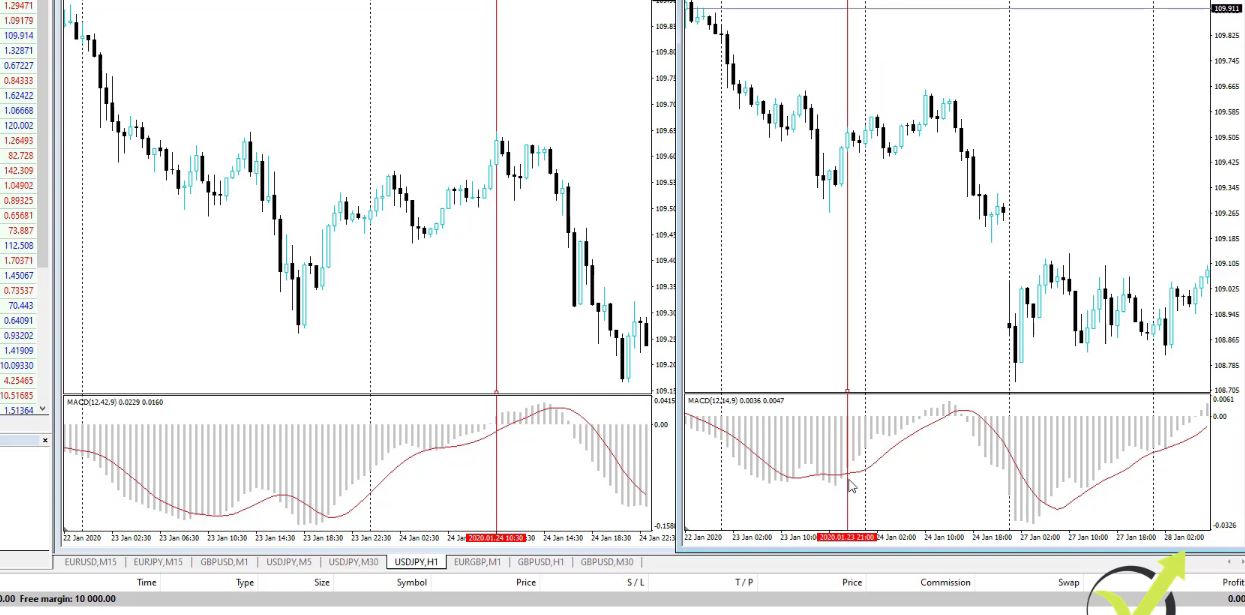
    These are the 2 rules that need to happen, the 2 events that need to happen at the same time on M5 in order to enter the market. So let’s have a look when we can buy or sell on M5, confirming on M30 and H1. For example, on M30, all that period the MACD line is below the 0 line which means that it allows us to buy.

    The MACD line allows the best Forex EA 2019 to sell.

    And when the price is above the 0 line, it gives us the confirmation to sell. For example, on the 24th of January, after that long period, we have the MACD above the 0 line which gives confirmation to sell.

    Confirmation to sell on M30

    You can place lines over the MACD but I prefer it to be over the chart. So the confirmation for MACD starts when the MACD line crosses the 0 line upwards, but for H1, the confirmation to sell starts when the MACD line is above the signal line, until this moment.

    Confirmation to sell on H1

    So the period that we are allowed to sell on H1 is much longer, this is when the MACD is above the signal line. But on M30, it’s much shorter when the MACD line is above the 0 line.

    The confirmation

    So here we are not looking at all the signal line, just the MACD. When it’s above the 0 line, we have the confirmation to sell. Now, let’s have a look at what we have on M5.

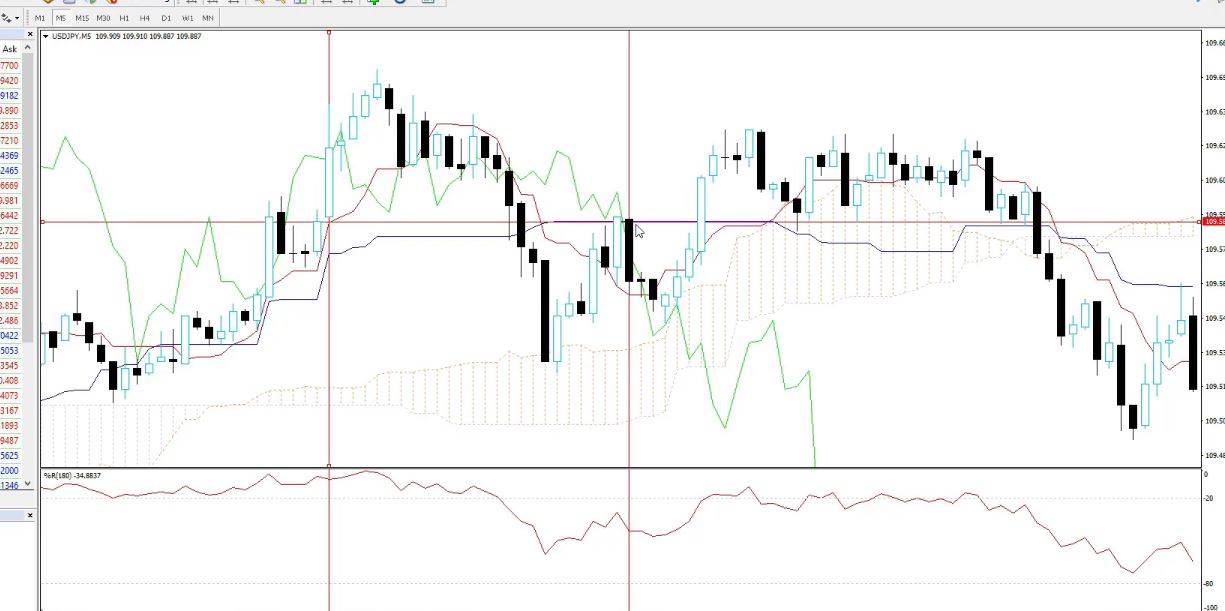
    We said that on M5 we are looking to sell when the price crosses the Kijun-sen downwards and at the same time, we want to see the Williams Percent Range changing its direction downwards. We have confirmation after 10:30 on the 24th. The first cross came but at this moment, the Williams Percent Range is just going downwards.

    There is no change in the direction. Then the price goes up and it went above the Kijun-sen, above the blue line, and then it went below on this bar which is a cross. We consider this as a cross because it went above then it went below.

    The cross

    Even a very small distance, still it’s a cross. Now, on this line, what you see is exactly what we need to have as confirmation. The Williams Percent Range changes its direction downward.

    The Stop Loss and Take Profit in the best Forex EA 2019

    So if you follow the crosshair, the price is going up, it goes above the blue line. And at this moment, the Williams Percent Range is going up. When the price goes down on the next candle below the blue line, the Williams Percent Range changes its direction. And this is the first entry we can have. I will place a horizontal line as well, exactly when it’s crossing the blue line.

    I made it red just because it’s a sell signal.

    Best Forex EA 2019
    The sell signal

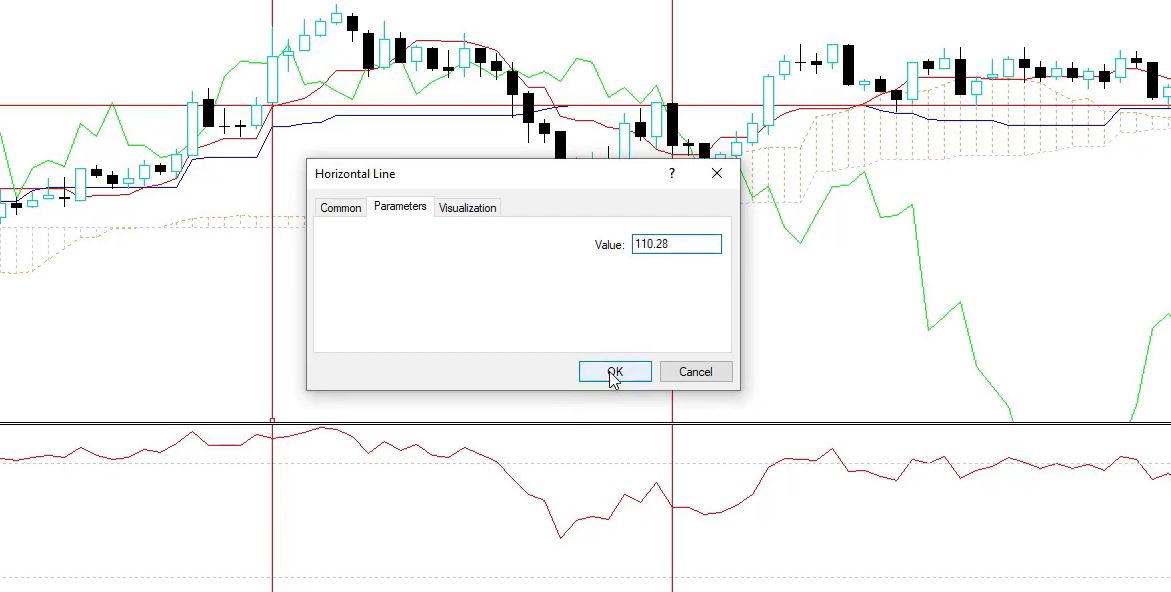
    And now for this strategy, what I have is Stop Loss of 70 pips and Take Profit of 80 pips. In the previous lecture, you will get the sheet with the setup. So Stop Loss is 70 pips or 700 points, Take Profit is 80 pips. We place the Stop Loss and the Take Profit so we will see what happened after that. I will change the parameters, entry, 109.58 plus 70 pips.

    That would be 110.28.

    Stop Loss

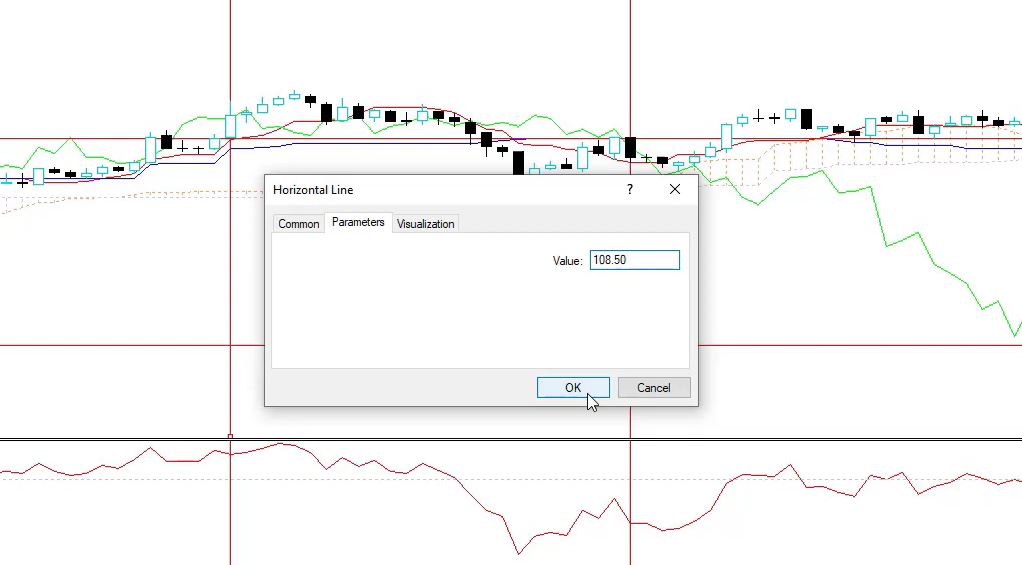
    I click on OK and it went above on the right spot. And as Take Profit, we said we have 80 pips. So I will place another line. Let’s make this one green since it’s a Take Profit. And as parameters, what I will have, 109.30 minus 80 pips. That would be 108.50.

    Take Profit

    I’m not going into the details, I just want to share with you how the strategy works.

    Taking the profit

    The price went a little bit on a negative, then it went to a positive going down. The Take Profit is still far away and the price goes sideways. The price here went towards the Take Profit.

    It’s a personal choice if you want to take the profit a little bit earlier or not. If you’re in front of the screen, I would suggest you take the profit if you see that you are getting very close because sometimes you will notice that the price goes towards the Take Profit and then reverses and might hit the Stop Loss. Personally, what I do if I see the price going close to the Take Profit and it has less than 10 pips to reach the Take Profit, I close it and I take the profit.

    This is if I’m in front of the screen and if I see it. But the idea of the Take Profit and the Stop Loss is not to touch it. The price went up and then it went down, and it hit right over here the Take Profit.

    The Take Profit is hit

    So having a Take Profit and the Stop Loss eliminates the emotions.

    Don’t involve emotions in your trading

    Many times when you enter, you will see the price going against you and people start to feel fear that they will lose and they hurry to close the trade. But there is the Stop Loss and as I said, with these strategies, the Stop Loss and the Take Profit are at these places for a reason based on a lot of statistics and algorithms that I have used to see which are the right levels. So try to avoid the emotions. Personally, when I trade manually, I place the Stop Loss, I place the Take Profit, and I just leave the trade. I don’t look at it.

    Otherwise, you will start to feel a lot of emotions. You might fear when the price goes to a loss. Or you might even fear when the price goes to a profit, you will be afraid not to lose your profit. So, for example, if you have $40 but your Take Profit is at 80, people fear that they will lose their profit and they hurry to close the trade. But as seen above, the price goes sideways for a couple of days, and then it hits the Take Profit in this example.

    So the idea of Stop Loss and Take Profit is to avoid the emotions. This is the strategy with the Ichimoku and the Williams Percent Range. A very interesting strategy. You will need some time to get used to the indicator if you’re using it for the first time. But with this strategy, we are using just the blue line.

    You can download this Best Forex EA 2019 from the Top 5 Forex strategies course. 

    Thank you for reading and if you have questions let me know.

    Cheers.

    Looking for the best Forex EA to download with no strings attached? Download our free Forex robot and try it out!

    Enter your email address to receive the free Forex robot download link.

    * indicates required
  • Ichimoku EA Trading Strategy for USDJPY

    Ichimoku EA Trading Strategy for USDJPY

    Ichimoku EA – how does a Robot for USDJPY works

    Hello, dear traders, it’s Petko Aleksandrov and in this blog post, I will show you the setup for the strategy for USDJPY from my brand new course Forex trading strategies from a professional trader + Top 5 professional EA. It is an Ichimoku EA that combines a few more indicators.

    Forex Academy is specialized in algorithmic and manual trading. In this post, you will learn an Ichimoku trading strategy.

    The Ichimoku EA works on M5. I use M30 and H1 as confirmation with the MACD indicator but with different parameters. And for the rest 3 strategies, there are no such confirmations. Therefore, this is just for the GBPUSD and for the USDJPY.

    Above all, this strategy is part of my Top 10 USDJPY Expert Advisors course so basically, I’ve selected the best strategy out of this course. And when I say the best, it means that it performs the best till the moment. However, if any of the strategies start to perform better in the future, I will replace it. But this one at the current moment is the top performer for me.

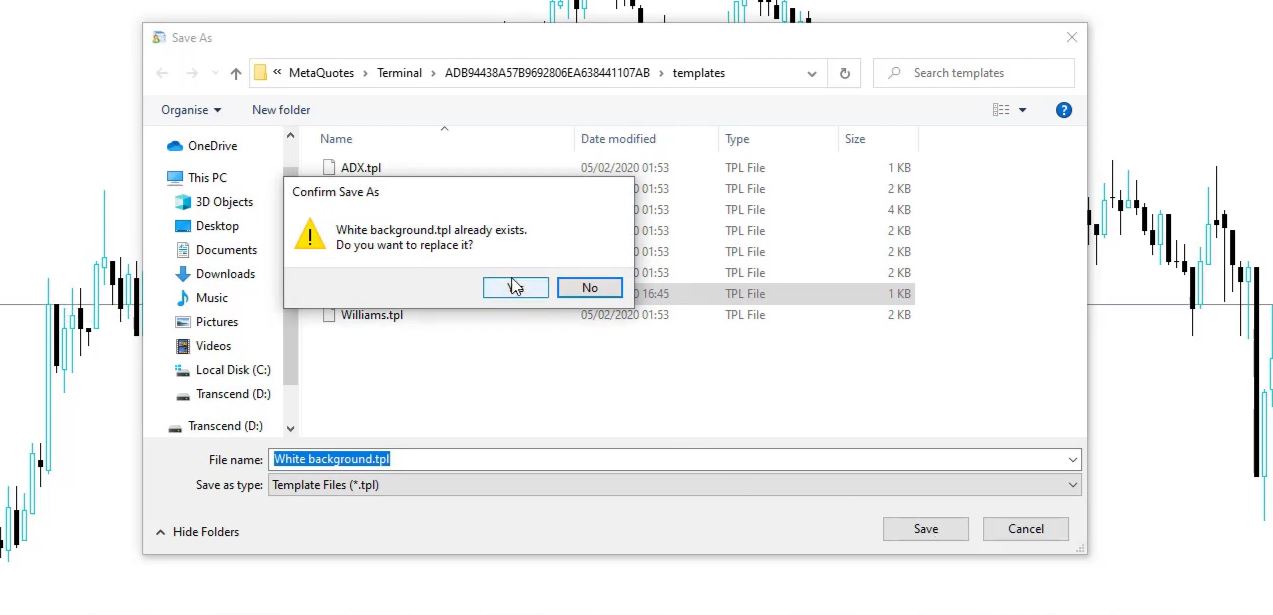
    I prefer to keep a white background for my trading charts. This way the indicators are more visual and it is easier to trade.  I will create a template for the White background so it will be easier when I set new charts on MetaTrader.

    Ichimoku EA Saving the template on MT4
    Saving the template on MT4

    The Ichimoku EA indicator uses Higher Time Frame Filsters.

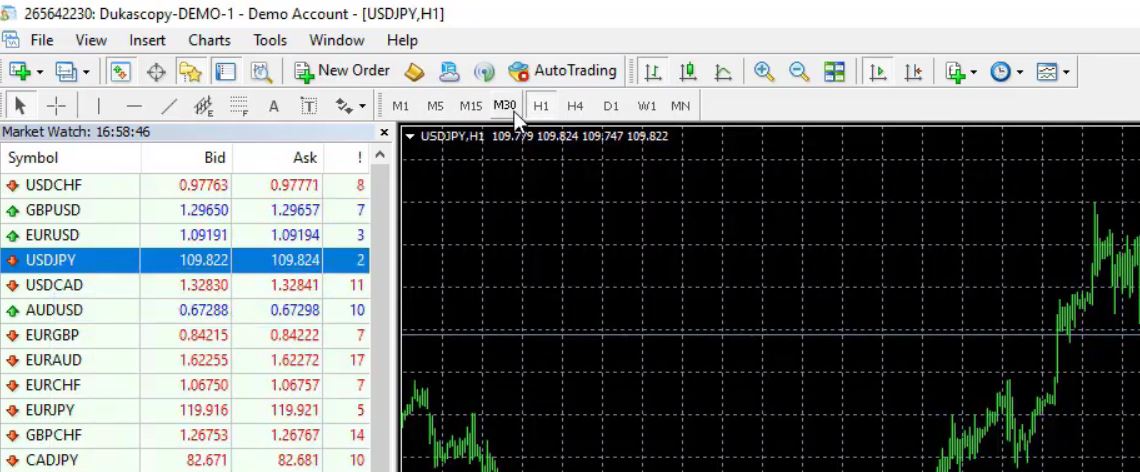
    And now let me open 2 more chart windows, one will be for M30, one will be for H1.

    The new chart windows for the higher time frames MetaTrader
    The new chart windows for the higher time frames

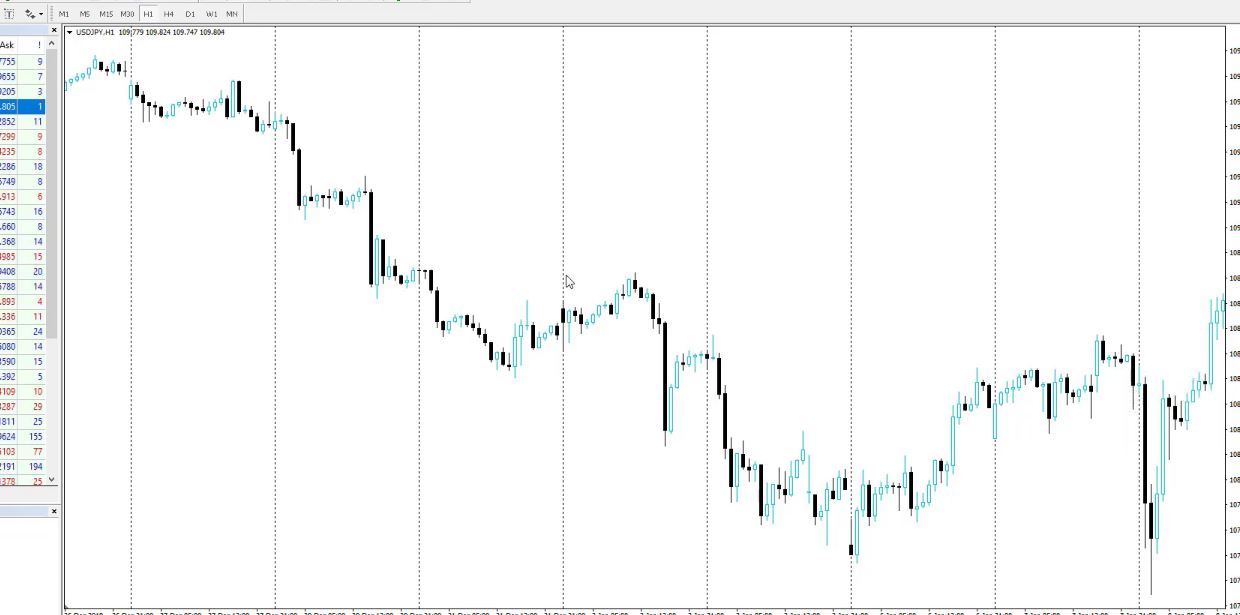
    I will apply the template, White background. These vertical lines that you see, these are the midnight.

    Ichimoku EA
    The vertical lines

    Basically they separate the days.

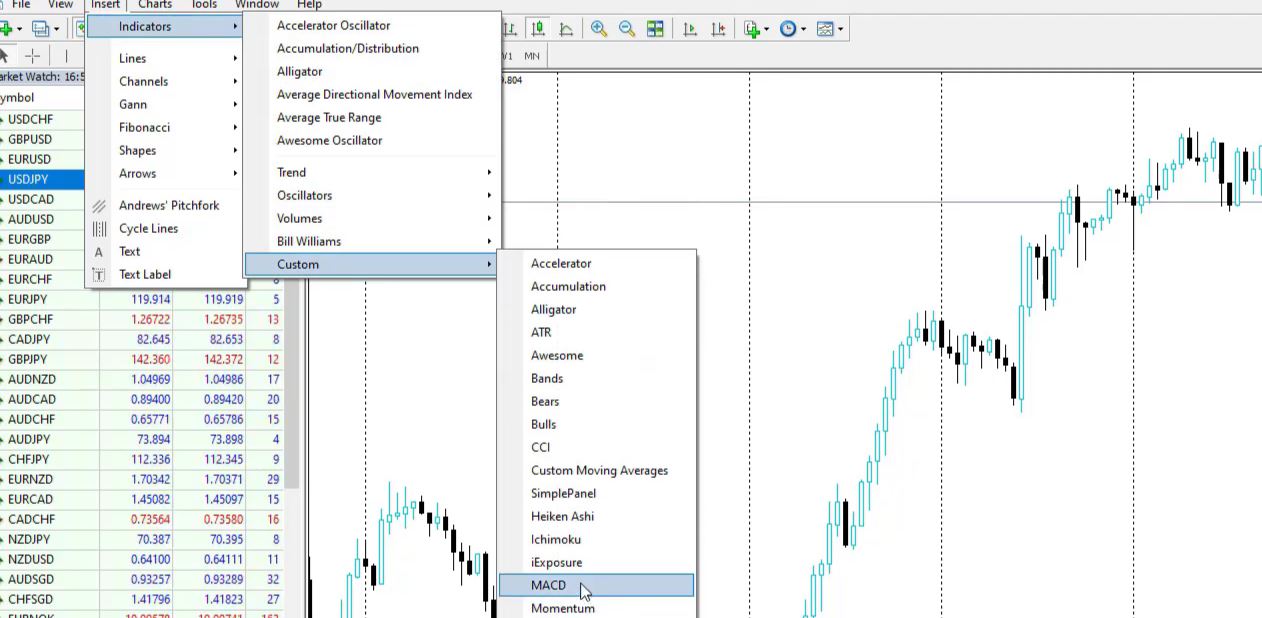
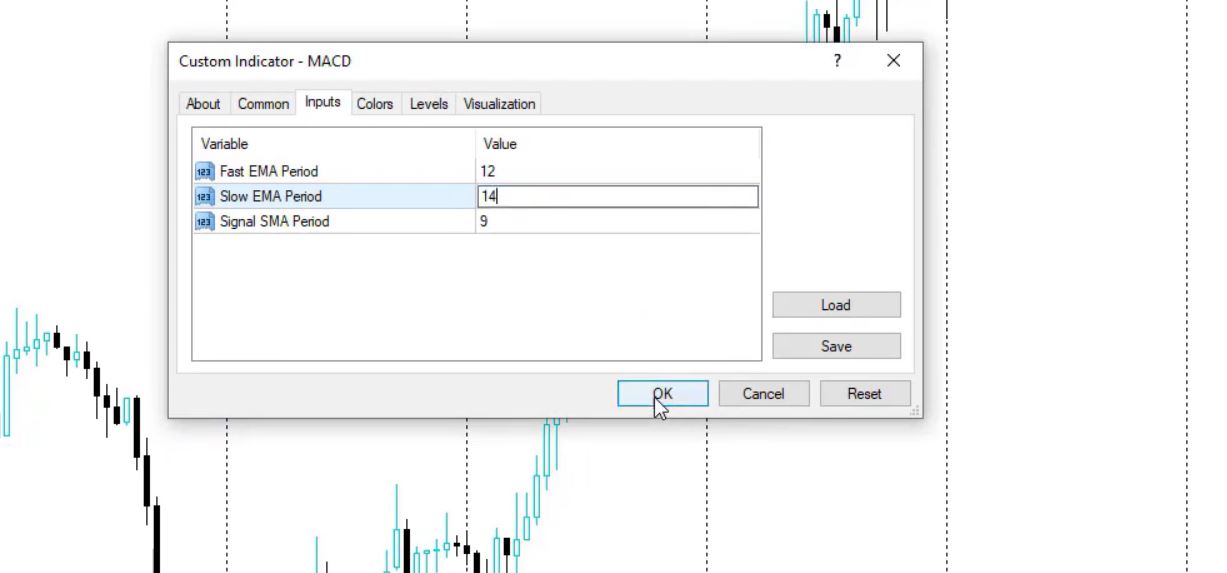
    In addition, what I’m using for this Ichimoku strategy on H1, this is the MACD indicator but with different parameters. So I go to Custom, MACD.

    Forex Go to Indicators, Custom, MACD
    Go to Indicators, Custom, then MACD

    And on H1 I have 12, 14, and 9. So for this Ichimoku EA, I do not use the default parameters.

    Ichimoku EA
    MACD indicator

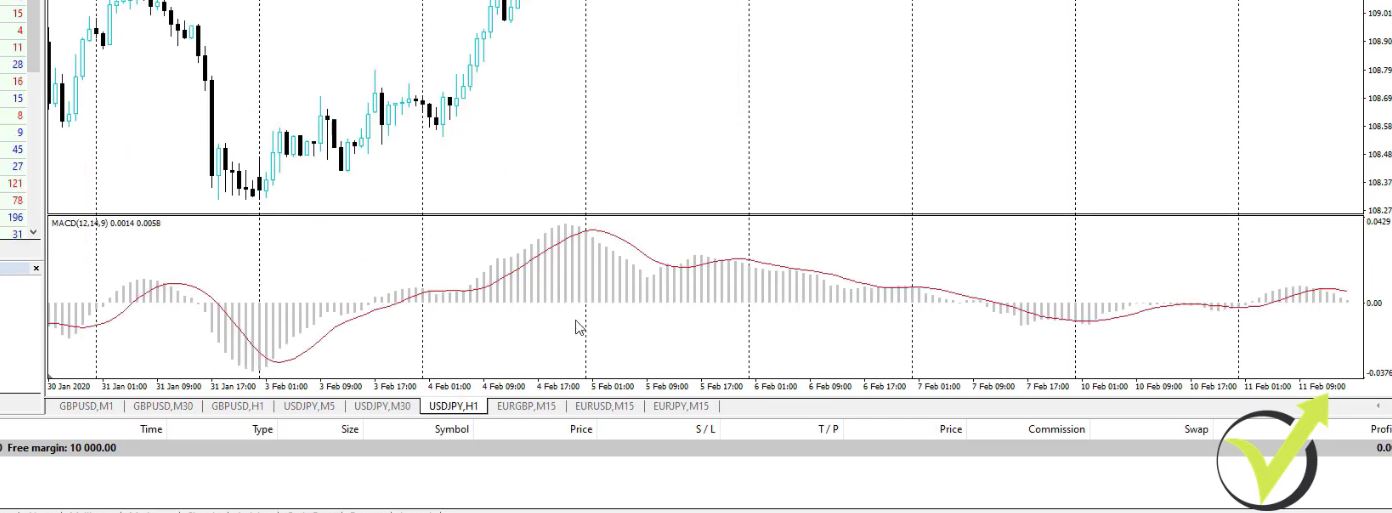
    This is how MACD looks in the trading robot for USDJPY on H1.

    The Froex MACD indicator on the chart
    The MACD indicator on the chart

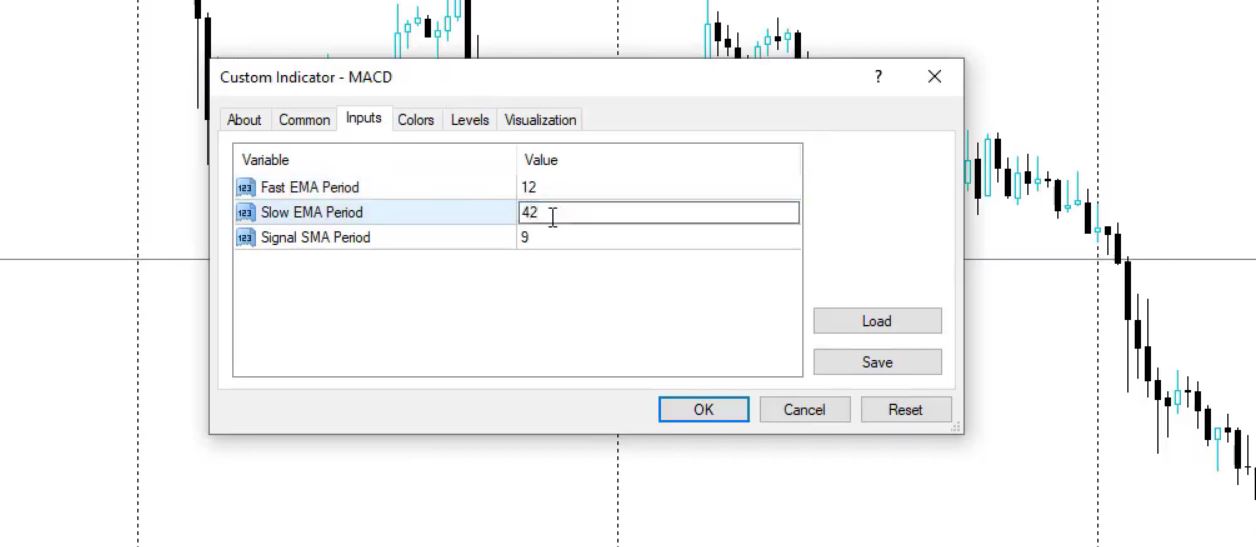
    Similarly, on M30 I will have again MACD but with parameters 12, 42, and 9.

    Ichimoku EA
    MACD on M30

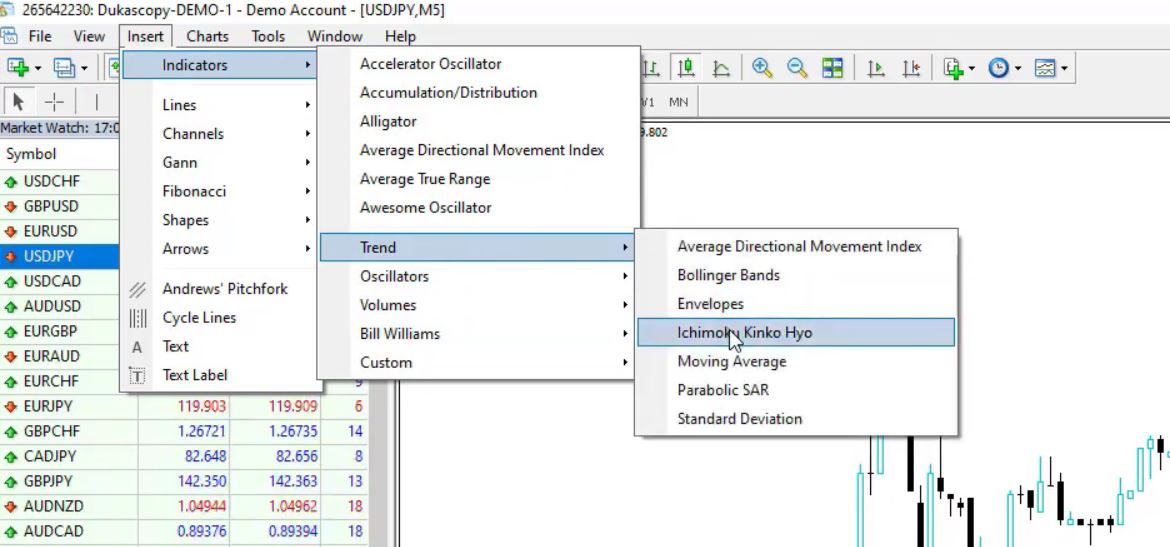
    I click on OK and here it is. After that, on M5 I will have the Ichimoku EA indicator, this is what the strategy is based on. It’s in the Trend indicators, Ichimoku EA.

    Ichimoku EA indicator
    Ichimoku indicator

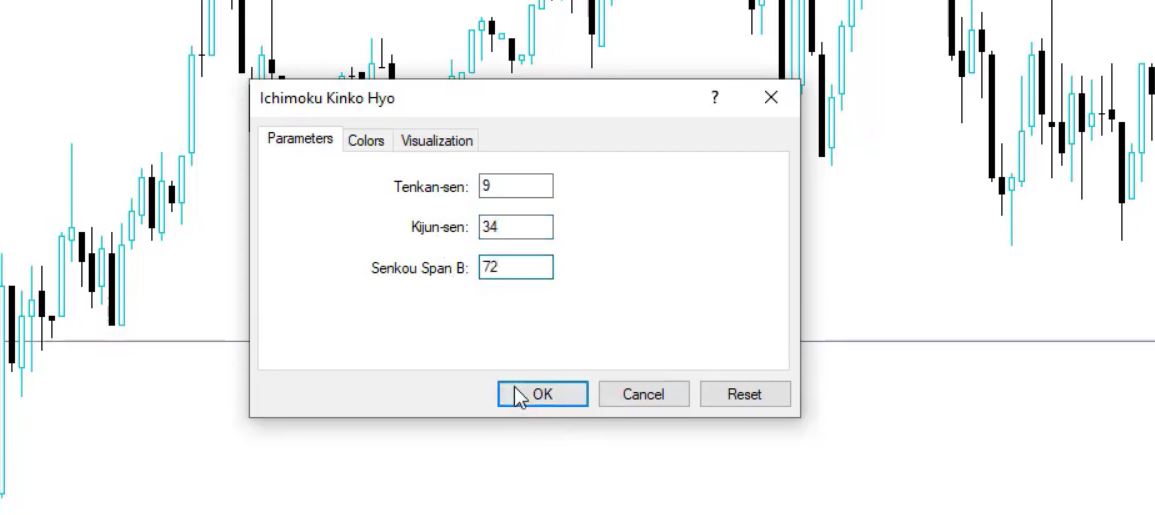
    And for the Ichimoku, we have the Tenkan-sen, Kijun-sen, and we have the cloud which is calculated from the Senkou Span B and Senkou Span A. For instance, the parameters here are Tenkan-sen 9, Kijun-sen it will be 34, and the Senkou Span B will be 72.

    Ichimoku EA parameters for USDJPY strategy
    Ichimoku parameters

    The Tenkan-sen and Kijun-sen

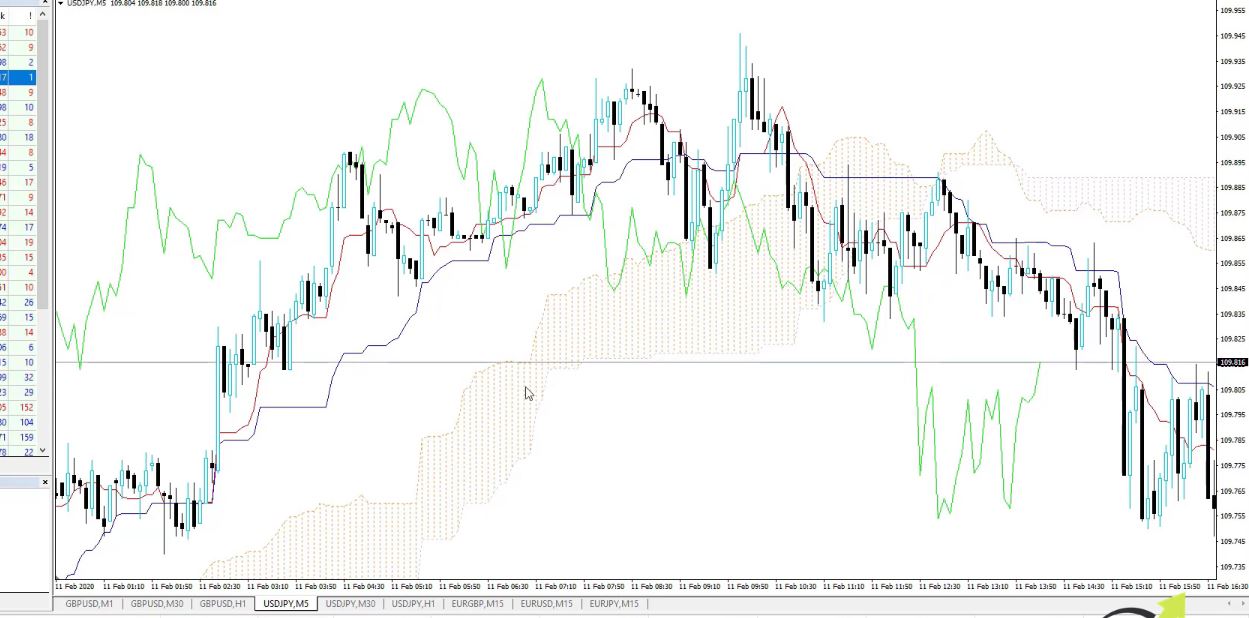
    I click on OK and you will see how it is displayed over the chart. The cloud is the zone that is fulfilled.

    the cloud for forex robot ea
    The cloud

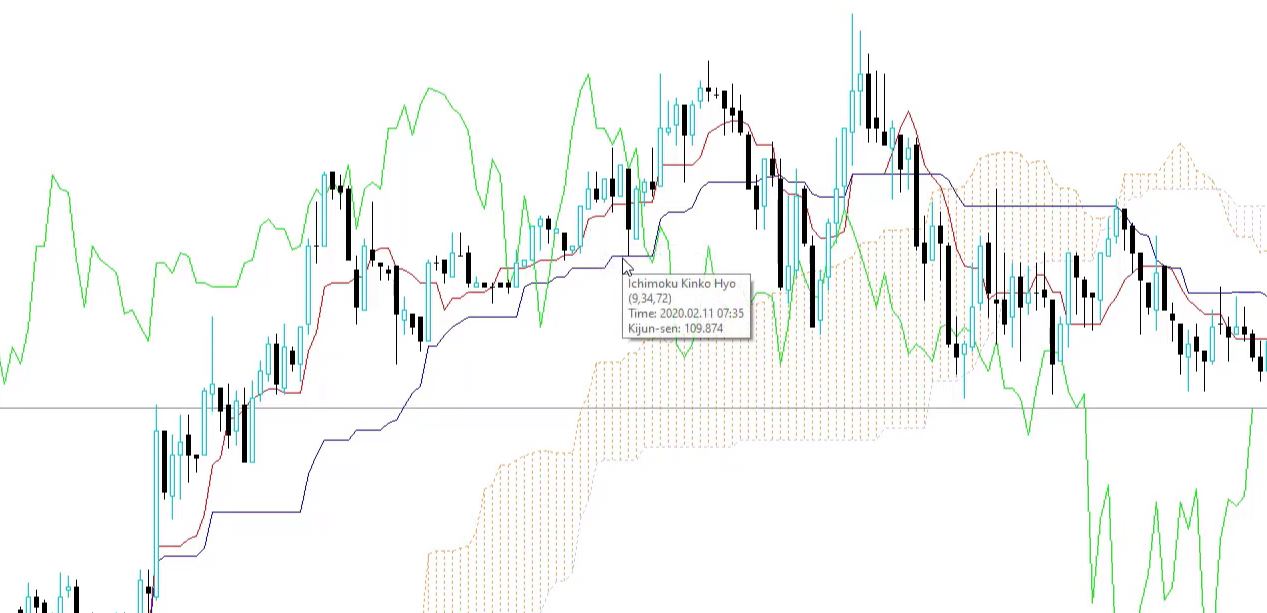
    For instance, the most popular strategy with this indicator is that the cloud plays the role of support and resistance. Basically, the price is above the cloud, it plays the role as a support. If the price is below the cloud as in the current moment, the cloud is resistance. We have the blue line and the red line.

    The red line, this is the Tenkan-sen and the blue line, this is the Kijun-sen.

    Red and blue line in the Forex robot EA
    The red line and the blue line

    In addition, we are using in this strategy the Kijun-sen. I will tell you in the next lecture what is the

    Execution of this Ichimoku EA

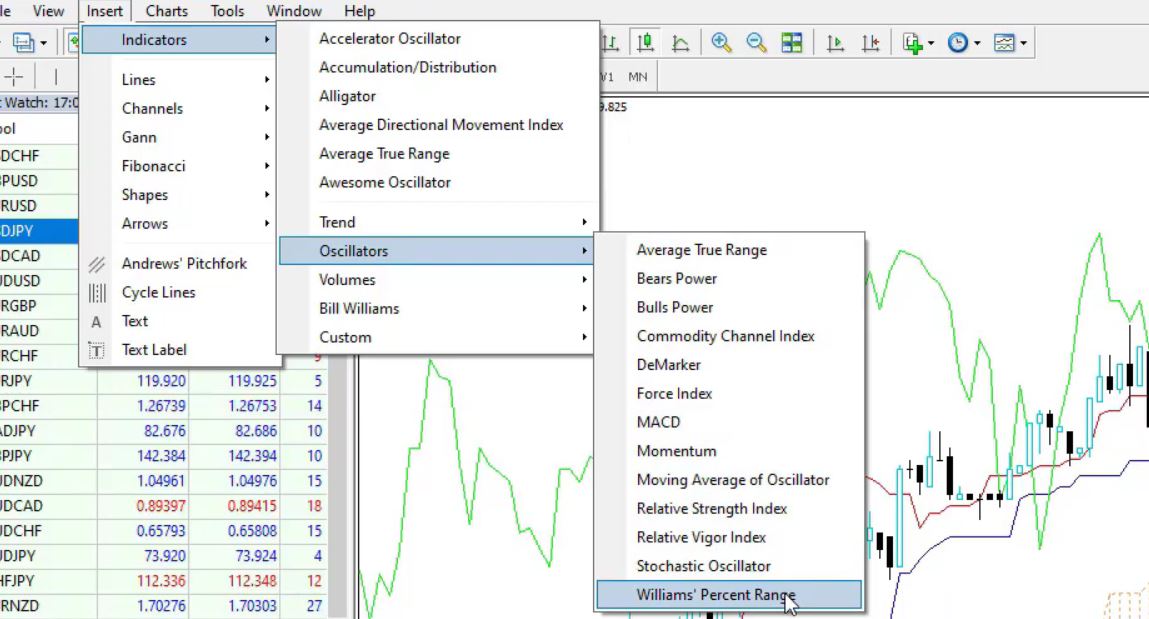
    I enter the market, and I will need one more indicator which is the Williams Percent Range. And the Williams Percent Range, you can find it in the Oscillators, Williams Percent Range.

    Forex Williams Percent Range strategy in a Forex robot EA
    Williams Percent Range

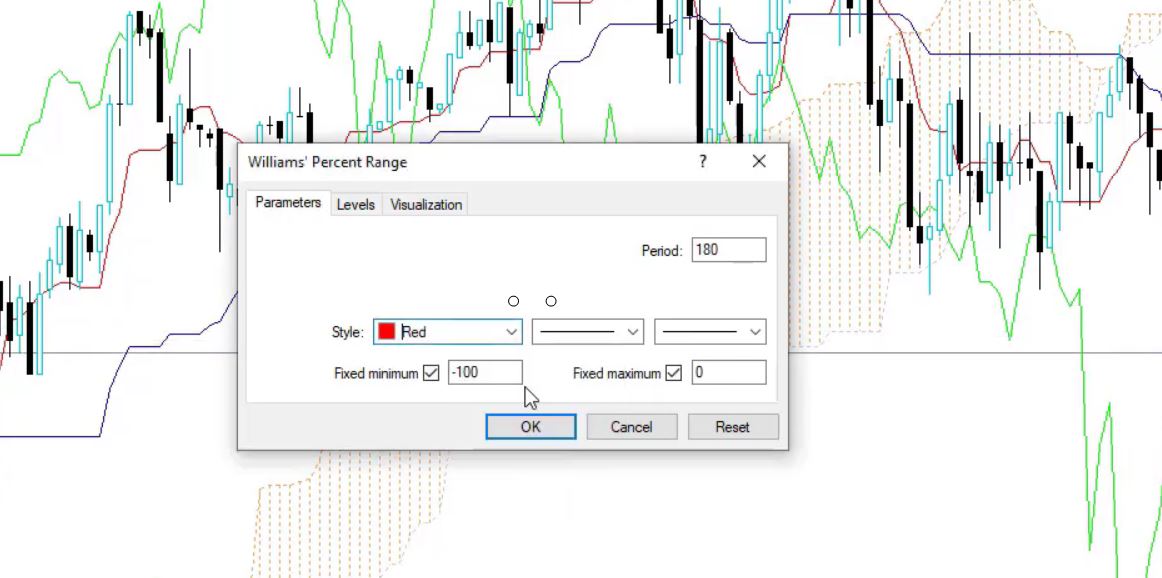
    Now, the period will be 180.

    You can see much bigger than the default 14. And as style, I will change the color to red so it will be more visual.

    Williams' Percent Range parameters in the Ichimoku EA
    Williams’ Percent Range parameters

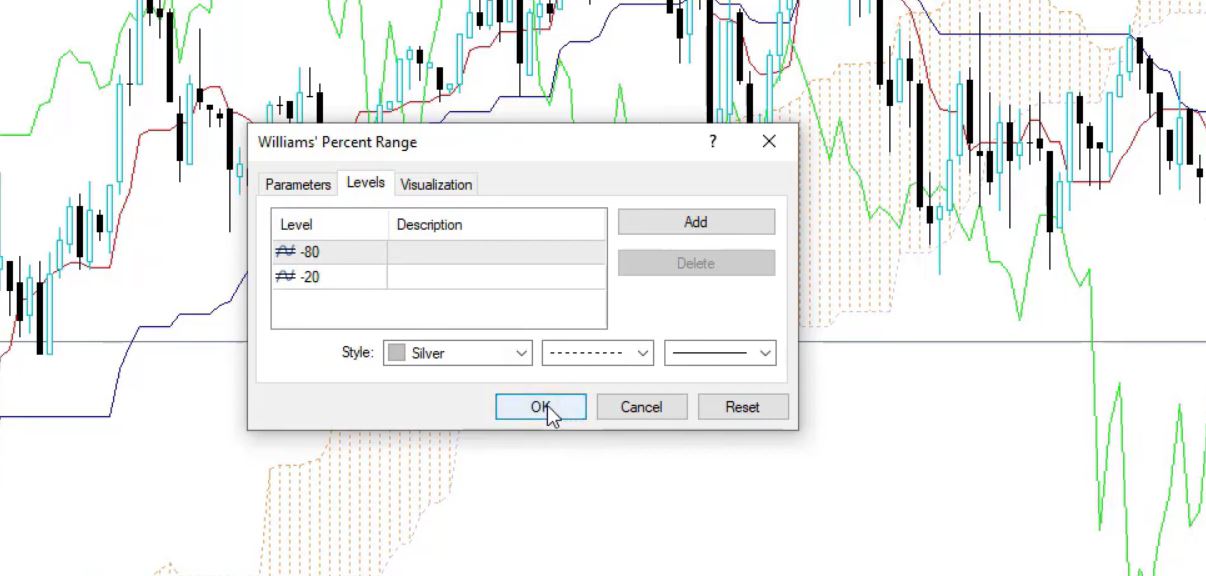
    And levels, it is -20 and -80 by default. This is just fine.

    Williams' Percent Range levels
    Williams’ Percent Range levels

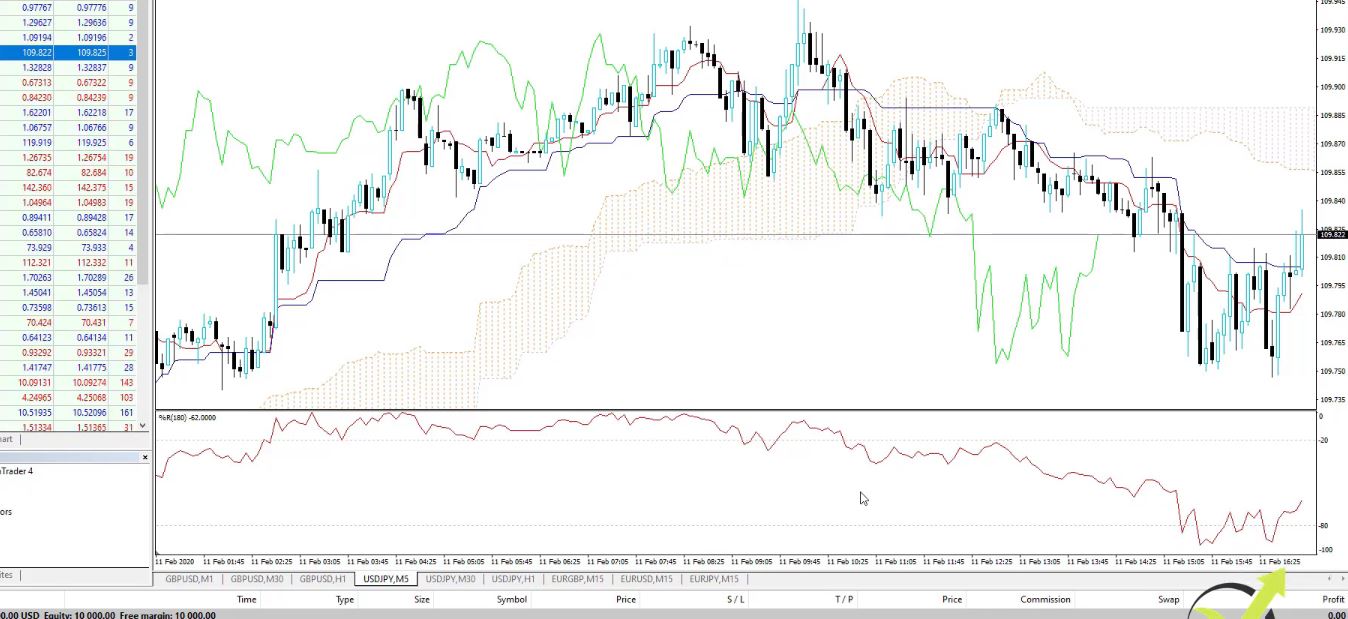
    I will click on OK and here it is displayed over the chart:

    Williams' Percent Range on the Forex chart
    Williams’ Percent Range on the chart

    In other words, we will not use the levels but we will leave them so we can have an idea when the market is overbought or oversold. But we will use something very simple with the Williams Percent Range and something very simple with the Ichimoku EA indicator.

    And in the next lecture I will show you how exactly this strategy works.

    In conclusion, you will find the rest 5 EAs In the course Forex trading strategies from a professional trader + Top 5 professional EA. I include the Ichimoku EA trading strategy and at the same time, I explain how to trade this strategy manually.

    If you have any questions, feel free to add them in the Forum.

    Petko A

    Looking for a Forex trading robot to download with no strings attached? Download our free Forex robot and test our EA trading strategy!

    Enter your email address to receive the free Forex robot download link.

    * indicates required
  • Best Forex Robot Free Download in 2021

    Best Forex Robot Free Download in 2021

    How to Download a Forex Robot for Free?

    Looking for a free Forex robot to download with no strings attached?

    You’re at the right place! Scroll to the bottom of this page to receive a free Forex robot download link.

    Or you can read this post and understand what is a Forex robot and how to use it. Having access to the Forex autopilot trading robot free download will help. And how you can get even more than just a single free Forex robot download link.

    Many of our traders took the opportunity to free download the Forex robot (full version 2020), and they were happy with the Robot. We received much positive feedback, and we truly appreciate it! Now in 2021, we will continue sharing our best Forex robot with a free download option.

    Have you ever thought about having a complete Forex trading software that can give you everything you need to trade successfully? Including free trading robots, backtesting strategies, and more?

    Forex trading doesn’t have to be difficult. More importantly, you should have all the tools and knowledge you need to make informed decisions. And to have your actions automated by a robot that has all the features you want.

    Forex robots today come in all shapes and sizes, but as you go through them you may find that they’re not a good fit for you or the trading strategy you want to implement.

    In this case, you may be better off creating a Forex EA robot that has all the rules you want. Or something that’s been created by a like-minded trader.

    What is a Forex Robot?

    forex robot free download for trading

    A Forex robot can help you with some of the tasks associated with Forex trading. It’s a tool that traders use if they want to buy or sell a certain asset and within a set time frame, for example.

    Think of a Forex robot as a digital assistant you can rely on.

    But of course, that is not a humon that will guide you in trading. It is a code that represents a Forex strategies. And with this post that we update regularly, you can ger a free Forex Robot and see how it works.

    When you’re away from the computer, sleeping, or on vacation, you can let the trading software run by itself and it will complete actions on your behalf.

    That way you won’t miss out on certain events as compared to manual trading alone.

    Not all Forex trading software is the same, though. You will need to do your research before buying one. Because chances are that it will have a different ruleset than what you’re used to.

    As there are dozens or even hundreds of parameters, it may take some time for you to find the best Forex robot free download.

    And if you don’t have the right software to use, you won’t ever find them.

    The good thing about technology is that everything is made easier. More accessible, and it’s the same with Forex robots.

    You won’t need programming skills or coding knowledge to trade Forex autopilot. You won’t need to rely on other people to make the perfect trading app that you want.

    Also, you can simply make your own Forex EA, with a specific set of rules. Without having to spend hundreds or thousands on it.

    Can You Create a Free Forex Robot?

    The short answer is yes, you can create a free Forex EA using a Forex strategy builder software called EA Studio.

    Creating a Free Forex Robot in EA Studio
    Creating a Free Forex Robot in EA Studio

    It’s an all-in-one trader’s platform that empowers beginner traders and seasoned veterans alike.

    There’s a lot you can do when you get EA Studio to help you in your trading journey. Even better is the fact that you can try it out 100% free for 15 days.

    The robot you create can help like-minded traders make more money on Forex. You can sell it or begin trading with it and not have to worry about spending too much on overpriced Forex apps out there on the web.

    It’s perfectly okay to try EA Studio for 15 days and download all the Forex trading autopilot robots you need for your cause. There are no strings attached and you’re not forced into anything.

    This free trial allows you to use the function of Forex Robot free download with one click. The only difference with the license is that you can not download Portfolio Fore Robot which combines many strategies into one EA.

    If you like the experience you can get a license and continue using world-class Forex trading software that’s used by thousands of people around the world.

    How To Create Your Own Forex Robot for Free?

    EA Studio is the tool you need when you’re looking for a Forex robot free download.

    It’s a comprehensive Forex strategy builder unlike any other. For one, you’re not tied to a single strategy that the experts ‘recommend’, or restricted to buying a Forex EA robot you won’t use.

    You can come up with your own depending on your style of trading.

    Better yet, EA Studio allows traders to test out their theories and future strategies in a safe environment. Backtesting is allowed, even encouraged in order to keep things fresh.

    You’ll feel a genuine sense of fulfillment knowing that a plan you came up with worked and is bound to do the same in real life.

    Moreover, there’s a free course on how to use EA Studio and a 15-day free trial so you can try it out risk-free.

    Doing this increases your trading knowledge and prepares you for the exciting world of Forex autopilot trading.

    Forex beginners, take note – you can learn the ropes and get a Forex robot free download at the same time. After the course you’ll learn everything there is to know about EA Studio and can move with confidence in making your own Forex autopilot trading robot.

    During the 15-day trial, you can perform as many free Forex robot downloads as you want.

    Install the free Forex EA robots on the MetaTrader platform, try out their functionalities, and test them in real-world settings.

    You will find one that works according to your strategy.

    In those days you’ll mostly have an idea of the kind of Forex robot you want for your own. If this is the case then you can create a free Forex robot by feeding the program with your rules and export it to working software.

    Are the 15 days not enough to get the best Forex trading automation software for your particular needs? You can obtain a license for a low cost and enjoy the features and benefits of EA studio.

    Forex trading can be difficult and has a high learning curve. Beginners will have a shortcut to getting what they need quickly and most of all, a working free Forex EA robot that can complete trades on their behalf.

    Therefore, it makes sense to enroll in the EA Studio’s free trial so you can save time and money. More importantly, you can get a free Forex EA autopilot trader in the process.

    A free Forex robot download can guarantee the following benefits:

    Free

    They say that the best things in life are free, and that’s true for Forex software. Because nothing beats free especially if it’s one that can make you money to live comfortably.

    EA Studio is free to use for 15 days. During that time, you can explore the platform and see what it’s all about. Once you have a basic grasp you can then head to the Forex robots section and check out what’s available.

    You can get a Forex robot free download if you make or download one within the 15-day limit. If there’s a certain strategy you use, then you can put in the rules and export it for free.

    Otherwise, you can download many free Forex EA robots and choose from the one that suits you best.

    Also, you can continue trading with the trading Robots when your trial account expires.

    Don’t Pay For What You Won’t Need

    Why waste money on trading software you won’t need after a few days or a week? That money can be spent on other things, such as acquiring more assets, investments, and the like.

    Forex trading apps aren’t cheap, and everyone wants to make a quick buck. The best Forex robot isn’t one that’s made by others, because chances are that they’d put in all the things they want which won’t help your cause.

    More, they were created for other brokers, and not for the one you use. Something essential that many EA buyers don’t understand.

    Forex Robots on MetaTrader platform
    Forex Robots on MetaTrader platform

    Making money is the top goal in Forex trading, and saving money wherever you can is key to trading successfully. When you eliminate the tools you won’t use then that’s money you can use somewhere else.

    Convenience

    A Forex robot also referred to as Expert Advisor, is like your very own trading assistant that can make the right decisions and act on your behalf.

    This means you won’t have to be tied to your desk for two, five, or eight hours, constantly checking on the market to see if there’s anything worth trading.

    That said, a Forex robot adds to your convenience because it frees up your time spent trading for the more important matters. At the start of the day, you can boot it up and leave it running throughout.

    The EA trading robot will pick up on market trends and actions and depending on its ruleset, buy, sell or do nothing. All you need is a computer, a stable internet connection, and EA Studio.

    Automation

    Automation makes work easier. A Forex trader’s success mainly lies in making the right decisions day in and day out. Having software that’s grounded in rules can be more reliable than traders themselves because of one factor – emotion.

    Automation takes guessing out of the picture because its movement is based on the parameters you set. This means that when you tell it to buy stocks when a certain asset reaches X amount or to sell when it drops down to X numbers.

    Still, looking for the best Forex Robot free download? With this article, you found out two options. One is to use the Forex ea free download option below and the second is to test the EA Studio for 15 days and get as many free robots as you wish. We leave it to you.

    Conclusion 

    You won’t have anything to lose by trying out the 15-day free trial offer on EA Studio. Head on to the site and make sure to brush up on the free course before exploring the ins and outs of the Forex trading software.

    Within the free trial period, you can download free robots and try them for as long as you like. Afterward, you will need a license to continue but the benefits far outweigh the price.

    Remember, a Forex robot guarantees perks such as convenience and automated trading done for you. This means you can make money even when you’re not actively trading as long as the Forex robot is running.

    Try it now and see for yourself!

    Enter your email address to receive the free Forex robot download link.

    Many traders look for the Best Forex Robot and they never find it. The most profitable Expert Advisor is the one that is created for your trading broker and your trading style.

    On many websites, there are Free Trading Robots. However, you always need to test them on a Demo account to be sure that they work properly.

    The trading Forex robots execute the positions for the traders automatically. This is why they are said to be Autopilot trading robots.

    The Forex trading robot software is a program that helps the traders to automate their trading strategies as Robots. Such programs are EA Studio and FSB Pro. If your strategy is profitable, such software will help you build the Robot for the strategy.

  • Forex Manual Trading for GOLD in 2020

    Forex Manual Trading for GOLD in 2020

    Forex manual trading for Gold strategies.

    Forex manual trading strategies may apply to many assets as the Gold, Oil, Apple and many others. In this article, I will share with you three strategies that I included in my Top 5 Gold trading strategies course.

    Hello, dear traders, this is Petko Aleksandrov, and I will share with you how the Expert Advisors work and what are the strategies behind.

    This way if you want to trade them manually you will know how to do it and if you are not a fan of Forex manual trading and you want to use only the Expert Advisors, you can take the Expert Advisors from the course and trade with them.

    Forex Manual trading with Expert Advisors that are included in the course

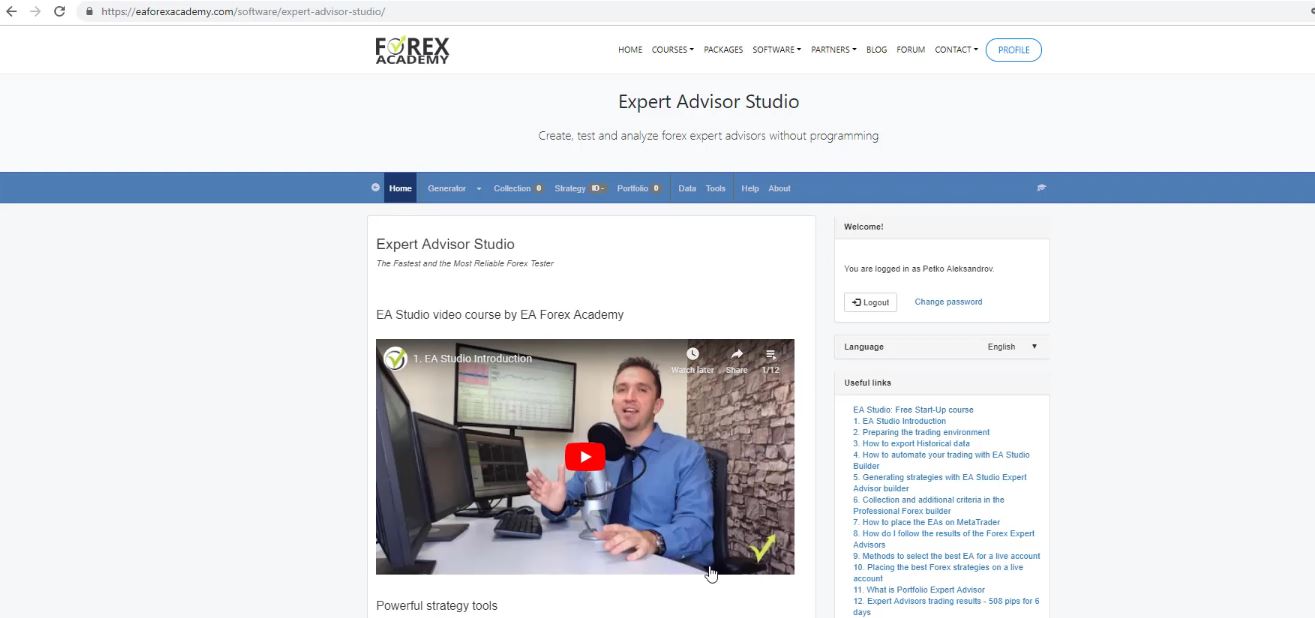
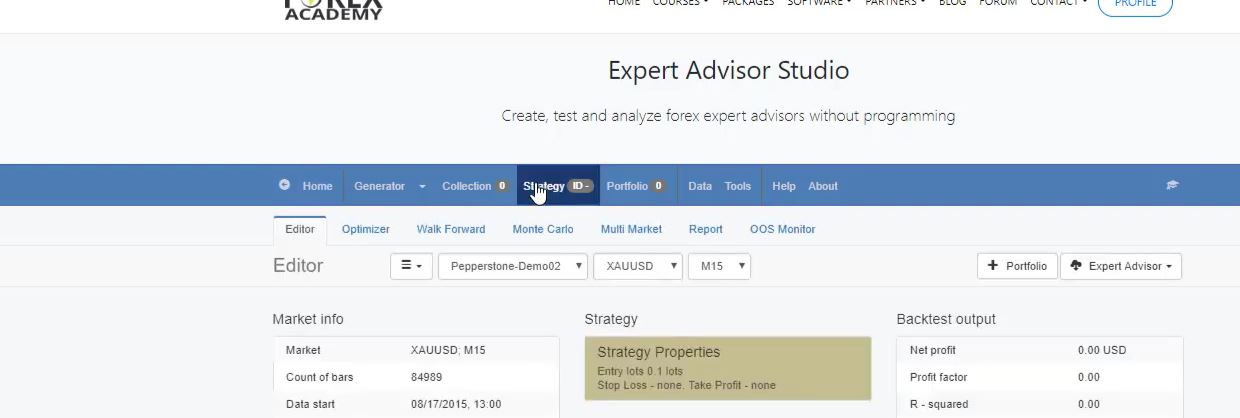
    Now, I will use the Expert Advisor Studio because we have a very lovely indicator chart and we can see exactly where the trades were opened and closed. And on the home page, you can see that there is a video of mine and below the useful links.

    Forex manual trading for Gold
    EA Studio home page.

    There is a new series of videos that are recorded recently, and I just uploaded them today. And they are free, and you can have a look at them if you want to learn how Expert Advisor Studio works.

    Learn about the EA Studio.

    It’s actually a complete startup course, and I show all the instruments, I go through them, and I show some examples of trading as well. So if you are interested to learn more about the Expert Advisor Studio, you can watch these free videos. Now, I will go-to strategy.

    Strategy.

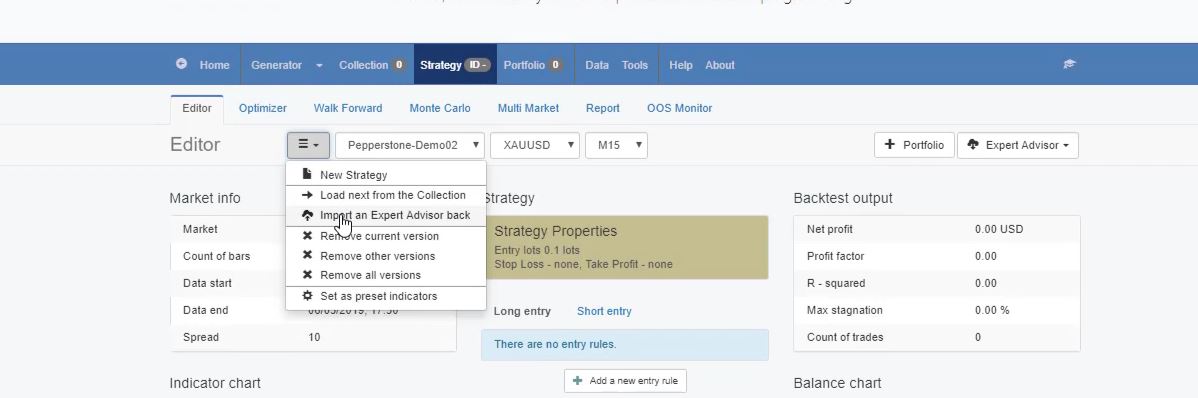
    And I will import back the first Expert Advisor.

    Forex manual trading strategy
    Import an Expert Advisor back.

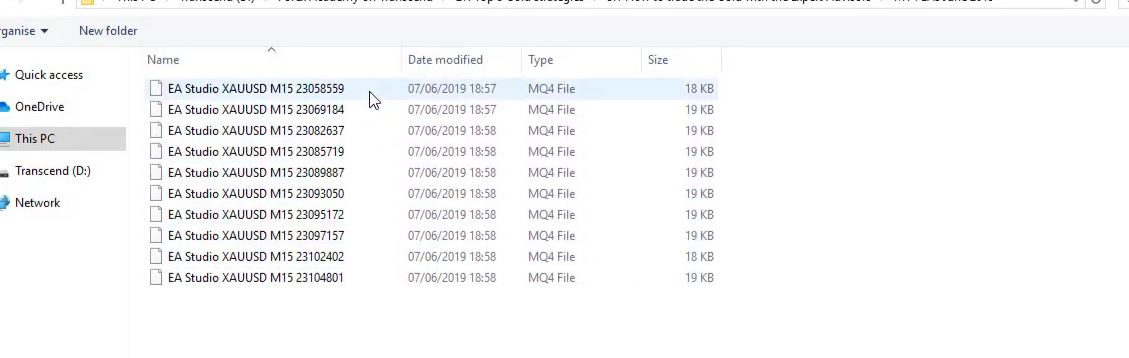
    This is the one ending in 559.

    The first Expert Advisor.

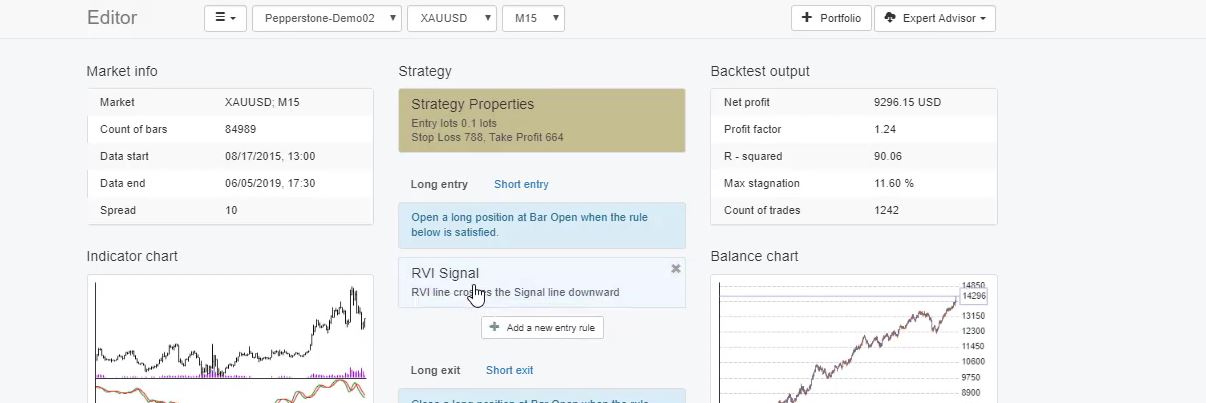
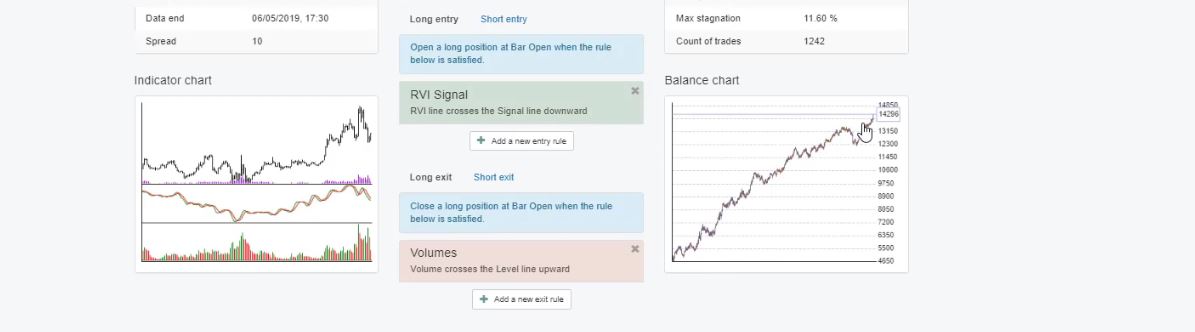
    I will click on open, and you can see what I have. I have one entry rule, the RVI Signal, and we have the RVI line crosses the Signal line downward.

    The RVI Signal.

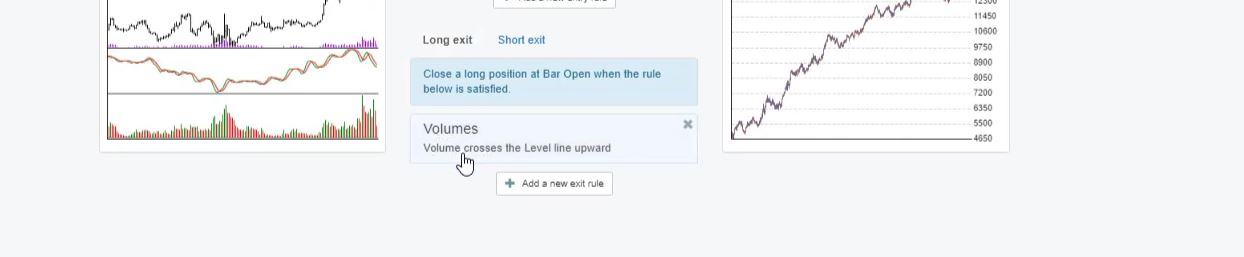
    This is the rule to buy for the long entry. And to exit the long trade or to exit the buy positions, we have Volumes. Volume crosses the Level line upward. This is the exit condition.

    Volumes.

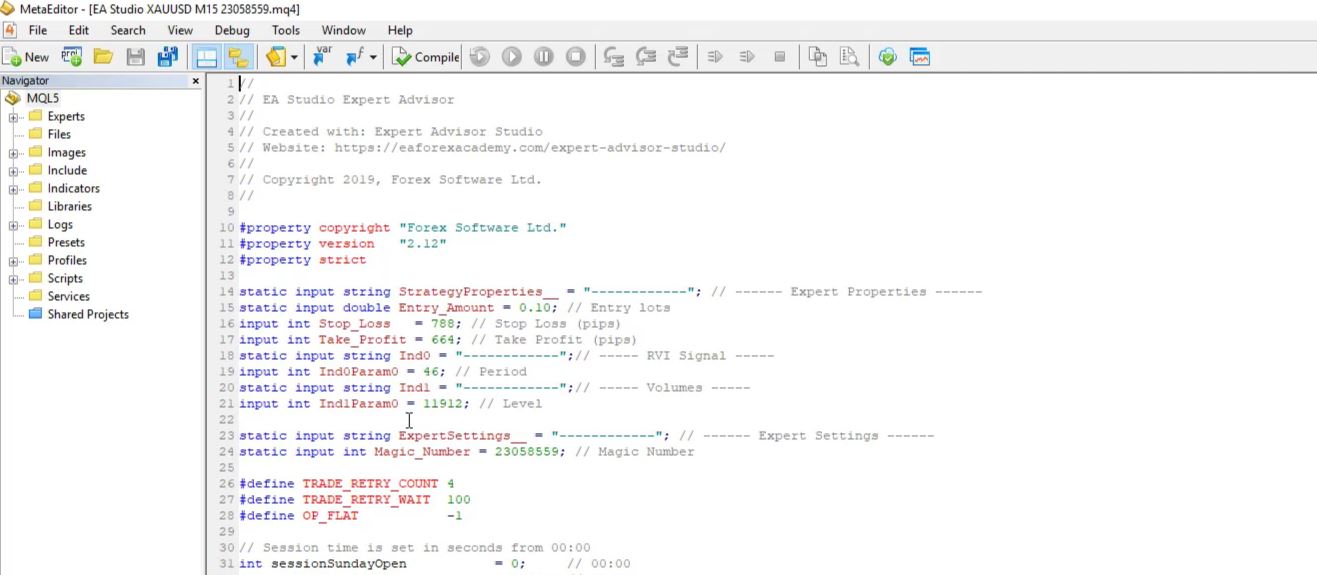
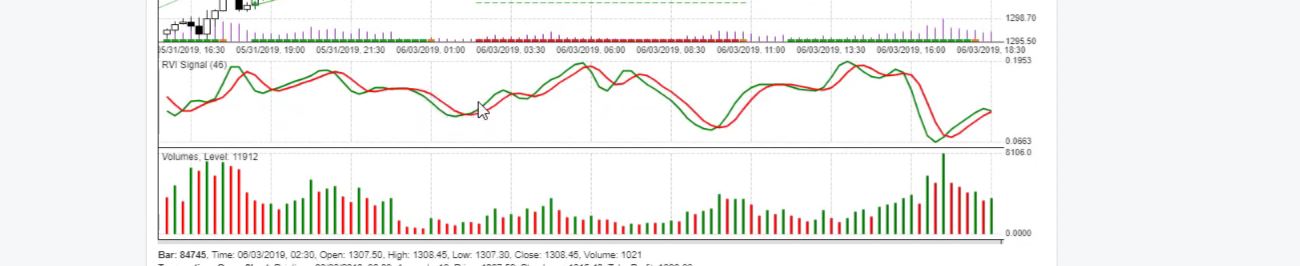
    So for the RVI, we have a Period of 46, and for Volumes, we have a level of 11,912. So these are the parameters for the initial Expert Advisors. Now, of course, with time, I will be updating these strategies.

    Because of the market changes, I will do some optimization, I will do some analysis according to the new market conditions, and I will change these parameters. Whenever I do a change, I will let you know.

    How to see the new parameters for Forex manual trading

    I will replace these strategies with the new ones, with the new settings. And one of the ways to see the new settings is if you open the strategy in the Meta Editor. You can see at the beginning of each strategy we have precisely the Stop Loss, the Take Profit, we have as well the indicator parameters.

    So you can see the new parameters inside the code of the strategies.

    Forex manual trading
    The MetaEditor.

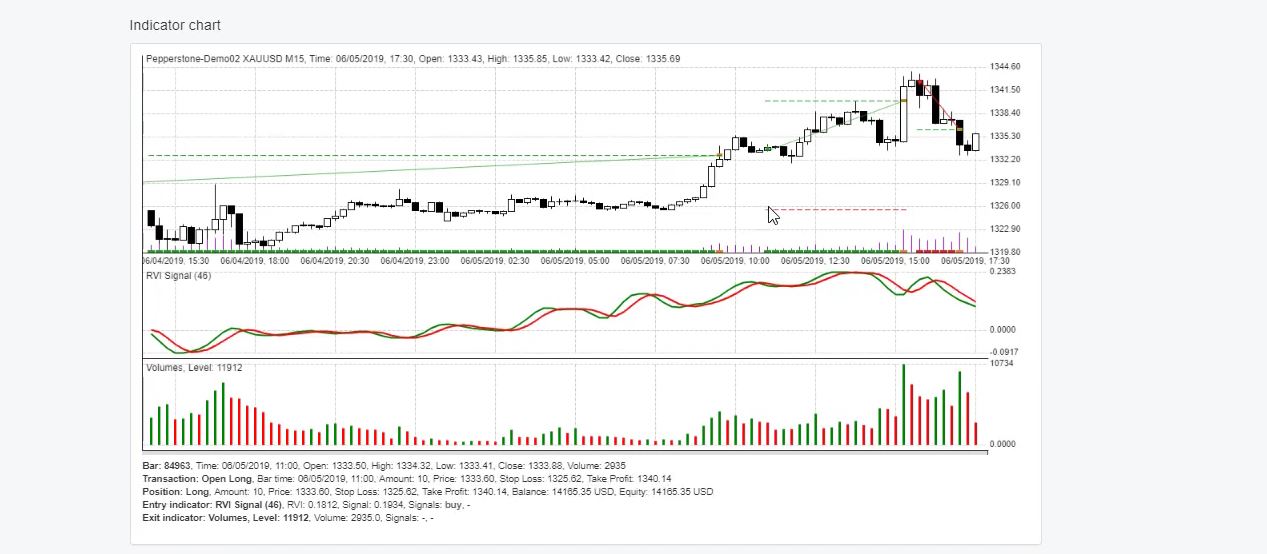
    So let’s see the indicator chart of the first strategy, how it looks. We have the RVI line crosses the Signal line downward. This is our entry rule. And we have Volumes as an exit rule. I click on the strategy, and you see here with the Expert Advisor Studio we have a very lovely indicator chart.

    The indicator chart.

    We see exactly where the trades were opened and closed. And right here we have a long trade because the RVI crosses the signal line downwards. And on the opening of the next bar, the trade is opened.

    So when we have the event happening, in this case, the event is the RVI line crossing the signal line downwards, on the opening of the next one the trade is opened.

    You can use any platform for Forex manual trading.

    But the EAs from this course work with MetaTrader. And with the Expert Advisors, the Take Profit and the Stop Loss are placed immediately. But if you do that manually, you need to place the indicators. You need to wait to see the cross.

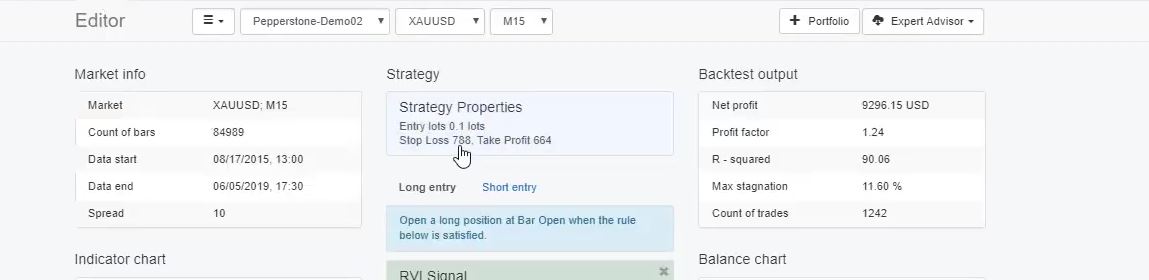
    And on the opening of the next bar, you need to be ready to open the trade. After that, you need to place the Take Profit and the Stop Loss. In this case, the Stop Loss is 788 pips and Take Profit of 664 pips which is $7.88 and $6.64.

    Forex manual trading for the Gold.
    Strategy properties and details

    So once you are into the trade, place your Take Profit, place your Stop Loss and keep watching the exit rule as well. Because if it reaches above 11,912, you need to close the position. In this case, from the indicator chart, you can see that the Take Profit was hit.

    So it doesn’t really matter which platform you will be using. For Forex manual trading, you can use any platform. There are many web-based platforms.

    I personally prefer Meta Trader because it is possible to trade with the Expert Advisors, but for Forex manual trading, you can use any platform.

    Place directional indicators on the chart.

    You can see it happened after the RVI crossed the signal line upwards, the opposite direction.

    A short trade.

    But in this case, the trade was closed because of the Stop Loss. So this is how the first strategy works, two indicators, Stop Loss and Take Profit. You can see it has a lovely balance chart so far.

    Forex manual trading results
    The balance chart.

    I will remove this strategy from the collection, and I will upload the next one.

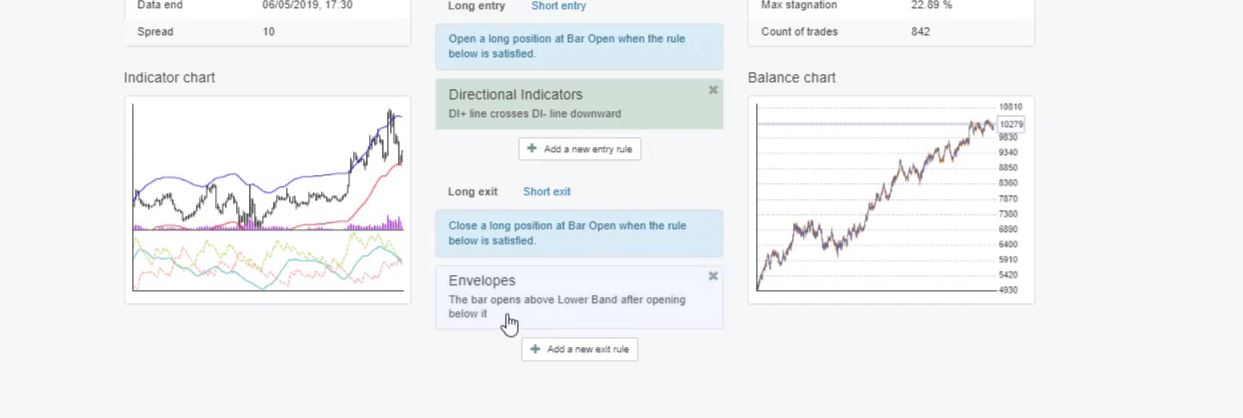
    It will be the one with Magic number ending in 184. I click on open. What we have here is the Directional indicators and Envelopes as an exit condition.

    The Directional indicators and Envelopes.

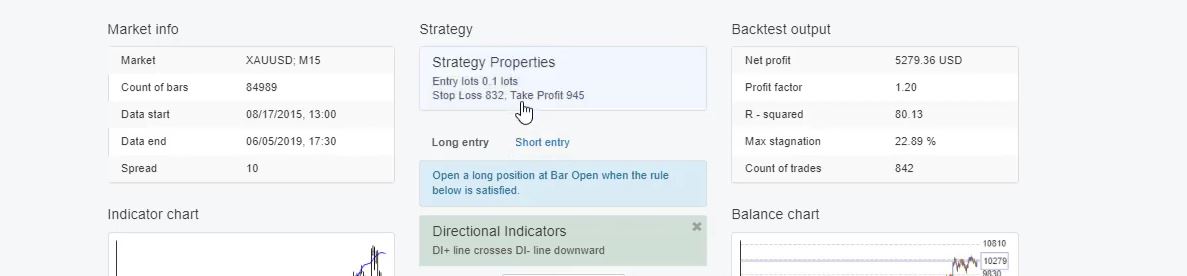
    We have Stop Loss of 832 and Take Profit 945.

    Strategy properties.

    Directional indicators, we have the DI+ line crosses the DI- line downwards with Period of 44. And with the Envelopes, I have the bar opens above Lower Band after opening below it.

    So it means that we will exit the long trade once the price was below the Envelopes and when it gets into the Envelopes we are out. Period of 20, deviation, 0.36. So these are the two indicators with the strategy.

    What you need to place on the chart if you want to trade it manually are the directional indicators that display below the chart. And the Envelopes, it is over the price chart.

    A trade closed due to the Envelopes.

    So we have the DI+ crosses the DI- downwards. You can see the green line. The positive one crosses the red line downwards.

    The green line crosses the red line downwards.

    So we need to buy on the opening of the next bar, the trade is opened. And you can see in this case. It goes to the Take Profit.

    So once you see the cross of the two lines you need to open your trade, and you need to place your Take Profit and your Stop Loss, and you need to look for an exit from the exit rule which is the Envelopes.

    Let’s have a look at an example where the trade was closed due to the Envelopes. I will go back and look for such a case. So the entry here is obvious when the two lines cross.

    Now, in one example, we have the opposite case. We have a short trade because the positive line crosses the negative line upwards. So we are selling.

    Let’s see what happens with this trade, it closes over here, and it closes because of the Envelope.

    Forex manual trading with Envelopes indicator
    The trade closes because of the Envelope.

    We set for a long trade. We want to see that the bar opens above the Lower Band after opening below it. So for the short trade, it will be the opposite thing. The bar will open below Upper Band after opening above it.

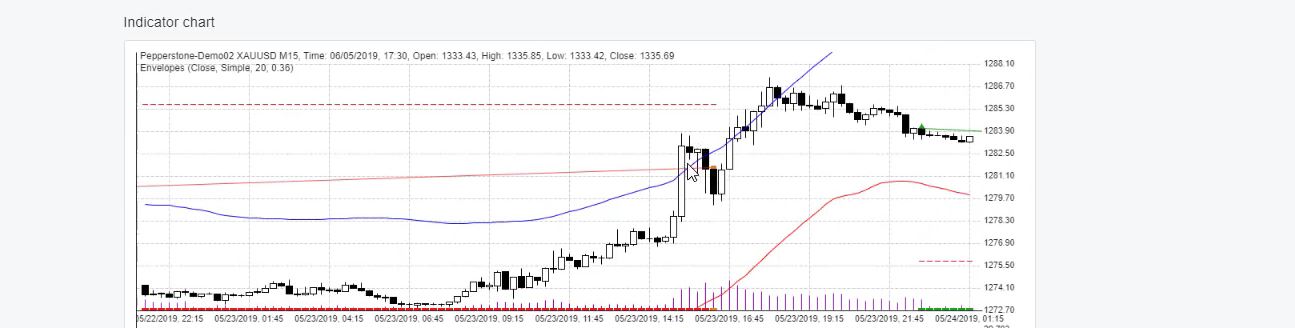
    Forex manual trading with the Average True Range.

    So we want to see the price going above the band, and when it gets into the Envelopes between the two bands, it closes straight on the first bar open. This is why we say that we will exit the short trade when the bar opens below Upper Band after opening above it.

    This bar opens above on the opening of the next one. We are out. This is how the Envelopes work in this Forex manual trading strategy. I will click on the editor one more time so you can view the strategy.

    One entry rule, Period of 44, one exit rule, Period of 20, deviation 0.36. We have the Stop Loss and the Take Profit.

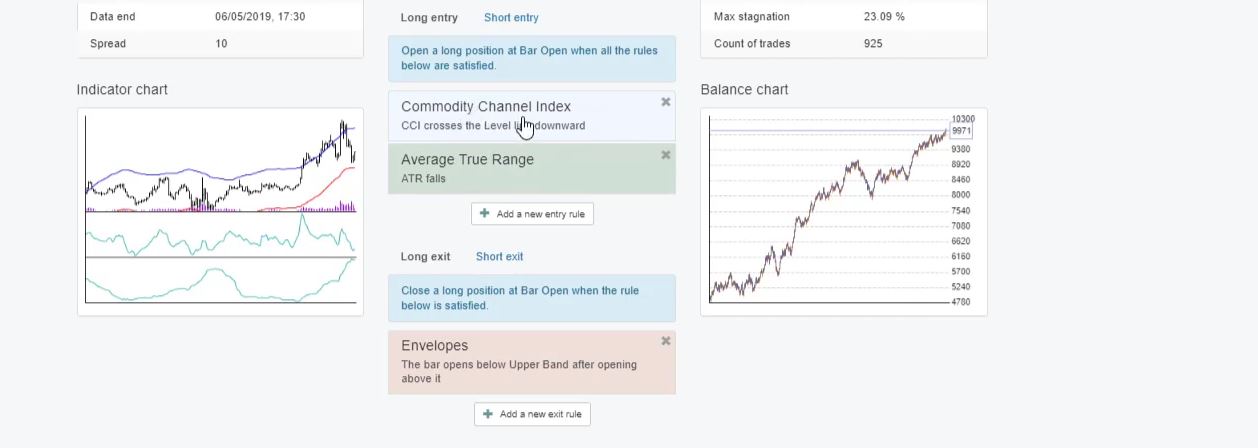
    I will remove this strategy, and I will import back the third Expert Advisor ending in 637. I click on open, and you will see that here we have 2 indicators as an entry rule and we have 1 exit.

    Third Forex Manual trading strategy
    2 entry rules and 1 exit rule.

    The first one is the CCI, and it says CCI crosses the Level line downwards, Period of 23 and it applies to Typical method.

    And let’s have a look at the Average True Range, we want the ATR to be falling. Period of 21, Level of 0.01. And the Envelopes is our exit indicator. Again, the bar opens below Upper Band after opening above it.

    So this case is different. The bar opens below Upper Band after opening above it. This is for the long trade now. We need to see that the price gets into the bands in order to exit the long trade.

    The confirmation in Forex manual trading is vital!

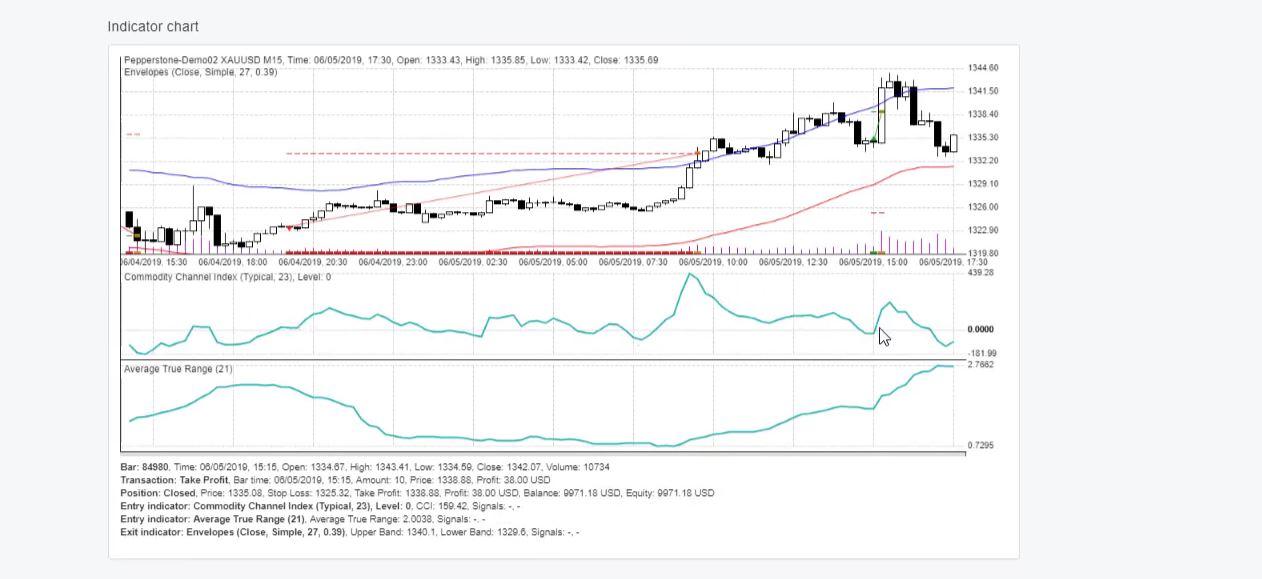
    And here we have Period of 27, deviation of 0.39. Let me have a look at the indicator chart. We said that we want to have the CCI crossing the Level line downwards in order to buy and it will be upwards in order to sell.

    The indicator chart.

    You can see here the CCI crosses the Level line upwards. Let’s have a look one more time at the level, yes it is the 0 line.

    You can see that it is displayed over here so when it crosses upwards, we sell, and when it crosses downwards, we buy. So you can see here is a sale and here it is a buy.

    And as a confirmation, we have Average True Range falls. This is for the long trades and for the short trades, it should be rising.

    So at this moment over here it is rising at the opening of this bar, I’m not sure if you can see it but here there is a small move down then it’s going a little bit up and then goes down again.

    And many traders actually make a mistake to look over the chart over trading platforms to analyze strategies with indicators. But the thing is that they repaint and they are very misleading when you look at them, back over time.

    Sometimes it is very clear where the entry is but sometimes the indicator at this moment was not exactly what we see it as right now. So here we have a long trade, you can see that we have the cross of the CCI of the Level line is going down, it’s crossing downwards the line.

    The Stop Loss and Take Profit.

    This is why at the opening of the next one, we have a long trade. So right here was the cross on the opening of the next bar. The trade is executed, and at the same time, we need to have the Average True Range falls.

    It’s falling at this moment right over here. And what happened with this trade, it hit the Take Profit, and you can see where the Stop Loss is.

    So the red line shows where the Stop Loss is. And this one over here shows where the Take Profit is. And you can see there is a small arrow where the trade was open. It is green if it was a buy position, and if it was a sell position, it is red.

    These are the first 3 strategies that I selected and that I placed for algorithmic trading, but I want to show how these strategies actually work.

    If someone is interested in Forex manual trading, they can use them. And as I’ve said, I will update these strategies whenever it is needed according to the recent market conditions. I will do some optimization. I will analyze them according to the new data that comes, the new bars, the new historical data.

    I attached resource files in the course as well.

    So in these 3 lectures where I show the manual trading of the strategies, I will attach PDF files as resources. I will describe the strategies there with the parameters and exactly the rules that are followed.

    If you want to trade these strategies manually, it will be easier for you. And the other thing is that when I update these strategies, I will update these resource files and I will put there the new parameters.

    If any other parameter is changed, I will underline it. For example, if I change the CCI to 25 but no longer 23, I will just underline the 25, so you know this is a new value, and you can start using the new value. And as well, I will update the Expert Advisors with the new parameters.

    I will upload the new Expert Advisors with the new parameters. And the other way that I told you to see the new parameters is from the code of the Expert Advisor. But I believe with the resources files that you will find attached to this lecture and the next 2 lectures. It will be much easier for you.

    Thanks for reading.

    Cheers.

  • Coronavirus and the markets

    Coronavirus and the markets


    Coronavirus and the markets

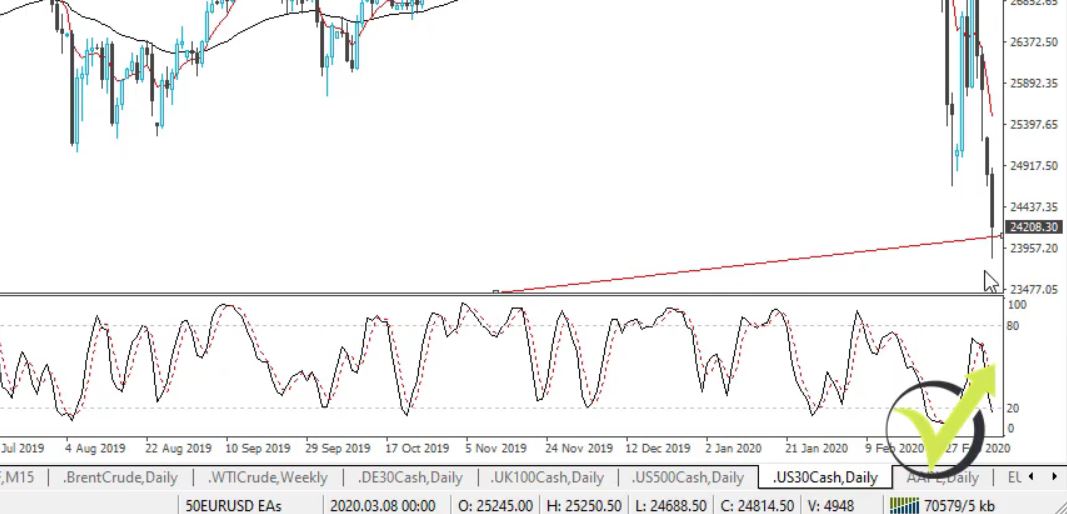
    Hello, dear traders, it’s Petko Aleksandrov from Forex Academy, today is 9th of March, 2020. I will do a quick recap over the Coronavisrus and the markets at the beginning of the week, what we can expect and we have another sell-off. The markets are falling down since the coronavirus spread last month. We have more than 50% of the countries worldwide affected and there are a lot of talks going on.

    As you know from my Stock market course + 10 Dow Jones EAs I normally trade the indexes with EAs, but these days there are some great short opportunities that I wish to share.

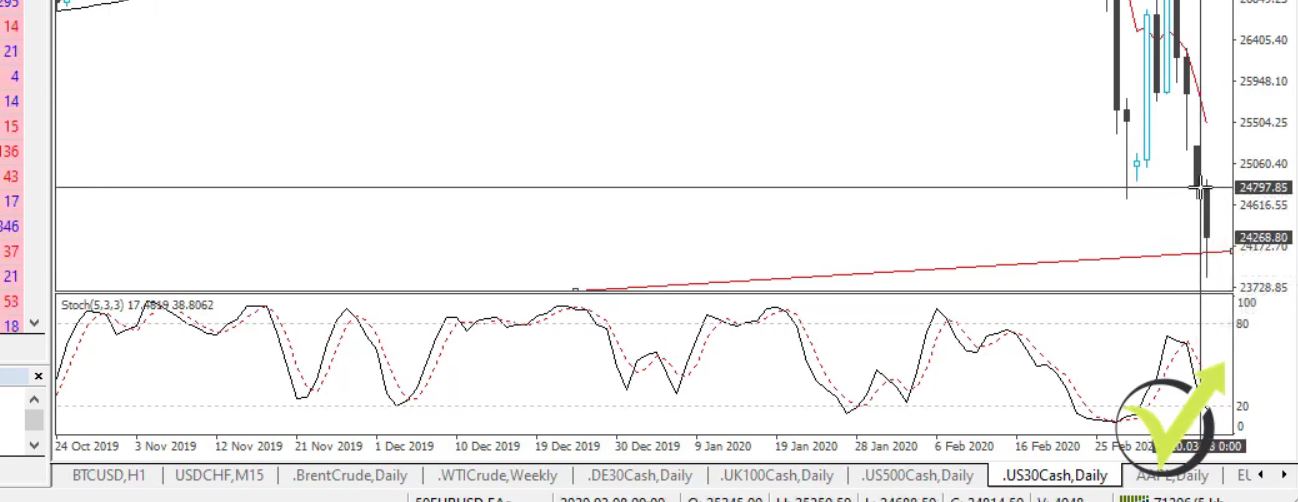
    Is this going to be the beginning of the next crisis? I think it is already, it looks like it. But let’s have a look at what we have today and what we can expect during the next days, and, of course, what trading setups I’m looking at. Dow Jones down below 24,000, another 6.5% today early US morning.

    coronavirus and the markets
    Dow Jones

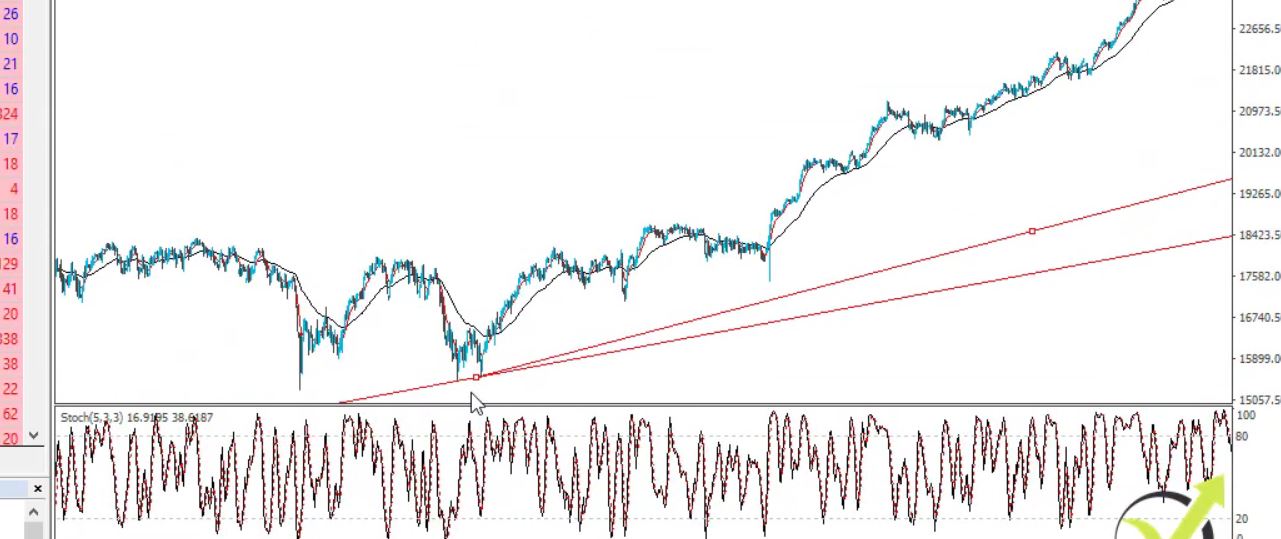
    You can see it is just at my trend line, if I zoom it out, we have this trend line coming from below.

    The trend line

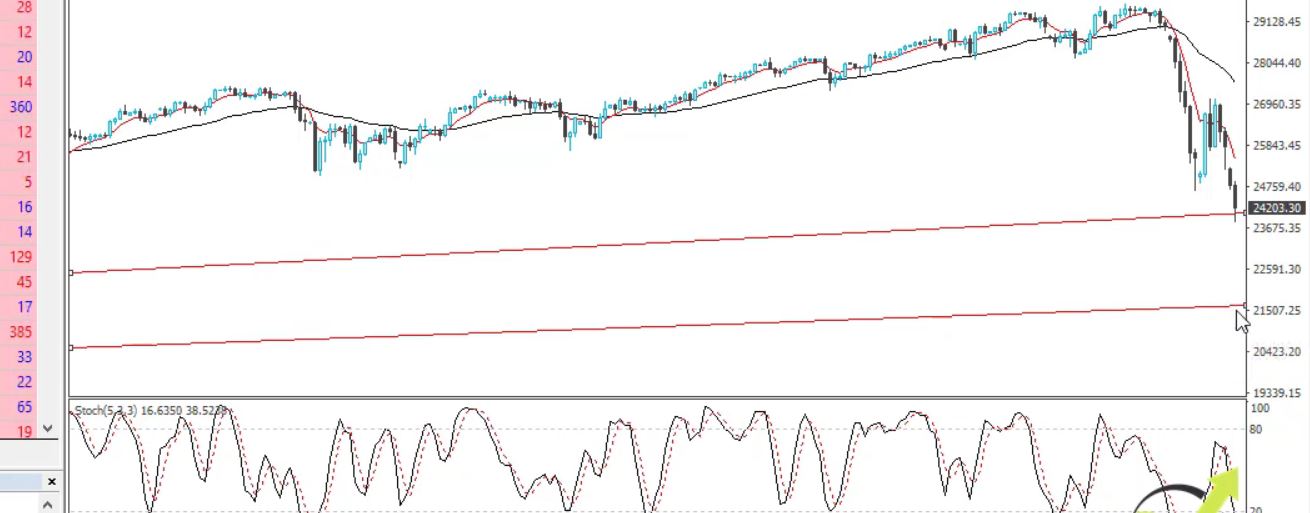
    From the low, that I have in 2015 and the one we had in 2018, now the price is just at that trend line. However, I don’t think such a massive sell-off will be stopped by the trend line. But it might give us some short-term opportunities. The other trend line that I have from the low from 2008 is sell down at 21,500. That is more realistic support at the moment.

    Coronavirus and the markets
    Support from the trendline

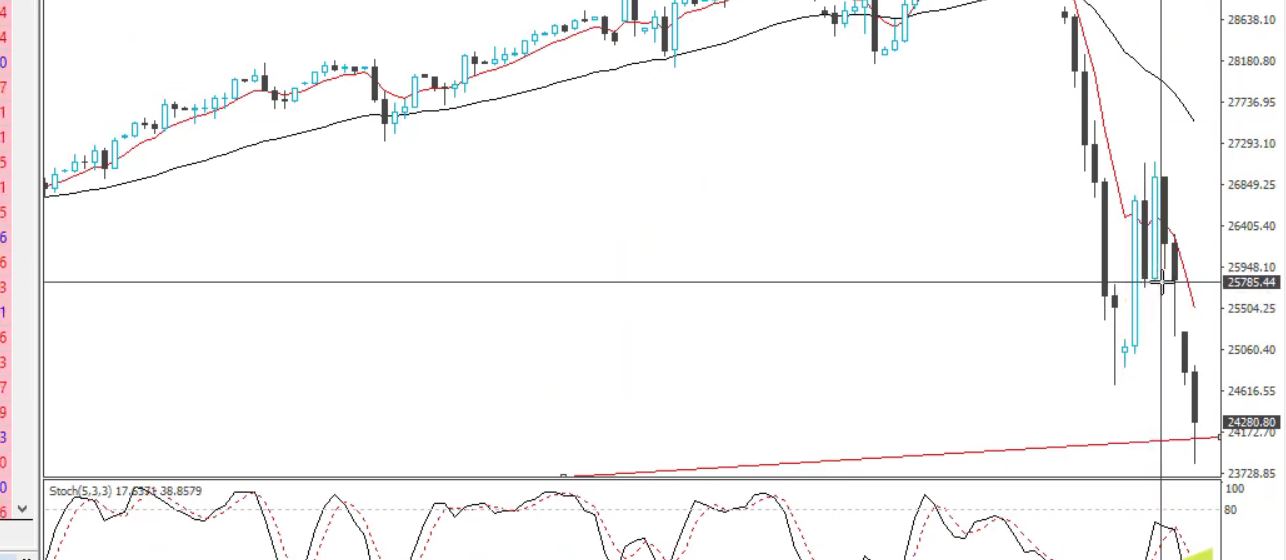
    And today the market opened another $1000 lower. So on Friday, we had a close at about 25,785,

    Coronavirus and the markets
    Friday’s closing

    and today we had an opening at about 24,800, this is the trading from Sunday night.

    Today’s opening

    Keep your Stop Loss higher

    You can see what a massive gap we have over here. The coronavirus and the markets went crazy over the weekend. And normally, after such a gap we can see further sell-off. However, if you are looking to sell, I’ll suggest you keep your Stop Loss a little bit higher if you can afford it, either over the gap or either at the high that we have at 27,000.

    Coronavirus and the markets and the Indexes

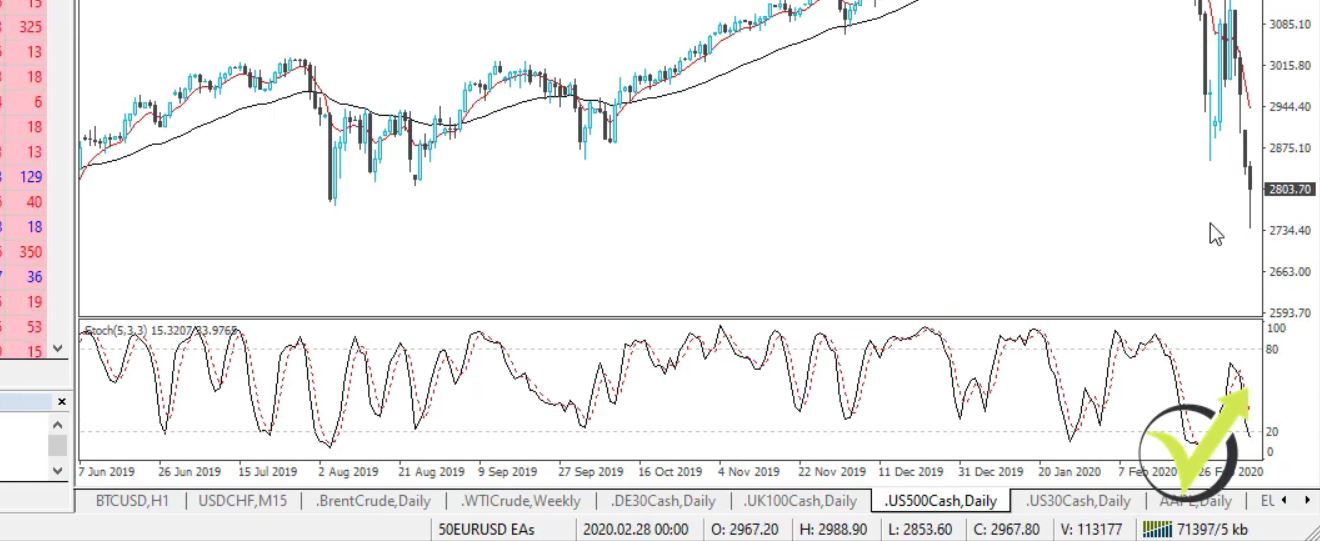
    S&P 500, a very similar thing. Now it’s trading below 3,000.

    S&P 500 and the coronavirus
    S&P 500

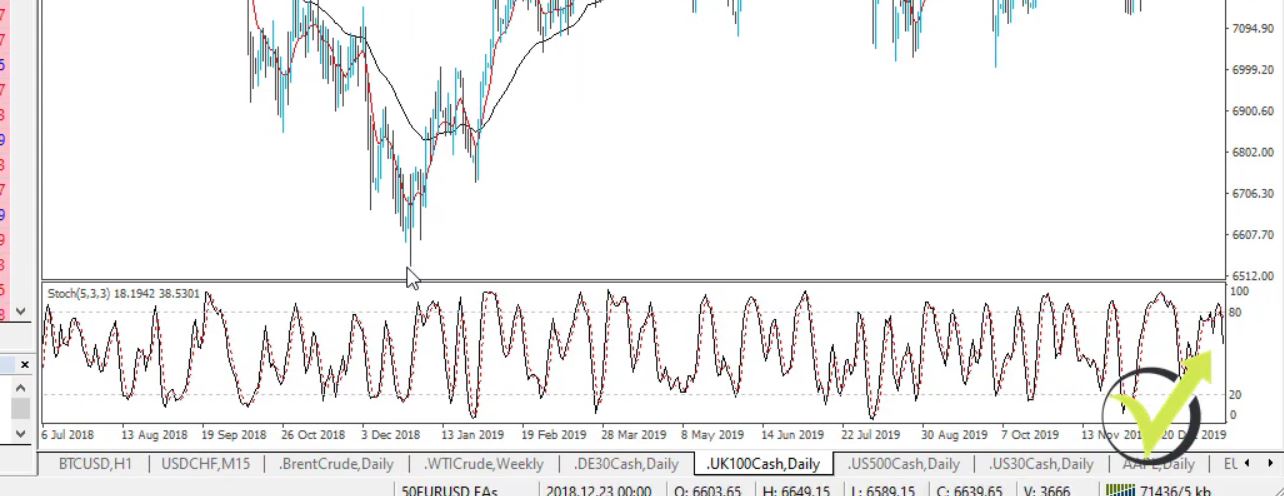
    The UK Index is below 6,000 reaching the low that we have from 2018.

    The UK Index

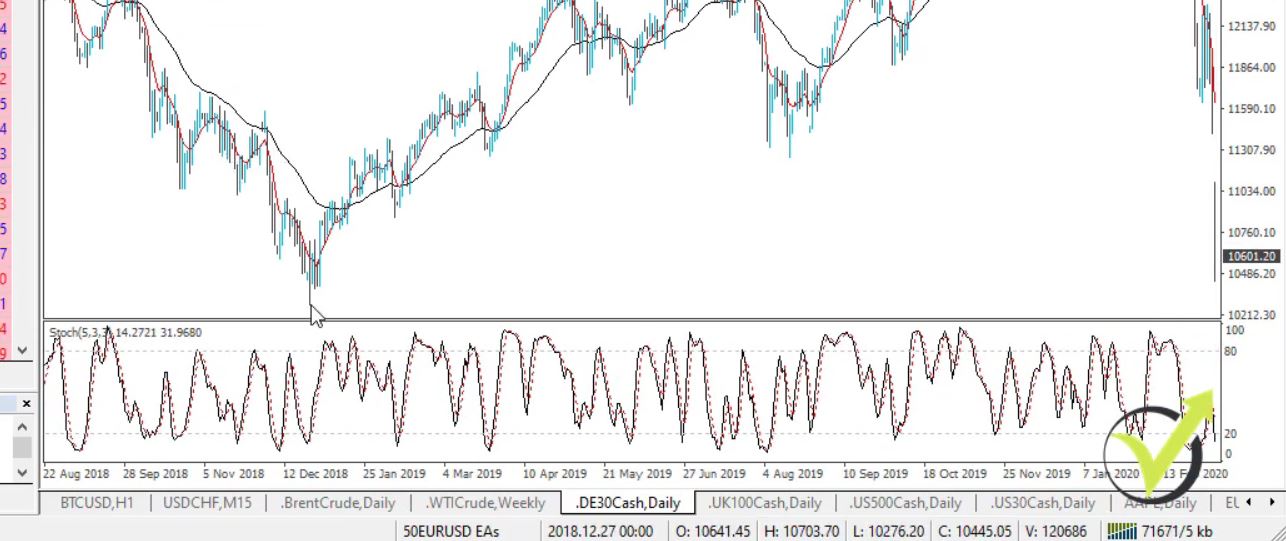
    It already passed the low that we have from 2018. So below 6,000, we have the next low at 5,400 and something. This is the low we have from 2016. We have the same thing with the German DAX, at the moment it’s testing the 10,000 round number, keep in mind it’s a round number.

    The German DAX

    And then we have the support from December 2018 which is at 10,270, strong support for me from that number and from the round number of 10,000.

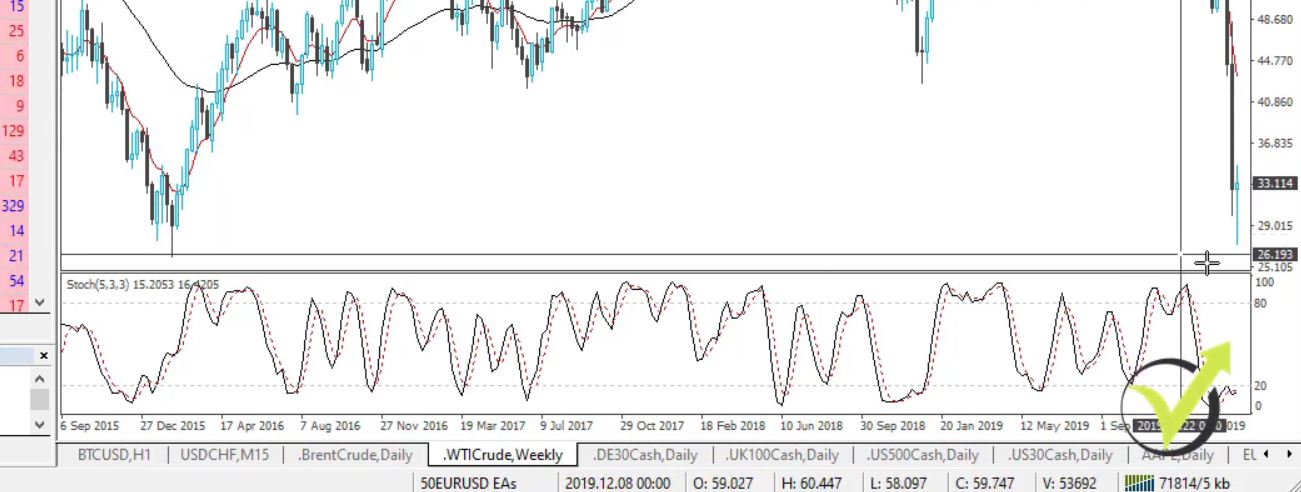
    The move of the week definitely is with the oil. You can see the price this morning fell below $30 and now we have a little bounce reaching till $23, $24.

    The oil

    However, that’s really a low price for the oil. The very low we have in 2015 is at 26. It couldn’t break the 26. It’s the lowest point we have with the oil and this might give us some great opportunities to buy actually.

    The cryptocurrencies suffered the most from the Coronavirus

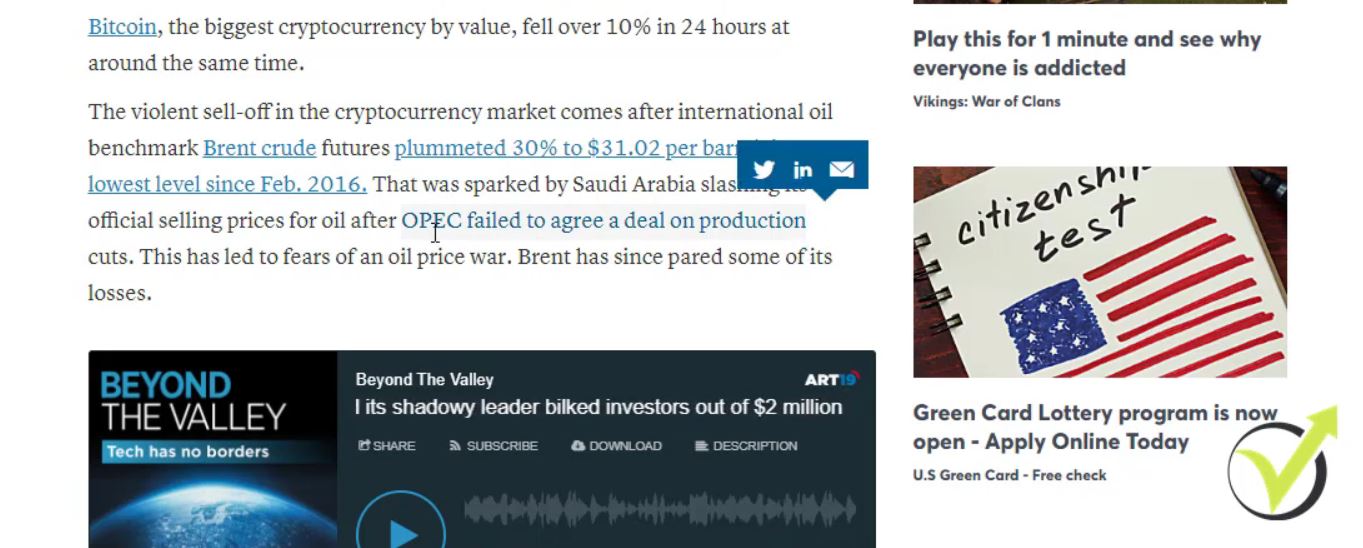
    However, for all of that, I won’t be buying unless I see some upward movements probably short-term uptrend looking at the daily charts or at the H4 charts. There’s something very important, this down movement on the oil is not so much of the coronavirus, instead, it’s the OPEC meeting that we had. What we see from the CNBC news is that this move was sparked by Saudi Arabia slashing its official selling prices for oil after OPEC failed to arrange a deal on production cuts.

    CNBC news

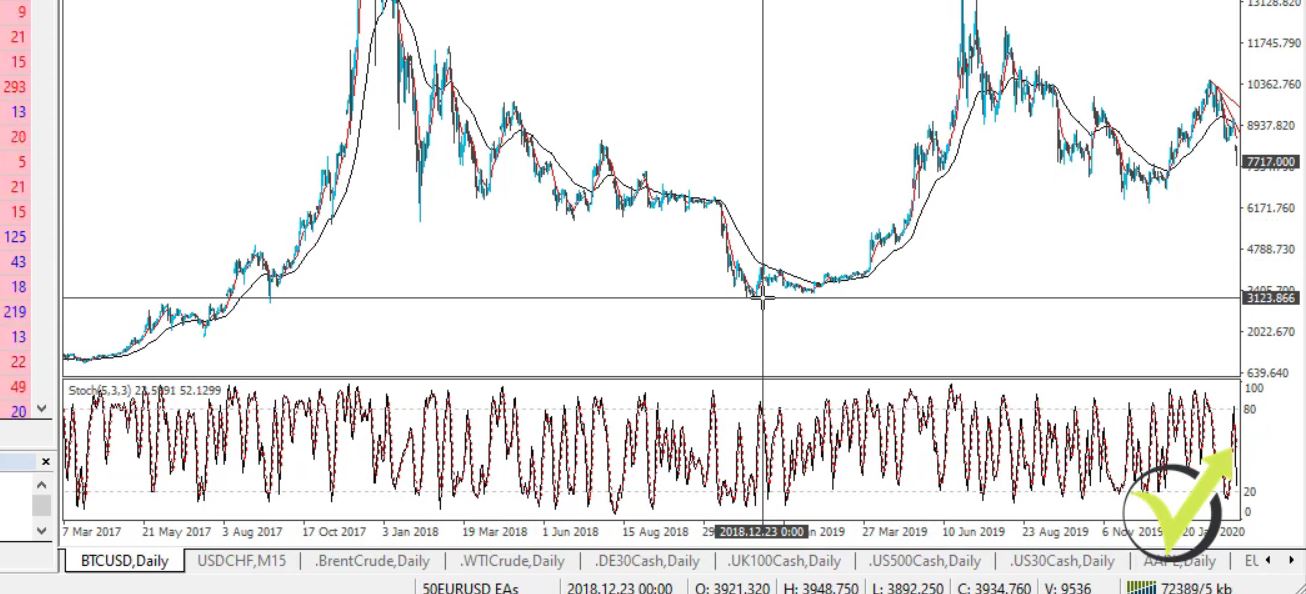
    And that’s a 30% fall which is really huge. What more was affected by that was the Bitcoin. The Bitcoin is down below 8,000. What we are looking at in the Bitcoin at the moment is the support. On the daily chart, below are the supports that we have from December. If it falls below 6,000, well, we will go to the 3,000.

    The Bitcoin support we can expect

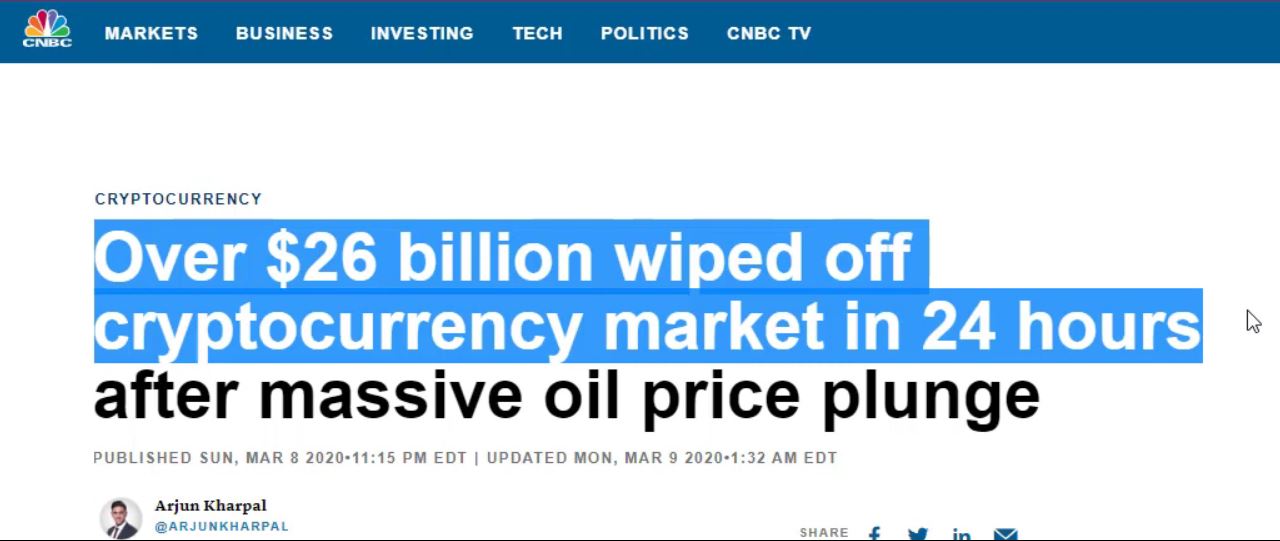
    All the cryptos are very volatile as you know. We have seen it and we can expect it, however, this gives some great opportunities to the investors to buy some Bitcoins at a lower price. And this morning we had about 26 billion of losses from the cryptocurrencies which is really massive.

    Over $26 billion wiped off cryptocurrency market in 24 hours

    The safe currencies with the Coronavirus and the markets

    A quick overview on the currencies we see gold is still very strong, the investors find it as a safe haven.

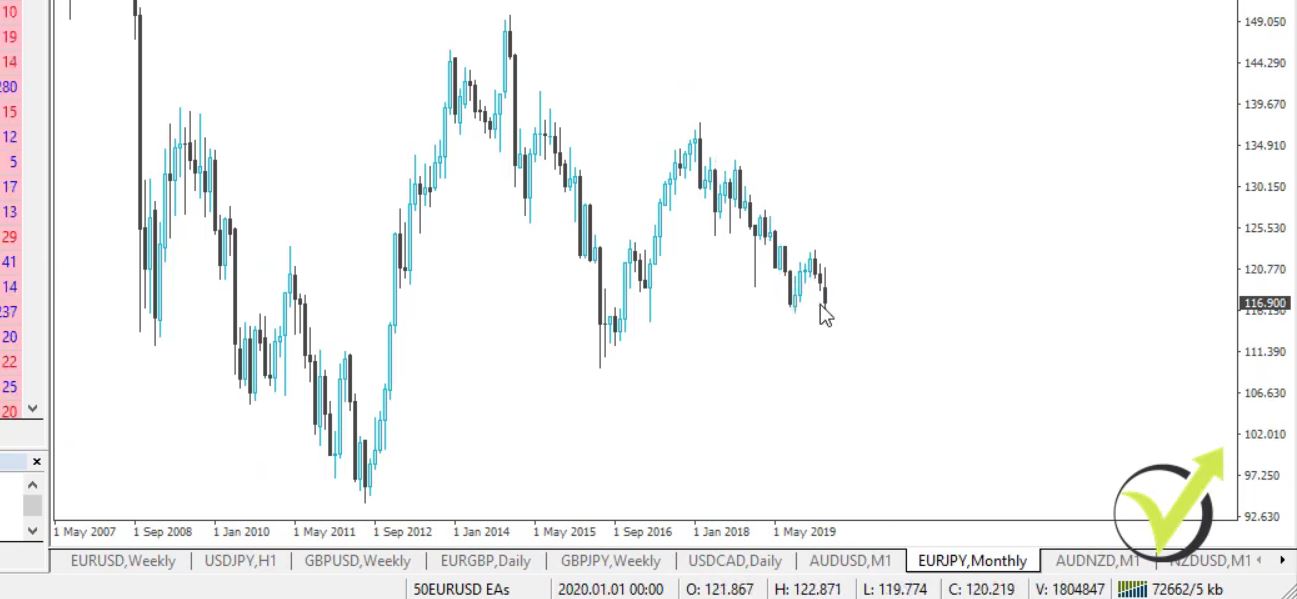
    And the other safe haven, as you know I’ve been talking about it a lot in my courses, is the Yen. If I go to EURJPY, you can see it’s going down at the moment,

    Coronavirus and the markets
    EURJPY

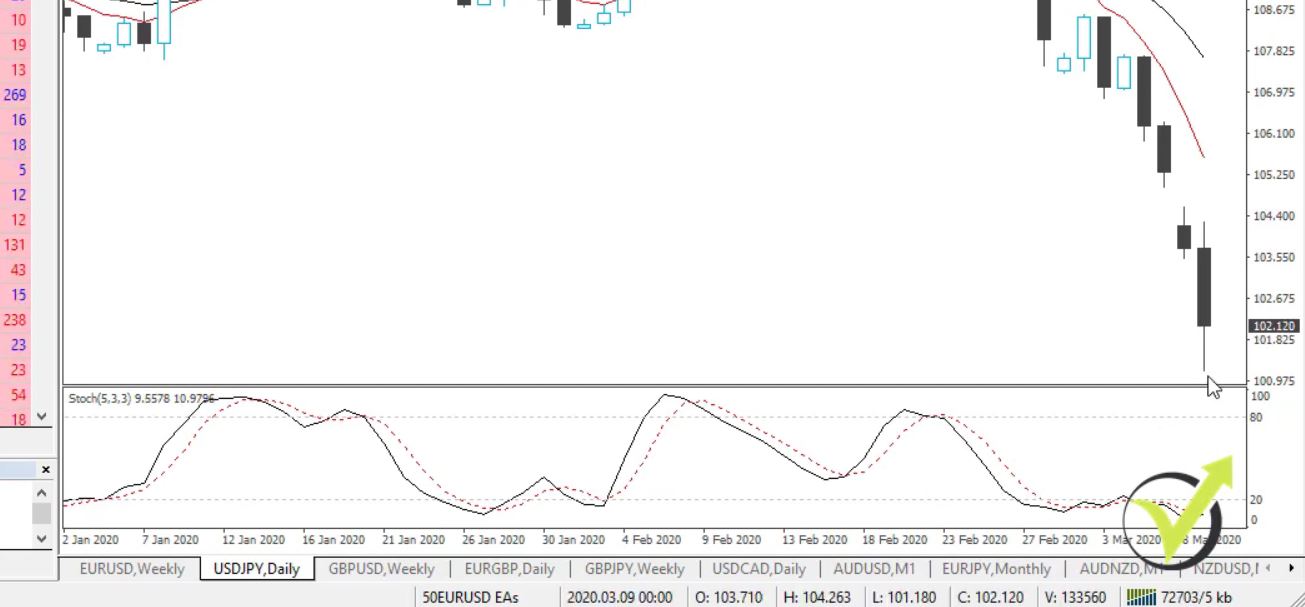
    but USDJPY is the one that is really going down. If I go to the daily chart, you can see the USDJPY. It’s testing the 100, again a round number.

    USDJPY

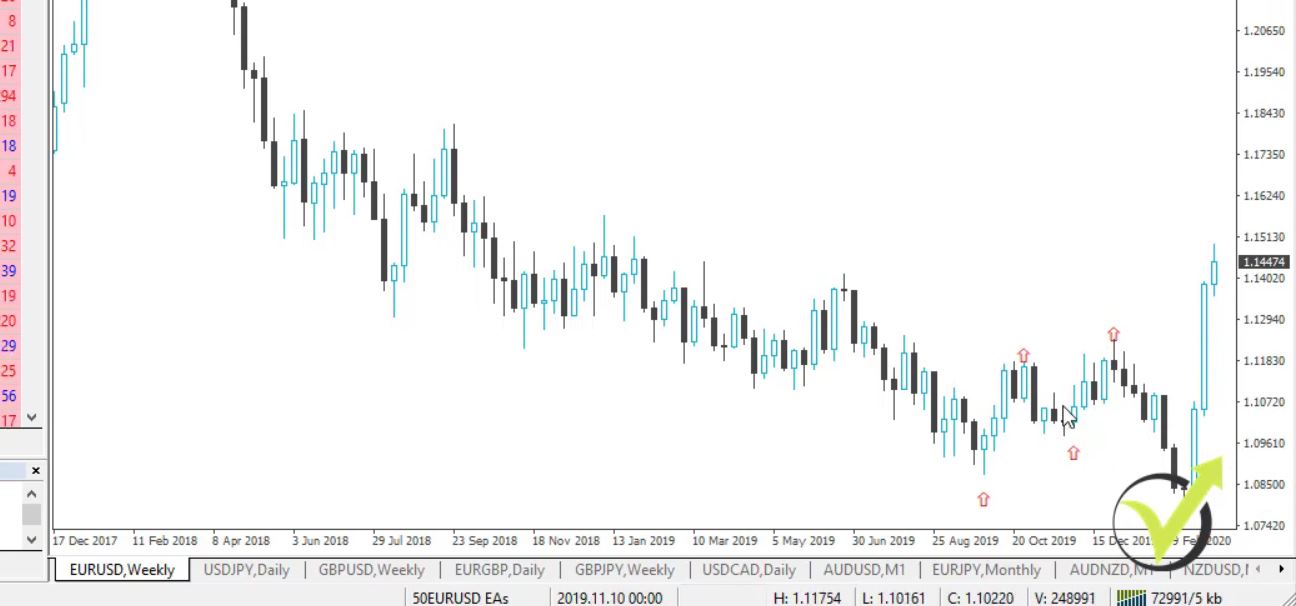
    I’ve been talking a lot about the round numbers, they really matter at such times. But, one more time, we have a really strong yen at the moment. It’s considered to be a safe currency and in times like this, in times of market uncertainty, stocks go down and the investors always put some money into the yen. EURUSD is above 114. It was a really stable downtrend with the EURUSD. I had some great positions on EURUSD.

    But when did I stop trading the EURUSD? Right over here at this short-term uptrend. Let me put the arrows so you can see it.

    A short-term trend

    Don’t put emotions into the coronavirus and the markets

    We had another push but after the talks about lowering the interest rates in the United States, we had a very positive euro. It’s two weeks now, into the third week we will see where it will go. And we have very obvious resistance lines, the ones I am looking at is 118. So this is what I’m looking at at the moment, strong yen, strong gold. Bitcoin, oil, and stocks are going down, I will wait a little bit to see how far they will go.

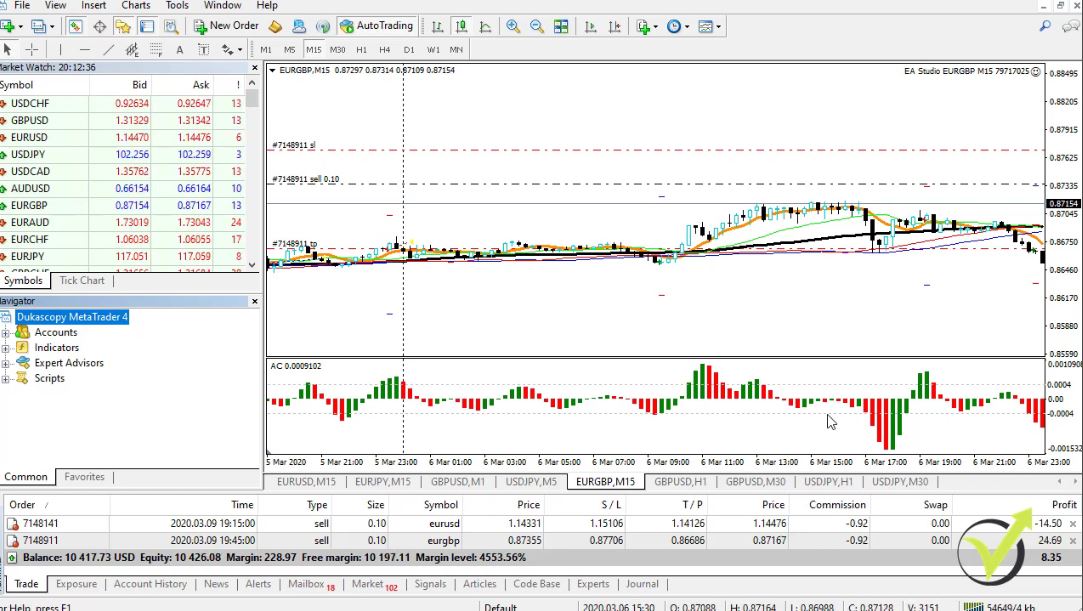
    Probably there will be some good opportunities to buy cheaper Bitcoins and at the same time, I will be looking to buy cheaper oil for a little bit longer-term trades. For the short-term trades, I have the Expert Advisors trading. These are the new Expert Advisors that I launched in my new Top 5 Forex strategies course.

    The new Expert Advisors

    I lowered the size because it’s a really volatile time but actually I had some great profits during the last week.

    There’s $400 from the last week. I started on the 5th of March with that account and I actually recorded some trading examples for the new top 5 course. So this is what’s going on on the market, I will keep you updated. And try not to put emotions so much while trading. Don’t be greedy. This is why I suggest trading with the Expert Advisors which might bring you more stable results.

    Thanks for reading and always take care!

    Cheers.

  • What is Expert Advisor in Forex?

    What is Expert Advisor in Forex?

    What is Expert Advisor?

    What is Expert Advisor? These are Trading Robots. Now, Robot is the slang word and the official name is Expert Advisor. So this is a code that describes the strategy.

    All the rules like entry rule, exit rule, Stop Loss, Take Profit, the entry amount, the Magic number which we use to follow the results, everything in the strategy is coded. And you can buy an Expert Advisor from the market. This is quite expensive.

    And even for one single Expert Advisor, you will need to pay a lot of money. Second, you can hire a developer which is expensive as well. You need to provide a detailed explanation about the strategy and they will code it for you. Let’s say in a week or two.

    If it is a professionalist, it will be faster but it will still cost you a couple of hundred dollars. Now, I use the third option. I use Strategy Builders. These are software, professional programs for algorithmic trading and I’m able to code the strategies without programming skills.

    Strategy Builders and the Expert Advisor.

    Simply, this software exports the strategy as an Expert Advisor. The code is brilliant without any errors. And this way I can afford to trade with many Expert Advisors. And everyone can do it.

    I demonstrate and explain what is Expert Advisor the course Top 5 Gold Expert Advisors in 2020 + 10 EAs included.

    I will show you the method that I’m using so you will understand better the strategies that I will include in this course. This is simply a code where we have all the rules from the strategy.


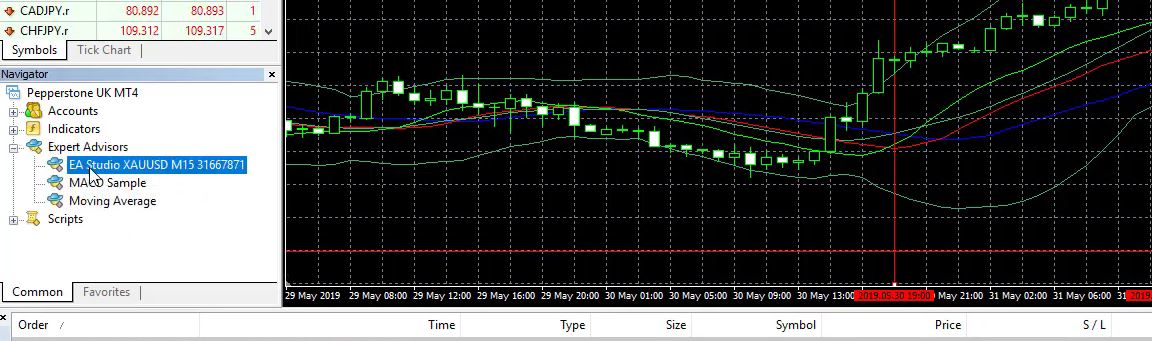
    what is Expert Advisor
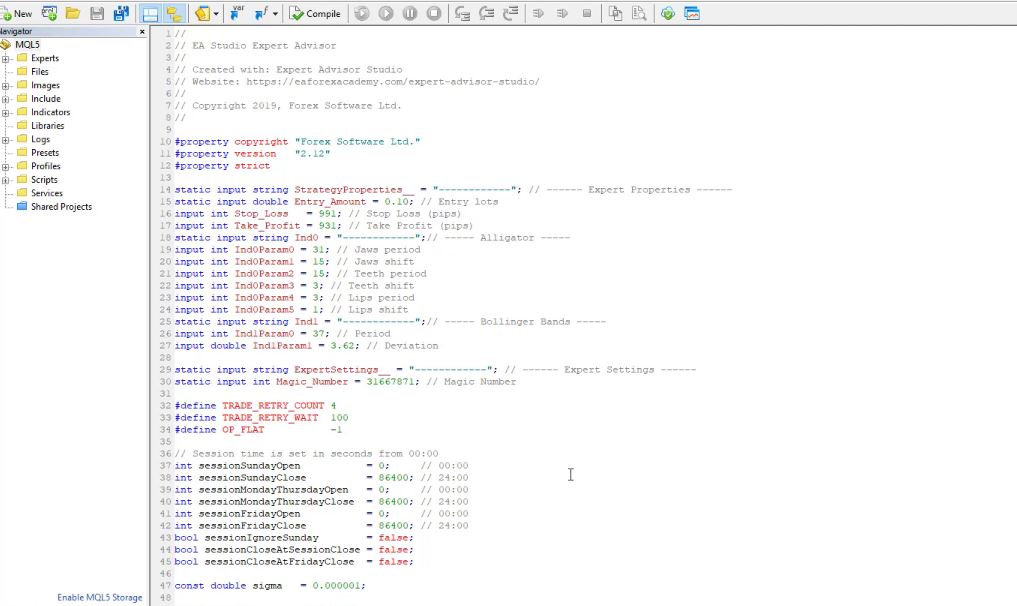
    The code.


    And in this case, I have exactly the strategy that I demonstrated in the course. I have the indicator alligator with the jaws, the teeth, the lips, which was my entry condition. And we have the Bollinger Bands right over here which was our exit condition.

    We have the Stop Loss and the Take Profit of the strategy. And below, you can see is the code for the complete strategy which is something that I really don’t understand because I’m not a developer. But I don’t need to do it because I have it as a ready Expert Advisor.

    You don’t need programming skills to code an Expert Advisor.

    And as well, the strategies that I include in this course, I provide with ready Expert Advisors. The code will be ready without any mistakes or errors. So you can test those strategies by yourself and you don’t need to have any programming skills or any experience in coding Expert Advisors.

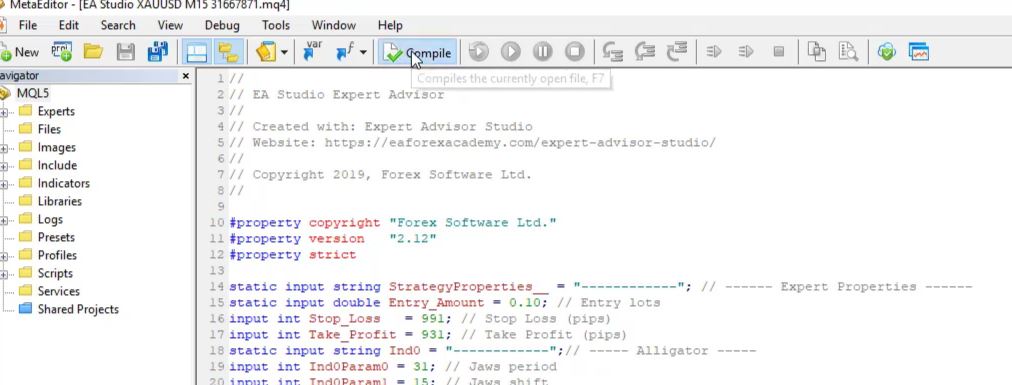
    Now, how do we put this code on the Meta Trader? First, we need to compile it


    Compile the code.


    which changes this code to a Trading Robot, we can say, or to a file that we can attach to the Meta Trader platform.

    What is Expert Advisor? A code for trading strategy.

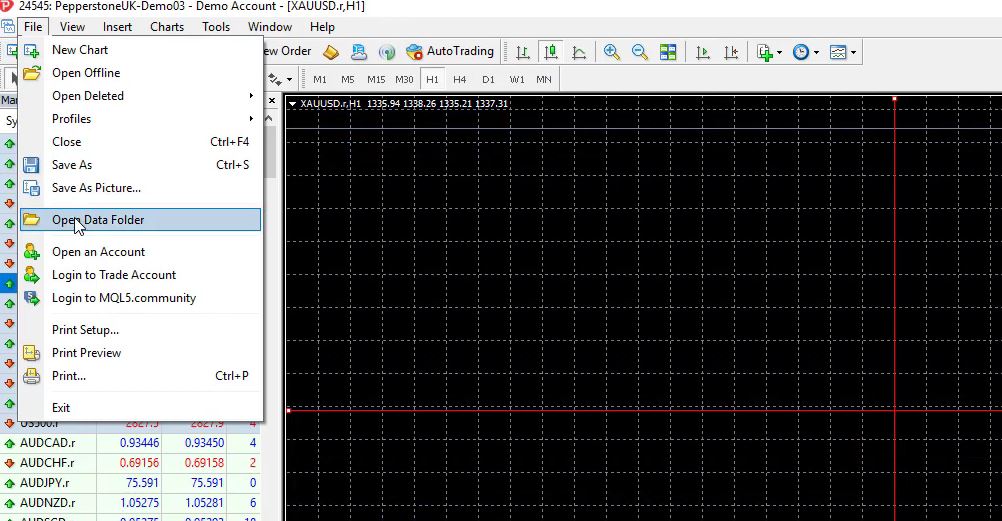
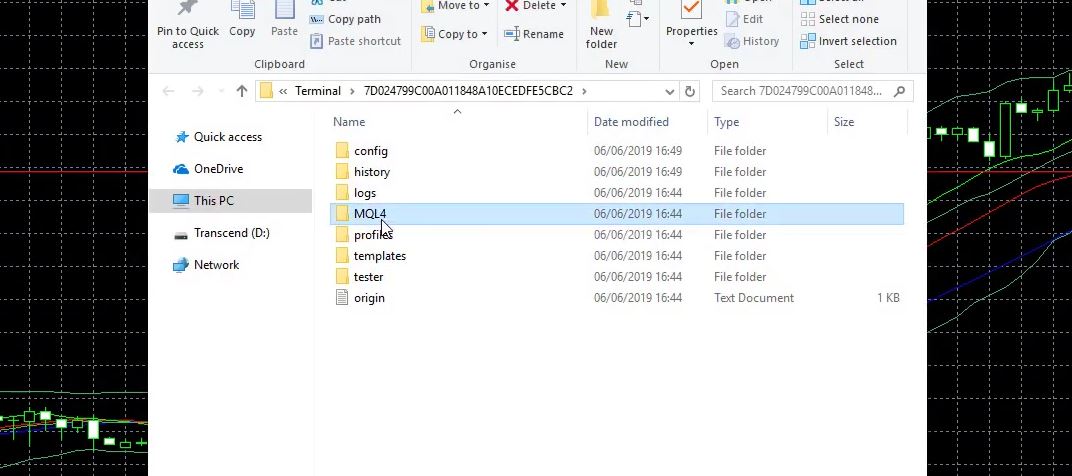
    So now I will go to File, Open Data Folder,


    what is expert advisor for mt4
    Go to File then Open Data Folder.


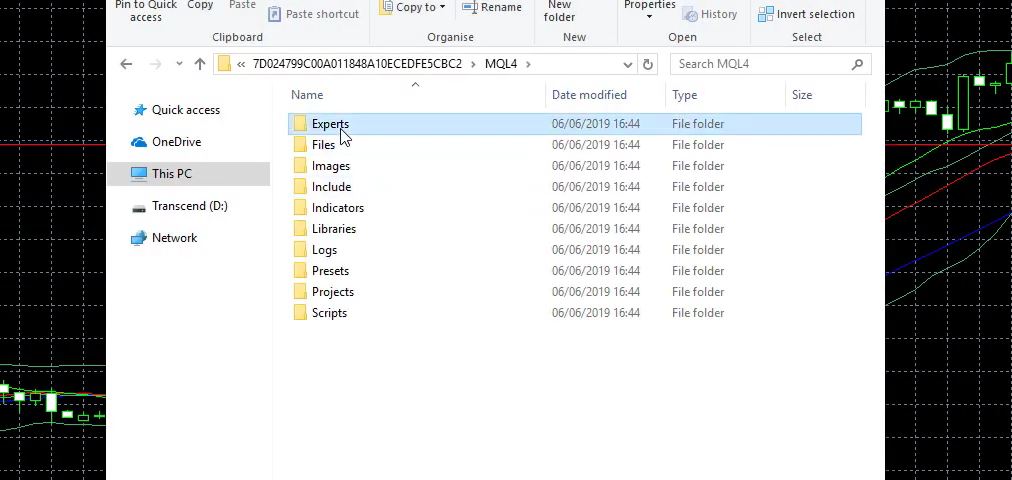
    and I will go to MQL4,


    MQL4.


    and I will go to Experts.


    Experts.


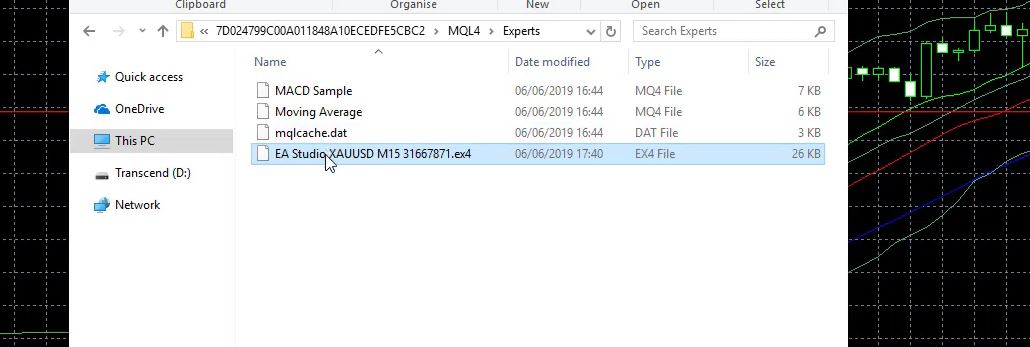
    I will paste the compiled file here which is the ex4 file


    Paste the compiled file.


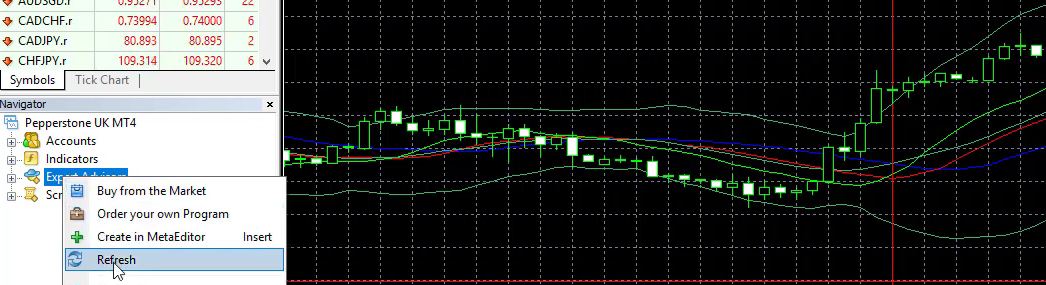
    and I will close this folder. Then I will go to Expert Advisors and I will refresh


    What is Expert Advisor compilation
    Go to Expert Advisors then click Refresh.


    and it should display below, right here.


    what is Expert Advisor
    The compiled file gets displayed.


    What is Expert Advisor Auto Trading in MetaTrader?

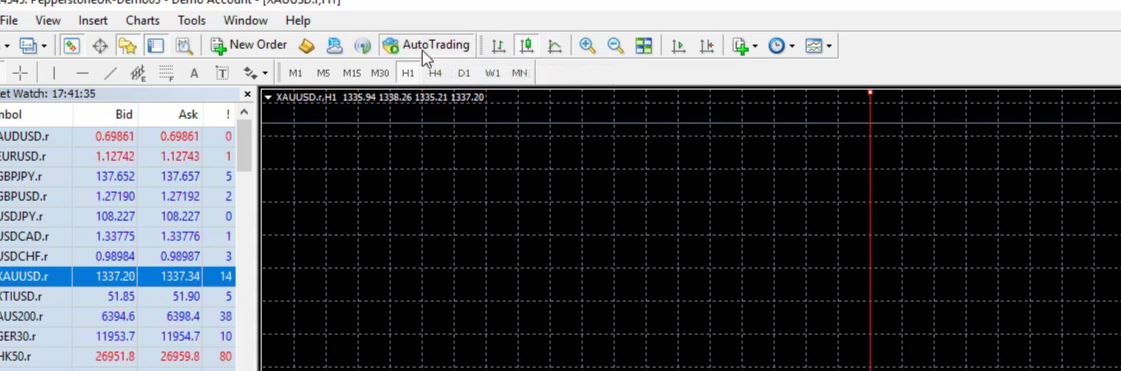
    Now, in order to enable the trading with Expert Advisors, I need to enable the AutoTrading.


    The AutoTrading.


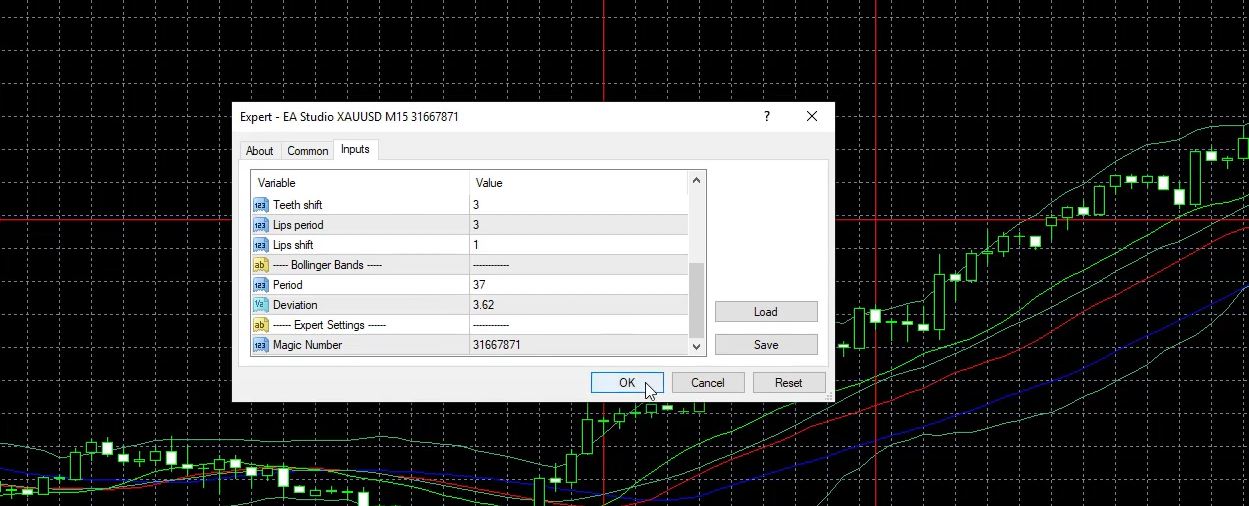
    But right now I am not going to trade with this Robot. I just want to show you how to place it over the chart. So I just drag it and here comes the menu with all the inputs that I have for the indicators for the alligator, for the Bollinger Band.

    Enable auto-trading.

    And if I click on OK, it will be on the chart.


    The Input menu.


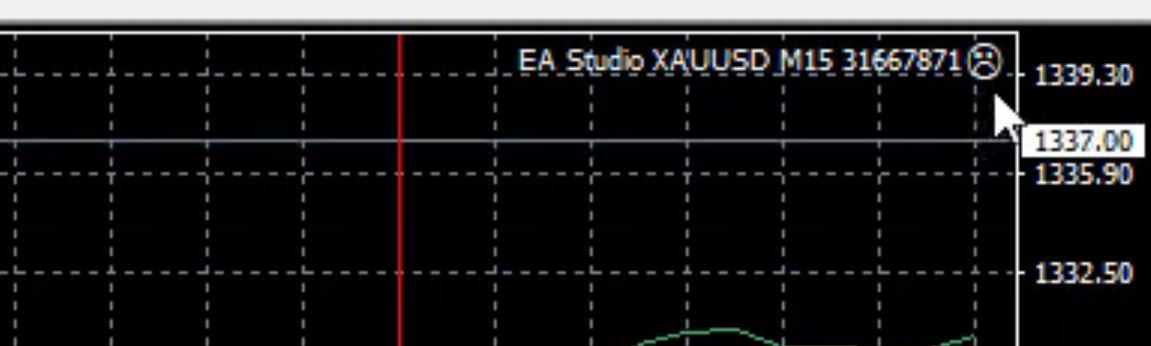
    But on the right upper corner, you can see that we have a sad face.


    what is Expert Advisor smiley face
    The sad face on the right upper corner.


    Which means that the AutoTrading is not enabled. But we can perform a backtest which means we will see how this strategy behaved in the past and what result it had.


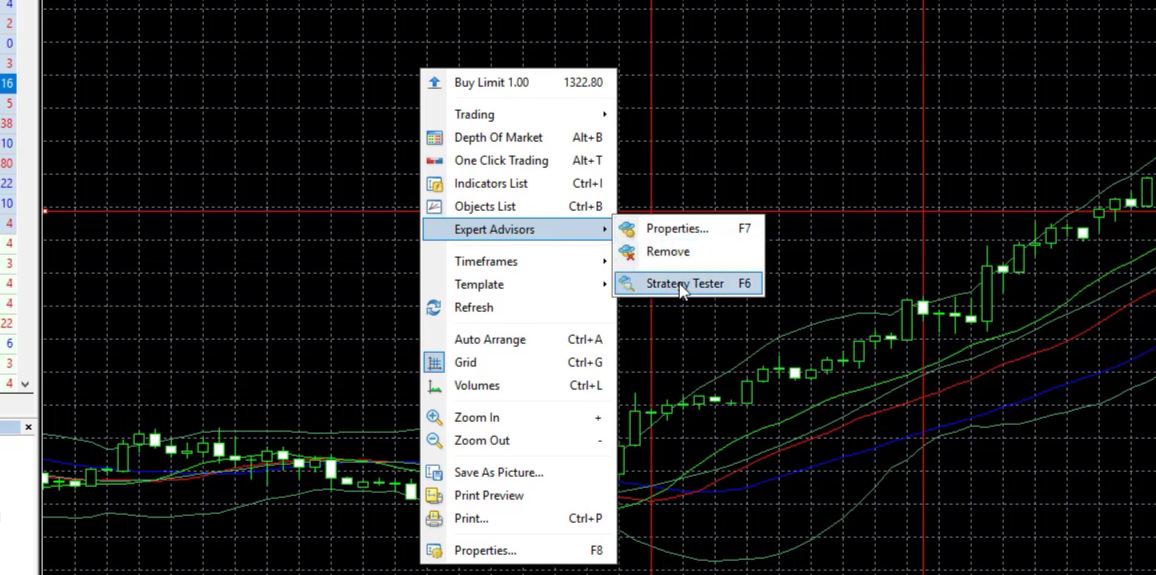
    The Strategy Tester.


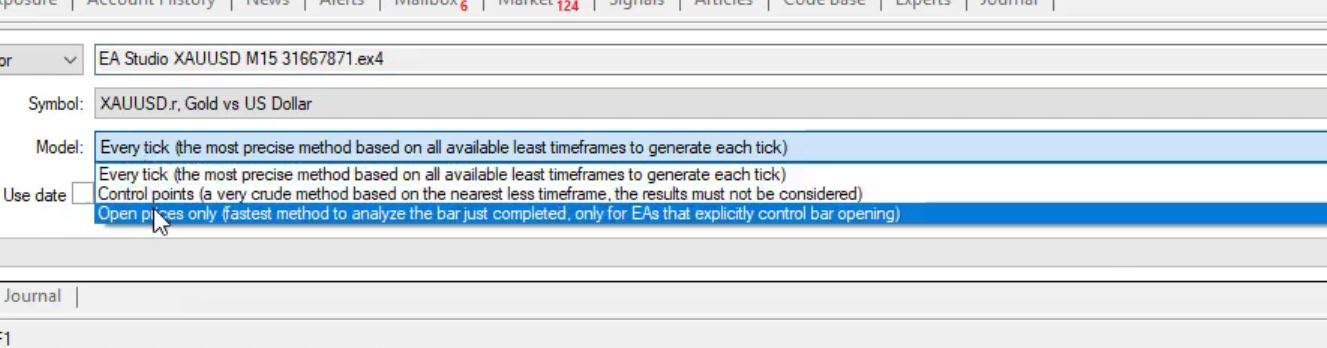
    So now I have here the gold versus the American dollar. It is H1 chart. I will use the current spread. As a model, I will use open prices only.


    The Model.


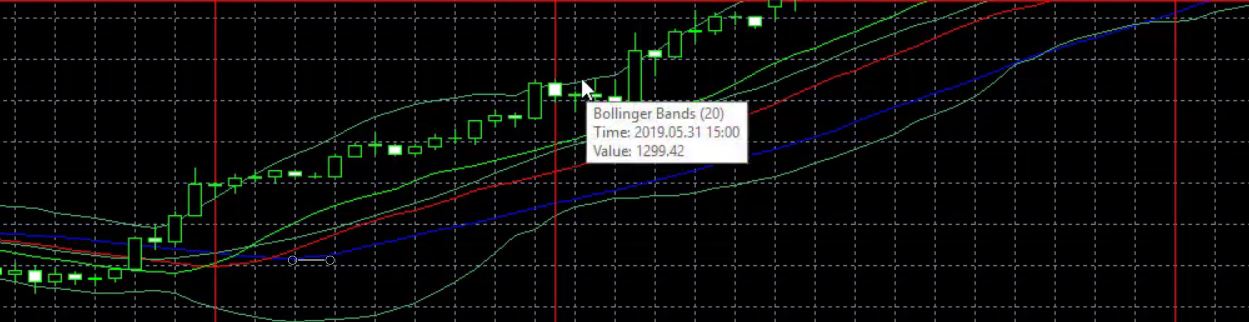
    So as we said, the strategy here looks for a bar opening above the upper band of the Bollinger Band.


    The strategy looks for a bar opening above the upper band of the Bollinger Band.


    Whenever the new bar opens, we check if the entry condition is there or not. And I click on start, you will notice how quick is the backtest. And we have here the results which are the results of the backtest. So we can see each trade in the past.

    What is Expert Advisor balance?

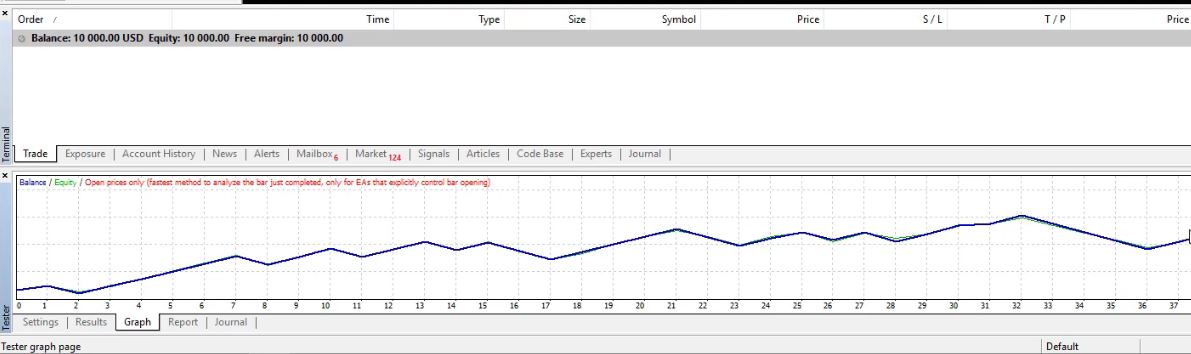
    We have a graph that is pretty normal and stable for an Expert Advisor.


    The Graph.


    Now, I really prefer having such equity lines with the Expert Advisors and the strategies because these are the so-called robust strategies. If you see this perfect line when making a backtest, normally this strategy is fitted to the backtested period.

    The journal.

    And the sellers of Expert Advisors normally try to have strategies that have these great backtest line. But normally, these strategies fail in the future. Then we have a report.

    In the end, we have the journal where we normally look for some errors or mistakes that happened when trading with the Expert Advisor. And now I have only 50 trades. And if you look at the graph, this is above 50 trades.

    So I believe I have about 2, 3 months or a little bit more. If I shift to the end of the chart, or to the beginning, or I can press the HOME key, I have it since the 31st of January, 2019. So it’s about 4 months and this is the result of the last 4 months.

    In the Gold trading course, I will show you how to get more bars from your broker in order to have a better backtest. And especially I need that when I generate strategies and when I create strategies and Expert Advisors. Because the more bars we have, the more historical data we have from the broker, the more count of trades we will have in our backtest.

    What is Expert Advisor trading and manual trading?

    And the more count of trades we have in our backtest, the more reliable it is. Because we really want to see a backtest with many trades, not just 5, 10 trades or something like that. If a strategy was profitable only in 5, 10 trades in the past, obviously we cannot rely on it for the future. We want to see more trades.

    This is why we need to have more historical data from the broker and I will show you how to do that. So the difference when we have Expert Advisor and manual trading is just a proof for us if this strategy was profitable. If we do this manually going back on the chart, it will be very hard for us to decide if the strategy is profitable or not.

    Because we will need to put some vertical lines, to say this was the entry, now here we will enter short, here we will enter long. But when did we start actually? At what point?

    And when we do a backtest with the Expert Advisor, the difference is that we see how the strategy performed the whole time. From the whole data that we have from the broker. It doesn’t matter if it was at night or during the day.

    We see what strategy parameters to use when trading with Expert Advisors.

    Simply we see for all bars or for all candlesticks with these indicators, what the result is. In this example, we see that this strategy was profitable. And when we trade with Expert Advisors, we can see what parameters to use for our strategy.


    what is Expert Advisor for algo trading
    The Properties.


    And normally, we don’t choose the default parameters. So, for example, you can see here the alligator, we have jaws, period of 31, we have shift as well. Teeth period of 15, shift as well right here. And lips period.

    The Bollinger Band, 37 and 3.62 of deviation.


    The input values.


    And, for example, you can see the indicators, how they come by default. If I click on edit, the Bollinger Band comes with period of 20 and deviation of 2.


    Default Bollinger Bands Parameters.


    And imagine if we want to trade manually all the different combinations, to test it with 20 and then with 21 and then you test it for a couple of months and you see that it’s not profitable, then you will decrease the deviation, for example, to 1.5. And then you will go to the other indicator and you will get really frustrated.

    The advantage of using Expert Advisor.

    And even having a look at the indicators chart and especially back in time you cannot really understand when exactly you should open the trade when there was the exit condition. Because keep in mind that the indicators are repeating. What we see right now is not what happened in the past.

    Because the indicators move after the price, they are lagging. This is very important but many people, especially beginner traders, don’t understand that. What happens right now, we will see the indicator a little bit different. Now, if the price drops, the Bollinger band will open and we will see the value of the Bollinger Band different after some time.

    Because it follows the price like what we see right here. So this is why I don’t like to give examples back in time and to give examples over the chart because it could be very misleading. But while we are trading with Expert Advisors, we actually see what is the result in detail.

    These are the benefits that we have with the Expert Advisors, a much more precise backtest and we can see if actually this strategy was profitable so far or not.

    If you want to learn more about what is Expert Advisor, have a look at the course Top 5 Gold Expert Advisors in 2020 + 10 EAs included

    Thank you for reading and I will continue with the next lecture.

    Cheers.

  • How to Trade Gold Online in 2020

    How to Trade Gold Online in 2020

    How to trade gold online: the easiest way to profit from the Gold

    How to trade gold online and what is the easiest way to trade gold nowadays? This is with the CFD trading. And the CFD trading is provided by the huge brokers that offer trading platforms the trading accounts which we can fund, and the trading assets like the gold.

    So it’s not like we really buy the gold physically and it will be delivered to our door, but we trade on the value of the gold.

    This is what CFD stands for, Contract For Difference.

    So we make a contract with the broker that we will benefit from the difference.

    So let’s say we have the price of the gold at the current moment at 1,300 and we buy it. The price goes up to 1,350. We sell it back, we close the position and we will benefit.

    There is a difference of $50. Of course, it depends on how much you will be trading and the profit could be bigger or smaller. This is CFD trading. It is very easy for everybody to access it through the trading platforms.

    How to trade gold online – The Meta Trader platform.

    In the Top 5 Gold Expert Advisors course, I have selected to use the Meta Trader platform because I will teach you how to do algorithmic trading and how to trade the gold with Expert Advisors. Or these are the so-called Trading Robots. The Meta Trader platform is very common among traders and brokers.

    Most of the regulated brokers offer the Meta Trader platform. So you need to choose your broker, download the Meta Trader platform and install it on your computer. It is very easy to do.

    You can find a lot of information about it. And in this course, I will teach you the very basics that you need to know about the platform in order to trade with the Expert Advisors because they do the trading for us.

    We don’t manually buy and sell. And, of course, for all of you who already have my courses, you know how Expert Advisors work. For those of you who don’t, you will learn it in this course and I am sure it will be very useful to you.

    So when you are ready with your Meta Trader platform, you need to open it. And now looking at my screen, you will see how the Meta Trader looks like when you install it.

    The Meta Trader.

    And actually, I have just installed a new Meta Trader platform from this broker on my computer.

    Don’t take the broker I use as a recommendation.

    And I didn’t touch anything just because I wanted to show you how it will look when you install it, or it will be something similar. This is because most of the brokers provide some setup or some charts with indicators by default. But you can change all of that.

    So what we have normally is the chart and we can make it as one chart

    Single chart.

    or you can separate it in a couple of charts. It depends on if you want to monitor a few assets at the same time. And on the left side, we have the Market Watch where we see all the assets provided by the broker.

    For example, here is the gold with Pepperstone broker.

    The gold.

    And please don’t take this broker as a recommendation because I am not connected to any of the brokers that I show in my courses. But, of course, I need to choose one to record the videos and the course.

    But I always look for the regulated brokers with small spreads. So the spread is the third column that we see right over here, next to the Bid and Ask price.

    So for the very newbie traders, when we look at the Market Watch we see Bid and Ask price.

    The Ask price is the price where we buy the asset and the Bid price is where we sell the asset.

    Or if we buy, for example, gold, we will buy it on the Ask price. And if we want to sell it later, to close the position, we will close it on the Bid price.

    So the broker will benefit this difference that is called spread. Now if you don’t see this column in your Meta Trader, you just need to right-click and there is the Spread. You just need to tick and it will show right here next to the Ask price.

    Right-click and tick the Spread option.

    Now, if you want to trade the gold or anything else, what you need to do is right-click and go to Chart Window. This is how to trade gold online with MetaTrader.

    Right-click and go to Chart Window.

    Now I have the chart for gold.

    The gold chart.

    All of the others, I will remove them now because I am not focused on the currency pairs in this course so I’ll just leave the gold.

    how to trade gold online
    I remove the other currency pairs.

    You can zoom the chart, you can change the color of the background or the candlesticks, for example, you can make it white. I prefer normally to make it white from the properties.

    The types of charts in Meta Trader – bars, candlesticks, line chart.

    But with green, it’s a really bad combination because the chart is not visible. And you can change as well the bars and everything. But for this course, I will leave it to black as it is by default.

    So we have these 3 types of charts in Meta Trader. We have the bar chart where we have bars.

    The bar chart.

    And if we are on the H1 timeframe, each bar represents 1 hour. On the left side of each bar, we have a small horizontal line that shows the opening of the bar and on the right side of each bar, we have the closing of the bar.

    The size of the bar shows the range where the price went during this 1 hour. And if I just switch to candlesticks, you will see that it is the very same thing, just that we see here candles which are fully filled.

    Gold trading
    The candlesticks in MetaTrader

    And in this case, it is white when we have a negative bar, or it opened at a higher price and it closed the bar at a lower price.

    If I put the mouse over the closing of the candlestick, you will see that I see precisely the open price, the high, the low and the close price and the volume.

    If I put the mouse over the closing of the candlestick.

    But normally, the volume here represents the volume for the broker itself and it’s not really an indicator that we are looking into. So this is the candlestick chart. It gives us a lot of information.

    Most traders prefer to use the bar chart and the candlesticks.

    And as well we have the line chart which just shows the direction of the price.

    how to trade Gold online
    The line chart.

    But the information that we get here is really limited.

    We cannot see a lot. That is why most traders prefer to use the bar chart and the candlesticks. And exactly this information for the high, the low, the close and the open is very important because we use it in algorithmic trading to backtest the strategies or to create new Expert Advisors.

    So this is the chart. Here we can place different indicators from the Insert button. Then we use the indicators to create the strategies where we want to buy and where we want to sell. For example, one of the most common indicators and especially in algorithmic trading is the Bollinger Bands

    The Bollinger Bands.

    which widens when the price goes aggressively higher or lower.

    How to trade gold online
    The Bollinger Bands

    And when the price stays in the range, you can see the bands go closer. And I have a detailed course about the Meta Trader and all the indicators I explained in detail in this course. So in this lecture, I just want to give a quick idea for the beginner traders, how to use the Meta Trader and how we can actually trade the gold there.

    How to trade Gold online when the different brokers come with different assets.

    For example, this is the MACD indicator.

    how to trade Gold online
    The MACD indicator.

    But now I’m not going to talk about the indicators. If you want to remove them, just go to Indicators List

    Indicators List.

    and click on each one and delete them.

    how to trade Gold online
    Click on the indicators and delete them.

    And you will have again the plain chart. This is the chart where we see the price.

    On the left side, as I said is the Market Watch. With different brokers, we have different assets. Normally, on the top are the currency pairs. Then we have some commodities, we have indexes, stocks, here we have cryptocurrencies,

    The cryptocurrencies.

    and many more assets to be traded.

    Of course, it is up to you which assets you want to trade. And what I really like to do is to diversify between different assets, between Forex and commodities. And this is why in this course I decided to dedicate it to the gold.

    But the method that I will show you how to create the Expert Advisors without programming skills, you can do this on any other asset that you see in your Market Watch. Below is the Navigator.

    The Navigator.

    We have here the name of the broker, different accounts if you have Demo and live, or maybe you might want to have a couple of Demo accounts, or a live account, it’s up to you. How to trade gold online in different accounts? You can, but if you use Expert Advisors you can not switch between accounts.

    It’s solely your choice whether or not to trade on a live account.
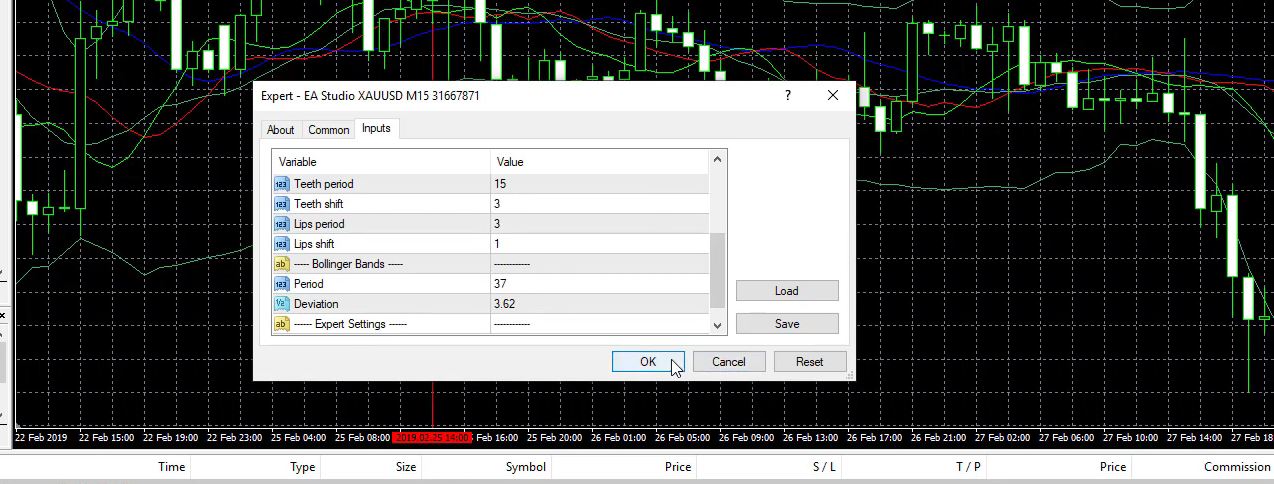
    I personally prefer to record my courses over a Demo account because I really don’t want to stimulate anybody for real trading. It is your personal choice and risk if you want to trade the strategies or any of the methods that I show on a live account.
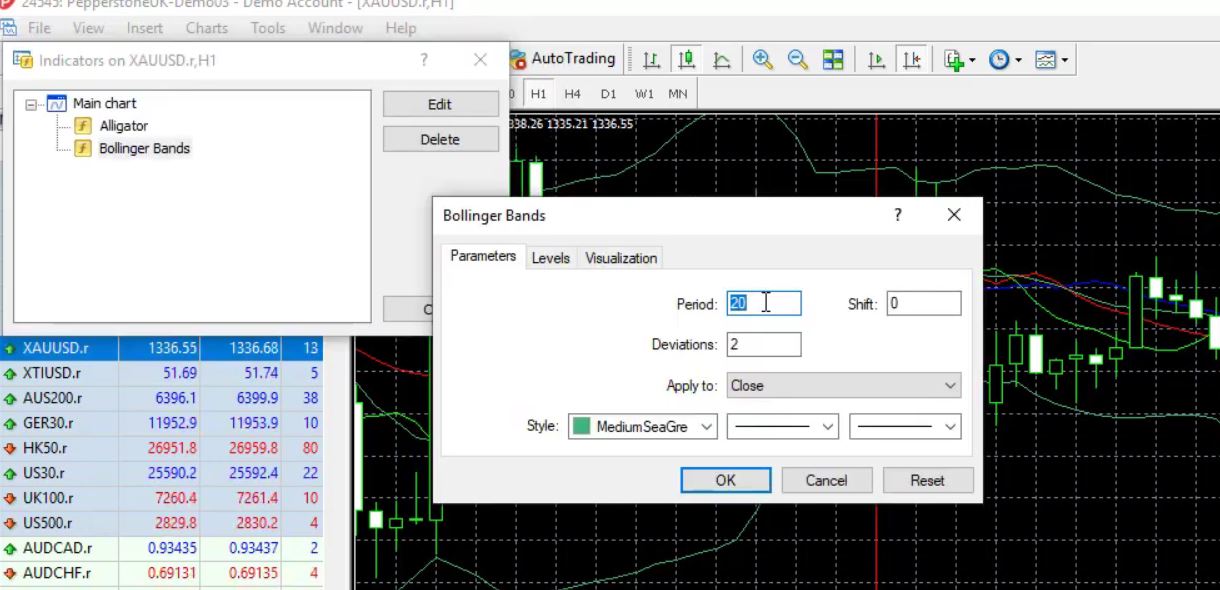
    This is why I prefer simply to demonstrate it on a Demo account. But it’s the same system and the same strategy that you might apply on a live account. Below that, are the indicators. The very same indicators we can add from right over here.
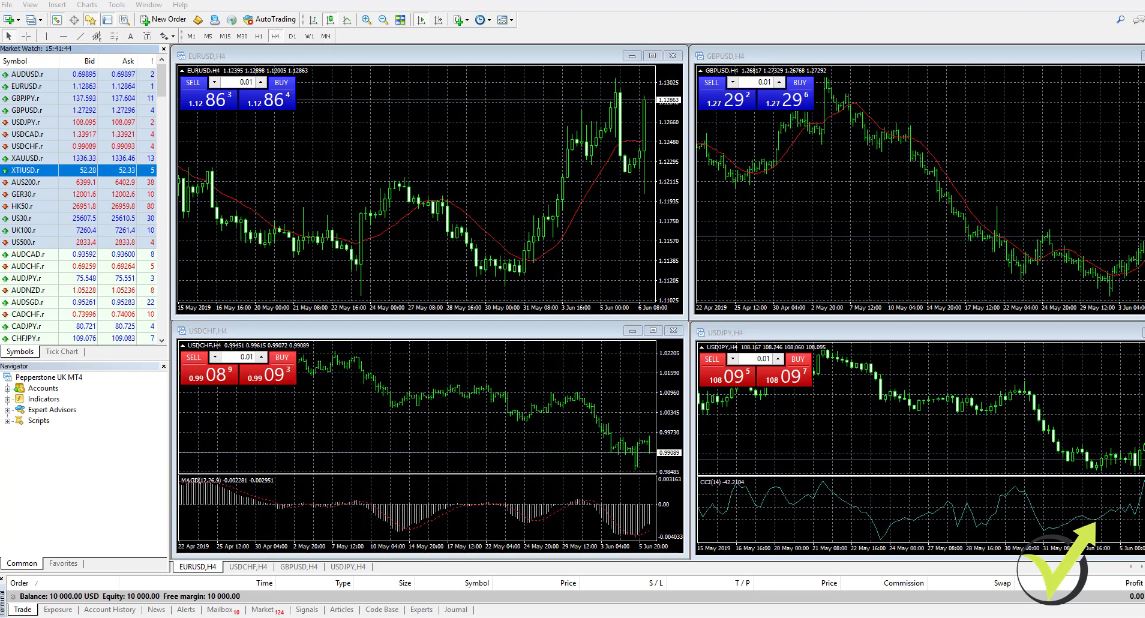
    how to trade Gold online
    Inserting the indicators.

    And then what we have are the Expert Advisors or these are the strategies for trading.

    The Expert Advisors.

    So, for example, you can see right over here I have many Expert Advisors from my other courses which I will remove later. And I have the scripts.

    The Scripts.

    So having scripts helps a lot to make some additional things such as export historical data, something I will show you later on in the how to trade gold online course. And I will provide you with such scripts so you can export your historical data from your broker if you want to create your own Expert Advisors. It is really easy to do that.

    Using the Meta Trader platform is quite easy.

    And below we have the terminal where we will see the open trades at this current moment. I don’t have any trades open. I see my balance of $10,000 but once again this is a Demo account.
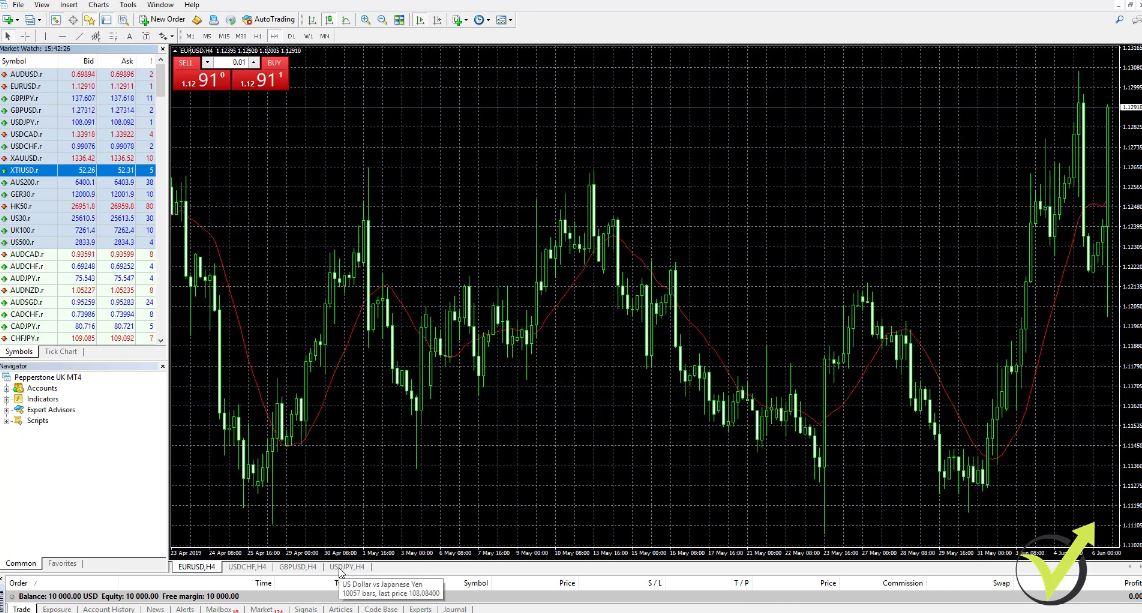
    how to trade Gold online
    The terminal.

    And later when I have some trades opened you will see them right over here at the terminal. You will see the type of order, the size, which symbol, what price was opened, what is the current price, the Stop Loss, the Take Profit, commission, if we have swapped, and what is the final result. So I will show you that later on in this course.

    And the Meta Trader platform is really easy to use. It is nothing hard. It is very similar to all trading platforms around. If you have experience with any other platform, I’m sure you will get used to the Meta Trader very quickly.

    But if you are just a beginner, I am sure it will take you a very small period of time just to get used to it. And especially if you want to trade the strategies automatically with the Expert Advisors, you really don’t need to do a lot. I will show you step by step how to place the Expert Advisors on the Meta Trader platform and how to trade with it.

    We have both profits and losses with every strategy.

    So having the gold on the chart, it allows us to trade. We can sell it, for example, right now at 1,335.58 and close the position down to 1,321 and we will benefit this difference. This is how to trade gold online on the value of the price.

    For example, if we want to buy then we buy it at 1,335 and we close the trade at 1,345, we will benefit the $10 of a difference for the gold. Of course, if the price goes against us, we will have a loss in the account. And keep in mind that with every strategy there are always losses, and there are profits.
    The important thing is to find strategies that will bring you more profits than losses. But don’t look for the strategy where you want to see only profits. Normally, these are the type of strategies that people sell online.

    Just because they sell them, they want to make money from selling the strategies. They sell the Expert Advisors really expensive for a couple of hundred dollars or even thousands of dollars.

    Practice on a Demo account how to trade gold online

    And they show these backtest results which are unrealistic without losses. Normally, this type of Expert Advisors will blow your account and you will lose a lot of money. So take it easy with buying Expert Advisors.

    You need to learn how they work and not to believe really on the promises of the seller. So in this course, I will show you some very realistic strategies for the gold and I will show you how to choose which one from those you want to trade.

    So I will show you my strategies for the gold but I will show you as well how to choose which one from these strategies you want to trade on your account. And it is very important to practice on a Demo account because this way, you will get used to the system and you will decide for yourself if you want to trade on a live account with the real money or not.
    But this is your own risk, keep that in mind. This is why I always suggest my students trade first on a Demo account. This is the Meta Trader platform. This is how to trade gold online.
    It is very easy and I will show you that in the course. if you want to enroll in the Top 5 Gold Expert Advisors in 2020 + 10 EAs included

    I will see you inside the class.

    Petko A

  • Online Forex Course: The Smart Choice in 2020

    Online Forex Course: The Smart Choice in 2020

    Online Forex course – it is easy for everyone in 2020 to become a trader

    Online Forex courses have emerged to equip beginners and advanced traders with vital information to make more profitable gains. Investors seeking to trade in the foreign exchange markets can find themselves losing capital fast, seeing their optimism spiral downward. Online Forex courses have been made available and accessible by Forex Academy.

    Forex Academy offers algorithmic and automated online Forex courses.

    online Forex course statistics
    The numbers in January 2020.

    The online Forex courses are based on the best strategy builders on the market by using multiple experts in a single account.

    The courses also use live and interactive examples when making illustrations to the traders. Further, you get to interact with fellow traders and other students of Forex Academy in our forum.

    An online Forex course has numerous yet inexhaustible benefits. The following are the overall benefits of choosing this mode of study:

    • The flexibility of time. Trades can be carried out at any time. Learning can be done at any time and place, such as in public transits.
    • Pocket-friendly option. It does not require much knowledge and skill to make profitable trades. It cuts down the cost of buying tickets and bookings to learn the craft. The transaction costs are also low since there are no commissions in real sense.
    • Accessibility of study videos. Videos of the courses being offered can be watched from any device, at any place and time. They also provide a point of reference when re-watched.
    • No background knowledge is required. The online Forex courses are comprehensive and teach the trader on how to use expert advisors without any experience in programming or previous trading.
    • Smooth evaluation of performance. Since automated forex online Forex platforms support multiple markets and sophisticated trading strategies, it is easy to monitor, account, and analyze performance. It also manages risk to ensure maximum profits and minimum losses. The strategies are also employed.

    This article explores two of the 30 online Forex courses offered by Forex Academy.

    It gives an intense and informative analysis of the Automated Forex trading course and a Forex trading strategies from a professional trader.

    trading Forex
    Which Online Forex course is better?

    It further brings out the differences between the two courses and the benefits you gain by enrolling in them.

    Automated Forex trading course + 99 Expert Advisors

    In this online Forex course, the trader is provided with 99 Expert Advisors for automated trading. For every month, 99 fresh expert advisors are updated in the course.

    The significant benefit of automated Forex online trading is the elimination of psychological influences and emotions that determine analysis and trade execution.

    Automated Forex trading course is a wholesome online Forex course that teaches the traders how to create Expert Advisors without any programming skills and trading experience.

    The trader receives actual and ready robots for trading. The trading course is also fully algorithmic, and the trader need not manage trades manually.

    Expert Advisors that are currently profiting and exhibiting the best performance are selected for the trade. Relying on a single expert advisor may not give the desired profitable gains.

    Automated Forex trading courses utilize multiple expert advisors in a single account to achieve steady results. The traders are instructed about placing the expert trading advisors on the Meta Trading platform.

    No previous trading experience is required, and live examples with realistic results are used to illustrate. This course targets traders at any level with a desire to gain knowledge to improve online Forex trading.

    It teaches the traders how to rely on statistics and results and not merely on emotions of hope and expectations. It provides critical analysis skills of the market traders and the best moment to enter the trade. The online Forex course also teaches the use of a statistical tool to follow the results of the expert advisors.

    Whos is the Mentor?

    Petko, the head trader at Forex academy, will share his 10 years of experience implemented in trading strategies. He will show you the professional strategy builder EA Studio he uses to generate many expert advisors.

    It is a software that tests and automates thousands of strategies in minutes. However, the software may not be essential since he provides ready expert advisors. Only if you are looking to create your own strategies and Experts.

    Automated Forex trading course equips the trader with substantial knowledge about strategies, market trends, analysis of statistics by expert advisors, and how to manage live accounts when trading.

    This information is undoubtedly vital if you want to receive steady profits from online Forex trading. This, in turn, boosts the confidence of the trader.

    The trader receives the following with this online Forex course:

    • Fresh 99 expert advisors each month
    • Lifetime updates of the expert advisors
    • A lifetime license to the videos

    30-day money-back guarantee if this trading method is not suitable for you

    Although the trader is not required to have any previous skill in trading, a secure internet connection is a must.

    A laptop or desktop is more recommended to use the expert advisors, and phones can be used for monitoring only. A desire to learn more about online forex trading is a prerequisite too.

    This online Forex course targets beginner and advanced traders who are seeking more information on improving profits. It also targets anyone who wants to earn additional income with trading in the market as a hobby or professionally.

    Forex Trading Strategies + 5 Robots included

    Forex trading strategies from a professional trader teaches the best Forex trading techniques.

    It is an online Forex course that explains how to trade in a single account using multiple professional expert advisors to diversify the risk. The trader gets the top five expert robots for online Forex trading strategies.

    Petko, the head trader at Forex Academy, has simplified online trading by employing the strategy taught in this online Forex course. Any trader with no knowledge or experience on online Forex trading is eligible to enroll.

    This online Forex course is comprehensive as it engages live examples and realistic results in teaching practical trading.

    It targets traders of all levels from beginners who seek knowledge in the online Forex trade, all the way to professional traders who want to sharpen their trading skills and increase their trade profits.

    The trader learns how to diversify the risk because five different Forex trading strategies are used. The strategies are used in five various currency pairs. Each strategy may be manually followed on any trading platform.

    The trader can also use the five expert advisors automatically on the Meta Trader. As earlier mentioned, no programming skills are required. The trader receives expert advisors ready for trading and will be taught how to place them correctly in the Meta trader site.

    The trader also receives lifetime updates, which are updated every month to trade in dynamic market trends. It is essential to keep the expert advisors aligned to the current market.

    The system of using five trading strategies on different currencies on three time frames increases the trading volume in the account. Since the stock market is highly volatile, professional trading experts increase your chances of catching volatility of the market. The market conditions are two main ones: the trending periods and the sideways movements.

    Three strategies are designed to follow trends, and the other two are for catching on the sideways market.

    The logic of the sideways movement is to buy when the price is low and sell when the price is hiked.

    This course is a result of trading and testing thousands of Forex strategies and combining robust methods hats are basic and easy to follow through.

    In the online Forex course, background knowledge of Forex trading will be vital, but it is not necessary. A stable internet connection is required and a zeal to gain more understanding of online Forex trading.

    Forex trading strategies target any level of the trader who wants to increase their gains. It is also for traders who wish to trade automatically

    Benefits of the online courses

    • Traders learn how to create expert robots without any programming skills or trading experience
    • In both courses, traders receive ready and active expert advisors
    • The online Forex courses are taught using live examples and realistic results making learning even more practical
    • The trader gets lifetime updates of the expert advisors once enrolled. Furthermore, the fresh and new robots are received every month.

    Differences in the courses

    • Content of the courses. Automated Forex trading courses primarily focus on how to use expert robots for trading. In contrast, the Forex trading strategies from a professional trader draws attention to the five strategies the trader applies in the trade. The latter teaches one how to diversify the risk and maximize profits using the five strategies, different currencies, and time frames. The multiple expert advisers are also used in one account, increasing its trading volume.
    • Type of trade. The automated Forex trading course focuses on teaching about automated trading using 99 expert robots, while Forex trading strategies equips the learner with skills to trade both automatically and manually.
    • Basic knowledge of Forex online trading. Having essential experience in Forex trading is useful, not necessary when enrolling in Forex trading strategies, whereas no previous knowledge is required for automated Forex trading courses.

    In conclusion, online Forex courses are the most efficient method of learning about online Forex trading. They are cost efficient and can be leaned in a flexible time frame. They also employ different strategies to diversify the risk and maximize the profits.

    Conclusion

    Forex trading is worth your investment. With the trading courses we provide, you can be sure of making worthy fortunes.