Crypto.com launched a new NFT platform on the 26th of March 2021
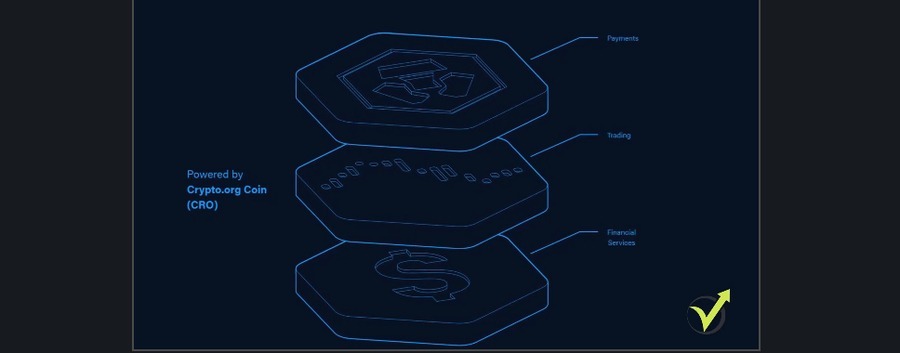
Crypto.com has launched the new open-source public blockchain that is focused on payments, DeFi and NFTs. At Crypto.com, the NFT platform is looking to become the world’s largest and most user-friendly NFT platform.
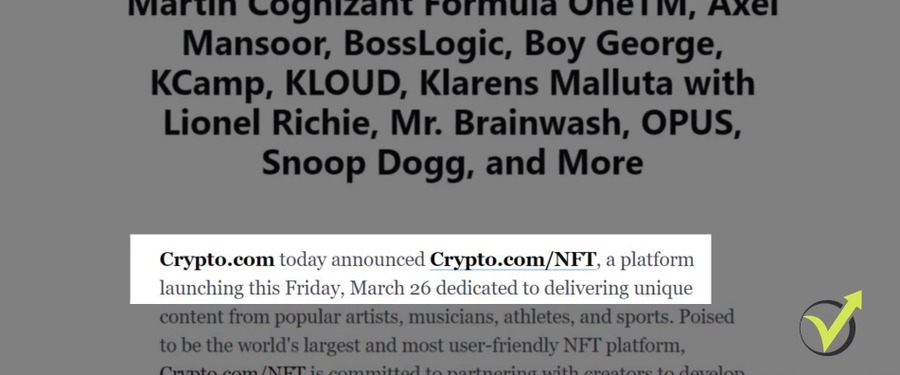
Crypto.com announcement on the launch of the NFT platform
Of course, the news pushed the CRO coin higher, the community expects the new platform.
Today, I will explain what the NFTs are, and why I am also looking forward to the new NFT platform from Crypto.com.
NFTs are the new mania, the new phenomenon, the new unbelievable digital assets that sell from a couple of hundred dollars up to tens of millions.
NFT stands for a Non-Fungible Token, which means that this is a digital token. That’s a type of cryptocurrency like all the rest we know, but unlike a standard coin, the NFT crypto coins are unique. Meaning that every NFT is just one and it is a unique token in the digital world and this might pump their prices to mind-blowing figures.
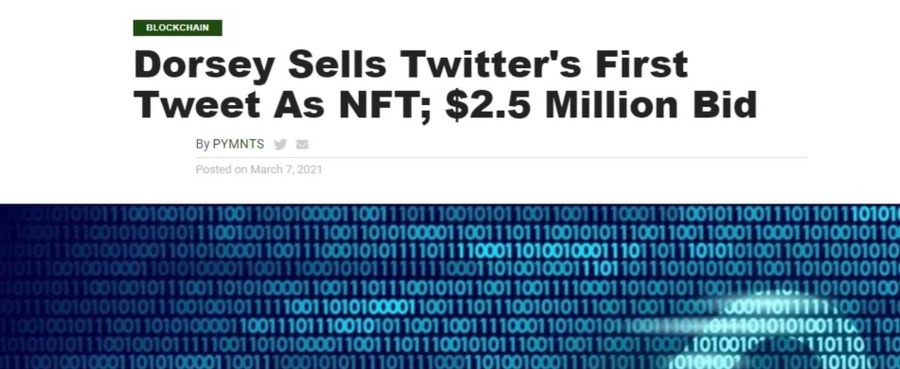
An example is Twitter CEO, Jack Dorsey, who sells the first tweet for 2.5 million.
Jack Dorsey’s tweet sale
And the NFTs are something new for the cryptocurrency world. It is new for me, it is new for the crypto exchanges too. And I’m very excited that Crypto.com launches the NFT platform. I believe everyone in the community will feel safe purchasing NFT crypto coins from the Crypto.com platform, and not from any website that is not established as Crypto.com is.
Purchasing NFT crypto coins
And at the same time, we will feel much comfortable purchasing NFT crypto coins with the funds we already have in our accounts on Crypto.com instead of trying to fund accounts on external websites where currently the NFTs are available.
On some of the websites, it’s kind of hard to fund an account especially from some countries outside the U.S. And exactly for that reason, I didn’t purchase any NFT coins so far but having them on Crypto.com, I guess it will be much easier. And if I decide to purchase any, of course, I will record a lecture while doing it.
But again, keep in mind that this is something new, we can say it’s still experimental. We don’t know where it will go, we don’t know if we purchase NFT crypto coins for $1,000, will we able to sell them after that for a more expensive price or we will be just keeping it for ourselves?
For the moment, most of the investors accept the NFTs not just as an investment but also as a support to a favorite artist.
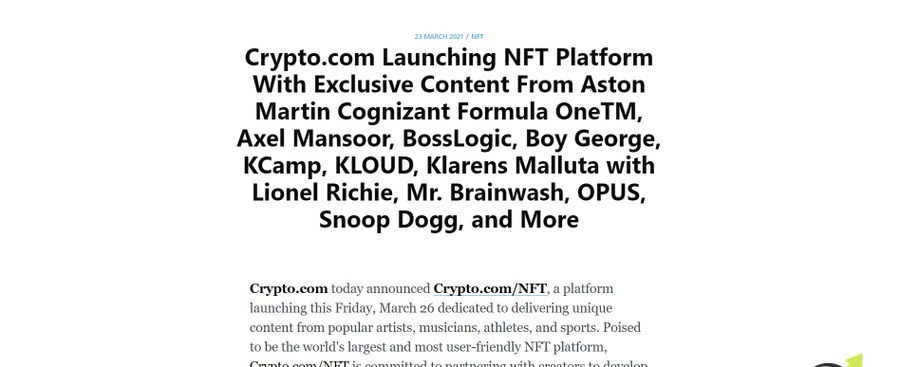
So let’s see below what exactly Crypto.com published on their blog. Crypto.com launching the NFT platform, with exclusive content from the different artists, as I said.
What Crypto.com published on their blog
This could be a piece from Aston Martin up to Snoop Dogg, for example. And Crypto.com has promised that this will be the most user-friendly and the world’s largest NFT crypto coins platform. Below, you can read more information about the event. But I will definitely make a review of it once it is live.
NFT crypto coins are different from other cryptocurrencies
I don’t want to go into details about the NFTs, how exactly they are being created and how they work.
But with very simple words, this could be just a JPEG or a very short video from an artist that is one of a kind. It’s a token but it’s unique. This is what makes the NFTs very different from the other crypto coins we know. Because most of the tokens that we know have a certain number of coins into circulation.
But with NFT crypto coins, it is just one. It’s a unique token and this is why some investors might find a huge value in the piece because it’s unique and they hope that they can sell that piece after years at a much more expensive price. Or they just want to have it for themselves, so no one else will have it. But the important thing is that the ownership of the NFT crypto coins is recorded on the blockchain.
The ownership of the NFT crypto coins is recorded on the blockchain
So why did the news about launching the NFT platform pushed the CRO coin higher?
For beginners, the CRO is the Crypto.com token, which I also invested in and recorded already many lectures about it.
The CRO coin of Crypto.com
But the sweet thing about it is the fact that when Crypto.com launches a new platform, services, anything that will be useful to the community, it pushes the price higher.
A month ago, I recorded a video about the mainnet launch and the CRO coin is burned. If you haven’t watched it, you can follow this external link (opens in a new tab).
I’m very glad that Crypto.com is offering new features, new platforms, new wallets. All the time they have something new to launch. And obviously, the community recognizes this as progress. And many investors and retail traders find value in the CRO coin because it represents the service that Crypto.com offers.
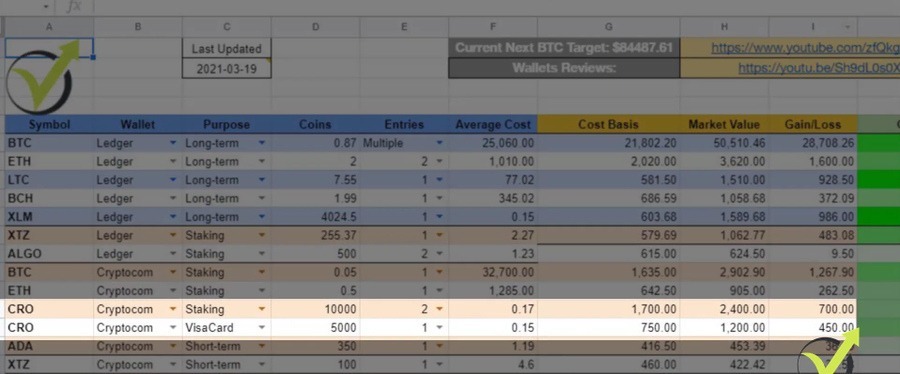
I have invested in the CRO coin too. And if you want to see all the assets that I invested in, I have shared my crypto portfolio spreadsheet. Check out my Patreon page to get access to the spreadsheet.
My portfolio spreadsheet
And if you want to get a bonus when you are staking CRO coins, you can follow this referral link.
Crypto.com NFT platform review
From what I saw on the first day Crypto.com launched the NFT platform, I think they have a huge chance of achieving that. One sentence for those of you who do not know what NFTs are, and I will review the platform from my computer.
The NFTs are Non-Fungible Tokens representing a digital piece of art, a JPEG, a short GIF, or a video. And the most important is that the NFTs are unique and their ownership is recorded on the blockchain.
Now, let me show you the Crypto.com NFT platform right on my computer.
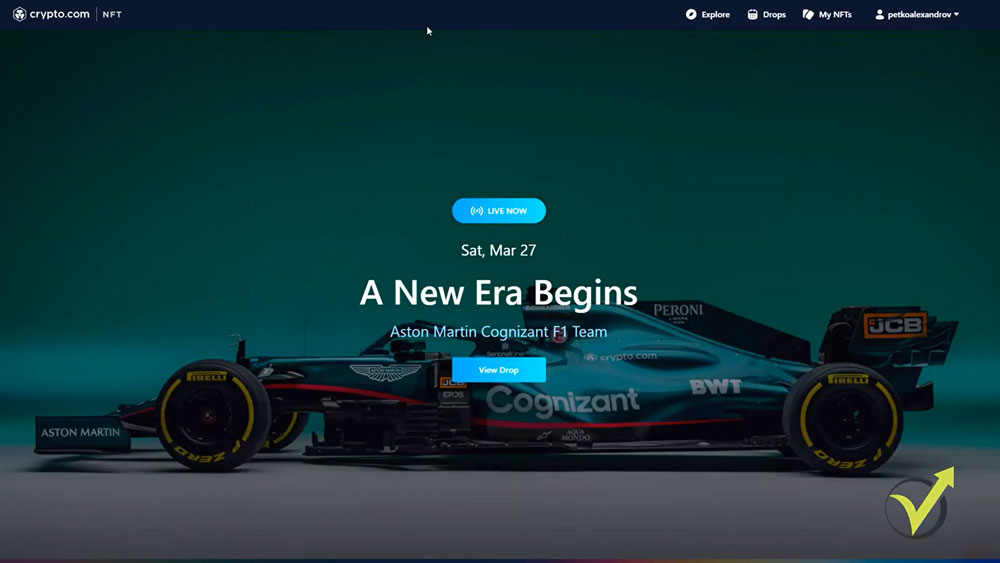
So when you land on Crypto.com, on the top you can see the new tab, NFT. And if you open it, the first thing you will see (on Saturday, March 27th) is the cool Formula 1 Aston Martin car.
The cool Formula 1 Aston Martin car on Crypto.com NFT platform
Now, the first thing you will notice, it’s really simple. On the top, we have the Explore, Drops, My NFTs, and My Profile.
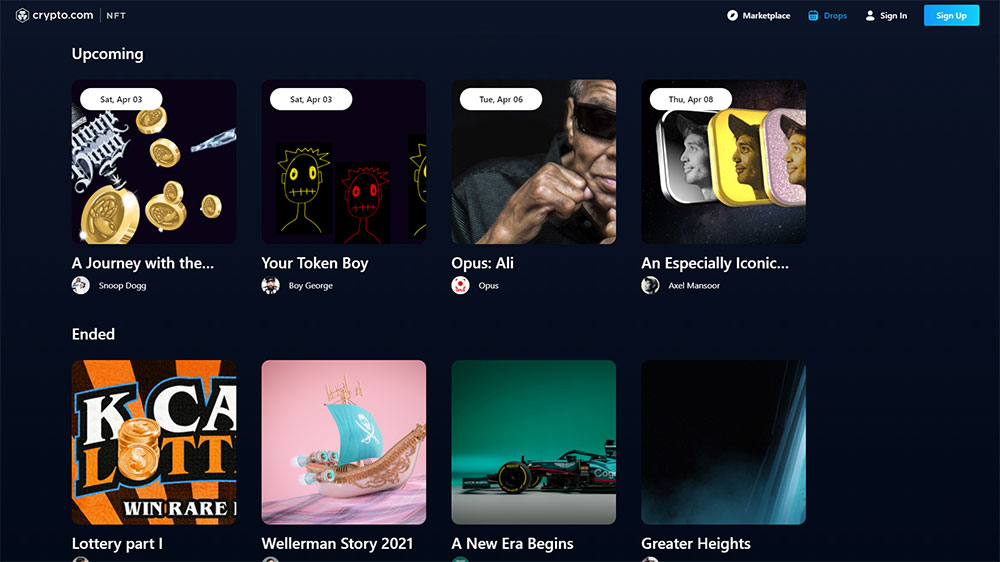
So I will start from the Drops. Basically, these are the NFTs that Crypto.com will be offering. At the current moment, we have “A New Era Begins” with the Aston Martin. And below, we have the ones that ended, so yesterday or the first day was with the artist Boss Logic. And it’s ended, so we cannot buy straight from Crypto.com these NFTs anymore.
Upcoming drops on the Crypto.com NFT platform
How you can purchase NFT crypto coins
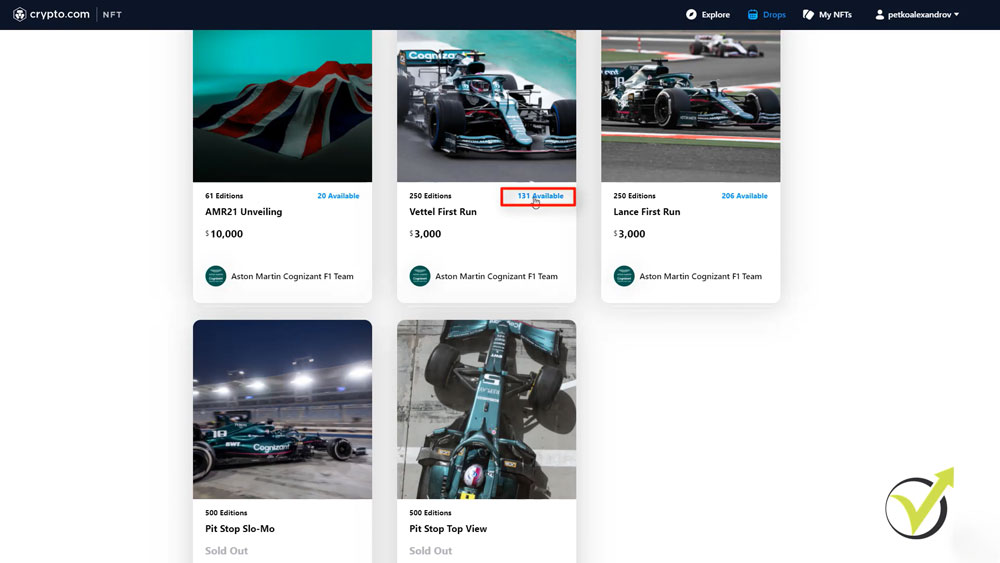
We can only buy them from the people who have bought them and are now reselling them. But at the current moment, we have live the Aston Martin NFTs. And if I tap on it, you will see some info about the creator, about the Drop, and below are the pieces. So we have the unveiling which starts from $10,000, then we have the first run from Vettel and we have the number of editions.
So let me click on one and you will see what it looks like, let’s hear it. I’m not going to leave it until the end but the price is $3,000. Some people might find it costly, others that are huge fans of formula and Vettel might find it super cheap and they just might want to have it in their wallets. However, that’s a personal choice. What I want to show you more, is how you can purchase one.
So let me click on the 131 available, so these are the pieces that are available until the moment.
How you can purchase NFT crypto coins
And I will tap on buy for $3,000, you see that I have the option to pay with credit or a debit card. Which makes it very easy for the people that are not Crypto.com users or the people that don’t have any cryptocurrencies. They can just purchase NFT crypto coins with a debit or a credit card. And this is what makes the Crypto.com NFT platform super simple according to me.
The new Drops from Crypto.com
Let me go back and what’s interesting here is if you don’t want to miss the new Drops from Crypto.com, you can just subscribe. I will do that right away.
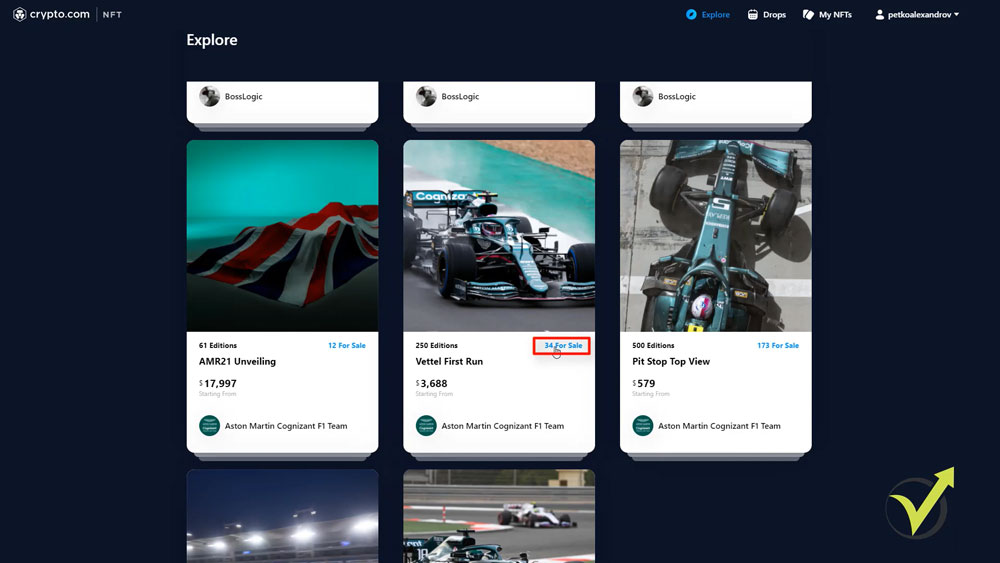
And then on the top, we have as well the Explore. This is where we will be seeing the NFTs that users bought and are now selling them. So, for example, these arts from Boss Logic, yesterday were selling for $2,000. And you see that the users are selling them at a more expensive price, which is obviously very logical. At the same time, someone has bought the Vettel’s first run which we saw starts from $3,000 and the guy is selling it for $3,688.
Actually, if I tap on 34 for sale, we will see how many of those pieces are available. If I click on Select available editions, right away we can see that there is a user who wants to sell his piece for $1 million. I wish him luck selling it for this price. However, it’s a personal choice what will be your strategy once you purchase NFT crypto coins. You can just keep it in your Collectibles.
NFT tokes for sale on the Crypto.com platform
So if I tap on My NFTs, you will see that I have the page with Collectibles. And then I will have the ones that I am selling or the ones that I have created and pretty much that’s it.
You can manage your profile easily, you can follow the Drops coming from Crypto.com, and you can explore the NFTs that you have missed to buy and you want to buy from other users who have bought it from the Crypto.com NFT platform.
I really found it awesome, it’s user-friendly, everyone can easily become an owner using a Visa card. Usually, NFTs are complicated but when you see a platform like this one, it’s just simple. And I’m a step away from purchasing one of these cool Aston Martin NFTs. But really? $3,000 for a short video? It’s not just a short video, but these are tokens. And later we can sell them. But I will think about it again.
Is it worth spending $3,000 for NFT? Do you plan to do it? Let me know what you think in the comments below. I’ll be glad to hear your thoughts. And if you enjoyed this article and our vlogs, subscribe to Trading Academy YouTube channel so you won’t miss anything new about the crazy crypto world. I will see you guys in another lecture.
What is NFT crypto coin?
NFT stands for a Non-Fungible Token, which means that this is a digital token. The NFT tokens represent a digital piece of art, a JPEG, a short GIF, or a video. The NFTs are unique tokens and their ownership is recorded on the blockchain.
What is DeFi?
DeFi, or decentralized finance, is a form of finance, based on blockchain, that does not rely on central financial intermediaries such as brokerages, or banks to offer financial instruments. DeFi recreates traditional financial instruments in decentralized blockchain architecture.
In this lecture, I will show you how to generate hundreds of trading strategies for Bitcoin. To achieve this, I will use EA Studio, which is a strategy builder software that we use most in the Academy.
Generating 100s of trading strategies for Bitcoin
As I’ve said many times in other lectures, EA Studio has a tool called Generator. The Generator can use the historical data that you import from your broker or the Premium historical data that is bundled with EA Studio. In this case, I will use the Premium Data that comes directly from the Historical Data app. And I made it work for the Hot Forex broker which I am using at a moment for Bitcoin trading.
In the Historical data section, I have also the Symbol, which is the currency pair that we’re trading with. Since I want to generate trading strategies for Bitcoin, I will use the BTCUSD symbol. Finally, I have the Period, from where I can select on what timeframe the strategy will trade.
So if I just click on the Start button, you will notice the high speed. This is the fastest Generator for strategies. In just a few seconds, I have over 60 trading strategies. And these strategies all go to the Collection tab automatically.
Generating Bitcoin trading strategies in EA Studio
If I click on the Collection, you will see that the Bitcoin trading strategies are listed there. And I have many pages, each containing 10 strategies.
Collection with trading strategies for BTCUSD
Now, obviously, I don’t want to have some random and simple Bitcoin trading strategies. So I will stop the Generator and I will delete all of these trading strategies. But before actually deleting them, I will click on one of the strategies and I will show you what tools we have in the Strategy section.
How to optimize Bitcoin trading strategies
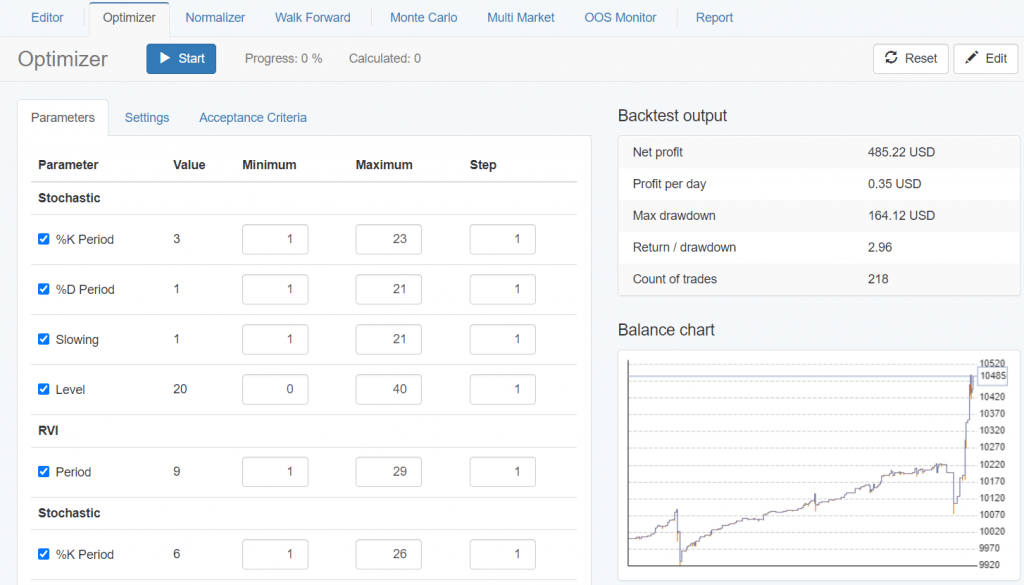
We have Optimizer and Normalizer. The Optimizer is very similar to the Optimizer that we have in MetaTrader. So if I just click on the Start button in the Optimizer, it will look for better parameters. It didn’t find any in this case, but it will look for better parameters with the trading strategies.
Optimizer in EA Studio
Now, optimizing a trading strategy sometimes is very risky because you can over-optimize it. In other words, you will find the best parameters but just for the tested period.
Usually what happens with such strategies is after you start trading, they start losing. Just because you have found the best parameters exactly for the period you are testing. And these are not robust strategies.
Normalize the Bitcoin trading strategies
The next tool we’re going to use when generating our Bitcoin trading strategies is the Normalizer, which is a unique feature of Expert Advisor Studio. It normalizes the strategies, reduces the Stop Loss, the Take Profit if you’re using. In other words, it pushes the parameters to the default parameters.
The Normalizer
Using Walk Forward and Monte Carlo
Then we have the Walk Forward, which is a little bit more advanced tool.
If I click on Start, this tool optimizes the trading strategy for a certain period of time. Then it tests the strategy on the next period, includes that period, and optimizes again, and tests the strategy again.
You can see that it found a much better result, which means that it found a better strategy.
The Walk Forward
We have the Monte Carlo, which is my favorite instrument among the robust instruments. So, Monte Carlo, Multi Market, and Out of Sample Monitor are robust tools. They don’t change the strategy like the Optimizer, Normalizer, and Walk Forward, but they test the strategy if it is robust or not.
With the Monte Carlo tool, I can test with random historical data, random spread, random slippage, random position entry and exit, and randomly closed position.
We have Strategy variations, which is the option I use the most. This will simply test the strategy with different indicator parameters. And I like to use “Randomize backtest starting bar”, which will backtest the strategy from different bars or from the different starting points. In addition, it is not a bad idea to check “Randomize spread” because as we saw with Hot Forex and with most of the brokers, the spread is floating.
The Monte Carlo
So sometimes your position will open on a $24 spread, sometimes $25. And if there is volatility, it might be even more. So if I click on “Start”, it will perform 20 tests and I see that just 13 out of the 20 were validated. Which is not enough for me. I like to have at least 18 or a minimum of 16 out of the 20, which is 80% of the tests to be validated. That is something I always use.
Testing different markets with Multi Market
Then we have Multi Market where we can add different markets.
The Multi Market
For example, I can add Bitcoin, Ethereum, Ripple, or any other cryptocurrency that I have as historical data and I can check if this trading strategy works well on the other markets.
And as well, I have the Out of Sample, which I will explain just in a minute.
Using the Reactor to generate Bitcoin trading strategies
Now the best thing with EA Studio that was improved during the years is that we don’t have to do all of that manually anymore. I just went over it to demonstrate what we were doing before. We were generating strategies, they were going to the collection after that, if I like any strategy, I was going through Optimizer, Monte Carlo, Multi Market one by one. Understand what I mean?
It was taking time because I had to do it manually for each trading strategy. Now, we don’t need to do this anymore because we have the Reactor. Right under the Generator is the Reactor.
The Reactor
If I go to Generator, we have historical data, strategy properties, and Generator settings. And if I click on the dropdown arrow after Generator and switch to Reactor, here we have the same things plus optimization and robustness testing.
So what the Reactor does is it passes all the strategies through this testing automatically and I don’t have to do it by myself manually.
So I will remove all the strategies in the Collection. I will switch to the Reactor and I will just set it very quickly so you know how I’m using it.
Now in the Reactor, I will go for Bitcoin on the H1 hourly chart. In the Strategy properties section, I will set Entry lots to 0.01 because this is the minimum quantity I can trade. And I would suggest you always start with 0.01, especially if you are generating Bitcoin trading strategies because this way you will just test the Expert Advisors.
You won’t risk a lot if you try them on your Live Account. And I don’t like to stimulate and motivate my students and traders to use huge volumes or big accounts. That’s a personal choice of how much you want to trade. One more time, changing the lot doesn’t change the Bitcoin trading strategy or the Robot. It changes just the result.
Should you use Stop Loss and Take Profit
Then I have the option to select if I want to use Stop Loss or Take Profit. I will not use Stop Loss and Take Profit.
First of all, I have done many tests with EA Studio generating Bitcoin trading strategies with Stop Loss, without Stop Loss, with Take Profit, and without Take Profit. I don’t have 100% proof that one of the two works better.
So if I include Stop Loss, let’s say I will be using a Stop Loss somewhere between 1 000 and 10 000 pips. Now, if your broker has 2 digits (the broker I’m using for this lecture has 3 digits), if I set a Stop Loss, let’s say $100 or $200, then if you are using more or a few digits, the Stop Loss will change. It will become either a $1000 or it will become either a $10.
Setting the Bitcoin trading strategy properties in the Reactor
And that is another thing that I have improved from the previous version of the Bitcoin Algorithmic Trading course where I was including Expert Advisors with Stop Loss and with Take Profit. Some of the students were like, “why don’t the EAs work with my broker” or “why do I see very huge Stop Loss and very huge Take Profit“.
And others were just fine because they were matching the digits with their broker and my broker. That is why when we are talking about Bitcoin, I do not use Stop Loss and Take Profit.
And for the beginner traders, these are automated levels where the position will close on a loss or it will close on a Take Profit.
But if you don’t have a Stop Loss and Take Profit, the strategy will simply exit based on the exit condition. There will be an indicator inside. So no worries if you don’t have Stop Loss. The trade still closes when the exit condition is there. And many traders say that it is better to trade without Stop Loss and Take Profit. One more time for me, I don’t have a 100% statement to say, is it better without or is it better with.
That’s why in the course I include Bitcoin trading strategies that are created without Stop Loss and Take Profit. So we will depend on the entry rules and on the exit rules. But you can test, of course, generating Bitcoin trading strategies with Stop Loss and with Take Profit.
Setting the generation time period in Generator settings
In the Generator settings section, I have the working minutes, so I set it to 1 hour and you will see how many Bitcoin trading strategies it will generate in 60 minutes. Usually, I leave the Reactor working for 10 hours, which is 600 minutes, and this way I leave it overnight and actually right now I’m recording late in the evening, so I will leave it to 600 minutes because I want to get more and more Bitcoin trading strategies.
When we generate for a longer time, it doesn’t mean that we will get better strategies. We will just get a bigger number of strategies. And in the Collection, we will see always the top strategies. The longer you run it, the more chances you have for finding better and better strategies.
Then for Search best, I will leave it the way it is – Net balance – so, at top of the Collection, I will see the Bitcoin trading strategies that have the most profit.
Using Out of Sample (OOS)
I will select 10% Out of Sample and what that means?
If you remember, the Out of Sample Monitor divides the whole backtest period into different zones.
Out of Sample monitor
So if I have 30% Out of Sample, this means that the Generator will use 70% of the historical data to generate Bitcoin trading strategies and it will simulate trading on the last 30% of the data.
Now, if I switch to 10%, this means that the Generator will use 90% of the time. And for the last 10%, it will simulate trading. And in our case, with the historical data that I have, this will be from the 3rd of August until December.
So for a little more than 4 months, it will be just a simulation of how these strategies would perform if I have placed them for trading on the 3rd of August.
The MACD Indicator
But actually, I won’t be testing them on a Demo Account or a Live Account, the strategy builder will do this simulation. And this is one of the methods to avoid over-optimization because I will just choose the strategies that are profiting in these last 4 months.
So going back to the Reactor, I will use Out of Sample 10%. For the Max entry indicators and Max exit indicators. I will leave it as it is.
The Generate strategies with preset indicators setting will be suitable if you have some favorite indicators. For example, let’s say you like the MACD Indicator and you want the MACD in every strategy, you can check that, when you click on it, you will go to Preset Indicators in Tools and then you can add MACD or any other indicator. Then this MACD indicator will be in all of your trading strategies.
Setting preset indicators in EA Studio
But I don’t usually do that. I want the Generator to show me which are the best combinations between different indicators.
How to use the common Acceptance Criteria
Make sure to set a checkmark before the Use the common Acceptance Criteria.
We need to use it. This is where we set some criteria. For example, I will select that I want to have a minimum of 500 counts of trades for every strategy or for every Robot.
Generator settings
Now, with time I found out that the more count of trades we use the more robust strategies we have.
Because imagine you have a backtest just with 20-30 trades or you have the Bitcoin trading strategy executing just 20 or 30 trades for the last 3 years. I guess you wouldn’t be happy trading such a strategy.
But having 300, 400, or over 500 trades that happened for the last 3 years, and the strategy is profitable, you will know that this is a robust strategy and you can depend on that strategy for the future. Because if it executed 500 times the same rules and it kept being profitable, then there is a higher chance that the strategy will keep being profitable in the future.
The minimum profit factor of 1.2 is just fine.
The profit factor is the net profit divided by the net losses.
You can add any other criteria, but I will stick to the Minimum count of traders and the Minimum profit factor.
And as well, we have the option to set criteria, for In Sample part which in our case will be the 90% zone. And I will go to the profit factor again, but I will decrease it just to 1.1. I will remove the net profit, no net profit. Obviously, on the top, we will see the strategies that have the most net profit.
So Minimum profit factor is 1.1, and this is the Acceptance Criteria that I will be using while generating the Bitcoin trading strategies.
The common Acceptance Criteria
So what happens now?
The Generator will produce strategies on Bitcoin, on the hourly chart without Stop Loss and Take Profit. It will generate the strategies over 90% of the historical data. And for the last 10%, it will test them, it will simulate trading and it will pass only the Bitcoin trading strategies that fulfill the Acceptance Criteria. Only the strategies that have more than 500 trades and that have more than 1.2 as a profit factor and that have more than 1.1 in the In Sample and in the Out of Sample.
Avoid optimizing strategies
I’m not going to use Optimize strategies settings because it is risky to over-optimize the strategies.
With my experience, I know that the Generator finds good enough combinations between indicators and parameters, so no need to optimize them and to look for better parameters. That’s personal, in my opinion. So in this lecture, I’m just showing you how I use the Reactor by myself to generate 100s of Bitcoin trading strategies.
And below we have the robustness testing tools. I will leave the Monte Carlo test, meaning that at least 16 out of the 20 tests, or 80%, from the Monte Carlo, should be true.
And if the Bitcoin trading strategies from the Generator pass the Acceptance Criteria, they will go through the Monte Carlo. If they go through the Monte Carlo, we will see them in the Collection.
We will see the number of strategies that are generated. How many pass the validation and how many trading strategies pass the Monte Carlo? And if the strategy passes everything that I’ve said, it will go into the Collection.
Number of Bitcoin trading strategies generated
And one last thing I wanted to mention, if I click on tools and I go to settings, I set it usually to close the trades at Friday close or at Friday to close all trades by 9:00 PM.
Different brokers close at different times on Fridays. Some will close at 10:00 PM, others at 11:00 PM, others at midnight. I put it at 9:00 PM. So it doesn’t matter what your broker uses as a closing hour, I want to make sure that you will not have trades left behind for the weekend.
Setting the trading session time
Now, I will return to the Reactor and I will click on Start.
Again the generation process is very fast but you can notice the difference. Not so many Bitcoin trading strategies are going into the Collection now. Only 1 has passed everything. And it went in the Collection. You see a very nice equity line and as well, the Out of Sample test is profitable.
The Bitcoin trading strategy in the Collection
So what I will do? I will leave the Reactor running for 600 minutes, which is 10 hours. Something else that I will do right now is to open the very same EA Studio on the other 2 browsers and I will generate strategies at the same time for M30 and for M15. And not just on different tabs, but on separate browsers, because this way the software works faster.
This is one of the things that I liked most the first time when using EA Studio. You can run multiple Reactors on your computer on different browsers.
I will leave it now for H1. Then I will open 2 more browsers actually for M30 and M15. And in the Bitcoin Algorithmic Trading course, I show you how many Bitcoin trading strategies I have generated and what strategies we will have in the Collection.
3 real Bitcoin trading strategies
Now, I will share with you 3 super simple trading strategies that you might want to consider if you have no idea about how to invest in Bitcoin, but you want to do it.
The Dollar cost averaging
The first strategy is called Dollar cost average, and it’s super popular from Stock trading and now it became really popular with Cryptocurrencies.
What you don’t want to do is to buy at one time with all of the money you have, because if the price falls after that, you will not have capital to buy at a cheaper price. And why would you want to buy on a cheaper price so you have a better average price.
Let’s imagine you bought Bitcoin at $20 000, then it fell to $15 000. Then it goes up again. Now, if you have bought on 20 and you have bought on 15, you will have an average price of $17 500. And then when the price goes up, you will benefit more compared to if you have bought all the $20 000.
So the Dollar-cost averaging trading strategy is perfect if you are a beginner, if you cannot read charts, if you don’t have the time to analyze the news and to follow the news on the crypto communities, and you just want to purchase constantly Bitcoin or other cryptocurrencies.
So with Dollar-cost average strategy, you can set up recurring payments or recurring purchases every week, every 2 weeks, or every month. I think these are the possibilities around the Crypto exchanges. And I will show you how that works, for example, with crypto.com. So let me open the crypto.com app, for example.
On the bottom, you see the blue circle with the lion. Click on that.
Click on the blue circle
Then you have Recurring Buy, I will tap on that.
I select Recurring Buy
It says Setup Crypto purchases weekly, bi-weekly or monthly. Then I have Setup recurring buy, I will check on that.
I click on Setup recurring buy
We have the option to select which Cryptocurrencies I want to buy, let’s say Bitcoin.
I select Bitcoin
And I set the amount.
Debit card purchases
For example, if I set a 100 BGN, that’s the national currency in Bulgaria, that’s about 50 to 55 EUR or about $60, I think at the current rate. And then I can select the frequency, for example, I want to buy every week 50 EUR, I will confirm on that. Then I want to repeat on every let’s say Monday.
I click on done and then pay with. And I can select any of my debit cards that I have used. I have to check. I understand and acknowledge that a 1.49% fee will be added for a recurring purchase using a credit card. So 1.49 is a relatively low fee using a debit card.
And then if I confirm I will set this schedule so weekly I will be buying 50 EUR. Every week 50 EUR will be withdrawn from my debit card and the purchase will go automatically into my account. So this is really suitable for beginners who want to avoid emotions. Just want to put on the site every month some money for Cryptos.
A Bitcoin trading strategy where you don’t have to do anything
And I can tell you that there are a lot of people who made a lot of money during the last 3 or 4 years, people who are just buying when the Bitcoin crashed after the 2018, 2019, 2020, buying weekly or buying monthly, and now they are on a fantastic profit and they basically didn’t do anything because it was all automatic.
And it’s super easy with some of the apps like crypto.com, where you can set it up and do nothing. You don’t care where the price is. That’s the idea of the Dollar-cost average trading strategy for Bitcoin. So you don’t care if the price going up today or it’s going down. It’s Monday. You buy Crypto, it’s Wednesday, let’s say you set it on Wednesday, you buy Crypto.
And at the times when the price just rocks it as it did in December 2020 and January 2021, you will be on a profit because you will have a better average price when Bitcoin reaches record highs. And personally, that’s not my strategy because I know how to read the charts, I’m in front of the computer every day.
The second Bitcoin trading strategy
I usually buy the dips or this is when the price drops and I take profits when it reaches some record highs. But that’s me. I’m trading and investing for many years, now I know how to do it, but especially if you’re a beginner, that is a strategy that you might consider.
Now, for the second strategy, I will need to get to my computer and I will show you something very simple and easy. So I will just share my screen with you. And for that Bitcoin trading strategy is actually a super simple strategy, you can use any website that offers charts and basic indicators. For example, you can use tradingview.com, you can use Coinbase Pro.
You can use any broker that offers Crypto, you can use crypto.com. And I will stick to it. Right now I have the Bitcoin chart and I’m on a daily chart.
The Crypto.com platform
Which means that each candlestick or each of these lines, I can say that way for the beginners, represents 1 day time.
Moving average indicator
So on the top, you see Indicators. I will click on that and I will look for the Moving Average indicator. That is one of the basic indicators, but it works really great if you are planning to invest in the long term.
I click on Moving Average
So I will click on that. I will close that box and I see it on the chart.
But it’s blue so I will just format it, right-click to make sure it’s a little bit more visual. I will go to style and I will change to red for example. So it’s more visual. I can make it thicker and then I will go to inputs. What I will do? I will increase the number not 9 but to 21 and I click on OK and here it goes.
The Moving Average on the chart
You can see the moving average is just the line that represents kind of average price. Basically, if it’s 21 it means that it takes the last 21 days the value of the closing price of the day and it divides that sum by 21. That’s how it works. So it takes the average price for the last 21 days.
When the price goes up
So this is the very simple Bitcoin trading strategy, guys. I want to go to any details. Whenever the price is above the 21 moving average, you can buy, you just have the confirmation that the price is going up and if I scroll a little bit the chart going back to August or September, in July, the price starts to go up.
Let me go back to the bottom that we had that year after the coronavirus.
The coronavirus impact
The price reached the low of 3 900, according to crypto.com. And then when the price goes above the moving average, you can buy. The price is already reversing. It’s going into uptrends and you are all right to buy it.
If I scroll to the right, I see just when the price goes sideways and when the price is under the moving average, there is a high possibility that it will continue lower. But whenever it crosses the moving average and starts to go up, you are fine to buy. In September there was a pullback and after that in October, the price just went much, much higher.
Price action trading
So if at any moment you wonder, should I buy? Is it a good time to buy? Now, you can simply look at the 21 moving average and if you see the price above, then you are fine. Now, in January 2021, we have the price below the 21 moving average and it’s a lot of talks and analysis around there if the price will actually go lower or if it will continue higher.
So personally, I’m not buying any more Bitcoins until I see the Bitcoin again above the 21 moving average. So that’s a very simple strategy that I can show you in this short lecture. But of course, if you want to learn more about price action trading, you should go for it and learn it, price action trading basically represents the behavior of the investors, of the participants on the market.
I personally use a lot of price action and it’s much more than a simple moving average, obviously. And I have a complete course about Bitcoin investing with price action – it is the Bitcoin investment strategy course. So there I explain the whole method that I follow while I am analyzing the charts and I show many live examples while I’m purchasing Bitcoins and other Cryptocurrencies.
Moving average strategy in Bitcoin trading
So the moving average strategy, as I’ve said, is super simple and you really don’t need to have any previous experience to apply it. But it’s more of a strategy that will show you when to buy. Or is it a good moment to buy right now? Is the price going up or not? So if you see the moving average going up, the price is above the moving average.
Price is going up at the moment. How far? We don’t know. But if you see, for example, the price going below the 21 moving average, then it could be a good time to take your profits. And the third trading strategy that I will share with you is for the time when you already have bought Bitcoin or cryptocurrencies, you have them in your wallets, but you’re not planning to sell them soon.
You just want to hold for a longer time. And by holding coins, you can actually earn an interest rate on it without doing anything. That’s the staking. So staking got really, really popular because it is absolutely suitable for complete beginners and it’s not as complicated as mining. And at the same time, it doesn’t cost you anything.
Staking
I will try to explain it with very simple words. Staking is just like depositing money into your bank and you earn an interest rate on it. But at the current moment, especially after 2008, the banks offer very low interest rates on deposits like 1, 2. I don’t think there is 3% anywhere at the moment in 2021. Hopefully, in the future, there will be by the time you’re watching that video.
But for the moment, the interest rates in the banks are really, really low. That’s one of the reasons why the huge investors and institutional traders decided to invest more in Bitcoins and Cryptocurrencies because they wanted to have faster returns on their investment.
So instead of depositing money into your bank, you can actually stake your Cryptocurrencies and earn interest rates. And nowadays, in 2021, it’s more and more popular and as well crypto.com, for example, offers staking.
Stake options
So if I open the app again and I click again on that icon.
I click on the icon again
At the bottom and you will see Earn.
You will see Earn as one of the options
So right now I can earn up to 12% annually on my Crypto assets. So at the moment, by the time I’m recording that video, I have 2 options with 5 000 or less CRO stake, which is the coin for crypto.com or with 50 000 or more CRO stake.
And I have 3 options to stake; 3-month term, 1-month term, and the flexible option. So for the 3-month term, I have the option and the possibility to stake many Cryptocurrencies. With Bitcoin, it’s at the moment at 6.5%, Ethereum is 5.5, Tether is 12%. And what I like to stake a lot is the Dollar coin, which is at 12%.
So the Dollar coin is a coin that has the price of the American Dollar. So basically, it doesn’t fluctuate a lot. It doesn’t change its value that much as the others. And that’s one of the reasons they offer 12%. For example, I put $10 000, at the end of the year I will have a $1 200, 12% without doing anything. For me, that’s amazing.
You cannot access your coins
There has never been something like that. I don’t care what will happen with the price, is it going up, is it going down. Of course,if you stake, for example, Bitcoin or Ethereum and the price of the Bitcoin goes up, that will be great because you will gain more value. But the good thing is that you will get your profit after 3 months but for 3 months, your coins will be locked. You cannot sell them, you cannot exchange them, you can’t do anything.
If you think that 3 months is too much, then you can go for a shorter period, like 1 month. And of course, this will lower the interest rate. For example, with Bitcoin right now is 4.5. And with the Dollar, it is 10% I know that because I use that. So I see it – Dollar coin, 10% for 1 month.
And if I go to flexible, which allows you to withdraw your money, you can see Bitcoin 2% and with the Dollar coin, it is 8%. So this is the staking. And since it becomes really popular, a lot of my students asked me about staking how I do it, which Crypto exchange I used to do it, or what websites. I’m planning to record a complete course about it and show more details how I personally do it.
But it is actually quite easy to do it with apps like crypto.com. But guys, I’m not recommending it. I’m just giving you 3 different strategies in this lecture that you can think about or what you can do is just try the 3 of them and see which one will work best for you.
Final words
So please share with me which of the 3 strategies you find most appropriate for yourself in the comments below. I would be happy to assist you if you have any questions.
Thank you, guys, for reading. I hope this lecture will be useful to you and will help you to understand how to generate simple and complex Bitcoin trading strategies in less than a day using the EA Studio strategy builder.
If you have enjoyed the lecture, share it across social media or just leave a comment below to show your appreciation. I will see you in another lecture.
In this lecture, I will share with you how to use crypto trading software to create strategies and use them to trade with the major cryptocurrencies. You will see how easy it is to automate the strategies with one click and use them for trading with Robots on MetaTrader.
Here in the Academy, we use Expert Advisor Studio, which is one of the best strategy builders on the market. EA Studio is suitable for both beginner and advanced traders, interested in Forex, cryptocurrencies, stocks, and even gold trading. If you haven’t watched the free EA Studio Basics course yet, you can enroll here.
So, in EA Studio we have 2 options. The first is to generate strategies using the historical data that we have prepared, and the second is to build the strategy.
So if you have a strategy for any trading asset, let’s say Bitcoin, and you have your rules for the strategy, you can add them here.
Adding a rule
Using multiple indicators
For example, I can add a rule. Let’s pick any of the Indicators, RVI, or let’s take the RVI Signal and for RVI Signal, we have a few entry rules. RVI line crosses the Signal line upward, RVI line crosses the Signal line downward, RVI line is higher than the Signal line, RVI line is lower than the Signal line.
RVI entry rules
I will select RVI line crosses the Signal line upward, the first one on the top and I click on Accept and you see that I have a Balance chart immediately, which is obviously losing.
The balance chart
But we cannot have a trading strategy just based on 1 indicator.
The best results are coming when we combine trading indicators.
So that’s why I will add as well an exit condition. And let’s grab now the RSI, which is one of the most popular indicators in trading. And again, we have a few more options here. RSI rises, RSI falls, RSI is higher than the Level line, RSI is lower than the Level line, RSI crosses, RSI changes. And the one I will be using is RSI crosses the Level line downward. This one right here. Then I click on Accept.
The RSI
Improving the strategy
And look at that, we already have a profitable strategy.
The balance chart changes
That’s the Balance chart. So the account starts at 10 000. This is how it is set in the Tools and Settings. You can change that in the crypto trading software. I will show the settings in EA Studio a little bit later, but you will see that already from the two indicators.
We have a Balance chart and the best thing is that we see it at the moment. I don’t need to test this strategy on MetaTrader, but I see the backtest straight away, right after adding the indicators, and I can play a lot with the strategy to improve it. So for example, in the RVI period, I can increase it to 20. Let me see if that will be better. Not really.
I will go to 30. That’s a little bit better. But I see a huge drawdown in the middle. I will go to 40. No, not really. Let’s change the RSI. I will increase the Level line for example to 40 and the period I will go to 30, click on accept, not really.
Having the right parameters for the strategies
Let me decrease a little bit the period and I will increase it a little bit the level. I click on Accept, which improved the strategy a little bit. Now I will start increasing as well, the RVI, I click on accept, let’s go to 3, accept, we have a much better result.
I have hundreds of options actually for parameters, and especially if I use a few indicators.
It is really, really hard if you don’t have a strategy builder or crypto trading software to find out which are the best parameters for the strategies.
The good thing is immediately, right after we do a change, we see the results. Let me try increasing it one more time. Now, I think with 43 it has a much smoother equity line.
It depends with the amount and strategy to trade with
As well, we have Backtest output.
The backtest output
Net profit is 12 599 for the tested period. So the data starts from the 23rd of May 2017 and it is until December 2020. And we have a profit per day, $2. But actually, that is trading with 0.1.
If I increase it, for example, with 1 lot and I click on Accept, you will see the same equity line. This doesn’t change the strategy but it changes the result. As well, you can add Stop Loss and Take Profit if you want to.
And of course, you can decrease the lot to 0.01, it depends on the amount you’re starting with.
But one more time, this doesn’t change the strategy. It is the same equity because we have the same rules for the strategy. So it really depends on how much you’re starting and how many strategies or Expert Advisors you will be trading with.
Hiring developers vs. Using software for crypto trading
So once you’re ready with the trading strategy, here is the magic. In the upper right-hand corner of the crypto trading software, you can see Expert Advisor as shown below. If I click on it, I have the option to export this strategy as Expert Advisor for MetaTrader 4 or for MetaTrader 5. Let’s click on Expert Advisor for MT4.
How to export the strategy
Immediately, I have the code exported and that is the ready to use Expert Advisor.
Here is the code.
The code
So if you are a developer, you can I guess change something, modify, improve or remove something. I personally do not touch anything in the code because I’m not a developer. I don’t know how to do it.
In the past, I used to hire developers to automate my strategies, but it was a very hard process because it is expensive to hire such developers. First, these guys take a lot of money, and second of all, it was taking a lot of time.
Doing a backtest on MetaTrader
Such a strategy at that time, that was about 4 years ago, I think, I was paying over $100 for such a simple strategy with 2 Indicators inside. And then there was always a problem with the strategy, with the code.
So I had to send it back to the developers and they were sending me the fixed version and sometimes it was taking a few months to have the final version of the strategy. But even when the Expert Advisor was complete, I didn’t have that type of statistic like in the crypto trading software. Backtest output, Balance chart, Indicator chart.
You can do a backtest on MetaTrader, by the way, but we don’t have so many details like in EA Studio. For example, if I click on the Indicator chart, I can see exactly where every trade was opened and where every trade was closed.
Sell trade
So one more time, the entry rule for this crypto strategy is the RVI line crosses the Signal line upward and this is when we want to Buy. And when we want to Sell it will be the opposite thing. And for the Buy, the exit is when RSI crosses the Level line downward. So if I click one more time on the Indicator chart in EA Studio, you can see below that I have the Sell trade right after the RVI crosses the Signal line downward in this case.
The indicator chart
That’s why I have a Sell trade. I have a Buy, the RVI crosses the Signal line upward. So we can see very clearly where all trades were opened and closed.
And using this crypto trading software long enough gave me a great experience and knowledge about how Expert Advisors actually work and when they open trades.
Drawbacks of MetaTrader
And the bad thing with MetaTrader when you are looking at the Indicators is that they are repeating. Sometimes you might not see a cross. For example, at one point it looks like the lines are just touching and it’s really hard to say are they crossing or not.
And when the price changes, the cross might not be visual, but the strategy builder knows that precisely because we have all these values of bar opening, closing high and low, which we said comes from the historical data that we have imported. There is no mistake here. What happened?
It’s 100% accuracy and actually, that is something that is not possible for the human to recognize and to calculate. And one more time, there are hundreds of trades, for example, with this strategy. 506 trades executed for the tested period.
Looking for trades through charts will mislead you
So imagine if you have to go through MetaTrader or any other platform to put Indicators and to follow. Here, I will Buy. Where will be my exit? Where the RVI crosses? Will you see it? I see how close are the 45 and 55 levels in this case. And then this is my next entry. Where is my exit? What happened? Am I Buying?
So for example if you are Selling here and if you start from that moment, are you Selling, do you know if there is no trade already opened at this moment? You don’t know that. We don’t know.
I don’t know, personally, even I have a lot of experience, I know that if I go through the charts and try to look for the trades, it’s wrong. It’s a mistake. Many people do it, but it will mislead you with the results.
How to build a strategy
The only way to do it is with the backtest, such as this one with EA Studio. There is another software that can perform the backtest – the Forex Strategy Builder Professional. And MetaTrader also has a backtest, but it’s not that reliable as the one that we have performed in EA Studio. We have the Balance chart where we see exactly the balance for this strategy.
In the crypto trading software we have a Journal where we see all trades that are opened and closed for that period of time.
The journal
We have a lot of statistical information. Balance chart, Count of entries by weekdays, Profit and loss, Backtest output. But it’s a lot of information that you can find below and that shows a lot more about the strategies.
So this is how you can use EA Studio software to build your own crypto trading strategy and export it as an Expert Avisor robot for MetaTrader 4 or MetaTrader 5.
In one of my courses about crypto trading, I show how I’m using the Generator. And you will see that even if you don’t have such a trading strategy and you don’t know how to build a strategy, you can use the Generator, which will produce hundreds of strategies based on the historical data that you have prepared.
And if you don’t have historical data, if you don’t know from where to start, you can go just straight away with the premium data in EA Studio software, which is the very same data that I’m using for crypto trading. All I did is I changed the spread, the swap to make it work for HotForex, the broker that I’m using at the moment for Bitcoin trading.
If you enjoyed this lecture, feel free to share it across social media so more users can learn about EA Studio crypto trading software. See you in the next lecture.
Ledger Nano X claims to be the safest hardware crypto wallet. But is it true to its claims? Should you consider buying it? In this Ledger review, we will share about it so you can decide easily!
With the increasing popularity of cryptocurrencies, the need for safe and secure crypto wallets is also increasing. When it comes to storing cryptocurrencies, online wallets are not considered to be safe as they are prone to cyber-attacks and other security threats. This is where hardware crypto wallets come in. They are more reliable and can store a great number of your cryptocurrencies. Ledger Nano X is a crypto hardware wallet that is receiving much popularity these days. But is it worth the hype? Don’t worry, this is why we have compiled this Ledger X review.
In this Ledger wallet review, we will discuss every little and big thing about this hardware wallet including the background of the company, features of the wallet, supported coins, pros and cons, and a few other details.
At the end of this detailed Ledger wallet review, you’ll be able to decide whether or not to consider Ledger Nano X as your cryptocurrency wallet. So, without wasting any more time, let’s dive into our Leger review.
Ledger review: About The Company
Ledger was established back in 2014 by eight experts that have specialized in fields like cryptocurrencies, entrepreneurship, embedded security, and several other security solutions implementing the blockchain models. At present, the company has around 130 employees and offices in Paris, San Francisco, and Vierzon.
Ledger is becoming a major hardware crypto wallet manufacturer in the industry. You can determine the growth and popularity of the company from the fact that it has sold over 1 million products across the globe. Pretty impressive, isn’t it?
You might be wondering to whom these crypto wallets are designed? Here is the answer, these wallets are specially designed for people who don’t want to compromise on security. These hardware wallets are a lot more reliable, safe, and secure than online or software wallets that work on the internet and are highly prone to cyber-attacks.
Because Ledger Nano X is a cold wallet, all of your assets are kept offline. We will get into more details in the later section of this Ledger X review.
Features And Benefits of Ledger Wallet
Let’s begin this detailed Ledger review with the key features and benefits of this hardware wallet. Make sure to learn and understand each aspect clearly in order to make an informed decision.
Security
The first question that comes to mind when considering any crypto wallet is, whether it is safe or not. This question keeps haunting the cryptocurrency enthusiasts when they go for purchasing any such device. For this reason, we will discuss the security aspect very first in this Ledger review. After all, it is the security that matters the more than anything else when it comes to the review of any crypto wallet.
So, once for all, let’s make this thing crystal clear that the Ledger Nano X hardware wallet is extremely secure. You can use this cold wallet to keep your Bitcoins, Altcoins, Litecoins, and all the other types of coins offline with full safety. This means a hacker can never access your wallet because it is not connected to the internet.
Staking
Staking cryptocurrencies is the future in the blockchain. Why? It does not consume energy as the maining does and evyerone can do it. With the Ledger it is easy to stake:
It is great that you can earn passive income from your cryptos while they are stored securely in your hardware wallet.
Wireless Connection
You will find that the Ledger hardware wallet comes with Bluetooth Low Energy or simply BLE connectivity which enables you to use the wallet without dealing with any cable clutter. Although wireless connectivity accounts for convenience and ease of use, it may also ring security bells into the minds of customers. But before jumping to any conclusion, note that there are no security concerns with this Ledger X wallet.
Know that only public data is transferred over BLE connection and your private data – seed and keys never leave the cold wallet, which means there is no need to worry about security.
Moreover, the company clearly mentioned that even if a hacker tries to hack your Bluetooth connection, he would never be able to make any changes to the system because the Nano X feature like Security Element (SE) would never allow anyone to do anything without your permission.
Secure Operating System
To take the security of their hardware crypto wallet to the next level, Ledger has developed and deployed a very unique and powerful operating system known as BOLOS. This operating system integrates a secure chip for the crypto wallet line and this feature makes it stand out from the rest of the hardware wallets. Ledger Nano X is the only wallet in the industry that comes with this technology.
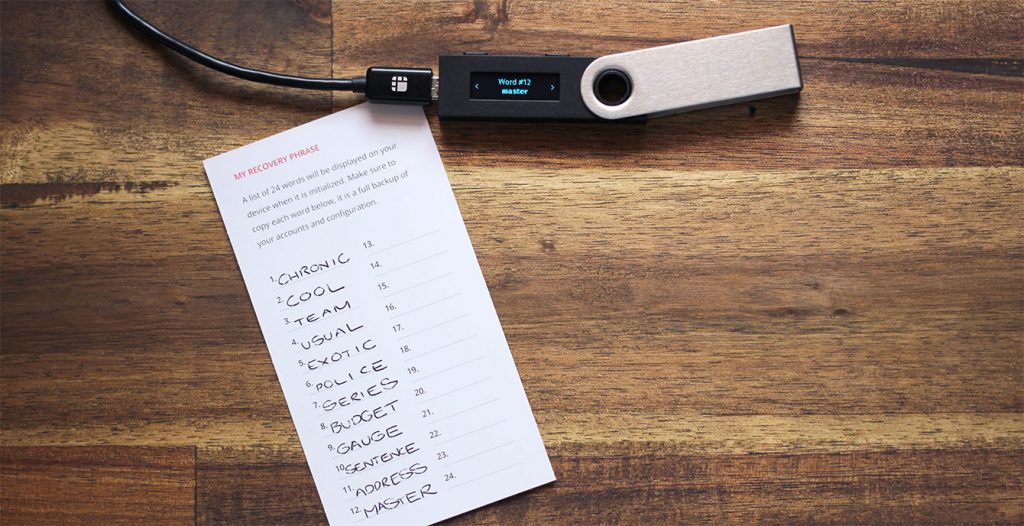
To keep your assets tightly secured, you have to create a 4-digit pin for your device as soon as you receive it. As with any other password, you need to keep this pin to yourself. In case you forget your password, you have to give a 24-word recovery phrase in order to set a new pin. This phrase will be given at the time you set up your Ledger account for the first time.
With all these features in mind, it is safe to say that Ledger Nano X is one of the safest and secure hardware crypto wallets available right now. You shouldn’t be worrying about its security aspects.
Excellent Build Quality
Because this is a hardware wallet, it is important to consider its build quality before making any purchase decision. You need to make sure whether or not it can withstand any physical damage.
Well, you can sigh in relief because Ledger X is constructed using the finest quality materials that can withstand any type of physical damage. The out body of this wallet is made from professional-grade stainless steel, it won’t break even if you accidentally drop it.
Software wallets or the “hot” wallets are very different. Usually, you download them on your mobile or PC. They exist online, that’s it. Many people prefer using online wallets because they are free and slightly easy to use.
However, the major concern with software wallets is, they can’t be used to store huge amounts of cryptocurrencies because they can be easily hacked. Any hacker can access these wallets and infect them using a keylogger that can allow them to steal and change your cryptocurrencies. As you can see, software wallets are extremely exposed to cyber-attacks. Hence, we highly recommend using hardware crypto wallets instead. And we are not saying that software wallets are useless, it’s just that they shouldn’t be used for storing large amounts of cryptocurrencies.
Supported Cryptocurrencies
Ledger Nano X supports all the major as well as a few other cryptocurrencies. It is very important to learn about the cryptocurrencies that can be supported by a wallet because there is no wallet that supports all the existing variety of cryptocurrencies. This is especially true if you’re interested in using less popular currency and not the major ones like Bitcoin and Ethereum.
The good news is, Ledger X supports over 1500 crypto coins and tokens, including the following: Bitcoin, Ethereum, Ripple, Litecoin, Bitcoin Cash, EOS, Binance Coin, and etc.
Have you ever wonder if you should buy Bitcoin, or Ethereum, or any other cryptocurrency? Check out this article to learn a proven strategy that will help you make the right choice.
Apart from these, Ledger X also supports many other less popular coins and tokens. So, even if you don’t use mainstream cryptocurrencies, you can surely find your desired coin in the Ledger X supported coins category.
Design and Ease of Use: Ledger Nano X vs. Ledger Nano S
Talking about the look and appearance of Ledger Nano X, it is almost similar to their first model – Ledger Nano S. The few things that make the recent model different from its predecessor is its heavyweight and slightly wider screen. However, it is still very portable and offers a good hand feel.
Just like the previous model, the navigation buttons are situated next to the screen. Suppose if you want to opt “enter”, press and hold two buttons at the same time.
Overall, we can conclude that the design of Ledger Nano X is similar but a lot better than Nano S. Because it comes with a wider screen, you can see the details and wallet addresses with much ease and convenience.
Further, if you want to connect your Ledger hardware wallet to your PC, you can easily do so with the help of a USB-C cable. The best part is, you can even connect this crypto wallet to your smartphone which is a lot more comfortable and easy to use. By using the latter option, you can manage and transfer your funds almost instantly.
Drawbacks
Although Ledger Nano X is packed with some of the advanced features, there are some things that you need to keep in mind before making a final decision.
Comparatively Expensive
When it comes to cold wallets, the problem is you have to actually buy them. While the prices of hardware wallets vary from model to model, Ledger Nano X is slightly expensive when compared to other similar devices.
At present, the Ledger Nano X is priced at 119,00 EUR. On looking at the price of its previous model, Nano S which was priced at 59,00 EUR, is quite expensive.
However, the real deal is, Nano X is a lot more advanced and secure than Nano S and any other hardware crypto wallet. This means it is totally worth the price it comes at, you’re getting what you pay for.
Hardware wallets are not an expense, they are a mindful investment because the security they offer can’t be ensured through the software wallets and crypto exchanges.
Ledger Nano X vs Nano S
We have mentioned several times that Ledger Nano X is an improved and better version of Nano S. But how exactly is it different from the previous model? Let’s make it clear for the final time.
The price of Ledger Nano S is $59, on the other hand, Nano X comes with an increased price tag of $119.
Nano S is only compatible with Android and desktop computers, whereas Nano X can also connect to the iOS devices.
The type of crypto coins and tokens supported by each Ledger hardware wallet is the same.
Coming to the design and appearance, Nano X has a better and slightly bigger display that offers a higher resolution. Sadly, the touch screen feature is missing from Ledger devices. Finally, the body and construction of Nano X are better. This device is more sturdy and reliable than Nano S.
As you can see, there are very few differences between both the Ledger wallets. However, Nano X has a slight edge over its previous model. Ledger Nano X comes with support for up to 100 applications, has a huge screen, offers Bluetooth connectivity, and is easy to use. Further, it allows you to connect with your Android or Apple smartphone which offers added comfort and convenience.
Ledger Nano X might be twice as expensive as Nano S, but it is totally worth looking at its advanced features and functionalities.
What Is Included In The Hardware Wallet Package?
Ledger X comes with the following five components :
Ledger Nano X hardware wallet itself
1 USB Type-C cable
3 recovery sheets
1 keychain strap for the wallet
1 instruction leaflet
How to Get Started With Ledger Nano X Hardware Wallet?
Setting up the Ledger Nano X wallet is an easy and simple process. All you need to do is follow the below-mentioned steps.
1: Download Ledger Live
Ledger Live is an application that you need in order to set up your wallet and manage cryptocurrencies. You can install it on your desktop or smartphone. You can easily download it on your Mac, Windows or Linux from the official site of Ledger. Further, get it on your smartphone from the respective application stores.
Once you download this software, you’ll need to set up an account which you’ll be using for managing your wallet.
2: Set Up The Device
First things first, turn on your device. To do this, hold and press the buttons next to the USB slot until the screen gets active. Once it happens, simply read and follow the instructions that come to your screen. To go next, press the right button and to go back, press the left button. Once you find the “Set up new device” option on the screen, press both buttons together.
3: Create a 4-Digit PIN
After performing the above-mentioned steps, you’ll need to set up a 4-8 digit PIN. Again, press both the buttons next to the screen together until you find the “Create PIN code” option. Now, select the digits by pressing any button and again press both simultaneously to confirm. Once that’s done, click the checkmark “✓” and re-enter the pin code to confirm.
4: Note Down The Recovery Phrase
Once you’ve entered the PIN code, you will be provided with a recovery phrase which is a string of 24 words. Since it is only provided at once, make sure to note it down very carefully.
To get started, press the buttons simultaneously until you see the 1st word. Note it down and press the right button for the next word. Repeat the process until you’ve written all 24 words. Now again press both buttons and then use the left and right buttons to confirm the phrase word by word. And that’s it!
Press both buttons one last time and you are ready to use your dashboard.
5: Install The Cryptocurrency Applications
Now that your device is set up, you can install the desired applications on it. For this, visit your Ledger Live Manager and select the desired apps. You’ll find all the popular crypto apps including Bitcoin, XRP, Ethereum, and many others.
How to Send Funds With Ledger Nano X?
First thing you need to do for sending funds is mentioning the transaction details. Here is how to do that :
Select the Transact option from the bottom.
Select “Send”.
Select the account to send funds.
Provide the recipient’s wallet details. You can either do it manually or do it by scanning the QR Code.
Enter the amount you need to send.
Select “Continue”.
After filling in the details of the transaction, you’ll have to verify and proceed with the transaction. Here is how to do that:
After checking the transaction details, click “Continue”.
Check that the device is unlocked and turned on and then opt for Ledger Nano X as the device.
Select the required cryptocurrency app and select “continue”.
Check the transaction details once again to make sure everything is correct. Verify it and press both the buttons simultaneously.
Transaction Verified!
And that’s done!
How to Receive Funds In Ledger Nano X?
To receive funds in Nano X, the first thing you need to make sure that you have a Ledger Live account, and the required crypto app. For instance, if you want to receive Bitcoin, you should have the Bitcoin app installed on your device and so on. Below are the steps you need to follow:
Click the Transact tab which is located at the bottom of your page.
Select “Receive”.
Select the account you want to use.
Confirm the wallet address that matches the one shown in Ledger Live.
Now, simply copy the address and provide it to the person you want to receive the funds from.
Although the hardware wallets are safe, make sure that you provide the wallet address very privately to the person you want to make transactions with.
Ledger Nano X Pros and Cons
Pros
Can be used comfortably from the smartphone
High-quality construction
Bigger screen with higher resolution
Supports over 1500 cryptocurrencies
Cons
Slightly expensive
Final Verdict: Should You Purchase Ledger Nano X?
Ledger Nano X is undoubtedly one of the most secure hardware wallets at present. It is more reliable and safe than the other software and hardware crypto wallets. Because it stores your keys and addresses offline, no hacker can access and misuse them. This means you don’t have to worry about cyber attacks on your assets.
Further, when compared to the previous Ledger model, Nano S, it offers advanced features and capabilities. Not only it allows you to manage your cryptocurrencies with your smartphone, but also has a huge screen that enhances its capabilities and ease of use.
Talking about the cryptocurrencies Nano X supports, there are over 1000 coins and tokens that this wallet works with. Having said that, you can store the major as well as less popular cryptocurrencies in this wallet. So, yes, you should definitely think about purchasing a Ledger Nano X hardware wallet.
We hope this Ledger X review clears your doubts and helps you in making an informed decision. Whatever your decision is, always remember that hardware wallets offer better security and safety to your crypto assets and hence prefer them over software wallets.
Frequently Asked Questions
Is Ledger Nano X better than Nano S?
Yes, Ledger Nano X has an edge over Nano S in many ways. You can say that it is an improved version that comes with enhanced features and functionalities. First of all, it allows you to connect your device with your smartphone. Secondly, it has a bigger screen which increases its usability. Moreover, it offers Bluetooth connectivity which means you don’t have to worry about the wire clutter.
Is Ledger Nano X safe?
Yes, no doubt! Ledger Nano X is extremely secure and safe. Because it is a cold wallet, all your keys are kept offline means you don’t have to worry about cyber attacks. Further, its security features like Secure Element (SE) and secure operative system like BOLOS take the security to the next level.
Are hardware wallets a good investment?
It depends on your personal requirements and situations but in most situations – yes. If you’ve just started taking interest in cryptocurrencies and have a very less amount with you then purchasing a hardware wallet may not be a good idea as you can do fine with the online wallets. However, if you have large sums of cryptocurrencies or if you’re an active trader, online wallets aren’t a safe haven. In such conditions, more than a choice, hardware wallets become extremely important.
There are different payment methods that you can use to purchase Bitcoin or another cryptocurrency. The most popular one is to buy Bitcoin using your credit card or debit card. And the good thing is that usually the purchase is instant and you buy the assets at the current price.
Debit card or credit card purchase
The downside of buying Bitcoins with your credit card is the fact that most of the exchanges will charge you relatively higher fees. Now, by the time I’m recording this lecture, the fees are somewhere between 1.5% and 5%. So 5% as a fee is not small when you buy Bitcoins.
But there are times when I prefer to buy with my credit card. Because I want to catch a nice movement from the Bitcoin and I will tell you why.
How to buy Bitcoin with cash
The second option is to buy Bitcoin with cash via a wire transfer. With the wire transfer, usually, we pay much a lower fee, but it takes a few days for the money to arrive and it could take up to a week.
The wire transfer
Depends on where you live, from which crypto exchange you purchase, and so on.
And now keep in mind the following. The price for the Bitcoin went from $20,000 to $30,000 very quickly for a few days and after that from $30,000 to $40,000. When I was buying Bitcoins at that moment, I decided to use my credit card and I paid on some of the exchanges 2%, 3%, up to 5% as a fee.
But if I used a wire transfer to buy Bitcoin with cash at that moment and the money would arrive in a few days, then the price could be much higher than 5%. If the Bitcoin rises by 10% until your wire transfer arrives, then you would be buying it at a much more expensive price. You’d better pay the 5% fee and buy Bitcoin with a credit card. When the money arrives, this is when they will lock the rate.
Whether you are purchasing a huge or small amount
You sent your money with a wire transfer, which is the cheapest option, but it could turn out that it’s not cheaper if the price goes $5,000, $10,000 in a few days. And we saw already that this is possible with Bitcoin. But at the same time, there are some exchanges like Coinbase where you can send the wire transfer to your EUR wallet or USD wallet, for example.
This means that I will be sending money into my Coinbase account. I will not be purchasing any cryptocurrencies. The money will arrive there. And then from there, I have my EUR wallet, for example, personally because I’m in Europe and with these EUR, I will be purchasing Bitcoins or other cryptos whenever I decide.
Now, to summarize it, if you are buying a small amount of cryptocurrency, it’s better to use a credit card or a debit card. If you are purchasing a huge amount, the wire transfer would work. But there you take the risk that you don’t know where the price will be in a few days.
And how I do it personally? If I see the Bitcoin is very aggressive, for example, going from $20,000 to $30,000, from $30,000 to $40,000, and I want to buy it immediately, I use my debit card.
When I use my debit card
But if I just want to put money into my Coinbase wallet to have capital that I will be using in the future to buy and sell, then I would prefer to use the wire transfer. And I’m not immediately buying, I’m just funding my account, which I will be using in the future.
The PayPal option to buy Bitcoin
Now, the last option that comes very popular recently is PayPal. They announced in 2020 that they will provide cryptocurrencies. For the moment the option to buy Bitcoin with PayPal is only for U.S. customers.
But as soon as it becomes available in Bulgaria, for sure, I will take advantage of that. Because it would be really awesome for me to be able to buy cryptocurrencies using my PayPal account. Because currently, the exchanges are not very friendly when it comes to PayPal.
Check the payment methods before when choosing from where to buy
With Coinbase, I have the option to withdraw via PayPal. But I don’t have the option to purchase Bitcoins with my PayPal account. And this changes all the time. I’m just giving you the PROs and CONs when you are using your credit card to buy Bitcoin. This means higher fees, while wire transfer fees are lower but it takes a few days.
Buying cryptocurrency with PayPal will become popular in the near future. Actually, when they announced in 2020 that they are offering cryptocurrencies and this pushed Bitcoin higher.
So before you decide which exchange you want to use, make sure that you check the different payment methods they offer.
And, of course, with time the exchanges try to provide more and more options to their clients. Because obviously, they profit when we use the exchanges. They want to offer the clients a variety of different payment methods.
Check of your bank allows you to buy Bitcoin
So it will be easier for people to purchase and invest in cryptocurrencies. Of course, if your bank blocks that, that’s a different story, you really cannot do a lot. And as I’ve said, I had a lot of hard times when actually my bank blocks the purchase. And I just failed to send the money and I cannot buy and cryptocurrencies. That was very hard back in 2017, but now it got a little bit easier in Bulgaria. So it really depends where you are.
It would be best if you first check if your bank allows you to buy Bitcoin, what are the methods that you can use. Or if you have a credit card, that would be the easiest way.
As I’ve said, the best thing is just to test with a small amount if it will work for you to purchase to withdraw back the money into your account. So you will feel comfortable and you won’t worry that you will not be able to withdraw your money.
Thank you for reading the lecture. If you have any questions regarding the buying of Bitcoin with a credit card, with cash or via PayPal, just leave a comment bellow. I will see you in another lecture.
Hello, investors, in this lecture, I will tell you how you can decide at any moment if you should buy Bitcoin or Ethereum, or any cryptocurrency instead of another.
I will try to make it very clear and easy for beginners or even advanced investors and traders to decide what is better- to buy Bitcoin or Ethereum, or Litecoin, or any other assets on the cryptocurrency market.
Bitcoin price speculations on YouTube, or Reddit, or any other social platform
I know there are a lot of YouTubers, a lot of predictions, a lot of posts on Reddit, especially after Bitcoin broke the $20,000.
There’s a lot of prediction online
There are a lot of people saying that Bitcoin will reach $100,000, it will reach $450,000, it will reach $1,000,000. The truth is, nobody knows that. Nobody knows if Bitcoin will reach $1,000,000. Nobody knows if Ethereum will reach $20,000. It’s a lot of speculation.
All the YouTubers and all the articles that are being written are because they want to get more traffic and they want to make their articles and their YouTube videos sound like, “it will reach a $1,000,000“. Well, we don’t know that.
You cannot find a single video on YouTube or anywhere, or a single post before 2017 with a prediction where someone is saying that the price will reach $20,000, it will crash to $3,200. It will reach $14,000 almost. It will crash because of the coronavirus and then it will break $40,000.
There is no such a video over the Internet, no blog post, no article, nothing like that because nobody knew that and nobody knows what will happen in the future. That’s why I never do such predictions, because I will mislead a lot of my followers, a lot of my students, and I don’t want to do that.
Making decisions on how to buy Bitcoin or Ethereum
So I guess the most important question comes to how you decide at every moment whether it is better to buy Bitcoin or is it better to buy Ethereum, or Steller, or Litecoin, or any other cryptocurrency.
And there is a super easy solution that I use and I find it most appropriate and logical.
For example, let’s say we decide if we should buy Bitcoin or Ethereum. Right now I have the Crypto.com exchange, which I will make on a huge screen, and I have selected Ethereum versus Bitcoin. It’s a pair, Ethereum versus Bitcoin. Now, for the very beginners, Bitcoin price is Bitcoin versus American Dollars.
Bitcoin price
It’s a pair. Just like with the Forex pairs EURSD, GBPUSD, EURGBP, it is a currency pair. But with cryptocurrencies. Many of the crypto exchanges offer us not just with the US Dollar. But it could be a pair between different coins, for example, Ethereum versus Bitcoin, or Litecoin versus Tezos, or any other pair.
And the current price of Ethereum versus Bitcoin by the time I’m writing the lecture is 0.03 something, which means that you can buy 1 Ethereum for around 0.03 Bitcoins.
So how that would be useful to you to decide whether you should buy Bitcoin or Ethereum?
Now, if you look at the chart from June 2020 until September 2020, so between June 2020 and September 2020, the Ethereum Bitcoin pair goes upwards, which means that the Ethereum is stronger compared to Bitcoin its good to buy Ethereum during this time. Then from September down to December 2020, it was the better choice to buy Bitcoins instead of Ethereum. And this was the time when I bought most of my Bitcoins in my crypto portfolio.
Ethereum versus Bitcoin
And then after December or now I’m recording this lecture in January 2021, Ethereum is actually much stronger than Bitcoin. It just rises much faster compared to Bitcoin.
Bitcoin is in kind of consolidation, it brought the $40,000, drop down to $30,000. And now it’s just in this range and everyone is looking for the break either upwards or downwards.
But at the same time, Ethereum did some great profits and huge gains. And I’m very happy having it in my portfolio.
Ethereum made great profits
To make it easy and to summarize, just open Crypto.com or any other crypto exchange. And go to the asset and compare Ethereum versus Bitcoin. And if you see the chart going up it means that Ethereum is stronger. At that moment it is better to invest in Ethereum. And if you see the chart going down, like what I see from September 2020 to December 2020, this means that Bitcoin is stronger than Ethereum. It would be better to invest in Bitcoin at that particular time.
Buy different crypto coins to diversify the risk
Now, at the moment I’m writing this lecture in January 2021, one more time, Ethereum versus Bitcoin goes aggressively up, which means that Ethereum gains much faster compared to Bitcoin. And that same technique you can use for any other cryptocurrency pair.
If you look at the Crypto.com platform, there are a lot of possibilities as trading assets.
The trading assets
There is the Litecoin versus the Bitcoin, EOS versus the Bitcoin, Link versus the Bitcoin, and so on. So at any moment, you can see which one performs better, which one gains more compared to Bitcoin.
I always suggest my students diversify the risk into different coins, not depending on one. The technique that I explained in this lecture will show you at any moment if it is better to buy Bitcoin or Ethereum, or any other crypto pair.
Thank you very much for reading the lecture. And don’t forget to leave a comment below if you still find it difficult to decide should you buy Bitcoin, or Ethereum, or any cryptocurrency instead of another. I’ll see you in the next lecture.
In this lecture, I will talk about money management and leverage. I will try to make it very clear to the beginner traders why leverage is important when you are opening your first trading account, no matter if is a Demo Account or a Live Account. Doesn’t matter. You need to have a few things in mind.
The connection between leverage and your planned investment
So the 1st question is how much are you planning to trade with?
How much are you planning to trade with?
For example, if you are planning to put on the market $1000 or $10 000, it is very recommendable that you open a Demo Account with the same amount you are planning to use for your real trading. This way you will have a realistic idea of how much you can gain, how much is the risk, how much you can afford to trade with.
Keep in mind that opening an account with a particular amount of money doesn’t mean you’re risking it all. For example, if you open an account with $10 000, it doesn’t mean you are risking all of this $10 000 because there is leverage.
The leverage meaning
The leverage is the borrowed capital from the broker that amplifies the potential return.
If you are in Europe and your broker is regulated, most probably it will be under the ESMA regulations that restricted the brokers and providing higher leverage since 2018 I think.
ESMA regulations
What bigger leverage means
So for the cryptocurrencies, we have here in Europe just 2:1 leverage. This means that if I have an account of $10 000, I can open trades with a maximum of $20 000. Or in other words, I will be borrowing another $10 000 from the broker. And if I have leverage of 10:1, this means that I would be able to trade with $100 000.
But for cryptocurrencies, the leverage is just 2:1 in Europe. And if you are outside of Europe, then it will be easier for you to find brokers that allow higher leverage for cryptocurrencies.
But still, you need to be very careful when using leverage because it might amplify the potential returns. But at the same time, it amplifies the potential losses as well.
So having bigger leverage allows you to buy more from what you have in the account and to profit more. But at the same time, there is the risk that you will be losing more.
Now, if I have an account with $10 000 and leverage 2:1, this means that I can borrow from the broker, another $10 000 and I can buy assets totally for $20 000. So that would allow me to buy 2 Bitcoins or 2 lots of Bitcoins. Or that would allow me to buy 50 Ethereums. Or I can buy 1 Bitcoin for $10 000. And for the rest $10 000 I can Buy another 25 lots of Ethereum.
Ask price and Bid price
So having $10 000 in the account and having the leverage 2:1 will simply allow me to buy assets for $20 000 of value. And as I explained in the Top 5 Crypto Trading Strategies course initially, I started with $5 000. This is because I’m still not used to the ESMA restrictions. Or at least I don’t want to accept them, I don’t know why. But I was so used to trade with bigger leverage like 100:1.
I didn’t have basically any limitations and I was able to buy more from what I have in the account. Of course, having good money management is very important. However, now in Europe, these are the rules and we have to follow them, of course.
What is the risk?
So let me tell you what actually is the risk in the account.
What is the risk?
And if you have $10 000 in the account and you buy Bitcoin for $20 000 or any other assets for $20 000, it doesn’t really mean that you are risking your amount of money and you’re risking $20 000.
You are risking the amount that you will lose if your Stop Loss hits. So if your Stop Loss is at $120 and you have bought 1 Bitcoin, this will produce a Loss of $120 plus the spread.
Because as we said, we buy on the Ask price and we sell on the Bid price. Or if you buy 0.4 lots Bitcoin and you have a Stop Loss of $120 and your Stop Loss is hit, this will generate a loss.
You will have $48 plus the spread, which is 40% of the $120. And if the spread is $10 like with Pepperstone you will have another $4. So your total Loss will be $52.
If it’s not clear to you, of course, don’t hesitate to ask me. I just wanted to make it clear for you in this lecture that the risk that you are taking is the amount you are going to lose if your Stop Loss hits.
Whenever you have a position with a Stop Loss, you can put your mouse on the Stop Loss line and you will see how much the Loss is. Same with the Take Profit. If you put the mouse on it, you will see how much the Take Profit is.
How to know the Stop Loss or Take Profit value
To make something very clear for the beginner traders, when we use leverage and we borrow money from the broker, it’s not a loan that we are taking from the broker. We are not going to give it back with an interest rate or something like that.
The leverage is like an extra amount of money that the broker allows you to use so you can buy a bigger volume or more assets.
But of course, it’s not recommendable to risk more than 2-5 % from your account.
So one more time I said that the actual risk is the Stop Loss. So if you have an account with $10 000 and you have bought 1 Bitcoin, but your Stop Loss is $120, obviously, you’re going to lose $120 if your Stop Loss is hit. This will be 1.2% from your account. And that is normal money management, a normal risk that you are taking as a trader.
Practice on a Demo account
So I would suggest you not taking a risk of more than 5% from your account at any moment. It doesn’t matter how many positions you have. Whether you have a $10 000 account, no matter what assets you buy, the sum of all your Stop Losses should not be more than $500. This is 5% from a $10 000 account.
So this is about the size of the account, the leverage, the risk, and the Stop Loss. And you should be aware of them before risking real money.
But as I always suggest, start with a Demo Account and you will see how everything works.
Thank you for reading and I will see you in next lecture.
Today I will talk about security when we invest in cryptocurrencies and I will share with you which are the 3 best crypto wallets that we use.
So I guess you already know that keeping your coins on a crypto exchange is not the best option because it is less secure than the wallet.
We use the exchanges to Buy, Sell and exchange cryptocurrencies, but you should not trust the exchange to keep your crypto coins safe. So once you select your cryptocurrency exchange and you buy your Bitcoin or other cryptos you need to make sure that you keep them safe on a crypto wallet.
Coinbase Has One OF The Best Crypto Wallet Apps
The first crypto wallet that I use and probably has one of the best apps, is the Coinbase wallet.
As you already may know, Coinbase is one of the largest cryptocurrency companies in the world. They are best known for their Coinbase exchange, but they also have a wallet. It connects to the Coinbase exchange and it is super easy for me to transfer cryptocurrencies from the exchange to the wallet. I do not need to copy-paste addresses. When I am in the Coinbase wallet I can choose to transfer the coins from the exchange easily.
Many people trust Coinbase wallet because Coinbase has many regulations and licenses. Also, the USD wallets of US clients have insurance protection by the Federal Deposit Insurance Corporation, up to $250 000 dollars.
Coinbase wallet will be really comfortable for you if you are using the Coinbase exchange as well. Why? Because you can connect the two easily and transfer coins quickly without using addresses or any extra tags. However, you can use the Coinbase wallet to send and receive coins from friends or send to other wallets of course.
Software wallet is not as secure as a hardware wallet
Keep in mind that the Coinbase wallet is a software wallet, and it is not as secure as a hardware wallet like the Ledger, for example. However, Coinbase has one of the safest web wallets you can use. They store 99% of their assets in cold offline storage that can’t be accessed.
Coinbase wallet has one of the best crypto wallet mobile apps and is super easy to get started with, even if you are a complete beginner. The downside is that if you need support. Coinbase is known to have one of the slowest support responses compared to other cryptocurrency wallets. But as I said it is very easy to use the Coinbase wallet so you might never need support.
Exodus Can Be Used On A Mobile Device
The second option that I’ve been using quite a lot recently is the Exodus crypto wallet. This is a free software wallet that I use from my phone, but it could be used on a desktop. That is a great advantage in comparison with many other software wallets.
Exodus is a non-custodial wallet.
This means that you have private key access and you are in control of your coins.
Exodus gives you the option to back up your wallet with a 12-word phrase. This means that you can always rebuild your wallet on a new computer or if you lose your phone. That is why keeping your secure phrase offline is important. A piece of paper would work best and do not share it with anyone because if someone has your phrase, they can access your wallet from another device.
Another great feature with Exodus is that you can trade cryptocurrencies within the wallet and it supports over 100 coins. That I find is enough for me personally. This is useful when you want to buy some coins and simultaneously sell others. For example, couple of days ago, I wanted to sell Stellar and Buy Ripple. And I calculated that the fees I will pay on Coinbase to sell the Stellar, get Euros in my wallet, and buy Ripple with these euros would cost me 25% more in fees compared to exchanging Stellar to Ripple straight away. And I did it easily on the Exodus crypto wallet.
Ledger – The Best Crypto Hardware Wallet
The third crypto wallet I use is Ledger. This hardware wallet is among the best and most secure wallets on the market.
The first important thing to note is that the Ledger is a hardware wallet, and that is a very secure method to keep your coins safe because it is offline, and no one else except you has access to it.
Having your crypto coins offline keeps them safe from hackers.
The most popular model so far was the Ledger Nano S, and in 2020 they launched the new Ledger Nano X crypto wallet. When it comes to security, both are safe. They have a PIN code, and they have a 24 words recovery phrase as a backup.
Yes, it is a bit more expensive than the other crypto hardware wallet options, but if you have thousands of dollars in cryptocurrencies, I guess you would be likely to spend $150 for keeping them safe, wouldn’t you?
What are some of the major differences between the Ledger models?
The newer Nano X has Bluetooth compatibility with the Ledger Live Mobile. It has a bigger screen, and its battery can last up to 8 hours in standby mode. However, the size is slightly larger, and it is slightly heavier than the Nano S.
But, the main reason why I prefer the new Nano X, is because it allows up to 100 apps installed on the device, and the Nano S only allows up to 20. And for iPhone users, you can manage your assets with the Ledger app using your iPhone, while the Ledger Nano S only works with an android app. So, if you are using Android and holding a few different coins, then the Ledger Nano S might be suitable for you, and you can select the cheaper version.
Lastly, once you purchase either of the two, you will receive consecutive emails with instructional videos on how to use it that will assist you in getting started, and in addition, they have good support that will answer your questions and emails.
Risk Diversification
And for the moment, I haven’t found any issues using these 3 crypto wallets, but I don’t want to keep all my coins in one wallet. I prefer to diversify the risk by not keeping all of my eggs in 1 basket.
For example, I keep the coins that I Buy and forget in the Ledger, and the ones that I Buy and Sell every few weeks I keep in the Coinbase and in the Exodus wallets.
The Bottom Line
I hope this short lecture will help you in selecting the best crypto wallet. If you want to use the 3 of them together, that is even better.
If you have questions about the crypto wallets, drop them in the comments below. Thank you for reading and I will see you in another lecture.
In this lecture, I will talk about the different options that you have or the different methods you can use to buy your first Bitcoin, Ethereum, or another cryptocurrency. Moreover, I will show you what are the major differences when you crypto from a crypto exchange and when you buy it from a broker.
Now, in 2021, when I’m recording the Bitcoin for Beginners: Cryptocurrency Investment Course there are already so many websites, there are so many crypto exchanges and brokers offering cryptocurrencies. We have a huge choice of where to buy crypto. But at the same time, people get frustrated.
Where do I start when there are so many places to buy crypto? What’s the difference? What are the PROs, the CONs?
This is why I decided to record the course – to make it easier and to give you a few different options that you can choose from where to buy Bitcoin, Ethereum, or another crypto? Options that I have tested and I know they are trusty.
The crypto exchanges
So let’s start from what are the different methods to get your first Bitcoins or another cryptocurrency.
The first is where you can exchange one cryptocurrency for another.
So let’s say I have Ethereum. You have Bitcoin. We meet on the exchange and we exchange them. On the price that we agreed or the price that is currently on the market.
The first type of exchanges allows to exchange cryptocurrencies
But on these exchanges, let’s say I have a thousand US dollars in my bank account and I want to purchase Bitcoin, I cannot do it there. In other words, I cannot pay with fiat currencies. The fiat currencies are the EUR, the USD, the GBP, the Swiss franc and etc. Basically, most of the currencies that we use in our daily life.
So if you want to actually buy Bitcoin or another crypto, you need to go for the second type of exchange from where you can actually buy Bitcoin, Ethereum, or another crypto with cash, with your debit or credit card, or with a wire transfer.
There are different payment methods with the different crypto exchanges, but there are actually exchanges where you can purchase Bitcoin and Cryptocurrencies.
How to purchase Bitcoin on Coinbase?
The first exchange that I will draw to your attention is the exchange that I started with, and this is Coinbase. Coinbase is a licensed and regulated exchange in the United States. I have never had issues with it.
Coinbase exchange
And at the same time, they have a wallet and it’s very easy to transfer coins between the exchange and the wallet. But about the wallet, I will talk in detail in the course.
So for example, on Coinbase, with my type of account, I can buy Bitcoin for maximum 7,500 EUR. Which if I click on Preview Buy,
I click on Preview Buy
you will see that the Coinbase fee for that transaction will be 287 EUR which is much more compared to 25 USD.
The order preview
And this is for 7,500 EUR, which is actually less than half Bitcoin. So if I’m buying a complete Bitcoin on an exchange like Coinbase, I will be paying more than 560 – 570 EUR for that transaction. After that, when I’m selling it or exchanging it for other cryptos, there will be more fees, obviously.
The Huobi Exchange is another place from where to buy Bitcoin
The second exchange that I have used is the Huobi, and as far as I remember, it was located in China.
The Huobi Exchange
But still, I’m in Bulgaria and I succeeded to buy Bitcoin from there without any issues.
I have used as well, Coinmama, where I have bought some more cryptocurrencies.
Coinmama exchange
Purchase cryptocurrency from Crypto.com
And as well, I have used Crypto.com as it has a very nice and friendly mobile app.
Crypto.com
Actually, most of the exchanges and websites where they sell cryptocurrencies, have already friendly mobile apps. So personally, I do most of the crypto investing from the phone, which makes it very easy. No matter I’m at home, in the office, or outside, no matter what I’m doing if I see the price at which I want to buy crypto, I can easily do that from the phone.
So these are 4 different exchanges that I have used and I had no problems when buying Bitcoin, Ethereum, or another cryptocurrency. And now in 2021 when I’m recording the course it’s much easier because we already have a lot of reviews over the Internet.
We know which are the trusty and reliable exchanges. Back in 2015, 2016, even 2017, it was a little bit shady because there were so many scam websites, and exchanges, and brokers, and still there are such websites.
But as I said, we have a lot of feedback over the Internet, so make sure you always check the exchange, look for reviews from other people.
Directions to guide how to purchase Bitcoins or another crypto
I’m lucky because I do online courses and I have over 30,000 students joining my courses by the time I’m recording this course and many give me feedback and they complain as well when they are not happy with some broker or some exchange.
So I have like the bigger picture, which are the reliable places from where I personally can buy Bitcoin or Ethereum, or I can suggest to other students that have no idea where to start.
But please don’t take as a recommendation any of the exchanges. I’m not recommending any website. What I want to do is just to make it easier for you and you will know from where to start.
Buy cryptocurrency from a Broker
Now, the second option that we have to buy Bitcoin or other crypto coins is the brokers. Brokers are huge companies that originally started with Forex trading.
I started trading with brokers, which was long ago before the cryptocurrencies got popular, but the brokers started offering cryptocurrencies as well. But there was a huge difference between the exchanges and the brokers.
So with the exchange, we actually purchase Bitcoin, Ethereum, or other crypto coins. They send them to us, we can keep them in the wallet. And from there you can pay online. You can keep it as an investment or you can just want to put some money aside with cryptocurrencies.
The brokers don’t offer you real cryptocurrencies. How it works with the brokers is you open an account and you start trading with that account. For example, I open an account with $5,000 with a broker. I can buy and sell Bitcoin, Ethereum, or another crypto, but I don’t own actual cryptocurrency. It’s called CFD trading, which stands for Contract for Difference.
CFD stands for Contract For Difference
For example, let’s see an example with Hot Forex broker and the MetaTrader platform. Once you’re logged in to your trading account, you can see the Market Watch where we have the Bid and the Ask price changing all the time. This means that we are connected to the server of the broker and we have access to the market.
The Market Watch
No matter if you are using a Demo Account, you can still participate in the market and practice. And that’s the best thing actually in having a Demo Account because you are actually trading, of course, without having any real profits in the account or any losses.
But that’s the idea of practicing with a Demo Account. Now, on the left side, you will notice the Market Watch where we have different assets.
Bitcoin is the most volatile asset
We have the currency pairs on the top with Hot Forex broker and then we have gold, some indexes, oil, other commodities. Then there are some stocks. And if I scroll down, you will see the cryptocurrencies.
We have Bitcoin versus the USD, which is obviously the most popular asset that everyone trades. Then we have Bitcoin versus the EUR, Ethereum versus the USD, Ethereum versus the EUR, Litecoin EUR Litecoin USD and we have the Ripple as well.
OK, honestly, I haven’t seen much more of a difference with other brokers when it comes to the variety of assets for CFD trading. In one of my highly rated courses, I’m focusing on Bitcoin and I trade personally Bitcoin with Robots because it’s the most volatile asset and this is where we can maximize the profits when we are trading volatile assets. And Bitcoin versus the USD is definitely one of the most volatile assets.
The Bid price and the Ask price
Now we have 2 columns. 1 is the Bid price and the other one is the Ask price.
Keep in mind that when you buy a trading asset, you always buy at the Ask price, which is the more expensive price. When you sell it, you sell on the Bid price.
Hence, when you buy Bitcoin and then you close the position, you will be buying it at the Ask price, and then when you close the position since this is a Sell order, you will be closing it on the Bid price.
If you want to see exactly how much is the difference between the Bid and the Ask price, you can right-click over the Market Watch and check Spread.
Check Spread
This will show a 3rd column and this is exactly the spread.
The spread column
With most of the brokers, the spread is floating, which means it’s changing whenever there is volatility.
At this moment with the Bitcoin, it’s about $24. And something important to notice is that this broker has 3 digits after the decimal comma for the Bitcoin. The Ask price is $18,077.045. There are 3 digits after the decimal comma.
So this means that the spread, which is displayed as 24 000 something, is actually $24. So if I buy 1 complete lot and I close the position. Or I sell 1 complete lot and I close the position, I will pay about $24 as spread.
It looks much more compared to the others. But keep in mind, Bitcoin is the most expensive asset right here. And at the same time, if you are buying Bitcoin on Coinbase or on any other cryptocurrency exchange, you are still paying a fee.
Paying the Swap fees at the broker
Many people say that it’s more expensive to trade with a broker compared to the exchanges but that’s not actually the reality. And it might get more expensive if you are holding your position for a long time. Because when trading with Forex brokers like Hot Forex or any other, we pay as well swap.
If I go to specification,
I click on Specification
you will see that I have a negative of 6 000 points, which is I think 6 USD in this case of a swap because we have 3 digits.
BTCUSD contract specification
So this is about 6 USD fee if we hold the position overnight. So the brokers will charge us a swap when they transfer the trade for the next day. And we don’t have that on the exchanges. When we buy cryptos, we don’t pay a fee that we are holding it in the account.
So only in the case when you hold the trades for a long, long time on your MetaTrader account or on your broker’s account, it might get more expensive to trade the Bitcoin here because you will be paying swap every night.
The swap
But, because we are trading with Robots we close the trades quickly, some of the trades will not last over the night. The Robots that I included in the course will not last through the weekend.
Don’t forget the Spread
OK, so we have 3 days swap as well with the brokers, which means that if we have a trade opened on Friday or we have an open trade during Friday and it goes through Saturday, Sunday, and Monday, the market opens again, then we will pay swap for these 3 days. 3-day swap that is charged on Fridays. This is how the trading works. And on the exchanges, we don’t have such costs. Such a swap.
But one more time, as you saw, Coinbase fee is much more expensive compared to the spread that we have with Hot Forex in this example.
And back in time in 2017, 2018, when everybody was crazy about the Bitcoin and the brokers just placed the Bitcoin on their platforms, the spread was absolutely crazy. It was reaching about 200, 300 USD.
At that moment, I didn’t use Hot Forex. I found it later as a reliable broker. So I don’t know what was their spread during this time. But now with most of the brokers, the spread is somewhere between 15, 20, 25, 30 USD, which is just fine compared one more time to what we have on the exchanges.
Using MetaTrader in algorithmic trading
OK, so that’s why I said that the exchanges are more suitable if you buy cryptocurrencies and you hold them for a long time for investment purposes. This is what I’m showing in my Cryptocurrency Investment Strategy course where I analyze Bitcoin, for example, on TradingView. That is another platform for trading, very popular, especially for technical analysis like what you see below.
Trading View platform
But in that course, I teach the investors how to buy cryptocurrencies and when exactly to buy, when exactly to Take Profits, and to Sell the cryptocurrencies. But that’s different. That’s an investment. And this is why there I demonstrated over Coinbase and personally I use this system in Coinbase.
But when it comes to algorithmic trading, trading with Robots, MetaTrader is much more suitable with the broker as Hot Forex because there we have a much lower fee or in trading, this is called Spread. And if we are closing the trades within the same day or within a few days, we don’t pay a huge Swap, which is just fine.
The gaps between Friday and Monday
And why did I say that the trades don’t last over the weekend with the Robots that I include in the course?
This is because of the Forex brokers, usually, we don’t have trading on the weekend and you can see this gap over here. There is no price between these 2 levels.
The gap
So if I go to Properties and I go to Common and I uncheck Show grid, but if I check Show period separators and I click on OK,
I click on OK
you will see that this is exactly between Friday and Monday.
Let me go to the current price. I can go as well with the End button on my keyboard. Or if I press this button on top that says Scroll the chart to the end on tick incoming and zoom it,
I press the Scroll the chart to the end on tick incoming button
you will see that today it is the 10th of December, which is Thursday. We have Wednesday, Tuesday, Monday. It was 7th of December 2020. Then the next day is 4th of December, which was Friday. And then we have Thursday, Wednesday, Tuesday, Monday, which was the 30th of November 2020. And the next day is 27th of November 2020.
This is the weekend. This is Friday and here starts Monday. So we don’t have trading over the weekend with most of the Forex brokers for cryptocurrencies.
There is no trading over the weekend
And this is why the Expert Advisors that I included in this course will not hold positions over the weekend. Everything will be closed until Friday. And this way, you don’t worry if there are such gaps.
This is one of the things that I have improved compared to the EAs from the previous course, because before there were brokers offering trading during the weekend and this were the type of EAs I was using.
And then when I shared the EAs in my course, some of the students complained that their broker doesn’t have cryptocurrency trading during the weekend. So no worries about that anymore. You will not see trades opened during the weekend.
The difference between crypto exchanges and the brokers
So with the broker, every time when you buy crypto, let’s say you buy the Bitcoin at $20,000 and sell it at $30,000, you will benefit from this difference of $10,000 and it will go into your account as a profit. On the other side, if you buy crypto, let’s say at $40,000 and the price drops to $30,000 (something that happened at the end of January 2021 when Bitcoin fell by over 20% for 1 day) you will lose this difference of $10,000.
This is how the process of purchasing cryptocurrency works with the brokers. But you don’t have actual crypto coins in your account. You have a trading account that you use. You can benefit but you can lose too.
But at the end of the day, you have the money into your account that you can withdraw. But you don’t have any Bitcoin, Ethereum, or another cryptocurrency that you can send to your crypto wallet.
So that’s the major difference between the exchanges and the brokers.
How to purchase Bitcoins using an ATM terminal
The third option from where to buy Bitcoin, Ethereum, or another crypto is the ATM terminals. They are very popular in some countries, but in others not.
Bitcoin ATM terminals
For example, in Bulgaria we have, I think, about 3-4 such terminals. I’ve never used them because as far as I know, they have huge commissions over there.
But it’s an actual ATM terminal where you can go and purchase some Bitcoins or other coins depends what they offer.
And it really depends on the region you live in and what are the restrictions in your country. Some countries are very friendly to Bitcoin and cryptocurrencies. Others are blocking them. In Bulgaria where I live it is somewhere in the middle. It was very hard to purchase actual Bitcoins back in 2017.
That’s why I use the brokers and the trading accounts to trade the Bitcoin, but I don’t actually buy it. Nowadays it is much easier to find a place from where to buy a cryptocurrency. Even though some banks are still blocking my accounts and I still have hard times to exchange and buy cryptocurrencies with some banks. But it is possible, it is much easier than it used to be.
From where to buy your first cryptocurrency
So these are the main 3 options you have when deciding from where to buy your first crypto coins.
And if you do it really for the first time and you don’t know how to trade – you have no experience of reading charts, you have no trading strategy to follow and just want to buy some Bitcoin to have it in your portfolio – I would suggest you go with some famous and regulated cryptocurrency exchange. That’s the easiest way.
You can download their mobile app on your phone or you can use a web platform to purchase. As I’ve said, most of them have very user-friendly with mobile apps. And I guess most people nowadays use their smartphones to buy cryptocurrencies from the exchanges.
But make sure one more time to read reviews to make sure you are on a trusted website and that you will be actually able to withdraw your coins or to withdraw your money after that.
When you decide to sell your coins and you make some profits, that’s very important at the end of the day to have your money back into your bank account. That’s the most important thing.
Withdrawing your money
Even if you make a profit but you are not able to withdraw your coins, it will be a waste of time and unfortunately a waste of money.
So be very careful when you select the exchange. And what I always suggest is to just try it out first. For example, buy something small, let’s say $20, $50, just purchase some Bitcoins. Wait a little bit for the Bitcoin to go on a profit. Sell it or just buy and sell crypto immediately. Then withdraw your money to your account.
So you see actually the SMS or the notification, or you go to your online banking and you check that the money is into your account. Then you can say, OK, I tested it, it’s trusty, I can go for bigger investments.
The bottom line
That’s the right way to decide from where to buy cryptocurrencies. But don’t jump with $5,000 on a website that you don’t know and you haven’t checked, because you might never see your money, unfortunately.
There are always scam websites in every business, not just with cryptocurrency. So stay away from them. And one more time, the best thing would be just to try it out with a small amount of crypto or a small amount of money.
Thank you for reading. If you have found this lecture useful, I would really appreciate it if you leave a comment below. I will see you in the next lecture.
In this FXTM review, we will examine different aspects of the broker functioning – min deposit, account types, spread, the MT4 platform offered by FXTM, regulations, withdrawal, and customer support.
FXTM, also known as ForexTime, is a global FX and CFD broker having been founded in 2011. It is considered a safe, reputed, and reliable brand among FX and CFD brokers. Much of this is due to its sound business ethics and strict adherence to regulations.
It offers a wide range of markets and products for trading through 5 different types of accounts. Traders of all kinds of experience and skill levels can trade on this platform.
Licenses & Regulations
FXTM review has found that FXTM is licensed and regulated by the Financial Conduct Authority (FCA), Cyprus Securities and Exchange Commission (CySEC), and FSC, Mauritius.
Review Key FXTM Features
FXTM key features
FXTM has been a recipient of many industry awards including Best ECN Broker 2020. It offers a joining bonus of 30% capped at $100 through a group company, Exinity Ltd. It offers trading facilities primarily in CFD, Forex, Stocks, and Crypto instruments.
You can start trading with a minimum deposit of $10 and a minimum trade of 0.01 lots. Its trading platform can be integrated into MetaTrader 4 and MetaTrader 5. You can trade on FXTA via any of the devices that run Windows, iOS, and Android. It also offers auto-trading and Islamic Account.
FXTM Pros Review
Let’s have an FXTM review and look at what makes FXTA a good Forex broker.
Its customer service is quick and reliable
It offers plenty of educational opportunities
Account opening is digital and fast
FXTM review has found that ForexTime runs customer support in many languages and the executives are knowledgeable as they come up with relevant and reliable answers. They offer a demo account for you to do the necessary practice before entering the live trading sessions.
ForexTime also offers plenty of educational tools and webinars so that you can equip yourself with the required knowledge and skills to do better in your trading. The account opening is quick and an entirely online process.
FXTM Cons Review
However, there are some not-so-great aspects of FXTA such as it charges withdrawal and inactivity fees. It does not offer trading facilities in bonds, ETFs, and mutual Funds. In this sense, it has a limited product portfolio.
Trading Platforms
FXTM broker offers some of the most popular trading platforms such as MetaTrader 4 (MT4) and MetaTrader 5 (MT5). If you are using a Desktop or Laptop for your trading, you can download FXTM MT5 but it is not available on smartphones yet.
FXTM MT4 Platform
However, the FXTM broker review finds that you can use FXTM MT4 on smartphones. Both FXTM MT4 and MT5 are excellent platforms for Forex trading. These platforms are highly optimized for fast, easy, and straight-forward opening and closing of trades. They boast easy navigation, too.
Assets & Markets
In this review, we found that FXTA’s range of instruments available for trading depends on the legal framework of a particular country. However, its complete portfolio of products and markets includes the following:
Currencies trading: Forex
Spot metals: Gold and Silver
CFDs: For Commodities and Indices at FTSE, Nasdaq, DAX, and more
Shares CFDs: Google, Apple, BP, and more
Review FXTM Commission & Spreads
For Forex trading, the commission charged by FXTA broker is relatively low while for CFDs it’s close to the industry average. However, if you choose to work with an ECN account, the FXTM spread can be 0.1 points at the lowest. And ECN account levies low spreads but it attracts a commission. The commission tends to be lower if you maintain a higher account balance or trade more.
However, the FXTM broker review finds that ForxTime has several account types and each has a different fee structure. For Standard Account, the FXTM broker spread is quite competitive, though it is higher than the ECN accounts.
**Note: When you trade on the FXTM broker, spreads are never fixed but always floating and it may increase as per the market conditions during specific periods of trading.
ForexTime Broker Fees
There are quite a few additional charges applicable that may make it more expensive to trade on FXTM broker. For example, there is an inactivity fee. If your account remains inactive for more than 6 months, you will be charged $5 for every month after the first 6 months. At the prevailing rate, the inactivity fee is quite low and it seems to prompt you to remain active.
However, for withdrawal, you are charged a fee and it depends on the country of your residence, the currency, and the method you use. The bank transfer seems to be the most costly option while cryptocurrencies seem to be the least expensive for withdrawal in some countries. However, you have been spared from any FXTM account maintenance or deposit fees.
Feel free to compare the Fees with the Recommended Brokers we have on the brokers’ page.
FXTM Account Opening
FXTM offers its trading platform to clients from all over the globe with a few exceptions such as residents from the USA and Japan, among some other countries. The process to open the FXTM account is completely digital and online, and it’s quick and easy. You can expect your account to operate within a maximum of 2 working days. There are quite a few FXTM account types to choose from and we will review them further.
FXTM Min Deposit & Account Types
FXTM min deposit varies as per the account type you want to maintain. For a Cent Account, the minimum deposit requirement is $10. For a Standard Account, the FXTM min deposit is $100.
FXTM Account Types
FXTM offers different types of accounts. Some of these accounts or their features are not available to the residents of some countries. The min deposit, available trading platforms, and products differ as per FXTM account types.
Cent Account
Cent Account is available to people of all countries. It attracts a higher spread and the FXTM min deposit requirement is $10. It offers FXTM MT4 for Forex trading while the markets available to this type of account are Forex, and commodity CFD. There is no commission to be paid for this type of account.
Standard Account
FXTM Standard Account Type
FXTM Standard Account is available to all people of countries and a min deposit of 100 USD/EUR/GBP is required. It attracts a higher spread and offers an FXTM MT4 platform for Forex trading. Among the markets, Forex, commodity, or stock index CFD are available to this type of account. There is no commission to be paid for this type of FXTM account.
Stock CFDs Account
Stock CFDs Account is available to people in the European Union and the UK. It attracts a higher FXTM spread but charges no commission. The FXTM min deposit requirement is 100 EUR/GBP. It allows the use of FXTM MT4 for Forex trading while the market available to this account type is stock CFD.
ECN Account
ECN Account is available to people of all countries. It attracts a lower spread but FXTM charges a commission. The minimum deposit requirement is 500 EUR/GBP. It offers both FXTM MT4 and MT5 for Forex trading. The markets available under this account type are Forex, commodity, and stock index CFD.
ECN Zero Account
ECN Zero Account is available to people in the European Union including the UK. It attracts a higher spread, but FXTM charges no commission. The min deposit requirement is 200 EUR/GBP. It offers MT4 and MT5 for Forex trading and the markets available for trading include Forex, commodity, and stock index CFD.
ECN Account Types at FXTM
FXTM Pro Account
FXTM Pro Account is available to people all over the world, attracts a lower spread, and charges no commission. The min deposit requirement is 25,000 EUR/GBP and offers both MT4 and MT5 for Forex trading at FXTM. The available markets include Forex, commodity, and stock index CFD.
Trading in spot metals or real stock is available only to non-EU clients
Each of these FXTM account types can be converted into swap-free or Islamic accounts.
You can open a corporate account with FXTM. For this, you should write an email to FXTM.
How to open an FXTM account
Opening an account with FXTM is super easy. It’s a routine sign-up or registration process that you have to complete to open an account on any website. Plus, it’s a little more because your FXTM account type would involve financial transactions. The entire process is online and it will take a maximum of 30 minutes. Your account would be approved within a maximum of two working days, one working day in most cases. It’s mostly profile-related information that you need to fill in.
Here is how it happens:
There is a sign-up form on the home page. Fill in your name, address, email address, country of residence, and mobile phone number. You will also create your password on this page. You will receive a PIN on your phone that need to fill in to be able to go to the next page in the sign-up process.
After you click on ‘Register Now‘, you will be taken to another page where you need to fill in some personal information such as your level of education and date of birth.
You need to update your current address.
It will ask you some basic questions about your experience and financial background.
You need to answer a questionnaire seeking to analyze your knowledge about financial matters.
Now, is the time to choose the FXTM type of account you want.
The last requirement is to verify yourself and your address by uploading a copy of your ID or passport or driving license. You also need to upload a copy of your utility bill or bank statement to verify your address.
FXTM Deposit & Withdrawal Review
When it comes to deposit and withdrawal, the FXTM broker seems to have all possible options. You can use bank transfers, credit cards, and digital wallets. The process of deposit and withdrawal at FXTM is quick, it does not take more than 3 days in most cases.
The only downside is it charges a fee for most methods of withdrawal. For withdrawal, credit cards, electronic wallets, and bank transfers can be used. The withdrawal fees depend on the country of residence and method of withdrawal. You can withdraw money to an account in your name only.
For deposit, no fee is charged. You can make deposits with a bank account in your name only.
Base Currencies
There are 4 base currencies through which you can complete your FXTM deposit and withdrawal. These currencies are USD, EUR, GBP, and NGN (only Nigerian residents can use NGN).
The base currencies are important because if the currencies do not match between your bank account and the FXTM account type you are operating, you will have to pay a currency conversion fee for both deposits and withdrawals.
However, you can open a multi-currency bank account and get attractive rates for currency conversion. There are quite a few digital banks such as Revolut and TransferWise that offer this kind of service. They also offer international bank transfers at extremely attractive rates.
How to withdraw funds from FXTM
To withdraw money from your FXTM account, you need to follow a few simple steps. Here, they are:
Open MyFXTM and log in to it
Select ‘My Money’
Go to ‘Withdraw Funds’
Choose the withdrawal method
Fill in the amount you want to withdraw
State the reason why you want to withdraw
Initiate the withdrawal process
Verify with the 4-digit code you receive on your phone
That’s all. Your FXTM withdrawal will be processed and your money will be transferred to your chosen account.
Review The FXTM Trading Platforms
The different trading platforms at FXTM
Web Trading Platform
In this FXTM review, we found that the broker uses the third-party trading platform of MetaTrader. It does not have a trading platform of its own.
MetaTrader has MetaTrader 4 (MT4) and MetaTrader 5 (MT5) trading platforms which are very similar to each other both in design and functions. These platforms are highly customizable and available in many languages. It maintains clear fee statements. Both of these platforms have satisfactory search functions. The assets are easily traced in their categories.
On the downside, these platforms do not send price alerts, and some features are very hard to find. They also lack a two-step log-in.
Placing Orders
You can place the orders by choosing the basic order types such as Market, Limit, and Stop. However, you may not find sophisticated order types. You can use order time limits such as Good ’til time (GTT) and Good ’til canceled (GTC).
Notifications
On the desktop trading platform, you can set notifications and alerts.
Fee and Portfolio
FXTM trading platforms maintain clear and up-to-date fee and portfolio reports. You can find the profit-loss balance and also the commissions you have paid in the ‘History’ tab.
FXTM Mobile Platform
FXTM offers a very efficient mobile MT4 trading platform. It is immensely user-friendly and well-designed. However, you may find the log-in is not as safe as you would wish for a leading trading platform.
FXTM MT4 is available both in Android and iOS versions. To get FXTM on your MT4, download MT4 and then connect it to the FXTM server. You can choose from a large selection of languages but for that, you need to change the default language of your mobile phone number.
Overall, the mobile trading platform for FXTM is very efficient and user-friendly. You are going to like it. However, the log-in feature is similar to its web format. It uses a one-step login, which is not strong enough for a trading platform of FXTM’s size and stature. As of now, it does not use fingerprint or face recognition technology for authentication and login.
Search functions
The mobile version of the FXTM trading platform has an efficient search function that makes it easy to find a product by typing its name or searching through the category folders.
Placing Orders
The mobile format has the same order types available as on the web format.
Alerts
This facility is not available on the mobile platform.
Desktop Trading Platform
You should visit FXTM to try out the desktop format of its trading platform. The desktop trading platform is similar in design and functions to its web trading platform. The only major difference is that here it is possible to set price alerts.
You can use either MT4 or MT5 desktop trading platforms with FXTM. Most of the features are the same as in the web trading platforms. These features include design, languages, order types, search functions, and fee and portfolio reports.
The desktop trading platform gives you the facility to set notifications and alerts that it will send you to your email and mobile phone. You need to add your email id and mobile MetaQuotes ID. To add these details, you need to select ‘Tools’ and go to ‘Options’. To find a mobile MetaQuotes ID, you need to visit the settings of the MT4 app.
Customer Service
You can find the contact details of the customer service at the FXTM website. Keep in mind that the FXTM customer service is available only on weekdays. You can connect customer support in many ways and they impress you with quick and relevant information. You can contact them through phone, live chat, and email. They give you a quick response.
The best part of customer service is that they can take calls and help you in multiple languages including Arabic, English, Farsi, Czech, Chinese, French, Hindi, Korean, Malaysian, Indonesian, Italian, Polish, Russian, Vietnamese, Spanish, and Urdu.
You can chat with customer support through its live chat as well as through WhatsApp, Facebook Messenger, Viber, and Telegram.
Even their phone support is quick and reliable and you are able to connect with a well-informed executive within a few seconds.
The support team even responds to email queries within hours.
Final Thoughts
During this review, we found that FXTM is a large Forex broker with a global reach and operations. It has licenses from the UK, Cyprus, and Mauritian governments.
It has been in operation since 2011 and has clients in nearly 150 countries. FXTM offers its services through highly advanced MT4 and MT5 Forex trading platforms. It is available on the web, mobile, and desktop platforms.
The operations of FXTM broker are adequately supported by an efficient customer care department that resolves problems faced by its large number of customers globally at the earliest.