Blog

  • Happy Gold EA Tested On Gold Markets: Strategy Execution And Observed Trade Behaviour

    Happy Gold EA Tested On Gold Markets: Strategy Execution And Observed Trade Behaviour

    I’ve tested dozens of gold trading robots over the past few years, and most of them fall into predictable categories: overly aggressive martingale systems that eventually blow up, conservative trend followers that miss most opportunities, or black-box algorithms with zero transparency about how they actually work.

    Happy Gold EA Version 2.0 doesn’t fit neatly into any of those categories. It’s a scalping robot designed specifically for XAU/USD that uses a simple but effective approach, pending orders above recent highs with tiny stop losses and take profits four times larger. That 1:4 risk-reward ratio is what initially caught my attention.

    But what really made me dedicate this complete review to Happy Gold EA is the results I’ve achieved across multiple accounts over the past few months. On my 50K challenge account, it generated 4.6% return in just 8 days with no losing trades. On another 100K challenge, 4.3% over the same period, again with no losses. Even on my more conservative Darwinex account with lower leverage, it’s steadily profitable at 1.3% since early March.

    Is it perfect? No. The small $200 live account I’m running with BlackBull Markets has been losing recently, which tells you something critical about this EA: broker choice matters enormously. Scalping systems are incredibly sensitive to spreads and execution speed, and Happy Gold EA performs dramatically differently depending on which broker you use.

    This review will show you exactly how the system operates, walk through my results across four different accounts, explain why broker selection can make or break this EA, and help you decide whether this scalping approach suits your trading style and risk tolerance.

    How Happy Gold EA Actually Works

    Let me walk you through a real trade setup so you can see exactly what this EA does when it identifies an opportunity.

    The Pending Order Strategy

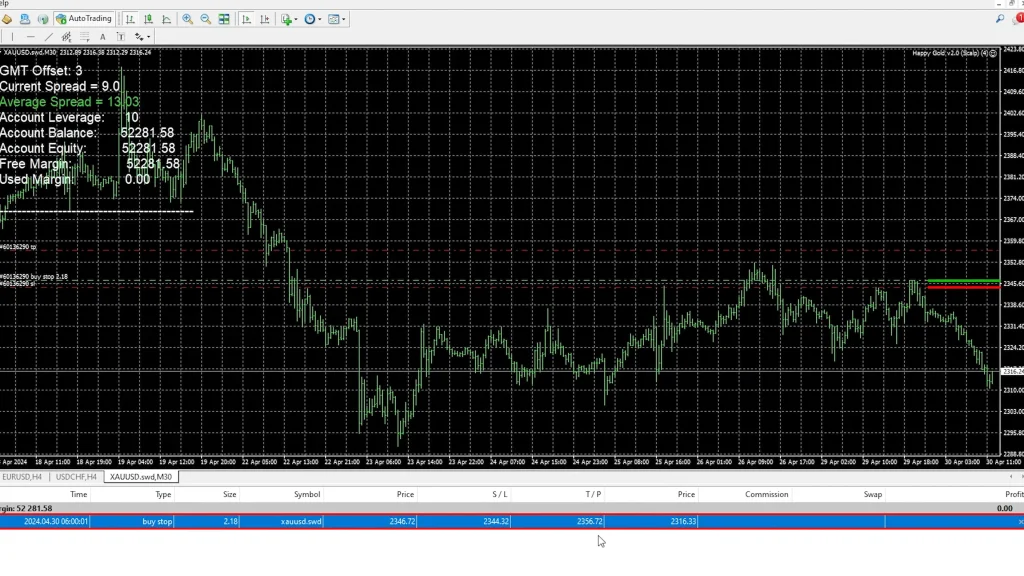
    Early one morning, while reviewing my challenge account, Happy Gold EA placed a buy stop order at 6:00 AM. This is the core of its strategy; it doesn’t enter market orders immediately. Instead, it places pending orders above recent price highs.

    Here’s what that specific setup looked like:

    • Entry level: 2346.72 (buy stop above recent high)
    • Stop loss: 2344.32 (just $2.40 below entry)
    • Take profit: 2356.72 (exactly $10 above entry)
    • Risk-reward ratio: 1:4

    I’m trading it on the M30 (30-minute) timeframe, and you can clearly see on the chart where it placed that pending order. If the price breaks through that level, the trade executes automatically. If the price doesn’t reach that level, the pending order eventually cancels, and the EA waits for the next setup.
    The Risk-Reward Mathematics

    That $2.40 stop loss versus $10 take profit creates a 1:4 risk-reward ratio, which is actually excellent for a scalping system. Most scalpers operate with 1:1 or even negative risk-reward ratios, relying on high win rates to overcome the mathematical disadvantage.

    Happy Gold EA flips that model. Even if it only wins 30-40% of trades (which it’s currently exceeding), the 1:4 ratio means it should be profitable long-term. When you combine a favorable risk-reward with the current high win rate, the results compound quickly.

    Trailing Stop Loss Functionality

    Once a trade executes and price moves favorably, Happy Gold EA implements a trailing stop to lock in profits quickly. This is where the “scalping” nature really shows.

    Looking at closed trades, I can see examples of this in action:

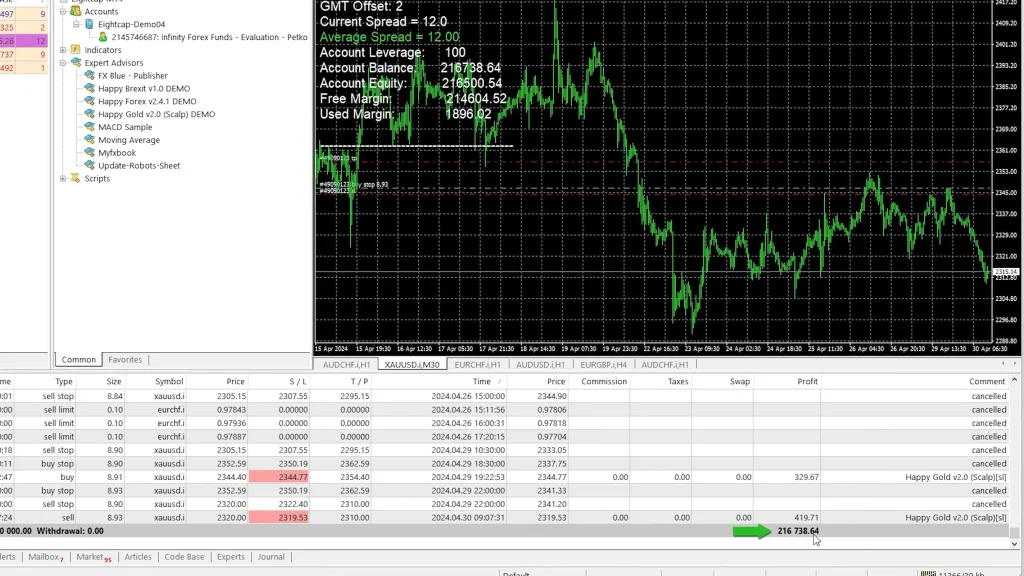
    • Long trade opened at 2344.40, stop loss hit at 2344.77 (locked 37-cent profit)
    • Short trade executed at 2320.00, stop triggered at 2319.53 (locked 47-cent profit)

    The EA trails the stop loss together with the position, securing quick profits rather than letting trades run for maximum potential. This reduces exposure time and captures smaller, more reliable moves rather than hoping for extended trends.

    Multi-Account Testing Results

    I’m not running Happy Gold EA on just one account and hoping for the best. I’ve deployed it across four different accounts with varying capital sizes, risk levels, and broker conditions. Here’s what each one shows.

    50K Challenge Account: 4.6% in 8 Days

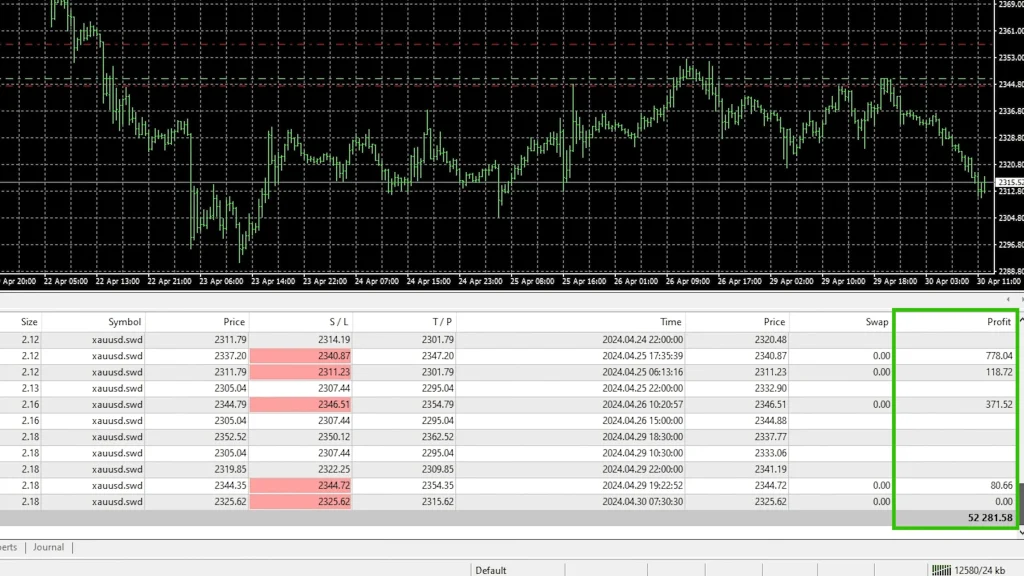
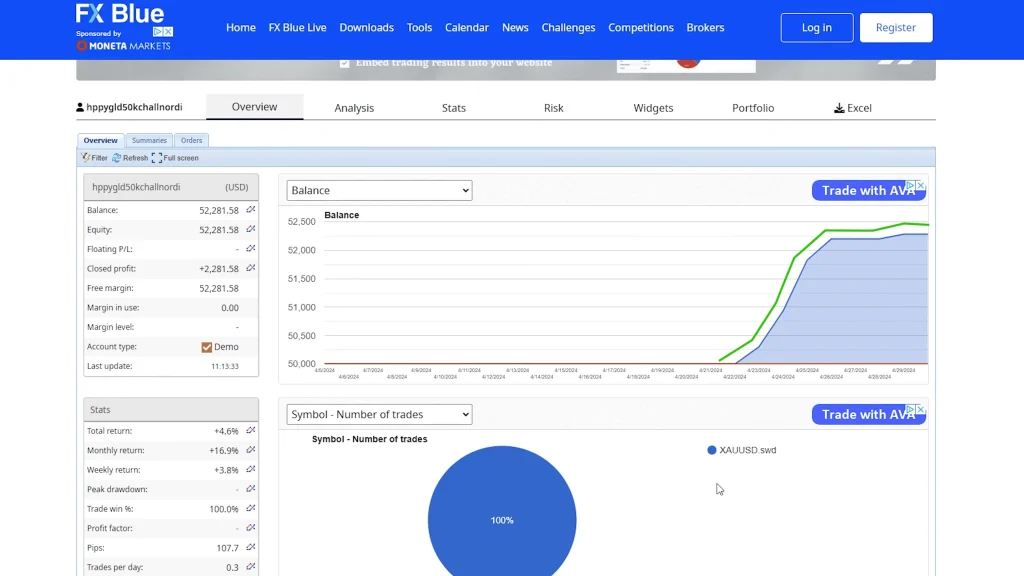
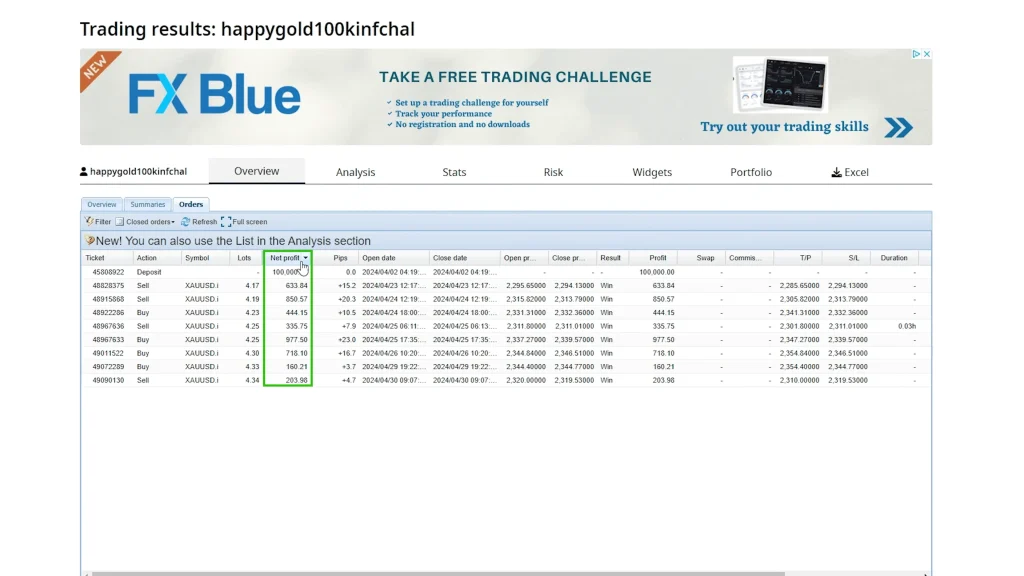
    I started this account on April 22nd, and as of April 30th (just 8 days later), Happy Gold EA generated a 4.6% total return. Looking at the FX Blue tracking, you can see several profitable trades executed with no losing trades during this period.

    The account history shows consistent profits:

    • $80 profit on one trade
    • $370 on another
    • $118, $778, and several more trades
    • All closed profitably

    Now, will it keep performing at this pace? I have no idea. Eight days is a very short sample size, and extrapolating 4.6% over 8 days to monthly or annual returns would be wildly premature. But as an initial data point, it’s encouraging.

    If performance continues anywhere near this level, reaching the 10% profit target could happen very soon. That’s the goal with challenge accounts, hit specific profit thresholds to advance through stages and eventually access larger capital allocations or payouts.
    100K Challenge Account: 4.3% Same Period

    I started a second challenge account at the same time with 100K capital. This one achieved 4.3% return over the identical 8-day period. Again, examining the closed orders shows no losses, just a series of profitable scalps accumulating steadily.

    The slightly lower return compared to the 50K account (4.3% vs 4.6%) likely comes from minor differences in execution timing, order fill prices, or position sizing relative to account size. But the performance is remarkably consistent between the two accounts, which suggests the results aren’t just random luck on one account.

    Darwinex Account: 1.3% Since March 5

    This account started earlier, on March 5th, which gives us a longer testing period of nearly two months. The return is lower at 1.3%, but there’s an important reason for that: I’m trading with lower leverage and reduced risk.

    Darwinex has specific requirements and evaluation criteria. The goal isn’t maximum short-term profits; it’s demonstrating stable, consistent performance over time that qualifies for investor allocation. By trading conservatively with lower position sizes, I’m prioritizing steady results over explosive gains.

    Obviously, getting less profit, but the objective differs from challenge accounts. With Darwinex, I’m building a track record that shows reliability rather than chasing fast percentage gains that might come with higher drawdown risk.
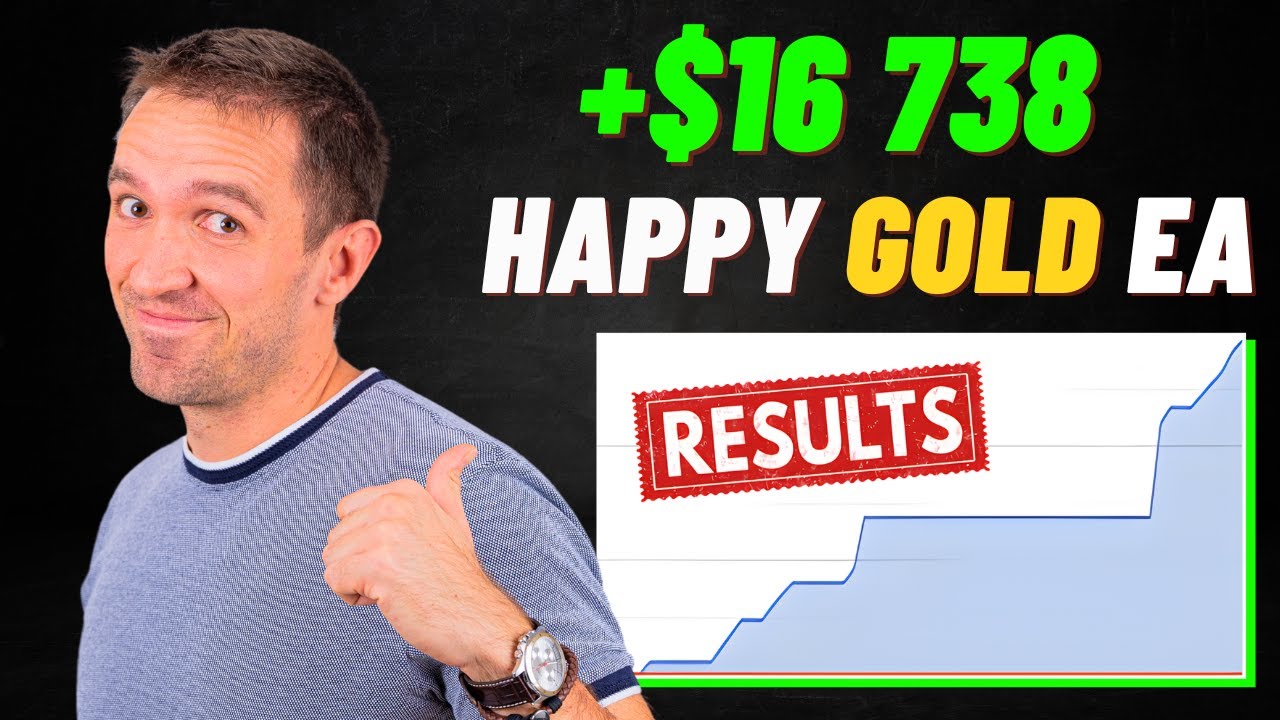
    Multi-EA Challenge: $16,738.64 Combined Profit

    The fourth account runs three Happy EAs simultaneously:

    • Happy Gold EA
    • Happy Forex EA
    • Happy Brexit EA

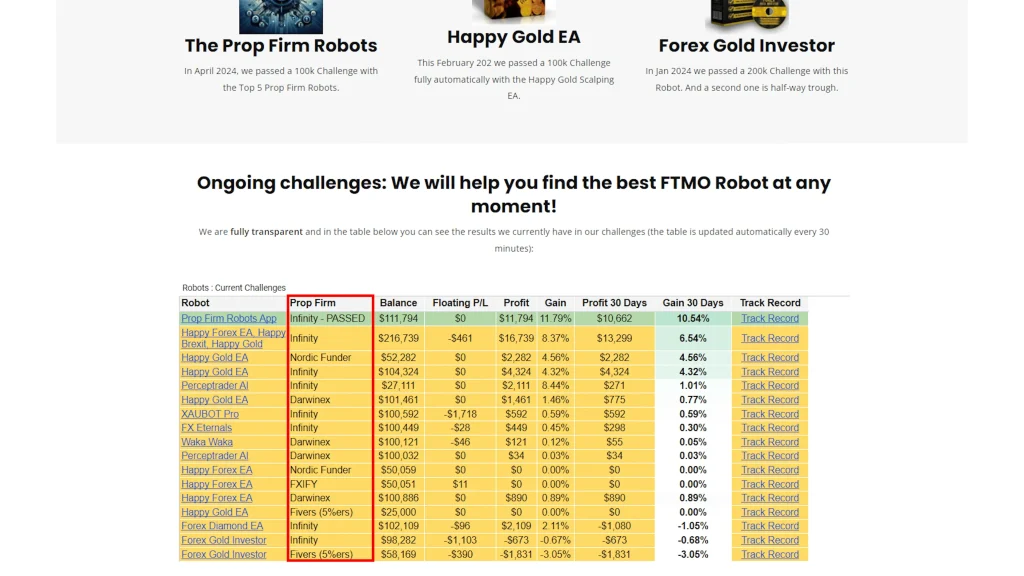
    This account initially went slightly into the loss, but recently it’s been gaining quite steadily. The three expert advisors together achieved an 8.3% total return, generating $16,738.64 in profit.

    Looking at the exposure breakdown, I have the most capital allocated to Happy Gold, followed by positions in AUD/USD (Aussie) and EUR/CHF (Euro Swiss) from the other EAs.

    This multi-EA approach provides diversification, as different systems trading different markets means less correlated risk. If gold conditions become unfavorable for Happy Gold EA, the forex pairs might still be profitable, smoothing overall account performance.

    Multi-Account Performance Summary

    AccountStart DateDurationCapitalReturnStatusKey Notes
    50K ChallengeApril 228 days$50,0004.6%ActiveNo losses yet, fast gains
    100K ChallengeApril 228 days$100,0004.3%ActiveSimilar to 50K results
    DarwinexMarch 5~2 months€100,0001.3%ActiveLower leverage, conservative
    Multi-EA ChallengeN/AOngoingVariable8.3%Active$16,738 profit, 3 EAs combined
    BlackBull LiveRecentShort$200LosingConcerningBroker-dependent issues

    The Broker Problem: Why BlackBull Markets Is Losing

    Here’s where things get interesting, and concerning if you don’t pay attention. I have Happy Gold EA running on a small $200 live account with BlackBull Markets, and recently, this expert advisor has been losing money on that account while profiting well on the Eightcap servers I’m using for challenge accounts.
    Why Broker Choice Matters for Scalping

    Happy Gold EA is a scalping robot. That means it uses very tiny stop losses and slightly bigger take profits, capturing small price movements quickly. When you’re working with such tight parameters, every pip of spread and every millisecond of execution delay matters enormously.

    Here’s the math: if your stop loss is only $2.40 and the broker’s spread on gold is 50 cents wider than another broker’s, you’ve just given up 20% of your stop loss buffer to spread costs. Do that across hundreds of trades, and profitable strategies become break-even or losing ones.

    Eightcap’s Competitive Advantage

    The challenge accounts run on Eightcap servers (through the prop firm’s Infinity platform), and the conditions there are notably better for scalping:

    Spread on Gold: Just 12 cents at the time I checked. That’s exceptionally tight for XAU/USD.

    Execution Speed: Very fast order fills with minimal slippage. When Happy Gold EA places that pending order and price hits the trigger level, the order executes immediately at or very near the intended price.

    Regulation: Fully regulated broker with proper oversight and client fund protection.

    These factors combine to create an environment where Happy Gold EA can actually capture those small scalps profitably. The strategy works when execution conditions are favorable.

    The BlackBull Markets Comparison

    I’m not saying BlackBull Markets is a bad broker; they’re fully legitimate, and I use them for other strategies. But for this specific scalping system, the conditions apparently aren’t optimal. The spread might be wider, execution might be slightly slower, or some combination of factors makes Happy Gold EA struggle there while succeeding on Eightcap.

    This is a critical lesson: the same EA with the same settings can produce dramatically different results depending on broker infrastructure. Before committing significant capital to any scalping system, test it extensively with your specific broker on demo accounts to verify it performs similarly to published results.

    My Plan Going Forward

    Based on this broker-dependent performance difference, I’m planning to open a live account directly with Eightcap and run Happy Gold EA there instead of the BlackBull Markets account. The challenge results are too good to ignore, and if Eightcap’s infrastructure enables those results, that’s where I should be trading this particular EA.

    However, I’ll still start with demo testing on the Eightcap live account infrastructure (not through a challenge platform) to verify performance before committing real capital. Just because it works on challenge servers doesn’t automatically mean identical results on direct live accounts, though it should be very similar.

    The Vendor Ecosystem: Happy EA Family

    Happy Gold EA isn’t a standalone product; it’s part of a larger family of expert advisors from the same vendor, all using similar scalping approaches on different markets.

    The Happy EA Suite

    Looking at the vendor’s website, they offer approximately 10 different expert advisors under the “Happy” branding. I’ve personally tested three or four of them so far:

    1. Happy Gold EA: XAU/USD scalping (the focus of this review) 
    2. Happy Forex EA: Currency pair scalping 
    3. Happy Brexit EA: EUR/GBP scalping specifically

    As shown in my multi-EA challenge account, these three systems are currently profiting together, generating that $16,738.64 combined. The fact that they can run simultaneously without interfering with each other suggests decent diversification in their entry logic and market selection.

    Package Pricing Structure

    Here’s the somewhat frustrating part: the vendor sells these EAs in packages rather than individually. You can’t just buy Happy Gold EA by itself, you purchase a package that includes all 10 EAs.

    The pricing depends on how many real accounts you want to run them on:

    • 2 Real Accounts Package: Lower price point
    • 5 Real Accounts Package: Higher cost but better value per account

    If you only want to test Happy Gold EA specifically, you’ll still need to buy the full package. The upside is you get 9 other EAs to experiment with. The downside is a higher upfront cost if you’re only interested in gold trading.

    Testing Multiple EAs Simultaneously

    The multi-EA account demonstrates you can run several Happy EAs together if you want diversification. However, I’d recommend testing them one at a time initially rather than loading all 10 immediately.

    Start with Happy Gold EA on demo. Run it for at least a month. Verify it performs as expected with your broker’s conditions. Then maybe add Happy Forex or Happy Brexit if you want additional market exposure. Gradually building rather than deploying everything simultaneously makes it easier to identify which systems work and which don’t under your specific circumstances.

    Risk Management and Settings

    Like any automated trading system, proper risk management configuration is essential for Happy Gold EA to deliver sustainable results rather than spectacular short-term gains followed by account destruction.

    Position Sizing Considerations

    The EA includes position sizing settings that determine how much capital is risked per trade. On my challenge accounts, I’m running fairly aggressive sizing to hit profit targets quickly. On Darwinex, I’ve reduced position sizes for more conservative, stable performance.

    You’ll need to find the balance that suits your account size, risk tolerance, and objectives. Challenge accounts often require faster profit accumulation, so slightly higher risk makes sense. Live personal accounts might warrant a more conservative approach, accepting slower gains in exchange for better capital preservation.

    Stop Loss Protection

    That $2.40 stop loss on individual trades provides per-trade risk control, but you should also consider overall account protection. If Happy Gold EA hits a losing streak (which hasn’t happened in my testing yet, but eventually will), you need safeguards against catastrophic drawdown.

    Consider setting maximum daily loss limits, weekly loss limits, or pausing the EA if drawdown exceeds a certain percentage. These external controls supplement the EA’s built-in risk management.

    The Trailing Stop Balance

    The trailing stop functionality is both a strength and a potential weakness. It locks in profits quickly, which is great for capital protection and reducing exposure time. But it also means you’ll never catch those occasional extended moves where gold runs $20, $30, $40 in one direction.

    Happy Gold EA is designed for consistent small wins rather than occasional home runs. If you’re psychologically wired for big wins and can tolerate long periods of chop to get them, this scalping approach might frustrate you. If you prefer a steady accumulation of smaller profits with quick trade resolution, it fits perfectly.

    Happy Gold EA Setup Specifications

    ParameterSetting/ValueNotes
    TimeframeM30 (30-minute chart)Optimized for this period
    Typical Stop Loss$2.40Very tight for scalping
    Typical Take Profit$10.004x larger than stop loss
    Risk-Reward Ratio1:4Excellent for a scalping system
    Order TypePending (Buy Stop)Placed above recent highs
    Trailing StopEnabledLocks quick profits
    Primary MarketXAU/USD (Gold)Specifically optimized
    Recommended BrokerEightcap (based on testing)12 cent spreads, fast execution

    Transparency and Public Tracking

    One principle I maintain across all my EA testing: complete public transparency. Every account I’ve mentioned is tracked and accessible for anyone to monitor.

    FX Blue Tracking Links

    I provide FX Blue tracking links for:

    • The 50K challenge account
    • The 100K challenge account
    • The Darwinex account
    • The multi-EA challenge account

    These links are publicly available (I include them in my video descriptions and resources). You can check them any time, not just when I publish a review, but weeks or months later to see how performance evolved.

    If Happy Gold EA stops working, you’ll see it. If the win rate drops, the drawdowns increase, or the accounts start losing money, that information is visible to everyone. 
    The Honest Approach

    I don’t cherry-pick the best results and hide the failures. The BlackBull Markets account that’s currently losing? I showed you that. The initial losses on the multi-EA account before recent gains? That’s visible too.

    This honesty builds trust over time. Readers can verify my claims, see the complete picture including unfavorable data, and make informed decisions rather than being misled by selective presentation of only the best moments.

    Who Should Consider Happy Gold EA?

    Based on several weeks of testing across multiple accounts, here’s my assessment of who this expert advisor suits best.

    Ideal Candidates

    • Scalping enthusiasts: If you understand and accept the scalping approach, small wins, tight stops, and quick trade resolution, Happy Gold EA aligns with that philosophy.
    • Broker shoppers: Traders willing to research and select brokers with excellent gold spreads and execution speeds will see better results than those who just use whatever broker they already have.
    • Challenge account participants: The relatively fast profit accumulation makes it appealing for hitting prop firm profit targets, though you need to ensure your specific challenge platform uses broker infrastructure where the EA performs well.
    • Gold specialists: If you’re specifically interested in XAU/USD trading and understand gold’s volatility patterns, this EA provides automated access to that market.
    • Package buyers: Those interested in testing multiple Happy EAs across different markets get better value from the package structure than someone only wanting gold exposure.

    Less Suitable For

    • Single-EA buyers: The package pricing means you can’t buy just Happy Gold EA alone. If you only want one system, paying for 10 feels inefficient.
    • Any-broker traders: If you’re committed to a specific broker with wide gold spreads or slower execution, this EA might not work well for you.
    • Patient long-term traders: Scalping’s fast-paced nature doesn’t suit everyone. If you prefer setting trades and letting them run for days, this approach might feel too active.
    • Immediate live trading: Despite positive results, I still recommend extensive demo testing with your specific broker before committing real capital.

    Frequently Asked Questions

    Why does Happy Gold EA perform differently on BlackBull Markets versus Eightcap?

    Scalping systems are extremely sensitive to execution conditions, particularly spread width and order fill speed. Happy Gold EA uses tiny $2.40 stop losses, so even small spread differences significantly impact results. Eightcap currently offers approximately 12-cent spreads on gold with very fast execution, creating favorable conditions for the EA’s strategy.

    BlackBull Markets apparently has wider spreads or slightly slower fills (or both), which prevents the EA from capturing those small scalps profitably. This broker-dependent performance is common with scalping robots; what works beautifully with one broker can fail with another despite identical settings and strategy. Always demo test with your specific broker before live trading any scalping system.

    Is the 4.6% return in 8 days sustainable long-term?

    Almost certainly not. Eight days is an extremely short testing period, and extrapolating that performance to monthly or annual returns would be unrealistic. Markets go through different phases, trending, ranging, volatile, quiet, and scalping systems perform very differently across these conditions. The 4.6% likely occurred during particularly favorable gold volatility and trending conditions.

    I’d expect more realistic long-term returns closer to what the Darwinex account shows (1.3% over two months with conservative settings) rather than the explosive short-term challenge account gains. Use those early results as encouraging signals worth further testing, not as guaranteed future performance. Extended demo testing across various market conditions provides much better performance expectations than brief winning streaks.

    Can I buy just Happy Gold EA without the other EAs in the package?

    No, the vendor only sells the Happy EAs as a package deal that includes all 10 expert advisors. You cannot purchase Happy Gold EA individually. Package pricing is based on how many real accounts you want to trade on (2-account or 5-account packages), but regardless of which tier you choose, you receive all the EAs.

    This structure is frustrating if you only want gold exposure, but it does provide value if you’re interested in testing multiple systems. Consider it an opportunity to experiment with Happy Forex, Happy Brexit, and the other included EAs once you’ve validated Happy Gold works with your broker. Just don’t feel obligated to run all 10 simultaneously; test methodically one or two at a time.

    How important is the M30 timeframe, or can I use different timeframes?

    I’m currently trading Happy Gold EA on the M30 (30-minute) timeframe as that’s what produced my positive results. Scalping systems are typically optimized for specific timeframes because entry logic, stop loss sizing, and take profit targets all depend on the price action characteristics of that particular timeframe. Switching to M5, M15, H1, or other timeframes without re-optimization would likely degrade performance significantly.

    The pending order placement strategy, the $2.40 stop loss, and the $10 take profit are calibrated for M30 price movements. If you want to experiment with different timeframes, conduct extensive backtesting and forward demo testing first, don’t assume settings optimized for M30 will work identically on other periods.

    What’s the maximum drawdown I should expect with Happy Gold EA?

    My testing hasn’t experienced significant drawdowns yet, the challenge accounts show no losing trades so far, and the Darwinex account has been steadily positive. However, this doesn’t mean drawdowns won’t occur. Every trading system eventually encounters unfavorable market conditions. Scalping systems can experience rapid drawdowns when volatility spikes unexpectedly or when spread widening during news events triggers multiple stop losses quickly.

    Without longer-term data across various market environments, I cannot provide reliable maximum drawdown estimates. Set conservative position sizes assuming drawdowns could reach 15-20% during difficult periods, even though we haven’t seen that yet. The absence of historical drawdowns in my short testing period doesn’t guarantee they won’t materialize in future conditions.

    Should I run Happy Gold EA alongside other Happy EAs or trade it alone?

    Both approaches work, based on my testing. My multi-EA challenge account runs Happy Gold, Happy Forex, and Happy Brexit simultaneously, achieving 8.3% combined return with $16,738 profit. This diversification spreads risk across different markets; if gold conditions become unfavorable, forex pairs might still perform well. However, running multiple EAs simultaneously increases complexity and capital requirements.

    I recommend starting with Happy Gold EA alone, testing it thoroughly for at least a month on demo, and verifying it works with your broker’s execution conditions. Once you’re confident in its performance, you could gradually add Happy Forex or another EA from the package. This methodical approach lets you isolate which systems work rather than deploying everything at once and struggling to identify what’s contributing to results.

    Where to Learn More

    If you’re interested in exploring Happy Gold EA further or want to see current pricing and package options, I’ve compiled resources on Algo Trading Space.

    Find everything here: algotradingspace.com/robots/commodities/happy-gold-ea

    The page includes links to the vendor’s website, information about the package options, and access to my ongoing transparent tracking across all accounts so you can monitor continued performance.

    Full transparency: purchases through that page provide a commission supporting ongoing independent testing and honest reporting. But whether you purchase through my link or directly, please test extensively on the demo first, particularly with your specific broker’s infrastructure, before risking real money.

    I’ll continue running Happy Gold EA across multiple accounts, updating results publicly so you can see exactly how it performs over the coming months as we gather more data across different market conditions.

    For traders interested in deeper insights, Algo Trading Space offers a VIP Club that provides exclusive access to our complete trading results dashboard, priority support, and early intelligence on high-performing EAs before they become public knowledge. Members also get downloadable set files, access to our private Discord community, and our full course library. 

    Testing Transparency Statement: This review reflects approximately 8 days of testing on challenge accounts (50K and 100K) showing 4.6% and 4.3% returns, respectively, plus nearly two months on the Darwinex account (1.3% conservative returns), and ongoing multi-EA testing generating $16,738 combined profits. All accounts are tracked publicly via FX Blue with transparent access. Short testing duration means long-term performance remains unproven.

    Broker selection critically impacts results; BlackBull Markets account losing while Eightcap accounts are winning demonstrates infrastructure dependency. Scalping systems carry significant execution risk. Always conduct extensive demo testing with your specific broker before live trading. Past performance never guarantees future results. The vendor sells Happy EAs as packages only; individual purchase of Happy Gold EA is not available.

  • Dark Gold EA Tested On Gold Markets: Strategy Execution, Entries And Observed Results

    Dark Gold EA Tested On Gold Markets: Strategy Execution, Entries And Observed Results

    There’s something undeniably exciting about seeing a trading robot post 69 consecutive winning trades without a single loss. When I first loaded Dark Gold EA onto my Darwinex Zero account at the end of March, I wasn’t expecting perfection, just consistent, profitable performance on XAU/USD that could survive real market conditions.

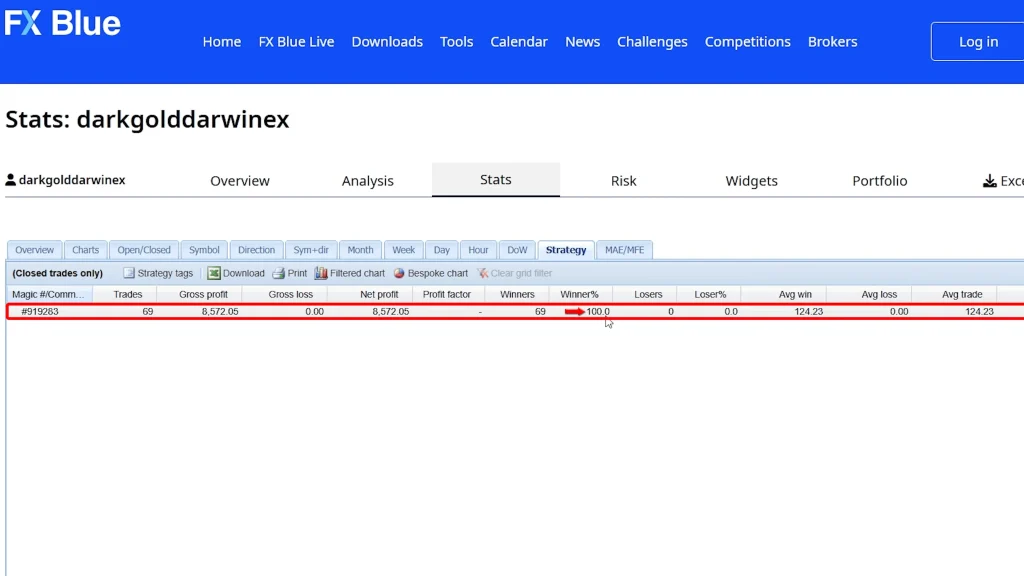
    Three months later, the track record shows something remarkable: 100% win rate across all 69 trades. Every single position closed in profit. That sounds almost too good to be true, and in some ways, it is, but not for the reasons you might think.

    Here’s the reality: Dark Gold EA has indeed maintained a perfect win rate, but that doesn’t mean the account has never seen drawdowns. In fact, we’ve experienced several significant floating losses during this period, including one substantial drawdown and a current one as I write this review. The key difference is that the EA has recovered from every drawdown so far, eventually closing all positions profitably.

    This distinction matters enormously. A 100% win rate achieved by never experiencing adverse price movement is very different from a 100% win rate achieved by holding through temporary losses until recovery. The first scenario suggests perfect market timing. The second suggests a trend-following system with enough patience and capital buffer to outlast pullbacks.

    Dark Gold EA falls into that second category; it’s a fully automated trend-following expert advisor designed specifically for gold (XAU/USD) that enters positions aligned with the broader uptrend and holds through corrections until profitable exit points materialize. I’m running it in multiple configurations across different accounts: grid disabled on Darwinex Zero, grid enabled on another account, and a newer low-risk setup for comparison.

    This review will show you the actual trading results, explain why that 100% win rate shouldn’t be your only decision criterion, break down the settings I’m using, discuss the Darwinex Zero funding opportunity, and help you assess whether this gold EA deserves a place in your automated trading strategy.

    Dark Gold EA Performance Summary

    AccountDurationConfigurationWin RateCurrent StatusKey Notes
    Darwinex Zero Main~3 monthsGrid disabled, buy only100% (69 trades)Floating lossMet Darwinex requirements
    Grid-Enabled Account~3 monthsGrid enabled, mixed with Dark TitanNot isolatedActiveFaster drawdown recovery
    Low-Risk Account~2 weeksConservative settingsMostly positiveActiveSlower profit, smaller drawdowns

    Darwinex Zero Account: The Perfect Testing Ground

    Let me start by showing you the primary account where Dark Gold EA has posted those 69 consecutive wins, my Darwinex Zero allocation account running on MT5.

    What is Darwinex Zero?

    For those unfamiliar, Darwinex Zero is an instant funding platform with a unique structure. You pay a monthly subscription (€43, or €38 with the discount code I’ll share later) and receive €100,000 in virtual capital to trade immediately. No evaluation phase, no profit targets to pass, just start trading.

    The catch? Darwinex Zero has strict rules about trading strategies, particularly regarding grid and martingale systems. They prefer straightforward approaches: open a trade, close a trade, done. This requirement actually influenced how I configured Dark Gold EA, which I’ll explain shortly.

    Performance on Darwinex Zero

    Since late March (just under three months), Dark Gold EA has executed 69 trades on this account, all buy positions, all closed profitably. Looking at the MT5 platform history, you can scroll through page after page of green trades, each one contributing to the overall account growth.

    But let’s talk about what those FX Blue statistics don’t immediately reveal: the floating losses along the way.

    The Drawdown Reality

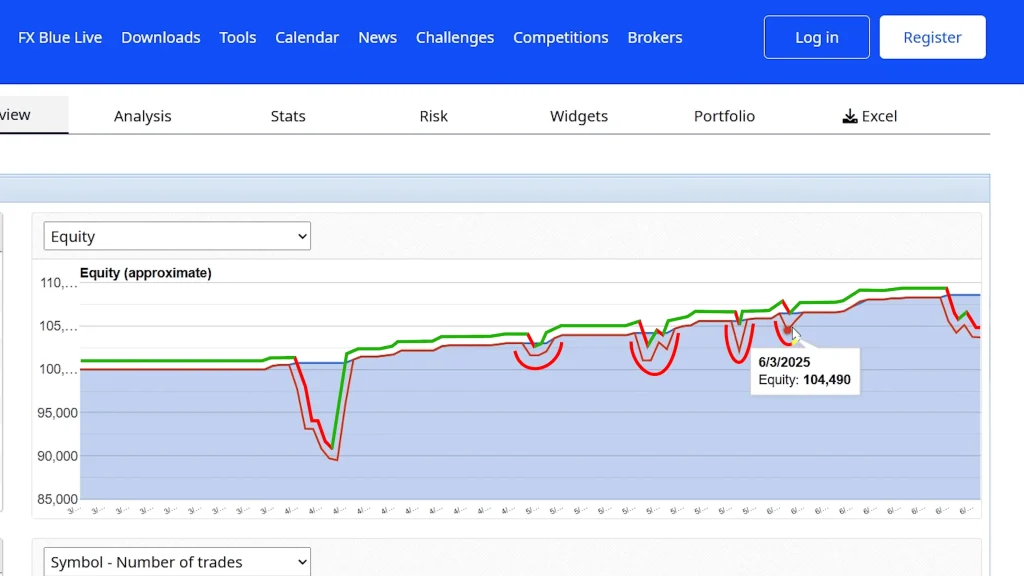
    When you examine the equity curve on FX Blue, you’ll notice something important. While the balance line (closed trade results) shows consistent upward progression, the equity line (which includes open positions) tells a more complete story.

    There have been several points where floating losses appeared:

    • One quite large drawdown early in the testing period
    • A few smaller drawdowns along the way
    • A current floating loss as of this review

    Each time, the system has recovered and eventually closed those positions profitably. But during the drawdown periods, the account equity dropped below the balance line, sometimes significantly.

    Right now, as I’m recording my review, we’re in another drawdown period. Am I concerned? Not particularly, and here’s why.

    Market Context and Trend Analysis

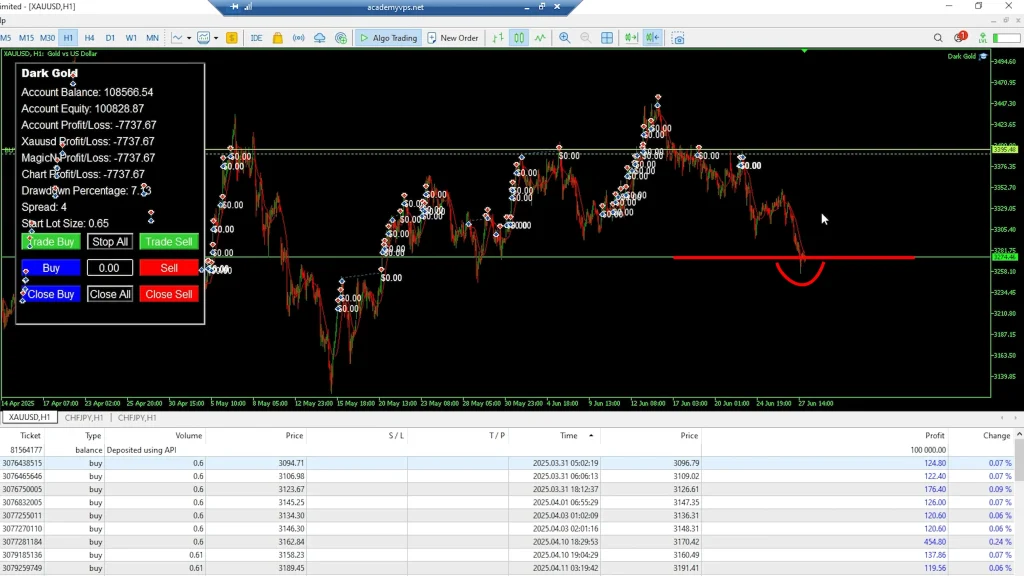
    When you zoom out on the gold chart, XAU/USD is still very much in an upward-trending market. Yes, the last few days have seen slight declines, but when you look at the broader picture, gold is trading within a clear channel with defined support and resistance levels.

    The price did break through support recently, which triggered the current floating loss. However, I believe it will return to the uptrend soon based on the technical picture. Gold has been one of the strongest trending markets over the past year, and trend-following systems like Dark Gold EA are built exactly for these conditions.

    The 25% Safety Net

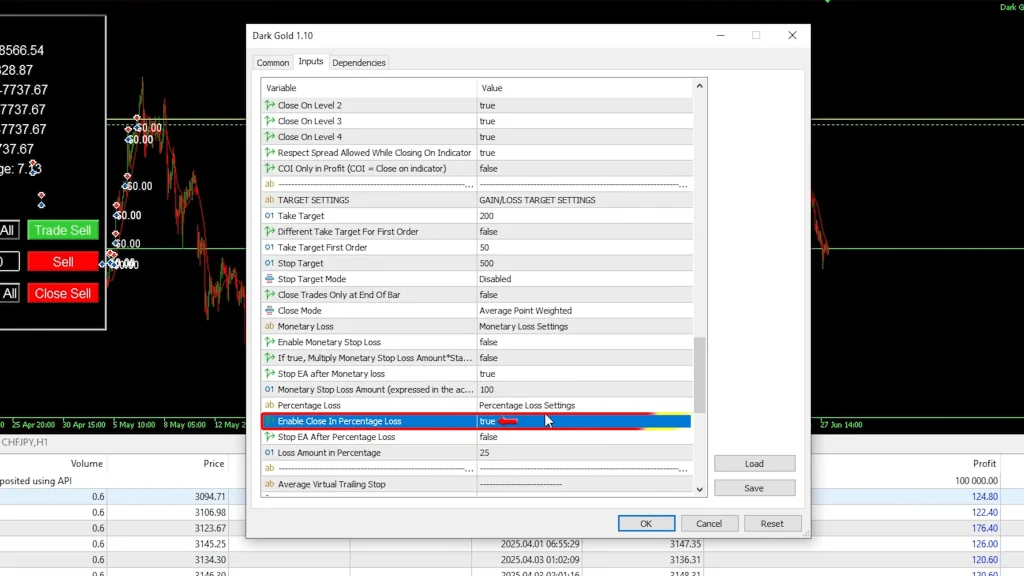
    Given the potential for deeper corrections, I’ve configured a safety parameter: “close on percentage loss” set at 25%. If the account equity drops 25% below the starting balance, Dark Gold EA automatically closes all positions to prevent catastrophic losses.

    Is 25% a large drawdown? Absolutely. But there’s important context here. On a Darwinex Zero account with €100,000 in virtual capital, a 25% drawdown means you’ve protected 75% of your allocation. More importantly, because it’s virtual capital rather than your own money at risk, the psychological impact differs from losing 25% of your personal savings.

    Additionally, looking at the historical drawdowns so far, none have approached the 25% threshold. The safety setting provides a buffer well beyond what the EA has needed historically.

    Darwinex Zero Phase Structure

    PhaseMonthly CostVirtual CapitalPerformance FeeMinimum RatingMy Current Status
    Calibration€38-43€100,0000% (evaluation)N/APassed
    Silver€38-43€100,00015%75+Currently here (rating: 84.17)
    Gold€38-43€100,000Higher %Higher thresholdNot yet
    Investor Allocation€38-43Actual investor funds15%+ based on phase75+Eligible

    Grid vs. Non-Grid: Two Different Approaches

    One of Dark Gold EA’s strengths is flexibility; you can run it with or without the grid feature enabled, and both configurations have performed successfully in my testing.

    Darwinex Zero Configuration: Grid Disabled

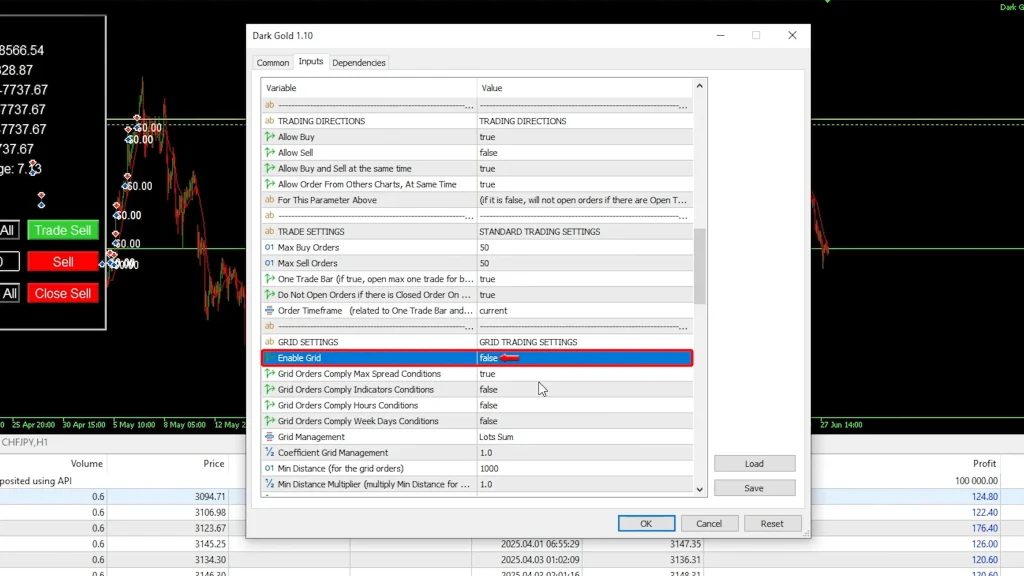
    On my Darwinex Zero account, I have “Enable Grid” set to false in the EA settings. This is not optional; it’s a requirement.

    Darwinex Zero’s risk engine evaluates strategies based on various factors, and they explicitly prefer straightforward systems without grid or martingale components. If your trading shows patterns of averaging down or adding multiple positions at different price levels, it can negatively impact your rating and allocation eligibility.

    So for Darwinex Zero, grid disabled is the only viable approach.

    Alternative Account: Grid Enabled

    I’m also running Dark Gold EA on a separate account with the grid feature enabled. This account also has another EA (Dark Titan) running simultaneously, so results are mixed, but I can see how Dark Gold performs with grid functionality active.

    During the same period that caused a drawdown on my Darwinex Zero account, the grid-enabled version opened one additional position to average the entry price and successfully recovered, closing all positions profitably.

    The grid approach provides faster recovery from temporary adverse price movements because you’re adding positions at better prices. The trade-off is increased exposure and more capital tied up in multiple positions, which means larger potential losses if the trend completely reverses.

    Low-Risk Configuration: Conservative Testing

    I’ve also started a newer account running Dark Gold EA with lower risk settings. This account began trading mid-June, so it only has about two weeks of history.

    Results have been solid, most trades are profitable, a couple closed at small losses but were recovered in the same cycle, and overall, the account remains positive.

    This low-risk setup demonstrates that Dark Gold EA can be scaled according to your risk tolerance. You don’t need to run maximum position sizes to achieve profitability; conservative configurations work as well, just with slower absolute profit accumulation.

    Configuration Comparison

    FeatureGrid DisabledGrid Enabled
    Position CountSingle position at a timeMultiple positions possible
    Drawdown RecoverySlower (wait for price return)Faster (average entry price)
    Maximum ExposureLower riskHigher risk
    Darwinex Zero CompatibleYes (required)No (rejected by platform)
    Capital Required$1,000-2,000 minimum$2,500+ recommended
    ComplexitySimpleModerate
    My TestingPrimary accountSecondary account

    The All-Buy Strategy: Riding the Gold Bull Market

    One configuration choice that might surprise some traders: I have Dark Gold EA set to buy only, no short positions.

    Why Buy Only?

    Gold has been in a sustained uptrend for an extended period. When you have a strongly trending asset, trading with the trend (buying during uptrends, selling during downtrends) historically provides better risk-adjusted returns than trying to capture both directions.

    By restricting the EA to buy positions only, I’m ensuring every trade aligns with the dominant market direction. This reduces the risk of getting caught in counter-trend positions that can accumulate significant losses during powerful trend continuation.

    Could I make more money by allowing both buying and selling? Possibly, during consolidation periods, when gold oscillates within a range. But during strong trends, which have characterized gold’s recent behavior, the buy-only approach has proven effective.

    The Trend-Following Core Strategy

    Dark Gold EA is fundamentally a trend-following system. It identifies the broader market direction and enters positions that align with that trend, holding through minor corrections until the trend resumes and profits materialize.

    This approach works beautifully in trending markets. It struggles during choppy, range-bound conditions where price whipsaws without establishing a clear direction. Fortunately, gold has provided excellent trending conditions during my testing period.

    Market Context Matters

    Looking at the current gold chart, we’re still trading within a well-defined channel. Support and resistance levels are clear. Yes, price recently broke below support, triggering the current floating loss. But trend-following systems expect temporary violations; what matters is whether price returns to the broader trend channel.

    Based on the technical picture and gold’s fundamental drivers (inflation concerns, central bank policies, geopolitical tensions), I expect the uptrend to reassert itself. But that’s a bet on market direction, not a guarantee. Trends eventually end, and when they do, trend-following systems experience their most challenging periods.

    Darwinex Zero Progression: From Silver to Allocation

    Let me explain how the Darwinex Zero funding structure works, because it influences how I’m trading Dark Gold EA and what the potential returns actually look like.

    The Phase System

    Darwinex Zero operates through several stages:

    • Calibration: The initial trading period where the platform assesses your strategy 
    • Silver Phase: Where I currently am; eligible for allocation based on rating 
    • Gold Phase: Higher tier with better allocation terms 
    • Investor Allocation: Actual capital from Darwinex investors gets allocated to trade

    Performance Fees and Profit Sharing

    In the Silver phase, I receive 15% of the profits generated as my performance fee. Here’s how that works mathematically:

    Let’s say I make 10% profit on the €100,000 allocation, which equals €10,000 gain. If my risk ratio is 1 (meaning my DARWIN trades 1 lot for every 1 lot I trade), I receive 15% of that €10,000 = €1,500 as my performance fee.

    The 10% return on €100,000 virtual capital translates to €1,500 real money in my pocket. That’s the attraction of Darwinex Zero, you’re not risking your own capital, but you’re earning real profits based on performance.

    Allocation Qualification and Ratings

    To receive allocation, you need a rating of at least 75. My account currently shows a rating of 84.17, which comfortably qualifies.

    Ratings are calculated based on:

    • Monthly return percentage
    • Maximum drawdown
    • Consistency of returns
    • Risk management

    For example, if I averaged 3% monthly over five months with an 8% maximum drawdown, that might produce a rating of 88, qualifying for €40,000 in allocation.

    Allocations last for three months. Hit your targets again the next month, and you receive additional allocation. The system rewards consistent, controlled profitability over flashy but risky performance.

    Permanent Allocation Option

    There’s also a shortcut: purchasing permanent allocation. If your account grows 5%, you can buy a permanent allocation for $695. Want it from day one? That’s $1,500 or €1,300.

    As your profit target increases (10%, 15%, 20%), the purchase price decreases. This option lets traders skip the rating-based allocation queue and immediately access investor capital.

    I haven’t purchased a permanent allocation. I’m following the standard progression path to see how Dark Gold EA performs under the normal evaluation criteria.

    Pricing, Licensing, and Vendor Ecosystem

    Dark Gold EA is part of a broader product family from the Dark EA vendor, and the pricing structure is notably generous compared to many expert advisors.

    License Options

    5 Flexible Licenses: $99

    • Works on MT4 and MT5
    • Can run on demo or live accounts
    • Switch between accounts as needed

    10 Flexible Licenses: $149

    • Same flexibility as 5-license version
    • Better value if running multiple accounts

    The “flexible” aspect is valuable; you can move the EA between different accounts without buying new licenses. Test on demo, move to live, switch brokers if needed, all with the same purchase.

    Discount Code

    Use coupon code PETKO10 at checkout for 10% off, bringing the 5-license package down to about $89.

    The Dark EA Family

    Dark Gold EA is one of several products from this vendor:

    • Dark Nova: Different trading approach
    • Dark Titan: Another strategy (I’m running this on one of my accounts alongside Dark Gold)
    • Dark Algo: Additional trading system

    I haven’t fully tested the other EAs yet, but the fact that I’m comfortable running Dark Titan simultaneously with Dark Gold suggests the vendor produces quality products across their lineup.

    What You Get

    Beyond the EA itself, you receive:

    • Set files for different configurations
    • Documentation (though the EA is fairly intuitive)
    • Updates as the vendor refines the system
    • Support for technical issues

    The set files are particularly valuable; they provide pre-configured parameters for different risk levels and trading styles, so you don’t need to spend weeks optimizing settings yourself.

    Risk Management: The Critical Settings

    Running any automated trading system, especially one that can experience significant floating drawdowns, requires proper risk management configuration. Here’s how I’ve approached this with Dark Gold EA.

    The 25% Stop Loss

    As mentioned earlier, I have “close on percentage loss” enabled at 25%. This is my catastrophic loss prevention; if something goes dramatically wrong, the EA won’t allow the account to be completely destroyed.

    On a Darwinex Zero account, losing 25% of €100,000 virtual capital means I’ve protected €75,000. That remaining allocation can continue trading and potentially recover. Without this setting, a severe adverse move could wipe out the entire allocation, ending the funding opportunity.

    Position Sizing Considerations

    The EA includes position sizing parameters that control how much capital is risked per trade. I’m running moderate position sizes on my main account, not overly aggressive, but not so conservative that profits are negligible.

    On the newer low-risk account, I’ve reduced position sizes significantly. This produces slower profit accumulation but also minimizes drawdown depth during adverse periods.

    Grid Settings: Enabled or Disabled

    The grid toggle is perhaps the most important risk decision:

    Grid Disabled: Single positions only, smaller capital exposure, slower recovery from adverse moves

    Grid Enabled: Multiple positions possible, faster recovery, but higher maximum exposure if the trend reverses

    For Darwinex Zero, the grid must be disabled. For personal accounts without such restrictions, it’s a personal choice based on risk tolerance.

    Monitoring and Adjustment

    Even with automated systems, I check the accounts regularly. I’m not making constant adjustments, but I’m aware of:

    • Current floating profit/loss
    • Open position count
    • Market conditions (is gold still trending?)
    • Any unusual behavior

    If I see performance degrading or drawdowns approaching historical maximums, I’ll reassess whether to continue trading or pause the EA until conditions improve.

    Testing on Alternative Assets

    One interesting development mentioned in my testing: I’ve started experimenting with Dark Gold EA on another asset, not XAU/USD, but a different market entirely.

    Why Test Other Markets?

    If the core trend-following logic is sound, it should theoretically work on any trending market, not just gold. By testing on alternative assets, I can validate whether the strategy is specifically optimized for gold’s unique behavior or whether it’s broadly applicable.

    Early Promising Results

    Initial results look encouraging, though I don’t have enough data yet to make definitive claims. The EA appears to identify trends and enter positions appropriately on the alternative asset.

    However, I’m cautious about declaring success too early. Every market has a different personality, different volatility patterns, different trading hours, and different fundamental drivers. What works on gold might not translate perfectly to forex pairs, indices, or commodities.

    I’ll continue testing and share results once I have several months of data. For now, the preliminary indications are positive enough to warrant continued experimentation.

    Real Results, Real Tracking, Real Transparency

    One principle I maintain across all my EA testing: complete transparency. Every account is tracked publicly, losses are visible alongside wins, and I don’t hide failures.

    Multiple Account Tracking

    I’m running Dark Gold EA on at least three accounts currently:

    1. Darwinex Zero main account: Grid disabled, 69 trades, 100% win rate
    2. Grid-enabled account: Also running Dark Titan, mixed strategy
    3. Low-risk newer account: Conservative settings, two weeks of data

    All three accounts have tracking links available so you can monitor ongoing performance in real-time. If an account blows up, you’ll see it. If results degrade, you’ll know.

    Set Files Available

    I’m sharing the actual set files I use on these accounts. You can download them, load them into your own MT4 or MT5 platform, and replicate my exact configuration.

    This eliminates the guesswork of parameter optimization. You’re getting settings that have been tested and proven profitable over three months of real trading.

    The Honesty Standard

    When I say Dark Gold EA has a 100% win rate, I also immediately clarify that doesn’t mean no drawdowns. When I show impressive balance growth, I also show the equity dips along the way. When I’m currently in a floating loss, I tell you that upfront rather than waiting until it resolves to make the review look better.

    This honesty is critical for YMYL (Your Money Your Life) content like trading robot reviews. If you’re considering risking real capital based on this information, you deserve the complete picture, not just the marketing highlights.

    Who Should Consider Dark Gold EA?

    Based on three months of testing across multiple configurations, here’s my assessment of who this expert advisor best suits.

    Ideal Candidates

    • Trend followers: If you believe markets trend and want to capture those trends systematically, Dark Gold EA’s approach aligns with that philosophy.
    • Gold traders: Obviously, if you’re specifically interested in XAU/USD trading, this EA was built for that market.
    • Darwinex Zero participants: The EA works well under their constraints (grid disabled) while still maintaining profitability.
    • Patient traders: You need psychological tolerance for seeing floating losses that eventually resolve. If you panic during drawdowns, this isn’t for you.
    • Hands-off automation seekers: The EA genuinely runs on its own with minimal intervention required.

    Less Suitable For

    • Range-bound market traders: Trend-following systems struggle in choppy, directionless markets. If gold enters extended consolidation, expect reduced performance.
    • Low drawdown tolerance: If you can’t handle seeing 10-15% floating losses periodically, the psychological stress won’t be worth the profits.
    • Short-term result expectations: Three months is still relatively short for full validation. If you need proof the system works across multiple years and market cycles, we don’t have that data yet.
    • Multi-asset diversification without testing: While I’m experimenting with other assets, gold is the proven market for this EA. Don’t assume it works equally well elsewhere without your own testing.

    Frequently Asked Questions

    What does a 100% win rate really mean for Dark Gold EA?

    The 100% win rate means all 69 trades have closed profitably over three months, but it doesn’t mean the account never experienced losses. Dark Gold EA has encountered several significant floating drawdowns where open positions temporarily showed substantial losses.

    However, the trend-following approach held through these corrections until the price returned favorably and all positions eventually closed in profit. This is fundamentally different from a system that never experiences adverse movement; it’s a system that tolerates temporary losses because the underlying trend remains intact. If gold’s uptrend reverses significantly, the win rate will end as stop losses trigger.

    Should I run Dark Gold EA with grid enabled or disabled?

    The decision depends on your account type and risk tolerance. For Darwinex Zero accounts, the grid MUST be disabled due to their strategy requirements; they don’t approve grid or martingale systems for allocation. For personal accounts, grid-enabled provides faster recovery from drawdowns by adding positions at better prices, but increases total exposure and risk.

    Grid disabled means single positions only, slower recovery, but lower maximum capital at risk. I’m successfully running both configurations on different accounts. Start with the grid disabled for a conservative approach; enable it only if you fully understand and accept the additional risk involved in multiple simultaneous positions.

    How much capital do I need to run Dark Gold EA safely?

    The vendor doesn’t specify strict minimum requirements, but based on my testing with 25% drawdown protection and the historical floating losses observed, I’d recommend at least $1,000-$2,000 for personal accounts running conservative settings.

    For Darwinex Zero, you’re starting with €100,000 virtual capital, so account size isn’t a constraint; risk management settings matter more. If running with grid enabled, consider $2,500+ to handle multiple simultaneous positions comfortably. Remember that gold’s volatility means significant pip movements; undercapitalization could force you to trade such small position sizes that profits become negligible even when the EA performs well.

    Is Dark Gold EA only for gold, or does it work on other markets?

    Dark Gold EA was specifically designed and optimized for XAU/USD (gold), and that’s where my three months of verified results exist. The vendor markets it primarily as a gold expert advisor. However, I’ve begun testing it on an alternative asset with early, promising results, suggesting the trend-following logic may be applicable to other trending markets.

    That said, I cannot recommend using it on other assets without extensive personal testing first. Different markets have different volatility, spreads, trading hours, and fundamental drivers. If you want to experiment with other assets, run extensive demo testing first rather than assuming gold-optimized settings will work identically elsewhere.

    How does Darwinex Zero allocation actually make you money with virtual capital?

    Darwinex Zero provides €100,000 in virtual funds to trade, but your profit comes from performance fees on a separate DARWIN product that mirrors your trading. When you reach the Silver phase (where I currently am), you receive 15% of the profits generated by your DARWIN. If your account makes 10% (€10,000 profit) and your DARWIN has a 1:1 risk ratio, investors in your DARWIN also make 10%, and you receive 15% of those investor profits as your fee.

    The virtual €100,000 lets you demonstrate trading ability without personal capital risk, while actual profits come from the percentage of investor money following your strategy. Monthly subscription is €38-43, so you need consistent profitability to make the math worthwhile.

    What happens if Dark Gold EA hits the 25% stop loss protection?

    If account equity drops 25% below the starting balance, Dark Gold EA automatically closes all open positions immediately, regardless of whether they’re profitable or not. This prevents catastrophic losses but also ends any chance of recovery from that particular drawdown. On my Darwinex Zero account with €100,000 virtual capital, a 25% loss means €75,000 remains, still a substantial allocation to continue trading.

    The EA would resume normal operation after the forced close, opening new positions based on market conditions. Historical drawdowns haven’t approached 25%, but the protection exists for extreme scenarios like flash crashes or fundamental gold market shifts. You can adjust this percentage based on risk tolerance; higher settings give more recovery room but risk larger losses.

    Where to Learn More

    If you’re interested in exploring Dark Gold EA further or want access to current pricing and set files, I’ve compiled resources on Algo Trading Space.

    You can find everything here: algotradingspace.com/robots/commodities/dark-gold-ea-trend-following-expert-advisor-for-xau-usd

    The page includes links to the Dark EA website where you can purchase the system, the PETKO10 discount code for 10% off, and access to my ongoing transparent tracking across all three accounts so you can monitor continued performance.

    Full transparency: purchases through that page provide a commission supporting ongoing independent testing and honest reporting. But whether you purchase through my link or directly, please test thoroughly on the demo first and size positions appropriately for your risk tolerance.

    I’ll continue running Dark Gold EA across multiple accounts, updating results publicly so you can see exactly how it performs over the next several months as we gather more data across different market conditions.

    For traders interested in deeper insights, Algo Trading Space offers a VIP Club that provides exclusive access to our complete trading results dashboard, priority support, and early intelligence on high-performing EAs before they become public knowledge. Members also get downloadable set files, access to our private Discord community, and our full course library. 

    Testing Transparency Statement: This review reflects approximately three months of live testing on multiple accounts with varying configurations, grid disabled (Darwinex Zero), grid enabled (personal account), and low-risk setup (recent account). The 100% win rate represents 69 closed trades all ending profitably, but does NOT mean the account has never experienced losses; significant floating drawdowns have occurred and currently exist.

    All account tracking is transparent and publicly accessible. Past performance never guarantees future results. Gold (XAU/USD) has been in a strong uptrend during the testing period; trend reversal would significantly impact performance. The 25% stop loss protection provides downside limit but represents substantial potential loss. Always conduct extensive demo testing before risking real capital with any automated trading system.

  • FX Proctor EA Tested & Reviewed In Live Conditions: Strategy Execution And Observed Trade Behaviour

    FX Proctor EA Tested & Reviewed In Live Conditions: Strategy Execution And Observed Trade Behaviour

    There’s something satisfying about being able to withdraw profits from a trading robot after six months of testing. Not hypothetical gains, not backtest results, but actual money transferred from your broker account to your wallet.

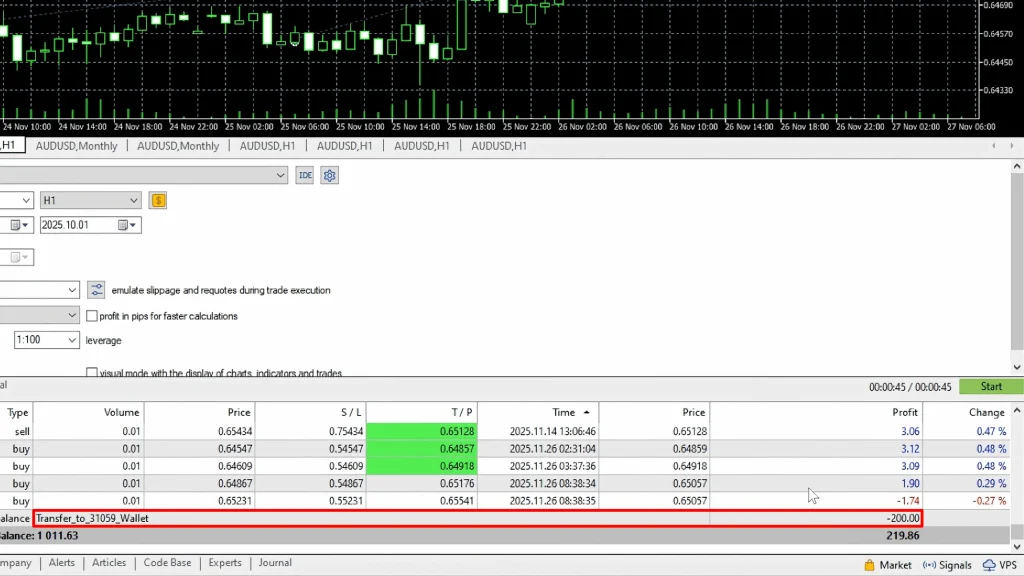
    That’s exactly what happened with FX Proctor EA. After running this automated trading system on a $1,000 live account with BlackBull Markets for approximately six months, I just processed a $200 withdrawal, a clean 20% return on the initial capital.

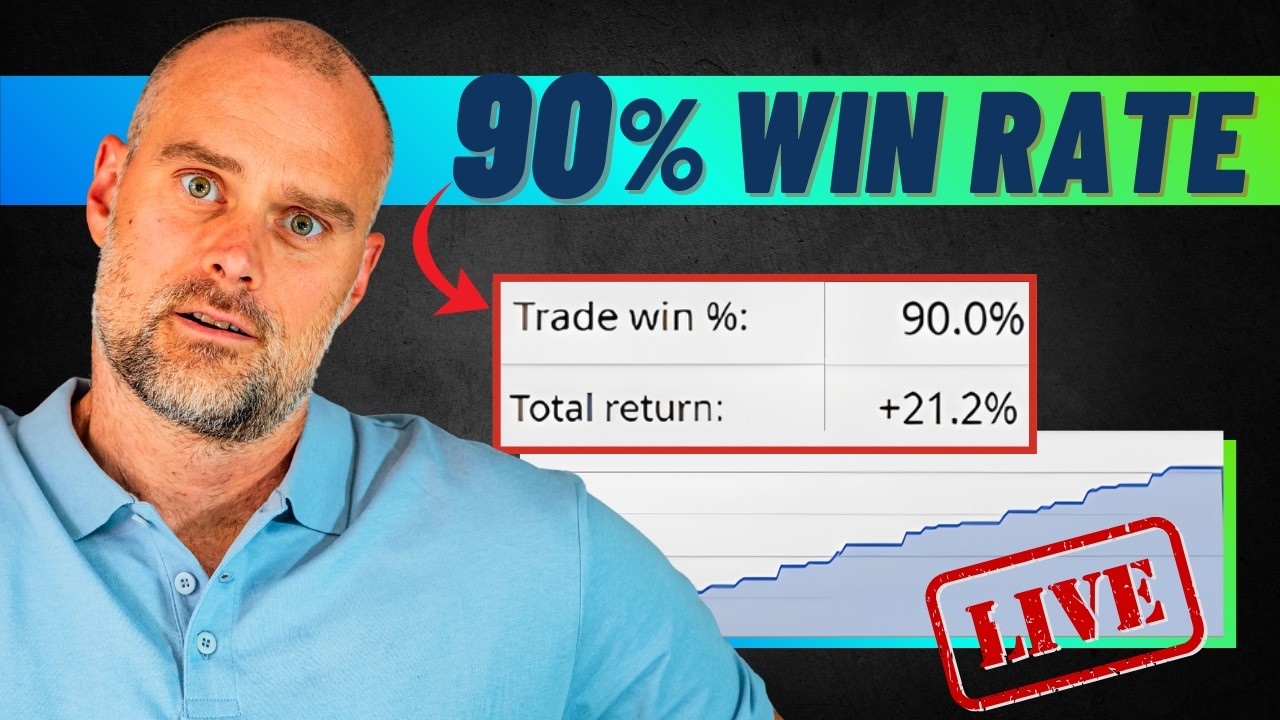
    Now, 20% over six months might not sound earth-shattering compared to the wild claims you see marketed by some forex robots. But here’s what makes it valuable: the equity curve has been remarkably smooth, the maximum drawdown stayed minimal, and the system achieved a 90% win rate while trading about every other day. That’s the kind of boring consistency that actually compounds into serious money over time.

    FX Proctor EA specializes in AUD/USD (the Australian dollar), though upgraded versions exist for multiple currency pairs. The strategy uses a broad timeframe filter to identify market context and trend direction, then executes orders on the H1 timeframe. It’s essentially a plug-and-play system, with minimal settings to configure, straightforward to deploy, and so far at least, reliably profitable.

    This review will show you the actual live trading results, walk through the backtest performance, explain the two “path” options the system offers, discuss the different pricing tiers for multi-pair versions, and help you assess whether this trading robot fits your automated trading strategy.

    Let me show you what six months of real money testing revealed.

    FX Proctor EA Performance Summary

    MetricLive Account (6 Months)Backtest (2 Years)
    Starting Capital$1,000$1,000
    Total Return20%$897 profit
    Monthly Average~4%N/A
    Win Rate90%Not specified
    Maximum DrawdownMinimal (not breached)$155 (15.5%)
    Trade FrequencyEvery other day (~15/month)Similar pattern
    Withdrawal Executed$200 (20% of capital)N/A
    Currency PairAUD/USD onlyAUD/USD only
    Path ConfigurationPath 1Path 1
    Lot Size0.10.1

    Live Account Performance: The Numbers That Matter

    Before we get into strategy details or theoretical discussions, let’s examine the actual performance on my live account. This is real money, real trades, real broker, not a demo simulation or cherry-picked backtest.

    Six-Month Results Summary

    Here’s what the $1,000 live account with BlackBull Markets generated:

    • Total return: 20%
    • Monthly return: Nearly 4% average
    • Win rate: 90%
    • Trade frequency: Approximately one trade every other day
    • Withdrawal executed: $200 transferred to wallet
    • Currency pair: AUD/USD exclusively

    That 4% monthly average is exactly the sweet spot I look for in automated systems. It’s high enough to generate meaningful returns through compounding, but not so aggressive that it requires excessive risk or unsustainable strategies.

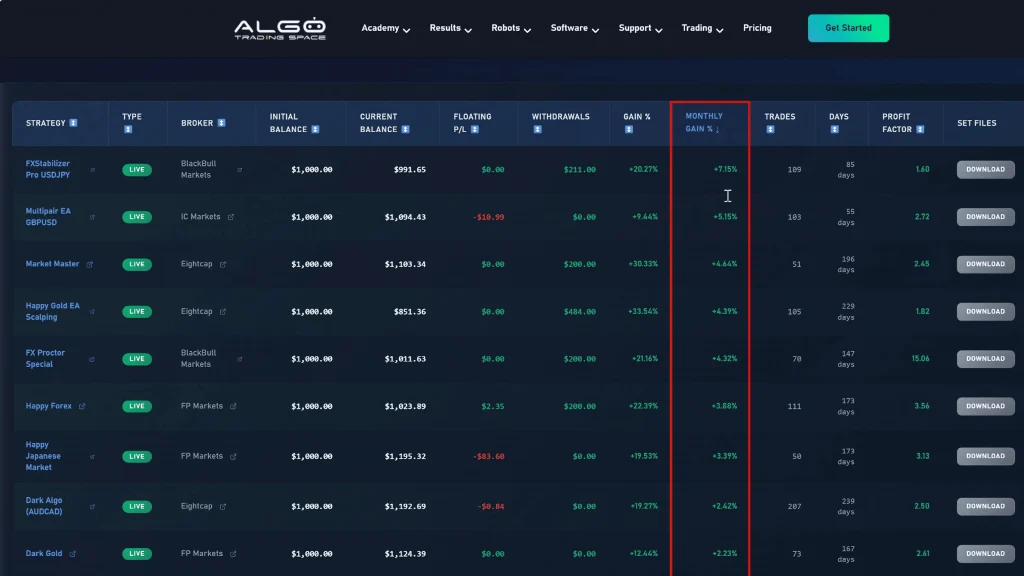
    FX Blue Track Record Analysis

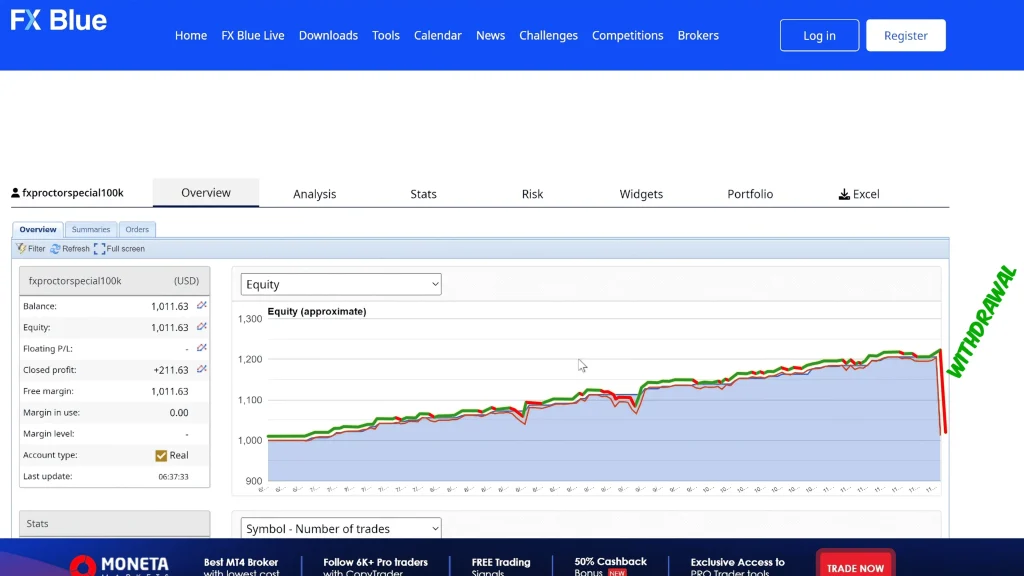
    Looking at the FX Blue tracking data, several patterns stand out immediately. The balance line shows very steady growth, not the wild swings up and down you see with aggressive martingale systems or grid robots that eventually blow up. Just consistent, gradual appreciation over time.

    The equity curve (which includes floating profit/loss from open positions) follows the balance remarkably closely. This tells you the EA isn’t holding massive open positions with large floating losses, hoping for reversals. When I examine the chart, I don’t see huge equity spikes or drops that would indicate the system is taking on hidden risk.

    The Withdrawal Milestone

    That $200 withdrawal is visible on the FX Blue chart as a noticeable drop in the balance line, but it’s not a loss; it’s profit extraction. After six months of watching this EA trade, generating consistent returns, and maintaining controlled risk, I felt confident enough to pull out 20% of the account.

    This is an important psychological milestone for any trading system. It’s one thing to see paper profits accumulating. It’s another thing entirely to actually withdraw money and prove those profits are real and accessible.

    Trade Distribution and Frequency

    FX Proctor EA places roughly one trade every other day on average. This isn’t a high-frequency scalping system that executes dozens of trades daily, nor is it a long-term position trading approach that might hold trades for weeks.

    The frequency feels just about right, active enough to capitalize on regular market opportunities, but not so frequent that trading costs eat into profitability or that you’re constantly exposed to market risk.

    The 90% Win Rate

    A 90% win rate over six months of live trading is genuinely impressive. Most profitable trading systems operate in the 55-70% win rate range, accepting that some losses are inevitable in exchange for capturing larger wins.

    FX Proctor EA appears to achieve its high win rate through selective trade entry, waiting for high-probability setups rather than forcing trades. The “Path 1” configuration I’m using (more on that later) is specifically designed for less frequent but more accurate trade execution.

    Does a 90% win rate guarantee future success? Of course not. Markets change, and what worked for six months might not work forever. But it’s certainly encouraging evidence that the entry logic is sound.

    Version Comparison Table

    FeatureBasic (AUD/USD)Special (2 Pairs)Max (4 Pairs)
    Currency Pairs1 (AUD/USD only)2 pairs4 pairs
    Path OptionsPath 1 onlyPath 1 & 2Path 1 & 2
    Price TierLowestMediumHighest
    Minimum Capital$500-$1,000$1,500-$2,000$3,000-$4,000
    DiversificationSingle pairModerateHigh
    Management ComplexitySimpleModerateMore complex
    My Testing6 months liveNot testedNot tested
    Recommended ForBeginners, smaller accountsIntermediate tradersExperienced, larger capital

    Settings and Configuration: Plug-and-Play Simplicity

    One of FX Proctor EA’s strengths is how straightforward the configuration process is. Unlike some expert advisors with dozens of complex parameters requiring optimization, this system keeps things simple.

    Core Settings Overview

    When you load FX Proctor EA on your VPS and check the settings, here’s what you’re working with:

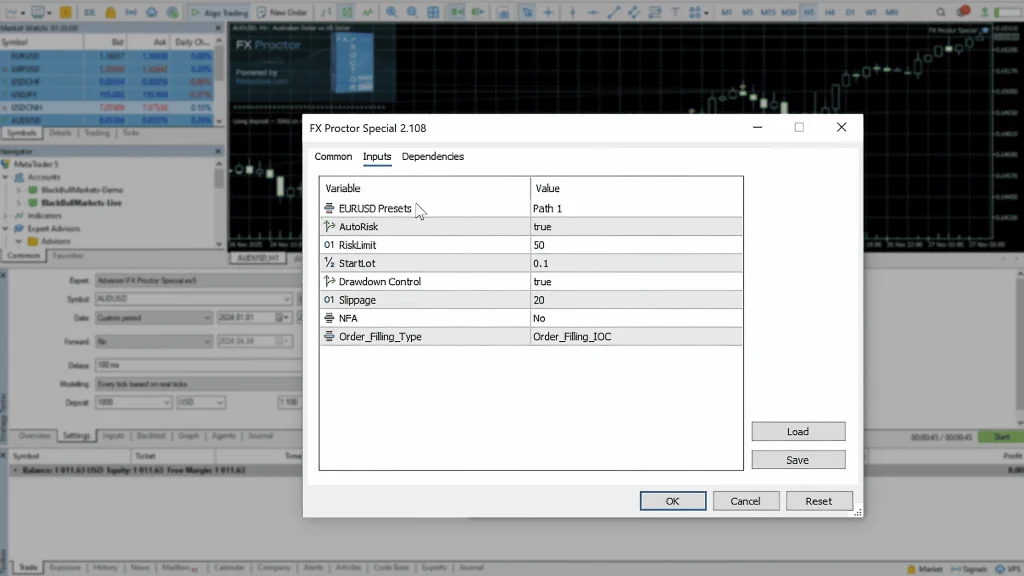
    • Risk Protection: Set the equity percentage at which the EA closes all trades to protect capital. I configured mine at 50%, meaning if the account equity drops to half the starting balance, all positions close automatically.
    • Start Lot Size: Configure the initial position size. I’m using 0.1 lots on the $1,000 account, which provides reasonable profit potential while keeping risk controlled.
    • Path Selection: Choose between Path 1 (less frequent, higher accuracy) or Path 2 (higher frequency, more trades). I’m running Path 1 based on my preference for quality over quantity.

    That’s essentially it. No complex indicator parameters, no optimization requirements, no endless tweaking needed. Load it, set your risk level and lot size, select your path, and let it run.

    Path 1 vs. Path 2: Understanding the Difference

    The vendor offers two distinct operational modes, and understanding the trade-off is important:

    Path 1 Characteristics:

    • Trades less frequently
    • Higher win rate (more selective entries)
    • Focuses on high-probability setups
    • Better for traders prioritizing consistency

    Path 2 Characteristics:

    • Higher trade frequency
    • More market exposure
    • Potentially more profit opportunities
    • Better for traders comfortable with more active trading

    I chose Path 1 for my live account because I prefer fewer, higher-quality trades over constant market exposure. The 90% win rate I’m seeing suggests this approach is working well, at least in current market conditions.

    Risk Management Configuration

    The 50% equity protection setting acts as a circuit breaker. If something catastrophic happens, a flash crash, unexpected news event, or prolonged adverse trend, the EA will close all positions before the account is completely destroyed.

    Is 50% a large drawdown to tolerate? Yes, absolutely. But looking at the backtest data (which I’ll detail shortly), the actual maximum drawdown was only $155 on similar account sizes. Setting protection at 50% provides a substantial buffer beyond what the system has historically needed.

    You could certainly set this more conservatively, maybe 30% or 40%, if you have a lower risk tolerance. The trade-off is potentially missing recovery opportunities if the EA needs more room to manage temporary drawdowns.

    Backtest Validation: Two Years of Historical Data

    Live results over six months provide meaningful evidence, but backtesting extends the validation across different market conditions and time periods. I ran FX Proctor EA through comprehensive backtests to see how it would have performed historically.

    Backtest Configuration

    I tested the system using:

    • Currency pair: AUD/USD
    • Timeframe: H1 (1-hour chart)
    • Account size: $1,000 (matching live account)
    • Lot size: 0.1 (matching live settings)
    • Path: Path 1
    • Data period: 2 years of historical data

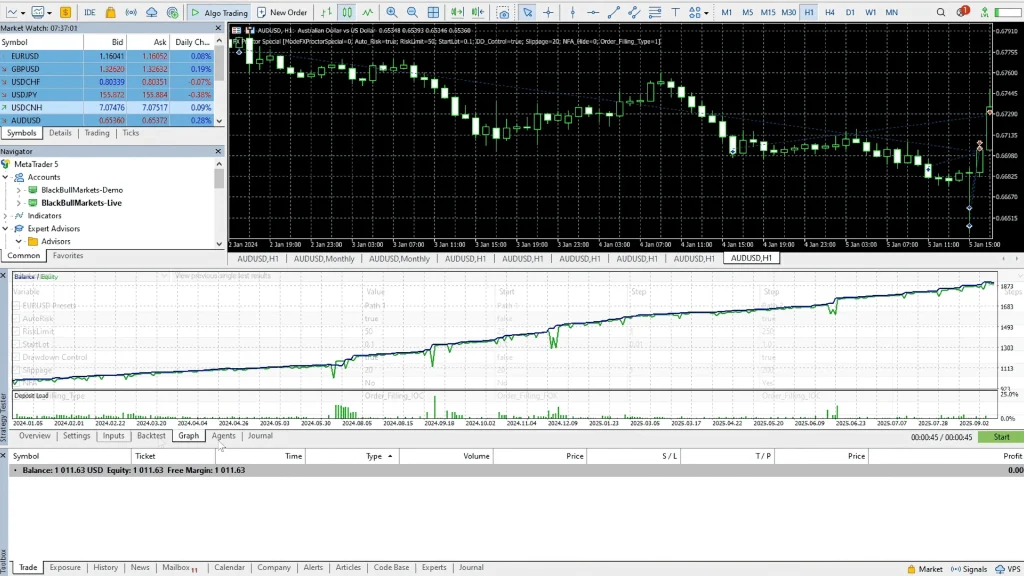
    First, I ran the test using the “Open, High, Low, Close” model, which is faster but less precise. Then I validated with the “Full Tick” model, which captures trading costs more accurately.

    Open High Low Close Results

    The OHLC backtest generated impressive results:

    • Total profit: $9,511.95
    • Equity curve: Very smooth with no large spikes
    • Balance growth: Steady upward progression

    These numbers are obviously much better than the live results (20% in six months vs. massive gains in backtest), but that’s normal. Backtests never account for all real-world variables, slippage, connection issues, execution delays, spread variations during news events, etc.

    What matters more than the absolute profit number is the shape of the equity curve. No massive drawdowns, no catastrophic losses, just consistent growth.

    Full Tick Model Validation

    The full tick backtest provides more realistic results because it captures trading costs more accurately:

    • Total profit: $897
    • Maximum drawdown: $155
    • Equity curve: Very similar to the OHLC model
    • Balance line: Smooth with controlled drawdowns

    The fact that both backtesting models produced similar equity curve shapes is actually more important than the profit differences. It suggests the strategy isn’t overly sensitive to exact entry prices or spread variations; it’s robust enough to work across different execution conditions.

    Drawdown Analysis

    The $155 maximum drawdown in backtesting is remarkably small. On a $1,000 account, that represents only about 15.5% equity reduction at the worst point, and it recovered from there.

    Compare this to grid martingale systems that can see 30%, 40%, even 50% drawdowns before recovering (if they recover at all). FX Proctor EA’s controlled drawdown profile makes it suitable for traders with lower risk tolerance and potentially even for funded account programs with strict drawdown limits.

    Spread Sensitivity Testing

    The vendor claims FX Proctor EA is “not dependent on narrow spreads” and works with almost any broker. The close alignment between OHLC and full tick backtest results supports this claim; if the system were highly spread-sensitive, you’d see major performance degradation in the full tick model.

    This is actually a significant advantage. Many scalping EAs that work beautifully on backtests with perfect 1-pip spreads fall apart in live trading when real broker spreads are 2-3 pips or wider during certain hours.

    Strategy Breakdown: How It Actually Trades

    While the vendor doesn’t reveal every detail of the proprietary algorithm, enough information is available to understand the general strategic approach.

    Multi-Timeframe Analysis

    FX Proctor EA uses a two-layer timeframe approach:

    • High Timeframe Filter: The system first analyzes the broader market context and long-term trend direction. This prevents counter-trend trading during strong directional moves and helps identify high-probability market conditions.
    • H1 Execution Timeframe: Once the high timeframe filter confirms favorable conditions, the EA places orders on the 1-hour chart. This timeframe provides enough price action detail for precise entries without the noise and false signals common on lower timeframes like M5 or M15.

    This multi-timeframe approach is actually quite sophisticated. Many struggling traders make the mistake of trading on a single timeframe without considering the broader market context. By requiring alignment between long-term conditions and shorter-term setups, the EA improves trade quality.

    The AUD/USD Specialization

    FX Proctor EA was specifically designed and optimized for AUD/USD. The Australian dollar has distinct characteristics:

    • Strong correlation with commodity prices (especially metals)
    • Influenced by Chinese economic data (major trading partner)
    • Responds to risk sentiment (risk-on vs. risk-off environments)
    • Liquid major pair with decent volatility

    By specializing in a single pair rather than trying to be a jack-of-all-trades across dozens of currencies, the vendor could optimize the entry logic, filters, and parameters specifically for AUD/USD’s personality.

    Does this mean the EA can’t work on other pairs? Not necessarily, the vendor offers multi-pair versions. But the core system was built around Aussie dollar characteristics.

    Trade Selection and Entry Logic

    Based on the 90% win rate and the every-other-day trade frequency, FX Proctor EA is clearly very selective about entries. It’s not taking every possible setup; it’s waiting for conditions to align perfectly before executing.

    This patience is actually one of the system’s strengths. Overtrading is one of the fastest ways to destroy a trading account, whether automated or manual. By being selective, the EA avoids low-quality trades that might win sometimes but reduce overall profitability.

    Exit Management

    The EA uses take-profit targets rather than trailing stops or manual exits. Once a trade reaches its profit target, it closes automatically. This removes emotion and second-guessing from the exit process; if the target is hit, the profit is banked.

    The system also appears to have stop loss protection, though exact parameters aren’t disclosed. The small maximum drawdown suggests stops are reasonable and not set so wide that a single losing trade could devastate the account.

    Pricing Tiers and Multi-Pair Options

    FX Proctor EA comes in different versions depending on how many currency pairs you want to trade simultaneously.

    Version Comparison

    Basic Version (AUD/USD Only – Path 1)

    • Single currency pair: AUD/USD
    • Path 1 option only
    • Lowest price point
    • This is the version I’m testing

    Special Version (2 Pairs)

    • Two currency pairs
    • Both Path options are available
    • Medium price tier

    Max Version (4 Pairs)

    • Four currency pairs
    • Both Path options are available
    • Highest price tier

    The pricing increases with each tier as you add more pairs. The vendor’s website shows the exact costs, which I won’t specify here since they may change or have promotional discounts.

    Which Version Should You Choose?

    For most traders starting out, I’d recommend the basic AUD/USD version for several reasons:

    • Lower initial investment: Test the system’s core strategy on one pair before committing to multi-pair versions.
    • Simpler management: Monitoring one pair is easier than tracking four simultaneously.
    • Proven performance: My six-month live results are specifically on the basic version, so you know this configuration works.
    • Capital efficiency: You can run one pair effectively on a smaller account ($500-$1,000) rather than needing larger capital to properly allocate across multiple pairs.

    Once you’ve proven the basic version on your own account and feel confident in the approach, you could consider upgrading to multi-pair versions for diversification.

    Example Portfolio Integration

    FX Proctor EA has earned a spot in my example portfolio, a collection of my best-performing automated systems trading on live accounts with full transparency.

    The Portfolio Concept

    The example portfolio consists of:

    • $10,000 total capital across multiple accounts
    • Diversified across different currency pairs
    • Multiple strategies (not just one EA)
    • All positions are tracked transparently
    • Monthly gains ranging from 1.5% to 7% per strategy

    FX Proctor EA is one of the top performers in this portfolio, contributing its steady 4% monthly returns alongside other systems with different risk-reward profiles.

    How Traders Can Use This

    If you have $10,000 to allocate toward automated trading, you could essentially replicate this entire portfolio:

    • Open accounts matching the example
    • Load the same EAs with identical settings
    • Use the same risk parameters
    • Get similar diversification

    If you have less capital, say $2,000 or $3,000, you can select the 2-3 best-performing systems from the portfolio and run just those, scaling position sizes to match your available capital.

    VIP club members get access to the exact set files I’m using, making replication straightforward rather than requiring extensive testing and optimization.

    Portfolio Diversification Benefits

    Running FX Proctor EA as part of a broader portfolio rather than as your only trading system provides several advantages:

    • Reduced correlation: Different EAs trading different pairs with different strategies means less correlated risk.
    • Smoother equity curves: When one system has a temporary drawdown, others might be profitable, smoothing overall account performance.
    • Risk distribution: No single system failure destroys your entire capital.
    • Performance comparison: See which strategies work best in current conditions and adjust allocations accordingly.

    Broker Selection: Why BlackBull Markets

    I tested FX Proctor EA specifically with BlackBull Markets, and there are solid reasons for that choice beyond just personal preference.

    Execution Speed Matters

    For any automated trading system, execution speed is critical. Delays between when the EA sends an order and when it actually executes can mean the difference between profit and loss, especially on shorter timeframe strategies.

    BlackBull Markets provides lightning-fast execution speeds. Orders fill quickly with minimal slippage, which preserves the edge the EA is trying to capture.

    Trading Cost Considerations

    Every trade incurs costs through spreads and commissions. Over hundreds of trades, these costs compound significantly. Brokers with wide spreads or high commissions can turn a profitable EA into a break-even or losing one.

    BlackBull Markets offers competitive trading costs, particularly with their institutional accounts.

    The Institutional Account Advantage

    Normally, institutional accounts (which provide tighter spreads and 50% commission reductions) require $20,000 deposits. That’s out of reach for many retail traders starting with $1,000-$5,000.

    BlackBull Markets offers a promotional deal, 90% off institutional account requirements. Instead of needing $20,000, you can access institutional pricing with just a $2,000 deposit.

    For automated trading where you’re executing regularly, those reduced costs add up quickly. If you’re serious about running FX Proctor EA or any other automated system long-term, the institutional account upgrade is worth considering.

    Platform Compatibility

    FX Proctor EA works on both MT4 and MT5. BlackBull Markets supports both platforms fully, so you have flexibility in which you prefer to use.

    I’m currently running it on MT4, but knowing I could switch to MT5 if needed provides options for the future.

    Refund Policy and Purchase Considerations

    Before purchasing any EA, always check the refund policy. It tells you a lot about the vendor’s confidence in their product.

    FX Proctor EA’s Refund Terms

    The vendor offers a money-back guarantee, but, and this is important, it’s not a “no questions asked” policy. According to their terms, they’ll refund you if you’re not getting good results, but it’s conditional.

    I prefer seeing straightforward 30-day or 60-day money-back guarantees regardless of performance. Those policies demonstrate vendor confidence and remove purchase risk for the buyer. With FX Proctor EA’s conditional refund, you’ll likely need to demonstrate the EA isn’t working as described to qualify.

    Is this a dealbreaker? Not necessarily, especially given that my positive six-month results provide independent verification. But it’s worth knowing upfront so you’re not surprised if you request a refund and face conditions.

    License Terms

    Your purchase includes:

    • License for one live trading account
    • Works on both MT4 and MT5
    • User manual (though it’s largely plug-and-play)
    • Ability to change accounts unlimited times

    That last point is valuable; if you switch brokers or want to move the EA between accounts for testing purposes, you can do so without buying additional licenses.

    Minimum Account Requirements

    The vendor recommends a minimum $500 account size. Based on my backtesting and live experience, I’d actually agree with that assessment. You could potentially run it on less, but you’d need to reduce lot sizes proportionally, which means very small absolute profits even when the percentage returns are good.

    For comfortable operation with standard settings, I’d recommend $1,000 as a practical minimum. This gives you room for temporary drawdowns while maintaining reasonable position sizing.

    Risk Assessment and Long-Term Viability

    Let’s examine the risk factors honestly and assess whether FX Proctor EA represents sustainable long-term value or just short-term profitability that might fade.

    The Drawdown Cushion

    Looking at the backtest’s $155 maximum drawdown on a $1,000 account, there’s a substantial safety margin before hitting the 50% protection level I configured. In fact, you could probably trade at 2x the lot size I’m using and still remain reasonably safe from catastrophic losses.

    However, I’m not inclined to push the risk higher. The system is already generating 4% monthly at current settings, which compounds to roughly 48% annually if performance continues. Why chase higher returns when you’ve already got excellent risk-adjusted performance?

    Perhaps I’m being overly conservative, but I’d rather have a comfortable cushion and consistent, stress-free profits than squeeze every possible basis point while increasing the chance of significant drawdowns.

    Long-Term Sustainability Questions

    Six months of live results and two years of backtest data provide meaningful validation, but they don’t guarantee the strategy will work forever. Markets evolve, correlations change, and what works today might not work in 2027 or 2028.

    FX Proctor EA’s selective entry approach (trading every other day rather than constantly) suggests it’s not over-optimized to specific conditions. The high win rate indicates it’s capturing genuine market inefficiencies rather than forcing trades.

    Still, I’ll continue monitoring performance monthly. If the win rate drops significantly or drawdowns increase beyond historical norms, that’s a signal that market conditions may have shifted in ways that reduce the EA’s effectiveness.

    Diversification Remains Critical

    Even with FX Proctor EA’s strong performance, I wouldn’t recommend putting 100% of your trading capital into this single system. Diversification across multiple strategies reduces the impact if any one system stops working.

    That’s why the example portfolio approach makes sense, FX Proctor EA as one component alongside other uncorrelated strategies provides more robust overall performance than any single system alone.

    Key Advantages vs. Concerns

    AdvantagesConcerns
    ✓ 90% win rate over 6 months✗ Conditional refund policy (not no-questions-asked)
    ✓ 4% monthly average return✗ Single pair only (basic version)
    ✓ Minimal drawdown (15.5% max in backtest)✗ Limited long-term data (6 months live)
    ✓ Successful $200 withdrawal executed✗ Requires $500-$1,000 minimum capital
    ✓ Plug-and-play simplicity✗ Path 1 trades less frequently
    ✓ Works on both MT4 and MT5✗ Performance not guaranteed to continue
    ✓ Not spread-dependent✗ Higher-tier versions cost more
    ✓ Multi-timeframe analysis approach✗ Specialization limits flexibility

    Frequently Asked Questions

    What’s the difference between Path 1 and Path 2 in FX Proctor EA?

    Path 1 is designed for less frequent but more accurate trading, focusing on high-probability setups with better win rates. It trades more selectively, waiting for optimal conditions before executing. Path 2 offers higher trade frequency with more market exposure, taking more trades overall but potentially with slightly lower win rates.

    My live account uses Path 1 and has achieved a 90% win rate over six months by being selective about entries. For traders prioritizing consistency and quality over quantity, Path 1 is typically the better choice. Path 2 suits those comfortable with more active trading and willing to accept more frequent small losses in exchange for greater total trade volume.

    Can FX Proctor EA work on currency pairs besides AUD/USD?

    Yes, the vendor offers upgraded versions that trade multiple currency pairs. The “Special” version covers two pairs, while the “Max” version trades four pairs simultaneously. However, the basic version I’ve tested specializes exclusively in AUD/USD, which the EA was specifically designed and optimized for based on the Australian dollar’s particular market characteristics.

    My six-month live results and backtesting are all on AUD/USD only. If you want multi-pair diversification, you’ll need to purchase one of the higher-tier versions. For beginners, I’d recommend starting with the single-pair AUD/USD version to prove the strategy works before investing in multi-pair upgrades.

    What’s the minimum account size needed to run FX Proctor EA safely?

    The vendor recommends $500 as the minimum account size, and my backtesting confirms this is technically viable. However, I’d recommend $1,000 as a more practical minimum for comfortable operation. With smaller accounts, you’ll need to reduce lot sizes proportionally, which means very small absolute profits even when percentage returns are good.

    My live testing uses a $1,000 account with 0.1 lot sizing, providing reasonable profit potential while maintaining risk control. The backtest showed a maximum drawdown of only $155, so a $1,000 account provides an adequate buffer. If you have $2,000+, you could run the institutional account with BlackBull Markets for better trading costs, improving overall profitability.

    How does FX Proctor EA compare to grid or martingale trading systems?

    FX Proctor EA is fundamentally different from grid martingale systems. It doesn’t average down with increasing position sizes when trades move against you; each trade uses fixed lot sizing based on your configured parameters. This eliminates the catastrophic blowup risk common with martingale systems that double positions during losing streaks.

    The maximum drawdown in my backtesting was only $155 (15.5%), compared to 30-50% typical in grid systems. The EA trades selectively (every other day) rather than constantly adding positions, achieving a 90% win rate through quality entries rather than recovery through position sizing. This makes it substantially safer for capital preservation while still generating solid 4% monthly returns.

    Does FX Proctor EA work on both MT4 and MT5 platforms?

    Yes, FX Proctor EA is compatible with both MetaTrader 4 and MT5 platforms, giving you flexibility in platform choice. The license you purchase works on either platform without requiring separate purchases. I’m currently running my live account on MT4, but the vendor confirms full MT5 compatibility.

    Your license covers one trading account but allows unlimited account changes, so you can switch between MT4 and MT5 or between different brokers as needed. This flexibility is valuable if you want to test different broker conditions or if your preferred broker eventually phases out MT4 in favor of MT5 as the industry gradually transitions toward the newer platform.

    What makes the 90% win rate sustainable, and will it continue?

    The 90% win rate over six months appears sustainable because it’s achieved through selective trade entry rather than artificial recovery mechanisms. FX Proctor EA uses Path 1 configuration, which trades less frequently but waits for high-probability setups where market context aligns across multiple timeframes.

    This patience avoids low-quality trades that reduce overall performance. However, no win rate is guaranteed to continue forever; markets evolve, conditions change, and historical performance never guarantees future results.

    I monitor monthly statistics to identify any degradation. If the win rate drops significantly or drawdowns increase beyond backtest norms, that signals potential strategy drift requiring either adjustment or discontinuation. For now, the selective approach and multi-timeframe analysis suggest robustness rather than curve-fitting.

    Where to Learn More

    If you’re interested in exploring FX Proctor EA further or want access to current pricing and vendor information, I’ve put together a comprehensive resource page on Algo Trading Space.

    You can find everything here: algotradingspace.com/robots/forex/fx-proctor-ea

    The page includes links to the vendor’s website, any available promotional codes, and ongoing access to my transparent FX Blue tracking so you can monitor continued performance as testing extends beyond the six-month mark.

    Full transparency: purchases through that page provide a commission that supports ongoing independent testing and honest reporting across multiple forex robots. But whether you purchase through our link or directly, the most important thing is that you conduct your own testing, preferably on a demo first, before committing significant capital.

    I’ll continue running FX Proctor EA on my live account, updating results publicly so you can see exactly how it performs over the next six months, year, and beyond. If performance degrades, you’ll see it. If it continues delivering 4% monthly, that will be visible too.

    For traders interested in deeper insights, Algo Trading Space offers a VIP Club that provides exclusive access to our complete trading results dashboard, priority support, and early intelligence on high-performing EAs before they become public knowledge. Members also get downloadable set files, access to our private Discord community, and our full course library. 

    Testing Transparency Statement: This review reflects approximately six months of live account testing with $1,000 starting capital on BlackBull Markets, along with two years of historical backtesting. All performance metrics are tracked transparently through FX Blue with public access. A $200 withdrawal (20% of capital) has been successfully processed, confirming profits are real and accessible.

    However, past performance never guarantees future results, and all forex trading involves substantial risk of loss. The vendor’s refund policy is conditional rather than no-questions-asked. Always conduct your own testing, preferably on demo accounts first, before committing significant capital to any automated trading system.

  • JapanStrike EA Tested In Live Markets: Strategy Execution, Entries, and Observed Results

    JapanStrike EA Tested In Live Markets: Strategy Execution, Entries, and Observed Results

    I’ve been testing JapanStrike EA on a $1,000 demo account with BlackBull Markets for over a month, and the results have been genuinely impressive. Above 10% total gain with 8% in the last 30 days alone, smooth equity curves, and drawdowns that never exceeded 6-7%. For a fully automated USD/JPY trading system, that’s solid performance.

    But here’s where things get interesting, and a bit confusing.

    The vendor’s track record claims 1,566% gain in just three months, with individual monthly returns of 91%, 228%, and 79%. Those numbers are so far beyond what I’m seeing in my own testing that they raise some obvious questions. Either they’re running wildly different (and much riskier) settings, or something about those claims doesn’t add up.

    The good news? You don’t need 228% monthly returns for an EA to be valuable. Consistent 8-10% per month with controlled drawdowns actually compounds into serious money over time, and it’s far more sustainable than whatever aggressive approach generated those vendor numbers.

    So this JapanStrike EA review focuses on what I can actually verify: my demo account results, my early live account testing, how the system operates technically, and whether those vendor claims should influence your decision at all (spoiler: they probably shouldn’t).

    Let me show you what this EA actually does when tested independently with conservative, realistic settings.

    JapanStrike EA Performance Summary

    MetricDemo Account ResultsVendor ClaimsMy Assessment
    Testing Duration30+ days3 monthsDemo: adequate; Vendor: short-term
    Total Gain10%+1,566%Demo: realistic; Vendor: suspicious
    Last 30 Days8%+Varies (79-228% monthly)Demo: sustainable; Vendor: unrealistic
    Maximum Drawdown~6.3% (observed)Not disclosedControlled and acceptable
    Risk ApproachFixed lots, no martingaleUnknown (likely aggressive)Conservative vs. reckless
    VerificationTransparent FX Blue trackingNo live update badgeDemo: trustworthy; Vendor: questionable
    Live Account (6 days)8% gain, 21 tradesN/AEarly but promising

    Demo Account Testing: What Actually Happened

    Let me start with what I can verify, my own testing on a demo account, where I have complete visibility into every trade, setting, and result.

    Initial Setup and Configuration

    I started testing JapanStrike EA with:

    • Broker: BlackBull Markets
    • Account type: Demo
    • Starting balance: $1,000
    • Platform: MetaTrader 4 (only platform supported)
    • Currency pair: USD/JPY exclusively

    The setup process was straightforward. Load the EA onto a USD/JPY chart, configure the settings (which I’ll detail shortly), and let it run. No complicated optimization needed, no multi-currency setup required.

    Performance Results

    After running for over 30 days, here’s what the account showed:

    • Total gain: Above 10%
    • Last 30 days: 8%+
    • Balance growth: Very steady with no huge drawdowns
    • Equity behavior: Stays relatively close to the balance line
    • Drawdown example: Balance at $1,087, equity dropped to $1,018 (roughly 6.3% temporary drawdown)

    That 8% in 30 days is solid. It’s not going to make you a millionaire overnight, but it’s the kind of consistent monthly return that compounds into serious money over time. And perhaps more importantly, it achieved those returns without significant equity swings.

    Equity Curve Analysis

    Looking at the track record, the balance line shows very steady upward growth. It’s not perfectly linear, no real trading ever is, but there are no dramatic spikes up or terrifying drops down. Just consistent, gradual improvement.

    The equity line (which includes floating profit/loss from open positions) stays close to the balance throughout testing. This is important because it means the EA isn’t holding massive floating losses, hoping for reversals. When I saw the balance at $1,087 and equity temporarily at $1,018, that $69 difference represented about 6.3% drawdown, completely normal and within acceptable parameters.

    Backtesting Limitations

    I performed a backtest starting from April 2nd, 2025. Unfortunately, JapanStrike EA only works on MT4, and I don’t have extensive historical data beyond that date for proper long-term backtesting. But even with a limited timeframe, the backtest generated plenty of trades and showed several drawdown periods that the system recovered from normally.

    The backtest results aligned reasonably well with forward testing, which gives me some confidence that the strategy isn’t just curve-fitted to recent market conditions.

    How JapanStrike EA Actually Works

    After analyzing the trades, settings, and behavior patterns, here’s what I’ve learned about this system’s operation.

    Trading Approach: Fixed Lots, No Martingale

    One of the first things I noticed when reviewing the trade history: every single position opens with the same lot size. There’s no position sizing escalation, no martingale recovery, no averaging down with larger positions.

    This is actually a significant positive. Many forex robots that show impressive gains use martingale or grid martingale approaches, where losing positions trigger larger follow-up trades. Those systems can look fantastic until they don’t, then they blow accounts spectacularly.

    JapanStrike EA avoids that entirely by trading fixed lot sizes based on your settings. Each trade stands on its own merit rather than relying on recovery mechanisms that amplify risk.

    Take Profit and Trailing Stop Configuration

    The EA uses specific profit targets and stop protection:

    • Take profit: 240 points (24 pips on USD/JPY)
    • Trailing stop: 20 points (2 pips)

    A quick clarification because this confuses beginners: USD/JPY has three digits after the decimal, so 240 points equals 24 pips, not 240 pips. When you see an entry at 143.25 and take profit at 143.265, that’s 15 points or 1.5 pips difference, not 15 pips.

    The trailing stop appears to activate immediately or very quickly after a trade opens. Looking through the history, many trades that technically “hit the stop loss” actually closed in profit because the trailing stop had already locked in gains as the price moved favorably.

    Trade Execution Speed

    JapanStrike EA can execute and close trades extremely quickly. I saw examples where trades opened and closed within 16 minutes. The system isn’t looking for long-term position holds or multi-day swing trades; it’s capturing short-term momentum moves in the USD/JPY market.

    This speed requires excellent broker execution. Slippage or delays could significantly impact results, which is why I tested with BlackBull Markets. Their execution speed is genuinely fast, and for a system like this, that matters enormously.

    Example Trade Breakdown

    Let me walk through a specific trade to illustrate how the system operates:

    • Long trade opened: May 7th at 9:00 PM 
    • Entry price: 143.258 Take profit: 143.265 (7 points = 0.7 pips) 
    • Closed: 16 minutes later 
    • Result: Profit

    Wait, that take profit seems wrong based on the 240-point setting, right? That’s because I’m reading the closed trade data, not the initial order. The EA set the take profit at 240 points above entry (143.498), but the trailing stop locked in profit as the price moved up, then closed the position when the price pulled back slightly.

    Another trade example that hit the stop loss: Entry: 144.348 Stop loss: 144.072 Result: Small loss of $1.92

    But then look at the trades below that one in history, multiple trades that technically hit stop loss but ended in profit because the trailing stop had already moved into positive territory.

    Drawdown Protection Feature

    In the EA settings, there’s a drawdown protection parameter. I set mine to 30%, meaning if the account equity drops 30% below the starting balance, the EA closes all positions and stops trading.

    The backtest showed a maximum drawdown of only 10.10%, so setting protection at 30% gives plenty of buffer. This feature acts as a safety net; if something goes catastrophically wrong (flash crash, unexpected news event, etc.), the EA won’t let the account completely blow up.

    The Vendor Track Record: Too Good to Be True?

    Now let’s address the elephant in the room, the vendor’s MyFXBook track record that initially triggered all my skepticism alarms.

    The Unbelievable Numbers

    According to the vendor’s website, JapanStrike EA has generated:

    • Total gain: 1,566%
    • Time period: 3 months (February to May)
    • February: 91% gain
    • March: 228% gain
    • April: 79% gain
    • May: Just started, showing 2%

    These numbers are extraordinary. Extraordinary in a way that makes experienced traders immediately suspicious rather than excited.

    Why I’m Skeptical

    When I see track records like this, three explanations typically come to mind:

    • Theory 1: Manipulation: The vendor could be manipulating results through various means, cherry-picking the best trades, not showing all accounts, and editing the data before uploading. It happens more than people realize in this industry.
    • Theory 2: Survivorship Bias: Vendors sometimes open dozens of accounts with very aggressive, risky settings. Most blow up, but the few that survive show spectacular gains. They display those winners on the website while the failures disappear into the ether. You’re seeing the 1 in 20 that worked, not the 19 that died.
    • Theory 3: Unsustainably Risky Settings: The vendor might be running with extremely aggressive position sizing, no drawdown protection, or other high-risk configurations to generate impressive short-term results that boost sales. Eventually, these accounts typically blow up, but by then they’ve already sold plenty of copies.

    The Missing Verification

    One detail that increases my skepticism: the vendor’s MyFXBook account doesn’t have the “live update” badge. This verification costs money (especially if you have multiple accounts), but it provides third-party confirmation that results aren’t being manipulated.

    Without live update verification, I have to take the vendor’s numbers on faith. And given how extraordinary those numbers are, I’m not inclined to do that.

    My Testing Philosophy

    This is exactly why I always test EAs independently before recommending them. I don’t care what the vendor claims; I want to see what happens when I run it with my settings, on my accounts, with full transparency.

    The vendor might be showing 228% monthly gains, but my demo account made 8% in 30 days. That’s a massive difference. Yet interestingly, 8% monthly is actually a fantastic result if it’s sustainable and achieved with controlled risk.

    I’d rather have a genuine 8% per month than a claimed 228% that probably involved luck, manipulation, or risk levels that will eventually destroy the account.

    Live Account Deployment: The 100K Project

    Based on the positive demo results, not the vendor’s unverifiable claims, I decided to deploy JapanStrike EA on a live $1,000 account as part of our 100K project.

    Early Live Results

    The live account started just 6 days before I recorded my initial review, and it had already generated:

    • Gain: 8%
    • Number of trades: 21
    • Account status: Active and profitable

    That 8% in 6 days is obviously much higher than the demo’s 8% in 30 days. This could be due to market conditions, slight setting differences, or just normal variance in short-term results. I’m not getting overly excited about it; I need months of data to assess true performance.

    Transparent Tracking

    The live account results are publicly visible on our website with full track record transparency. There’s no manipulation, no hiding losses, no cherry-picking results. If the account blows up, you’ll see it. If it performs poorly, you’ll know. If it does well, the evidence is there.

    This transparency is critical because it provides independent verification of what the EA actually does versus what vendors claim it does.

    Why BlackBull Markets

    I’m testing with BlackBull Markets for several specific reasons:

    • Execution speed: Lightning fast, which matters enormously for a system that opens and closes trades within minutes
    • Leverage options: Up to 1:500, providing flexibility in position sizing
    • Instrument variety: Thousands of tradable instruments (though JapanStrike EA only trades USD/JPY)
    • Support quality: Responsive and helpful when technical issues arise
    • Platform options: Full support for MT4 and MT5 (though this EA only uses MT4)

    For algorithmic trading, broker selection significantly impacts results. A slow broker could turn a profitable EA into a break-even or losing one through slippage and execution delays.

    Technical Specifications Table

    FeatureDetails
    PlatformMetaTrader 4 only (no MT5)
    Currency PairUSD/JPY exclusively
    Take Profit240 points (24 pips)
    Trailing Stop20 points (2 pips)
    Position SizingFixed lots (no martingale)
    Drawdown ProtectionConfigurable (tested at 30%)
    Automation LevelFully automated
    Execution SpeedFast (trades close in minutes)
    Backtest ReliabilityLimited data available on MT4
    Price$300 (often discounted to $199)
    Recommended BrokerBlackBull Markets (fast execution)

    Pros, Cons, and Final Assessment

    Let me break down the advantages and disadvantages of JapanStrike EA based on actual testing rather than marketing claims.

    What Works Well

    • Fixed lot sizing: No martingale means controlled, predictable risk on every trade. You won’t wake up to find the EA has opened massive positions trying to recover from losses.
    • Fully automated: Once configured, it runs completely hands-off. You don’t need to monitor it constantly or make manual decisions.
    • Drawdown protection: The configurable drawdown limit acts as a safety net, closing all positions if equity drops below your threshold.
    • Consistent demo performance: Over 30 days, the system delivered steady growth with acceptable drawdowns, exactly what you want to see in initial testing.
    • Fast execution: Trades open and close quickly, capitalizing on short-term momentum without holding positions through extended risk periods.
    • Trailing stop functionality: Locks in profits as trades move favorably, converting potential losses into gains when the price reverses.

    Areas of Concern

    • MT4 only: No MetaTrader 5 version, which limits options for traders committed to that platform.
    • Vendor track record credibility: The claimed 1,566% in three months without live update verification raises serious red flags about authenticity.
    • Limited backtesting data: MT4’s historical limitations prevent comprehensive long-term backtesting to validate the strategy across different market cycles.
    • Single currency pair: Only trades USD/JPY, meaning no diversification across multiple markets. If JPY-specific events occur, the EA has no alternative pairs to balance risk.
    • Short testing period: My demo testing spans just over a month. While results are positive, there is not enough time to see how the system handles various market conditions.
    • Price consideration: At $199 (discounted from $300), it’s not cheap. Given the concerns about vendor claims, some traders might want more third-party verification before investing.

    Who Should Consider This EA?

    JapanStrike EA might be suitable for:

    • Traders are comfortable with single-pair strategies
    • Those seeking automated systems with fixed risk per trade
    • People who can handle 6-10% temporary drawdowns
    • Traders willing to conduct extended demo testing first
    • Anyone using brokers with excellent execution speeds

    Who Should Avoid It?

    This EA probably isn’t right for:

    • Traders requiring MT5 compatibility
    • Those who want multi-currency diversification
    • People who can’t handle any drawdown psychologically
    • Anyone expecting vendor-claimed 228% monthly returns
    • Traders are unwilling to test thoroughly before committing real capital

    Frequently Asked Questions

    Does JapanStrike EA use martingale or grid trading strategies?

    No, JapanStrike EA does not use martingale position sizing. Every trade opens with the same lot size regardless of whether previous trades won or lost. While some might categorize any system that takes multiple positions as a “grid,” this EA doesn’t employ the typical grid approach of averaging down with equal-sized positions at set intervals. Instead, it takes individual trades based on its entry signals, each with fixed risk.

    This fundamentally changes the risk profile compared to traditional grid martingale systems that can blow accounts during extended trends. The consistent lot sizing means maximum risk is predictable and controllable.

    Why is there such a huge difference between vendor results (1,566%) and your testing (10%)?

    The vendor’s track record shows 1,566% gain over three months with monthly returns ranging from 79% to 228%, while my demo account generated approximately 10% over a similar timeframe. This massive discrepancy likely stems from drastically different risk settings.

    The vendor is presumably running extremely aggressive position sizing, possibly without drawdown protection, to generate spectacular short-term results for marketing purposes. My testing uses conservative settings with drawdown protection at 30%, which produces sustainable, controlled returns. I’m skeptical that the vendor’s results are achievable long-term without eventually blowing the account.

    I’d rather have a genuine 8-10% monthly return with controlled risk than a claimed 228% that’s probably unrealistic or unsustainable.

    What is the trailing stop, and how does it work on USD/JPY trades?

    JapanStrike EA uses a trailing stop of 20 points (2 pips on USD/JPY) that appears to activate immediately or very shortly after trade entry. As the price moves in your favor, the stop loss automatically adjusts to lock in profits.

    For example, if you enter a buy at 143.25, the initial stop might be 143.01 (240 points below). As the price rises to 143.35, the trailing stop moves up to maintain that 20-point distance. If the price then reverses, the trade closes at a profit even though it technically “hit the stop loss.”

    This explains why many trades in history show stop-loss closures but still ended profitably; the trailing mechanism had already secured gains.

    Can I run JapanStrike EA on MetaTrader 5, or is it MT4 only?

    JapanStrike EA is exclusively compatible with MetaTrader 4. There is no MT5 version available currently, and the vendor hasn’t indicated plans to develop one. If you’re committed to using MT5, this EA won’t work for you.

    Most brokers still offer both platforms, so switching to MT4 specifically for this robot is possible if you’re interested in testing it. However, the limitation is worth noting because the industry is gradually moving toward MT5, and eventually, MT4-only products may face compatibility challenges as broker support evolves. For now, MT4 remains widely supported, so it’s not an immediate barrier for most traders.

    Should I trust the vendor’s 1,566% track record, or is it likely manipulated?

    I’m highly skeptical of the vendor’s track record for several reasons. First, the numbers are extraordinary, 1,566% in three months with individual monthly gains of 228%, 91%, and 79%. Second, the MyFXBook account lacks “live update” verification, meaning results aren’t independently confirmed in real-time.

    Third, vendors often open multiple accounts with risky settings and only display the survivors. My testing shows the EA can be profitable with conservative settings (approximately 8-10% monthly), but nothing remotely close to vendor claims.

    I recommend completely disregarding the vendor’s track record and making decisions based on independent third-party testing like mine or your own thorough demo testing before risking real capital.

    Where to Learn More

    If you’re interested in exploring JapanStrike EA further or seeing current pricing and available resources, I’ve put together a dedicated page on Algo Trading Space.

    You can find it here: algotradingspace.com/robots/forex/japanstrike-ea

    The page includes links to the vendor’s website, any active discount codes, and access to our transparent tracking so you can monitor ongoing performance as we continue testing both demo and live accounts.

    Full disclosure: purchases through that page provide a commission supporting continued independent testing and transparent reporting across multiple forex robots. But regardless of where you buy, please conduct your own thorough demo testing first, don’t rely solely on vendor claims or even my results. Every trader’s experience can differ based on broker, settings, and market timing.

    I’ll continue running JapanStrike EA on both demo and live accounts, updating results publicly so you can see exactly how it performs over extended periods, including any drawdown phases or performance changes that develop.

    For traders interested in deeper insights, Algo Trading Space offers a VIP Club that provides exclusive access to our complete trading results dashboard, priority support, and early intelligence on high-performing EAs before they become public knowledge. Members also get downloadable set files, access to our private Discord community, and our full course library. 

    Testing Transparency Disclaimer: This review reflects approximately 30+ days of demo account testing and 6 days of live account performance with conservative risk settings. All results are tracked transparently through FX Blue and publicly visible. The vendor’s claimed 1,566% returns over 3 months are not verified through live updates and should be viewed with extreme skepticism. I recommend conducting your own thorough demo testing before risking real capital, and I strongly suggest disregarding vendor performance claims that lack third-party verification. Past performance never guarantees future results, and forex trading carries substantial risk of loss.

  • EuroStable EA Tested: Strategy Execution, Risk Profile And Trade Consistency

    EuroStable EA Tested: Strategy Execution, Risk Profile And Trade Consistency

    Grid-based expert advisors have a reputation problem in forex trading. They either work brilliantly with smooth equity curves or they blow up accounts spectacularly when trends run too long in one direction. There’s not much middle ground, which is why I approached EuroStable EA with cautious optimism rather than excitement.

    I’ve been running this EA on a $1,000 live account since June 19th, and here we are in late August with some interesting results to share. The profit isn’t spectacular, just over 10% in roughly two months, but what caught my attention is how it got there. The equity curve has been remarkably smooth, the maximum drawdown was only about 3.5-4%, and every single trade opened with the same 0.01 lot size.

    That last point is crucial. Most grid systems use martingale position sizing, doubling or multiplying lot sizes as they add positions, which is exactly how accounts get into trouble. EuroStable EA runs a grid without the aggressive recovery approach, and based on these initial results, I’m comfortable enough to move it onto a Trading.com instant funding account with its strict 10% drawdown limit.

    This review covers the live account performance, explains how the EA actually operates, examines the vendor’s track record (which uses very different settings), and discusses whether this type of system is suitable for funded accounts with withdrawal limits. Let’s get into it.

    Live Account Results: The Numbers That Matter

    I started testing EuroStable EA on June 19th with a $1,000 deposit on a live account. Today is August 26th, which gives us about two months of real trading data, not a huge sample, but enough to see patterns and evaluate the system’s behavior.

    Current Performance Metrics

    After two months of actual trading:

    • Starting balance: $1,000
    • Current balance: $1,102
    • Total profit: $102 (10.2% gain)
    • Average monthly return: Approximately 5%
    • Profit factor: 3.24
    • Maximum drawdown: 3.5-4% (balance dropped from $1,024 to $981)
    • Trade frequency: High (multiple trades daily)

    That 5% average monthly return, according to FX Blue tracking, is solid, particularly when paired with a profit factor above 3. For context, a profit factor of 3.24 means that for every dollar lost, the EA made $3.24 in profits. Anything above 2 is generally considered good; above 3 is excellent.

    Performance Summary Table

    MetricLive Account ResultsVendor Track Record
    Testing Duration~2 months (June 19 – Aug 26)Since March last year (~18 months)
    Starting Capital$1,000Not specified
    Total Gain10.2% ($102 profit)6,000%+
    Average Monthly Return~5%Significantly higher (implied)
    Profit Factor3.24Not specified
    Maximum Drawdown3.5-4%22-23%
    Martingale SettingDisabled (1.0)Enabled (aggressive)
    Risk ConfigurationConservative (1% auto lots)Aggressive (high risk)
    Suitability for FundedYes (with strict limits)No (exceeds typical drawdown limits)

    The Drawdown Story

    Perhaps the most impressive aspect of these results is the drawdown control. The maximum equity dip was from $1,024 down to $981, a loss of about $43, which represents roughly 3.5-4% depending on how you calculate it.

    For a grid-based system, that’s remarkably controlled. I’ve seen grid EAs experience 20%, 30%, even 40% drawdowns before recovering. A 4% maximum drawdown after two months suggests the system isn’t overextending itself with too many simultaneous positions or poor risk management.

    Equity Curve Analysis

    Looking at the FX Blue track record, both the balance line and equity line are very smooth. The balance line shows steady upward progression with minimal choppiness. The equity line, which includes floating profit and loss from open positions, stays extremely close to the balance line throughout the testing period.

    There was one small dip visible on the chart, but it was minor and quickly recovered. The rest of the time, equity tracks balance almost identically, meaning the EA isn’t holding large floating losses for extended periods.

    Trade Size Consistency

    When examining the trade history, one pattern is immediately obvious: every single trade opens with a 0.01 lot size. Every. Single. One.

    This confirms the EA is not using martingale position sizing despite being a grid system. Traditional grid martingale systems double or multiply position sizes as they add to losing positions, which accelerates both recovery potential and risk. EuroStable EA maintains consistent position sizing, which is why the drawdowns remain so controlled.

    Trading Pattern Observations

    Scrolling through the closed trades, there’s a noticeable pattern: clusters of consecutive buy trades followed by clusters of sell trades, then more buys, then more sells. This suggests EuroStable EA is trend-following rather than mean-reversion based.

    It appears to identify a trend direction, open positions in that direction using the grid approach, and then switch directions when market conditions change. That’s actually a smart approach. Grid systems that fight trends tend to accumulate massive floating losses, while those that follow trends can capture extended moves with multiple profitable positions.

    How EuroStable EA Works: Settings and Strategy

    Let me walk through the configuration and explain what’s happening under the hood based on the settings and observed behavior.

    Platform and Compatibility

    EuroStable EA runs exclusively on MetaTrader 4. There is no MT5 version available. If you’re committed to MT5, this EA isn’t an option. Most of the vendor’s other robots are also MT4-only, which seems to be their development focus.

    Key Configuration Settings

    Looking at the EA properties, here are the critical settings:

    • Auto Lots: Set to 1, which represents 1% risk per the account balance. This is conservative and allows the position sizing to scale with account growth.
    • Martingale: Set to 1.0. With this vendor’s EAs, a martingale setting of 1.0 means the martingale is disabled. The EA will still add grid positions, but it won’t increase lot sizes; each new position opens with the same size as the previous one.
    • Take Profit: Set to 50 pips. This defines the profit target for trades.
    • Stop Loss: Configurable (setting visible but specific value not mentioned in my testing)
    • Max Open Trades: This setting limits how many simultaneous positions the EA can hold, which is critical for risk management in grid systems.

    Grid Steps: Adjustable to determine spacing between grid levels.

    Why Disabling Martingale Matters

    The decision to disable the martingale fundamentally changes how this EA behaves compared to most grid robots. Standard grid martingale systems work like this:

    1. Opens position with 0.01 lots
    2. If price moves against it, adds position with 0.02 lots
    3. Next position: 0.04 lots
    4. Next position: 0.08 lots
    5. Continues doubling until recovery or account death

    With the martingale disabled, EuroStable EA works like this:

    1. Opens position with 0.01 lots
    2. If price moves against it, adds position with 0.01 lots
    3. Next position: 0.01 lots
    4. Continues with the same size, eventually closes all when profitable

    The trade-off is clear: slower recovery from drawdowns, but dramatically reduced risk of catastrophic losses. You won’t see those spectacular 6,000% gains (like the vendor’s aggressive account), but you also won’t see 22% drawdowns or account wipeouts.

    Settings Simplicity

    The EA settings are relatively simple; there aren’t dozens of complex parameters to configure. You’ve got the core settings listed above and a few other minor options. For traders who don’t want to spend hours optimizing and tweaking, this simplicity is actually beneficial. The vendor has presumably tested these defaults extensively, and my results suggest they work well.

    Settings Configuration Comparison

    SettingMy Conservative ApproachVendor’s Aggressive Approach
    Auto Lots1 (represents 1% risk)Likely higher
    Martingale1.0 (disabled)Enabled (>1.0 multiplier)
    Take Profit50 pips (default)Not specified
    Max Open TradesLimited appropriatelyPossibly higher
    Expected Monthly5%Much higher (15-20%+)
    Expected Drawdown<5%20-25%
    Best ForFunded accounts, risk-averseAggressive traders own capital

    Vendor Track Record: The Aggressive Approach

    Before we move forward, let’s examine what the vendor shows on their website, because it’s dramatically different from how I’m trading this EA.

    RobotForexPro’s Verified Results

    The vendor, RobotForexPro, maintains a MyFXBook track record for EuroStable EA showing extraordinary performance:

    • Gain: Over 6,000% since March of last year
    • Equity curve: Very smooth balance line with decent equity tracking
    • Maximum drawdown: 22-23%

    That 6,000%+ gain is genuinely insane. It’s the kind of performance that makes traders drool and immediately want to buy the EA. But there’s a critical difference between their settings and mine.

    The Martingale Factor

    Based on the vendor’s drawdown levels (22-23% maximum), I’m confident they’re running with martingale enabled, and probably quite aggressively. You don’t get 6,000% gains with 1% risk and no position sizing multiplication. The math doesn’t work.

    Their settings likely involve:

    • Martingale multiplier above 1.0 (perhaps 1.5x, 2x, or higher)
    • Higher risk per trade
    • More aggressive grid spacing
    • Larger position sizes relative to the account

    This explains both the spectacular gains and the substantial drawdowns. It’s a high-risk, high-reward configuration.

    Which Approach Is Better?

    That depends entirely on your risk tolerance and objectives. The vendor’s aggressive approach is suitable for:

    • Traders comfortable with 20%+ drawdowns
    • Those seeking maximum profit potential
    • People trading their own capital without strict limits
    • Risk-takers willing to accept potential account losses for bigger gains

    My conservative approach is better for:

    • Funded accounts with drawdown restrictions
    • Risk-averse traders prioritizing capital preservation
    • Those seeking steady, sustainable growth
    • Traders who can’t psychologically handle large equity swings

    Neither approach is “wrong”; they just serve different purposes and trader profiles.

    Other EAs from RobotForexPro

    The vendor offers several other expert advisors, and we’ve tested a few of them. Some use similar grid-based approaches, while others employ different strategies. The quality seems consistent across their product line, though I always recommend testing each EA independently rather than assuming one successful robot means all their products will perform well.

    Funded Account Strategy: Trading.com Deployment

    Based on the conservative results from my live account, specifically that 3.5-4% maximum drawdown, I feel confident deploying EuroStable EA on a Trading.com instant funding account.

    How Trading.com Instant Funding Works

    Trading.com offers instant funding with a unique stage-based structure:

    Initial Investment Options:

    • $1,000 deposit
    • $2,500 deposit
    • $5,000 deposit

    Stage Multipliers:

    • Stage 1: 10x your deposit
    • Stage 2: 20x your deposit
    • Stage 3: 40x your deposit
    • Stage 4: 80x your deposit
    • Stage 5: 200x your deposit

    For example, with a $1,000 deposit, you immediately get $10,000 in trading capital. There’s no evaluation period like traditional prop firms; you get funded instantly.

    The Drawdown Constraint

    Here’s the critical limitation: Trading.com enforces a 10% static drawdown limit across all stages. With a $10,000 account (stage 1), your maximum drawdown is $1,000. Exceed that, and the account is closed.

    This is why EuroStable EA’s 3-4% maximum drawdown is so important. It provides a comfortable buffer within the 10% limit, even if market conditions worsen temporarily.

    Profit Targets and Splits

    At stage 1, you need to reach 20% profit to advance. When you hit that target:

    • You receive 80% of the profit ($1,600 on a $10,000 account earning $2,000)
    • You advance to stage 2 with $20,000 trading capital
    • The static drawdown remains at $1,000 (your original deposit)

    This continues through subsequent stages. The profit split percentage decreases at higher stages because the account sizes grow substantially, but the potential earnings increase dramatically.

    My Deployment Plan

    I’m placing EuroStable EA on a Trading.com account, starting at stage 1 with these settings:

    • Same conservative configuration as my live account
    • 1% auto lots
    • Martingale disabled (set to 1.0)
    • Default take profit and grid settings
    • Maximum open tradesare  limited appropriately

    The goal is to generate consistent 5% monthly returns while staying well below the 10% drawdown threshold. If I can replicate the live account’s smooth performance, reaching the 20% profit target should take approximately 4 months at current performance levels.

    Important Warnings and Considerations

    Before anyone rushes to purchase EuroStable EA based on these positive results, there are critical considerations you need to understand.

    The Refund Policy Problem

    This is significant, so pay attention. If you visit the vendor’s website and navigate to their refund policy, here’s what you’ll find:

    EuroStable EA is a digital product delivered via email, and according to their policy, it cannot be returned. Refunds or exchanges are only applicable “when the product is defective from the time of signing after submitting the agreement.”

    In plain language: You can only get a refund if there’s a technical problem with the software itself, if it doesn’t open trades, if it crashes, if there’s an actual defect in the code. But if the EA simply isn’t profitable, or if you’re unhappy with its performance, there’s no money-back guarantee.

    This is different from many EA vendors who offer 30-day or 60-day money-back guarantees regardless of performance. With RobotForexPro, you’re committing your purchase price without recourse if you simply don’t like the results.

    Why This Matters

    Given the no-refund policy, you need higher confidence before purchasing. Here’s what I recommend:

    1. Review multiple third-party test results (like this one)
    2. Check the vendor’s track record thoroughly
    3. Understand you’re accepting the financial risk
    4. Only purchase if you’re comfortable with potentially losing the cost
    5. Start with demo testing if possible

    My live account results are promising, which reduces risk somewhat. But past performance never guarantees future results, and markets change constantly.

    Testing Duration Limitation

    My testing period is only about two months. That’s enough to see patterns and evaluate basic functionality, but it’s not enough to know how EuroStable EA handles major market events, extended trends, or volatile conditions.

    The vendor’s track record extends back to March of the previous year, providing more historical context. But even that doesn’t guarantee the strategy will continue working indefinitely. Grid systems can struggle during certain market regimes, particularly when trends extend unusually long without reversals.

    Personal Capital vs. Funded Accounts

    I’m deploying this on both a live account (my own capital) and a funded account (Trading.com). My risk tolerance allows for this approach, but yours might not. Consider:

    • How much capital can you afford to lose completely
    • Whether the funded account rules align with the EA’s characteristics
    • Your psychological ability to handle drawdowns
    • Whether you prefer more aggressive or conservative configurations

    Frequently Asked Questions

    Is EuroStable EA suitable for prop firm accounts with strict drawdown limits?

    Based on my two months of testing, EuroStable EA shows promise for funded accounts with 10% drawdown limits, particularly when run with conservative settings (martingale disabled). The maximum drawdown I’ve experienced was only 3.5-4%, providing a substantial buffer below typical funded account thresholds.

    However, this assumes you maintain the conservative configuration I’m using, 1% risk, martingale set to 1.0, default grid settings. If you enable aggressive martingale like the vendor’s track record (which shows 22-23% drawdowns), it becomes unsuitable for strict funded account rules. Always test extensively on a demo first.

    What’s the difference between the vendor’s 6,000% results and your 10% results?

    The vendor’s track record shows 6,000%+ gains because they’re running with martingale enabled and likely using aggressive position sizing multipliers. This creates spectacular profits but also 22-23% maximum drawdowns. I’m running with martingale disabled (set to 1.0), which means every grid position opens with the same lot size rather than doubling.

    This produces more modest returns, approximately 5% monthly, but keeps drawdowns under 4%. Both approaches work; they just serve different risk tolerances. High risk, high reward versus low risk, steady growth. Choose based on your comfort level and account constraints.

    Does EuroStable EA work on MetaTrader 5, or is it MT4 only?

    EuroStable EA is exclusively compatible with the MetaTrader 4 platform. There is no MT5 version available currently, and the vendor (RobotForexPro) seems to focus their development on MT4 robots across their entire product line. If you’re committed to using MT5, unfortunately, this EA won’t work for you.

    You’ll need to either switch to MT4 for testing this system or look at alternative expert advisors that support MT5. Most brokers still offer both platforms, so switching isn’t usually difficult, but it’s worth noting this limitation before purchasing.

    Can I get a refund if EuroStable EA doesn’t meet my performance expectations?

    No, and this is a critical consideration. RobotForexPro’s refund policy explicitly states that digital products delivered via email are non-refundable. Refunds only apply if there’s a technical defect, if the software doesn’t function properly, doesn’t open trades, or has coding errors.

    If the EA simply isn’t profitable or you’re dissatisfied with performance, there’s no money-back guarantee. This differs from many EA vendors offering 30-60 day guarantees regardless of results. Given this policy, you should only purchase if you’re comfortable accepting the financial risk, and ideally, after reviewing multiple third-party test results like this review to build confidence.

    What lot sizing and risk settings do you recommend for EuroStable EA?

    I’m trading with auto lots set to 1, which represents 1% risk relative to account balance, and this has produced stable results with minimal drawdown. The martingale multiplier is set to 1.0 (disabled), take profit at 50 pips, and I’m limiting maximum open trades appropriately for account size.

    These conservative settings generated 5% average monthly returns with only 3.5-4% maximum drawdown over two months. If you want higher returns and can tolerate larger drawdowns, you could enable martingale (set above 1.0) and increase risk, but this isn’t recommended for funded accounts with strict limits. Start conservative, monitor performance for at least a month, then adjust cautiously if needed.

    Where to Learn More

    If you want to explore EuroStable EA further or review current pricing and available discounts, I maintain a dedicated resource page on Algo Trading Space.

    You can find everything here: algotradingspace.com/robots/forex/euro-stable-ea

    The page includes links to RobotForexPro’s website, where the EA is available, discount codes when they’re active, and access to my ongoing FX Blue tracking so you can monitor performance in real-time as testing continues.

    Full transparency: purchases through that page provide a commission that helps fund continued testing across multiple EAs and transparent reporting. But regardless of where you purchase, please consider the no-refund policy carefully and make sure this EA aligns with your risk profile and trading objectives.

    I’ll continue running EuroStable EA on both the live account and the Trading.com funded account, updating results publicly so you can see exactly how it performs over time, including any drawdown periods, performance changes, or issues that emerge.

    For traders interested in deeper insights, Algo Trading Space offers a VIP Club that provides exclusive access to our complete trading results dashboard, priority support, and early intelligence on high-performing EAs before they become public knowledge. Members also get downloadable set files, access to our private Discord community, and our full course library. 

    Testing Transparency Note: This review reflects approximately two months of live account testing with $1,000 starting capital, along with analysis of the vendor’s long-term track record. All performance figures are based on actual trading results tracked via FX Blue. Past performance does not guarantee future results. The no-refund policy means purchases carry additional risk; always conduct thorough research and demo testing before buying. EuroStable EA is a grid-based system that can be configured conservatively or aggressively; results vary dramatically based on settings used.

  • MultiPair EA Tested: Real Results from 2+ Months of Live Testing

    MultiPair EA Tested: Real Results from 2+ Months of Live Testing

    When I came across MultiPair EA from ProRobot EA, I’ll admit my first thought was: “Here we go again, another multi-currency system promising consistent profits.” The forex robot market is saturated with EAs claiming to trade multiple currency pairs simultaneously with minimal drawdown and impressive monthly returns.

    But something about this one caught my attention. The vendor’s track record showed they’d been running a live account since late 2023, turning a $3,645 deposit into over $50,000. That’s substantial growth, and more importantly, it wasn’t just a backtest; it was a verified live account with regular updates.

    So I did what I always do: I bought it, put it on a live account with real money, and let it run for over two months to see if the performance matched the marketing. This MultiPair EA review is based on those results, along with a detailed examination of the vendor’s claims, the system’s strategy, and some critical warnings you should know before purchasing.

    The bottom line upfront? The EA has been profitable on my live account, generating approximately 10% monthly returns with a 77% win rate across 3,400+ trades. That said, there are significant limitations and concerns, particularly around the refund policy and backtesting reliability, that deserve your attention.

    MultiPair EA Quick Reference

    FeatureDetails
    Price$199 (2 licenses)
    PlatformMT4 only (no MT5 support)
    Recommended PairsEUR/USD, GBP/USD, USD/JPY, AUD/USD, NZD/USD
    Strategy TypeGrid system (martingale disabled)
    Money ManagementPercentage-based automatic scaling
    BacktestingUnreliable (uses live data)
    Refund PolicyNo refunds (digital product)
    UpdatesLifetime (vendor claims)
    Best ForLive accounts, instant funding programs
    Avoid ForTraditional prop firms
    VPS RequiredYes (24/7 operation needed)
    Trade Frequency~8 trades per day across 5 pairs

    What is MultiPair EA?

    MultiPair EA is a forex trading robot available through ProRobot EA’s website, where they sell seven different expert advisors, all priced at $199. This particular EA is designed to trade five recommended currency pairs using a combination of price action analysis, support and resistance levels, and various filters to identify entry opportunities.

    Platform and Licensing

    One important detail right away: this system only works on MetaTrader 4. If you’re running MT5, you’re out of luck. For $199, you get two licenses, which means you can run the EA on two separate accounts or VPS instances simultaneously. That’s actually a reasonable value if you’re planning to test on demo while running live, or if you want to split between different brokers.

    The vendor describes it as a “lifetime license,” but I’d take that term with a grain of salt. In the EA world, “lifetime” often means “as long as we continue supporting it,” which could be years or could be until market conditions change and they decide to stop updates. Just manage your expectations there.

    The Five Recommended Currency Pairs

    The vendor recommends trading these five forex pairs:

    • EUR/USD
    • GBP/USD
    • USD/JPY
    • AUD/USD
    • NZD/USD

    Interestingly, when you examine the vendor’s live account history, you’ll see they actually traded nine different pairs. My guess? They tested multiple pairs, saw which ones performed best, and now recommend those top five to customers. That’s a sensible approach, better to give traders the highest-probability pairs than to push everything they tested.

    Strategy Overview

    From the vendor’s description, MultiPair EA uses:

    • Price action analysis
    • Support and resistance levels
    • Multiple technical filters
    • Money management based on account percentage

    Looking at the equity curve and trade patterns, it appears to use some sort of grid system. However, and this surprised me, the martingale feature is disabled by default (set to 1 in the settings). This means it’s not doubling down on losing positions the way classic martingale systems do.

    That’s actually a positive. Grid systems without aggressive martingale recovery tend to have more controlled drawdowns, though you’ll see more equity dips as positions work through temporary losses.

    Vendor Track Record: What They’re Showing

    Before putting real money into any EA, I always examine the vendor’s track record carefully. In this case, ProRobot EA maintains a live account that’s been running since the end of 2023.

    The Numbers

    The performance metrics from their verified account are impressive:

    • Starting deposit: $3,645
    • Current balance: Over $50,000
    • Average monthly return: 20%
    • Maximum drawdown: 37%
    • Total trades: Over 4,000
    • Win rate: Approximately 70%

    Those are strong numbers. A 20% average monthly return over two and a half years is excellent, particularly if it’s genuinely sustainable. The 37% maximum drawdown is substantial; you need to be prepared for equity swings of that magnitude, but it’s not extreme for a grid-based system trading multiple pairs.

    Drawdown Pattern Analysis

    What’s particularly interesting is how the drawdown pattern evolved. If you examine their equity curve closely, the largest drawdowns by far occurred in the first few months of trading. From March 2024 onward, the drawdowns have been much smaller, more like 6% rather than the 37% maximum.

    Did they improve the algorithm? Did market conditions just become more favorable for the strategy? I don’t know. But the recent drawdown-to-return ratio has been excellent compared to those early months. This could be a positive sign of system refinement, or it could just be a favorable market period. Time will tell.

    Live Updates and Verification

    The account shows regular updates, which I appreciate. I always prefer when track records display “live updates,” meaning they’re automatically synced rather than manually uploaded. This particular account doesn’t show that badge, but I’ve seen it being updated regularly, so I’m not overly concerned. The trading activity is clearly ongoing and transparent.

    Nine Pairs vs. Five Recommended

    The vendor’s account actually traded nine currency pairs, and all of them were profitable. That’s encouraging; it suggests the underlying strategy has some robustness across different market conditions. By recommending only the top five performers, they’re presumably trying to give customers the best risk-adjusted returns rather than pushing maximum diversification.

    My Live Testing Results

    Vendor track records are one thing. Independent verification is another. That’s why I set up a $1,000 live account with BlackBull Markets and ran MultiPair EA with the recommended settings on the five recommended pairs for over two months.

    Testing Configuration

    Here’s how I set up the test:

    • Broker: BlackBull Markets
    • Account size: $1,000 starting capital
    • Platform: MT4 on VPS for 24/7 operation
    • Settings: Default recommended settings
    • Pairs: The five recommended pairs only
    • Tracking: FX Blue for transparent performance monitoring

    I chose BlackBull Markets because they’re regulated, offer tight spreads, and have excellent execution speeds, all crucial factors for algorithmic trading. Their institutional account options provide even better trading conditions, which I’ll discuss later.

    Performance Metrics After 2+ Months

    The results have been positive:

    • Balance gain: 25%
    • Equity: 13% (accounting for open positions)
    • Monthly return: Approximately 10% according to FX Blue
    • Total trades: 3,400 across the five pairs
    • Win rate: 77%
    • Average trades per day: Nearly 8

    The 10% monthly return is roughly half of what the vendor achieves (20%), but I’m perfectly fine with that. The difference likely comes down to risk settings; I’m probably trading more conservatively, which also means I should see smaller drawdowns. A 10% monthly return that compounds over time is nothing to complain about.

    Trade Distribution

    All five currency pairs are generating trades reasonably evenly. Some trade more frequently than others depending on market conditions, but it’s not like one pair is doing 80% of the work while others sit idle. The 3,400 trades provide a statistically significant sample size, which means the 77% win rate is probably reliable rather than just short-term luck.

    Equity Curve Analysis

    The balance line has been very smooth and linear, which is exactly what you want to see. It looks remarkably similar to the vendor’s equity curve, which gives me confidence the system is performing as advertised.

    Currently, there’s a slight equity drawdown, meaning some open positions are temporarily negative, which is typical for these types of grid systems. The EA holds positions through minor pullbacks and closes them when the price returns to profitable levels. As long as the drawdowns stay within acceptable limits, this is just part of how the system operates.

    Profit Factors Across Pairs

    Each of the five pairs is showing good profit factors and win rates. I won’t list each individual pair’s metrics here, but the key point is that no single pair is dramatically underperforming. The risk is truly spread across multiple markets rather than concentrated in one or two pairs that happen to be having a good run.

    Strategy Deep Dive: How It Actually Works

    Let me address what I’ve learned about how MultiPair EA actually operates, based on observing the trades and examining the settings.

    Grid System Without Aggressive Martingale

    Looking at the chart patterns and open positions, this is definitely a grid-based system. As price moves, the EA places additional positions at set intervals. However, unlike many grid systems, the martingale multiplier is set to 1 by default, meaning it’s essentially disabled.

    What does that mean in practice? When the EA opens a second position after the first moves against it, the position size stays the same rather than doubling. This is actually safer than aggressive martingale approaches, though it means you’ll see more floating drawdown since you’re not accelerating recovery through position sizing.

    Money Management Features

    The system includes percentage-based money management, automatically adjusting lot sizes based on account balance. This is good for capital preservation, as your account grows, position sizes scale up proportionally. If you hit a losing period, position sizes scale down, reducing risk during vulnerable times.

    Technical Components

    From the settings I can see, the EA uses:

    • Custom indicator (exact indicator not disclosed)
    • Timeframe settings for entry analysis
    • Take profit levels
    • Stop loss parameters (though grid systems may override these)
    • Various filters for trade validation

    The exact entry logic isn’t fully transparent, which is typical for commercial EAs. Vendors understandably protect their proprietary strategies. What matters is whether it works consistently over time, which the track records suggest it does. 

    Optimization Considerations

    The settings appear relatively simple to adjust if you wanted to optimize for different pairs. You’ve got the indicator parameters, timeframe, take profit, and stop loss variables to work with. However, and this is critical, I wouldn’t recommend optimizing this system yourself.

    Why? Because of something the vendor explicitly states in their FAQ.

    The Backtesting Problem

    Here’s where things get concerning. When you go to the vendor’s FAQ section, they address backtesting directly:

    “Can you backtest the EA?” “Yes, you can, but keep in mind it’s an advanced system that uses live data, and you will not get accurate results.”

    That’s a red flag for many traders, and I understand why. We generally prefer EAs that backtest reliably because it allows you to validate the strategy across different market conditions and time periods before risking real capital.

    Why Some EAs Don’t Backtest Well

    I’ve encountered this situation before with other expert advisors. Some systems incorporate live market data feeds, broker-specific information, or other dynamic elements that simply don’t exist in historical data. When you backtest them, you get results that don’t match forward testing.

    Is that ideal? No. I’d much prefer systems that backtest similarly to how they trade live. But I’ve also seen EAs that backtest poorly yet perform excellently on demo and live accounts for extended periods. It happens. It’s not my favorite scenario, but it’s not necessarily a dealbreaker.

    The Optimization Problem

    The bigger issue is what this means for optimization. If backtests aren’t reliable, how do you optimize settings for different pairs or market conditions? The short answer: you probably can’t, at least not with any confidence.

    This is why I strongly recommend sticking with the vendor’s recommended settings and the five recommended pairs. They’ve presumably done extensive forward testing to arrive at these configurations. Trying to optimize yourself without reliable backtest data is just guessing, and guessing with real money rarely ends well.

    Testing Alternative: Extended Demo

    If you want to test modifications or different pairs, your only reliable option is forward testing on a demo account for several months. That’s time-consuming and not as satisfying as running quick backtests, but it’s the only way to get meaningful data with this particular system.

    Broker Selection: Why I Chose BlackBull Markets

    When testing any EA, broker selection matters significantly. Spreads, execution speed, slippage, and server stability all impact performance, sometimes dramatically.

    Why BlackBull Markets?

    I selected BlackBull Markets for several reasons:

    • Fully regulated: They hold multiple regulatory licenses, which provide client protection and operational oversight
    • Excellent trading costs: Tight spreads and competitive commissions
    • Fast execution speeds: Critical for EAs that need precise entry prices
    • Algo-friendly: No restrictions on automated trading
    • Institutional account options: Premium trading conditions for qualifying deposits

    The Institutional Account Advantage

    BlackBull Markets offers institutional accounts that provide:

    • Tighter spreads than standard accounts
    • 50% reduction in commissions
    • Better overall trading costs

    Normally, institutional accounts require a $20,000 deposit. However, through specific promotional links (like the one on Algo Trading Space), that minimum drops to just $2,000, a 90% reduction.

    For traders running multiple EAs or trading frequently, those reduced costs compound significantly over time. Even small improvements in spreads and commissions can mean the difference between a profitable EA and a break-even one when you’re executing thousands of trades.

    Regulation Matters

    I always prioritize regulated brokers when testing with real money. BlackBull Markets is regulated by multiple authorities, providing legal recourse and security for client funds. With unregulated brokers, you’re taking unnecessary risk regardless of how good their trading conditions appear.

    Prop Firm Compatibility: My Strong Warning

    The vendor’s website mentions that MultiPair EA “can be used for prop firms.” I’m going to respectfully but strongly disagree with that recommendation.

    Why Prop Firms Won’t Work

    Most reputable prop firms have rules specifically designed to detect and prevent traders from using commercial EAs. Here’s why MultiPair EA won’t work:

    • Lack of unique trades: Everyone using this EA with recommended settings will have nearly identical trade entries and exits. Prop firms monitor for this pattern because it indicates EA usage rather than discretionary trading.
    • Quick detection: Within weeks, sometimes days, prop firms will notice the pattern and close your account. You’ll lose your evaluation fee or funding access.
    • Violation of terms: Many prop firms explicitly prohibit commercial EA usage in their terms of service.

    Alternative: Instant Funding Programs

    Instead of traditional prop firms, consider instant funding programs like iFunds that:

    • Don’t have the same third-party EA detection rules
    • Provide immediate capital access
    • Focus more on drawdown limits than on how you generate returns
    • Are more EA-friendly overall

    For live accounts using your own capital, obviously, there are no restrictions. That’s where I’d primarily recommend running this system.

    The Refund Policy Problem

    Before purchasing any EA, always check the refund policy. This is where MultiPair EA has a significant issue.

    No Refunds Offered

    The vendor states clearly: “It’s a digital product and these items are non-refundable.”

    I really don’t like this policy. Industry best practice is offering a 30-day money-back guarantee, no questions asked. If you buy the EA, test it on demo for a few weeks, and don’t like the results or find it doesn’t suit your trading style, you should be able to get a refund.

    With no refund policy, you’re taking the full risk. If the EA stops working next month due to changed market conditions, you’re stuck with a $199 loss and no recourse.

    What This Means for You

    Given the no-refund policy, you need to be extra cautious:

    • Review track records thoroughly before purchasing
    • Accept that you’re committing $199 with no safety net
    • Consider waiting to see additional third-party testing results
    • Start with demo testing before committing to live if you do purchase

    The vendor’s track record and my own results are both positive, which reduces the risk somewhat. But the lack of refund protection means you need higher confidence before pulling the trigger.

    Pricing and Value Assessment

    At $199 for two licenses, MultiPair EA sits in the mid-range pricing category for forex robots. It’s not cheap, but it’s not outrageously expensive either.

    What You Get

    • Two MT4 licenses (can run on two accounts)
    • Lifetime updates (theoretically)
    • Access to five optimized currency pairs
    • Support from the vendor
    • Regular algorithm updates

    Comparing Cost to Returns

    If the EA generates 10% monthly returns consistently (my results) or 20% (vendor’s results), the $199 cost becomes negligible quickly:

    • At 10% monthly on a $1,000 account: $100/month profit
    • At 20% monthly on a $1,000 account: $200/month profit

    The EA pays for itself in 1-2 months if performance continues. The bigger question is whether it maintains those returns over time, which only longer testing periods will answer.

    The ProRobot EA Bundle

    ProRobot EA sells seven different expert advisors, all priced at $199. If you’re interested in building a diversified portfolio of EAs, you might consider testing multiple systems from their lineup. However, each comes with the same no-refund policy, so the risk multiplies if you purchase several.

    Recommended Usage Strategy

    Based on my testing and analysis, here’s how I’d recommend approaching MultiPair EA if you decide to purchase it.

    Start with Demo Testing

    Even though I’ve shown positive live results, start with your own demo testing:

    1. Run the EA on a demo account for at least one month
    2. Use the five recommended pairs
    3. Monitor drawdowns, win rates, and monthly returns
    4. Compare your results to mine and the vendor’s

    If your demo results align with established track records after 30-60 days, that’s a good sign for moving to live.

    Use Appropriate Account Types

    Best account types for MultiPair EA:

    • Live accounts: Your own capital, full control, no restrictions
    • Instant funding accounts: Programs like iFunds without third-party EA restrictions
    • Demo accounts: For ongoing testing and optimization attempts

    Avoid:

    • Traditional prop firms: High risk of detection and account closure
    • Accounts with very strict drawdown limits: The 37% historical maximum might exceed some thresholds

    Risk Management Settings

    Stick with the recommended settings initially. The percentage-based money management is already built in, so the EA will scale positions appropriately. Don’t get aggressive trying to boost returns; that’s how you turn a 37% maximum drawdown into a 60%+ account killer.

    Monitor Regularly

    Even though it’s automated, check your account regularly:

    • Daily quick checks for obvious problems
    • Weekly detailed review of trades and drawdowns
    • Monthly assessment of returns versus expectations

    If performance degrades significantly or drawdowns exceed historical norms, be ready to pause or shut down the EA.

    Technical Requirements and Setup

    Platform Specifications

    • Required: MetaTrader 4 (MT4)
    • Not compatible: MetaTrader 5 (MT5)
    • Licenses included: 2

    VPS Hosting

    Running MultiPair EA requires a VPS for 24/7 operation. The EA trades five pairs simultaneously and needs consistent connectivity to:

    • Monitor multiple markets continuously
    • Execute entries at optimal moments
    • Manage open positions across all pairs
    • Close profitable trades when targets are hit

    VPS costs typically run $20-30 monthly from providers like ForexVPS, BeeksFX, or your broker’s VPS service.

    Broker Requirements

    Choose a broker that offers:

    • Tight spreads (crucial for profitability)
    • Fast execution (prevents slippage on entries)
    • MT4 platform support
    • No EA restrictions
    • Proper regulation

    BlackBull Markets meets all these criteria, which is why I selected them for live testing.

    Tracking Your Results

    One advantage of MultiPair EA is the high trade frequency, nearly eight trades per day across five pairs. This means you accumulate statistically significant data quickly rather than waiting months to see if the EA performs as expected.

    I upload my results to FX Blue for transparent tracking. You can monitor:

    • Balance and equity curves
    • Win rates by currency pair
    • Profit factors
    • Drawdown depths
    • Monthly return percentages

    This transparency helps you assess whether my results align with yours if you’re testing the same system.

    Long-Term Outlook and Sustainability

    The critical question with any EA: will it continue performing over the long term?

    Positive Indicators

    Several factors suggest potential sustainability:

    • A multi-currency approach spreads risk
    • Grid without aggressive martingale reduces blowout risk
    • Vendor’s 2.5-year track record through different market conditions
    • Multiple profitable pairs (not relying on one)
    • Reasonable drawdown recovery pattern

    Concerns and Unknowns

    However, there are unknowns:

    • Market conditions can change
    • What worked in 2023-2026 might not work in 2026-2029
    • The unreliable backtesting limits historical validation
    • No refund policy means you’re committed even if it stops working

    My approach is cautious optimism: the results are encouraging, but I’m not betting the farm on it. It’s one EA among several in a diversified automated trading strategy.

    Performance Comparison Table

    MetricVendor’s AccountMy Live TestingComparison
    Testing Duration2.5 years2+ monthsThe vendor has a longer history
    Starting Capital$3,645$1,000Different scales
    Current Balance$50,000+$1,250Proportionally similar growth
    Monthly Return~20%~10%My testing is more conservative
    Maximum Drawdown37%Not yet testedVendor shows worst-case
    Win Rate~70%77%My testing is slightly higher
    Total Trades4,000+3,400+High frequency both
    Currency Pairs9 tested, 5 recommended5 recommended onlyFollowing recommendations
    MartingaleDisabled (set to 1)Disabled (set to 1)Same configuration

    Frequently Asked Questions

    Does MultiPair EA really trade five currency pairs simultaneously, or is it optimized for just one or two?

    Yes, MultiPair EA genuinely trades all five recommended pairs (EUR/USD, GBP/USD, USD/JPY, AUD/USD, NZD/USD) with a reasonable balance across them. In my live testing, all five pairs generated trades consistently, totaling 3,400+ trades over two months. Trade distribution varies by market conditions; some pairs trade more frequently during certain periods, but no single pair dominates completely.

    The vendor’s account actually tested nine pairs, and all were profitable, then recommended the top five performers. This multi-currency approach provides legitimate diversification rather than being a marketing gimmick with one dominant pair doing all the work.

    Why doesn’t MultiPair EA backtest accurately, and should that concern me?

    The vendor states the EA uses “advanced systems that use live data,” which don’t exist in historical data, causing backtest inaccuracy. While I’d prefer reliable backtesting, I’ve seen other EAs with this limitation perform well in forward testing. The real concern is that unreliable backtests prevent meaningful optimization; you can’t test different settings confidently without accurate historical validation.

    This means you must stick with recommended settings rather than customizing for your preferences. For some traders, this limitation is unacceptable. Personally, I accept it because forward testing (vendor’s 2.5 years and my 2+ months) shows consistent profitability, but it’s definitely less than ideal.

    Can I use MultiPair EA on prop firm accounts without getting detected?

    No, and I strongly recommend against trying. Despite the vendor mentioning prop firm compatibility, traditional prop firms actively detect commercial EA usage by identifying identical trade patterns across multiple accounts. Since everyone using MultiPair EA with recommended settings generates nearly identical entries and exits, detection happens quickly, often within weeks.

    Your account will be closed, and you’ll lose your evaluation fees or funding. Instead, consider instant funding programs like iFunds that don’t have the same EA detection rules, or simply trade the EA on your own live account, where there are no restrictions on automation.

    What’s the typical drawdown I should expect with MultiPair EA?

    Based on the vendor’s 2.5-year track record, the maximum drawdown reached 37%, though most drawdowns since March 2024 have been much smaller (around 6%). My own testing over 2+ months shows equity drawdowns are temporary and recover as grid positions close profitably.

    You should mentally prepare for drawdowns in the 15-30% range, particularly during trending markets that move against open positions.

    The EA uses a grid system without aggressive martingale, so drawdowns are controlled compared to systems that double position sizes. However, 30% equity swings will test your psychological tolerance, so ensure you’re comfortable with that magnitude before committing real capital.

    Is the $199 price reasonable given the no-refund policy?

    The price itself is mid-range for forex robots, not cheap but not outrageously expensive. You get two licenses and lifetime updates, which adds value. However, the no-refund policy significantly changes the risk-reward equation.

    Without a 30-day money-back guarantee (industry standard), you’re committing $199 with no safety net. If the EA performs as advertised (10-20% monthly returns), it pays for itself in 1-2 months, making the cost negligible long-term.

    But if market conditions change and performance degrades, you’re stuck with the loss. Given this risk, I recommend extended demo testing before purchase, reviewing all available track records carefully, and only buying if you’re confident you can accept the $199 as a sunk cost.

    How much starting capital do I need to run MultiPair EA safely?

    I tested MultiPair EA on a $1,000 live account and found it adequate for the five recommended pairs with conservative risk settings. The EA includes percentage-based money management that automatically scales position sizes to your balance. However, given the potential for 30%+ drawdowns, I’d recommend at least $1,000 minimum, preferably $2,000-3,000 for a more comfortable cushion.

    If you’re running on an instant funding account or have tighter drawdown restrictions, you might need more conservative lot sizing, which effectively requires larger starting capital for meaningful returns. Avoid running this on micro accounts ($100-500) as one significant drawdown period could breach your psychological or hard stop limits.

    Final Verdict

    MultiPair EA has delivered solid results both on the vendor’s account (20% monthly over 2.5 years) and my own live testing (10% monthly over 2+ months). The 77% win rate across 3,400+ trades provides statistically meaningful data, and the equity curve has been smooth and consistent.

    The system appears to be exactly what it claims: a multi-currency grid system without aggressive martingale recovery, capable of generating consistent monthly profits with controlled drawdowns when markets cooperate.

    However, the no-refund policy is a significant negative. Combined with unreliable backtesting, you’re taking more risk upfront than with EAs that offer money-back guarantees and solid historical validation.

    I’d recommend this EA for:

    • Traders are comfortable with 20-30% drawdowns
    • Those running live accounts or instant funding programs
    • People willing to accept the $199 risk without refund protection
    • Traders seeking automated multi-currency strategies
    • Those who can commit to extended demo testing first

    I’d avoid this EA if:

    • You need traditional prop firm compatibility
    • You can’t handle significant equity swings
    • You require money-back guarantees
    • You want to heavily optimize and customize settings
    • You’re using MT5 instead of MT4

    For me, it’s earned a place in my trading portfolio based on two months of positive results. But I’m monitoring it closely and ready to adjust if performance degrades.

    Where to Learn More

    If you want to explore MultiPair EA further or see current pricing and promotions, I’ve put together a dedicated resource page on Algo Trading Space.

    You can find it here: algotradingspace.com/robots/forex/multipair-ea

    The page includes links to ProRobot EA’s website, where the system is available, access to my ongoing FX Blue tracking so you can monitor real-time performance, and any updates to testing results as they develop.

    Full disclosure: purchases through our page provide a commission that supports continued testing and transparent reporting across multiple EAs. But regardless of where you purchase, please do your own thorough demo testing first; the no-refund policy means you need high confidence before committing your $199.

    I’ll continue running MultiPair EA on my live account and updating results publicly. You can follow along on our live trading results page to see exactly how it performs over the coming months, including any drawdown periods or performance changes.

    For traders interested in deeper insights, Algo Trading Space offers a VIP Club that provides exclusive access to our complete trading results dashboard, priority support, and early intelligence on high-performing EAs before they become public knowledge. Members also get downloadable set files, access to our private Discord community, and our full course library. 

    Testing Transparency Note: This review reflects 2+ months of live account testing with real money on BlackBull Markets, along with analysis of the vendor’s 2.5-year track record. All performance figures are based on actual trading results. However, past performance does not guarantee future results, and all forex trading carries substantial risk of loss. The no-refund policy means purchases carry additional risk. Always test thoroughly on demo accounts before risking real capital.

  • FXStabilizer PRO EA Review: Testing 8 Currency Pairs with Real Money

    FXStabilizer PRO EA Review: Testing 8 Currency Pairs with Real Money

    I’ll admit, I approach new forex robots with caution these days. After testing dozens of expert advisors over the years, you start recognizing patterns, what works, what doesn’t, and what’s likely to blow up your account when market conditions change.

    FXStabilizer PRO EA caught my attention because it’s designed to trade eight different currency pairs simultaneously. That’s unusual. Most EAs focus on one or two pairs, maybe three if they’re versatile. But eight? That either means the developer has done extensive optimization work, or they’re spreading risk across multiple markets, hoping something sticks.

    So far, though, the results have been interesting. All eight recommended pairs are showing profits in my demo testing, and I’ve started running them on both a live account with Eightcap and two funded accounts with Trading.com. The performance has been positive, but there are definitely risks you need to understand before putting real money behind this system.

    This FXStabilizer PRO review is based on actual testing, not vendor claims, not cherry-picked backtests. I’m showing you what’s happening in my accounts right now, including the drawdowns, the profit factors, and the currency pairs that are outperforming (and underperforming) the others.

    Performance Comparison Table

    MetricDemo AccountLive AccountBacktest (USD/CAD)
    Testing DurationSeveral monthsRecently startedComplete history
    Starting CapitalNot specified$1,000+$10,000+
    Total Return21.4%In progress$61,163 profit
    Maximum DrawdownModerateMonitoring33.07% (risk 40)
    Currency PairsAll 84 stable pairsUSD/CAD only
    Risk Limit SettingNot specified2040
    Current StatusProfitableOpen positions in profitCompleted

    What is FXStabilizer PRO EA?

    FXStabilizer PRO is an automated forex robot that uses a grid martingale system to trade multiple currency pairs. If you’re not familiar with grid martingale strategies, here’s the basic idea: the EA opens positions at set intervals as the price moves against you, averaging your entry price. When the market reverses, all those positions close for a profit.

    The Eight Currency Pairs

    The system is designed to trade these eight pairs:

    • AUD/USD (Aussie)
    • EUR/USD (Euro)
    • EUR/JPY
    • USD/JPY (Yen)
    • EUR/GBP
    • CHF/JPY
    • USD/CAD (Canadian)
    • GBP/CHF

    According to the vendor, four of these pairs are more stable in recent market conditions: AUD/USD, EUR/USD, EUR/GBP, and USD/CAD. I’m testing both configurations, all eight pairs on one funded account, and just the four stable pairs on another, to see which approach delivers better risk-adjusted returns.

    Currency Pair Performance Breakdown

    Currency PairProfitTradesProfit FactorNotes
    USD/CAD$5,5251646.82Best performer
    USD/JPYNot specified501.88Highest exposure
    AUD/USDProfitableNot specified>1.88Stable pair
    EUR/USDProfitableNot specified>1.88Stable pair
    EUR/GBPProfitableNot specified>1.88Stable pair
    EUR/JPYProfitableNot specified>1.88Full set
    CHF/JPYProfitableNot specified>1.88Full set
    GBP/CHFProfitableNot specified>1.88Full set

    All eight pairs are showing profitability in demo testing

    Grid Martingale: The Strategy Behind the System

    Grid martingale systems have a reputation in forex trading, and not always a positive one. When they work, they can generate steady profits with smooth equity curves. When they fail, they can wipe out accounts quickly if proper risk management isn’t in place.

    FXStabilizer PRO includes a critical safety feature: a risk limit setting that acts as a global stop loss. You can set it to 20 or 40 (or other values), and if your account equity drops to that level, all positions close automatically. This prevents the total account blowout scenario that gives martingale systems their bad reputation.

    Is this foolproof? No. But it’s better than unlimited averaging with no protection.

    Demo Account Testing: First Real Results

    I started testing FXStabilizer PRO on a demo account running all eight currency pairs simultaneously. The goal was simple: see if all pairs remain profitable, identify which ones perform best, and monitor drawdown levels before committing real capital.

    Overall Performance

    The demo account has generated over $2,000 in profits, which represents above 20% return. Specifically, the track record shows a 21.4% total return with a remarkably smooth balance line.

    When I switch the view to equity instead of balance, you can see the floating profit and loss more clearly. There was one drawdown at the beginning of testing, but it recovered. Another drawdown appeared in mid-May, and after that, the equity line has been climbing steadily upward.

    This kind of recovery pattern is actually encouraging with grid systems. You want to see that when drawdowns happen, the system can work its way back to profitability rather than just digging deeper holes.

    The Standout Performer: USD/CAD

    Looking at the stats broken down by currency pair, USD/CAD is the clear winner. It’s generated $5,525 in profit from just 16 trades. But here’s the really impressive number: the profit factor is 46.82.

    For context, a profit factor above 1 means the strategy is profitable. A profit factor of 2 is solid. Anything above 3 is excellent. But 46.82? That’s exceptional. It means for every dollar lost, the EA made $46.82 in profits on USD/CAD trades.

    I’ve rarely seen profit factors that high outside of heavily optimized backtests, so seeing it in forward testing caught my attention. Whether it continues at that level remains to be seen; profit factors can fluctuate significantly as more trades are executed, but it’s a strong start.

    All Eight Pairs Showing Profits

    Here’s what matters: every single currency pair is profitable in the demo testing. The profit factors range from 1.88 (USD/JPY with 50 trades) up to that exceptional 46.82 on USD/CAD.

    USD/JPY shows the highest exposure, meaning the EA has more capital tied up in those positions. But high exposure doesn’t automatically equal high profitability, as the results demonstrate.

    Live Account Performance at Eightcap

    Demo results are one thing. Live performance with real money and real spreads is something else entirely. That’s why I opened a live account at Eightcap to see how FXStabilizer PRO performs under actual market conditions.

    Why Eightcap?

    I chose Eightcap for several reasons:

    • Fully regulated broker (I’m in the EU, and they’re regulated by CySEC)
    • Low spreads, which matter significantly for grid systems that open multiple positions
    • Good execution speed
    • Supports automated trading

    When you’re running a grid martingale system, spreads eat into your profits with every position opened. On EUR/USD, Eightcap’s spreads are around one pip, with similarly tight spreads on other major pairs. That makes a tangible difference in overall profitability.

    Current Live Results

    The live account was started recently, so there’s no closed trade history yet. But there are several open positions, and they’re all currently in profit. That’s a good sign, though obviously we need more time and more closed trades to judge long-term performance.

    What I’m trading on the live account are the four stable pairs recommended by the vendor: AUD/USD, EUR/USD, EUR/GBP, and USD/CAD.

    Configuration and Risk Settings

    On this live account, I’m using a risk limit of 20 with auto risk enabled. Auto risk means the EA adjusts lot sizes based on the current account balance. As the balance grows, position sizes increase proportionally, and vice versa during drawdowns.

    The risk limit of 20 acts as a safety net. If the account equity drops to 20% of its starting value (which would be an 80% drawdown), all positions close automatically. Is that a large drawdown? Yes. But without any limit, a grid martingale system could theoretically drain the entire account. At least with this setting, you preserve 20% to rebuild or withdraw.

    Backtest Analysis: USD/CAD Deep Dive

    Since USD/CAD emerged as the top performer in demo testing, I ran a complete backtest using all available historical data from Eightcap. The backtest was performed on a $10,000 starting deposit.

    Backtest Results

    The numbers are striking:

    • Total profit: $61,163
    • Maximum drawdown: 33.07%
    • Time period: Complete history provided by the broker

    A 33% drawdown might sound high if you’re used to low-risk systems, but for a grid martingale strategy, it’s actually reasonable. Some systems in this category can see 50%, 60%, or even 70% drawdowns before recovering.

    The Drawdown Events

    Looking at the equity curve, there are two major drawdown events visible:

    The first occurred from the beginning of the backtest until around September 2022. The equity dipped significantly as the system averaged into positions. But here’s where the risk limit setting proved its value, it triggered at the 40 setting (used for this particular backtest), closed all positions, and prevented further losses.

    After that reset, the system recovered and reached approximately $70,000 in balance. Then in 2023, another drawdown event occurred. Again, the system recovered and continued climbing.

    Comparing Risk Limit Settings

    I also ran the backtest with a more conservative risk limit of 20 instead of 40. The results changed significantly:

    • Total profit: approximately $17,000 (down from $61,163)
    • Maximum drawdown: 16.77% (down from 33.07%)

    So you’re making a clear trade-off. Lower risk limits reduce your drawdown exposure but also cap your profit potential. Higher risk limits allow larger gains but expose you to deeper drawdowns.

    Which is better? That depends entirely on your risk tolerance and whether you’re trading your own capital or a funded account with strict drawdown rules.

    Funded Account Testing

    I’m running FXStabilizer PRO on two funded accounts with Trading.com, both with 10% maximum drawdown limits. This is where risk management becomes critical, exceed that 10% threshold, and you lose the account.

    Configuration Differences

    On the first funded account, I’m trading all eight currency pairs. On the second, I’m trading only the four stable pairs (AUD/USD, EUR/USD, EUR/GBP, USD/CAD).

    Why test both configurations? I want to see if spreading across eight pairs provides better diversification and smoother returns, or if focusing on the four stable pairs delivers superior risk-adjusted performance within the 10% drawdown constraint.

    Current Results

    So far, I have $92 in profits across the funded accounts. That’s not a huge amount yet, but we’re in the early stages of testing. All executed trades are visible in the trade history, and I’m monitoring daily to ensure we stay well within the drawdown limits.

    The real test will be whether the EA can maintain profitability while respecting that 10% maximum drawdown restriction. Grid martingale systems can easily breach drawdown limits if they enter a prolonged losing sequence, which is precisely why I wanted to test this configuration.

    The Vendor’s Track Record: Long-Term Performance

    FXStabilizer PRO is available on the Forex Store website, where the vendor maintains a verified track record for EUR/USD. This track record provides longer-term context than my relatively short testing period.

    EUR/USD Historical Performance

    The vendor’s EUR/USD account started in 2016 with a $500 deposit. As of the most recent update, it has gained over 3,500% in total returns. That’s across approximately 9 years of trading.

    Now, I’m naturally skeptical when I see track records showing 3,500%+ returns. It’s possible, but it often involves higher risk or specific market conditions that may not continue. That’s exactly why I wanted to test this EA myself across multiple accounts and currency pairs.

    Stop Loss Events

    What’s notable about the vendor’s track record is that you can see it hit the risk limit stop loss five times over those 9 years. Each time, the system closed all positions, took the loss, and started rebuilding. And each time, it recovered and went on to new equity highs.

    This pattern shows both the risk and the resilience of the approach. Yes, there are significant drawdown events that trigger the global stop loss. But the system has historically recovered from those events and continued generating profits.

    Will that pattern continue? Nobody knows. Market conditions change, volatility patterns shift, and what worked for 9 years could stop working tomorrow. But it’s at least encouraging that the strategy has weathered multiple market environments.

    Risk Management: Understanding the Dangers

    Let me be direct about this: grid martingale systems carry significant risk. I’m not going to pretend otherwise just because FXStabilizer PRO has been profitable so far.

    How Grid Martingale Can Go Wrong

    The fundamental risk is simple: if the market trends strongly in one direction without reversing, the EA keeps adding positions at worse and worse prices. Your losses grow with each additional position, and you’re hoping for a reversal that may not come in time.

    This is why the risk limit feature is so important. It’s your circuit breaker; it caps your maximum loss at a predetermined level.

    Drawdown Tolerance

    Based on the backtests and live results, you should expect drawdowns in the 15-35% range, depending on your risk limit settings. If you can’t psychologically handle seeing your account down 20-30% at times, this EA isn’t for you.

    Funded accounts with 10% drawdown limits are particularly challenging because you have less room for error. The four-pair configuration might be safer for these constraints, but I’m still gathering data on that hypothesis.

    Capital Requirements

    You need sufficient capital to weather the drawdowns. Running this on a $100 account is asking for trouble. The vendor’s track record started with $500, and even that’s on the aggressive side. I’d recommend at least $1,000 for live trading, and preferably more.

    Turbo Mode vs. Durable Mode

    FXStabilizer PRO offers different operational modes that adjust how aggressively the system trades. While the transcript didn’t detail my specific mode settings, these configurations typically affect:

    • Position sizing
    • Grid spacing (how far apart the EA places new positions)
    • Take profit targets
    • Maximum number of open positions

    Turbo mode generally means more aggressive trading with tighter grid spacing and larger position sizes. Durable mode takes a more conservative approach with wider spacing and smaller positions.

    For funded accounts with strict drawdown limits, durable mode makes more sense. For live accounts where you have more flexibility, turbo mode might generate higher returns, with correspondingly higher risk.

    Comparing Currency Pair Performance

    One of the interesting aspects of testing eight pairs simultaneously is seeing how they differ in performance characteristics.

    Top Performers

    • USD/CAD: Exceptional profit factor of 46.82, though based on only 16 trades
    • Other pairs show consistent profitability but with more modest metrics

    Higher Exposure Pairs

    • USD/JPY: Highest exposure but lower profit factor (1.88)
    • More trades executed (50), but smaller per-trade profits

    The correlation between exposure and profitability isn’t straightforward. Sometimes pairs with lower exposure generate better returns because they catch cleaner market movements. Pairs with high exposure might be experiencing choppier conditions requiring more averaging.

    Platform and Technical Requirements

    MetaTrader 4 Compatibility

    FXStabilizer PRO runs on MT4, which remains the most popular platform for retail forex trading. Setup is straightforward if you’ve installed EAs before, drag the file to your experts folder, attach it to charts, configure your settings, and let it run.

    VPS Hosting

    Like most automated systems, you’ll need a VPS to ensure 24/7 operation. Grid martingale strategies are particularly sensitive to connectivity issues because they manage multiple open positions simultaneously. Missing a critical price level could mean missing an exit opportunity or failing to place a necessary averaging position.

    VPS costs typically run $20-30 monthly, which should be factored into your total operating costs.

    Broker Considerations

    Not all brokers are suitable for grid martingale systems. You need:

    • Low spreads (because you’re opening multiple positions)
    • Fast execution (to hit target entry prices)
    • No restrictions on EA trading
    • Sufficient leverage (though excessive leverage is dangerous)

    Eightcap meets these criteria, which is why I chose them for live testing.

    Pros and Cons

    What’s Working Well

    • Profitability across all pairs: In demo testing, all eight currency pairs are generating profits. That suggests the strategy isn’t overly optimized for specific market conditions.
    • Risk limit protection: The global stop loss feature prevents total account wipeout, which is the nightmare scenario for martingale systems.
    • Strong profit factors: Several pairs show profit factors well above 2, with USD/CAD showing exceptional numbers.
    • Vendor transparency: The 9-year track record with visible drawdown events shows both good and bad periods rather than cherry-picked results.
    • Smooth equity curves: When the system is working, it generates steady profits with relatively smooth balance growth.

    Areas of Concern

    • Grid martingale risk: No matter how good the risk management, the underlying strategy carries significant drawdown risk.
    • Drawdown depths: 33% drawdown in backtests (or even 16.77% with conservative settings) is substantial. Not everyone can handle that psychologically.
    • Limited live data: My live testing is still in early stages, with a few closed trades. Long-term performance may differ from these initial results.
    • Funded account challenges: The 10% drawdown limit on funded accounts might be too tight for this EA’s natural drawdown pattern.
    • Currency pair differences: Performance varies significantly between pairs. What works on USD/CAD might not translate to other pairs under different market conditions.
    • Requires monitoring: While automated, you should still check the system regularly to ensure it’s functioning properly and not approaching risk limits.

    Pricing and Where to Get It

    FXStabilizer PRO is available through the Forex Store website. I haven’t included specific pricing in this review because it can change based on promotions and package options, but you can find current information on our dedicated page.

    My Testing Plan Going Forward

    I’m taking a measured approach with FXStabilizer PRO. Here’s what I’m doing:

    1. Continue demo testing with all eight pairs to build a longer track record
    2. Monitor the live Eightcap account with the four stable pairs
    3. Track both funded accounts separately to compare eight-pair vs. four-pair performance
    4. Consider scaling up to a $5,000 account if the live results remain stable

    If the live account continues showing positive results over the next few months, I’ll increase capital allocation. If I see concerning drawdown patterns or performance degradation, I’ll reduce risk or exit positions.

    The results will be transparently shared on our live trading page and funded accounts page, so you can follow along in real-time and make your own assessment.

    Frequently Asked Questions

    What makes FXStabilizer PRO different from other grid martingale EAs?

    FXStabilizer PRO stands apart through its risk limit feature that functions as a global stop loss across all positions. Most grid martingale systems average down indefinitely, which can lead to complete account losses during strong trends. This EA automatically closes all positions when equity reaches your preset risk level (20, 40, or other values), preserving remaining capital.

    Additionally, it’s designed to trade eight currency pairs simultaneously, providing diversification that single-pair systems lack. The vendor’s 9-year verified track record on EUR/USD demonstrates that the strategy has survived multiple market cycles, though it has triggered the risk limit five times during that period.

    Which currency pairs should I trade with FXStabilizer PRO?

    Based on current testing, the vendor recommends four pairs as more stable: AUD/USD, EUR/USD, EUR/GBP, and USD/CAD. In demo account results, USD/CAD has shown exceptional performance with a profit factor of 46.82 from just 16 trades.

    However, all eight supported pairs (including EUR/JPY, USD/JPY, CHF/JPY, and GBP/CHF) have been profitable in testing. The choice depends on your risk tolerance; trading all eight pairs provides maximum diversification but increases complexity and capital requirements. For funded accounts with 10% drawdown limits, the four stable pairs might be safer.

    Can FXStabilizer PRO work on funded accounts with strict drawdown limits?

    This is challenging and depends heavily on your risk settings. Backtests show drawdowns ranging from 16.77% with conservative risk limits up to 33.07% with more aggressive settings. Most funded account programs impose 10% maximum drawdown limits, which is tighter than FXStabilizer PRO’s natural drawdown pattern.

    I’m currently testing this scenario on two Trading.com funded accounts, one with all eight pairs and another with four stable pairs. Results will show whether the EA can generate consistent returns while respecting the 10% constraint. Conservative risk limit settings (20 or lower) are essential for funded account trading.

    What’s the difference between turbo mode and durable mode?

    Turbo mode and durable mode represent different risk-reward configurations in FXStabilizer PRO. Turbo mode typically uses tighter grid spacing, larger position sizes, and more aggressive averaging, which can generate higher returns but also leads to deeper drawdowns during adverse market movements.

    Durable mode takes a conservative approach with wider grid spacing, smaller positions, and less frequent averaging, resulting in slower profit accumulation but better drawdown protection. For funded accounts or traders with lower risk tolerance, durable mode is generally recommended. For personal accounts where you can handle larger equity swings, turbo mode offers higher profit potential.

    How much capital do I need to trade FXStabilizer PRO safely?

    Minimum capital requirements depend on which pairs you trade and your risk settings. The vendor’s long-term track record started with $500, but that’s aggressive for most traders. Based on backtest drawdowns ranging from 16% to 33%, I recommend at least $1,000 per currency pair you’re trading, preferably more.

    If trading all eight pairs, $5,000-$10,000 provides an adequate buffer for weathering drawdown periods. For funded accounts with 10% drawdown limits, you need even more conservative position sizing. Remember that grid martingale systems require sufficient capital to average down during unfavorable price movements; undercapitalization is one of the primary reasons these systems fail.

    What are the main risks I should understand before using this EA?

    The primary risk is inherent to grid martingale strategies: positions average down as price moves against you, and if the trend continues long enough, losses accumulate rapidly. FXStabilizer PRO’s risk limit provides protection, but you can still lose 60-80% of your account before it triggers (depending on settings).

    The vendor’s track record shows five stop loss events over 9 years, demonstrating this risk is real, not theoretical. Other considerations include broker dependency (you need low spreads and fast execution), drawdown tolerance (can you psychologically handle 20-30% equity drops?), and funded account compatibility (10% limits may be too tight). Always test on demo accounts first and never risk capital you can’t afford to lose.

    Final Assessment

    FXStabilizer PRO has shown promising results in early testing, but I’m maintaining realistic expectations. Grid martingale systems can look fantastic for extended periods before hitting challenging market conditions.

    The risk limit feature provides meaningful protection compared to unlimited martingale systems. The multi-currency approach offers diversification that single-pair EAs can’t match. And the vendor’s long-term track record demonstrates that the strategy can work across different market environments.

    But the drawdowns are real, the risks are substantial, and anyone considering this EA needs to understand what they’re getting into. This isn’t a low-risk system. It’s a calculated risk approach that trades higher drawdown potential for steady profit generation during favorable conditions.

    For traders comfortable with that trade-off and who can allocate sufficient capital to weather 20-30% drawdowns, FXStabilizer PRO is worth considering. For those with lower risk tolerance or limited capital, there are probably better options.

    I’ll continue testing and updating results as more data accumulates. The next few months will be telling, particularly how the funded accounts perform within their 10% drawdown constraints.

    Where to Learn More

    If you’re interested in exploring FXStabilizer PRO further, I maintain an updated resource page on Algo Trading Space with current information about the EA, vendor track records, and setup guidance.

    You can find everything at: algotradingspace.com/robots/forex/fxstabilizer-pro-ea

    The page includes links to the Forex Store listing where the EA is available, along with the vendor’s verified MyFXBook accounts showing long-term performance. I update it periodically as I gather more data from my own testing across demo, live, and funded accounts.

    Full transparency: if you purchase through our page, we receive a commission that helps support ongoing testing and transparent reporting. But the choice is entirely yours, do your own research, test thoroughly on demo accounts, and make decisions based on your own risk tolerance and trading goals.

    You can also follow my ongoing results on our live trading page and funded accounts page to see exactly how FXStabilizer PRO performs in real market conditions over time.

    For traders interested in deeper insights, Algo Trading Space offers a VIP Club that provides exclusive access to our complete trading results dashboard, priority support, and early intelligence on high-performing EAs before they become public knowledge. Members also get downloadable set files, access to our private Discord community, and our full course library. 

    Testing Disclosure: This review reflects ongoing testing across demo, live, and funded accounts. Results shown are based on actual account performance, but past results do not guarantee future outcomes. Grid martingale systems carry a substantial risk of significant drawdowns. Always test on demo accounts first, never risk capital you cannot afford to lose, and understand that all forex trading involves risk of loss.

  • Forex Fury Tested: Real Results After 6 Months of Testing

    Forex Fury Tested: Real Results After 6 Months of Testing

    Look, I’ll be upfront with you. When I first bought Forex Fury about six months ago, I wasn’t expecting much. The market is flooded with automated trading robots that promise the world but deliver disappointing results. Perhaps that’s why I was so surprised when this particular expert advisor turned out to be, well, actually profitable.

    This Forex Fury review is based on real money, not backtests, not demo accounts with perfect conditions, but actual funded accounts and my own live trading account. I’ve tracked every trade, monitored the drawdowns, and watched how this trading bot performs when real capital is on the line.

    What makes this different from other reviews you might read? I’m not affiliated with the vendor. I paid $459 of my own money for the Diamond version, and I’ve been testing it across multiple accounts with different brokers.

    The results speak for themselves, but I’ll walk you through both the good and the not-so-perfect aspects of this software.

    What is Forex Fury?

    Forex Fury is an automated trading system, an expert advisor, if you want to get technical, that runs on the MetaTrader 4 platform. It’s one of the more popular EAs in the forex trading community, and for good reason, as I’ve discovered.

    The Basic Concept

    The strategy is surprisingly simple, which was actually one of my initial concerns. We’re talking about a 16-pip take profit and a 16-pip stop loss. No grid system. No martingale recovery trades that can blow your account when the market moves against you. Just straightforward entries with defined risk parameters.

    When I first looked at these settings, I thought: “There’s no way this can work consistently.” I mean, 16 pips is such a tight range. But here’s the thing, when you have solid entry signals, a balanced risk-reward ratio like this can actually outperform more complicated systems.

    Trading Approach

    Forex Fury focuses on the London session open, which is typically between 10:16 and 11:16 GMT. This was something I used to do manually back when I was actively day trading, wait for the market to open, identify the best setup, place one trade with a stop loss and take profit, and call it a day.

    The trading bot essentially automates that approach. It’s not trying to be in the market 24/7, and it’s not placing dozens of trades hoping one will hit big. One trade per session, during the most liquid time of the day. That’s it.

    Performance Summary Table

    MetricResult
    Testing Period216 days (7+ months)
    Average Monthly Return3.12%
    Total Gain (xrading account)22%
    Maximum Floating Drawdown~3%
    Profit Factor~4.0
    Primary Trading PairGBP/USD
    Trading Frequency1 trade per day
    Take Profit16 pips
    Stop Loss16 pips
    Trading SessionLondon open (10:16-11:16 GMT)
    Grid/MartingaleNo
    Price (Diamond Version)$459 (with discount)
    Accounts Allowed2 (Diamond version)

    First Impressions and Initial Skepticism

    Why I Was Doubtful

    I’ve tested probably two dozen different EAs over the past few years. Most of them either use aggressive martingale systems that eventually blow up, or they rely on perfect backtested conditions that don’t translate to live markets. So when I saw Forex Fury’s simple approach, my first reaction was skepticism.

    A 16-pip stop loss means you’re going to hit that stop fairly often in volatile conditions. And 16 pips for a take profit? That’s not exactly giving the trade much room to breathe. I kept thinking about all the times I’d watched trades reverse right after hitting my stop, or how many times a position would need just a few more pips to become profitable.

    The Waiting Game

    For the first few weeks, the results were mixed. Some days it won, other days it lost. The account balance went up and down, which is normal, but I wasn’t seeing anything spectacular. I think this is where many traders give up on an EA. They expect immediate, consistent wins, and when they don’t get them, they move on to the next shiny object.

    But I decided to stick with it. I kept the same settings, maintained proper risk management, and let the system do its thing. That patience paid off.

    Performance on Funded Accounts

    The Numbers That Matter

    After sorting through all my expert advisors by performance, Forex Fury came out on top. Not by a small margin, either; it’s been the number one performer across all my funded trading accounts.

    On my xrading.com account, the EA generated a 22% gain over 216 days. That works out to an average monthly return of 3.12%. Now, I’m typically happy with anything above 2% per month because that compounds nicely over time. But consistently hitting above 3%? That’s better than I expected.

    Trading Only GBP/USD

    I’ve been running Forex Fury exclusively on GBP/USD for my main funded account. The British pound tends to have decent volatility during the London session, which gives the EA opportunities to capture those 16-pip moves.

    Here’s what the track record shows, according to FX Blue stats:

    • Monthly return: Nearly 3%
    • Profit factor: Close to 4
    • Maximum floating drawdown: Around negative 3%

    That last point about drawdown is important. Many funded account programs have strict drawdown limits, usually around 10%. When your EA only pulls back 3% at its worst, you’re well within safe territory.

    Reaching the Profit Target

    I hit the 20% profit target with xrading.com, which triggered their payout structure. Here’s how their instant funding model works: You start with a $1,000 account, and they add $9,000 in credit, so your equity is $10,000. Make 20% ($2,000), and you get an 80% profit split.

    In my case, I made slightly more than 20%, and the account grew to $12,247. That means I’m getting 80% of the $2,247 profit, which comes to roughly $1,800. Not bad for letting an automated system run for about seven months.

    Once I receive that payout, I move up to the next stage with a $20,000 equity account. Same 10% drawdown rules, same 80% profit split. If I hit another 20% gain ($4,000), that’s $3,200 in my pocket. The profit splits adjust as you move through the stages, but by stage five, you’re looking at a potential minimum net profit of $40,000.

    Live Account Results

    Real Money, Real Risk

    Funded accounts are great, but there’s something different about trading your own capital. That’s where the real test comes in, and I’ve been running Forex Fury on a $1,000 live account for the same six-month period.

    Initially, I was trading with 0.10 lots on this account. As the balance grew, I switched to using the lot size based on the equity percentage feature. This automatically scales your position size as your account grows, which means your profits compound more effectively.

    Adjusting Risk Parameters

    I started with 1% equity risk, but after seeing how stable the performance was, no huge drawdowns, no grid or martingale nonsense, I increased the risk slightly. I’m still conservative compared to what the vendor shows in their track records (some of them are trading at much higher risk levels), but I’m comfortable with where I’m at.

    The live account has been profitable, and I’ve already requested a withdrawal. That’s the ultimate verification for any trading system: can you actually take money out of the account?

    Trade Frequency and Timing

    Looking at the charts, you can see how frequently Forex Fury trades. On a typical day, you might see:

    • One short trade closed with take profit hit
    • Another short trade hitting TP
    • Occasionally, a trade hits the stop loss

    The win rate is higher than the loss rate, which is what you need for a system with equal TP and SL distances. If you’re taking 16 pips on winners and losing 16 pips on losers, you need to win more than you lose to be profitable. Forex Fury manages that consistently.

    Trading Strategy and Settings

    The Core Approach

    Let me break down what makes this EA tick. Every trade follows the same pattern:

    1. EA monitors the market at the London open
    2. Identifies entry based on its algorithm
    3. Enters the position
    4. Places a 16-pip take profit
    5. Places a 16-pip stop loss
    6. Let’s the trade resolve

    There’s no trailing stop, no breakeven modification, no manual intervention needed. Set it and forget it, basically.

    Set Files and Configuration

    I’ll be honest, I can’t remember exactly where I got the set file I’m using because I manage so many accounts. But I believe it came from the vendor’s website. I typically don’t optimize EAs or fiddle with the settings too much. If the developer has done proper testing, their recommended settings usually work fine.

    The vendor provides installation videos and downloadable resources, including:

    • The expert advisor file
    • Multiple set files for different currency pairs
    • Different track records showing various configurations

    Manual Trading Origins

    This strategy reminds me of how I used to trade manually. Wait for the London open, scan for the best setup, take one high-probability trade, set your risk parameters, and walk away. That’s essentially what Forex Fury automates.

    The advantage of letting a robot do it is consistency. No emotional decisions, no second-guessing, no revenge trading after a loss. The EA just follows its rules every single day.

    Risk Management and Drawdown

    Comparison: Risk Management Approaches

    FeaturForex FuryGrid/Martingale EAsTypical
    Max Drawdown~3%20-50%5-15%
    Recovery MethodFixed TP/SLPosition AveragingMultiple Small Trades
    Daily Trade Count15-50+10-100+
    Blow-up RiskVery lowHighMedium
    Prop Firm SuitableYesRiskyDepends
    Stress LevelLowHighMedium-High

    Why Low Drawdown Matters

    One of Forex Fury’s biggest strengths is its drawdown profile. With a maximum floating loss of around 3%, this EA is suitable for:

    • Prop firm challenges
    • Funded accounts with strict drawdown limits
    • Any account with withdrawal restrictions
    • Live accounts where capital preservation matters

    Compare that to grid or martingale systems that can see 30%, 40%, even 50% drawdowns before (hopefully) recovering. Those systems might look great in backtests, but they’re account killers in real trading.

    No Grid, No Martingale

    I keep emphasizing this point because it’s crucial. Forex Fury doesn’t double down after losses. It doesn’t add multiple positions, hoping to average out the price. Each trade is independent, with its own risk defined upfront.

    This means you’re never in a situation where one bad market move can cascade into a disaster. You know your maximum risk on every single trade before it’s placed.

    Scaling Position Size

    The EA offers three ways to manage lot sizes:

    1. Fixed lots (e.g., always trade 0.10 lots)
    2. Dollar value (e.g., risk $X per trade)
    3. Equity percentage (e.g., risk 1% of current equity)

    I use the equity percentage method because it allows the account to grow organically. As profits accumulate, position sizes increase proportionally. If there’s a drawdown, position sizes decrease, which protects capital during rough patches.

    Currency Pairs and Versatility

    GBP/USD: My Primary Choice

    I’ve focused on GBP/USD for my main accounts, but Forex Fury isn’t limited to just one pair. The vendor provides track records for multiple currency pairs, each with different results.

    Other Tested Pairs

    Looking at the vendor’s verified MyFXBook track records:

    • AUD/USD: This version has been trading since October and shows a gain of 159%. That’s trading just one pair, and the results have been pretty decent. The Australian dollar has its own personality in the market, with strong correlations to commodity prices, particularly gold.
    • Gold (XAU/USD): The gold version made 130% since October 2024. Trading gold requires different considerations than currency pairs, higher volatility, larger spreads, and different session characteristics. But the EA seems to adapt well.
    • AUD/NZD: This cross pair has been running since 2023 with a 62% gain. There was a significant drawdown period visible on the chart, but the system recovered and continued making profits. This shows both the challenge of trading cross pairs and the EA’s resilience.
    • EUR/USD: This is a relatively new track record from August 2025, showing an 81.65% gain. However, they’re trading much higher risk on this account, around 0.66% per $1,000 capital, compared to my conservative approach.

    Risk Levels Vary by Pair

    It’s worth noting that the track records show different risk levels. Some are trading at 2 lots on a $3,000 account, which is aggressive. I’m trading around 0.04 to 0.10 lots per $1,000, depending on the equity percentage setting.

    You could certainly push the risk higher given the low drawdown characteristics, but I’m satisfied with steady, consistent returns. The choice is yours based on your risk tolerance and account goals.

    Pricing and Value

    What I Paid

    I bought the Diamond version for $459, using a coupon code for a discount. The Diamond package allows trading on two accounts simultaneously, which is perfect for running it on both a funded account and a live account.

    Pricing Tiers

    Forex Fury offers different pricing tiers depending on how many accounts you want to trade:

    • Basic version for fewer accounts
    • Diamond version for two accounts
    • Higher tiers for more accounts

    The vendor periodically offers discount codes, so it’s worth checking for those before purchasing.

    Return on Investment

    Let’s put this in perspective. I paid $459 for the EA. My xrading.com funded account is paying out roughly $1,800 after reaching the profit target. The EA has already paid for itself nearly four times over from just one funded account payout.

    Add in the profits from my live account, and the ROI becomes even more attractive. If I continue through the xrading.com funding stages and reach stage five, I’m looking at a minimum of $40,000 in net profits. That’s an 87x return on the software investment, not counting live account profits.

    Now, obviously, past performance doesn’t guarantee future results. Markets change, conditions shift, and what works today might not work tomorrow. But based on 216 days of actual trading, the value proposition is solid.

    Suitability for Different Trading Styles

    Prop Firm Challenges

    Forex Fury is honestly better than I expected for prop firm challenges. The low drawdown makes it ideal for passing those strict evaluation phases where you need to hit profit targets without exceeding maximum loss limits.

    Most prop firms have rules like:

    • 10% maximum drawdown
    • 5% daily loss limit
    • Need to hit 8-10% profit target

    With a 3% maximum floating loss, Forex Fury gives you plenty of buffer room. You’re not going to be sweating every trade wondering if you’re about to breach the daily loss limit.

    Instant Funding Programs

    Programs like xrading.com provide instant funding, meaning you get the account immediately without going through evaluation phases. The trade-off is usually stricter profit-sharing splits and lower initial capital.

    Forex Fury works well here because:

    • Steady monthly returns (2-3%) compound over time
    • Low drawdown keeps you within limits
    • Consistent performance means you can progress through stages

    Live Personal Accounts

    For traders using their own capital, Forex Fury offers a hands-off approach to forex trading. You’re not glued to charts all day. You’re not trying to time entries manually. The EA handles everything during the London session while you sleep, work, or do whatever else you need to do.

    The real deal here is that you can run this alongside other EAs or trading strategies. I have multiple expert advisors running across different accounts, and Forex Fury is just one piece of a diversified portfolio.

    Not Ideal For Everyone

    That said, this might not suit traders who:

    • Want to be actively involved in every trading decision
    • Prefer scalping strategies with dozens of trades per day
    • Are looking for quick, explosive returns rather than steady growth
    • Can’t commit to running a VPS (Virtual Private Server) for 24/7 uptime

    Automated trading requires patience and trust in the system. Some traders simply can’t let go of manual control, and that’s okay; different approaches work for different people.

    Additional Track Records and Verification

    Verified MyFXBook Accounts

    The vendor maintains several verified MyFXBook accounts showing real trading results. These aren’t demo accounts or backtests; they’re connected to live or funded trading accounts with verified metrics.

    When evaluating any EA, I always check for:

    • Verified accounts (not just unverified claims)
    • Long track records (at least 6-12 months)
    • Reasonable risk levels
    • Transparent drawdown information

    Forex Fury has all of these. You can see the wins, the losses, the drawdown periods, and the recovery phases. That transparency builds trust.

    My Own Results

    Beyond the vendor’s track records, I’ve shared my own results through FX Blue and account statements. My xrading.com account ran for 216 days with documented performance. My live account shows similar consistency.

    I believe showing real results from actual traders (not just vendor claims) provides a more realistic picture. Vendors obviously want to showcase their best-performing settings and most impressive results. Independent verification from people who paid for the software and tested it with their own money adds credibility.

    Technical Requirements

    MetaTrader 4 Platform

    Forex Fury runs on MetaTrader 4, which is pretty much the industry standard for retail forex trading. If you’re already trading forex, you likely have MT4 installed. If not, it’s a free download from most brokers.

    VPS Hosting

    To run the EA consistently, you’ll need a VPS. This ensures your trading robot stays online 24/7, even if your personal computer is off. VPS hosting typically costs $20-30 per month from providers like ForexVPS, Vultr, or BeeksFX.

    Is it worth the extra cost? Yes, because automated trading systems need continuous connectivity to monitor the markets and execute trades. Missing opportunities because your computer was off defeats the purpose of automation.

    Broker Compatibility

    Most forex brokers that support MT4 will work with Forex Fury. However, you should check:

    • Spreads during London open (when the EA trades)
    • Execution speed (slippage can affect tight TP/SL targets)
    • Whether the broker allows EA trading

    I’ve tested it with multiple brokers through my funded accounts, and it performs consistently across different execution conditions.

    Pros and Cons

    What Works Well

    • Low drawdown profile: The 3% maximum floating loss is phenomenal compared to most EAs. This single feature makes it suitable for funded accounts and prop firm challenges.
    • Simple, transparent strategy: No black box algorithms or mysterious “proprietary indicators.” The EA uses defined TP and SL levels without complex recovery systems.
    • Consistent monthly returns: Averaging 3% per month isn’t flashy, but it’s sustainable. Compound that over a year, and you’re looking at solid annual returns.
    • One trade per day approach: This reduces exposure to market noise and transaction costs. You’re not over-trading, which is a common problem with many automated systems.
    • Multiple currency pair options: While I focus on GBP/USD, having track records for other pairs shows versatility.
    • Works with prop funding programs: The low drawdown and steady returns align perfectly with prop firm requirements.

    Areas of Concern

    • Tight TP/SL requires good execution: With only 16 pips, slippage and spread can eat into profits. You need a broker with tight spreads and fast execution.
    • Limited to London session: Trading only during one session means you’re not capturing opportunities at other times. That’s a design choice that limits overall trade frequency.
    • Requires patience: This isn’t a get-rich-quick system. The returns are steady but not explosive. Traders looking for massive weekly gains will be disappointed.
    • Past performance isn’t guaranteed: Like any trading system, market conditions can change. What worked for 216 days might not work forever.
    • Upfront cost: $459 isn’t cheap, especially for beginners. Though, as I showed, the ROI can justify it if results continue.

    Customer Support and Resources

    The vendor provides installation videos, set files, and track records through their members’ area. When I had questions about configuring the EA for my broker, the support team responded within 24 hours.

    Having access to multiple set files for different currency pairs is helpful. You can test different configurations on demo accounts before committing real capital.

    The members’ area also includes links to verified MyFXBook accounts, giving you ongoing transparency into how the EA performs under current market conditions.

    The real question is whether it continues performing as markets evolve. I’ll keep monitoring my accounts and updating results. For now, though, Forex Fury has earned its place as my top-performing EA.

    Frequently Asked Questions

    What makes Forex Fury different from other trading robots?

    Forex Fury stands out primarily because of its risk management approach. Unlike many automated trading systems that use grid or martingale strategies, this expert advisor uses fixed 16-pip take profit and stop loss levels with no position averaging.

    This creates a maximum drawdown of around 3%, which is remarkably low compared to industry standards. The EA trades only during the London session open (10:16-11:16 GMT), taking one position per day, which reduces exposure to market volatility and transaction costs while maintaining consistent profitability.

    Can Forex Fury be used for prop firm challenges?

    Yes, Forex Fury is actually excellent for prop firm challenges. Most prop firms impose strict drawdown limits, typically around 10%, and daily loss limits around 5%. Since Forex Fury’s maximum floating loss is approximately 3%, you have significant buffer room to meet profit targets without breaching risk limits.

    The EA has been successfully used on funded accounts with companies like xrading.com, generating an average monthly return of 3.12% while staying well within drawdown restrictions. This makes it suitable for both evaluation phases and ongoing funded account management.

    How much capital do I need to start trading with Forex Fury?

    You can start with as little as $1,000, though your returns will obviously scale with account size. The EA allows three position sizing methods: fixed lots, dollar value per trade, or equity percentage. Using equity percentage (recommended at 1-2%) means your position sizes automatically adjust as your account grows or shrinks.

    For funded accounts, programs like xrading.com provide instant funding starting at $10,000 equity ($1,000 deposit plus $9,000 credit), which gives you more flexibility. The key is maintaining proper risk management regardless of account size.

    Which currency pairs work best with Forex Fury?

    GBP/USD has shown strong performance, averaging over 3% monthly returns with stable drawdown characteristics. However, the vendor provides verified track records for multiple pairs: AUD/USD (159% gain since October), Gold/XAU/USD (130% gain since October 2024), AUD/NZD (62% gain since 2023), and EUR/USD (81.65% gain since August 2025).

    Each pair has different volatility and spread characteristics, so results vary. GBP/USD offers good liquidity during the London session, which aligns with the EA’s trading window. Most traders start with one pair and potentially add others once comfortable with performance.

    Do I need a VPS to run Forex Fury effectively?

    Yes, a VPS (Virtual Private Server) is highly recommended for consistent performance. Forex Fury needs to monitor markets and execute trades during the London session, typically 10:16-11:16 GMT. If your personal computer is off during this window, you’ll miss trading opportunities.

    A VPS ensures the EA runs 24/7 regardless of your computer’s status, provides stable internet connectivity, and prevents interruptions from power outages or system updates. VPS hosting costs approximately $20-30 monthly from providers like ForexVPS or BeeksFX, which is a worthwhile investment for automated trading reliability.

    What is the typical win rate and profit factor for Forex Fury?

    Based on real trading results over 216 days, Forex Fury maintains a profit factor close to 4, meaning it makes $4 in profits for every $1 lost. The win rate typically exceeds 50%, which is necessary given the equal 16-pip distance for both take profit and stop loss. With a balanced risk-reward ratio, you need more winning trades than losers to be profitable.

    The EA achieves this through quality entry signals during the London session opening. Monthly returns average around 3%, though individual months vary. Perhaps most importantly, the consistency over six-plus months demonstrates the strategy’s reliability across different market conditions.

    Final Verdict

    After six months of testing Forex Fury on both funded accounts and my live account, I can say it’s been a positive experience. The EA delivered consistent profits, maintained low drawdown, and proved reliable enough that I’m comfortable scaling up through higher-tier funded accounts.

    Is Forex Fury perfect? No. No trading system is. You’ll have losing days, losing weeks sometimes. But the overall trajectory has been upward, and the risk management approach gives me confidence that even during rough patches, the system won’t blow up my account.

    For traders considering automated trading, this is one of the more beginner-friendly EAs I’ve tested. The strategy makes sense, the settings are straightforward, and the results are verifiable through multiple track records.

    Would I recommend it? If you’re looking for steady, consistent returns with controlled risk, yes. If you want aggressive growth with higher drawdown tolerance, you might look elsewhere. If you’re entering prop firm challenges or managing funded accounts, absolutely, the low drawdown characteristics align perfectly with those requirements.

    Where to Get Forex Fury

    If you’re interested in testing Forex Fury yourself, we’ve put together a dedicated page on Algo Trading Space with current pricing, available discount codes, and direct access to the vendor’s resources.

    You can find everything at: algotradingspace.com/robots/forex/forex-fury

    The page includes links to the vendor’s verified track records, installation guides, and any active promotions. I check it periodically to make sure the information stays current, especially when the vendor updates their pricing or releases new set files.

    Worth mentioning: if you do decide to purchase through our page, we earn a small commission at no extra cost to you. This helps fund the testing and transparent reporting we do across multiple EAs. But obviously, the decision is yours, do your own research, test on demo accounts first, and only commit capital you’re comfortable risking.

    For traders interested in deeper insights, Algo Trading Space offers a VIP Club that provides exclusive access to our complete trading results dashboard, priority support, and early intelligence on high-performing EAs before they become public knowledge. Members also get downloadable set files, access to our private Discord community, and our full course library. 

    Author’s Note: This review reflects real trading results from the author’s funded and live accounts over a 216-day testing period. All performance figures are based on verified trading statements and FX Blue tracking data. Trading involves substantial risk, and past performance does not guarantee future results. Always conduct your own due diligence and never risk more than you can afford to lose.

  • Hola Prime Review 2026: Challenges, Payouts, and Trading with RobotsHola Prime Challenge Structure

    Hola Prime Review 2026: Challenges, Payouts, and Trading with RobotsHola Prime Challenge Structure

    Introduction: Why Hola Prime Matters in 2026

    The prop trading landscape has shifted dramatically for traders in 2026. Platforms that once dominated the market now face new restrictions, particularly for US-based traders. Among the firms making waves, Hola Prime stands out, promising up to $4 million in trading capital, six trading platforms, and one-hour payouts. But how realistic are these claims? This review takes a close, comprehensive look at Hola Prime, focusing on Hola Prime challenges, trading with robots, and the strategies you should avoid.

    If you are a trader trying to navigate prop firm rules or looking for a reliable platform to scale, understanding Hola Prime’s framework is critical. This guide will break down the platform, its competitors, and alternative solutions, while highlighting everything from challenge structures to payout speed.


    Overview of Hola Prime

    Hola Prime is a relatively new entrant in the prop trading space, launched in 2024. Despite its recent arrival, the firm is built on over a decade of trading experience from its founding team. Their mission is simple: fix the inefficiencies that plague traditional prop firms. Many traders have dealt with delayed withdrawals, unclear rules, and limited platform options. Hola Prime claims to address all of these pain points.

    The firm is licensed by the Financial Services Commission of Mauritius (license GB24203729). While Mauritius regulation does not carry the weight of Tier 1 authorities like the FCA or NFA, it provides global legal standing and operational oversight. Traders from over 175 countries can access Hola Prime, with localized payout options and fully transparent trading reports.

    What makes Hola Prime particularly interesting is its multi-platform offering. The firm supports MT4, MT5, cTrader, DXTrade, MatchTrader, and TradeLocker. This flexibility allows traders to select their preferred environment and adapt their strategies accordingly.


    Hola Prime Challenge Structure

    Hola Prime offers a variety of challenge types, designed to cater to different trading preferences and experience levels. The firm provides five primary account paths:

    • One-Step Pro and Two-Step Pro: Leverage up to 1:100, profit targets of 10% or staged 8% + 5%, and daily loss limits ranging from 3-5%.
    • One-Step Prime and Two-Step Prime: With Leverage up to 1:30, similar staged profit targets and daily limits, Prime accounts are Hola Prime’s more flexible evaluation path. They are structured to reduce friction for traders who value freedom in execution and position management.
    • Direct Account: Bypasses the challenge entirely for traders who prefer immediate funded accounts.

    A key consideration is the profit split. Traders can choose between weekly payouts at 65%, bi-weekly payouts at 80%, monthly payouts at 95%, or On-Demand payouts at 80%, offering added flexibility for accessing profits when needed. Importantly, all challenge fees are refundable with the first payout. Scaling opportunities extend up to $4 million, providing strong long-term growth potential for consistently profitable traders.

    The structure accommodates algorithmic trading on pro and prime challenges. However, direct accounts restrict EA usage. Prohibited strategies include tick scalping, arbitrage, and account sharing. Understanding these rules is essential for traders seeking to avoid unnecessary breaches.


    Trading Platforms and Tools

    A standout feature of Hola Prime is its diverse platform selection. Here’s a breakdown of what each option offers:

    • MetaTrader 4 & MetaTrader 5: Standard among professional traders. MT4 is ideal for algorithmic trading and established indicators. MT5 provides enhanced market depth and timeframes.
    • cTrader: Favored by traders who prefer precision order execution and native algo integration.
    • DXTrade, MatchTrader, TradeLocker: Less common but provide robust charting tools, risk management options, and multi-asset trading capabilities.

    All platforms support mobile and web access. Traders can maintain full control over their strategies, whether they rely on manual trading or Hola Prime trading with robots.

    Hola Prime’s transparency tools are notable. Daily reports compare prices tick-by-tick with external benchmarks such as TradingView, Exness, and FXCM. This level of visibility reduces the risk of hidden slippage or execution issues, which can often occur in other firms.


    Trading with Robots

    For algorithmic traders, Hola Prime is one of the few prop firms in 2026 that accommodates robot trading without major restrictions. Many US-based traders faced difficulties after MetaQuotes banned most prop firms from using MT platforms. Hola Prime, however, offers environments where EAs can run effectively during challenge accounts.

    The strategy process recommended by experienced users follows a structured approach:

    1. Rules First, Robot Second: Start by analyzing the challenge’s profit targets, daily loss limits, and consistency rules. Only then select a trading robot that aligns with these parameters.
    2. Randomization: Robots downloaded from the Prop Firm Robots App allow randomized stop loss, take profit, indicator settings, and magic numbers. This prevents multiple users from creating identical trade patterns, reducing the risk of manipulation detection.
    3. Forward Testing and Out-of-Sample Validation: Strategies are tested on unseen historical data to verify consistent performance across different market conditions.
    4. Multi-Asset Allocation: Effective robot trading involves diversifying strategies across multiple assets to prevent concentration risk.

    The integration between Hola Prime and the Prop Firm Robots App provides a seamless workflow. Traders can configure account balance, maximum loss, daily loss, and profit targets within the app, then export strategies directly to MT4 or MT5. News filters are also available, reducing exposure during high volatility events.

    By following these steps, traders increase the probability of passing Hola Prime challenges while adhering to the platform’s rules.


    Payout System and Profit Distribution

    Hola Prime positions itself as one of the fastest paying prop firms. The platform claims to provide a 1-hour payout guarantee, though average times are reported at 30-40 minutes. For traders, fast withdrawals mitigate capital lock-up risks and enable reinvestment without delay.

    Profit splits are flexible:

    • Weekly: 65%
    • Bi-weekly: 80%
    • Monthly: 95%
    • On Demand: 80%

    These rates are competitive compared to most industry standards. For algorithmic traders, immediate access to funds allows for continuous reinvestment in multiple strategies, enhancing compounding potential.

    The payout system relies on a 10-point framework, providing clarity on eligibility and preventing ambiguous delays that can occur in less transparent firms.


    Hola Prime Prohibited Strategies

    While the firm is accommodating, not all approaches are allowed. Traders must avoid:

    • Tick Scalping: Extremely rapid trades that exploit micro-movements in price.
    • Arbitrage: Exploiting pricing inefficiencies across platforms.
    • Account Sharing: Using multiple traders under the same account.

    Understanding these prohibitions is essential for trading with robots. Some strategies that may work elsewhere could result in immediate account termination at Hola Prime.


    Comparison with Competitors

    Similar to other prop firms, Hola Prime generally offers MT5 alongside several other platforms, giving traders broad flexibility.

    For US traders only, Hola Prime competes with firms like The5ers and Funded Next. Each has distinct strengths:

    • The5ers: Long-standing firm, solid reputation, but limited to cTrader for US accounts. Copying MT5 strategies is impossible.
    • Funded Next: Offers high funding limits and multiple platforms. Supports MT5 strategy copying during challenges but requires adaptation post-funding.
    • Hola Prime: Three platforms for US traders (Match-Trader, DXTrade and TradeLocker), fast payouts, and flexible profit splits. Allows algorithmic trading in challenges with fewer restrictions.

    For traders seeking speed, flexibility, and platform variety, Hola Prime has a clear advantage.


    Educational Support and Resources

    Hola Prime provides limited direct educational content, but integration with tools like the Prop Firm Robots App expands learning opportunities. Traders gain insights into:

    • Strategy validation through backtesting and out-of-sample testing.
    • Risk management applied to daily loss, maximum equity, and news filter settings.
    • Proper robot configuration for compliance with Hola Prime prohibited strategies.

    While beginner traders may need supplementary resources, advanced users benefit from the transparency and automation-friendly environment.


    Pros and Cons

    Advantages:

    • Multiple platforms for desktop, web, and mobile.
    • One-hour payout guarantee.
    • High profit splits up to 95%.
    • Supports algorithmic trading during challenges.
    • Daily transparency reports.
    • Scaling potential up to $4 million.

    Limitations:

    • Relatively new, founded in 2024.
    • Mauritius regulation may concern traders seeking Tier 1 oversight.
    • Direct accounts have restrictions on EA usage.

    This balance shows Hola Prime is best suited for traders willing to engage with the rules, particularly algo traders who can optimize robots to match challenge constraints.


    Who Should Consider Hola Prime?

    • Traders seeking high-speed payouts to reinvest profits quickly.
    • Algorithmic traders looking for flexible challenge environments.
    • Traders prioritizing transparency in execution and reporting.
    • US-based traders needing platforms compatible with EAs like Match-Trader, DXTrade and TradeLocker.

    Traders who prioritize long-term regulatory oversight or who rely exclusively on copy trading from MT5 demos may need to consider alternatives.


    Alternatives and Competitors

    For those evaluating Hola Prime challenges, it’s helpful to consider these alternatives:

    • FTMO: Popular globally but US restrictions limit MT platform access.
    • The5ers: Solid track record, but platform options are limited.
    • Funded Next: Flexible but requires MT5 adaptation post-challenge.

    Each competitor has trade-offs in funding limits, payout speed, and robot compatibility. Comparing these elements with Hola Prime’s offerings helps traders select the firm that aligns with their strategies.


    Conclusion

    Hola Prime is a compelling option for traders in 2026, particularly for those focused on trading with robots. Its challenge structures, fast payouts, and platform diversity make it well-suited for algorithmic traders aiming to scale quickly. While the company is new and regulated in Mauritius rather than a Tier 1 authority, its transparency and operational design mitigate some of the risks.

    Success at Hola Prime requires careful adherence to rules, especially prohibited strategies like tick scalping and arbitrage. Following a structured approach—rules first, robot second—significantly increases the chances of passing challenges and accessing full funding.

    Ultimately, Hola Prime offers a bridge for traders navigating evolving industry restrictions, particularly in the US. With flexible challenge options, multiple platforms, and scalable capital, it is a noteworthy addition to the prop trading ecosystem.

    For those willing to invest the time in understanding the rules, adapting strategies, and leveraging robot trading, Hola Prime provides tools and conditions that make scaling from thousands to millions achievable. The firm demonstrates that a modern prop trading firm can prioritize both speed and transparency without compromising trader flexibility.

    Are you ready to test your skills and take advantage of Hola Prime challenges? Whether through manual trading or optimized robots, the opportunities are clear—but success demands discipline, preparation, and strategy alignment.

  • IC Markets Review – Raw Spreads, Fast Execution, Pro Trading Tools

    IC Markets Review – Raw Spreads, Fast Execution, Pro Trading Tools

    Introduction

    If you’re researching brokers and want a detailed, up-to-date IC Markets review, you’re in the right place. Known for raw spreads, fast execution, and powerful platforms, IC Markets has become a top choice for both beginner and advanced traders. In this review, we’ll break down everything you need to know — from trading conditions and account types to regulation, tools, and support — so you can decide if this broker fits your trading goals.

    What Is IC Markets?

    IC Markets is a global Forex and CFD broker known for speed, transparency and low cost. Founded in 2007 by traders, it was designed to give retail clients institutional grade conditions – tight spreads, deep liquidity and fast execution without unnecessary fees or dealing desk intervention.

    The broker is operated by Raw Trading Ltd and regulated by the Seychelles Financial Services Authority (FSA) under license SD018. It also has regulatory entities in Australia (ASIC) and Cyprus (CySEC) but this review is for the globally available FSA regulated entity.

    Today IC Markets handles over $1.6 trillion in trading volume per month and has over 200,000 clients worldwide. Its infrastructure is designed for active traders with servers hosted in the Equinix NY4 data center for ultra low latency and high speed execution.

    IC Markets operates a true ECN model and connects to over 25 liquidity providers so spreads can go as low as 0.0 pips during peak trading hours. It’s a great fit for scalpers, algo traders and anyone who values precision and performance.

    ic-markets-review-1

    Who Can Trade with IC Markets?

    IC Markets accepts traders from most global jurisdictions, including India, South Africa, Malaysia, and Thailand. Registration is done online and verification processes within 24 hours typically.

    Clients operate with multiple base currencies including USD, EUR, AUD, GBP, JPY, and SGD, eliminating currency conversion fees during account funding.

    IC Markets restricts access from the United States, Canada, Brazil, Israel, New Zealand, and specific jurisdictions due to regulatory compliance requirements.

    Traders can access unlimited demo platforms, multilingual assistance, and 24/7 support channels for immediate trading.


    Is IC Markets Regulated and Safe?

    As mentioned above, IC Markets operates under Seychelles FSA regulation through Raw Trading Ltd. The broker maintains adequate safety standards and runs on an ECN model.

    Client funds stay in segregated bank accounts, separate from company money. Data protection uses SSL encryption and two-factor authentication, with transactions processed through secure systems.

    They don’t run a dealing desk, so there’s no conflict of interest — they earn from spreads and commissions, not client losses.


    IC Markets Review: Trading Platforms

    IC Markets provides three trading platforms — MetaTrader 4, MetaTrader 5, and cTrader — giving traders standard tools and execution speed.

    MT4 remains the most common platform in the industry. It works reliably and supports third-party indicators and Expert Advisors (EAs). IC Markets provides raw pricing without a dealing desk, suitable for manual and automated trading.

    MT5 expands on MT4 with additional timeframes, indicators, economic tools, and multi-asset access. It handles more complex requirements, including stock and futures CFDs.

    cTrader serves traders who need fast execution and detailed order management. It includes Level II pricing, detachable charts, and built-in algorithmic trading through cTrader Automate. The platform runs efficiently in ECN environments.

    All platforms work with IC Markets account types, providing raw spreads, fast infrastructure, and VPS support for continuous trading.

    Platform Performance and Infrastructure

    IC Markets platforms connect to Equinix NY4, an advanced financial data center. Execution speeds average under 40 milliseconds. Fast-moving markets and automated systems benefit from this setup.

    Order routing goes direct, no dealing desk involved. Platforms maintain stability for high-frequency strategies and institutional order sizes.

    IC Markets built its platform for automated and algorithmic trading. These systems handle over 60% of trades placed daily. The broker processes more than 500,000 trades each day through Expert Advisors, or trading bots as they are more commonly referred to, and high-frequency systems.


    IC Markets Review: Account Types

    IC Markets offers three main live trading accounts: Standard, Raw Spread (MetaTrader), and Raw Spread (cTrader). Each account delivers tight spreads, low costs, and fast execution for different trading needs.

    The Standard Account charges no commissions. Trading costs are built into spreads starting from 0.6 pips on major pairs. This makes cost calculation simple and suits beginners and swing traders who prefer transparent pricing. The account uses IC Markets’ no-dealing-desk execution.

    The Raw Spread Account for MetaTrader 4 and MetaTrader 5 starts spreads at 0.0 pips during peak hours. IC Markets charges $3.50 commission per standard lot per side, totaling $7 per round-turn. Scalpers, high-frequency traders, and algorithmic strategies use this account. It connects to 25+ liquidity providers.

    The Raw Spread Account on cTrader matches MetaTrader execution quality with $3.00 per lot per side commission. Traders who prefer cTrader’s interface, Level II pricing, and chart tools choose this option.

    IC Markets provides a free demo account that doesn’t expire with regular use. The demo replicates real market conditions across all platforms and account types. New traders use it for learning basics while experienced traders test strategies.

    Consider your platform preference, cost model, and trading approach when choosing accounts. All IC Markets accounts provide fast execution, no dealing desk, and transparent pricing for scaling strategies.

    ic-markets-review-3

    What Can You Trade?

    IC Markets provides access to over 2,250 tradeable instruments. These cover Forex, commodities, indices, stocks, crypto, bonds, and futures through a single account.

    Forex represents the primary market offering, with over 60 currency pairs available. These include majors, minors, and exotics. Spreads start at 0.0 pips, and trading operates 24/5 with standard liquidity and execution.
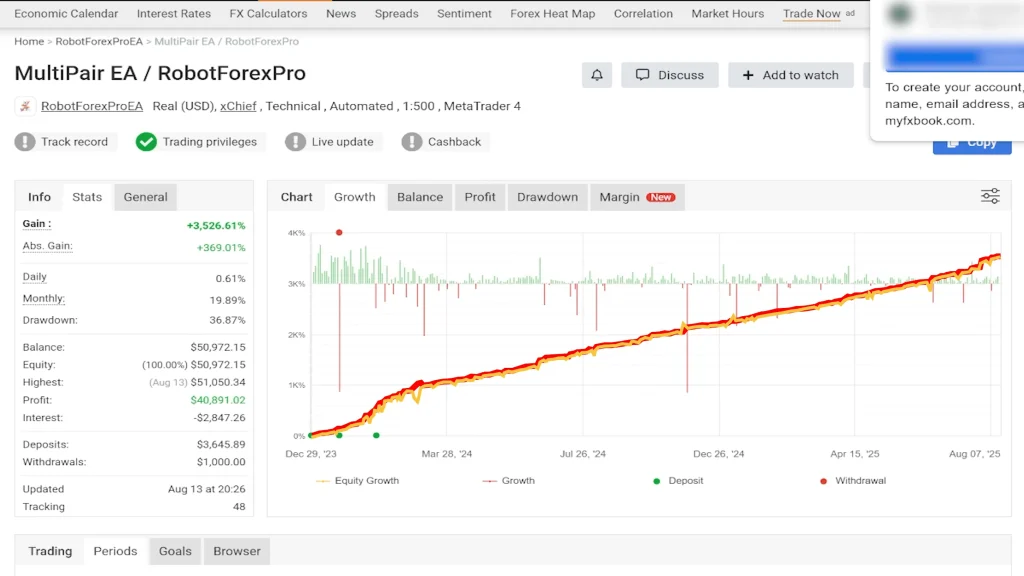
    Commodity CFDs cover gold, silver, oil, and agricultural products. Gold (XAU/USD) maintains activity levels with competitive spreads during standard market hours.

    Indices such as the S&P 500, NASDAQ 100, DAX 40, and Nikkei 225 operate nearly 24/5. These instruments allow traders to access broad market movements.

    Stock CFDs include 2,100+ global companies from US, European, and Asian markets. MetaTrader 5 handles these exclusively, supporting both long and short positions with leverage options.

    Crypto CFDs feature Bitcoin, Ethereum, Ripple, and others with 24/7 availability. No wallets or exchange fees apply, though regional restrictions may exist.

    Bond and futures CFDs provide exposure to interest-rate assets and global futures contracts. No separate futures account is required for access.

    This instrument range supports diversified strategies and global market access through one platform.

    IC Markets Mobile App

    IC Markets provides a mobile trading app for iOS and Android devices. The app lets traders monitor markets, execute trades, and manage accounts from their phones — you can’t lose the core functionality when you’re away from your desktop.

    The app includes real-time price feeds, interactive charts, and access to order history and open positions. It handles all standard order types and supports one-click trading for quick market moves. You can check account details, handle deposits or withdrawals, and reach support directly through the app.

    Traders who need constant market access or prefer using smartphones and tablets get a secure interface that doesn’t compromise on essential trading functions.


    IC Markets Review: Trading Conditions: Spreads, Speed, and Execution Quality

    IIC Markets is renowned for its low spreads, fast execution and transparent pricing — essential for scalpers, day traders and algo systems.

    Raw Spread accounts have institutional grade pricing from over 25 liquidity providers, with 0.0 pips on major pairs like EUR/USD. Standard accounts start from 0.6 pips and have no commissions, a simpler cost structure.
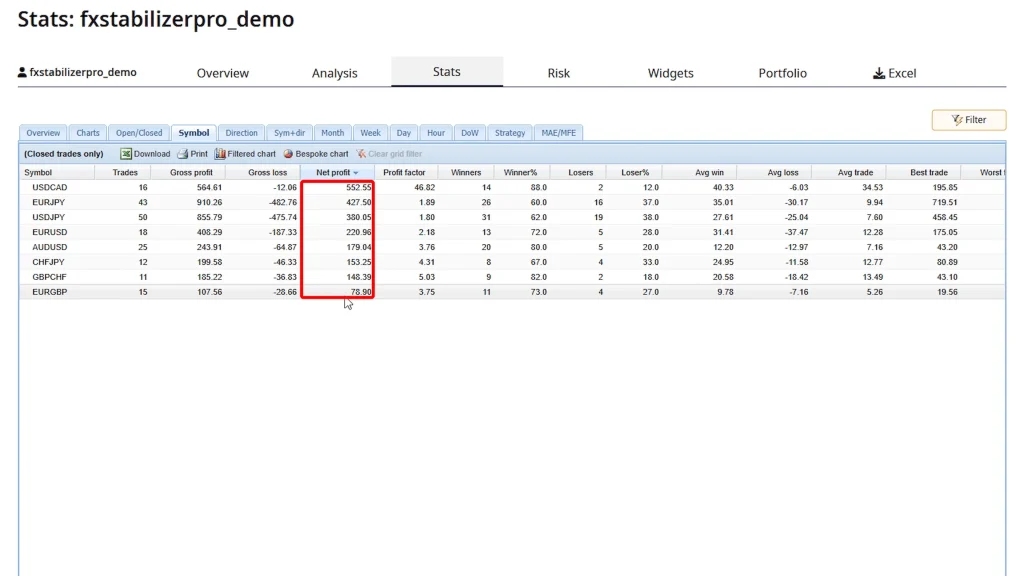
    If you choose Raw Spread, you’ll pay $3.50 per side on MetaTrader platforms or $3.00 per side on cTrader. IC Markets charges no extra fees for platforms, inactivity or withdrawals.
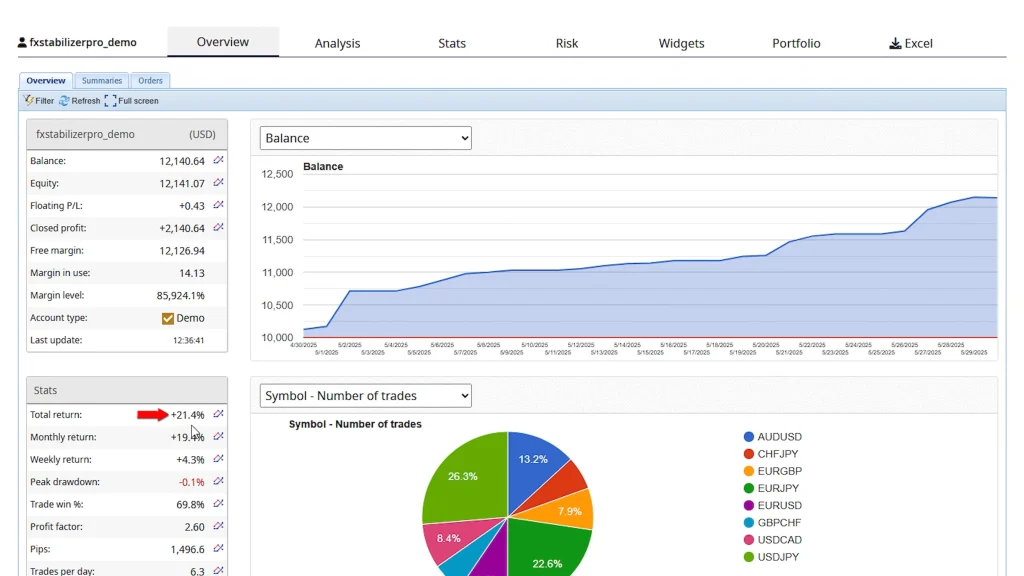
    All trades are executed from the Equinix NY4 data center, under 40 milliseconds. This low latency reduces slippage and ensures fast and accurate fills — perfect for high frequency trading and automation.

    IC Markets is a no dealing desk (NDD) execution model, so trades aren’t routed or manipulated. There are no re-quotes, slippage is minimal or even in your favour. Scalping, hedging and using Expert Advisors are fully supported, so you have full control over your strategy.


    IC Markets Review: VPS Hosting and Automated Trading

    For algorithmic traders, system uptime and execution speed is everything. IC Markets gets it and offers Virtual Private Servers (VPS) so you can stay connected to the market 24/7 — even when your own computer is off.

    This is a big win for algorithmic traders, especially those using Expert Advisors (EAs) or high-frequency systems.

    Why use a VPS?

    A VPS hosts your trading platform in a secure, always-on environment — so your strategies run even if your local internet or power fails. Located near IC Markets’ NY4 data center, a VPS minimizes latency and improves execution precision, which is key for scalpers and algorithmic traders.

    IC Markets partners with top-tier VPS providers like NYC Servers, Beeks FX and ForexVPS. Active traders may qualify for free VPS, typically by trading around 15 lots/month on a Raw Spread account. Contact support with proof of trading volume to apply.

    EA and Automation-Friendly Environment

    IC Markets is one of the few brokers that fully supports Expert Advisors, copy trading platforms, and other forms of automation. There are no restrictions on EAs, no limitations on high-frequency trading, and no trade rejections tied to automation.

    This makes IC Markets especially appealing for tech-savvy traders who rely on scripts, bots, or signal-based systems. Whether you’re using a commercially available EA or coding your own strategies, the broker’s infrastructure is ready to support it.

    Combined with the raw spreads and low-latency data center access, IC Markets offers one of the most automation-friendly environments in retail trading.

    IC Markets Review: Deposits and Withdrawals

    IC Markets offers a quick, easy and flexible funding experience for traders worldwide. Whether you’re depositing to start trading or withdrawing profits, the broker prioritises speed, security and zero fees on their end.

    Fast Deposits

    You can fund your trading account using a wide range of payment methods. These include:

    • Credit and debit cards (Visa, MasterCard)
    • Bank wire transfers
    • eWallets such as Skrill, Neteller, PayPal
    • Cryptocurrencies such as BTC, ETH, USDC, USDT
    • Regional options based on your location (e.g., FasaPay, UnionPay, POLi, and more)

    IC Markets processes most deposits instantly for card and wallet based payments. Bank wire transfers may take 2–5 business days depending on your bank and location.

    The broker doesn’t charge fees on deposits, but your payment provider may charge fees or conversion costs. You can deposit in multiple base currencies including USD, EUR, GBP, AUD, SGD, NZD, JPY and more which helps reduce exchange costs when funding with a matched currency.

    ic-markets-review-5

    Fast Withdrawals with No IC Markets Fee

    Withdrawals are also quick. Most withdrawals are processed within 24 hours, especially during business days. Card and eWallet withdrawals tend to be faster, while bank transfers may take several days depending on the receiving bank and country.

    IC Markets doesn’t charge any withdrawal fees, regardless of the method. However, your bank or third-party processor may deduct a transaction or intermediary fee for international wire transfers.

    You can manage both deposits and withdrawals through the secure client portal which uses encryption and other security measures to protect your payment details.

    IC Markets Review: Security and Transparency

    All funding operations are secured through encrypted payment gateways and protected by SSL protocols. IC Markets holds client funds in segregated accounts, so your trading capital is separate from the broker’s operational funds – so you’re protected in the event of any financial issues at the company level.

    There’s full transparency across all stages of the funding process. The broker provides real-time updates via the client portal and if you need help 24/7 support is available to assist with any issues.

    No Inactivity Fees or Hidden Costs

    IC Markets operates without inactivity fees, platform fees, or hidden charges. The broker maintains this policy regardless of trading frequency.

    Accounts remain unaffected during periods of market absence. Funds stay intact unless you execute trades or request services like withdrawals, which IC Markets processes without charge.

    This approach suits both frequent and occasional traders. The policy reflects standard operational practices without additional account maintenance costs.


    IC Markets Review: Education and Tools

    IC Markets goes beyond pricing and execution by offering useful resources and tools for traders of all levels.

    Its Education Hub has clear, beginner-friendly content on order types, risk management, leverage and technical analysis. Platform tutorials and video guides are also available to help you navigate MetaTrader and cTrader.

    For more in-depth information, IC Markets hosts webinars led by market professionals. These sessions cover trading techniques and market trends in real time. The broker also publishes daily market analysis highlighting key events, chart setups and price action insights to help you stay informed and plan better.

    Tools for Advanced Traders

    Beyond education, IC Markets has several useful tools for advanced traders.

    First, there’s Autochartist, an automated market scanning tool that integrates into MetaTrader. It finds chart patterns, key levels and potential breakout zones in real time. You can use it to validate setups or generate new trade ideas.

    IC Markets also integrates with DupliTrade, a copy trading platform where you can mirror strategies from professional traders. Perfect if you want to be in the market but don’t have time to trade manually.

    Finally, for coders and strategy developers, MetaTrader 4, MetaTrader 5 and cTrader have custom indicators, scripts and algorithmic bots. Whether you write your own code or use third-party tools, the platforms give you full control over how your system works


    IC Markets Review: Customer Support

    IC Markets has 24/7 customer support through live chat, email and phone. This is very useful for traders around the world who might be in a timezone other than the broker’s or traders who trade particular sessions that might fall in the middle of the night elsewhere.

    Live chat is the fastest option. Most users get connected to a real person within a few minutes. The support team handle everything from technical questions and platform issues to funding and account setup.

    If your issue requires more in-depth help you can also email. Support teams respond within 24 hours and escalate as needed. Trained agents handle urgent matters by phone not outsourced call centers.

    Knowledgeable and Friendly Agents

    IC Markets has multilingual support in English, Spanish, Chinese, Vietnamese and Portuguese. This makes it easier for traders worldwide to get help in their own language.

    The Help Center is well organized with step by step articles and FAQs for verification, funding and platform setup. Ideal for self service users.

    And all traders get equal support whether you have a $200 account or trading 6 figures. The broker’s client first approach means prompt and helpful assistance for everyone.

    ic-markets-review-7

    Final Verdict: Should You Choose IC Markets?

    IC Markets has raw spreads, fast execution and advanced trading platforms, making it one of the best for active retail traders.

    The broker delivers 0.0 pip spreads, sub-40ms execution, and MT4, MT5 and cTrader. With over 2,200 instruments across Forex, crypto, indices, shares and more it’s built for serious traders who want flexibility and depth.

    Customer support is fast and reliable, and the platform infrastructure is for discretionary and algorithmic strategies.

    But IC Markets isn’t available in U.S., Canada, Brazil, Israel and New Zealand. Also, stock CFDs are only available on MT5, which may be a problem for some users. While the Seychelles FSA regulation is good it’s not tier one.

    Still, for traders who want low costs, speed and a smooth trading experience, IC Markets stands out. Whether you’re starting out or scaling up it has pro tools and infrastructure for traders who take performance seriously.